Sur cette page
TranslatePress AI
TranslatePress AI vous permet de traduire automatiquement l'intégralité de votre site web. Notre système combine des modèles de langage de grande envergure (LLM) de pointe (tels que Gemini et GPT) et des moteurs de traduction automatique neuronale (NMT) (tels que DeepL et Google Translate), offrant ainsi aux propriétaires de sites une solution tout-en-un pour des traductions de sites web instantanées et de haute qualité grâce à l'IA. Le tout est directement intégré au plugin, sans configuration supplémentaire ni clés API requises.
Votre contenu sera traduit une seule fois (c'est ce que nous considérons comme un mot traduit), enregistré dans votre base de données WordPress et, tant que le contenu original ne change pas, TranslatePress proposera cette traduction directement à partir de la base de données.
Cela signifie que le moteur de traduction n'est accédé qu'une seule fois pour un contenu unique.
Les mots de l'IA sont comptés par mot, par langue. Par exemple, une page de 2 000 mots traduite dans 2 langues utilise 4 000 mots d'IA.
Les traductions sont stockées une fois et réutilisées partout où elles apparaissent sur votre site.
Vous pouvez utiliser notre compteur de mots pour estimer combien de mots IA votre site web pourrait nécessiter.
Les mots IA sont liés à votre licence, pas à des sites individuels.
Les mots générés par l’IA ne seront pas remboursés ou réinitialisés, même si vous supprimez une langue ou du contenu traduit.
Disponibilité :
- toutes les nouvelles licences premium ainsi que les renouvellements recevront un nombre de mots IA correspondant à leur type de licence.
- les traductions n'ont pas de date d'expiration et peuvent être utilisées tant que la licence est active.
- les mots de traduction ne peuvent pas être utilisés avec une licence expirée.
Paramètres du plugin
La fonction TranslatePress AI peut être activée à partir de WordPress → Paramètres → TranslatePress → Traduction automatique.
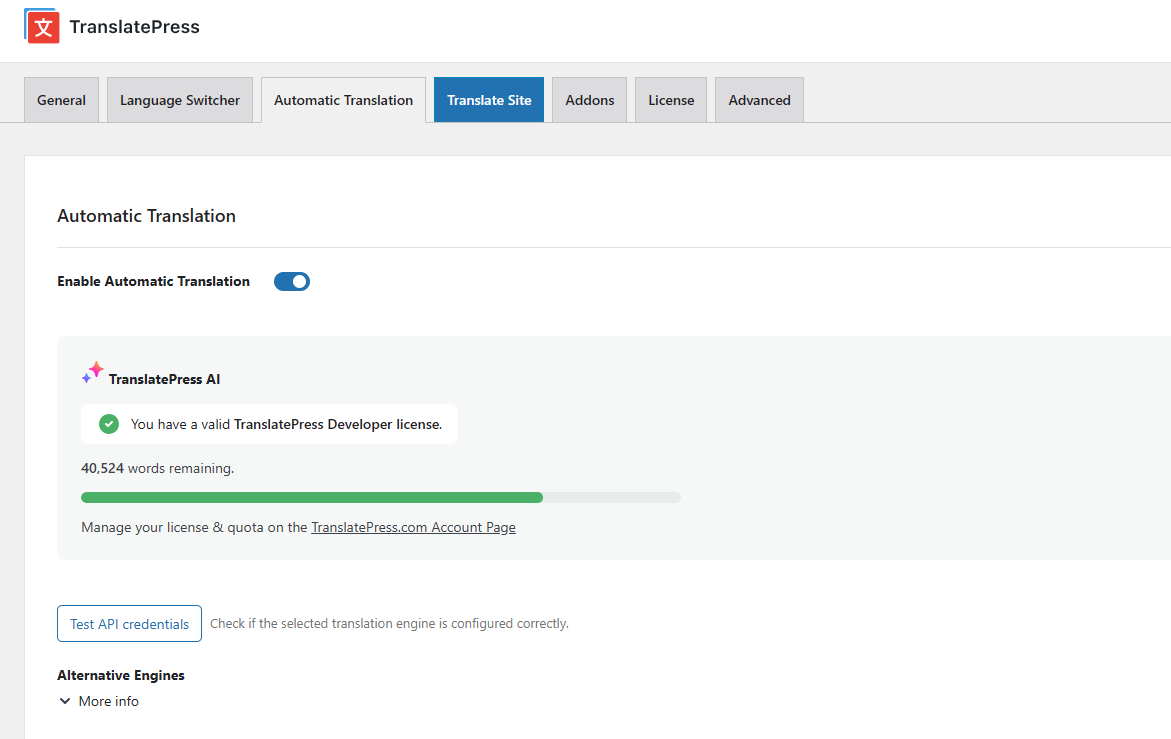
Si vous n'avez pas de licence payante active, veuillez visiter WordPress → Paramètres → TranslatePress → Licence et l'activer. Votre licence se trouve sur https://translatepress.com/account/.
Une fois activé correctement, votre site Web sera automatiquement traduit dans les langues définies dans WordPress → Paramètres → TranslatePress.
Paramètres du compte
La page de compte sur https://translatepress.com/account permet d'allouer les mots disponibles différemment pour chaque site Web que vous avez actif pour une licence particulière. Par exemple, vous pouvez allouer 10 000 mots à un site Web particulier, mais en laisser un autre pour utiliser tous les mots disponibles auxquels une licence a accès. Pour ce faire, cliquez simplement sur “Gérer le quota de site individuel” lien.
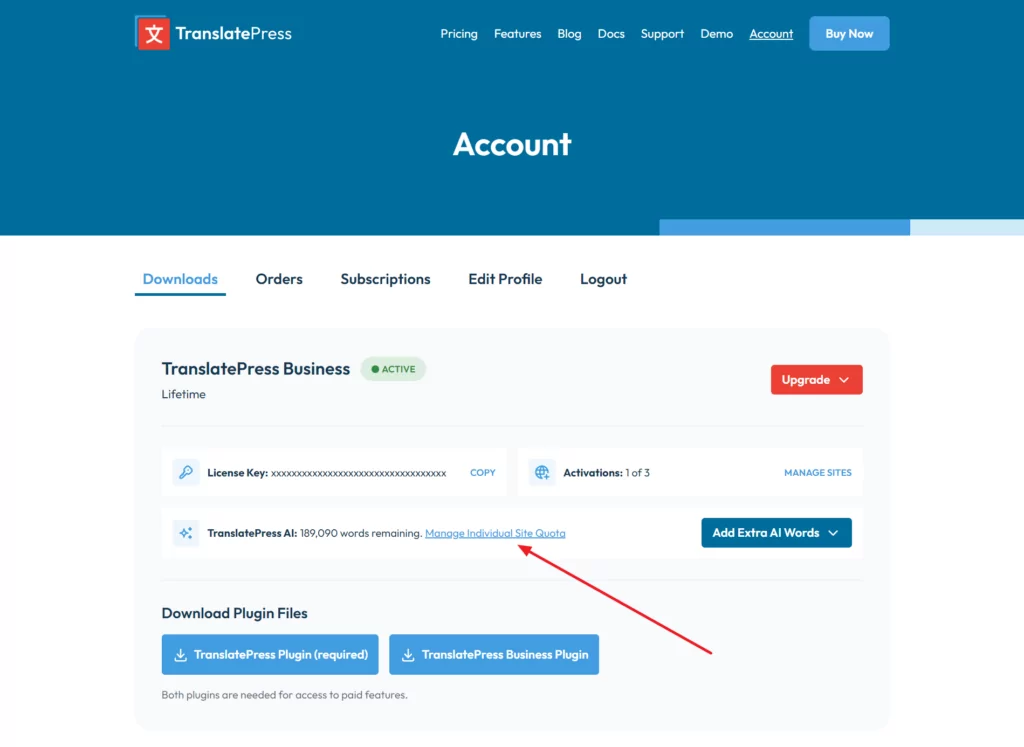
Si vous ne souhaitez pas qu'un site web particulier reçoive des traductions automatiques, vous pouvez simplement limiter ce site web à 0 (zéro) mot. Bien sûr, la traduction automatique doit être désactivée dans les paramètres du plugin, mais au cas où l'utilisateur final de ce site web l'activerait, le réglage de 0 mot sur ce site web garantit qu'il ne consomme pas de mots de traduction si vous ne le souhaitez spécifiquement pas.
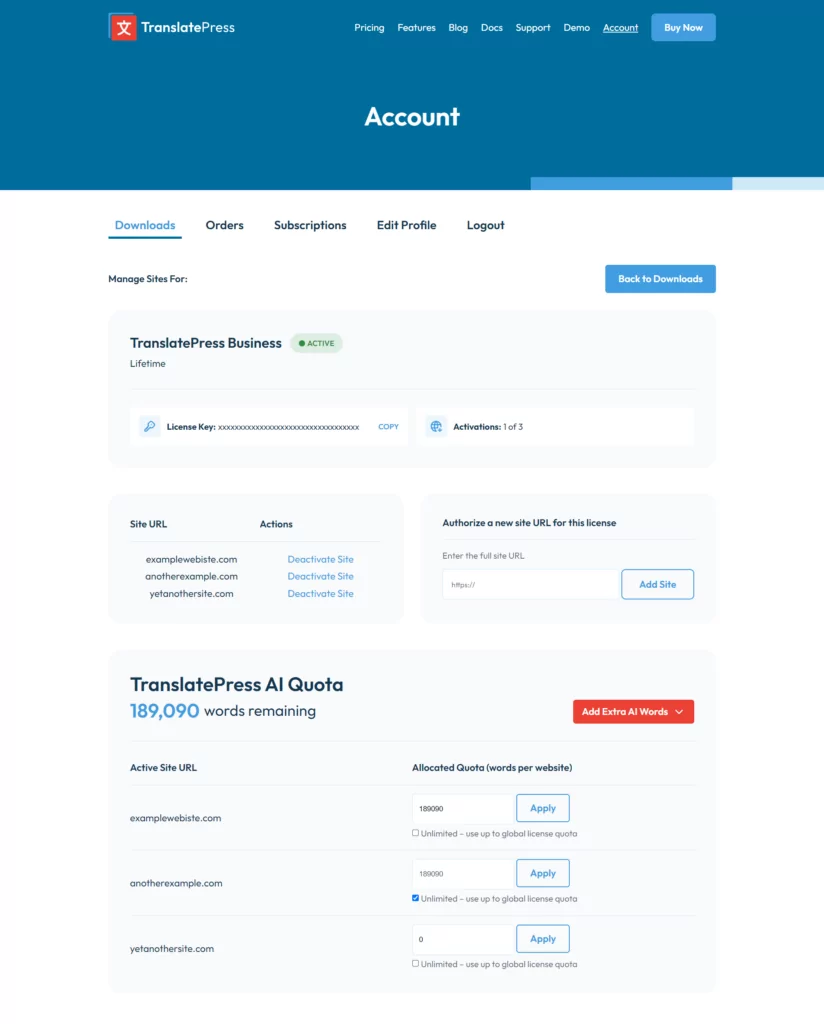
Remarque: Si un site web associé à votre licence n'apparaît pas dans le tableau d'attribution des quotas TranslatePress AI, cela signifie qu'il n'a pas été synchronisé et que vous devez cliquer sur le “Synchroniser le site” lien sous Actions de la liste des sites web.
Acheter des mots de traduction supplémentaires
Tout licences actives peut acheter des mots de traduction supplémentaires. Cela peut être fait à partir du https://translatepress.com/account page. Naviguez vers la Téléchargements Onglet et cliquer “Ajouter des mots IA supplémentaires” liste déroulante pour sélectionner un forfait et passer à la caisse.
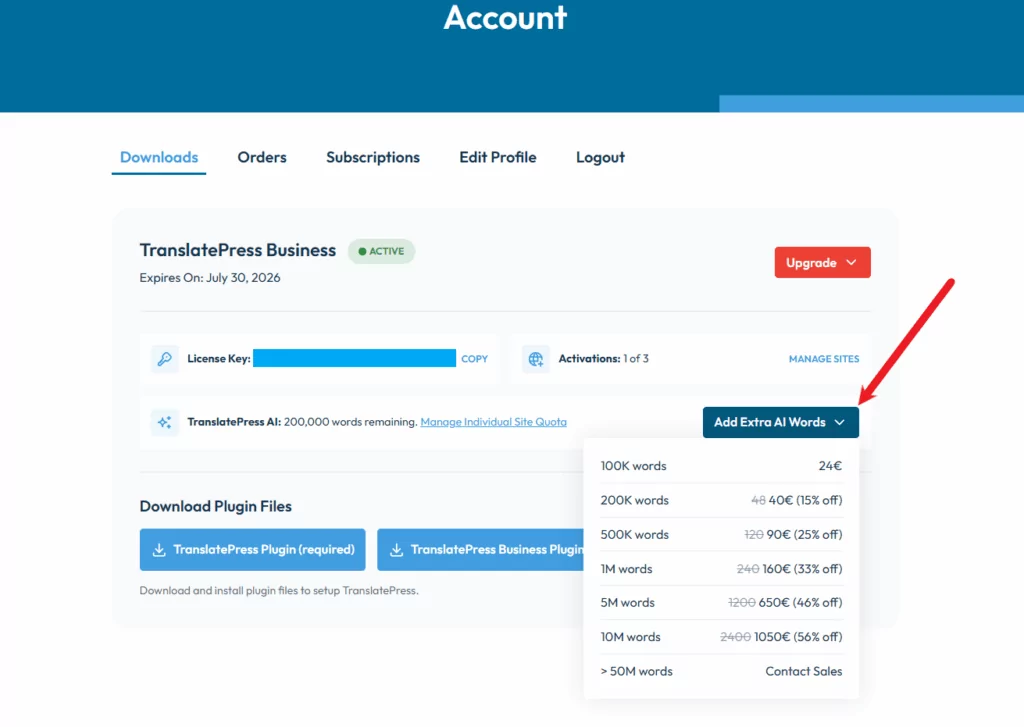
Les packages de mots IA supplémentaires sont un achat unique. Les mots achetés sont ajoutés au quota de traduction automatique disponible et sont consommés au fur et à mesure que le contenu est traduit. Les mots achetés inutilisés restent disponibles et n'expirent ni ne sont réinitialisés au moment du renouvellement ; ils restent sur la licence jusqu'à ce qu'ils soient entièrement utilisés.
Voir le Page de compte pour plus de détails.
FAQ sur TranslatePress AI
Voici une liste des questions les plus fréquemment posées au sujet de TranslatePress AI, ainsi que leurs réponses :
1. Calcul de mots: TranslatePress AI calcule le nombre de mots selon un rapport unique de 1 caractère pour 5, ce qui permet un comptage plus précis et plus flexible.
2. Allocation de motsVous pouvez facilement attribuer des mots à des sites Web individuels, ce qui permet un meilleur contrôle des volumes de mots à traduire.
3. Facilité d'utilisation: Contrairement à la gestion des clés API dans d'autres services comme Google, TranslatePress AI est convivial et s'intègre à votre configuration existante, ce qui simplifie le processus de traduction.
4. Processus de traduction simplifié: TranslatePress AI révolutionne son processus de traduction automatique en évitant d'avoir à basculer sans cesse entre DeepL et l'API Google pour chaque langue. Cette approche simplifiée permet de gagner du temps et d'économiser des efforts.
5. Inclus avec les licences existantes: TranslatePress AI est inclus dans les licences TranslatePress existantes, ce qui en fait une solution de traduction complète sans frais supplémentaires. Contrairement aux services API autonomes tels que Google ou Deepl, qui facturent à l'utilisation, TranslatePress AI fait partie intégrante de votre abonnement, ce qui simplifie votre processus de traduction et vous évite des dépenses supplémentaires.
Nous recommandons vivement TranslatePress AI plutôt que DeepL pour vos traductions, car cette solution offre un contrôle supérieur sur le nombre de mots à traduire par site web, ce qui permet une gestion efficace et évite les coûts imprévus. Contrairement à DeepL, qui vous limite à une seule clé API, TranslatePress AI propose une approche plus flexible et personnalisable pour répondre à vos besoins spécifiques, vous permettant de basculer vers DeepL en toute transparence si nécessaire — par exemple, une fois que vous avez épuisé le quota de caractères disponible via TranslatePress AI.
Lorsque vous utilisez TranslatePress AI, soyez assuré que toutes les traductions réalisées avec d'autres moteurs (tels que DeepL ou Google Translate) resteront intactes dans votre base de données. Ces traductions existantes ne seront pas retraduites et continueront de fonctionner comme auparavant, préservant ainsi votre travail antérieur et garantissant une continuité sans interruption.
Si vous décidez d'adopter TranslatePress AI pour vos futures traductions, ce changement ne s'appliquera qu'aux nouveaux contenus, ce qui vous permettra d'intégrer en toute transparence ce nouvel outil à votre flux de travail sans perdre aucune de vos traductions existantes.
Les mots de traduction non utilisés seront reportés à l'année suivante, garantissant ainsi que vous ne perdez aucun volume de mots. Lors du renouvellement de votre abonnement, vous recevrez une nouvelle attribution de mots de traduction pour l'année à venir, offrant ainsi une plus grande souplesse et une valeur accrue au fil du temps.
Pour plus de clarté, voici comment fonctionne la distribution des mots de traduction :
- Nouveaux achats et renouvellementsÀ partir du 21 mai 2024, les nouveaux achats et renouvellements de licences premium recevront des mots de traduction en fonction de leur type de licence.
- Licences existantesUne licence qui expire avant le 21 mai 2025 n'inclura pas de mots de traduction supplémentaires, mais ceux-ci peuvent être achetés séparément si nécessaire.
- Sans expirationLes mots de traduction fournis n'expirent pas et peuvent être utilisés tant que la licence reste active.
- Licences expiréesLes mots de traduction ne sont pas utilisables avec une licence expirée.
Nous proposons 3 formules pour des mots IA supplémentaires :
- 100K mots - 24€
- 200K mots -
4840€ (-15%) - 500K mots -
12090€ (-25%) - 1M mots -
240160€ (-33%) - 5M mots -
1200650€ (-46%) - 10M mots -
24001050€ (-56%)
TranslatePress AI génère des traductions côté client, déclenchées lorsqu'un utilisateur accède à une page, une catégorie ou un article de blog dans une langue secondaire. Voici une explication étape par étape de son fonctionnement :
Ajout de contenuLorsque de nouveau contenu est ajouté sur votre site web, il est initialement enregistré dans la langue principale.
Déclencheur de traduction: Le processus de traduction démarre dès qu'un utilisateur consulte ce contenu dans une langue secondaire ; TranslatePress AI génère alors une traduction dynamique en temps réel.
StockageUne fois généré, le contenu traduit est stocké dans la base de données, ce qui garantit qu'il est toujours à jour et ne nécessite pas de nouvelle traduction pour les visites ultérieures, améliorant ainsi l'efficacité et les temps de chargement.
Cette approche élimine le besoin de pré-traduire tout le contenu, ce qui permet d'économiser du temps et des ressources.
Notre modèle TranslatePress AI s'appuie sur les moteurs de traduction de Google, Deep et Microsoft Translate. Concrètement, nous transmettons votre contenu à ces moteurs, en fonction de la langue principale utilisée sur votre site web. En tant qu'intermédiaire entre les utilisateurs et les services de traduction, nous ne collectons ni ne conservons aucune donnée personnelle. Vos données ne sont pas utilisées pour l'entraînement de modèles d'IA, et nous n'enregistrons ni n'accédons aux données de traduction. Bien que la mise en cache stocke temporairement les chaînes traduites sur nos serveurs, cela n'a aucun rapport avec votre licence ou votre site web. Notre objectif est de fournir des traductions efficaces, mais veuillez noter que nous n’avons aucun contrôle ni aucune visibilité sur les politiques de confidentialité et de traitement des données des moteurs de traduction tiers, qui peuvent être consultées sur leurs sites web respectifs.
Lors de la gestion des quotas de site, tenez compte du scénario suivant :
- Disons qu'il y a un quota total restant de 200 000 sur tous les sites
- Certains sites disposent déjà d'allocations fixes (par exemple 100K, 25K, etc.), qui totalisent 200K
Si vous souhaitez attribuer un quota à un nouveau site qui en a actuellement 0, il n'est pas possible de le modifier pour un nombre fixe, car il ne reste aucun quota non attribué. Définir le nouveau site sur Illimité a le même effet : comme il ne reste aucun quota non attribué, l'attribution n'est pas modifiable.