Sur cette page
Utilisation du Module complémentaire Traducteur de comptes, vous pouvez créer ou permettre aux utilisateurs existants de traduire le site sans les droits d'administrateur.
Les traducteurs pourront traduire le site web (directement depuis le front-end) sans avoir à travailler avec le back-end de WordPress, les constructeurs de sites ou les meta boxes.
Activer le module complémentaire Comptes Traducteurs
Le module complémentaire Traducteur de comptabilité est disponible avec TranslatePress Business et Developer licences.
Après avoir acheté une version premium de TranslatePress, suivez ces instructions guide pour installer TranslatePress.
Une fois TranslatePress installé, rendez-vous sur Paramètres → TranslatePress dans votre tableau de bord WordPress, puis naviguez jusqu'à Add-ons onglet
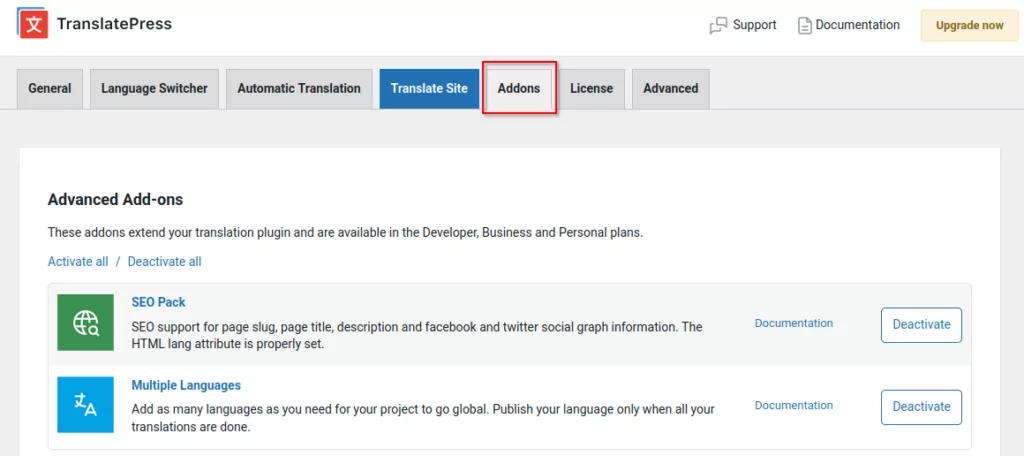
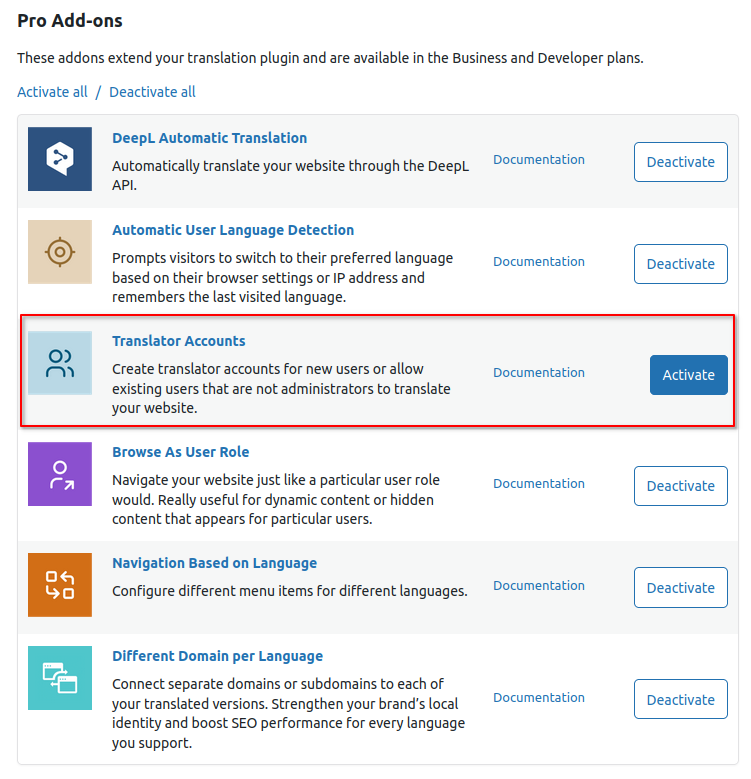
Faites défiler vers le bas jusqu'à Translator Accounts Add-on et Activer c'est ici.
Fonctionnalités pour les traducteurs
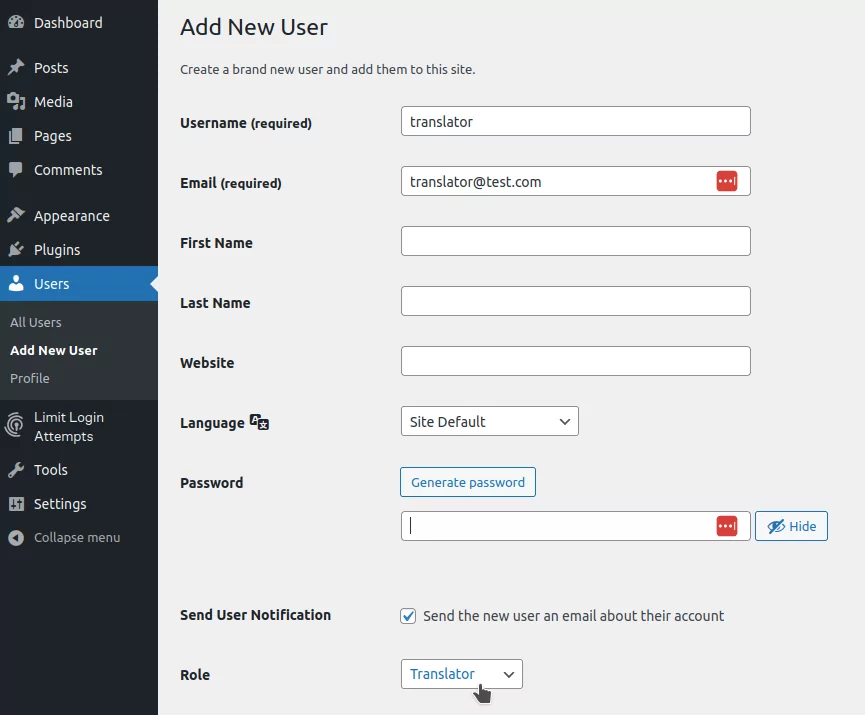
Créer un nouvel utilisateur avec le rôle de Traducteur : WordPress → Utilisateurs → Ajouter nouveau.
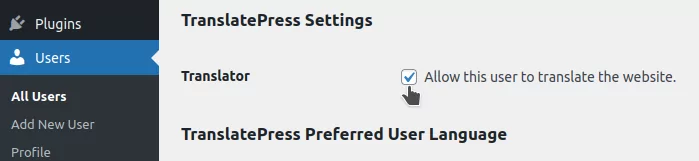
Permettre aux utilisateurs existants de traduire le site web : WordPress → Utilisateurs → Modifier l'utilisateur → Paramètres TranslatePress (ou en changeant leur rôle actuel en celui de Traducteur).
Accès au traducteur pour les langues sélectionnées
Par défaut, le module complémentaire accorde aux utilisateurs l'accès à toutes les langues définies sur votre site. Cependant, il n'offre pas la possibilité de restreindre les utilisateurs à la modification de quelques langues sélectionnées.
Le code suivant vous permet de limiter les langues disponibles pour un utilisateur spécifique. Par exemple, il peut être utilisé pour restreindre l'édition de l'utilisateur 1 au roumain et à l'italien uniquement.
/*
 * Limit the actual available languages for a particular user.
 *
 */
add_filter( 'option_trp_settings', 'filter_trp_settings' );
function filter_trp_settings( $settings ) {
    // Define the languages you want to exclude
    $excluded_languages = array( 'ro_RO', 'it_IT' ); // Example languages to exclude

    $is_editor = (isset($_GET['trp-edit-translation'])) ? $_GET['trp-edit-translation'] : false;

    $current_user = wp_get_current_user();
    if ( $is_editor && $current_user && $current_user->user_login === 'translator' && isset( $settings['translation-languages'] ) && is_array( $settings['translation-languages'] ) ) {
        // Remove excluded languages from 'url-slugs'
        if ( isset( $settings['url-slugs'] ) && is_array( $settings['url-slugs'] ) ) {
            foreach ( $excluded_languages as $lang ) {
                unset( $settings['url-slugs'][ $lang ] );
            }
        }

        // Remove excluded languages from 'translation-languages'
        if ( isset( $settings['translation-languages'] ) && is_array( $settings['translation-languages'] ) ) {
            $settings['translation-languages'] = array_values(array_diff( $settings['translation-languages'], $excluded_languages ));
        }

        // Remove excluded languages from 'publish-languages'
        if ( isset( $settings['publish-languages'] ) && is_array( $settings['publish-languages'] ) ) {
            $settings['publish-languages'] = array_values(array_diff( $settings['publish-languages'], $excluded_languages ));
        }
    }

    return $settings;
}
Comment utiliser:
- Remplacez les codes de langue dans le
1TP17Langues excluestableau avec les codes de langue que vous souhaitez restreindre. - Remplacer
'traducteur'avec le nom d'utilisateur de l'utilisateur que vous souhaitez limiter à des langues spécifiques.
Obtenir le module complémentaire Comptes Traducteurs