
In diesem Beitrag
Möchten Sie SEO-Übersetzungen nutzen, um Ihre Website auszubauen?
Das Internet ist eine globale Plattform – wenn Sie Ihre Website nur in einer einzigen Sprache anbieten, entgeht Ihnen ein riesiger Pool potenzieller Besucher.
Die Lösung ist also, eine mehrsprachige Website zu erstellen und Ihre übersetzten Inhalte für SEO zu optimieren. Und genau das ist das Thema dieses Beitrags.
Wir führen Sie durch alles, was Sie über SEO-Übersetzung wissen müssen, einschließlich Folgendem:
- Was ist SEO-Übersetzung? Wie unterscheidet sie sich von der Lokalisierung?
- Vier wichtige Tipps zur Optimierung Ihrer übersetzten Inhalte für Suchmaschinen.
- Drei weitere wesentliche mehrsprachige SEO-Tipps, um das Beste aus Ihren Bemühungen herauszuholen.
- Schritt-für-Schritt-Anleitung zur SEO-Übersetzung auf WordPress mit TranslatePress.
Lasst uns loslegen…
Was ist SEO-Übersetzung?
SEO-Übersetzung ist im Grunde das, was der Name schon sagt – die Idee, Teile oder den gesamten Inhalt Ihrer Website zu übersetzen, damit Sie die übersetzten Inhalte in Suchmaschinen ranken können, um neue Besucher zu gewinnen.
Zum Beispiel, vielleicht hast du einen Blogbeitrag über “Gitarre spielen lernen”. Dieser Beitrag wird viele Leute erreichen, die auf Englisch suchen, aber es gibt auch Leute, die Gitarre spielen lernen wollen und in ihrer lokalen Sprache bei Google suchen.
Zum Beispiel könnte eine spanischsprachige Person nach “Como tocar la guitarra” suchen.
Mit SEO-Übersetzungen können Sie Ihren Inhalten die Chance geben, auch diese Menschen zu erreichen.
Der Hauptvorteil dabei ist, dass Sie den Traffic auf Ihrer Website steigern können. Nehmen wir zum Beispiel an, Sie bemerken folgende Suchmuster:
- “Wie spielt man Gitarre?” wird monatlich 10.000 Mal gesucht.
- “Como tocar la guitarra” erhält 2.000 Suchanfragen pro Monat.
Nun, wenn Sie Ihren ursprünglichen englischen Artikel ins Spanische übersetzen, haben Sie Ihren Kreis potenzieller Besucher um 20% erweitert – und das, ohne “neue” Inhalte zu erstellen.
SEO-Übersetzung vs. Lokalisierung
SEO-Übersetzung und Lokalisierung sind zwei verbundene, aber unterschiedliche Themen.
Während sich SEO-Übersetzung darauf konzentriert, Ihre übersetzten Inhalte in Google zu positionieren, geht es bei der Website-Lokalisierung mehr darum, ein kohärentes Erlebnis für Ihre Besucher zu schaffen, unabhängig davon, woher sie browsen oder welche Sprache sie sprechen.
Nehmen wir zum Beispiel an, Sie einen Online-Shop haben. Sie haben eine englischsprachige Version, die sich an Käufer in den USA richtet, und dann eine spanischsprachige Version, die sich an Käufer in Spanien richtet.
Bei der SEO-Übersetzung würden Sie sich hauptsächlich darauf konzentrieren, Ihre Produktseiten zu übersetzen und sie für die Platzierung in Google zu optimieren.
Bei der Lokalisierung würden Sie einen Schritt weiter gehen und alle Details Ihrer Website auf das lokale Publikum zuschneiden. Zum Beispiel:
- Währung – Sie würden die Produktwährung von USD auf Euro umstellen.
- Abmessungen – Sie würden die Produktabmessungen vom imperialen System in das metrische System umwandeln, um die in Spanien gebräuchlichen Maße wiederzugeben.
- Bilder – Sie könnten sogar die Bilder auf Ihrer Website ändern, um sie für Spanier relevanter zu machen.
- Usw.
Wenn Sie mehr erfahren möchten, haben wir Ein ganzer Beitrag zur Website-Lokalisierung.
Vier wichtige SEO-Übersetzungstipps und Best Practices
Lass uns nun zu einigen SEO-Übersetzungstipps übergehen, die du verwenden kannst, um Hochstufen Ihrer Inhalte in mehreren Sprachen. Sobald wir diese Tipps abgeschlossen haben, zeigen wir Ihnen, wie Sie TranslatePress alle diese Taktiken auf Ihrer WordPress-Website zu implementieren.
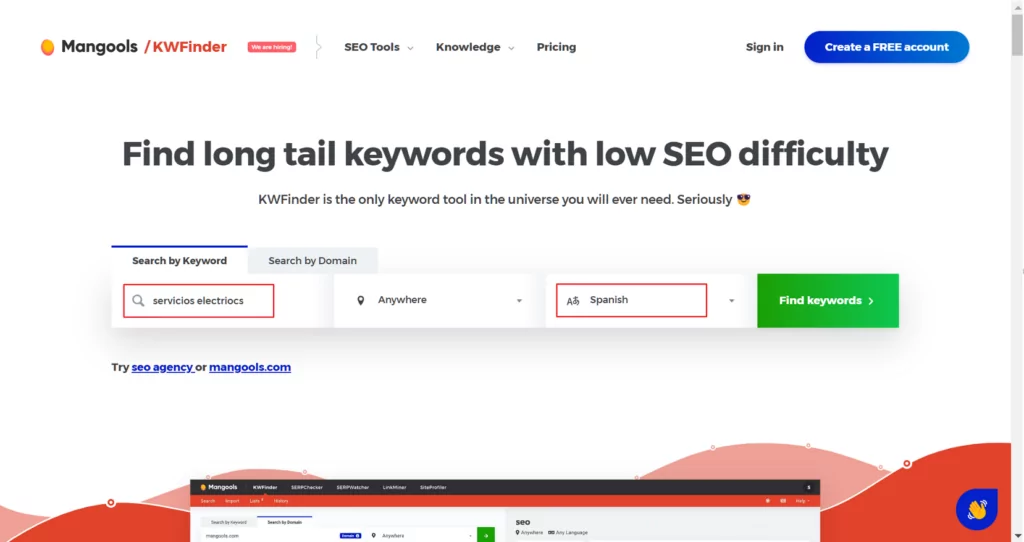
1. Keyword-Recherche in den Zielsprachen durchführen
Als Sie Ihre ursprünglichen Inhalte verfasst haben, haben Sie wahrscheinlich eine Keyword-Recherche durchgeführt, um die Keywords zu entdecken, nach denen die Leute suchen. Das liegt daran, dass Sie Ihre Inhalte mit den Phrasen abgleichen möchten, die die Leute tatsächlich verwenden.
Nun, dasselbe gilt auch für Ihre übersetzten Inhalte. Sie können nicht automatisch davon ausgehen, dass die Leute nach der exakten wörtlichen Übersetzung Ihres ursprünglichen Fokus-Keywords suchen werden. Daher sollten Sie einige Recherchen zu hochwertigen Inhalten durchführen, um genau herauszufinden, wonach die Leute in jeder Sprache suchen.
Die meisten hochwertigen Keyword-Recherche-Tools unterstützen bereits die Keyword-Recherche in mehreren Sprachen. Wenn Ihr Tool dies nicht tut, können Sie erwägen, zu einem Tool wie ... zu wechseln Ahrefs oder KWFinder.
2. Übersetze deine SEO-Titel und Meta-Beschreibungen
Zusätzlich zur Übersetzung Ihrer Hauptinhalte ist es auch wichtig, Ihre SEO-Titel und Meta-Beschreibungen zu übersetzen, damit die übersetzten Inhalte in Suchmaschinen ranken.
Wenn Sie mit diesen Begriffen nicht vertraut sind, sind dies der Titel und die Beschreibung, die für den Inhalt angezeigt werden, wenn jemand bei Google sucht.
Idealerweise möchten Sie auch Ihr Fokus-Keyword in beiden Elementen einfügen (was Sie bei Ihrer Keyword-Recherche hätten herausfinden sollen).
3. Achten Sie darauf, Ihre Slugs SEO-gerecht zu übersetzen
Über Ihre SEO-Titel und -Beschreibungen hinaus sollten Sie auch Übersetze deine URL-Slugs. Das ist der Teil der URL Ihrer Website, der nach dem Hauptdomainnamen angezeigt wird.
Zum Beispiel, yoursite.com/wie-man-einen-truthahn-zubereitet. Der Teil “how-to-cook-a-turkey” der URL ist der Slug, und er liefert sowohl Menschen als auch Suchmaschinen wichtigen Kontext über den Inhalt einer Seite.
Ihre URL-Slugs sind ebenfalls ein hervorragender Ort, um Ihr Hauptfokus-Keyword einzubinden.
4. Lassen Sie automatisch übersetzte Inhalte von einem Menschen überprüfen
Automatische maschinelle Übersetzung ist eine großartige Möglichkeit, die Inhalte Ihrer Website schnell zu übersetzen. Wenn Sie es jedoch mit der SEO-Übersetzung ernst meinen, sollten Sie sich nicht einfach auf einen automatischen Übersetzungsdienst verlassen und die Sache damit auf sich beruhen lassen.
Laut Google Search Central, Google steht “von einem automatisierten Tool ohne menschliche Überprüfung oder Kuration vor der Veröffentlichung übersetztem Text” negativ gegenüber.
Das Wichtigste dabei ist jedoch, dass Sie die automatische Übersetzung nicht komplett vermeiden müssen. Das bedeutet lediglich, dass Sie die automatischen Übersetzungen vor der Veröffentlichung von einem Menschen überprüfen lassen sollten.
Das solltest du ohnehin schon tun, um deine Titel, Slugs und andere Inhalte für dein Fokus-Keyword zu optimieren, daher sollte das deinen Arbeitsablauf nicht allzu stark belasten.
Wenn Sie Zeit und Geld sparen möchten, sieht ein guter Arbeitsablauf für die Nutzung von maschinellen Übersetzungsdiensten für die SEO-Übersetzung ungefähr so aus:
- Nutzen Sie den maschinellen Übersetzungsdienst, um Ihre Baseline-Übersetzungen zu erstellen.
- Lassen Sie die Übersetzungen von einem Menschen überprüfen und überarbeiten, um zwei Dinge zu tun. Erstens: Korrigieren Sie eventuelle Fehler des maschinellen Übersetzungsdienstes. Zweitens: Optimieren Sie den Inhalt im Hinblick auf das richtige Fokus-Keyword.
Drei weitere allgemeine SEO-Tipps für mehrsprachige Websites
Zusätzlich zu den SEO-Übersetzungstipps, die sich speziell auf den Inhalt selbst konzentrieren, gibt es auch einige andere wichtige mehrsprachige SEO-Taktiken, die Sie umsetzen müssen, wenn Sie Ihre übersetzten Inhalte ranken möchten.
Wir habe einen ganzen Beitrag zum Thema mehrsprachige SEO, sodass Sie sich das für weitere Details ansehen können. Aber hier ist eine kurze Zusammenfassung...
- Verwenden Sie eine indexierbare URL für jede Sprache – Sie möchten sicherstellen, dass Google jede Sprache auf Ihrer Website problemlos crawlen kann. Einer der besten Ansätze ist die Verwendung eines Unterordners für jede Sprache. Zum Beispiel Ihre englischen Hauptinhalte unter yoursite.com/hello-world, die spanische Version unter yoursite.com/es/hola-mundo usw.
- Verwende das hreflang-Tag – das hreflang-Tag teilt Google mit, welche Sprache bzw. Region mit den einzelnen Inhalten verknüpft werden soll, wodurch Google sicherstellen kann, dass für jede sprachliche Suche die passende Version der Seite in den Rankings angezeigt wird.
- Erstellen einer mehrsprachigen XML-Sitemap – genau wie Ihre ursprüngliche XML-Sitemap, eine mehrsprachige XML-Sitemap hilft Google dabei, alle übersetzten Versionen Ihrer Seite zu finden und zu crawlen.
So nutzen Sie TranslatePress für SEO-Übersetzungen und die Erstellung einer mehrsprachigen Website
Jetzt, da du es weißt was Sie müssen tun, lasst uns darüber sprechen, wie Sie eine SEO-Website-Übersetzung auf Ihrer WordPress-Website implementieren können.
Um auf einfachste Weise eine mehrsprachige Website zu erstellen und diese für SEO zu optimieren, können Sie das TranslatePress-Plugin verwenden.
TranslatePress ist eine vollständige mehrsprachige Lösung für WordPress. Sie hilft Ihnen dabei:
- Übersetzen Sie Ihre Inhalte in unbegrenzte Sprachen und erstellen Sie für jede Sprache eine SEO-indexierbare Version Ihrer Website.
- Verwalten Sie Ihre Übersetzungen über einen visuellen Editor. Sie können Ihre Inhalte entweder von Grund auf neu übersetzen oder einen maschinellen Übersetzungsdienst (Google Translate oder DeepL) nutzen.
- Implementieren Sie Best Practices für die SEO-Übersetzung wie das Übersetzen von SEO-Titeln, Meta-Descriptions und URL-Slugs.
- Implementieren Sie weitere Best Practices für mehrsprachige SEO, wie das automatische Hinzufügen von hreflang-Tags und das Erstellen einer mehrsprachigen XML-Sitemap.
TranslatePress verfügt tatsächlich über eine kostenlose Version auf WordPress.org. Für eine SEO-Übersetzung möchten Sie jedoch mindestens kaufen die Personal Lizenz damit Sie auf das SEO-Pack-Add-on zugreifen und alle mehrsprachigen SEO-Funktionen von TranslatePress freischalten können.
Im Folgenden zeigen wir Ihnen, wie Sie TranslatePress auf Ihrer Website einrichten können, wobei wir einen besonderen Schwerpunkt auf die SEO-Funktionen für die Website-Übersetzung legen.
TranslatePress Mehrsprachig
1. Installieren Sie TranslatePress und aktivieren Sie das SEO-Pack-Add-on
Zu Beginn müssen Sie installieren und aktivieren das kostenlose „Core TranslatePress“-Plugin von WordPress.org sowie die Premium-Version des Plugins, die Sie herunterladen können von Das Dashboard Ihres TranslatePress-Kontos nach dem Kauf.
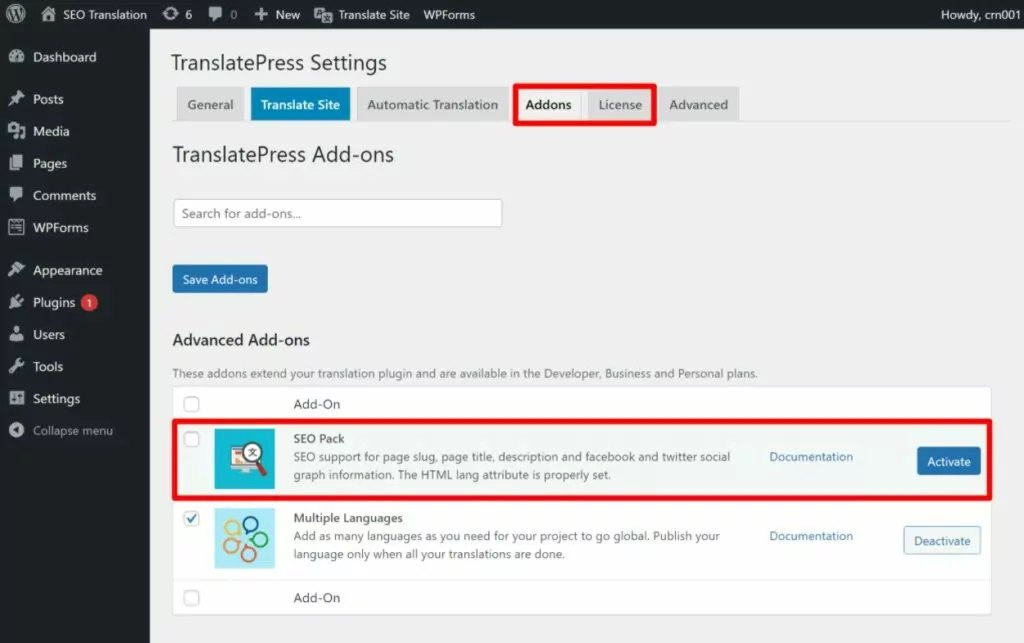
Sobald Sie beide Plugins installiert haben, gehen Sie zu Einstellungen → TranslatePress → Lizenz zur Aktivierung Ihres Lizenzschlüsselsdie Sie auch über das Dashboard Ihres TranslatePress-Kontos abrufen können).
Klicken Sie dann auf Add-ons tabulieren und aktivieren Sie die SEO-Paket Add-on, das Sie benötigen, um auf viele der SEO-Content-Übersetzungsfunktionen zuzugreifen:
Hinweis – wenn Sie einen genaueren Blick auf die nicht-SEO-bezogenen Teile der Einrichtung Ihrer mehrsprachigen Website werfen möchten, können Sie sich einen unserer vollständigen Leitfäden ansehen:
- Wie man eine mehrsprachige WordPress-Website erstellt.
- Der ultimative Leitfaden zur Erstellung einer mehrsprachigen Website.
2. Sprachen auswählen
Gehen Sie als Nächstes zum Allgemein Registerkarte im Einstellungsbereich „TranslatePress“, um die Sprachen auszuwählen, die Sie auf Ihrer Website verwenden möchten:
- Standardsprache – die aktuelle Sprache der vorhandenen Inhalte Ihrer Website.
- Alle Sprachen – eine oder mehrere neue Sprachen, in die Sie die Inhalte Ihrer Website SEO-übersetzen möchten.
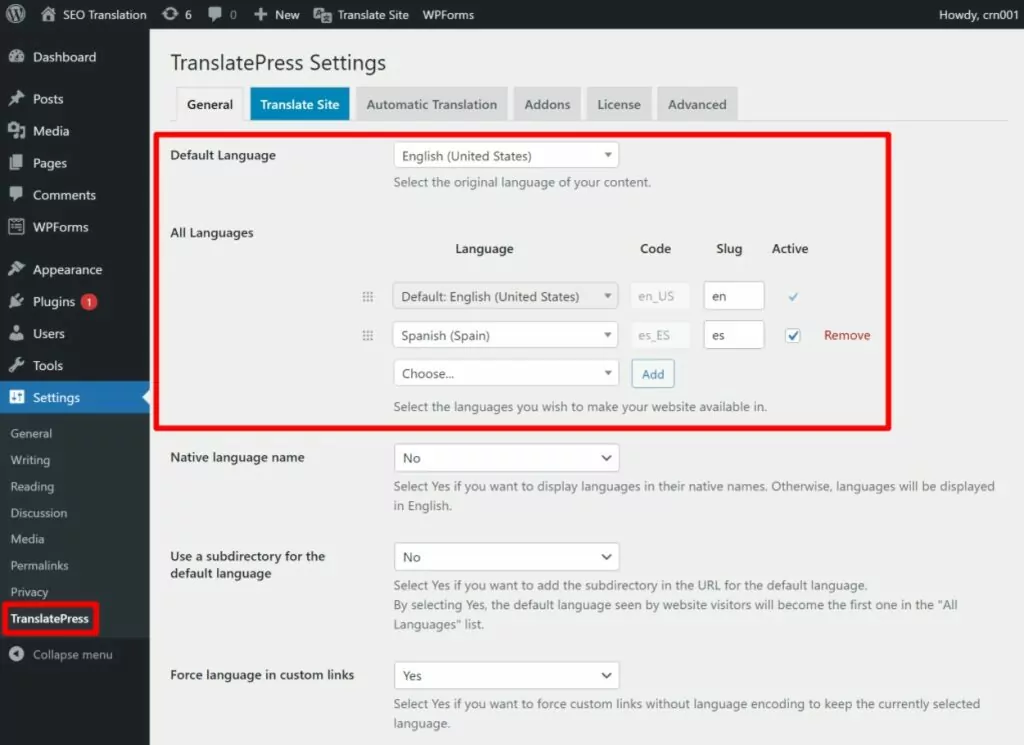
Wenn Sie Ihre gewünschte Sprache nicht sehen, können Sie jederzeit eine benutzerdefinierte Sprache hinzufügen.
3. Automatische Übersetzung einrichten (Optional)
Wenn Sie die automatische maschinelle Übersetzung nutzen möchten, sollten Sie diese als Nächstes einrichten. Denken Sie daran, dass es für die SEO-Übersetzung in Ordnung ist, maschinelle Übersetzung zu verwenden, um das Ausgangswert Übersetzungen für Ihre Website – Sie werden diese Übersetzungen lediglich manuell überprüfen wollen, um sie hinsichtlich Klarheit und SEO zu optimieren (was wir im nächsten Abschnitt behandeln werden).
Falls Sie doch eine automatische Übersetzung nutzen möchten, unterstützt TranslatePress zwei Maschinelle Übersetzungsdienste:
- Google Übersetzer – in der kostenlosen Version von TranslatePress verfügbar.
- DeepL – erfordert mindestens der Business Lizenz für TranslatePress.
Schau mal Unser Vergleich zwischen Google Translate und DeepL den Unterschied lernen.
Sie können die automatische Übersetzung einrichten von Automatische Übersetzung Registerkarte im Einstellungsbereich „TranslatePress“ – in diesen Anleitungen finden Sie eine ausführlichere Anleitung:
- Wie übersetze ich WordPress automatisch
- TranslatePress Google Translate-Anleitung
- Wie man DeepL zum Übersetzen von WordPress verwendet
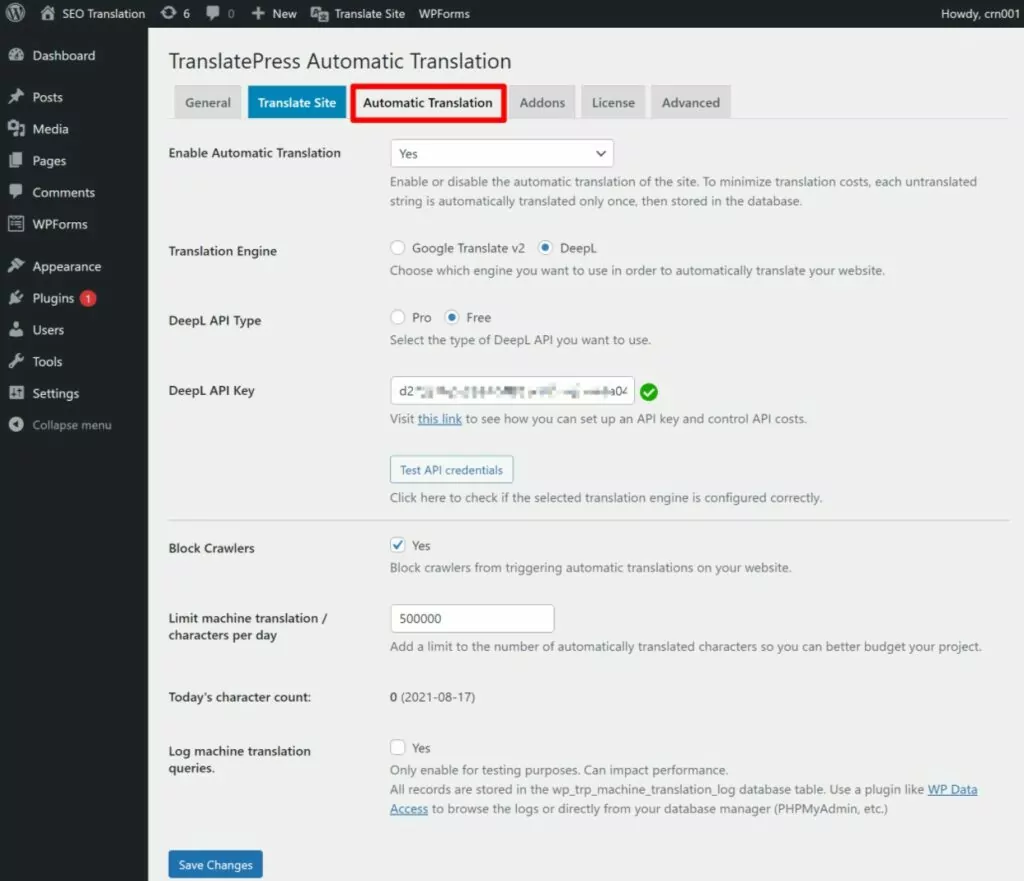
Hauptinhalt (Titel und Text) übersetzen/optimieren
Als Nächstes sollten Sie die Übersetzungen für Ihre Hauptinhalte bearbeiten – den Titel des Inhalts und den Fließtext:
- Wenn Sie die automatische Übersetzung aktiviert haben, müssen Sie lediglich die Übersetzungen von Google Translate oder DeepL bearbeiten bzw. überprüfen.
- Wenn Sie Ihre Inhalte manuell übersetzen, müssen Sie die Übersetzungen von Grund auf neu eingeben.
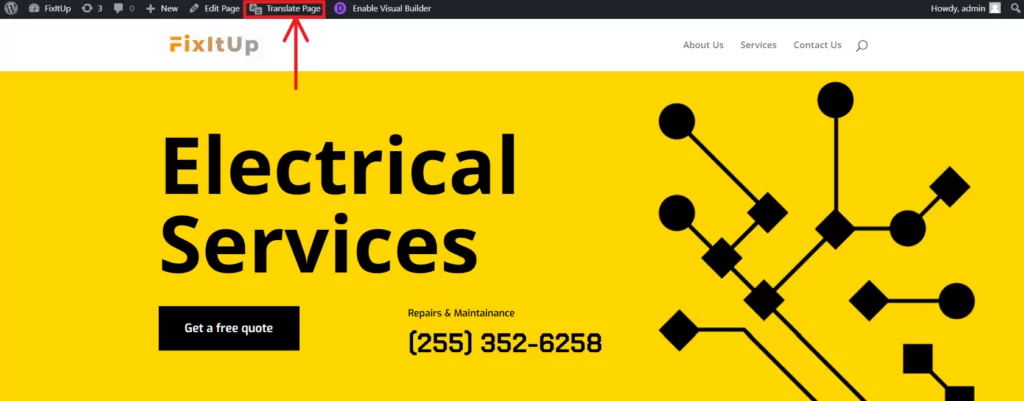
Öffnen Sie zunächst den Inhalt, den Sie übersetzen möchten, im Frontend Ihrer Website. Klicken Sie dann auf Seite übersetzen Option in der WordPress-Symbolleiste zum Starten des visuellen TranslatePress-Editors:
Sie sollten rechts eine Live-Vorschau des Inhalts und links eine Seitenleiste sehen.
Um Inhalte auf Ihrer Website zu bearbeiten, fahren Sie einfach in der Live-Vorschau mit der Maus darüber und klicken auf das Stiftsymbol. Dadurch wird die Übersetzung in der Seitenleiste geöffnet, wo Sie Ihre Änderungen vornehmen können:
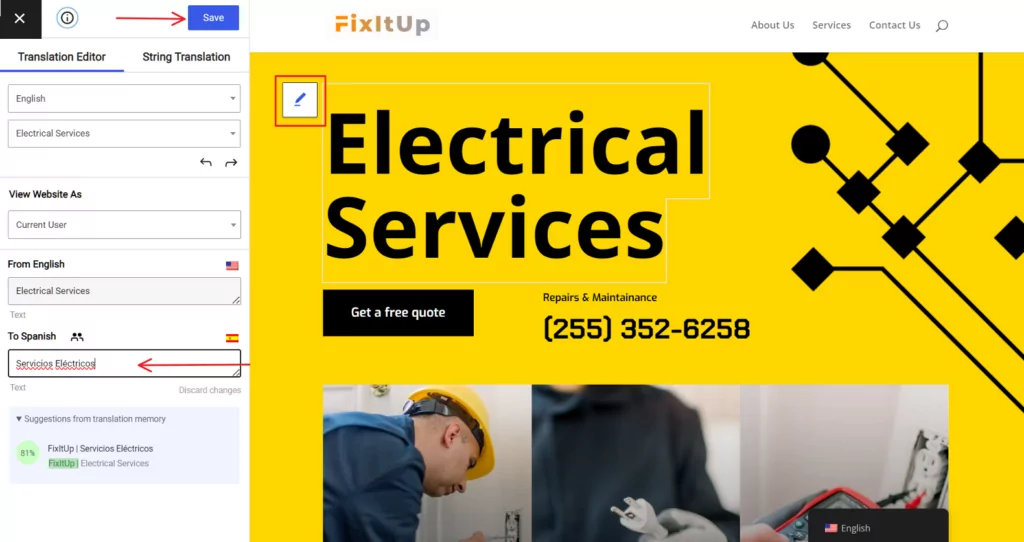
Denken Sie beim Bearbeiten und Hinzufügen Ihrer Übersetzungen daran, dass Sie die übersetzten Inhalte im Hinblick auf Klarheit optimieren möchten. und SEO. Sie sollten zum Beispiel sicherstellen, dass Sie Ihr Fokus-Keyword im Titel des Beitrags und idealerweise im gesamten Inhalt verwenden.
Wenn Sie einen detaillierteren Einblick in die Übersetzung verschiedener Arten von Inhalten erhalten möchten, schauen Sie sich diese Beiträge an:
- Editor (Gutenberg) Blöcke
- Benutzerdefinierte Felder
- Benutzerdefinierte Beitragstypen
- WordPress Formulare
- WordPress Menüs
- Popup-Inhalt
- Schieberegler
- WooCommerce-Produkte
- Elementor (Seitenersteller)
- Divi (Seitenersteller)
- Sauerstoff (Website-Baukasten)
5. Übersetzen Sie Ihren SEO-Titel und Ihre Meta-Beschreibung
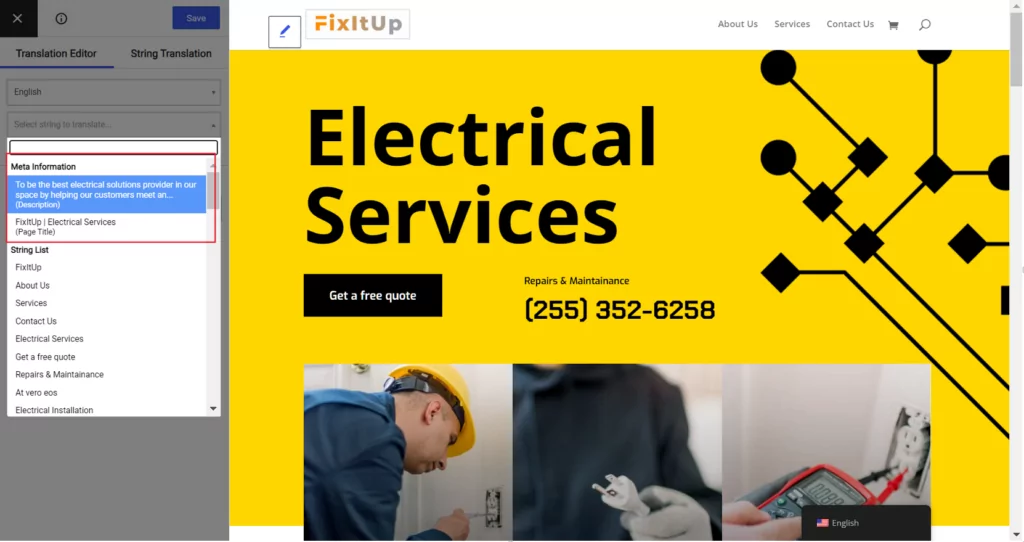
Nun geht es daran, die SEO-Metadaten Ihres Beitrags zu übersetzen. Mit dem Add-on „SEO Pack“ bietet TranslatePress integrierte Unterstützung für die meisten WordPress-SEO-Plugins. einschließlich Yoast SEO, Rank Math und vielem mehr.
Stellen Sie zunächst sicher, dass Sie Ihren SEO-Titel und Ihre Meta-Beschreibung für die Originalsprache Ihres Inhalts festgelegt haben, indem Sie Ihr SEO-Plugin Ihrer Wahl.
Sobald Sie dies erledigt haben, können Sie im visuellen TranslatePress-Editor über das Dropdown-Menü oben in der Seitenleiste auf diese Übersetzungen zugreifen:
6. Übersetzen Sie Ihre URL-Slugs
Für das letzte bisschen Optimierung sollten Sie Ihre Slugs SEO-übersetzen.
Um den URL-Slug für ein einzelnes Stück Inhalt zu übersetzen, können Sie auch das Dropdown-Menü im visuellen Editor verwenden, genau wie Sie es für Ihren SEO-Titel und Ihre Beschreibung getan haben:
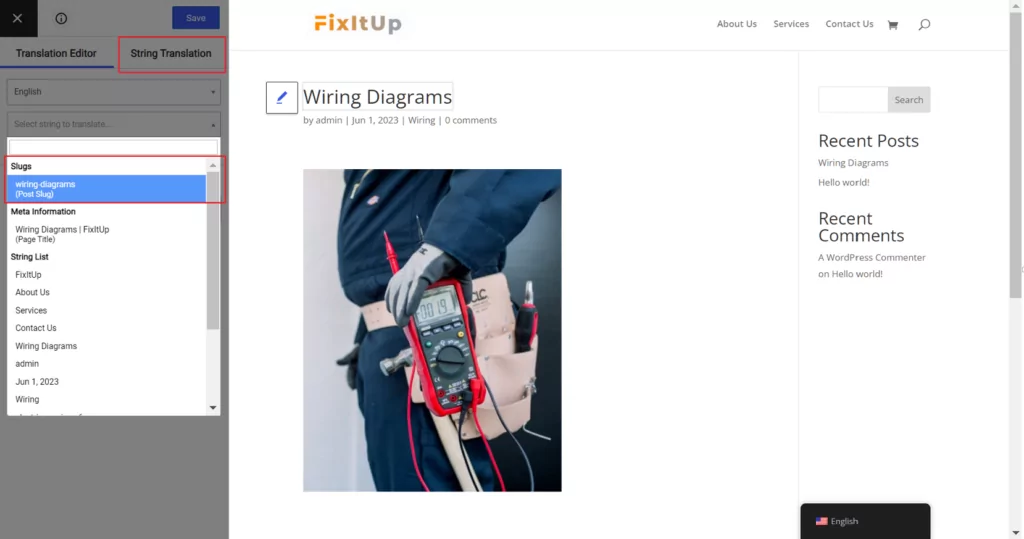
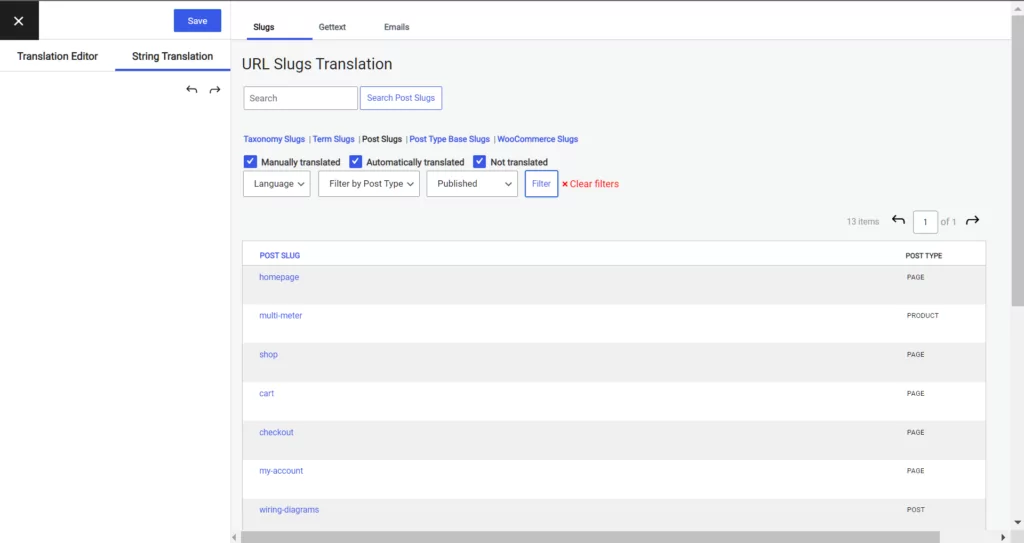
Um Ihre websiteweiten URL-Slugs zu übersetzenwie die Slugs für Kategorien und Schlagwörter), können Sie die Benutzeroberfläche für die String-Übersetzung öffnen (oben abgebildet).
Hier können Sie alle anderen URL-Slugs auf Ihrer Website übersetzen:
Und das war's! Wir haben uns wieder hauptsächlich auf die SEO-Aspekte der Übersetzung einer Website konzentriert. Wenn Sie also einen umfassenderen Blick auf die Einrichtung Ihrer mehrsprachigen Website werfen möchten, schauen Sie sich unsere Vollständige Anleitung zum Erstellen einer mehrsprachigen WordPress-Website.
Beginnen Sie noch heute mit SEO-Übersetzungen
SEO-Übersetzung ist eine großartige Möglichkeit, die Sichtbarkeit Ihrer Website in Suchmaschinen wie Google zu erhöhen.
Die Optimierung übersetzter Inhalte für Google ähnelt stark der regulären Suchmaschinenoptimierung, erfordert jedoch einige besondere Überlegungen bei der Überprüfung Ihrer Fokus-Keywords und der Sicherstellung, dass Sie wichtige Details wie URL-Slugs und SEO-Metadaten übersetzen.
Um auf einfachste Weise von SEO-optimierten Übersetzungen auf Ihrer WordPress-Website zu profitieren, können Sie TranslatePress nutzen.
Mit dem SEO-Pack-Add-on unterstützt Sie TranslatePress dabei, wichtige Best Practices für die Übersetzung von SEO-Inhalten und für mehrsprachiges SEO ganz einfach umzusetzen.
Um zu beginnen, Kaufen Sie TranslatePress noch heute:
TranslatePress Mehrsprachig
Haben Sie noch Fragen zur SEO-Optimierung Ihrer übersetzten Inhalte? Lassen Sie es uns in den Kommentaren wissen!