
In diesem Beitrag
WordPress wird auf fast 43% aller Websites eingesetzt, und nicht alle davon sind auf Englisch. Tatsächlich nimmt die Zahl der nicht-englischsprachigen Websites zu, wobei 56% der WordPress-Seiten, die in anderen Sprachen als US-Englisch erstellt werden. Dies zeigt, dass es eine riesige Chance gibt, mehrsprachig zu werden und Ihre Website in mehrere Sprachen zu übersetzen.
Aber der Einstieg kann verwirrend sein, selbst für erfahrene WordPress-Benutzer. Vielleicht fragen Sie sich, was die besten mehrsprachigen WordPress-Plugins sind? Was sind die technischen Herausforderungen bei der Einrichtung? Mehrsprachige Website? Gibt es SEO-Auswirkungen? Soll ich verwenden Maschinelle oder menschliche Übersetzungen?
In diesem Beitrag führe ich Sie durch alles, was Sie über die Übersetzung Ihrer WordPress-Website wissen müssen, und beantworte hoffentlich alle Ihre Fragen. Wir behandeln alles von der Klärung, ob Sie Ihre Website in andere Sprachen übersetzen müssen, über verschiedene Methoden und WordPress-Plugins für die Übersetzung bis hin zu den besten Wegen, Ihre Inhalte zu übersetzen.
WordPress-Index
- Müssen Sie Ihre WordPress-Website übersetzen?
- Vorteile der Übersetzung von WordPress
- Maschinelle Übersetzung vs. Humanübersetzung
- Auswahl einer Lösung für die Übersetzung Ihrer WordPress-Website
- Was sollten Sie übersetzen?
- Welche URL-Struktur sollten Sie verwenden?
- Was sind hreflang-Tags?
- So übersetzen Sie WordPress mit TranslatePress
- Beginne mit der Übersetzung von WordPress
Müssen Sie Ihre WordPress-Website übersetzen?
Die Übersetzung Ihrer WordPress-Inhalte ist nichts, was man zum Vergnügen tut – sie erfordert eine durchdachte Strategie. Wenn Sie sich also fragen, ob Sie eine mehrsprachige Website benötigen, prüfen Sie am besten zunächst, ob Sie bereits internationalen Traffic erhalten.
Der einfachste Weg, dies zu tun, ist mit Google Analytics. Um zu überprüfen, auf welche Sprachen Ihre Besucher ihre Browser eingestellt haben, gehen Sie zu Berichte → Publikum → Geo → Sprache.
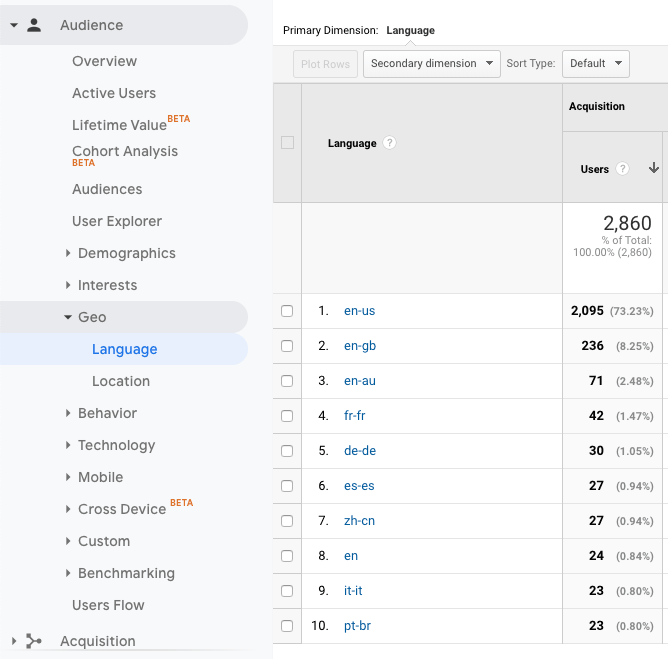
Es ist hilfreich, diese Daten mit den Standorten Ihrer Besucher zu vergleichen, die Sie finden unter Berichte → Publikum → Geo → Standort.
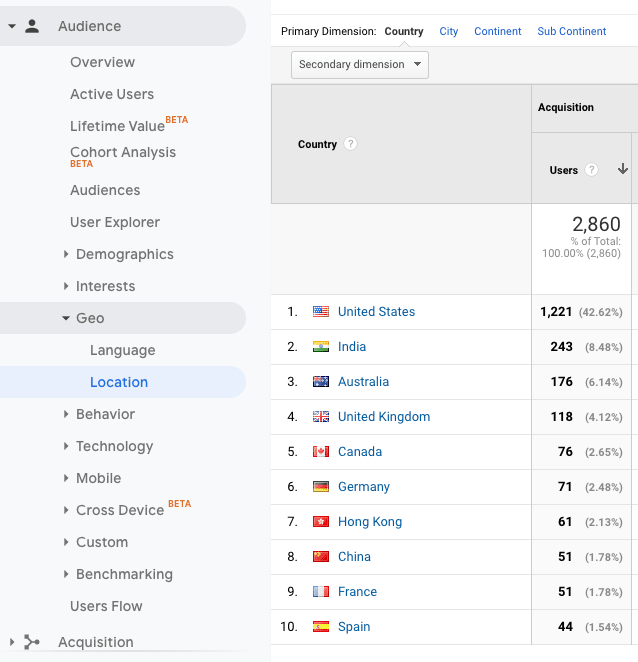
Was bedeutet das alles nun für die Daten? Man kann einige Schlussfolgerungen ziehen:
- Die meisten Besucher surfen auf dieser Website auf Englisch.
- Die Menschen in Indien surfen nicht in ihrer Muttersprache im Internet, aber vielleicht würden sie das gerne tun.
- Besucher aus Spanien, Frankreich und China surfen in ihren jeweiligen Sprachen und fühlen sich möglicherweise wohler, wenn sie auf die Website auf Spanisch, Französisch und Vereinfachtem Chinesisch zugreifen.
Unter dem Strich gibt es also Möglichkeiten, diese Website in andere Sprachen zu übersetzen, darunter Hindi, Spanisch, Französisch und Chinesisch.
Vorteile der Übersetzung einer WordPress-Website
Die Übersetzung von WordPress nützt nicht nur Ihren Besuchern, sie bietet auch viele Vorteile für Ihr Unternehmen. Wenn Sie lokal und national erfolgreich sind, ist es vielleicht an der Zeit, über die Expansion in andere Länder nachzudenken. Die Skalierung Ihres Unternehmens ist ein ebenso guter Grund, die Übersetzung Ihrer Inhalte in Betracht zu ziehen.
1. Verbessern Sie Ihre SEO
Einer der größten Vorteile von zusätzliche Sprachen ist der Anstieg der Besucherzahlen, den Sie dadurch erzielen werden.
Nehmen wir zum Beispiel an, du Übersetzen Sie Ihren Inhalt ins Spanische und Französische.. Wenn Google Ihre Website das nächste Mal crawlt, erkennt es Ihre neuen Sprachen als eigenständige Inhalte neben Ihren englischen Seiten. Das bedeutet, dass Ihre Website in den Suchergebnissen auf Englisch, Spanisch und Französisch erscheint.
Zudem ist der Wettbewerb um Suchergebnisse auf Englisch zwar hart, doch möglicherweise fällt es Ihnen leichter, mit Ihren Suchbegriffen in anderen Sprachen ein gutes Ranking zu erzielen.
Zum Beispiel ist der Keyword-Begriff ‘translation plugins’ wettbewerbsintensiv, wie Sie an den unten stehenden KWFinder-Ergebnissen sehen können:
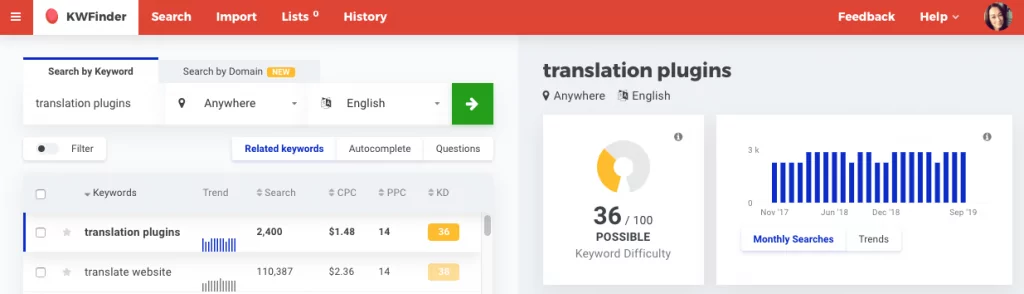
Wenn man nach denselben Suchbegriffen auf Spanisch sucht, ist es plötzlich viel einfacher, ein gutes Ranking zu erzielen:
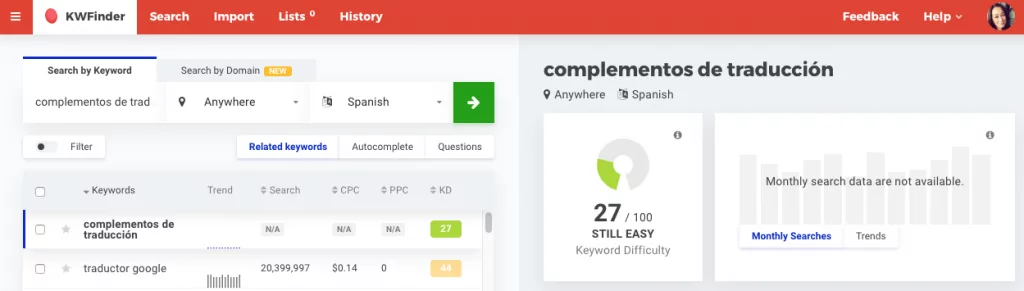
Und eine Suche nach ‘plugins de traduction’ auf Französisch zeigt, dass es noch mehr Potenzial gibt, in den SERPs weit oben zu ranken.
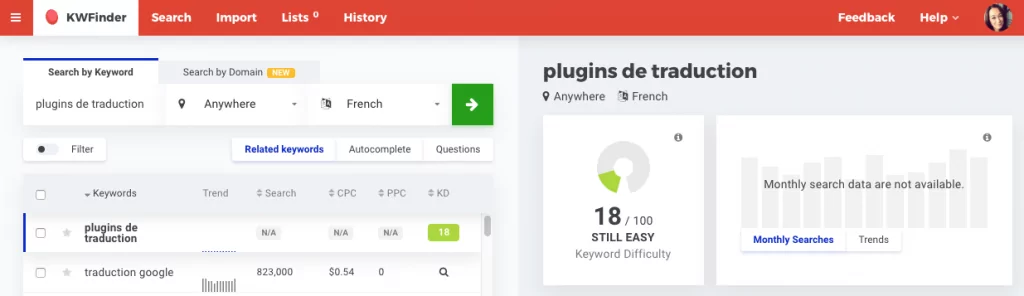
Die Erstellung einer mehrsprachigen WordPress-Site, zusammen mit einem gut durchdachten internationale Keyword-Strategie, kann Ihnen dabei helfen, ein breiteres Spektrum an Suchbegriffen abzudecken. Dadurch erhöhen sich Ihre Chancen, in mehr als einer Sprache auf der ersten Seite der Suchergebnisse zu erscheinen.
2. Benutzererfahrung verbessern
Wenn Sie ins Internet gehen, halten Sie es wahrscheinlich für selbstverständlich, dass Sie in Ihrer Muttersprache surfen können, oder? Für einen Großteil der nicht englischsprachigen Welt ist das jedoch nicht der Fall.
Die Übersetzung von WordPress verbessert sofort die Benutzererfahrung für Besucher, die andere Sprachen sprechen. Sie werden nicht nur in der Lage sein, Ihre Inhalte zu verstehen, sondern sie werden sich auch willkommen fühlen und weiter stöbern wollen. Dies hat einen Dominoeffekt auf Ihrer gesamten Website, der den Traffic erhöht, Ihre Absprungrate senkt und die Konversionen steigert.
3. Vertrauen und Glaubwürdigkeit aufbauen
Für Unternehmen ist es wichtig, die gleichen Sprachen wie ihre Zielmärkte zu sprechen. Warum? Weil sich Menschen in ihrer Muttersprache wohler fühlen, da sie in dieser Kultur aufgewachsen sind.
Ich habe vollständig übersetzte Website kann dazu beitragen, Ihr Unternehmen als glaubwürdiges Angebot in Ihren Zielmärkten zu etablieren. Qualitätsbewusste mehrsprachige Inhalte reduzieren zudem Missverständnisse und Fehlinterpretationen Ihrer Marke im Ausland.
4. Hoher ROI
Übersetzung einen Schritt weiter bringen mit Lokalisierung — der Prozess der Anpassung Ihrer Inhalte an die Sprache, die Bräuche und die Kultur eines spezifischen Marktes — kann sich weiter auf die Marke Ihres Unternehmens, die Kundenbeziehungen und letztendlich auf das Endergebnis auswirken.
Gemäß der Industry Specification Group for Localization (ISG), Für jeden US$1, der für die Lokalisierung ausgegeben wird, erzielt ein Unternehmen einen Ertrag von $25.. Ganz genau – eine Rendite von 2.500%.
Maschinelle Übersetzung vs. Humanübersetzung
Es gibt zwei primäre Arten von Übersetzungen: maschinelle Übersetzung und menschliche Übersetzung.
1. Maschinenübersetzung
Auch bekannt als automatische Übersetzung, maschinelle Übersetzung verwendet Übersetzungspakete oder KI, um Wörter auf einer Seite in andere Sprachen zu konvertieren. Eines der beliebtesten Beispiele für maschinelle Übersetzung ist Google Übersetzer und dessen System zur neuronalen maschinellen Übersetzung.
2. Menschliche Übersetzung
Menschliche Übersetzung stützt sich auf menschliche Intelligenz, um eine Ausdrucksweise in eine andere zu übertragen. Es gibt viele professionelle Übersetzungsdienstleistungen verfügbar, bereit, Inhalte gegen eine Gebühr zu übersetzen. Menschliche Übersetzung ist in der Regel genauer und natürlicher, da Menschen besser darin sind, die Nuancen der Sprache zu interpretieren als Maschinen.
Auswahl einer Lösung für die Übersetzung Ihrer WordPress-Website
Bevor Sie sich in die Übersetzung Ihrer Website oder WordPress-Website stürzen, gibt es drei wichtige Dinge zu beachten:
- Wie hoch ist Ihr Budget? Möchten Sie eine kostenlose Lösung oder sind Sie bereit, ein laufendes monatliches Abonnement für qualitativ hochwertige Übersetzungen zu bezahlen?
- Wie viel Zeit hast du? Haben Sie die Zeit, Ihre Inhalte manuell zu übersetzen und laufend zu verwalten, oder bevorzugen Sie eine Lösung, die dies automatisch für Sie erledigt?
- Wie wichtig sind Qualität und Genauigkeit? Verkauft Ihr Unternehmen Produkte oder Dienstleistungen, bei denen kein Raum für Missverständnisse ist und Genauigkeit unerlässlich ist? Zum Beispiel in der Medizin, im Finanzwesen oder im Recht? Genügen maschinelle Übersetzungen oder benötigt Ihr Unternehmen menschliche Übersetzungen?
Es gibt viele verschiedene Möglichkeiten, WordPress-Inhalte zu übersetzen, aber wir schauen uns die 3 gängigsten an:
- WordPress-Plugins
- Inhalt manuell kopieren und einfügen
- Verlassen Sie sich auf Browser
1. WordPress-Plugins
Die beliebteste Art, WordPress zu übersetzen, ist mit einem WordPress-Übersetzungsplugin. Übersetzungsplugins sind die bequemste Lösung, um einer Website mehrere Sprachen hinzuzufügen.
Dies steht in krassem Gegensatz zu der Situation vor nur wenigen Jahren, als man sich noch mit Sprachpaketen, .PO- und .MO-Dateien sowie der Übersetzung von Strings herumschlagen musste. Heute gibt es intuitive Übersetzungs-Plugins, mit denen Sie Texte direkt im Frontend Ihrer Website visuell und ganz unkompliziert übersetzen können.
Eine kurze Suche im WordPress.org-Plugin-Verzeichnis zeigt die beliebtesten kostenlosen WordPress-Plugins für Übersetzungen:
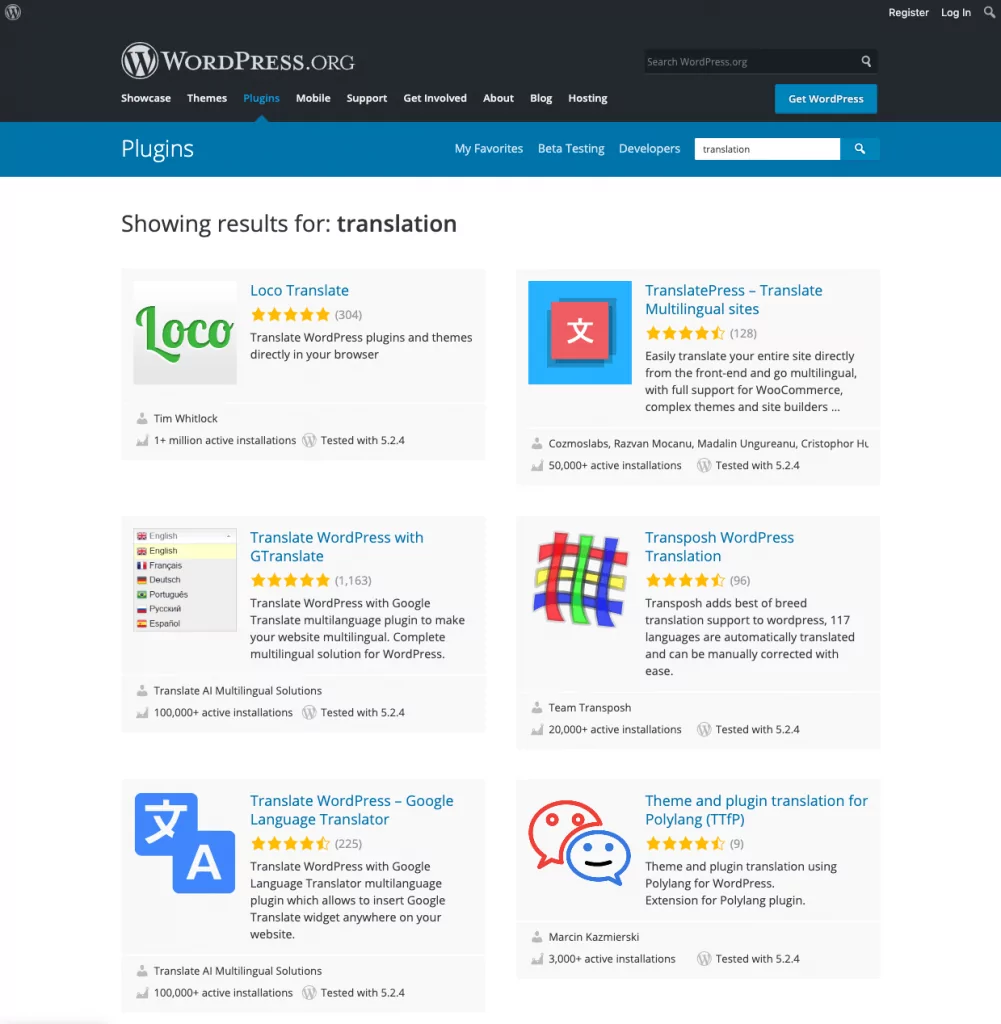
Wenn Sie nach ‘Übersetzungs-Plugins’ gegoogelt haben, sind Sie wahrscheinlich auf einige andere Plugins zum Erstellen einer mehrsprachigen WordPress-Website gestoßen, wie zum Beispiel TranslatePress, Loco Translate, WPML, Polylang oder Transposh.
Alle diese kostenlosen und kostenpflichtigen Optionen bieten unterschiedliche Funktionen und Oberflächen zum Übersetzen von Inhalten. Es lohnt sich, ihre Vor- und Nachteile zu prüfen, um zu entscheiden, welche am besten zu Ihnen passt.
TranslatePress: Ein WordPress-Übersetzungs-Plugin, das jeder nutzen kann
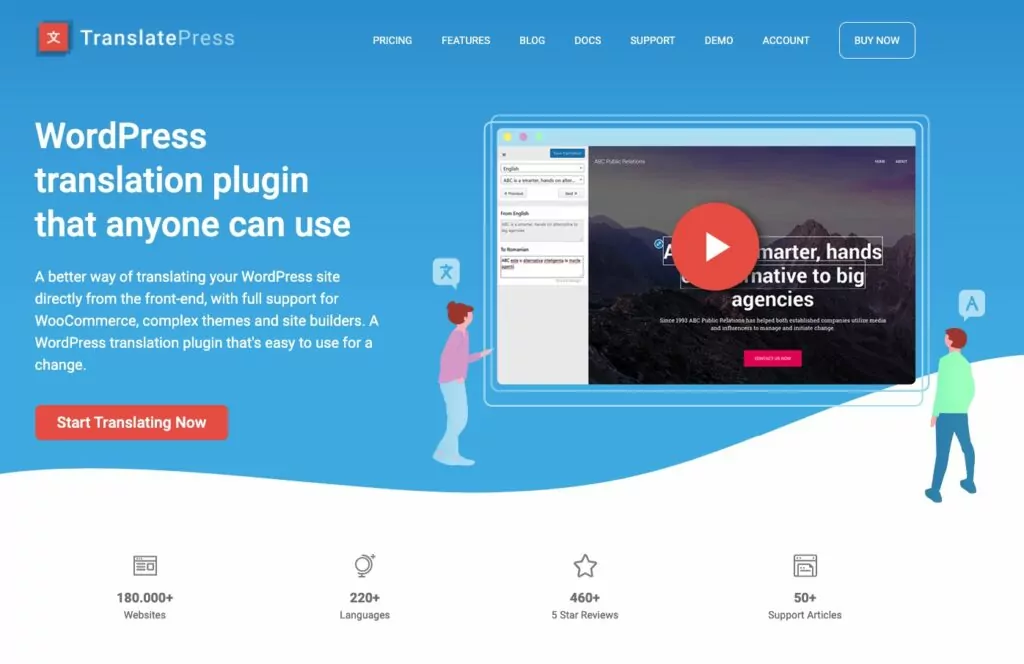
Das beste WordPress-Übersetzungsplugin in Bezug auf Preis, Qualität, Genauigkeit und Benutzerfreundlichkeit ist TranslatePress.
Es ermöglicht Ihnen, Ihre Website manuell und mit automatischer maschineller Übersetzung zu übersetzen, unterstützt durch Google Übersetzer oder DeepL—super nützlich, um mit maschineller Übersetzung zu beginnen und dann manuelle Korrekturen für Genauigkeit und Nuancen vorzunehmen.
Zu den wichtigsten Merkmalen gehören:
- übersetzen alles auf Ihrer Website, einschließlich Beiträgen und Seiten, der Ausgabe von Plugins, Shortcodes und Kontaktformulare.
- Benutzerfreundliche visuelle Oberfläche zum Übersetzen von Inhalten.
- Fügen Sie so viele Sprachen hinzu, wie Sie benötigen.
- Bilder übersetzen (d. h. für jede Sprache Ihrer Website andere Bilder anzeigen).
- SEO-freundlich. Erstellen mehrsprachige Sitemaps und indexierbare Versionen Ihrer Website für jede Sprache.
- Unterstützt WooCommerce, Benutzerdefinierte Beitragsarten, komplexe Themes und Page Builder.
- Anpassbar Sprachumschalter.
Weiter unten in diesem Beitrag werden wir uns ansehen, wie Sie Ihre WordPress-Website mit TranslatePress übersetzen können.
2. Inhalte manuell kopieren und einfügen
Copy & Paste ist eine der einfachsten Methoden zur Übersetzung von WordPress, da Sie keine Plugins installieren oder für Premium-Dienste bezahlen müssen.
Um diese manuelle Übersetzungstechnik anzuwenden, kopieren Sie einfach den Text, den Sie übersetzen möchten, in ein Dokument, das Sie dann mit einem privaten Übersetzer oder professionellen Übersetzungsdiensten wie Gengo oder Straker Translations teilen. Wenn der übersetzte Text fertig ist, kopieren Sie ihn und fügen ihn in neue Seiten auf Ihrer Website ein.
Dies ist eine einfache Lösung, wenn Sie nur einen Teil des Quelltextes auf Ihrer Website übersetzt benötigen. Sie kann jedoch zeitaufwändig sein und sich aufgrund schwerwiegender SEO-Nachteile möglicherweise nicht lohnen.
Google sucht nach dem hreflang-Attribut in den Header-Bereichen von Seiten, um Informationen darüber zu erhalten, in welcher Sprache der Inhalt veröffentlicht wurde. Ohne dieses Markup hat Google keine Ahnung, ob sich Ihre Website auf Englisch oder in einer anderen Sprache befindet. (Wir werden uns hreflang-Tags später in diesem Artikel genauer ansehen.)
Wenn Sie also den Weg des Kopieren und Einfügens gehen, gibt es nur eine sehr geringe Chance, dass Ihre Inhalte in mehreren Sprachen ranken.
Sie könnten die hreflang-Tags zwar selbst hinzufügen, aber es ist viel einfacher, dies einem Plugin wie TranslatePress zu überlassen, das das für Sie erledigt. Außerdem profitieren Sie von den zusätzlichen SEO-Vorteile von URL-Slug-Übersetzung, WooCommerce-Unterstützung, automatischer Übersetzung und Bildübersetzung.
3. Auf Browser vertrauen
Der einfachste – und faulste! – Weg, WordPress zu übersetzen, ist, es überhaupt nicht zu tun. Dank Browsern wie Chrome können Sie es Ihren Besuchern überlassen, Ihre Inhalte zu übersetzen.
Browser können den gesamten Inhalt einer Seite automatisch übersetzen. Der Vorteil dabei ist, dass der Besucher selbst entscheiden kann, ob er Ihre Website in der Originalsprache durchstöbern oder zu seiner bevorzugten Sprache wechseln möchte.
Der Nachteil ist, dass Sie keinerlei Einfluss darauf haben, wie Ihre Website übersetzt wird. Google Translate könnte Ihre Inhalte falsch interpretieren, und alle Nuancen oder der persönliche Stil Ihres Textes würden bei der Übersetzung verloren gehen.
Außerdem verlieren Sie das so wichtige Vertrauen und die Glaubwürdigkeit, die mit der Bereitstellung mehrsprachiger Inhalte einhergehen. Sich bei der Übersetzung auf Browser zu verlassen, sollte nur dann eine Option sein, wenn die Bereitstellung mehrsprachiger Inhalte keine Priorität hat.
Was sollten Sie übersetzen?
Es ist im Allgemeinen eine bewährte Praxis, Übersetzen Sie alles auf Ihrer Website. Das ist sowohl für die Nutzererfahrung als auch für die SEO wichtig. Wenn Sie nur einen Teil des Inhalts auf einer Seite übersetzen und den Rest nicht, wirkt das nicht nur störend für den Besucher, sondern verwirrt auch die Suchmaschinen.
1. Inhalt
Dies umfasst Blog-Beiträge und Seiteninhalte sowie Kopf- und Fußzeileninhalte, Kategorien und Schlagwörter, Widgets, und Menüpunkte.
Vergessen Sie nicht, benutzerdefinierte Beitragstypen sowie die Seiten für Ihre Datenschutzrichtlinie und Ihre Allgemeinen Geschäftsbedingungen zu übersetzen.
2. SEO-Metadaten
Der Meta-Titel und die Meta-Beschreibung Ihrer Seiten und Beiträge werden normalerweise in den Suchergebnissen angezeigt, übersetzen Sie daher auch diese Textteile. Dies trägt dazu bei, Ihren organischen Traffic in anderen Sprachen zu steigern.
Stellen Sie sicher, dass Sie ein Übersetzungs-Plugin wählen, das unterstützt Mehrsprachige SEO und Sitemaps (TranslatePress unterstützt beides).
3. URLs
SEO-Best-Practices empfehlen, dass Keywords in den URL-Slugs enthalten sein sollten. Das tun Sie für Ihre Seiten und Beiträge wahrscheinlich ohnehin schon. Daher ist es natürlich eine gute Idee, Übersetzen Sie Ihre URLs, auch.
Zum Beispiel könnte Ihre Kontaktseite diesen Slug auf Englisch verwenden:
example.com/kontakt
Und auf Deutsch sähe das so aus:
example.com/kontaktieren-sie-uns
Während einige WordPress-Übersetzungstools die Übersetzung von URL-Slugs nicht zulassen, bietet das Add-on ’TranslatePress’ SEO Pack“ diese unverzichtbare Funktion.
4. Bilder
Das Übersetzen von Bildern ist entscheidend für die Aufrechterhaltung einer konsistenten Benutzererfahrung. Wenn Sie den gesamten Inhalt einer Seite übersetzt haben, kann es für Besucher verwirrend sein, wenn Bilder, die Text enthalten, in einer anderen Sprache sind.
Mit TranslatePress können Sie über die visuelle Übersetzungsoberfläche für jede Sprache Ihrer Website unterschiedliche Bilder festlegen. So können Sie die Bilder auf Ihrer gesamten Website je nach der vom Besucher verwendeten Sprache austauschen.
Für mehr, besuchen Sie So übersetzen Sie Bilder in WordPress [Vollständige Anleitung].
Welche URL-Struktur sollten Sie verwenden?
Google bietet einige Tipps zur Verwaltung mehrsprachiger Versionen Ihrer Website. Es empfiehlt die Verwendung einer URL-Struktur, mit der sich Ihre Website einfach geografisch ausrichten lässt:
- Länderspezifische Domain für jede Sprache – example.de (oder example.com für englischsprachige Besucher)
- Subdomain für jede Sprache – de.example.com
- Unterverzeichnis für jede Sprache – example.com/de/
Google rät davon ab, URL-Parameter (z. B. example.com?loc=de) zu verwenden, da Nutzer das Geo-Targeting möglicherweise nicht an der URL erkennen und ein Geo-Targeting über die Google Search Console nicht möglich ist. Dank sprechender Permalinks lässt sich dies in WordPress recht einfach vermeiden.
TranslatePress verwendet für jede Sprache Unterverzeichnisse, auch bekannt als Unterordner, was den Best-Practice-Empfehlungen von Google entspricht.
Was sind hreflang-Tags?
hreflang-Tags sind eine Methode zur Kennzeichnung übersetzter Seiten, die inhaltlich ähnlich, aber für verschiedene Sprachen und/oder Regionen bestimmt sind.
Wie Yoast erklärt, Es gibt drei gängige Methoden zur Implementierung von hreflang:
- Inhalte mit regionalen Varianten wie en-us und en-gb.
- Inhalte in verschiedenen Sprachen wie en, de und fr.
- Eine Kombination aus verschiedenen Sprachen und regionalen Varianten.
Hreflang-Tags teilen Suchmaschinen wie Google mit, welche Version einer Seite für die Sprache und Region eines Nutzers optimiert ist.
Im folgenden Beispiel sehen Sie, dass das hreflang-Attribut US-Englisch angibt:
<link rel=”alternate” href=”http://example.com” hreflang=”en-us” />
Hreflang-Tags verhindern zudem das Problem von Duplicate Content. Wenn Sie beispielsweise denselben Inhalt auf Englisch haben, aber für die USA, Großbritannien und Australien, ist der Unterschied im Inhalt auf diesen Seiten möglicherweise minimal. Mit dem hreflang-Attribut können Sie Suchmaschinen mitteilen, dass es sich bei diesen Seiten nicht um Duplicate Content handelt.
Wenn Sie TranslatePress verwenden, fügt das Programm automatisch hreflang-Tags für jede Sprache auf Ihrer Website hinzu.
So übersetzen Sie eine WordPress-Website mit TranslatePress
Suchen Sie nach einer einfachen Möglichkeit, Ihrer WordPress-Website Sprachen hinzuzufügen? Damit machen Sie garantiert nichts falsch: TranslatePress.
Schauen wir uns an, wie man loslegt mit dem Kostenlose Version von TranslatePress. In diesem Beispiel richte ich eine Website ein in Englisch und Deutsch.
Schritt 1: TranslatePress installieren und aktivieren
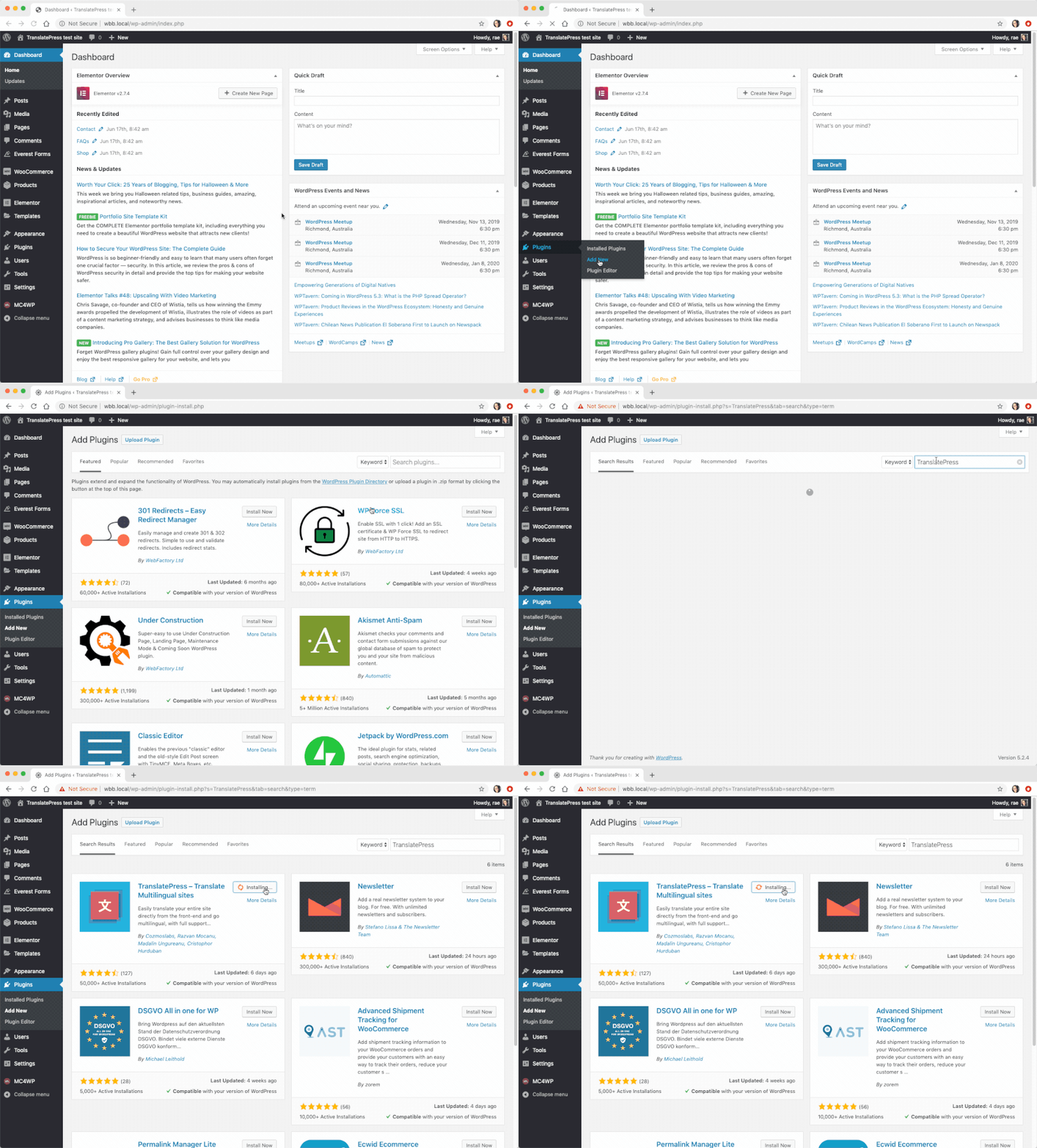
Gehen Sie im WordPress-Dashboard zu Plugins → Neu hinzufügen und suchen Sie nach ‘translatepress’. Installieren und aktivieren Sie das Plugin.
Schritt 2: Wählen Sie Ihre Sprachen
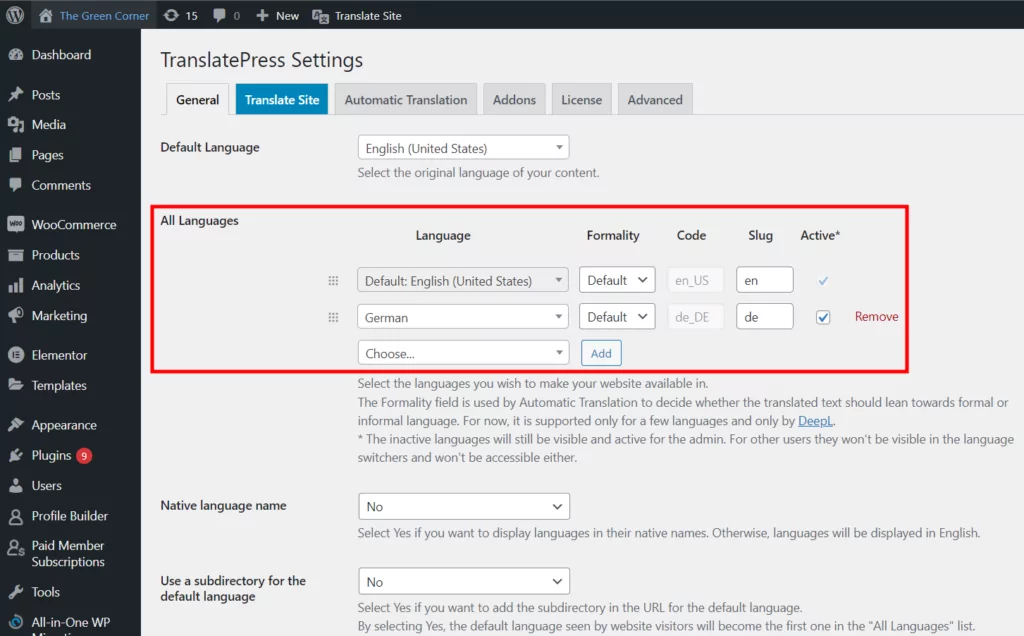
Gehen Sie als Nächstes zu Einstellungen → TranslatePress einige Grundeinstellungen vorzunehmen.
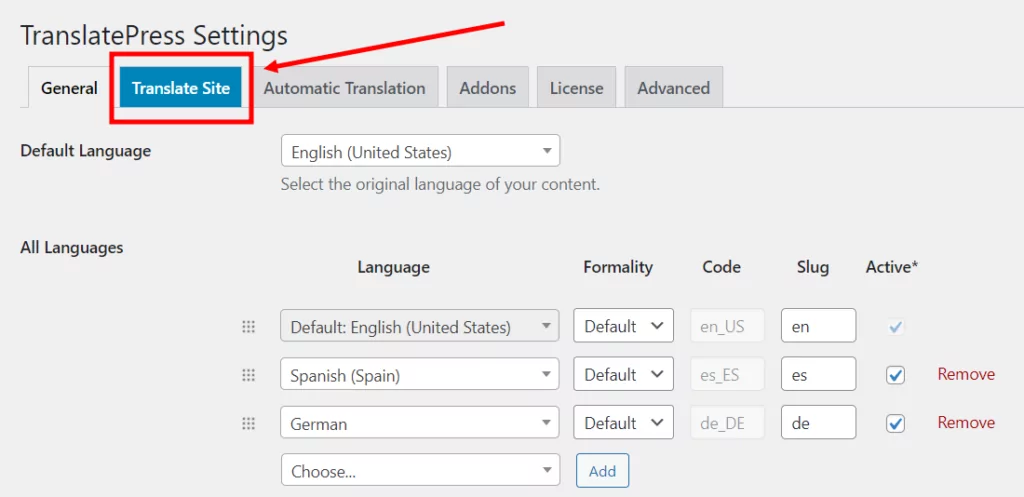
In den Allgemeinen Einstellungen können Sie Ihre Standardsprache und die zusätzlichen Sprachen auswählen, in die Sie Ihre Inhalte übersetzen möchten. Wie Sie unten sehen können, habe ich Deutsch hinzugefügt.
Schritt 3: Sprachumschalter anpassen
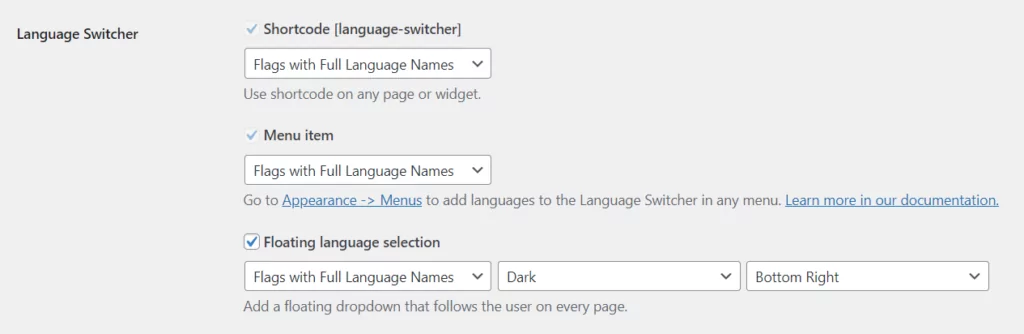
Standardmäßig fügt TranslatePress im Frontend Ihrer Website eine schwebende Schaltfläche zur Sprachauswahl hinzu. Damit können Besucher zwischen den verschiedenen von Ihnen festgelegten Sprachen wechseln.
Sie können das Aussehen des Sprachumschalters anpassen, mit Optionen für vollständige und kurze Sprachnamen, Flaggen und einer Kombination aus beidem.
Schritt 4: Wählen Sie aus, wie Sie Inhalte übersetzen möchten
Wenn Sie möchten, dass Ihre Inhalte automatisch übersetzt werden, Automatische Übersetzung Mit dem Tab können Sie wählen, ob Sie die maschinelle Übersetzung aktivieren möchten oder nicht.
Wenn Sie ‘Ja’ wählen, müssen Sie eine Google Translate API-Schlüssel um eine Verbindung zum Dienst herzustellen. Es gibt auch eine Option zur Verwendung Automatische Übersetzung mit DeepL mit der Premium-Version von TranslatePress.
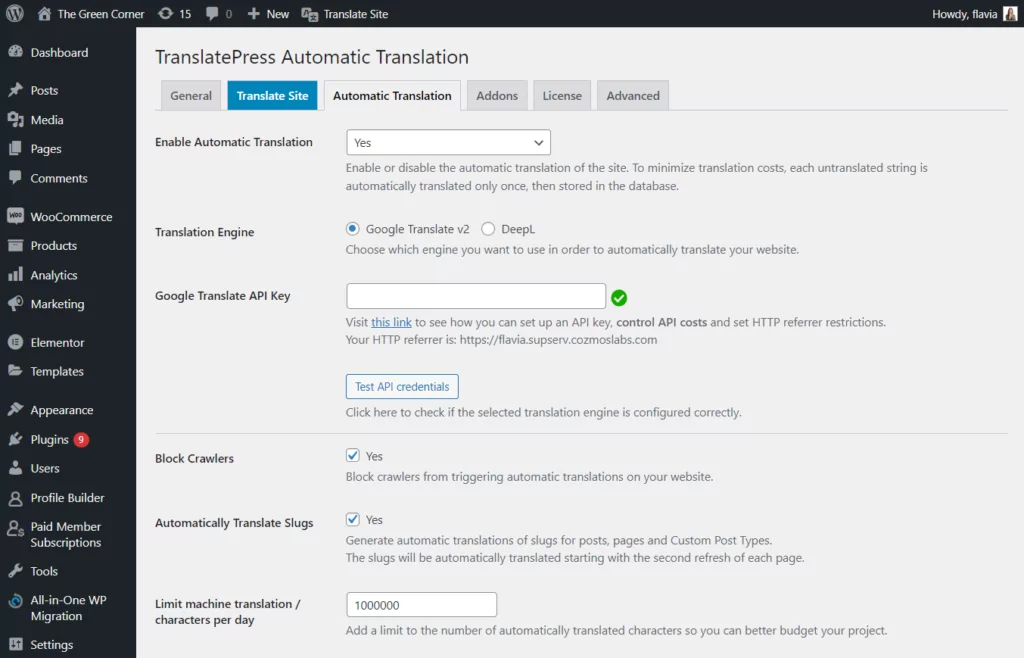
Wenn Sie auf ‘Änderungen speichern’ klicken, übersetzt das Plugin Ihre Website beim nächsten Mal, wenn Sie oder ein Besucher eine andere Sprache auswählen.
Schritt 5: Beginnen Sie mit der Übersetzung Ihrer WordPress-Website
Jetzt, da Sie mit den Basiskonfigurationen fertig sind, können Sie mit der Übersetzung Ihrer WordPress-Inhalte beginnen.
Das Tolle an TranslatePress ist, dass man dank seiner benutzerfreundlichen grafischen Oberfläche Texte übersetzen kann alles direkt auf Ihrer Website über das Frontend, was das Ändern von Texten spielend einfach macht.
Um auf die Übersetzungsoberfläche zuzugreifen, suchen Sie nach der Schaltfläche ‘Seite übersetzen’ in der WordPress-Admin-Leiste, wenn Sie angemeldet sind. (Sie werden auch den Sprachumschalter unten rechts bemerken.)
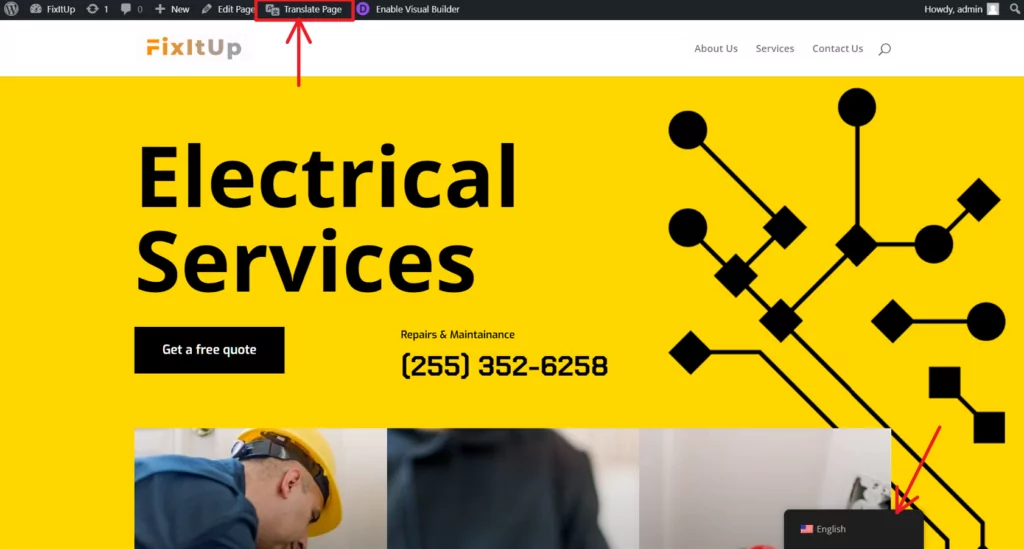
Alternativ können Sie die Benutzeroberfläche über die TranslatePress-Einstellungen aufrufen.
Um Text zu übersetzen oder eine bestehende Übersetzung zu bearbeiten:
- Bewegen Sie den Mauszeiger über den zu übersetzenden Text und klicken Sie auf das Bleistiftsymbol, oder
- Verwenden Sie das Dropdown-Menü auf der linken Seite, um den Inhalt der Seite zu durchsuchen.
Sie sehen den Text, den Sie übersetzen möchten, in der Seitenleiste. Das Hinzufügen einer Übersetzung ist so einfach wie die Eingabe Ihres Textes und das Speichern der Übersetzung, etwa so:
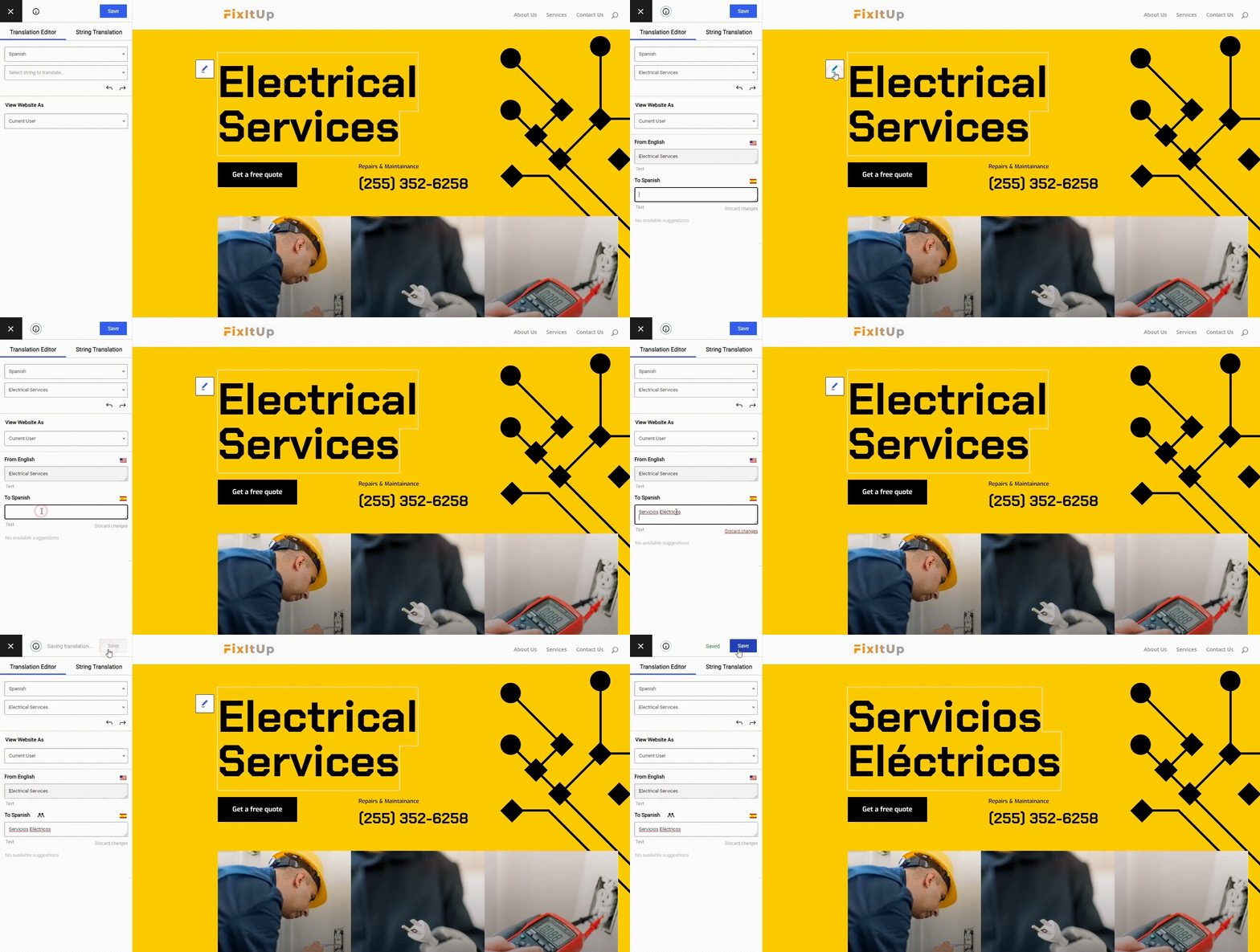
Jetzt müssen Sie nur noch Ihre Website Seite für Seite mit dem visuellen Übersetzungseditor durchsuchen. Klicken Sie weiter, um bestimmte Elemente auszuwählen, geben Sie Ihre Übersetzungen ein und gehen Sie zum nächsten Textstück über.
Mit TranslatePress ist Ihre Website im Handumdrehen vollständig übersetzt!
Neben der Übersetzung von Standardtexten können Sie mit TranslatePress verschiedene Elemente Ihrer Website übersetzen, darunter Pop-ups, Schieberegler, Formulare, WooCommerce-Produkte, Bilder und mehr.
Ich empfehle dringend, sich den vollständigen Leitfaden anzusehen auf So erstellen Sie eine mehrsprachige WordPress-Website.
Beginne mit der Übersetzung von WordPress
Hoffentlich hat dieser Leitfaden geholfen, eventuelle Unklarheiten bezüglich der WordPress-Übersetzung zu beseitigen. Auf den ersten Blick mag es überwältigend erscheinen, aber mit etwas Planung und dem richtigen Übersetzungs-Plugin können Sie mit geringem Aufwand eine mehrsprachige WordPress-Website erstellen.
Sowie die Bereitstellung einer benutzerfreundlichen visuellen Benutzeroberfläche für Übersetzungen, TranslatePress kümmert sich um alle technischen Herausforderungen, die mit der Einrichtung einer mehrsprachigen Website einhergehen. Dazu gehören SEO und hreflang-Tags, das Übersetzen von URL-Slugs, das Einrichten maschineller Übersetzungen, das Anpassen von Sprachumschalter-Schaltflächen und vieles mehr.
TranslatePress Mehrsprachig
Haben Sie Fragen zur Übersetzung von WordPress? Oder haben Sie eigene Tipps für die Erstellung einer mehrsprachigen Website? Lassen Sie es uns in den Kommentaren unten wissen.
Wenn Sie diesen Beitrag hilfreich fanden, schauen Sie sich bitte unsere an YouTube-Kanal, wo wir ständig kurze und leicht verständliche Video-Tutorials hochladen. Sie können uns auch folgen auf Facebook und Twitter um der Erste zu sein, der jedes Mal Bescheid weiß, wenn wir etwas posten.

Danke für den Artikel! Er hilft! Geht mein vorheriger Inhalt verloren, wenn ich die Standardsprache ändere?
Wenn Sie die Standardsprache tatsächlich ändern (über die TranslatePress-Einstellungen), müssen Sie alle von Ihnen verfassten Inhalte in die neue Sprache umwandeln und anschließend alle Informationen erneut übersetzen.
Es gibt keinen vernünftigen Weg, dies zu automatisieren, da Übersetzungen direktional sind. Außerdem wird Ihr Inhalt keinen Sinn ergeben, da er voraussichtlich in der Standardsprache verfasst sein muss.
Danke für die Infos. Ich probiere es schon aus und spiele mit dem Gedanken, mir die Pro-Version zu holen.
Gibt es eine Möglichkeit zu verhindern, dass die übersetzten Zeichenketten zur Originalsprache zurückkehren, wenn man eine kleine Änderung am Originaltext vornimmt?
Danke!
Zu diesem Zeitpunkt noch nicht, da eine “kleine Änderung” beim Vergleichen von Zeichenfolgen schwer zu messen ist. Wir werden jedoch prüfen, ob wir dies in einer zukünftigen Version verbessern können.
Meiner Erfahrung nach eignet sich translatepress am besten für diese Aufgabe. Ich würde jedoch wärmstens empfehlen, die Pro-Variante zu wählen – schließlich kostet sie nur acht Dollar im Monat für eine Website. Von Google Translate bin ich nicht besonders begeistert. Ich frage mich, ob die Entwickler in Zukunft vielleicht deepl.com in Betracht ziehen würden?