
In questo post
WordPress è alla base di quasi 43% di tutti i siti web e non tutti sono in inglese. Infatti, il numero di siti web non in inglese è in aumento, con 56% di siti WordPress creati in lingue diverse dall'inglese statunitense. Questo dimostra che c'è un'enorme opportunità per diventare multilingue e tradurre il proprio sito in più lingue.
Ma iniziare può essere confuso, anche per gli utenti WordPress esperti. Potresti chiederti quali siano i migliori plugin multilingua per WordPress? Quali sono le sfide tecniche per impostarne u sito multilingua? Ci sono implicazioni SEO? Dovrei usare traduzioni automatiche o umane?
In questo articolo, ti guiderò attraverso ciò che devi sapere sulla traduzione del tuo sito WordPress e spero di rispondere a tutte le tue domande. Tratteremo tutto, da come capire se hai bisogno di tradurre il tuo sito in altre lingue, ai diversi metodi e plugin di WordPress per la traduzione, fino ai modi migliori per tradurre i tuoi contenuti.
Indice di WordPress
- Hai bisogno di tradurre il tuo sito web WordPress?
- I vantaggi della traduzione di WordPress
- Traduzione automatica vs Traduzione umana
- Scelta di una soluzione per tradurre il tuo sito WordPress
- Cosa dovresti tradurre?
- Quale struttura URL dovresti usare?
- Cosa sono i tag hreflang?
- Come tradurre WordPress con TranslatePress
- Inizia a tradurre WordPress
Hai bisogno di tradurre il tuo sito web WordPress?
La traduzione dei tuoi contenuti WordPress non è qualcosa che fai per divertimento: è qualcosa che fai con una strategia in mente. Quindi, se ti stai chiedendo se hai bisogno di un sito multilingue, è meglio iniziare controllando se stai già ricevendo traffico internazionale.
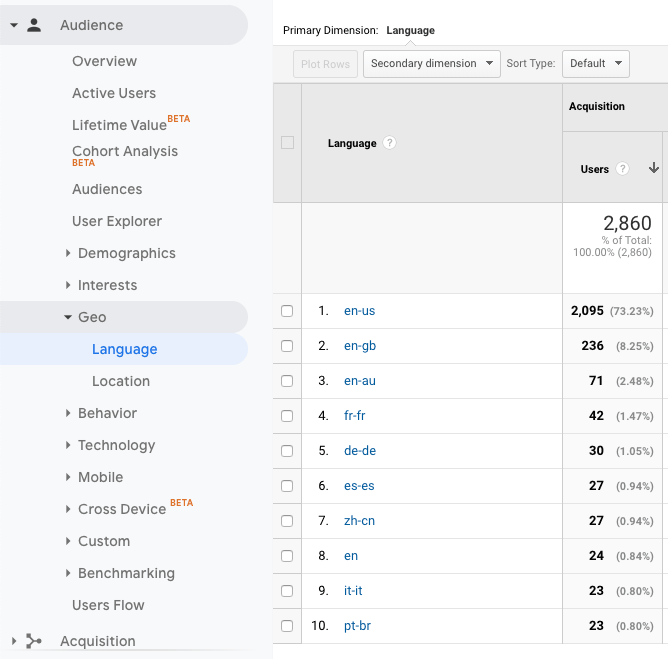
Il modo più semplice per farlo è con Google Analytics. Per verificare le impostazioni della lingua del browser dei tuoi visitatori, vai su Rapporti → Pubblico → Geo → Lingua.
È utile confrontare questi dati con le posizioni dei vostri visitatori, che troverete su Rapporti → Pubblico → Geo → Località.
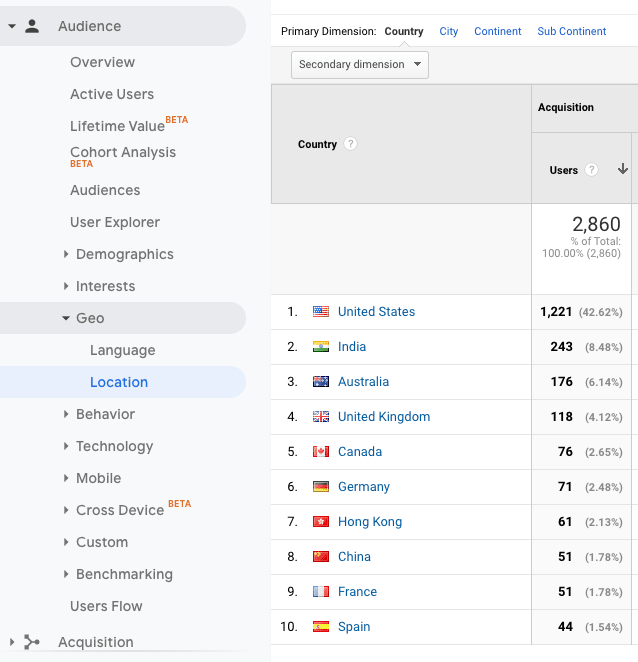
Quindi, che cosa significano tutti questi dati? Se ne possono trarre alcune conclusioni:
- La maggior parte dei visitatori naviga in questo sito in inglese.
- Le persone provenienti dall'India non navigano nelle loro lingue madri, ma forse vorrebbero farlo.
- I visitatori provenienti da Spagna, Francia e Cina stanno navigando nelle rispettive lingue e potrebbero sentirsi più a loro agio nell'accedere al sito in spagnolo, francese e cinese semplificato.
Il fatto è che ci sono opportunità per tradurre questo sito in altre lingue, tra cui hindi, spagnolo, francese e cinese.
Vantaggi della traduzione di un sito WordPress
Tradurre WordPress non avvantaggia solo i tuoi visitatori, ma offre molti vantaggi anche per la tua attività. Se stai ottenendo buoni risultati a livello locale e nazionale, potrebbe essere il momento di pensare all'espansione in altri paesi. Espandere la tua attività è un ottimo motivo per prendere in considerazione la traduzione dei tuoi contenuti.
1. Migliora il tuo SEO
Uno dei maggiori vantaggi di avere lingue aggiuntive è l'aumento di traffico che otterrai.
Diciamo, per esempio, tu traduci il tuo contenuto in spagnolo e francese. La prossima volta che Google eseguirà la scansione del tuo sito, riconoscerà le tue nuove lingue come contenuti separati rispetto alle tue pagine in inglese. Ciò significa che il tuo sito apparirà nei risultati di ricerca in inglese, spagnolo e francese.
Inoltre, sebbene la concorrenza per le SERP in lingua inglese sia agguerrita, potreste trovare più facile posizionarvi per le vostre parole chiave in altre lingue.
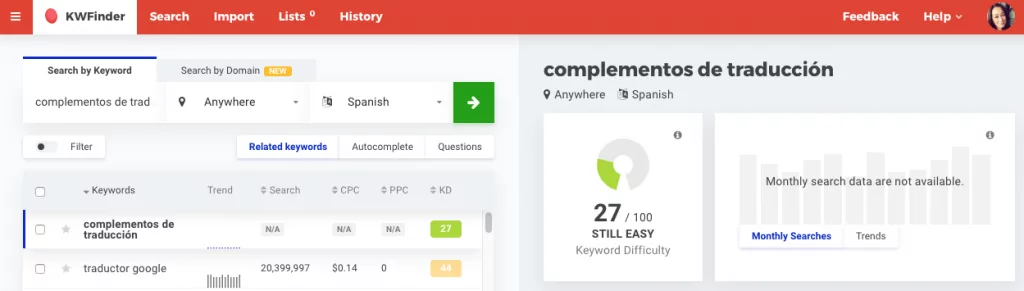
Ad esempio, la parola chiave ‘translation plugins’ è competitiva, come puoi vedere nei risultati di KWFinder qui sotto:
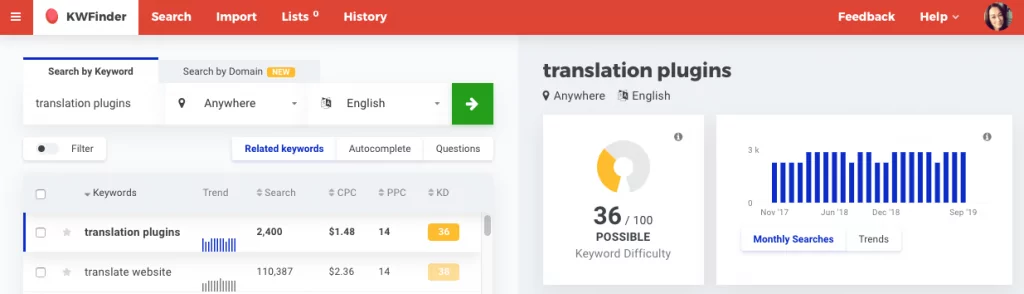
Se cerchi le stesse parole chiave in spagnolo, improvvisamente è molto più facile posizionarsi:
E una ricerca di ‘plugins de traduction’ in francese mostra che c'è ancora più potenziale per posizionarsi in alto nelle SERP.
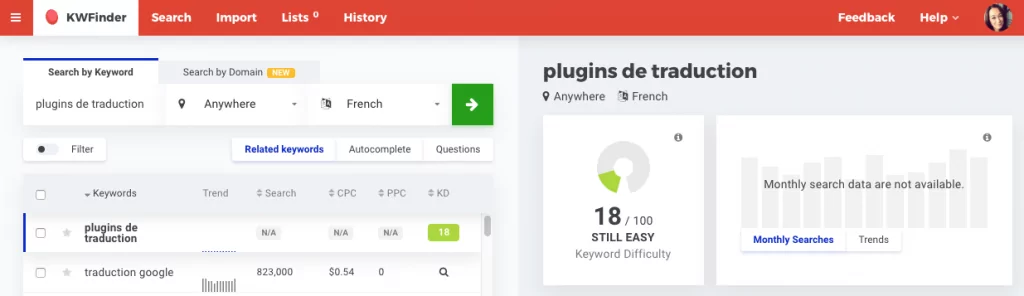
Creare un sito WordPress multilingue, insieme a una ben ponderata strategia di parole chiave internazionali, può aiutarti a puntare su una gamma più ampia di parole chiave. Questo aumenterà le tue possibilità di posizionarti sulla prima pagina dei risultati di ricerca per più di una lingua.
2. Migliorare l'esperienza utente
Quando vai online, probabilmente dai per scontato di poter navigare nella tua lingua madre, vero? Per gran parte del mondo non anglofono, non è così.
Tradurre WordPress migliora istantaneamente l'esperienza utente per i visitatori che parlano altre lingue. Non solo saranno in grado di comprendere i vostri contenuti, ma si sentiranno benvenuti e vorranno continuare a navigare. Questo avrà un effetto a catena in tutto il vostro sito, aumentando il traffico, riducendo la frequenza di rimbalzo e incrementando le conversioni.
3. Costruisci fiducia e credibilità
È importante per le aziende parlare le stesse lingue dei loro mercati di riferimento. Perché? Perché le persone si sentono più a proprio agio a conversare nella loro lingua madre, in quanto è la cultura in cui sono cresciute.
Avendo una sito web completamente tradotto può contribuire ad affermare la vostra attività come un'offerta credibile nei vostri mercati di riferimento. Contenuti multilingue di qualità ridurranno inoltre qualsiasi malinteso e travisamento del vostro marchio all'estero.
4. ROI elevato
Portare la traduzione a un livello superiore con localizzazione — il processo di adattamento dei vostri contenuti alla lingua, alle consuetudini e alla cultura di uno specifico mercato — può influire ulteriormente sul marchio della vostra azienda, sulle relazioni con i clienti e, in ultima analisi, sui profitti.
Secondo l'Industry Specification Group for Localization (ISG), per ogni US$1 speso per la localizzazione, un’azienda otterrà un ritorno di $25. Esatto: un rendimento di 2.500%.
Traduzione automatica vs Traduzione umana
Ci sono due principali tipologie di traduzione: traduzione automatica e traduzione umana.
1. Traduzione automatica
Anche noto come traduzione automatica, la traduzione automatica utilizza pacchetti di traduzione o intelligenza artificiale per convertire le parole di una pagina in altre lingue. Uno degli esempi più popolari di traduzione automatica è Google Traduttore e il suo sistema di traduzione automatica neurale.
2. Traduzione umana
La traduzione umana si basa sull'intelligenza umana per convertire un modo di dire in un altro. Ce ne sono molti servizi di traduzione professionale disponibile, pronto a tradurre contenuti a pagamento. La traduzione umana è solitamente più accurata e suona più naturale poiché le persone sono più brave a interpretare le sfumature della lingua rispetto alle macchine.
Scelta di una soluzione per tradurre il tuo sito WordPress
Prima di iniziare a tradurre il tuo sito web o il tuo sito WordPress, ci sono tre cose fondamentali da considerare:
- Qual è il tuo budget? Vuoi una soluzione gratuita o sei disposto a pagare un abbonamento mensile continuativo per traduzioni di alta qualità?
- Quanto tempo hai? Hai il tempo di tradurre manualmente i tuoi contenuti e gestirli costantemente, o preferisci una soluzione che lo faccia automaticamente per te?
- Quanto sono importanti la qualità e la precisione? La tua azienda vende prodotti o servizi in cui non c'è spazio per la confusione e la precisione è essenziale? Ad esempio, medicina, finanza o legge? Le traduzioni automatiche sono sufficienti o la tua azienda ha bisogno di traduzioni umane?
Esistono molti modi diversi per tradurre i contenuti di WordPress, ma in questa sede esamineremo i 3 più comuni:
- Plugin per WordPress
- Copia e incolla il contenuto manualmente
- Affidati ai browser
1. Plugin per WordPress
Il modo più popolare per tradurre WordPress è con un plugin di traduzione per WordPress. I plugin di traduzione sono la soluzione più comoda per aggiungere più lingue a un sito.
Ciò è in netto contrasto con appena qualche anno fa, quando bisognava fare i conti con language pack, file .PO e .MO, e tradurre le stringhe. Ora esistono intuitivi plugin di traduzione che consentono di tradurre facilmente il testo nel frontend del tuo sito, in modo visivo e senza problemi.
Una rapida ricerca nella directory dei plugin di WordPress.org restituisce i plugin di WordPress gratuiti più popolari per la traduzione:
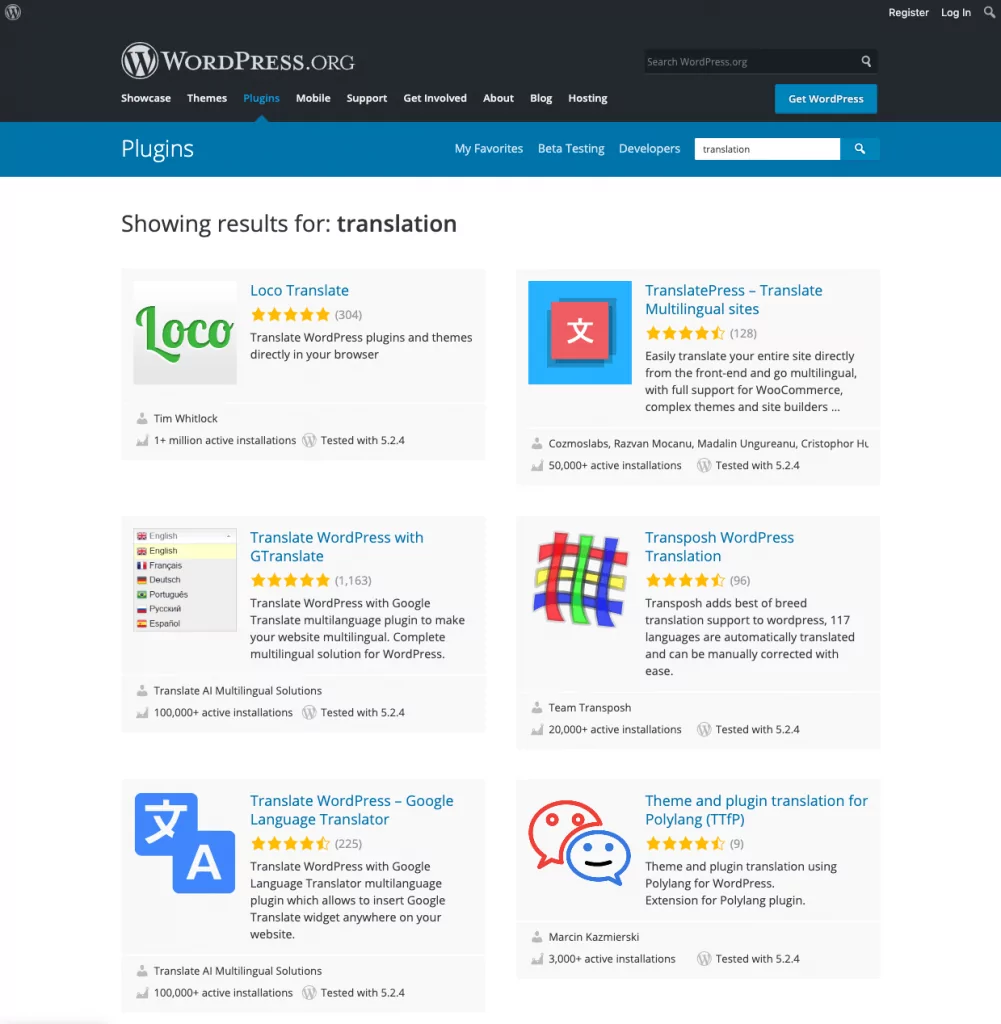
Se hai cercato su Google ‘plugin di traduzione’, probabilmente ti sarai imbattuto in altri plugin per creare un sito WordPress multilingue, come ad esempio TranslatePress, Loco Translate, WPML, Polylang o Transposh.
Tutte queste opzioni gratuite e a pagamento offrono diverse funzioni e interfacce per la traduzione di contenuti. Vale la pena esaminarne i pro e i contro per decidere quale sia la più adatta alle vostre esigenze.
TranslatePress: un plugin di traduzione per WordPress alla portata di tutti
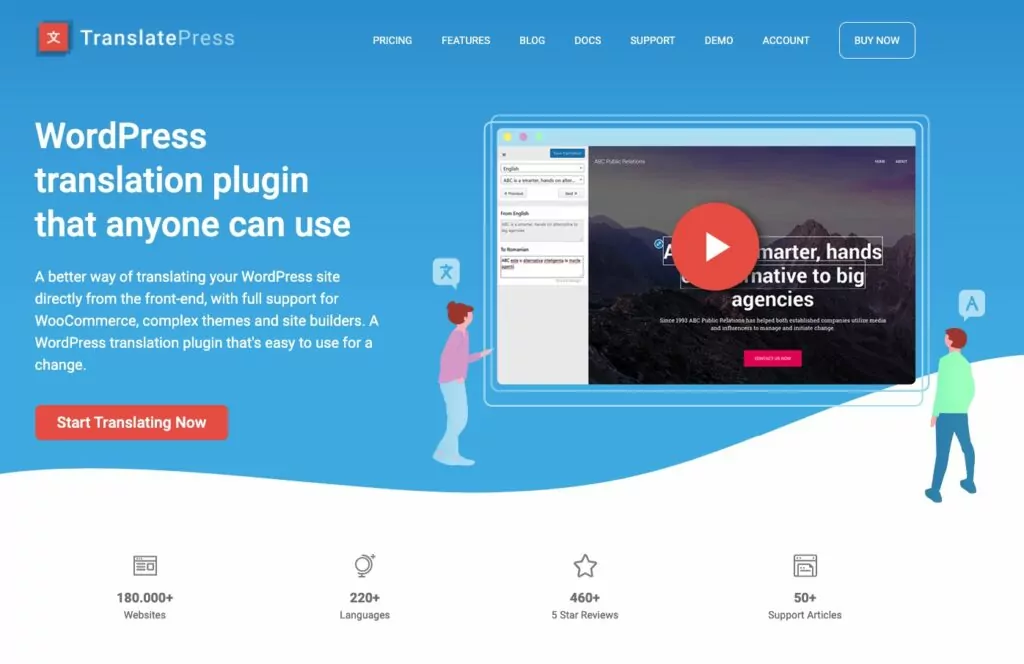
Il miglior plugin di traduzione per WordPress in termini di prezzo, qualità, accuratezza e facilità d'uso è TranslatePress.
Ti permette di tradurre il tuo sito manualmente e con la traduzione automatica basata su Google Traduttore o DeepL—estremamente utile per iniziare con la traduzione automatica e poi apportare modifiche manuali per garantire accuratezza e sfumature.
Le caratteristiche principali includono:
- Traduci tutto sul tuo sito, inclusi post e pagine, output da plugin, shortcode e moduli di contatto.
- Interfaccia visiva intuitiva per la traduzione dei contenuti.
- Aggiungi tutte le lingue di cui hai bisogno.
- Traduci le immagini (ovvero mostra immagini diverse per ciascuna lingua del tuo sito).
- Ottimizzato per i motori di ricerca. Crea sitemap multilingue e versioni indicizzabili del tuo sito per ciascuna lingua.
- Supporti WooCommerce, tipi di post personalizzati, temi complessi e costruttori di pagine.
- Personalizzabile cambio lingua.
Più avanti in questo post vedremo come tradurre il tuo sito WordPress con TranslatePress.
2. Copia e incolla il contenuto manualmente
Copia e incolla è uno dei metodi di traduzione di WordPress più semplici perché non è necessario installare alcun plugin o pagare per servizi premium.
Per utilizzare questa tecnica di traduzione manuale, basta copiare il testo che si desidera tradurre in un documento, che viene poi condiviso con un traduttese privato o con servizi di traduzione professionale come Gengo o Straker Translations. Quando il testo tradotto è pronto, copialo e incollalo nelle nuove pagine del tuo sito.
Questa è una soluzione molto semplice se hai bisogno che solo una parte del testo sorgente sul tuo sito sia tradotta. Tuttavia, può richiedere molto tempo e potrebbe non valerne la pena a causa dei notevoli svantaggi in termini di SEO.
Google cerca l'attributo hreflang nelle intestazioni delle pagine per ottenere informazioni sulla lingua in cui è pubblicato il contenuto. Senza questo markup, Google non avrà alcuna idea se il tuo sito sia in inglese o in un'altra lingua. (Esamineremo i tag hreflang in modo più dettagliato più avanti in questo articolo.)
Quindi, se percorri la via del copia e incolla, ci sono pochissime possibilità che i tuoi contenuti si posizionino in più lingue.
Potresti aggiungere i tag hreflang da solo, ma è molto più semplice affidare questo compito a un plugin come TranslatePress. Inoltre, otterrai il vantaggio aggiuntivo di Vantaggi SEO della traduzione degli URL slug, del supporto a WooCommerce, della traduzione automatica e della traduzione di immagini.
3. Affidati ai browser
Il modo più semplice — e pigro! — per tradurre WordPress è non tradurlo affatto. Grazie a browser come Chrome, puoi lasciare che siano i tuoi visitatori a tradurre i tuoi contenuti.
I browser sono in grado di tradurre automaticamente tutti i contenuti di una pagina. Il vantaggio è che il visitatore può decidere se navigare sul tuo sito nella lingua originale o passare alla lingua che preferisce.
Lo svantaggio è che non avrai alcun controllo su come verrà tradotto il tuo sito. Google Translate potrebbe interpretare erroneamente i tuoi contenuti e qualsiasi sfumatura o tratto distintivo del tuo stile di scrittura andrebbe perso nella traduzione.
Inoltre, perderai la fondamentale fiducia e credibilità che derivano dall'offerta di contenuti multilingue. L'affidamento ai browser per la traduzione dovrebbe essere un'opzione solo se fornire contenuti multilingue non è una priorità.
Cosa dovresti tradurre?
È generalmente una buona norma traduci tutto sul tuo sito. Questo vale sia per l'esperienza utente che per la SEO. Se traduci solo parte del contenuto di una pagina e non il resto, non sarà solo fastidioso per il visitatore, ma anche confusionario per i motori di ricerca.
1. Contenuto
Ciò include post del blog e contenuti delle pagine, nonché i contenuti dell'intestazione e del piè di pagina, categorie e tag, widget, e voci di menu.
Non dimenticare di tradurre i tipi di post personalizzati e le pagine della tua informativa sulla privacy e dei termini e condizioni.
2. Metadati SEO
Il meta titolo e la descrizione delle tue pagine e dei tuoi post vengono solitamente visualizzati nei risultati di ricerca, quindi traduci anche questi testi. In questo modo contribuirai ad aumentare il tuo traffico organico in altre lingue.
Assicurati di scegliere un plugin di traduzione che supporti SEO multilingue e sitemap (TranslatePress supporta entrambi).
3. URL
Le best practice SEO raccomandano di includere le parole chiave negli URL slug. Questo è probabilmente qualcosa che fai già per le tue pagine e i tuoi post. Quindi, naturalmente, è una buona idea converti i tuoi URL, anche.
Ad esempio, la tua pagina dei contatti potrebbe utilizzare questo slug in inglese:
example.com/contattaci
E in tedesco sarebbe così:
example.com/contattaci
Mentre alcuni strumenti di traduzione per WordPress non consentono di tradurre gli slug degli URL, il plugin ’SEO Pack” di TranslatePress offre questa funzionalità indispensabile.
4. Immagini
La traduzione delle immagini è essenziale per mantenere un'esperienza utente coerente. Quando hai tradotto tutti i contenuti di una pagina, può essere fonte di confusione per i visitatori quando le immagini che contengono del testo sono in un'altra lingua.
Con TranslatePress, puoi utilizzare l'interfaccia di traduzione visiva per specificare immagini diverse per ciascuna lingua del tuo sito web. Ciò ti consente di sostituire le immagini in tutto il sito, a seconda della lingua utilizzata dal visitatore.
Per saperne di più, dai un'occhiata a Come tradurre le immagini in WordPress [Guida completa].
Quale struttura URL dovresti usare?
Google offre alcuni consigli su come gestire le versioni multilingue del tuo sito. consiglia di utilizzare una struttura di URL che semplifichi la localizzazione geografica del tuo sito:
- Dominio specifico per paese per ciascuna lingua – example.de (o example.com per i visitatori inglesi)
- Sottodominio per ogni lingua – de.example.com
- Sottodirectory per ciascuna lingua – example.com/de/
Google sconsiglia di utilizzare parametri URL (ad es. example.com?loc=de) poiché gli utenti potrebbero non riconoscere il geotargeting dall'URL e non è possibile impostare il geotargeting tramite Google Search Console. In WordPress è abbastanza facile evitarlo grazie ai permalink personalizzati.
TranslatePress utilizza sottodirectory, note anche come sottocartelle, per ogni lingua, secondo le best practice di Google.
Cosa sono i tag hreflang?
tag hreflang sono un metodo per contrassegnare pagine tradotte che sono simili nel significato ma destinate a lingue e/o regioni diverse.
Come spiega Yoast, ci sono tre modi comuni per implementare hreflang:
- Contenuto con variazioni regionali come en-us e en-gb.
- Contenuto in diverse lingue come inglese, tedesco e francese.
- Una combinazione di lingue diverse e varianti regionali.
I tag hreflang indicano ai motori di ricerca come Google la versione di una pagina ottimizzata per la lingua e la posizione di un utente.
Nell'esempio sottostante, puoi vedere che l'attributo hreflang specifica l'inglese americano:
<link rel=”alternate” href=”http://example.com” hreflang=”en-us” />
I tag hreflang prevengono anche il problema dei contenuti duplicati. Ad esempio, se hai lo stesso contenuto in inglese, ma per Stati Uniti, Regno Unito e Australia, la differenza di contenuto in queste pagine potrebbe essere minima. Con l'attributo hreflang, puoi dire ai motori di ricerca che queste pagine non sono contenuti duplicati.
Se utilizzi TranslatePress, il sistema aggiunge automaticamente i tag hreflang per ogni lingua presente sul tuo sito.
Come tradurre un sito WordPress con TranslatePress
Cerchi un modo semplice per aggiungere lingue al tuo sito WordPress? Non puoi sbagliare con TranslatePress.
Diamo un'occhiata a come iniziare a utilizzare il versione gratuita di TranslatePress. In questo esempio, sto configurando un sito in Inglese e tedesco.
Passaggio 1: Installare e attivare TranslatePress
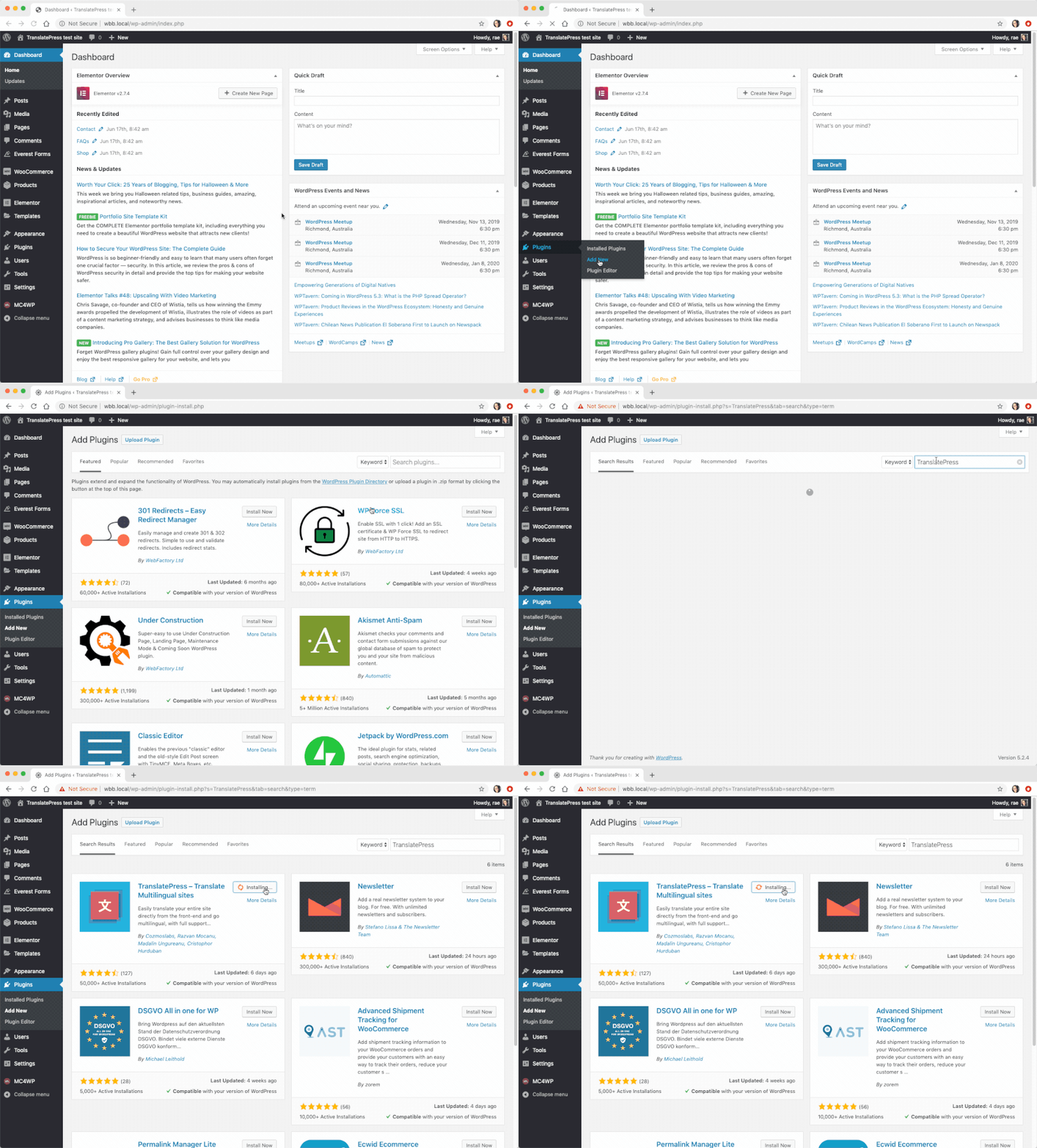
Nella dashboard di WordPress, vai su Plugin → Aggiungi nuovo e cerca "translatepress". Installa e attiva il plugin.
Fase 2: Scegli le tue lingue
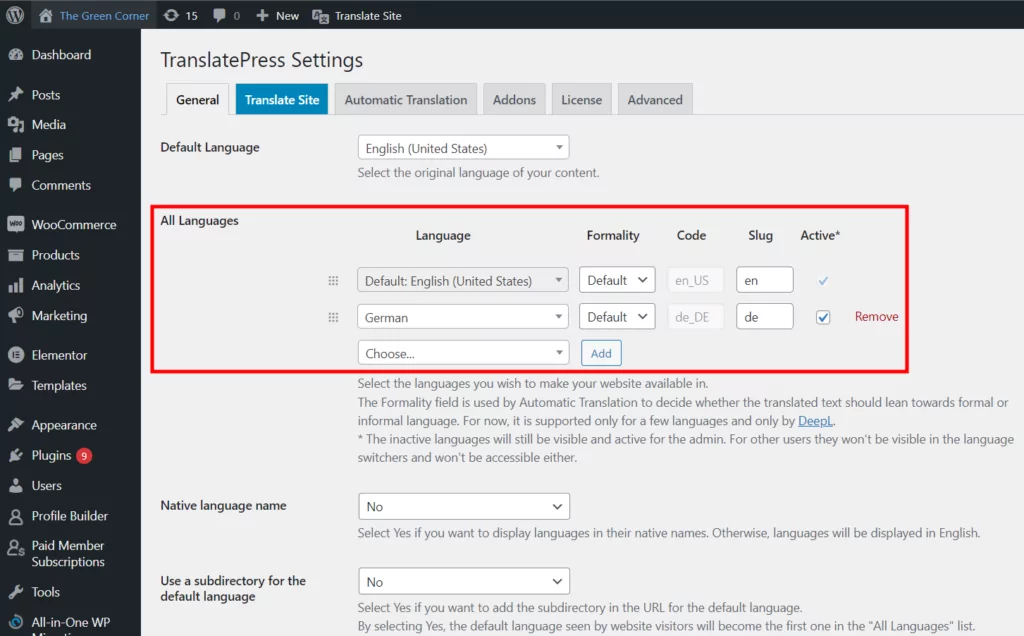
Successivamente, dirigiti verso Impostazioni → TranslatePress per configurare alcune opzioni di base.
Nelle impostazioni generali, puoi scegliere la lingua predefinita e le lingue aggiuntive in cui desideri tradurre i tuoi contenuti. Come puoi vedere qui sotto, ho aggiunto il tedesco.
Fase 3: Personalizza il selettore di lingua
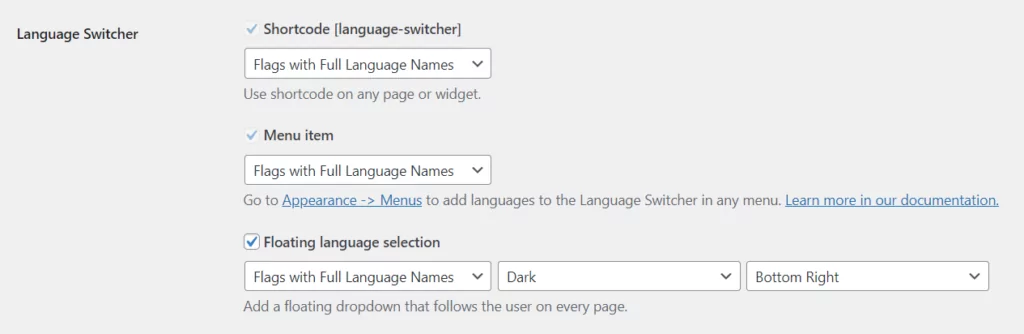
Per impostazione predefinita, TranslatePress aggiunge un pulsante mobile per la selezione della lingua nell'interfaccia del tuo sito. Consente ai visitatori di passare da una lingua all'altra tra quelle che hai impostato.
È possibile personalizzare l'aspetto di selettore di lingua, scegliendo tra nomi delle lingue completi o abbreviati, bandiere nazionali e una combinazione di entrambi.
Passaggio 4: Scegli come vuoi tradurre i contenuti
Se desideri che i tuoi contenuti vengano tradotti automaticamente, il Traduzione automatica La scheda consente di scegliere se abilitare o meno la traduzione automatica.
Se scegli ‘sì’, dovrai procurarti un Chiave API di Google Translate per connettersi al servizio. C'è anche un'opzione per utilizzare Traduzione automatica DeepL con la versione premium di TranslatePress.
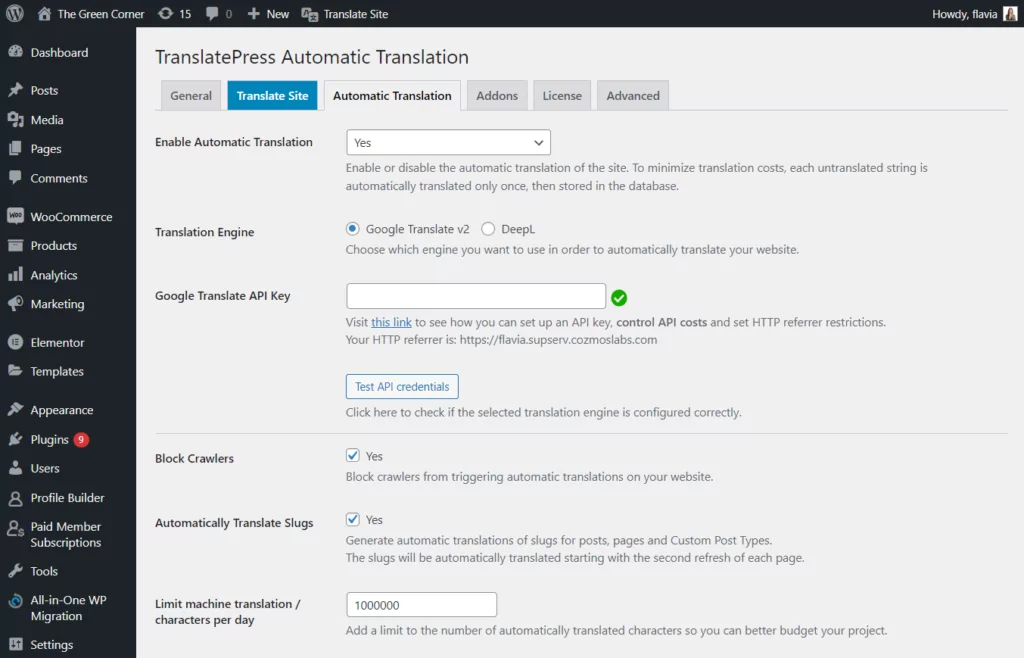
Quando fai clic su ‘Salva modifiche’, il plugin procederà a tradurre il tuo sito la prossima volta che tu o un visitatore sceglierete un'altra lingua.
Passaggio 5: Inizia a tradurre il tuo sito WordPress
Ora che hai terminato le configurazioni di base, puoi iniziare a tradurre i tuoi contenuti di WordPress.
La cosa fantastica di TranslatePress è che la sua interfaccia visiva intuitiva ti permette di tradurre tutto direttamente sul tuo sito dal front-end, rendendo facilissimo modificare qualsiasi testo.
Per accedere all'interfaccia di traduzione, cerca il pulsante "Traduci pagina" nella barra degli strumenti di amministrazione di WordPress dopo aver effettuato l'accesso. (Noterai anche la scritta selettore di lingua in basso a destra.)

In alternativa, è possibile accedere all'interfaccia dalle impostazioni di TranslatePress.
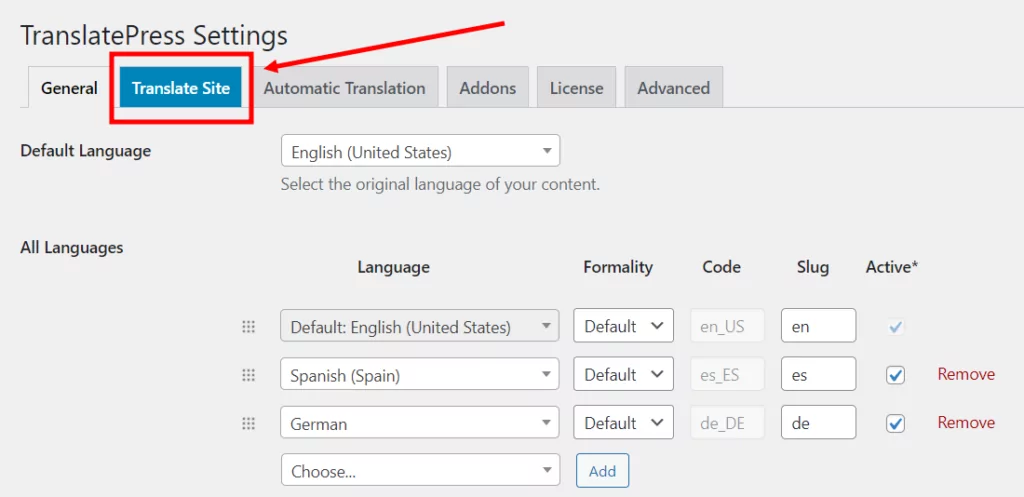
Per tradurre del testo o modificare una traduzione esistente:
- Passa con il mouse sopra il testo che desideri tradurre e fai clic sull'icona della matita, oppure
- Usa il menu a discesa a sinistra per cercare i contenuti nella pagina.
Vedrai il testo che vuoi tradurre apparire nella barra laterale. Aggiungere una traduzione è semplice come inserire il tuo testo e salvare la traduzione, in questo modo:

Ora tutto ciò che devi fare è esplorare il tuo sito, pagina per pagina, utilizzando l'editor di traduzione visiva. Continua a fare clic per selezionare determinati elementi, inserire le tue traduzioni e passare alla porzione di testo successiva.
Con TranslatePress il tuo sito sarà completamente tradotto in men che non si dica!
Oltre alla traduzione dei testi standard, TranslatePress ti permette di tradurre diversi elementi del tuo sito, tra cui pop-up, cursori, moduli, prodotti WooCommerce, immagini e altro.
Consiglio vivamente di dare un'occhiata alla guida completa su Come creare un sito WordPress multilingue.
Inizia a tradurre WordPress
Speriamo che questa guida abbia aiutato a chiarire qualsiasi dubbio sulla traduzione di WordPress. All'inizio potrebbe sembrare complesso, ma con un po' di pianificazione e il giusto plugin di traduzione, puoi creare un sito WordPress multilingue con il minimo sforzo.
Oltre a fornire un'interfaccia visiva di facile utilizzo per le traduzioni, TranslatePress si occupa di tutte le sfide tecniche legate alla creazione di un sito multilingue. Ciò include la SEO e i tag hreflang, la traduzione degli slug degli URL, la configurazione delle traduzioni automatiche, la personalizzazione dei pulsanti selettore di lingua e altro ancora.
TranslatePress Multilingue
Hai domande sulla traduzione di WordPress? O hai dei tuoi consigli per creare un sito web multilingue? Faccelo sapere nei commenti qui sotto.
Se hai trovato utile questo post, ti invitiamo a visitare il nostro Canale YouTube, dove carichiamo costantemente brevi tutorial video facili da seguire. Puoi anche seguirci su Facebook e Twitter per essere tra i primi a sapere ogni volta che pubblichiamo.

Grazie per l'articolo! È utile! Se cambio la lingua predefinita, perderò i miei contenuti precedenti?
Se modifichi effettivamente la lingua predefinita (dalle Impostazioni di TranslatePress), dovrai convertire tutti i contenuti che hai scritto nella nuova lingua e poi tradurre nuovamente tutte le informazioni.
Non esiste un modo adeguato per automatizzare questo processo poiché le traduzioni sono direzionali. Inoltre, il tuo contenuto non avrà senso, poiché si prevede che sia scritto nella lingua predefinita.
Grazie per le informazioni. Lo sto già provando e sto pensando di passare alla versione pro.
C'è un modo per evitare che le stringhe tradotte tornino alla lingua originale quando si fa una piccola modifica nel testo originale?
Grazie!
Non a questo punto, perché è difficile misurare una “piccola modifica” quando si confrontano le stringhe. Ma esamineremo la possibilità di migliorare questo aspetto in una versione futura.
Ho scoperto che translatepress è il migliore per questo scopo. Consiglio vivamente, però, di optare per la versione Pro: dopotutto costa solo otto dollari al mese per un sito web. Non mi piace molto Google Translate. Mi chiedo se gli sviluppatori prenderanno in considerazione l'integrazione di deepl.com in futuro.