
In questo post
Ciao! Come stai? Non riesci a capire come tradurre un sito web francese in inglese? Non preoccuparti, ci pensiamo noi.
Concordo, tradurre un sito WordPress è spesso confusionario. E se non lo si fa bene, si rischia di fare più danni che altro.
Come?
Pensa a traduzioni letterali che non hanno senso per il tuo pubblico di destinazione, o dover lottare con strumenti di traduzione complessi che ti fanno venire voglia di strapparti i capelli.
Inoltre, potresti impiegare il tuo tempo al meglio a trafficare con un sacco di strumenti finendo con un sito web con traduzioni incomplete.
Voglio dire. A differenza dei semplici siti web statici, un sito web WordPress ha così tante parti in movimento.
Ad esempio, come traduci contenuti dinamici che il tuo tema o i tuoi plugin generano al volo?
Come si riformulano i prodotti e le email di WooCommerce, per esempio? Che ne dici di tradurre URL o Elementi SEO aggiunto da un plugin SEO?
Tradurre un sito WordPress può far impazzire chiunque, anche gli sviluppatori esperti.
Tuttavia, vuoi tradurre il tuo sito web francese in inglese perché è fondamentale per il successo della tua attività.
Ma come si fa bene con tante parti in movimento?
Signore e signori, vorrei richiamare la vostra attenzione su uno straordinario strumento di traduzione che vi lascerà a bocca aperta.
Al centro della scena c'è TranslatePress, l'oggetto della recensione di oggi.
Nelle prossime sezioni, ti mostrerò esattamente come tradurre il tuo sito web francese in inglese. Tradurremo testi, immagini, plugin, temi e tutto il resto.
Alla fine, dovresti gestire la traduzione di siti web francesi come un boss.
Affare? Bene.
Entriamo nel vivo.
Vantaggi della traduzione di un sito web francese in inglese
Sei pronto a tradurre il tuo sito web dal francese all'inglese, ma sapevi che potresti godere di alcuni fantastici vantaggi? Scommetto che non lo sapevi, allora ecco qui.
È un gioco di numeri
Divertiti. Qual è il la lingua più parlata al mondo? Forse è troppo facile. Eccone un'altra. Qual è la lingua straniera più studiata nel mondo?
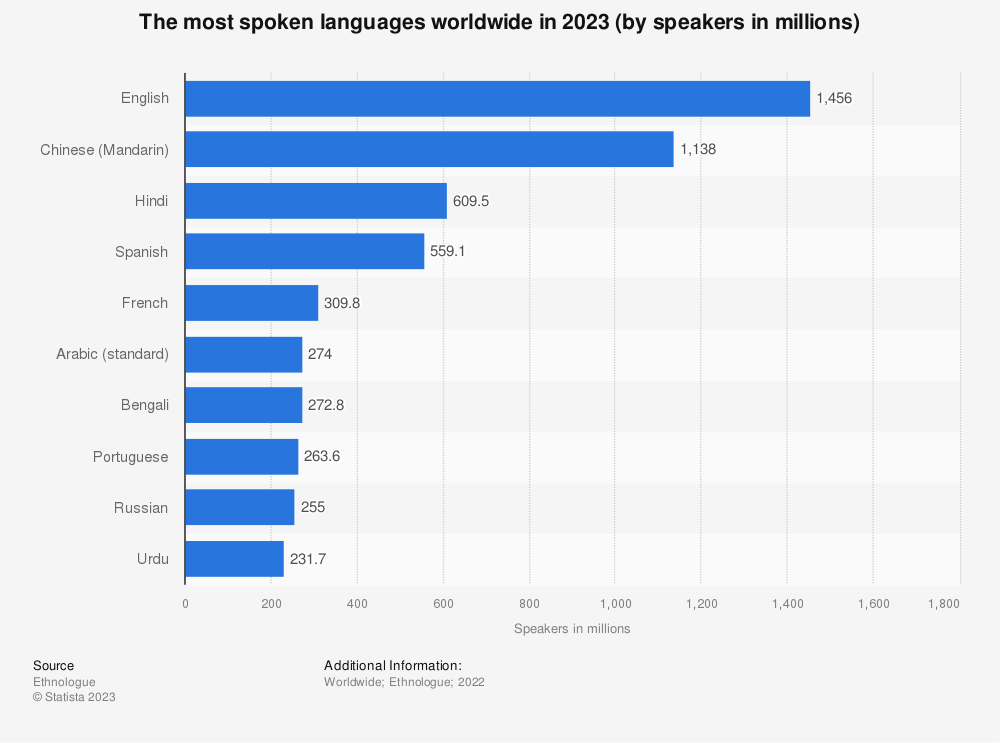
Sì, è inglese, con più di 1,4 miliardi di parlanti.
Francese? Beh, non più di tanto, con circa 310 milioni di parlanti a livello globale.
Sai cosa significa?
Ci sono buone probabilità che ci siano molti anglofoni nel tuo pubblico di riferimento. È una scelta ovvia, in qualunque modo la si guardi.
E sai cos'altro? Un sondaggio condotto su 8.709 consumatori in 29 paesi da CSA Ricerca è emerso che il 65% degli acquirenti online preferisce contenuti nella propria lingua, anche se di scarsa qualità 😲
Inoltre, 76% preferiscono acquistare prodotti con informazioni nella loro lingua madre. Ma c’è di più. Secondo lo stesso rapporto, 40% degli intervistati hanno dichiarato che non acquisterebbero mai da siti web in altre lingue.
Lo sapete benissimo cosa significa questo in qualità di marketer o proprietario di un sito web. Se i vostri report di analisi mostrano che state ricevendo molti accessi da paesi anglofoni, è giunto il momento di tradurre il vostro sito web francese.
Con oltre 1,4 miliardi di parlanti, puoi capire come rischi di perderti molte opportunità d'oro se non offri una versione inglese del tuo sito.
In altre parole, stai lasciando molti introiti sul tavolo.
Sei qui perché stai cercando di entrare nei mercati anglofoni. È giusto? Tradurre il tuo sito web francese in inglese ti dà un vantaggio sui tuoi rivali.
Se è un mercato completamente nuovo, hai il vantaggio di stabilire la qualità e gli standard che la tua concorrenza dovrà superare per distinguersi dal tuo marchio.
Vantaggi SEO

Potresti posizionarti bene su Google per le parole chiave francesi, e questo è un bene. Ma come te la cavi con le parole chiave inglesi?
Sì, è corretto: non ti posizionerai per parole chiave in inglese per il motivo più ovvio; non hai contenuti in inglese.
Un'altra cosa, alcune parole chiave francesi potrebbero avere una difficoltà delle parole chiave (KD) elevata rispetto alle loro controparti inglesi.
Guarda, hai già padroneggiato i contenuti in francese. Tradurre gli stessi contenuti in inglese aiuta Google a posizionare il tuo sito web per parole chiave in inglese, tutto senza creare contenuti freschi.
In altre parole, Google classifica entrambe le versioni del tuo sito web, il che – come potresti aspettarti – dà una bella spinta ai tuoi posizionamenti SEO. Di conseguenza, ricevi più traffico verso il tuo sito web.
Vedere è credere, giusto?
Kinsta hanno registrato un aumento del traffico organico pari a 18% dopo aver tradotto il proprio sito web in 10 lingue. Neil Patel ha aumentato il traffico di ricerca del 47% traducendo i propri contenuti in 82 lingue. Quel tipo è davvero incredibile 🙂
Le persone tendono a cercare su Google nella loro lingua madre. Gli utenti anglofoni difficilmente troveranno i tuoi contenuti in francese, anche se stanno cercando i prodotti o servizi che vendi.
Ha senso?
E se gli utenti anglofoni trovassero il tuo sito web per caso, se ne andrebbero immediatamente perché non riuscirebbero a capire i tuoi contenuti in francese, il che comporterebbe tassi di rimbalzo elevati e classifiche SEO inferiori.
Una brutta esperienza non fa bella figura per l'immagine del tuo marchio, il che ci porta al nostro prossimo punto.
Visibilità del marchio

Pensa a grandi aziende globali come Apple o Samsung. Come raggiungerebbero un pubblico globale se offrissero siti web in una sola lingua?
E come percepiresti l'uno o l'altro se i loro siti web fossero in una sola lingua? Non farebbe una buona impressione sulla loro immagine del marchio, vero?
Una versione inglese del tuo sito web francese ti permette di raggiungere più persone, il che si traduce in maggiore visibilità del marchio.
Poiché i visitatori di lingua inglese possono comprendere i tuoi contenuti ora tradotti, ciò riflette positivamente sull'immagine del tuo marchio. In altre parole, dimostra che tieni ai tuoi clienti.
Il contenuto tradotto è anche facile da condividere sui social media, aumentando la notorietà del marchio. È un'opportunità per ottenere menzioni del marchio e segnali sociali, che dicono a Google che sei autentico.
Fiducia e Credibilità

Ricordate i dati che abbiamo citato prima? Quelli relativi al 40% degli acquirenti online che non comprerebbero mai da un sito web che non fosse nella loro lingua madre? Scommetto di sì.
Ora, se una persona di lingua inglese atterra sul tuo sito web francese, è molto probabile che si volti e scappi. Perché? Non apprezzerebbero l'esperienza utente.
E tutti sappiamo che una scarsa esperienza utente non infonde un senso di fiducia. Di conseguenza, perdi punti di credibilità a destra e a manca.
Come ho già detto, offrire ai tuoi visitatori anglofoni una versione del tuo sito nella loro lingua dimostra che tieni alle loro esigenze.
Quale modo migliore c’è per aumentare la tua credibilità come marchio affidabile? Non mi viene in mente niente. E tu? Ti fideresti di un sito web che non capisci? Ti soffermeresti abbastanza a lungo da comprare qualcosa?
Vuoi aumentare la fiducia e la credibilità tra i tuoi visitatori che non parlano francese? Offri loro ciò che desiderano: un sito web che possano capire senza dover ricorrere a Google Translate.
Viviamo in un mondo multilingue globale, quindi dare per scontato che il tuo pubblico sia composto solo da francofoni (sì, anche se ti trovi in Francia) equivale a spararsi nei piedi.
Ora che puoi dire che la traduzione del tuo sito dal francese all'inglese ha dei vantaggi gradevoli (questa è solo la ciliegina sulla torta), vediamo come TranslatePress aiuti.
Come tradurre un sito web dal francese all'inglese con TranslatePress
Nella sezione seguente, mi seguirete nell'installazione e nella configurazione di TranslatePress per tradurre il vostro sito dal francese all'inglese.
Ti assicuro che è un gioco da ragazzi: chiunque può farlo. Non servono competenze specifiche di programmazione né superpoteri tecnologici, dato che TranslatePress ti permette di tradurre il tuo sito web in modo visivo. Inoltre, non tralascerò nessun passaggio e ti seguirò passo dopo passo 🙂
Pronto per la parte divertente? Ottimo, mettiamoci subito al lavoro.
Come installare TranslatePress
Il plugin principale TranslatePress 100% è gratuito, il che significa che puoi installarlo direttamente dalla dashboard di amministrazione di WordPress.
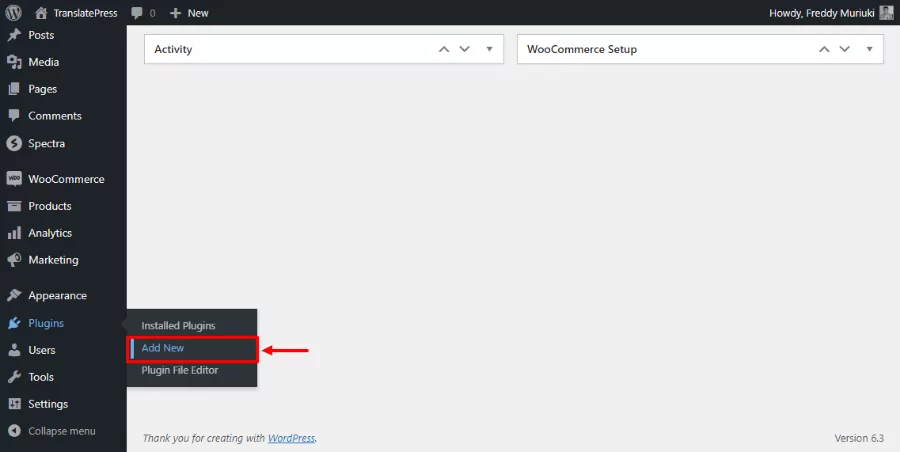
Navigare a Plugin → Aggiungi Nuovo.
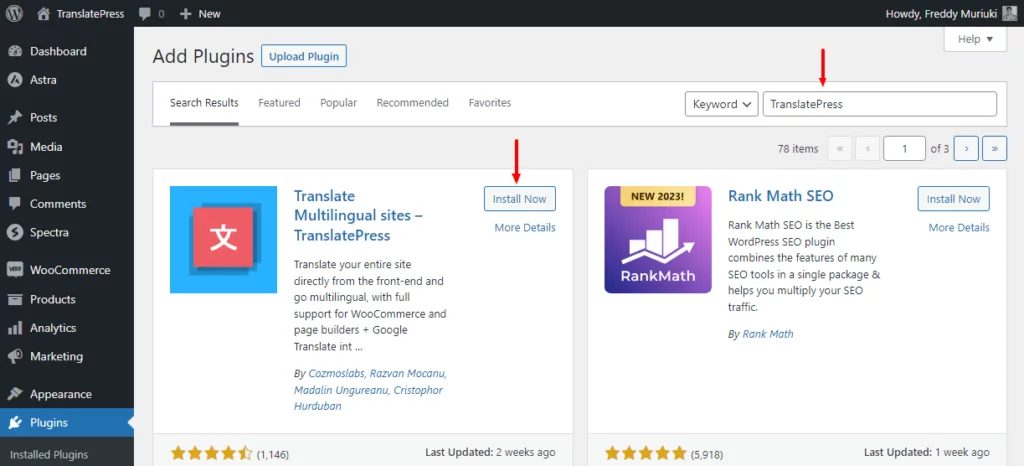
A questo punto, inserisci “TranslatePress” nella casella di ricerca per parole chiave e clicca sul Installa ora pulsante.
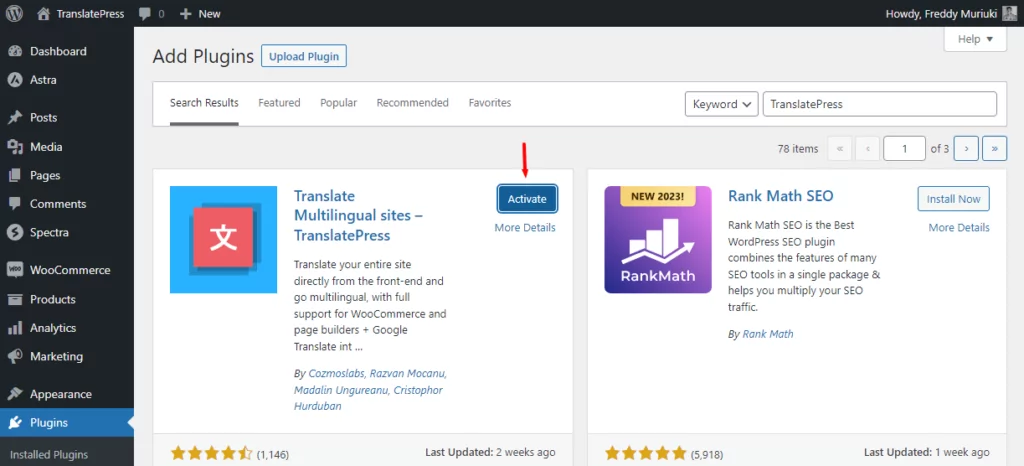
Dopo ciò, Attiva il plugin.
Successivamente, fai clic Consenti e continua perché spacchi.
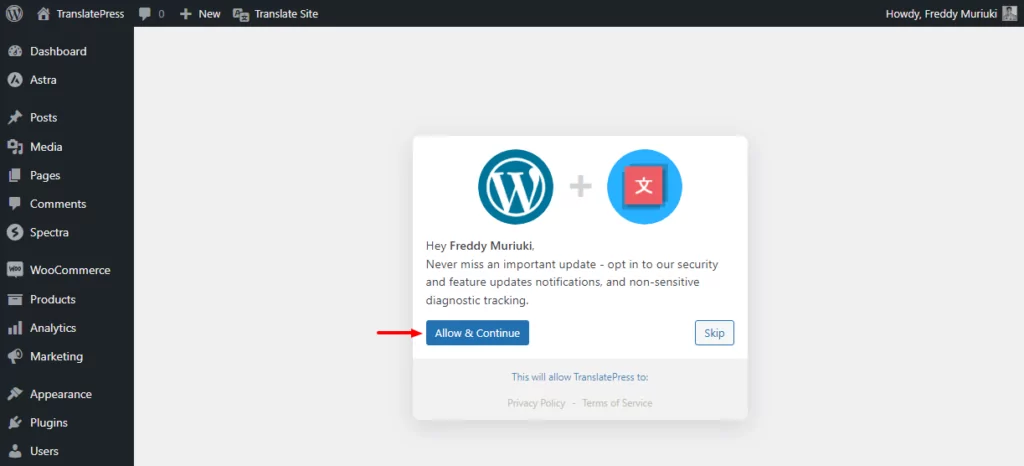
Stai facendo benissimo.
Dopo di che, impostiamo la lingua predefinita del sito, cioè il francese, e le lingue di traduzione, cioè l'inglese. Procedi pure scegliendo il francese sotto Lingua predefinita menu a tendina. Poi aggiungi Inglese sotto il Tutte le lingue sezione, come mostrato di seguito.
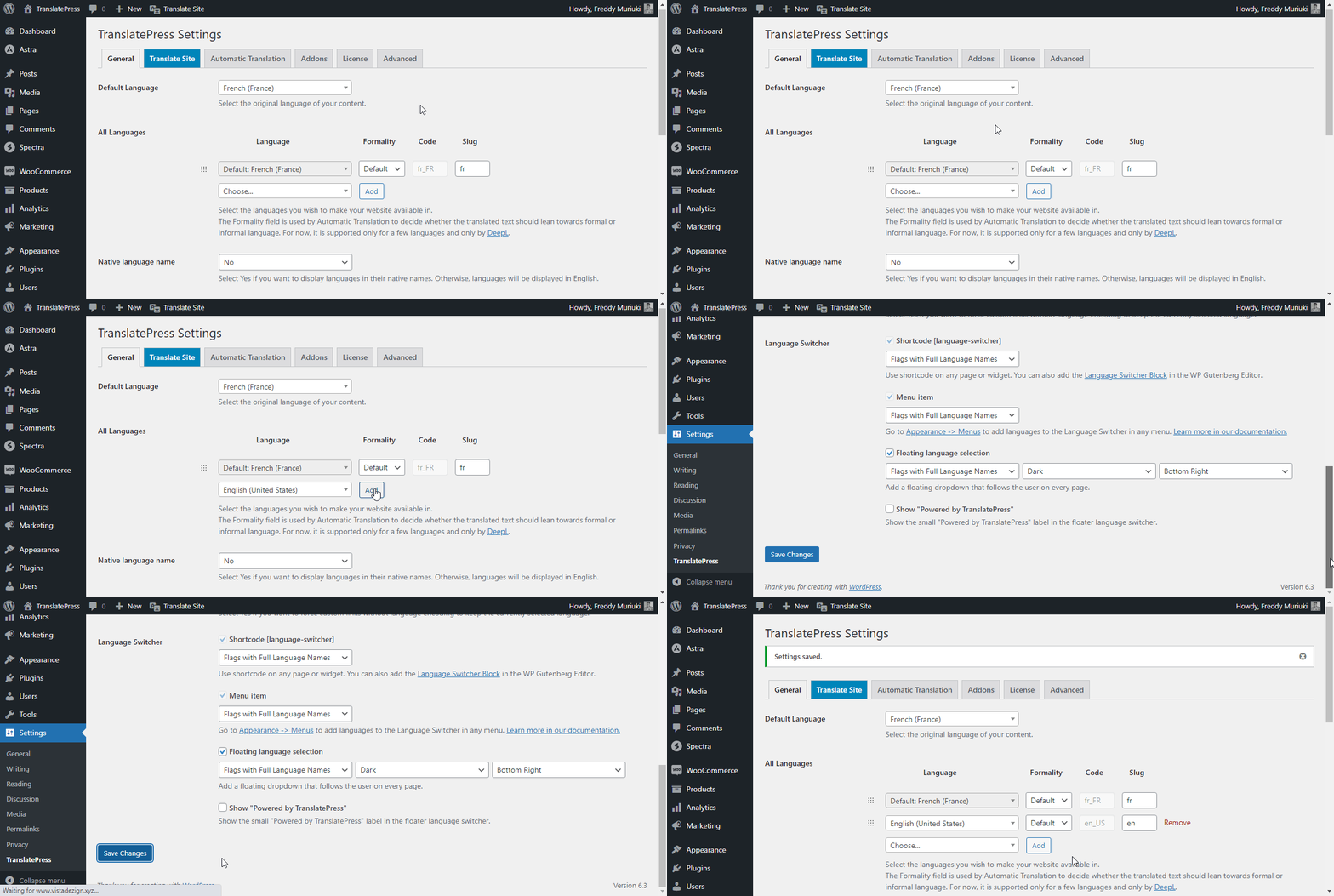
Ricorda sempre di salvare le tue modifiche. 👍
Consiglio Pro: TranslatePress Business ti consente di aggiungere più lingue di traduzione, ad esempio inglese UK, inglese Sud Africa, inglese Australia, eccetera. Hai anche molte più funzionalità, come imparerai in seguito.
⛔ Smetti: Non affrettarti ancora a controllare il tuo sito web. A questo punto, abbiamo appena installato TranslatePress e aggiunto le lingue che preferiamo. Ora sei pronto per tradurre il tuo sito web in modo automatico o manuale.
Nella sezione seguente vi mostrerò come tradurre automaticamente il vostro sito web utilizzando Google Translate. Successivamente, lo faremo manualmente.
Come tradurre automaticamente un sito web francese in inglese
Ti stai già divertendo? No? Ok, questa prossima sezione dovrebbe farti entrare nel vivo. TranslatePress supporta le traduzioni automatiche tramite Google Traduttore e DeepL.
La versione gratuita di TranslatePress offre Google Translate, ma dovrai passare a una versione a pagamento per usare DeepL.
La traduzione automatica ti aiuta a risparmiare tempo e ridurre i costi. È più veloce ed economica rispetto all'assunzione di servizi di traduzione professionali.
Mancia: Puoi tradurre gratuitamente il tuo sito in francese, purché non superi i limiti previsti dal piano gratuito di Google Translate.
Il piano gratuito ti consente di tradurre 500.000 caratteri al mese. Si tratta di circa 100.000 parole al mese. Se superi i limiti del piano gratuito, pagherai $20 per ogni 1.000.000 di caratteri (circa 200.000 parole).
Dato che in questa sezione stiamo utilizzando la versione base di TranslatePress, useremo Google Translate per le nostre traduzioni automatiche.
Per prima cosa, dobbiamo Non è possibile generare una chiave API per Google Translate. Le chiavi API vengono create e gestite tramite la console Google Cloud..
Segui la guida collegata sopra o guarda il video qui sotto.
Nota: Se è la prima volta che utilizzi il servizio, Google ti regalerà crediti per un valore di $300. Inoltre, non ti verrà addebitato alcun costo se esaurisci i crediti. Ti verrà addebitato un costo solo se passi a un piano a pagamento.
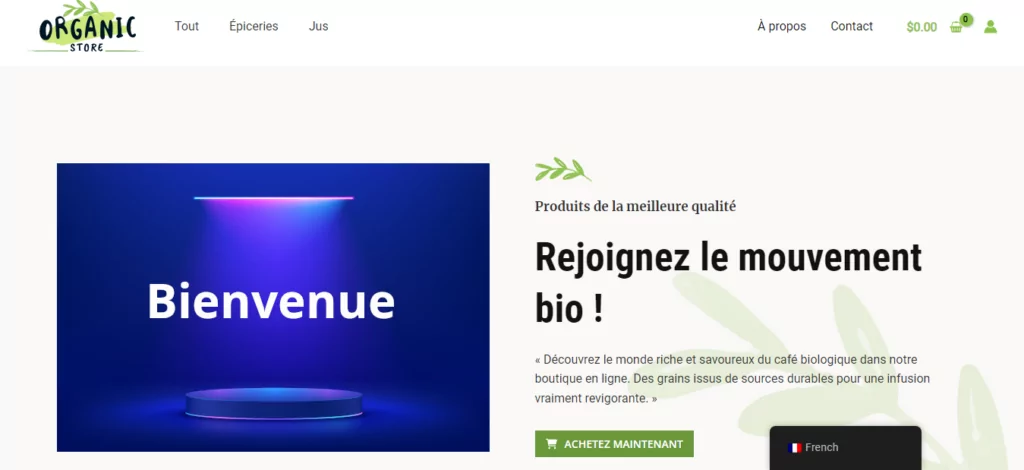
Oh, a proposito, ecco una schermata del sito di test su cui sto lavorando.
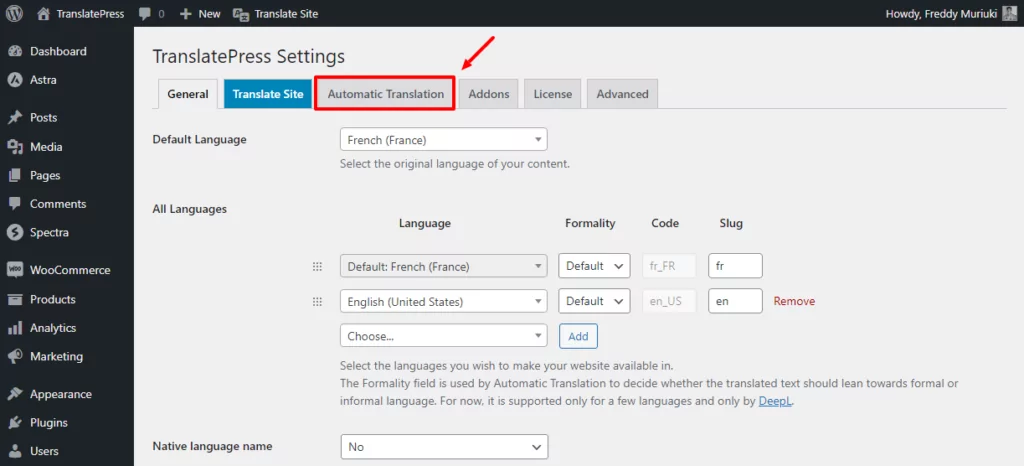
Dopo aver generato la tua chiave API Google Translate, vai alla pagina delle impostazioni di TranslatePress e clicca su Traduzione automatica, come mostrato di seguito.
A questo punto, attiva la traduzione automatica, inserisci la tua chiave API Google Translate e salva le modifiche.
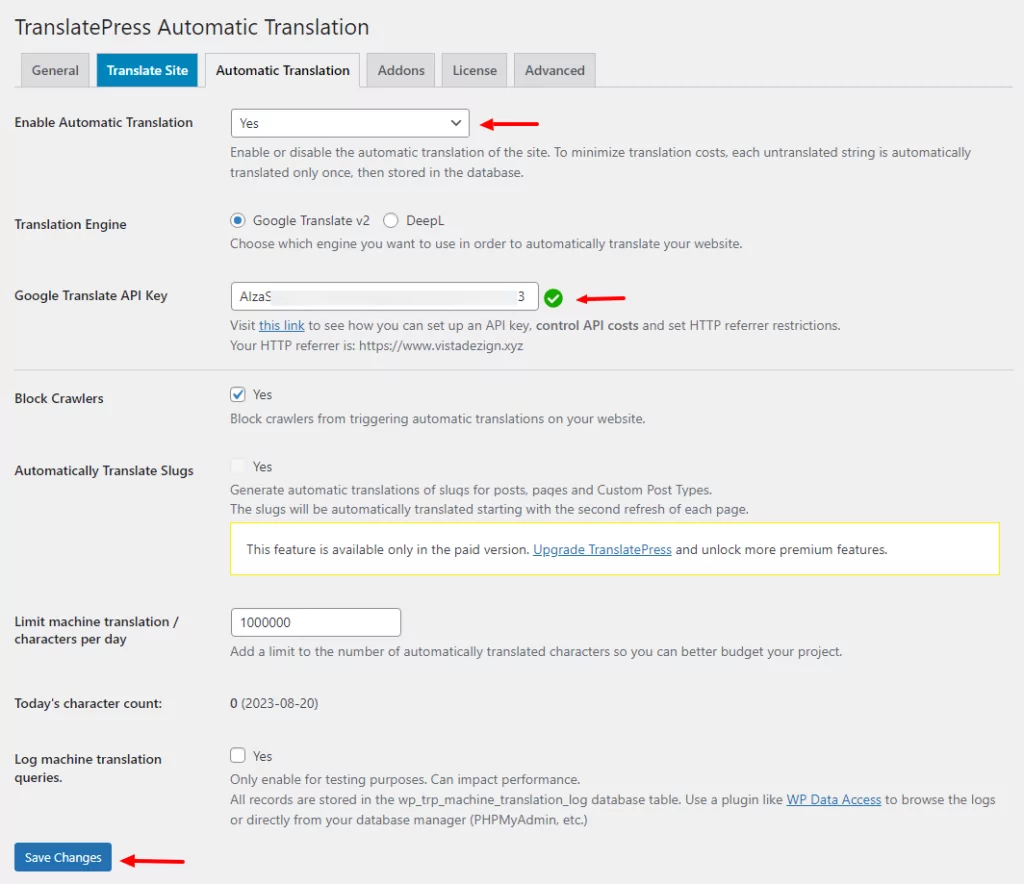
E questo è tutto. Da quel momento in poi ci penserà TranslatePress, traducendo automaticamente il tuo sito web in background. Tutte le tue pagine verranno tradotte in inglese alla prima visita e tutte le traduzioni saranno memorizzate nel tuo database.
Ora, se controlliamo il nostro sito di test, vediamo la versione in inglese.

Non è stato così difficile, vero?
Nota: Avevo già tradotto l'immagine sul mio sito web di prova utilizzando TranslatePress (ne parlerò meglio tra un attimo).
A questo punto, disponi di una versione in inglese del tuo sito web in francese.
Il plugin TranslatePress utilizza l'intelligenza artificiale Google Translate per generare traduzioni automatiche. Come ci si può aspettare, un sistema automatico può facilmente non cogliere le sfumature del linguaggio umano.
Ad esempio, Google Translate potrebbe non riconoscere il gergo di strada e altre espressioni comuni in francese che non hanno un equivalente in inglese.
Inoltre, potrebbe non piacerti come Google traduce alcune parole.
Cosa fare?
Inserisci la traduzione manuale e salvi la situazione.
Come tradurre manualmente un sito web francese in inglese
È proprio qui che TranslatePress dà il meglio di sé. Dopo aver attivato la traduzione automatica, puoi perfezionare manualmente le traduzioni per modificare o rimuovere qualsiasi elemento che non ti convince. In definitiva, otterrai traduzioni di ottima qualità.
TranslatePress ti permette di tradurre il tuo sito web tramite un editor visivo sul front-end. In questo modo, puoi vedere le traduzioni in tempo reale, proprio come le vedrebbero i tuoi lettori.
Come?
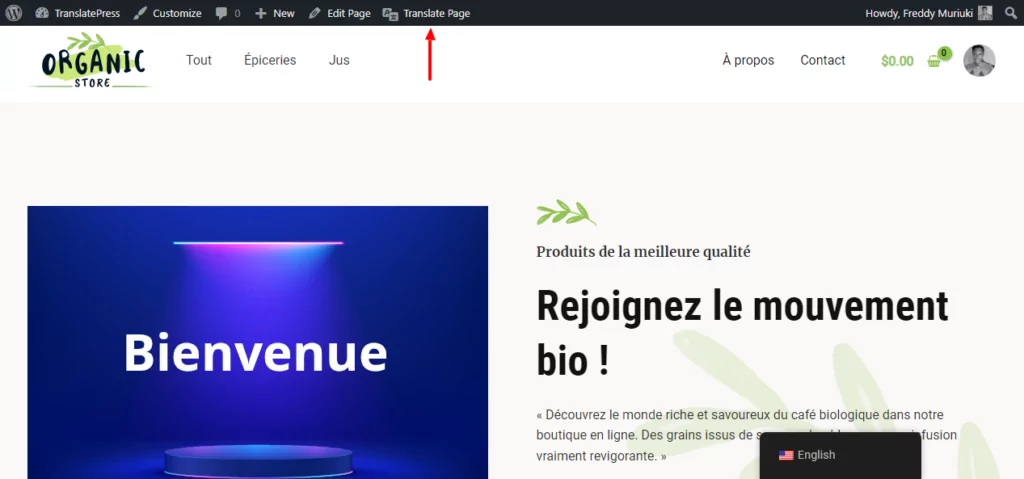
Apri la pagina che desideri tradurre e fai clic Traduci Sito nella barra di amministrazione di WordPress, come mostrato di seguito.
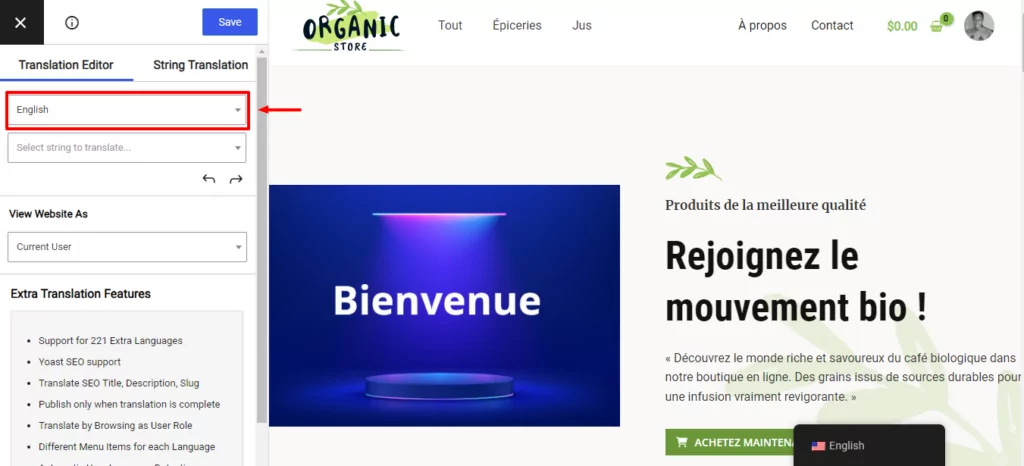
Dopodiché, imposta la lingua su inglese in modo da poter vedere le modifiche della traduzione direttamente sulla pagina.
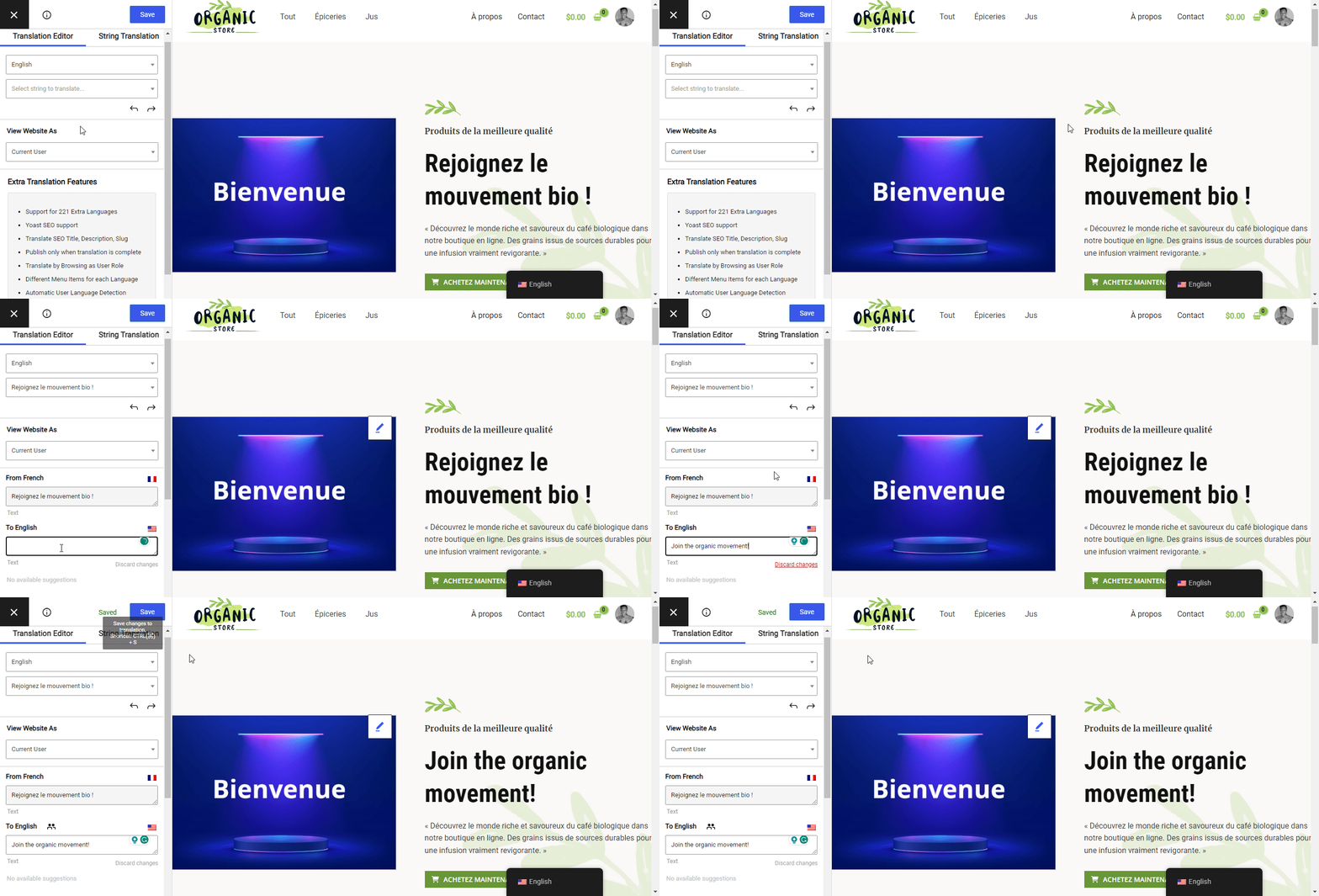
Successivamente, scegli il testo che desideri tradurre facendo clic sull'icona della matita. Dopodiché, aggiungi la tua traduzione in inglese e fai clic il Salvare pulsante, come illustrato nella GIF qui sotto.
Vedi? Te l'avevo detto che era facile. Puoi tradurre tutti i contenuti del tuo sito web allo stesso modo. Questo include voci di menu.
Ma questo è solo testo. Come si traducono le immagini?
Come tradurre immagini dal francese all'inglese
Spesso è necessario cambiare le immagini quando si passa dal francese all'inglese. Questo è particolarmente vero se l'immagine contiene del testo che deve cambiare quando la pagina cambia.
Abbiamo una guida utile su tradurre immagini in WordPress, quindi terrò questa parte breve. Tuttavia, ecco alcuni casi d'uso in cui la traduzione di immagini risulta utile:
- Aggiungere un'immagine o un logo con del testo che deve cambiare quando si cambia la lingua;
- Una copertina di ebook in cui bisogna cambiare il titolo dal francese all'inglese e viceversa;
- Slider multilingue che contengono diverse immagini con testo che deve cambiare quando si passa dal francese all'inglese;
- Traduzione delle immagini dei prodotti di WooCommerce.
TranslatePress rende la traduzione delle immagini estremamente semplice. È possibile tradurre anche il titolo e il testo alternativo. Ecco come fare.
Prima di tutto, hai bisogno di due immagini; una con del testo in francese e una con del testo in inglese. Usa la stessa immagine con dimensioni simili, ma puoi essere creativo. Carica le immagini nella tua libreria media di WordPress.
All'interno dell'editor visivo TranslatePress, clicca sull'immagine che desideri tradurre e sostituirla, come evidenziato di seguito.
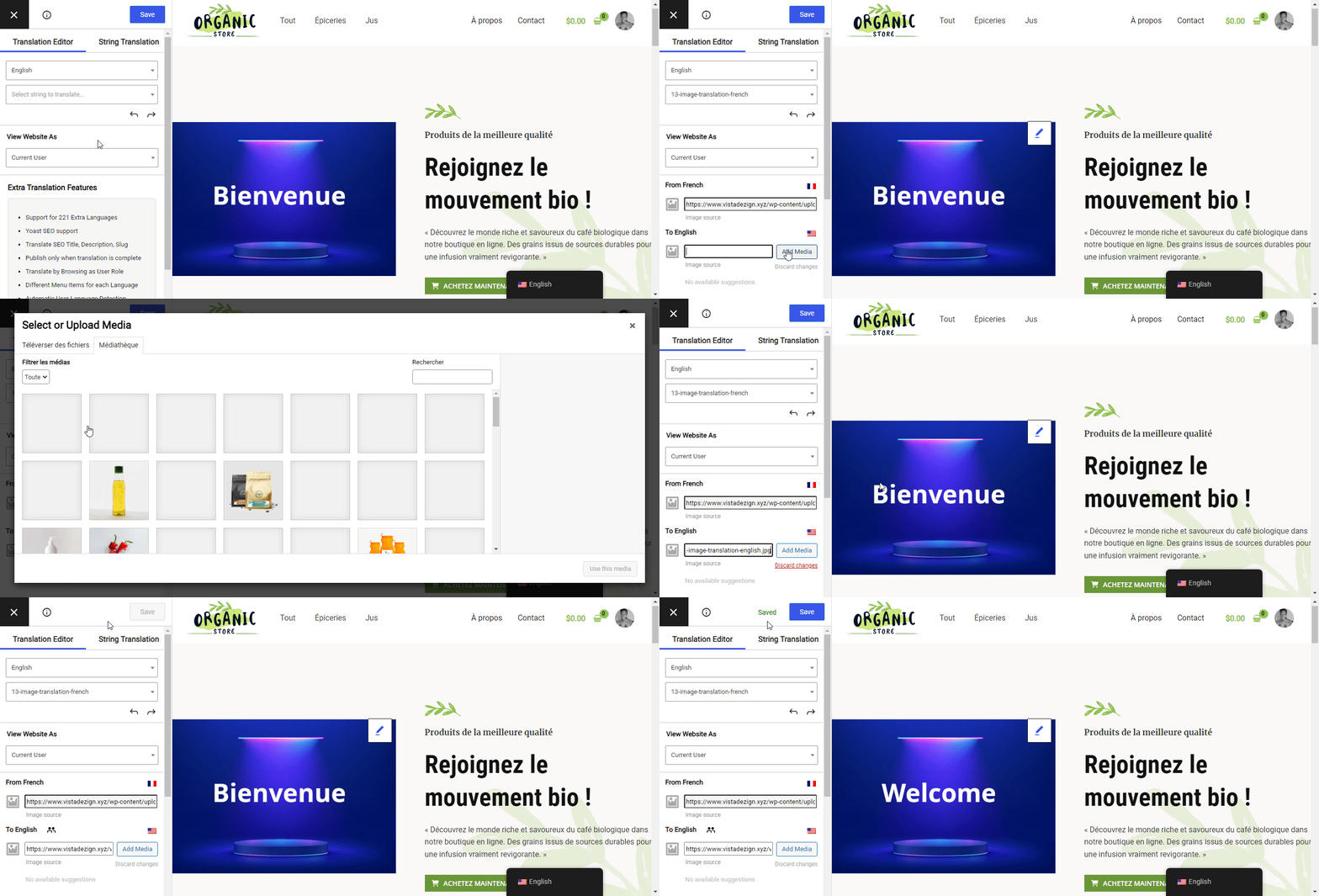
Di conseguenza, l'immagine cambierà ogni volta che passerai dal francese all'inglese. Puoi sostituire tutti i tipi di supporto allo stesso modo.
Fin qui tutto bene. Spero che oggi stiate imparando qualcosa. E pensare che tutte queste funzionalità sono disponibili nella versione gratuita di TranslatePress.
Ma cosa succede se hai bisogno di più? E se hai bisogno di tradurre contenuti dinamici, ad esempio stringhe aggiunte dal tuo tema, dai plugin e dai menu? E per quanto riguarda Email di WooCommerce?
Se è così, le prossime sezioni saranno utili.
Passiamo oltre e impariamo a tradurre le stringhe dai plugin.
Come tradurre stringhe dinamiche da plugin e temi
I plugin sono una parte integrante di qualsiasi sito web WordPress. Senza i plugin, i proprietari dei siti web dovrebbero programmare manualmente ogni funzionalità di cui hanno bisogno all'interno del sito. Come puoi immaginare, questo non è fattibile.
Per quanto i plugin siano utili, presentano una sfida unica quando si traduce un questo sito web dal francese all'inglese. Questo è particolarmente vero se si ha a che fare con plugin che non sono pronti per la traduzione.
I plugin di solito generano quelle che sono comunemente note come stringhe dinamiche. Questo tipo di contenuto non è scolpito nella pietra. Non è come il contenuto di testo statico nel tuo articolo.
Le stringhe dinamiche (o stringhe gettext) cambiano a seconda di molteplici fattori, inclusi l'input dell'utente e altre variabili.
Ad esempio, il popolare plug-in di e-commerce WooCommerce svolge un grande lavoro in background per creare il negozio online che vedi sul tuo sito WordPress.
Nel processo, genera stringhe dinamiche, ovvero pezzi di contenuto impossibili da digitare manualmente. Vengono generate al volo. Meno male che plugin come WooCommerce sono già pronti per la traduzione.
Questi elementi generati dinamicamente possono essere d'intralcio quando si tratta di tradurre il vostro sito web.
Esempi di contenuti dinamici includono:
- Contenuto della pagina 404;
- Pagina successiva;
- Pagina precedente;
- Valutato %s su 5;
- Pubblicato da %s;
- Realizzato con orgoglio da %s;
- Nessun prodotto nel carrello;
- Continua gli acquisti;
- Ecc.
Meno male – ho cercato di renderlo il più semplice possibile per i principianti. Spero che abbia senso 🙂 Per saperne di più, consulta tradurre stringhe dinamiche in WordPress.
Non preoccuparti. Puoi utilizzare TranslatePress per tradurre le stringhe dinamiche in qualsiasi plugin o tema. Questo ti permette di offrire un'esperienza multilingue potenziata sul tuo sito.
Nell'editor visivo TranslatePress è possibile visualizzare le stringhe gettext attive su qualsiasi pagina, come mostrato di seguito.
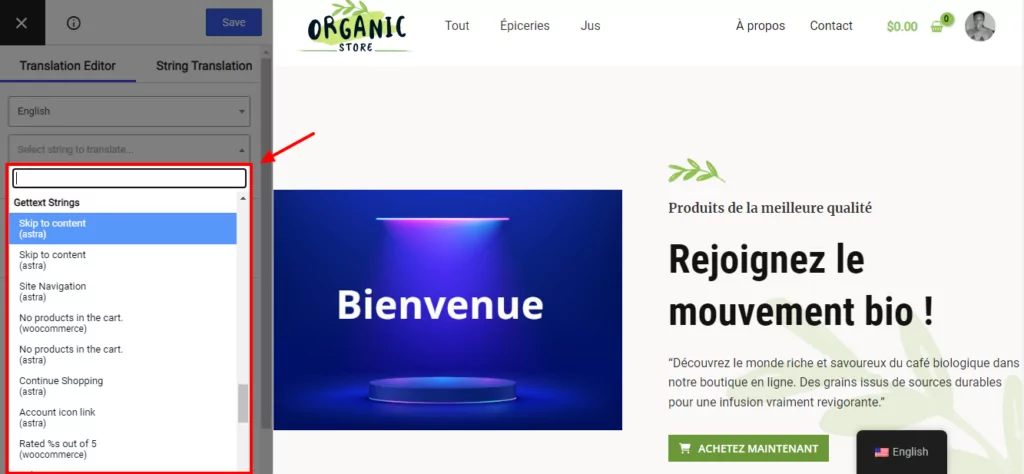
Fai clic su qualsiasi stringa gettext per fornire una traduzione e salvare le modifiche.
Se questo è poco chiaro, si prega di consultare le seguenti guide.
- Come tradurre un plugin WordPress in qualsiasi lingua;
- Come tradurre un tema WordPress – Guida completa alla traduzione dei temi.
Fatto questo, spendiamo due parole sulla traduzione delle email di WooCommerce.
Come tradurre le email di WooCommerce
Siamo d'accordo sul fatto che le email che WooCommerce invia a te e ai tuoi clienti siano importantissime. Queste email ti permettono di tenere tutto sotto controllo e di informare costantemente i clienti.
Le email di WooCommerce per i siti multilingua possono diventare complesse poiché è necessario considerare la lingua preferita di ciascun utente.
Allora, in che modo TranslatePress traduce le e-mail di WooCommerce?
Per le e-mail che WooCommerce invia ai tuoi clienti, TranslatePress utilizza la lingua con cui l'utente ha visitato il tuo sito l'ultima volta.
Se il sito web non richiede il login prima dell'acquisto, il plugin utilizza la lingua selezionata durante il checkout.
Per le e-mail che WooCommerce invia all'amministratore o al responsabile del negozio, TranslatePress utilizza la lingua impostata dall'utente nel proprio profilo.
Dai un'occhiata come tradurre manualmente le email di WooCommerce per saperne di più.
Come tradurre elementi SEO e URL
La SEO è una parte cruciale di qualsiasi sito web multilingue. Se fatta bene, la SEO può aiutarti a posizionarti più in alto nelle SERP e ad attrarre più traffico dagli stessi contenuti in lingue diverse.
Lo stesso vale per le tue traduzioni dal francese all'inglese. Puoi posizionarti per parole chiave francesi e inglesi. Ma come fai a garantire di avere gli elementi SEO appropriati per ciascuna lingua?
È semplicissimo. Basta usare un plugin come TranslatePress, che rende la traduzione dei titoli SEO, delle meta descrizioni e degli URL facilissima.
Nota, tuttavia, che la traduzione degli elementi SEO e degli URL richiede versione pro di TranslatePress.
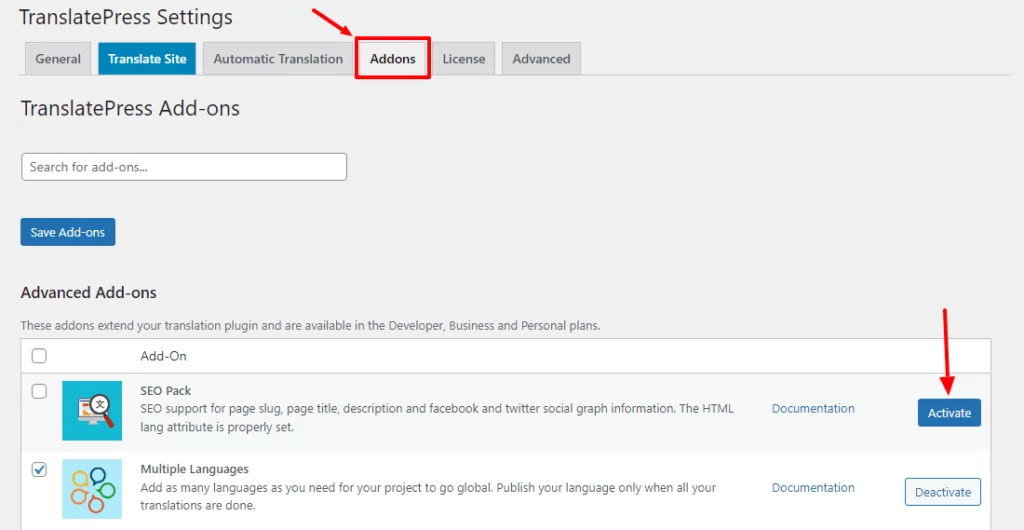
Una volta attivata la versione a pagamento, fai clic Add-ons e attiva il componente aggiuntivo SEO Pack.
Dopodiché, apri il post o la pagina che desideri tradurre nell'editor visivo di TranslatePress. Quindi, clicca sul menu a tendina per visualizzare e tradurre le meta-informazioni, come mostrato di seguito.
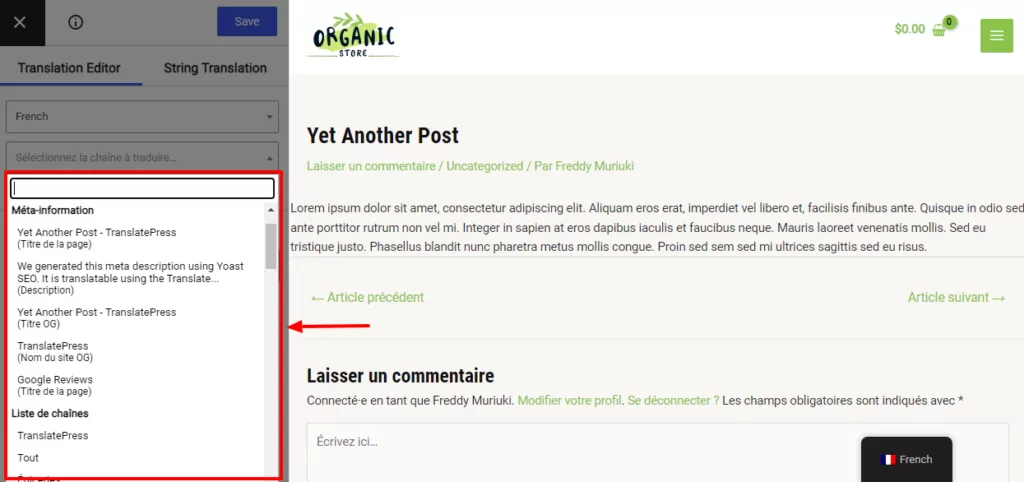
Fai clic per tradurre la meta description desiderata e salva le modifiche.
Per tradurre gli URL, seleziona lo slug che desideri tradurre dallo stesso menu a tendina.
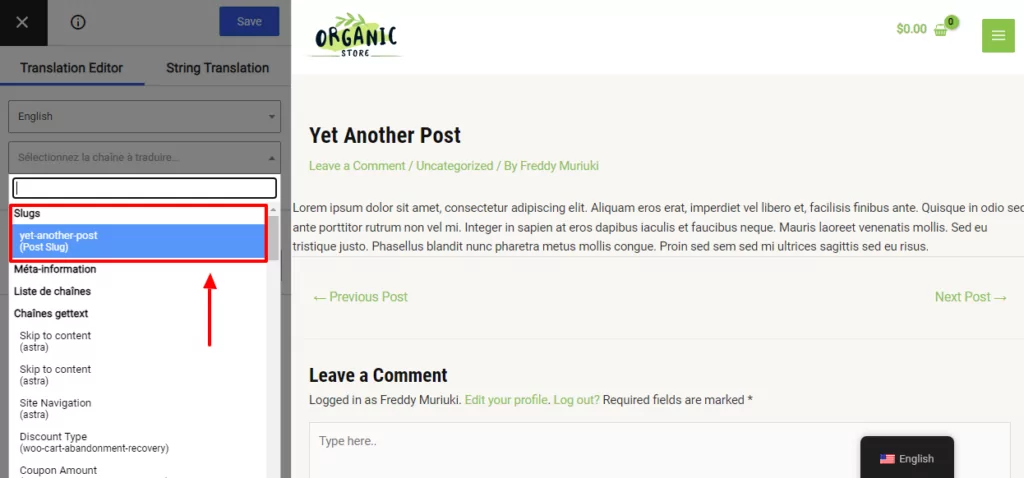
Modifica lo slug e salva le modifiche.
Come si può vedere, TranslatePress ti permette di tradurre visivamente tutti i contenuti del tuo sito web senza alcuno sforzo.
Altre caratteristiche di TranslatePress Pro includono:
- Pieno supporto a Yoast SEO;
- Supporto per 221 lingue aggiuntive;
- Traduci titolo SEO, descrizioni e slug;
- Pubblica solo a traduzione completata;
- Navigazione come ruolo utente;
- Voci di menu diverse per ciascuna lingua;
- Rilevamento automatico della lingua dell'utente;
- E altro ancora.
Infine, puoi utilizzare lo stesso processo per tradurre il tuo sito web dall'inglese al francese.
TranslatePress Multilingue
Tradurre il tuo sito web dal francese all'inglese non deve necessariamente essere un'impresa ardua, soprattutto se hai a disposizione uno strumento semplice come TranslatePress.
Quali sono le vostre opinioni? Fatecelo sapere nei commenti!
Se hai trovato utile questo post, ti invitiamo a visitare il nostro Canale YouTube, dove carichiamo costantemente brevi tutorial video facili da seguire. Puoi anche seguirci su Facebook e Twitter per essere tra i primi a sapere ogni volta che pubblichiamo.