
In questo post
Cerchi un modo per offrire WordPress in più lingue?
Creare un sito WordPress multilingue è un ottimo modo per costruire un sito web più intuitivo e raggiungere più visitatori. Ma se vuoi usare più lingue, avrai bisogno di un aiuto perché WordPress non supporta più lingue. per impostazione predefinita.
In questo post, analizzeremo i diversi strumenti che puoi utilizzare per offrire il tuo sito in diverse lingue. Dopodiché, ti mostreremo passo dopo passo come aggiungere lingue al tuo sito utilizzando TranslatePress, la soluzione che riteniamo migliore per la maggior parte degli utenti di WordPress.
Entro la fine di questo articolo, sarai in grado di offrire facilmente il tuo sito in più lingue e gestire le tue traduzioni utilizzando un semplice editor visivo come questo:
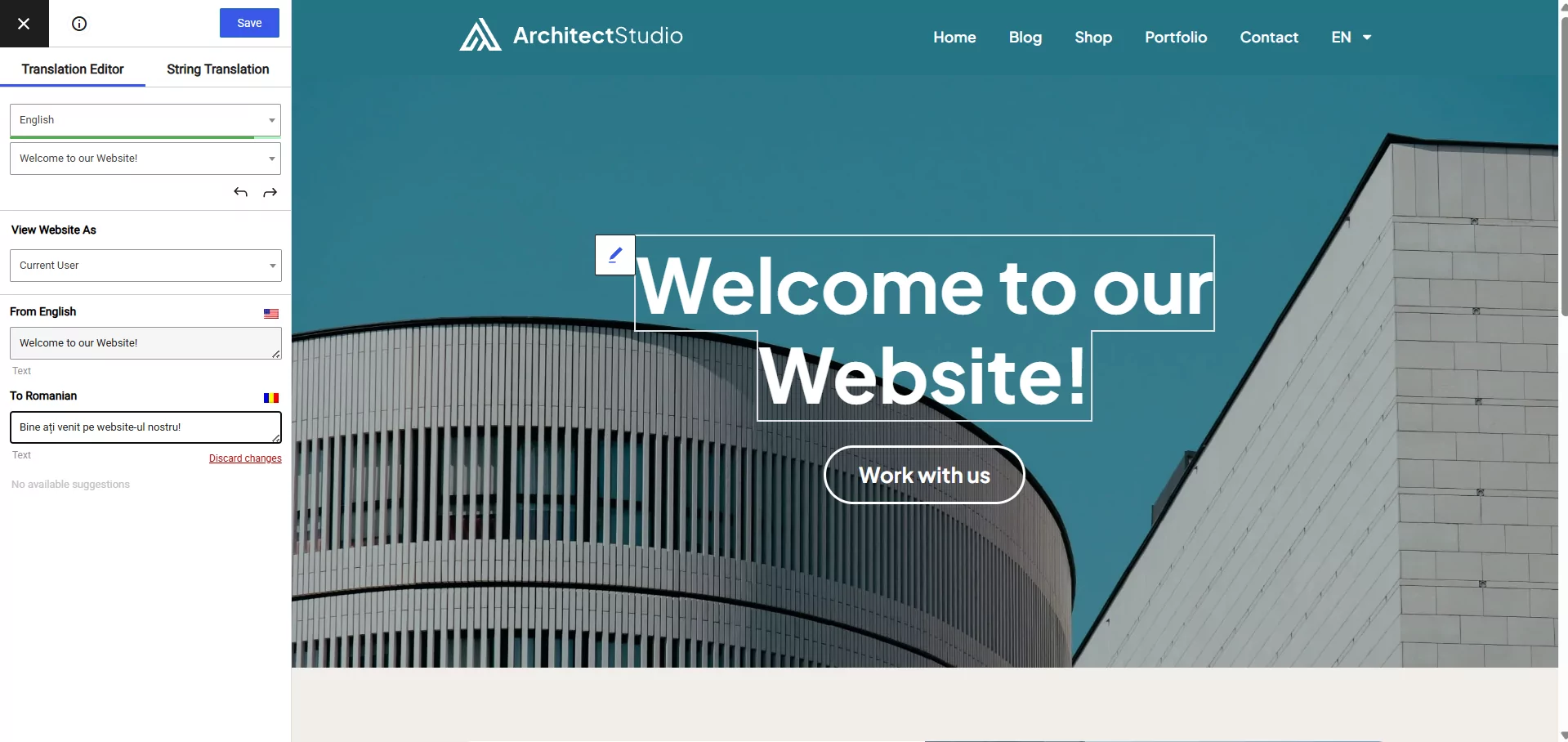
Ma prima di arrivare a tutte queste informazioni, esaminiamo rapidamente i maggiori vantaggi dell'utilizzo di più lingue su WordPress.
Vantaggi dell'offerta di WordPress in diverse lingue
Ci sono due grandi vantaggi nell'offrire WordPress in più lingue:
- Puoi raggiungere nuovi visitatori e ampliare il tuo pubblico.
- Puoi creare un'esperienza utente migliore per i visitatori nuovi o esistenti che parlano una lingua diversa.
Al primo punto, se implementato correttamente, rendere disponibile il tuo sito WordPress in più lingue ti permette di trarre vantaggio da ottimizzazione per i motori di ricerca (SEO) multilingue.
Con un sito WordPress monolingua, puoi posizionare i tuoi contenuti su Google per una sola lingua. Ma quando aggiungi più lingue, avrai la possibilità di posizionare i tuoi contenuti in ogni singola lingua che offri. Questo può raddoppiare o triplicare rapidamente le tue opportunità di posizionamento, il tutto senza creare alcun contenuto “nuovo”.
La traduzione del tuo sito può anche aumentare la tua visibilità in altri modi, poiché ti consentirà di raggiungere un pubblico nuovo anche sui social media.
Secondo, offrire il tuo sito in diverse lingue ti aiuta a creare una migliore esperienza utente per i tuoi visitatori multilingue.
Come ci si potrebbe aspettare, il la stragrande maggioranza delle persone preferisco navigare sui siti web nella loro lingua madre ogni volta che è possibile. Diventando multilingue, puoi offrire a questi visitatori ciò che desiderano.
Questo vale anche se il tuo sito web si rivolge solo a una piccola area geografica. Ad esempio, se il tuo sito web si rivolge a visitatori della California, una parte significativa dei tuoi visitatori parla spagnolo come lingua preferita. Offrendo il tuo sito sia in inglese che in spagnolo, puoi garantire a tutti un'esperienza ottimale.
Passiamo ora alla domanda successiva: come puoi ottimizzare il tuo sito web per ottenere questi miglioramenti?
Diversi metodi per utilizzare WordPress in più lingue
Se desideri rendere disponibile il tuo sito WordPress in più lingue, puoi seguire diverse strade:
- Plugin di traduzione per WordPress
- Servizio di traduzione SaaS (Software as a Service)
- Widget di traduzione dinamica
- WordPress Multisito
Esaminiamo i pro e i contro di ciascun approccio…
Plugin di traduzione per WordPress
A Plugin di traduzione per WordPress semplifica la traduzione del tuo sito WordPress in una o più nuove lingue.
A seconda del plugin, potrai utilizzare la traduzione manuale, quella automatica o una combinazione delle due.
Le tue traduzioni saranno completamente indicizzabili da Google e condivisibili sui social media. La maggior parte dei plugin di traduzione fa anche un passo in più, aggiungendo altre funzionalità utili come un selettore di lingua front-end e miglioramenti SEO multilingue.
Pro:
- Conveniente – la maggior parte dei plugin di traduzione ha un costo piuttosto contenuto e alcuni offrono addirittura versioni gratuite.
- Proprietà – tutti i tuoi contenuti tradotti rimangono sul server del tuo sito.
- WordPress nativo – trattandosi di plugin nativi di WordPress, potrai gestire tutto direttamente dalla dashboard di WordPress e non dovrai imparare a usare una nuova interfaccia.
Contro:
- Può richiedere molto tempo (se utilizzi la traduzione manuale) – se vuoi risparmiare tempo, ti consigliamo di scegliere un plugin che supporti la traduzione automatica tramite servizi come Google Translate o DeepL.
Servizio di traduzione SaaS
Con uno strumento di traduzione SaaS, avrai a disposizione una dashboard cloud dedicata dove potrai gestire tutte le traduzioni del tuo sito. Le tue traduzioni risiedono sui server dello strumento SaaS, ma in genere ti verrà fornito un plugin di integrazione per pubblicarle sul tuo sito WordPress.
In genere, la procedura di configurazione si svolge più o meno così:
- Crea un account sul sito web del servizio
- Installa il plugin di integrazione su WordPress e sincronizzalo con il servizio
- Gestisci le tue traduzioni dal sito web del servizio
Pro:
- Semplice – il vantaggio principale di questi servizi è la semplicità. Di solito traducono automaticamente i tuoi contenuti all'istante, permettendoti di iniziare a offrire WordPress in più lingue nel giro di pochi minuti.
Contro:
- Costoso – con uno strumento SaaS, dovrai pagare una tariffa ricorrente per tutto il tempo in cui desideri utilizzare il servizio. Questo è diverso dal normale approccio dei plugin di WordPress basato su una tariffa una tantum (più un rinnovo opzionale per continuare a ricevere aggiornamenti e supporto).
- Mancanza di senso di appartenenza – poiché le vostre traduzioni non “vivono” sui server del vostro sito WordPress, potrebbero esserci problemi di proprietà. La maggior parte dei servizi vi permetterà di esportare le vostre traduzioni se smettete di usare il servizio, ma non è comunque l'ideale.
Widget di traduzione dinamica
Un widget di traduzione dinamica funziona in modo molto simile alla funzione di traduzione automatica del browser Chrome. I visitatori scelgono la lingua preferita da un menu a tendina. A quel punto, il servizio (di solito Google Translate) traduce dinamicamente tutti i contenuti della pagina.
Se vuoi sperimentare questo in azione, apri semplicemente una pagina in Chrome che non sia nella tua lingua madre: questi widget aggiungono esattamente lo stesso effetto, ma al tuo sito WordPress.
Due cose importanti da notare su questo approccio sono che:
- Le traduzioni non vengono mai salvate da nessuna parte. Avvengono in modo dinamico nel browser di ciascun visitatore. Questo significa che non puoi modificarle.
- Le traduzioni non sono pagine separate, il che significa che le persone non possono collegarsi alla versione tradotta e Google non può indicizzare la versione tradotta.
Pro:
- Semplice – questi strumenti sono super facili da usare. Praticamente basta installare un plugin e sei pronto a partire.
- Completo – Puoi scegliere qualsiasi lingua supportata da Google Translate, il che ti permette di tradurre il tuo sito in oltre 100 lingue diverse con un unico widget.
- Free – Di norma, questi semplici plugin sono gratuiti (100%).
Contro:
- Non ottimizzato per i motori di ricerca – poiché il widget traduce dinamicamente i vostri contenuti, non esiste una versione statica dei contenuti tradotti che i motori di ricerca come Google possano indicizzare. In pratica, non potete posizionare i vostri contenuti tradotti su Google, il che significa che state perdendo completamente i vantaggi della SEO multilingue.
- Impossibile modificare le traduzioni – non c'è la possibilità di modificare manualmente le traduzioni dinamiche: si è completamente in balia delle traduzioni automatiche. Questo è un problema importante se si vuole garantire una traduzione accurata.
WordPress Multisito
Un altro approccio per aggiungere lingue a WordPress è usa WordPress multisite per creare una rete di siti. Puoi creare un nuovo sito della rete per ogni lingua che desideri offrire e quindi aggiungere i collegamenti a ciascuna lingua. Questo ti permetterà di avere un Sito WordPress multilingua senza usare un plugin.
Questo approccio è gratuito, ma presenta enormi svantaggi per quanto riguarda la gestione dei contenuti.
Pro:
- ottimizzato per i motori di ricerca – ogni lingua ha le proprie traduzioni indicizzabili, il che ti aiuta a beneficiare della SEO multilingue.
- Siti facili da personalizzare per la localizzazione – poiché ogni lingua è un proprio sito di rete, è facile creare layout/menu/sidebar/ecc. diversi, il che può migliorare la localizzazione in alcuni scenari.
Consigli:
- Nessun supporto per la traduzione automatica – dovrai tradurre tutti i tuoi contenuti manualmente da zero, il che richiede tempo rispetto ad altri strumenti che ti permettono di usare la traduzione automatica per ottenere una base.
- Difficile sincronizzare i contenuti – poiché ciascuna lingua è un sito di rete a sé stante, non c'è nulla che sincronizzi i contenuti, il che rende difficile tenere traccia delle cose. Ad esempio, se modifichi la versione in lingua inglese, dovrai ricordarti di aggiornare anche i contenuti in spagnolo. Un plug-in di traduzione o uno strumento SaaS di solito dispone di funzionalità per semplificare questa operazione.
Quale metodo dovresti usare?
Per la maggior parte delle persone, l'utilizzo di un plug-in di traduzione WordPress dedicato è la soluzione migliore per alcuni motivi:
- Puoi ottimizzare per la SEO multilingue – vale a dire, puoi effettivamente indicizzare i tuoi contenuti tradotti su Google, cosa che non sarebbe possibile con un widget di traduzione dinamica.
- Puoi scegliere il tuo metodo di traduzione – un buon plugin di traduzione dovrebbe consentire di scegliere tra traduzione automatica e manuale (e persino combinare le due cose per ottenere il meglio da entrambi i mondi).
- È conveniente – pagherai una tariffa una tantum anziché la costosa fatturazione ricorrente richiesta dagli strumenti di traduzione SaaS.
- Hai la completa proprietà – le tue traduzioni rimangono sul server del tuo sito WordPress, anziché essere fornite da un server separato come alcuni strumenti SaaS.
Quando si tratta di plugin di traduzione per WordPress, l'opzione migliore è TranslatePress. TranslatePress offre la facilità d'uso di uno strumento SaaS in un pacchetto di plugin nativo per WordPress.
Sarai in grado di gestire tutte le tue traduzioni utilizzando un semplice editor visivo come questo:
Fin da subito, TranslatePress funziona con tutto del contenuto del tuo sito WordPress, incluso contenuto dai tuoi plugin o dal tuo tema.
Include inoltre funzionalità SEO multilingue per aiutarti a migliorare il posizionamento dei tuoi contenuti e numerose funzionalità intuitive, come un selettore di lingua flottante nel front-end.
Guida a WordPress Multilingua
In questa sezione ti mostreremo come rendere disponibile il tuo sito WordPress in diverse lingue utilizzando il plugin TranslatePress. Ma prima di iniziare, ecco un breve video che spiega come farlo in meno di 5 minuti:
TranslatePress è disponibile gratuitamente su WordPress.org e potrai seguire gran parte di questo tutorial utilizzando solo la versione gratuita.
Con la versione gratuita, potrai offrire il tuo sito WordPress in una nuova lingua utilizzando lo stesso semplice editor visivo che hai visto sopra. Otterrai anche:
- Traduzioni completamente indicizzabili, che possono aiutarti a iniziare con la SEO multilingue.
- A front-end selettore di lingua che puoi aggiungere a diverse parti del tuo sito.
- La possibilità di utilizzare la traduzione automatica fornita da Google Translate (pur potendo ancora modificare manualmente tali traduzioni).
Per ulteriori funzionalità, puoi passa alla versione Pro a:
- Traduci il tuo sito in un numero illimitato di nuove lingue (rispetto a una sola nuova lingua nella versione gratuita).
- Migliora ulteriormente la tua SEO multilingue con la capacità di tradurre metadati SEO, slug URL e altro ancora.
- Utilizza DeepL per le traduzioni automatiche (oltre a Google Translate).
- Accedi a molte altre funzioni utili
TranslatePress Multilingue
Per iniziare installare e attivare il plugin gratuito TranslatePress disponibile su WordPress.org. Ecco come configurare il tutto...
1. Scegliere quali lingue aggiungere a WordPress
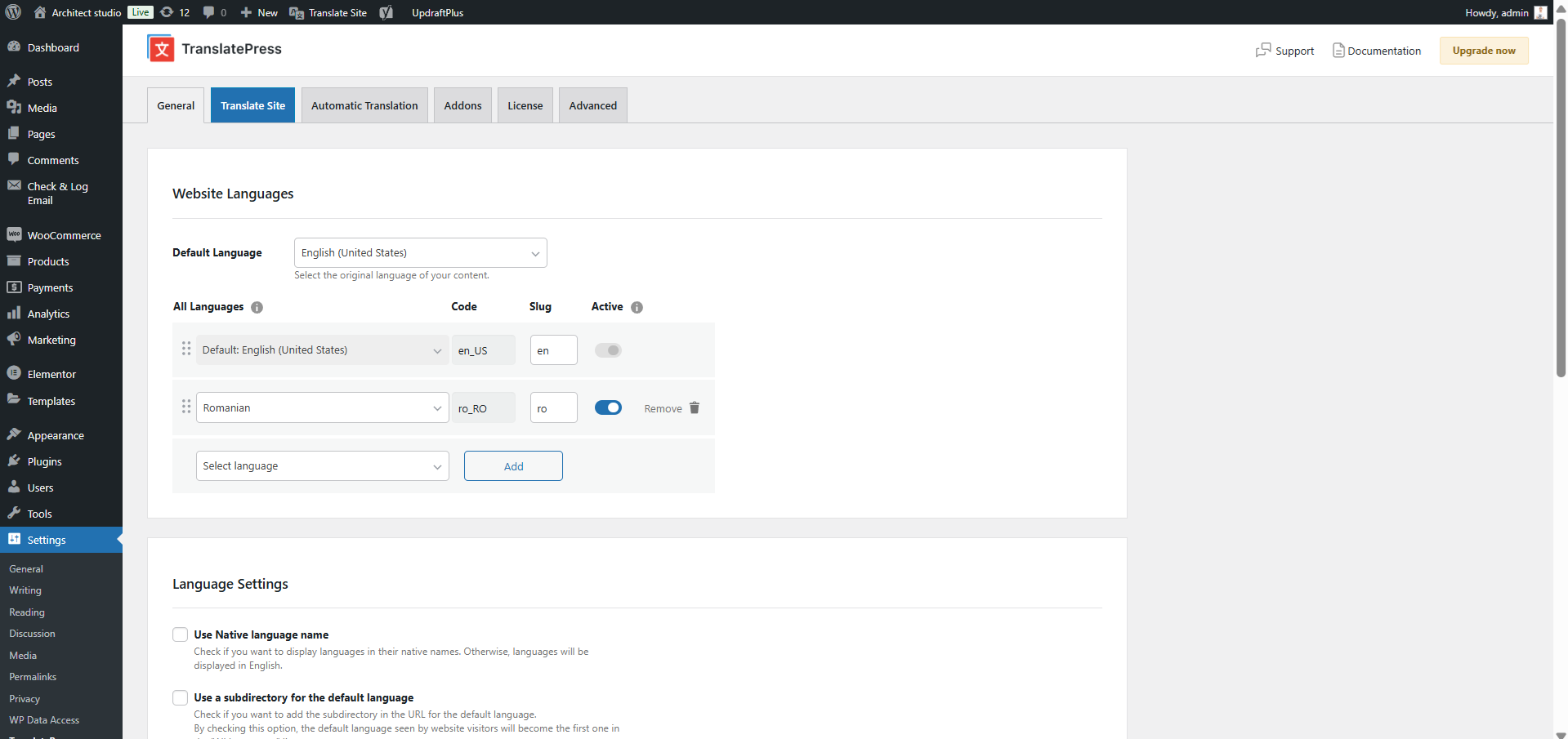
Una volta installato e attivato il plugin, puoi andare su Impostazioni → TranslatePress per scegliere la lingua predefinita del tuo sito e la nuova o le nuove lingue in cui desideri tradurre i tuoi contenuti:
2. Scegli il tuo approccio alla traduzione linguistica
Successivamente, devi scegliere come desideri tradurre i tuoi contenuti. Hai tre opzioni:
- Manuale 100% – puoi aggiungere manualmente tutte le tue traduzioni da zero, da solo o con l'aiuto di un freelance o agenzia di traduzione. Questo è l'approccio che richiede più tempo, ma garantisce traduzioni accurate.
- Traduzione automatica 100% – Puoi utilizzare Google Translate o DeepL per tradurre automaticamente l'intero sito. Questo è il metodo più veloce, ma, sebbene la traduzione automatica sia migliorata notevolmente, le traduzioni automatiche non sono ancora perfette.
- Misto – Puoi iniziare utilizzando Google Translate o DeepL per generare una serie di traduzioni di base. Successivamente, puoi rivedere tali traduzioni e perfezionarle manualmente secondo necessità.
Per la maggior parte delle persone, l'approccio misto offre il miglior equilibrio. Consente di avviare rapidamente un sito completamente tradotto. Tuttavia, è comunque possibile modificare manualmente le traduzioni necessarie dove opportuno: potete effettuare queste modifiche voi stessi oppure assumere un freelancer che riveda e corregga le vostre traduzioni automatiche.
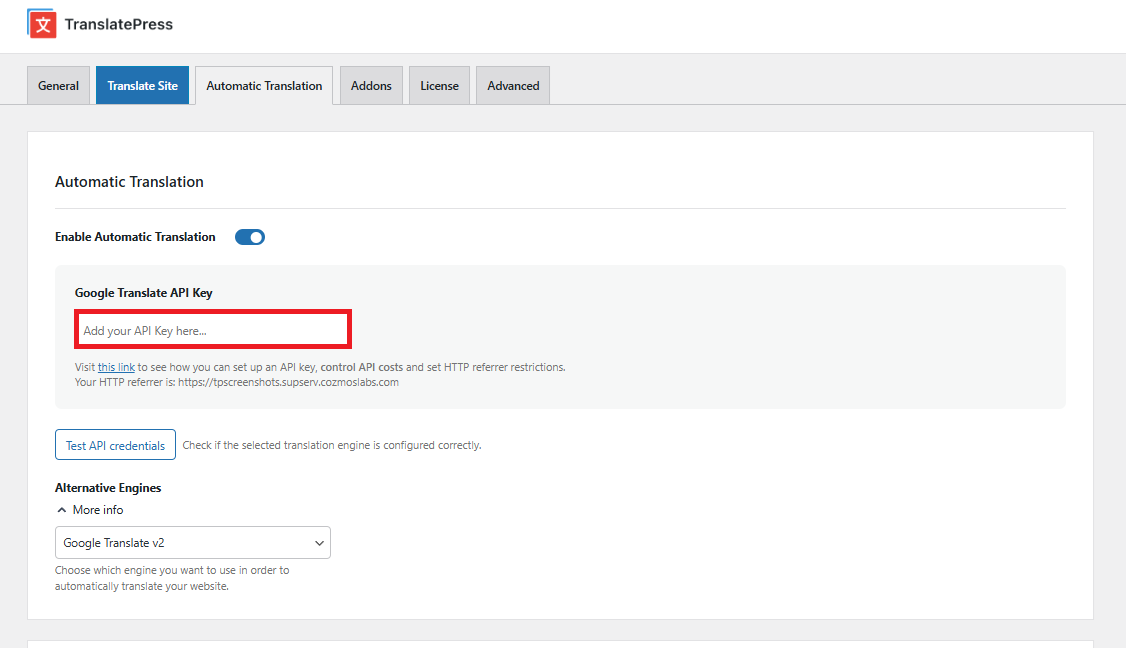
Se desideri utilizzare uno degli approcci di traduzione automatica, puoi configurare il tuo servizio preferito nel Traduzione automatica scheda. Ecco due guide relative ai servizi supportati da TranslatePress:
- Utilizzo di Google Translate per la traduzione automatica
- Utilizzare DeepL per la traduzione automatica
3. Trascina i Tuoi Contenuti
Ora sei pronto per tradurre i tuoi contenuti! Oppure, se hai utilizzato la traduzione automatica, sei pronto per perfezionare manualmente le tue traduzioni (se necessario).
Puoi utilizzare l'editor visivo di TranslatePress per tradurre 100% dei tuoi contenuti, indipendentemente dal fatto che provengano dall'editor di WordPress, dal tuo plugin, o il tema.
Per aprire l'editor di traduzione, vai al contenuto che desideri tradurre sul front-end del tuo sito e fai clic su Traduci pagina pulsante sulla barra degli strumenti di WordPress:

Questo avvierà un'anteprima dal vivo del tuo contenuto, insieme a una barra laterale sulla sinistra in cui puoi gestire le tue traduzioni.
Per tradurre qualsiasi contenuto sul tuo sito, passa il mouse sopra di esso nell'anteprima dal vivo e clicca sull'icona a forma di matita. Questo aprirà la traduzione nell'editor della barra laterale: tutto ciò che devi fare è inserire il testo tradotto nella casella:
Userai questo stesso approccio per tradurre l'intero sito. Se desideri visualizzare istruzioni più dettagliate per parti specifiche del tuo sito, ecco una serie di guide che possono aiutarti. Come tradurre…
- Blocchi dell'editor (Gutenberg)
- Campi personalizzati
- Tipi di pubblicazione personalizzati
- Moduli WordPress
- Menu di WordPress
- Immagini
- Contenuto del popup
- Cursori
- Prodotti WooCommerce
4. Ottimizza per la SEO multilingue
Nella sezione precedente, ci siamo concentrati sull'aiutarvi a tradurre il contenuto front-end del vostro sito. Di questo si cureranno principalmente i vostri visitatori umani. Tuttavia, se volete ottimizza la SEO multilingue del tuo sito, devi anche tradurre i dettagli del dietro le quinte come i tuoi:
- Titoli SEO e meta description
- URL slug
- Informazioni sui social media (tag Open Graph)
- Mappa del sito
Con il componente aggiuntivo Premium SEO Pack, potrai tradurre anche tutti questi elementi utilizzando TranslatePress.
Una volta acquistato e installato il componente aggiuntivo SEO Pack, potrai gestire le traduzioni dei tuoi metadati SEO e delle informazioni relative ai social media utilizzando il menu a tendina nell'editor TranslatePress:
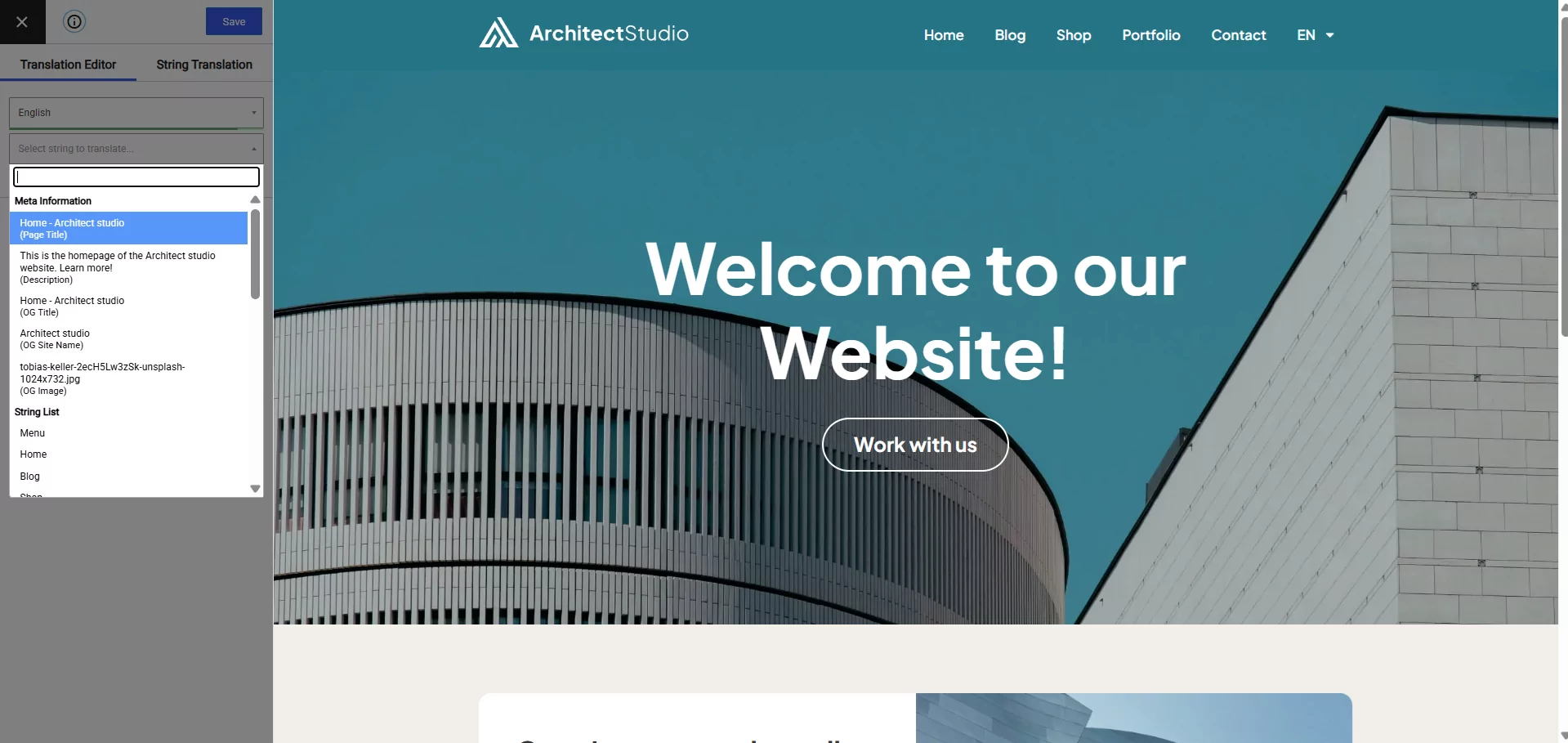
Per modificare gli URL slug, puoi fare clic sull'opzione per aprire l'interfaccia di Traduzione delle stringhe.
5. Configurare WordPress selettore di lingua
Per aiutare i tuoi visitatori a scegliere la lingua che preferiscono, TranslatePress aggiunge automaticamente un pulsante selettore di lingua mobile nell'angolo in basso a destra del tuo sito. Puoi personalizzare completamente questo selettore andando su Impostazioni → TranslatePress → selettore di lingua scheda.
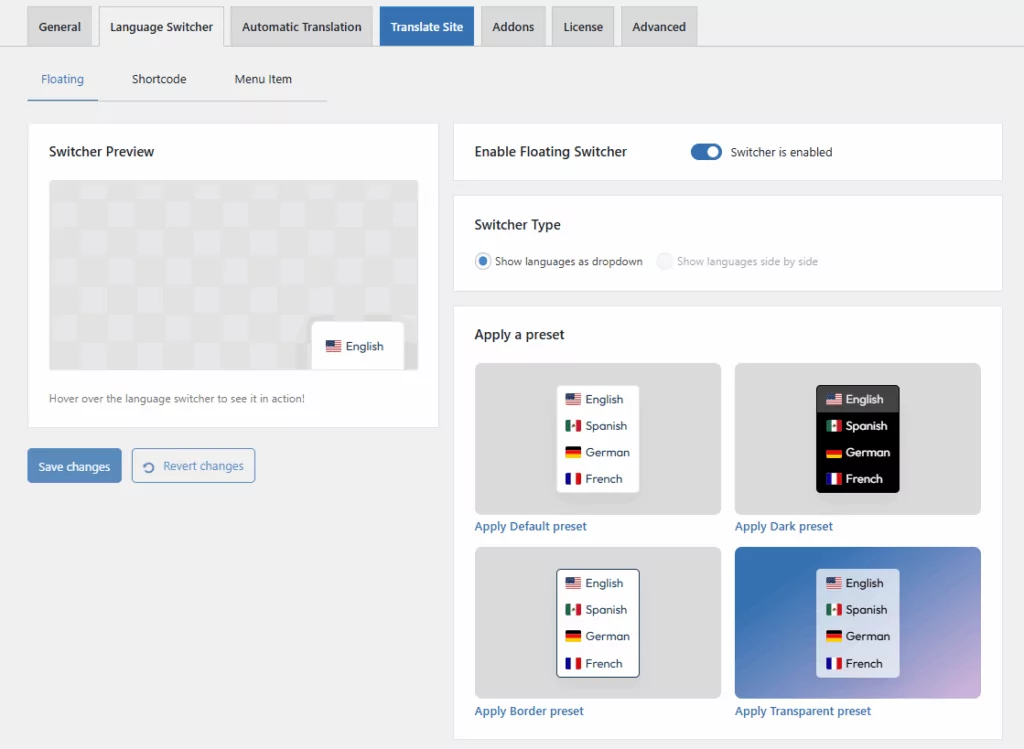
Qui hai la possibilità di spostare questo selettore di lingua in un’altra posizione e modificarne il funzionamento e l’aspetto. Ad esempio, potresti spostarlo nell’angolo in alto a sinistra del tuo sito e mostrare solo il nome della lingua (invece di mostrare anche una bandiera).
Oltre alla configurazione selettore di lingua flottante, puoi anche impostare la tua configurazione selettore di lingua:
- In un menu che utilizza una nuova opzione nello strumento menu nativo di WordPressAspetto → Menu).
- Ovunque sul tuo sito utilizzando un blocco o uno shortcode (incluso nella barra laterale aggiungendolo a un widget).
- Direttamente nei file del tema utilizzando una funzione PHP
E questo è tutto! I visitatori saranno ora in grado di trarre vantaggio da più lingue quando navigano sul tuo sito, e potrai anche iniziare a indicizzare i tuoi contenuti su Google in più lingue.
Inizia a usare WordPress in più lingue oggi
Offrire il tuo sito WordPress in più lingue è un ottimo modo per aiutarti a raggiungere più persone sui motori di ricerca e sui social media. Meglio ancora, offre anche un'esperienza migliore a tutti i visitatori multilingue già presenti sul tuo sito, poiché potranno scegliere le loro lingue preferite durante la navigazione.
Sebbene tu abbia molte opzioni per offrire WordPress in diverse lingue, un plugin di traduzione per WordPress dedicato è la scelta migliore per la maggior parte dei siti perché:
- Puoi utilizzare sia la traduzione automatica che quella manuale (e combinare i due approcci secondo necessità).
- Le tue traduzioni saranno contenuti statici indicizzabili, il che ti consente di beneficiare della SEO multilingue e permette anche ai visitatori di condividere i tuoi contenuti multilingue o di inserire un link ad essi dai loro siti.
- È conveniente perché puoi evitare le costose tariffe mensili associate agli strumenti di traduzione SaaS.
- Le tue traduzioni rimangono sul server del tuo sito WordPress.
Per iniziare facilmente con un sito WordPress multilingue, puoi usare il plugin gratuito TranslatePress su WordPress.org e segui questa guida.
Poi, se vuoi migliorare la SEO multilingue del tuo sito, offrire un numero illimitato di nuove lingue e avere accesso ad alcune altre utili funzionalità premium, aggiorna alla versione premium.