
En esta publicación
¿No encuentras la forma de traducir un sitio web al árabe? Bueno, no estás solo.
Traducir un sitio web al árabe y viceversa es un reto incluso para los mejores traductores.
Y eso se debe a que las traducciones del inglés al árabe plantean desafíos únicos en comparación con otros pares de idiomas, como Inglés a francés.
Hágase saber que el árabe es uno de los los cinco idiomas más difíciles de traducir, y aprenderemos por qué más adelante en el artículo.
Aun así, traducir su sitio web al árabe es una manera fantástica de llegar a un público más amplio y hacer crecer su marca, entre otras cosas.
Ahora bien, traducir una sola página al árabe es superfácil. Pero no podemos decir lo mismo de traducir todo tu sitio web de WordPress.
Traducir un sitio web entero puede parecer imposible para un principiante que no sabe nada mejor.
Pero nada más lejos de la realidad, especialmente si cuentas con un plugin de traducción para WordPress como TranslatePress.
Como veremos más adelante en la publicación, el plugin te permite traducir cada parte de tu sitio web de WordPress al árabe, ya sea texto, imágenes, elementos SEO, URL y contenido de tus temas o complementos.
Es verdaderamente un complemento notable para su caja de herramientas como traductor o desarrollador de WordPress.
Lo mejor es que la versión básica es gratuita (100%), lo que significa que puedes empezar a traducir tu página web al árabe de inmediato sin gastar ni un céntimo. Y con las características y funcionalidades adicionales, pronto verás por qué el versión pro vale cada centavo.
Dicho esto, adentrémonos de lleno y aprendamos a traducir un sitio al árabe de forma rápida y precisa.
Beneficios de traducir un sitio web al árabe y viceversa
Antes de hablar sobre los consejos prácticos para traducir del inglés al árabe, analicemos algunos beneficios para determinar si vale la pena su tiempo y esfuerzo.
Entonces, ¿cómo te benefician la traducción de tu sitio web del inglés al árabe o viceversa? Bueno, te alegrará descubrir que hay varios beneficios.
Audiencia ampliada y alcance global
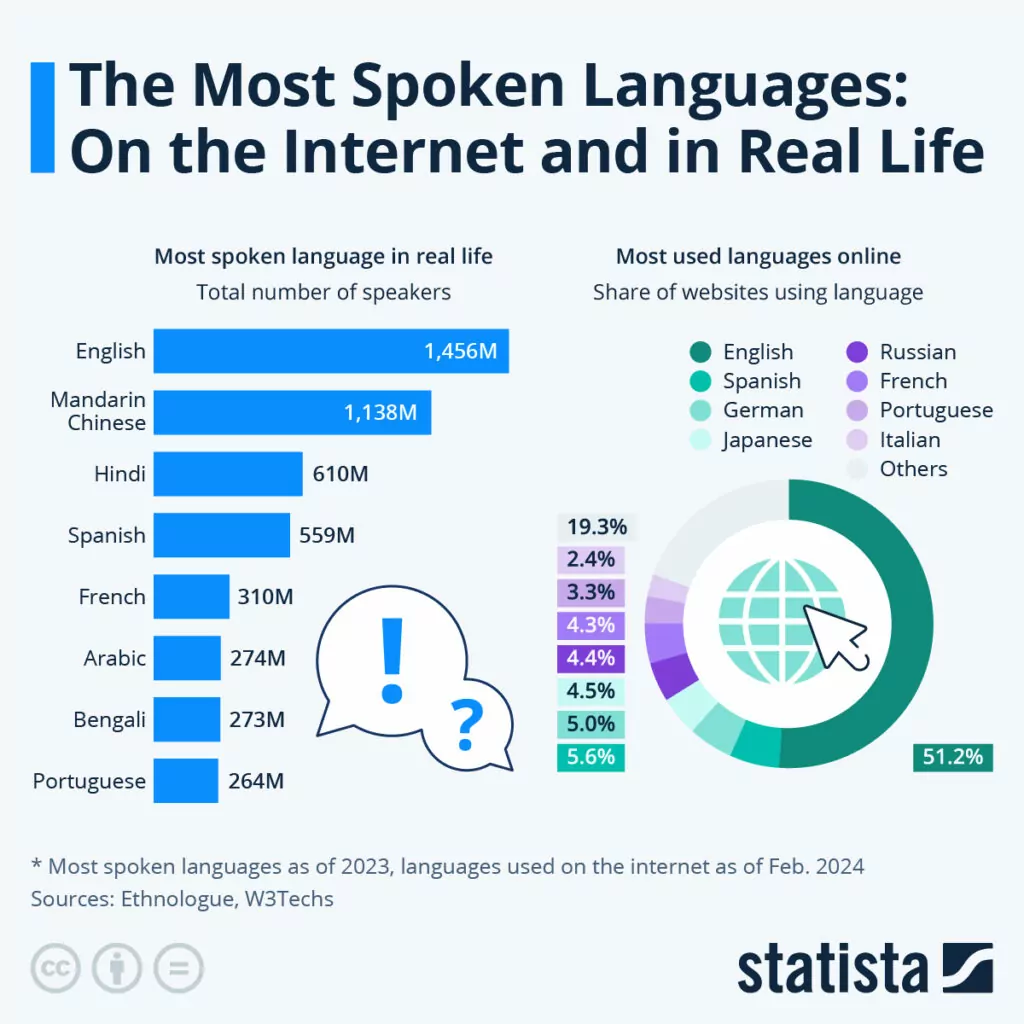
Fuente: Statista – Los idiomas más hablados: En internet y en la vida real.
Con casi 1.500 millones de hablantes, el inglés sigue siendo la lengua más hablada del mundo. Además, con un 51,2% de sitios web en inglés, es también la lengua más utilizada en Internet.
Según el gráfico anterior, el árabe ocupa el puesto número seis con unos 274 millones de hablantes. Son unos 400 millones en 2024 según Wikipedia, lo que lo convierte en el quinto idioma más hablado del mundo.
A partir de un informe diferente, Solo el 0,6% de las páginas web utilizan el árabe, lo cual sigue siendo significativo teniendo en cuenta que hay casi dos mil millones de sitios web en línea.
¿A dónde quiero llegar con esto? Es simple.
Ya sea que quieras traducir un sitio del inglés al árabe o viceversa, tienes la oportunidad de llegar a una audiencia global más amplia. Es uno de los principales beneficios de traducir su sitio web.
¿Y sabes qué más?
Los compradores son exigentes en lo que respecta al idioma de un sitio web, y hay datos que respaldan esta afirmación.
Así es. Según una encuesta realizada a más de 8.700 consumidores en 29 países por CSA Investigación, el 65% de los compradores prefiere las páginas web en su idioma, aunque sean de mala calidad.
Además, el mismo estudio reveló que el 76% de los consumidores prefiere los productos cuya información esté en su idioma.
Pero eso no es todo. El 40% de los encuestados afirmó que nunca compraría productos en una página web en otro idioma.
Como puede ver, vale la pena traducir su sitio web para llegar a los compradores de habla árabe. Si desea expandirse a Oriente Medio y el norte de África o sus informes de análisis muestran que recibe mucho tráfico de regiones de habla árabe, el momento es propicio para traducir su sitio web.
Las regiones de habla árabe te ofrecen importantes oportunidades para expansión de mercado y crecimiento empresarial. Traducir su sitio del inglés al árabe le permite llegar a clientes potenciales en estas regiones e interactuar con ellos.
Sigamos adelante.
Experiencia de usuario mejorada

Tal vez estoy solo en esto, pero ¿alguna vez has visitado un sitio web en un idioma que no entendías? Apuesto a que tu experiencia no fue agradable. Y probablemente hiciste clic en el botón de retroceso para no volver jamás.
Gracias a Dios que Chrome viene con un Google Traductor hoy en día. Otros navegadores aún tienen que ponerse al día.
Todos podemos coincidir en que es exasperante llegar a un sitio web con contenido en un idioma que no entiendes, especialmente si estás empeñado en encontrar la información que necesitas.
En consonancia con esto, ofrecer contenido en árabe mejorará la experiencia de usuario para los visitantes de su sitio web que hablan árabe.
Primero, traducir su sitio al árabe eliminará las barreras lingüísticas, asegurando que el público de habla árabe pueda entender y utilizar su sitio web sin contratiempos.
Es una excelente manera de que su empresa demuestre un compromiso con la accesibilidad y la usabilidad, lo que hace que su sitio sea acogedor para más personas.
Además, tienes la oportunidad dorada de personalizar las experiencias para los usuarios árabes. Considerando El árabe se presenta en tres versiones principales y tiene más de 25 dialectos, puedes adaptar tu contenido a distintos grupos y subculturas. Esto incluye la traducción del inglés al árabe. jerga.
En segundo lugar, traducir del inglés al árabe le permite localizar su sitio web. Puede adaptar fácilmente elementos como imágenes, monedas y formatos de fecha a las convenciones locales. Hacerlo aumenta la participación del usuario y crea un sentido de pertenencia entre los usuarios árabes.
Al mismo tiempo, puede transmitir sus mensajes de marketing en árabe, lo que aumenta la participación y las conversiones de los usuarios.
En tercer lugar, traducir su sitio web al árabe reducirá las tasas de rebote entre los usuarios de habla árabe. Los usuarios árabes pasarán más tiempo interactuando con su contenido, ya que está en un idioma que entienden.
No importa cómo se mire, una mejor experiencia de usuario conduce a una mayor participación, mayores duraciones de sesión y mayores tasas de conversión.
SEO mejorado y visibilidad en línea
Generar tráfico hacia un sitio web es una de las tareas más difíciles a las que se enfrenta cualquier emprendedor en línea.
Aun así, el tráfico es el alma de cualquier sitio web. Sin visitantes web, tu sitio es un fracaso. Es así de simple.
Por supuesto, existen muchas formas eficaces de atraer tráfico a un sitio web. Una de las mejores maneras es optimización de motores de búsqueda o SEO para abreviar.
El SEO implica optimizar tu sitio web y tu contenido para posicionarte mejor en los motores de búsqueda como Google y Bing.
Entonces, ¿cómo mejora el SEO de tu sitio traducirlo del inglés al árabe?
Permíteme explicar.
Cada vez que alguien busca su contenido o productos, por lo general introduce palabras clave o frases en un motor de búsqueda. Basta decir que muchas personas prefieren usar su idioma nativo.
Si su contenido es relevante para la palabra clave o frase, el motor de búsqueda mostrará su sitio web en las páginas de resultados del motor de búsqueda (SERP).
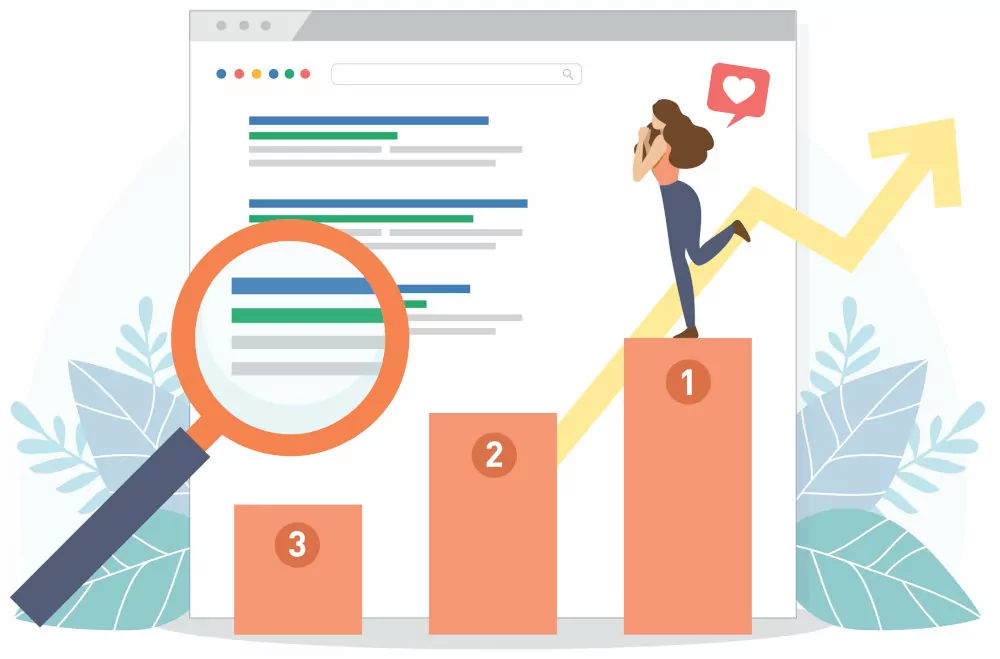
Si has hecho tus deberes, tu contenido aparecerá primero, enviando más visitantes a tu sitio web.
Sin una versión en árabe de su sitio web, los usuarios de habla árabe nunca encontrarán su sitio en las SERP, incluso si están buscando el contenido o los productos que ofrece.
Esto se debe a que introducen palabras clave o frases en árabe en el buscador.
Traducir su sitio web al árabe le permite capturar estas búsquedas, lo que puede aumentar significativamente su tráfico en las regiones de habla árabe.
Por ejemplo…
Neil Patel aumentó el tráfico de búsqueda en más de 47% después de traducir su contenido a 82 idiomas. ¿Necesitas otro ejemplo? La empresa de alojamiento web Kinsta se ha observado un aumento de 18% en el tráfico orgánico después de traducir su sitio web a 10 idiomas.
Esto es lo que SEO multilingüe se trata de.
Además, puedes utilizar la optimización de contenido geolocalizado para adaptar tu contenido a contextos culturales específicos y a diferentes regiones de habla hispana.
Esto ayuda a los motores de búsqueda a comprender la relevancia de su contenido para los usuarios locales, lo que se traduce en mejores clasificaciones para las búsquedas en árabe.
Otra cosa más. Crear una versión en árabe de tu sitio web puede ayudarte a aumentar la autoridad de dominio y la confianza. Combina eso con backlinks de sitios web árabes locales y tendrás una fórmula ganadora.
Y dado que los usuarios árabes que llegan a su sitio web entenderán el contenido, permanecen más tiempo, lo que se traduce en tasas de rebote más bajas, mayor interacción y, en consecuencia, clasificaciones más altas.
Después de todo, no tienes nada que perder y tu trabajo es mínimo. Ya tienes el contenido en inglés. Solo necesitas traducirlo al árabe para disfrutar de más tráfico orgánico.
Reputación de marca mejorada

Otra gran ventaja de traducir su sitio web al árabe es la mejora de la reputación de la marca. Los visitantes de su sitio web considerarán que su empresa es prestigiosa y vanguardista.
Si un usuario de habla árabe llega a su sitio pero no entiende nada porque está en inglés, saldrá y probablemente nunca regresará. Esto refleja una mala imagen de su marca.
Por otro lado, traducir su sitio web demuestra a los visitantes árabes que le importan sus necesidades, lo que le otorga puntos de credibilidad e impulsa la reputación de su marca.
En general, los usuarios de habla árabe aprecian el contenido culturalmente relevante en su idioma nativo.
Traducir su sitio web al árabe demuestra su compromiso con la inclusividad y un profundo respeto por su cultura e idioma.
Esto, a su vez, se traduce en conexiones más fuertes con su marca, fomentando una mayor lealtad a la marca, confianza y un mayor compromiso con su contenido.
Además, la traducción al árabe te permite adaptar tu contenido a los intereses y preferencias locales.
Demostrar que entiendes y te importan las costumbres locales, el argot y los matices culturales conduce a la aceptación por parte de los nativos y a una mejor reputación de la marca.
Se trata de fomentar la confianza...
En definitiva, hablarle a tu público objetivo en su idioma nativo, es decir, el árabe, fomenta una sensación de familiaridad y confianza.
Una cosa más. Es importante traducir su sitio web al árabe con esmero y profesionalismo. Esto le permite evitar malentendidos culturales y contenido ofensivo que podría arruinar la reputación de su marca.
Además, traducir su sitio web al árabe es una forma fantástica de diferenciarse de la competencia.
Esto le ofrece una ventaja competitiva ya que lo distingue de las empresas que no ofrecen soporte para el idioma árabe.
Como resultado, puede capturar una mayor cuota de mercado, atraer a usuarios que prefieren el contenido en árabe y posicionar a su empresa como líder en diversidad e inclusión.
Los visitantes árabes terminarán considerándoles una organización progresista y centrada en el cliente, lo que les hará ganar puntos extra de reputación de marca.
Cumplimiento de las normativas

Otro beneficio, o más bien motivo por el cual necesitas traducir un sitio al árabe, es el cumplimiento de las normativas. No querrás indisponerte con las agencias gubernamentales, ¿verdad?
Desconocidas para muchos principiantes, existen varias leyes que rigen las traducciones. Todas estas leyes tienen como objetivo hacer que el contenido sea accesible para todas las personas, independientemente de sus antecedentes y dominio lingüísticos.
En algunas regiones e industrias, la ley exige que los propietarios de sitios web proporcionen contenido en idioma árabe. Esto es especialmente cierto para sectores como el comercio electrónico, la educación, la sanidad y el gobierno.
Traduce tu sitio web al árabe para evitar repercusiones como multas cuantiosas y sanciones.
Lecturas relacionadas: Ventajas de la traducción: las 7 razones principales para traducir tu página web
Ahora que sabes que traducir un sitio web al árabe tiene varios beneficios, veamos algunos desafíos de traducir este idioma tan interesante.
Cómo traducir un sitio web al árabe: Retos

Anteriormente, dijimos que traducir del inglés al árabe plantea algunos desafíos únicos en comparación con otros pares de idiomas.
Y eso se debe principalmente a que el inglés y el árabe provienen de dos familias de idiomas completamente distintas.
El árabe es una lengua semítica, que es una rama de la familia de lenguas afroasiáticas. Por otro lado, el inglés es una lengua germánica occidental de la familia indoeuropea.
Por lo tanto, el inglés y el árabe son mundos aparte, lo que presenta varios desafíos durante la traducción.
En la siguiente sección, cubriremos los desafíos que debe esperar si desea traducir un sitio al árabe.
El árabe es amplio
Como, callado amplio.
El árabe es el idioma oficial y cooficial en más de 25 países. Se divide en tres versiones principales: Árabe coránico, Árabe Estándar Moderno (MSA), y Árabe coloquial.
- Árabe coránico – Esta es la forma de árabe en la que está escrito el Corán (el libro sagrado islámico). Esta es una lengua en peligro de extinción que se utiliza principalmente en la literatura en forma de poemas, novelas y libros históricos. También se conoce como árabe clásico;
- Árabe estándar moderno – La forma estandarizada del árabe utilizada en la comunicación formal, entornos académicos, publicaciones oficiales, etc. Se acepta generalmente como el principal dialecto comunicativo y se aprende principalmente en la escuela como segundo idioma;
- Árabe coloquial – Esta es la versión diaria e informal del árabe. Se utiliza en películas comerciales, cine, documentales y programas de televisión populares. Es un término general que incluye el árabe egipcio, el árabe del Golfo, el árabe hassanía, el árabe iraquí, el árabe hiyazí, el árabe levantino y más.
Bajo estas tres versiones, tienes más de 25 dialectos diferentes, lo que la convierte en una de las lenguas más diversas del mundo.
Tantos dialectos significan que un hablante de árabe en Egipto podría tener problemas para entender a un hablante de árabe de Yemen, por ejemplo.
Así de amplia y compleja es la lengua árabe.
Esto, por supuesto, presenta un desafío cuando quieres traducir un sitio en inglés al árabe. Por ejemplo, ¿qué dialecto y estilo debes adoptar para llegar a la mayoría de la gente?
El secreto aquí es ceñirse al árabe estándar moderno, pero tener en cuenta las sensibilidades culturales y religiosas en las traducciones.
El árabe es complejo
Otro desafío al que se enfrentan los traductores principiantes es la naturaleza compleja de la lengua árabe. Es un idioma rico con una estructura complicada que no está presente en muchos otros idiomas, incluido el inglés.
Primero, algunos términos y terminología en campos como la ciencia y la tecnología no existen en árabe. Esto presenta un desafío cuando se quiere traducir del inglés al árabe.
Encontrar términos o frases equivalentes podría conducir potencialmente a la pérdida del significado y estilo originales del texto fuente.
En segundo lugar, los traductores a menudo luchan con el uso de mayúsculas, que es una práctica estándar en inglés. ¿Por qué? ¡El árabe no tiene letras mayúsculas! Esto puede hacer que transmitir el contexto al texto traducido sea confuso, especialmente para los principiantes.
En tercer lugar, el alfabeto árabe tiene 28 letras, mientras que el alfabeto inglés tiene 26. Esto significa que el árabe tiene letras y sonidos que no existen en inglés.
Esto puede hacer que traducir elementos como los nombres sea una pesadilla. Intentar crear versiones en inglés de los términos y viceversa a menudo le quita el encanto y los matices culturales del idioma árabe.
Diglosia y formato de escritura
Según el diccionario Merriam-Webster, diglosia es “…el uso de dos variedades de la misma lengua en diferentes contextos sociales a lo largo de una comunidad de habla.”
Esta es una característica común del idioma árabe gracias a la diversa variedad de dialectos. Además de eso, el árabe tiene más de 12 millones de palabras con letras y sonidos que no existen en otros idiomas.
Combina la diglosia con el estilo del alfabeto cursivo, un vocabulario desafiante y estructuras gramaticales complejas, y podrás ver lo fácil que es arrancarse los pelos al traducir del inglés al árabe y viceversa.
Para mayor seguridad, lo mejor es ceñirse al árabe estándar moderno, pero no olvides las sensibilidades religiosas, los matices culturales y la jerga árabe.
Otra cosa. El formato de escritura de derecha a izquierda (RTL) presenta un desafío cuando buscas traducir un sitio al árabe y viceversa.
Considerando que el inglés es un idioma de izquierda a derecha (LTR), traducir al árabe significa prestar mucha atención al diseño de su sitio web.
Esta diferencia fundamental en los formatos de escritura afecta a la disposición del texto, las imágenes y los menús de navegación, entre otros elementos de diseño.
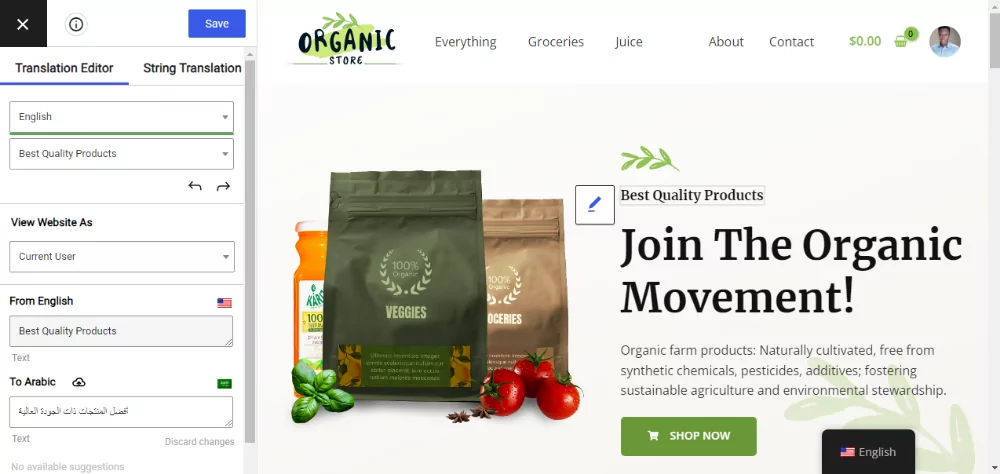
Sin embargo, no hay motivo de alarma. El TranslatePress el complemento es compatible con idiomas de derecha a izquierda (RTL) e incluye un editor de traducción visual e intuitivo que muestra cómo cambia el diseño con cada traducción.
Se ve algo así:
Sensibilidad cultural y religiosa
Los traductores novatos a menudo olvidan que la cultura influye en el idioma, dando forma a los estilos de comunicación, los modismos y el vocabulario. El árabe no es una excepción.
Los países de habla árabe tienen creencias, culturas, costumbres, tradiciones y valores inconfundibles que influyen en la interpretación y el uso del idioma.
El traductor ávido debe estar bien versado en estos contextos culturales para evitar malas interpretaciones y traducciones literales que puedan considerarse ofensivas.
Además, las regiones de habla árabe son mayoritariamente islámicas, una religión con tradiciones y valores distintos que impactan el lenguaje y las normas sociales.
Para traducir un sitio web al árabe de manera eficaz, debes prestar mucha atención a la terminología religiosa, las referencias y la etiqueta en tus traducciones.
Si no tienes el cuidado suficiente, podrías darte un tiro en el pie, ya que ciertas expresiones, temas e imágenes se consideran ofensivos o tabú en los países de habla árabe.
Para traducciones eficaces del inglés al árabe, debe actuar con discreción y respetar las sensibilidades culturales y religiosas.
Además, esfuérzate por adaptar tus traducciones a varios dialectos regionales y etnias, teniendo en cuenta que las culturas de habla árabe conceden gran importancia a la hospitalidad, el respeto y la educación.
Además, asegúrate de que tus traducciones sean inclusivas y no muestren sesgo de género ni ninguna forma imprevista de discriminación.
Esto le permite crear traducciones respetuosas y relevantes para su público objetivo árabe. También demostrará que celebra y respeta su cultura, que es exactamente lo que desea.
Dejando de lado los desafíos, pasemos ahora a cómo traducir un sitio al árabe de forma automática y manual.
Cómo traducir una página web al árabe utilizando el plugin TranslatePress
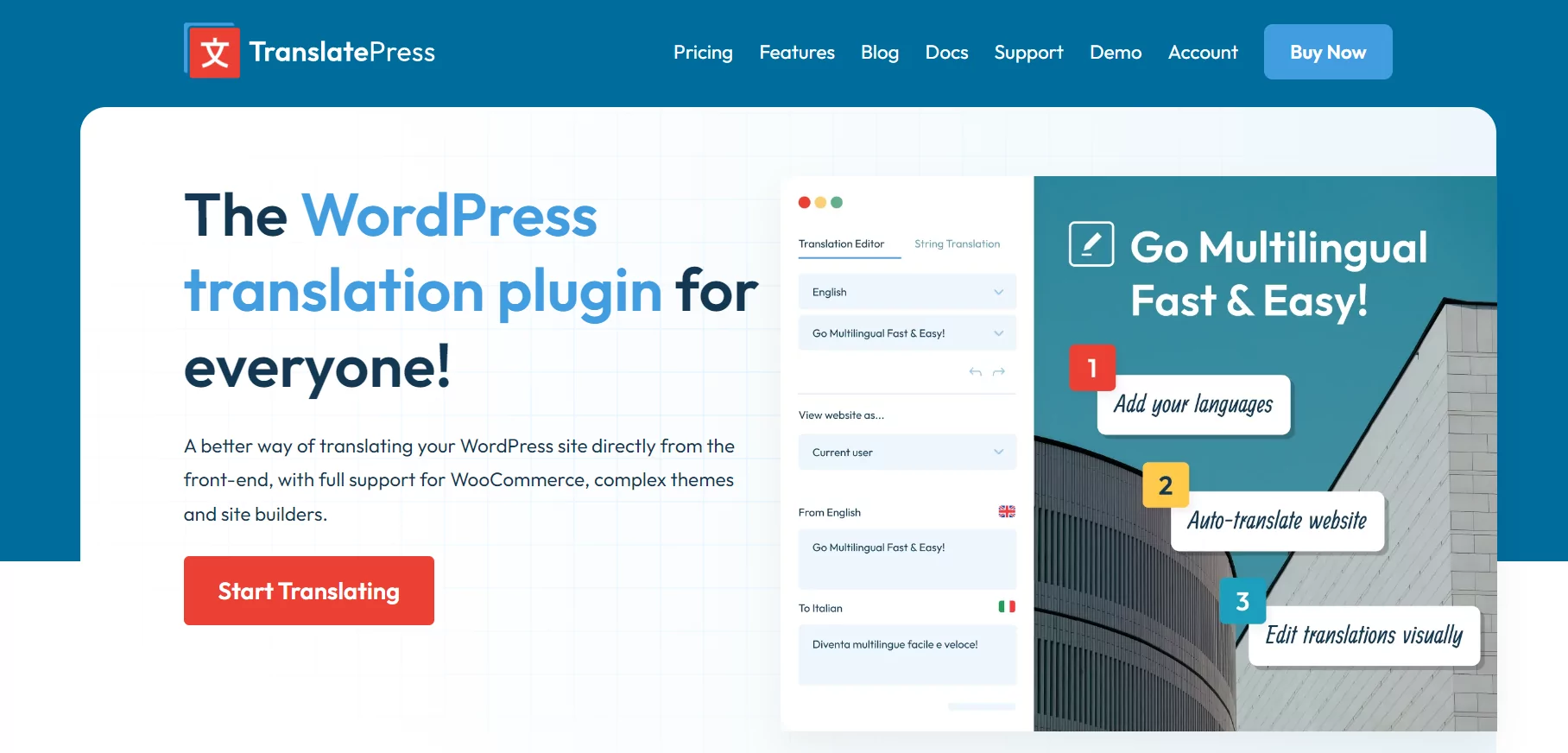
En la siguiente sección, instalaremos y configuraremos Complemento de traducción para WordPress TranslatePress traducir un sitio web al árabe, ya sea de forma automática o manual.
El proceso es tan fácil que deberías estar en marcha en unos pocos minutos. Además, te llevaré de la mano en cada paso del camino para asegurarme de que no tropieces 🙂 Asimismo, no dudes en hacer cualquier pregunta pertinente en la sección de comentarios y te responderemos con prontitud.
Empecemos por instalar el complemento TranslatePress.
Cómo instalar TranslatePress
El versión básica de TranslatePress 100% es gratuito, lo que significa que puedes instalarlo directamente desde el panel de administración de WordPress.
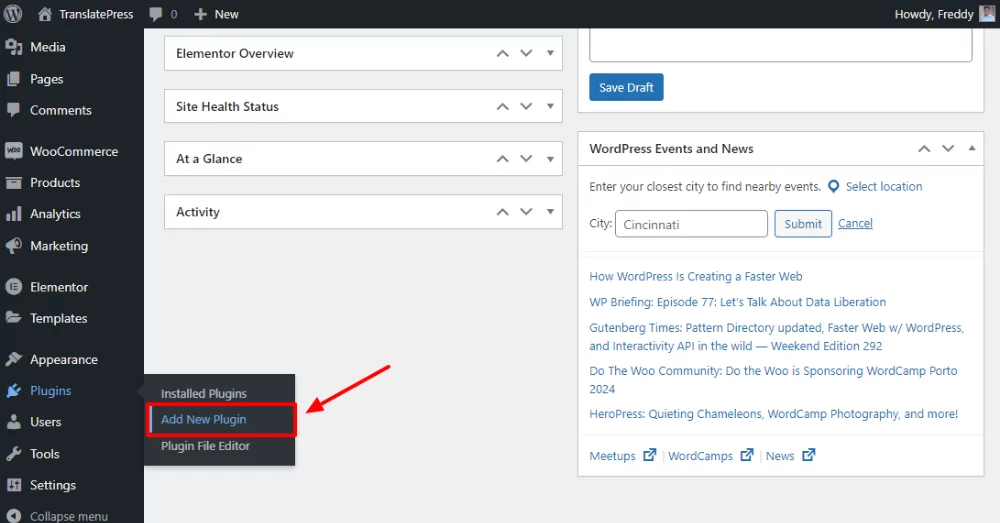
Navegar a Complementos → Añadir nuevo complemento.
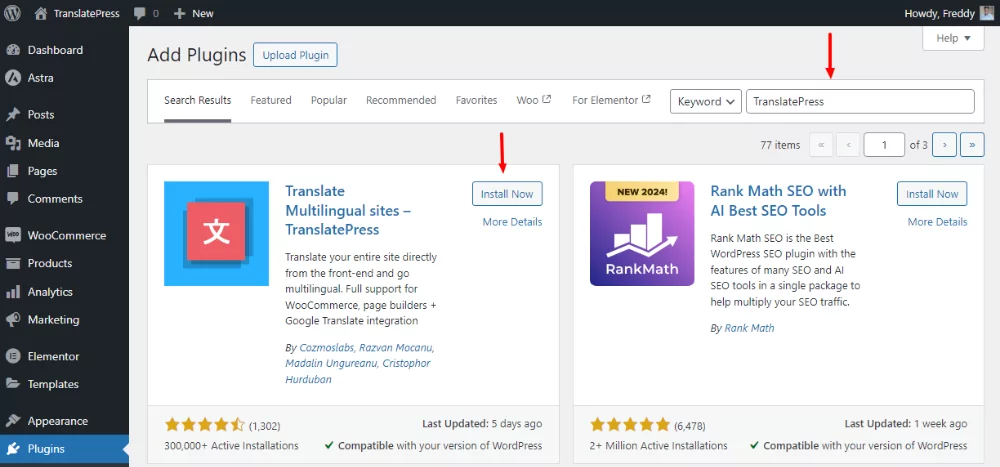
A continuación, escribe “TranslatePress” en el cuadro de búsqueda por palabra clave y pulsa la tecla Instalar ahora botón, como se muestra en la imagen de abajo.
Después de eso, Activar el complemento.
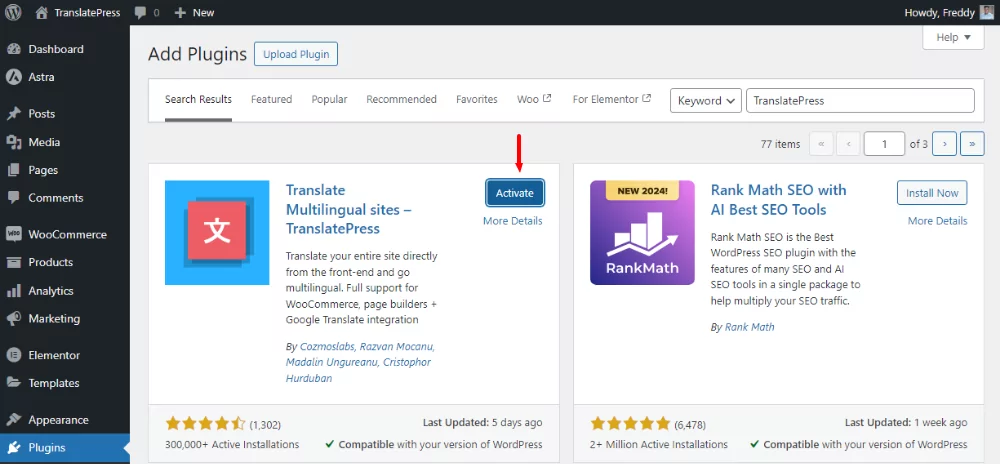
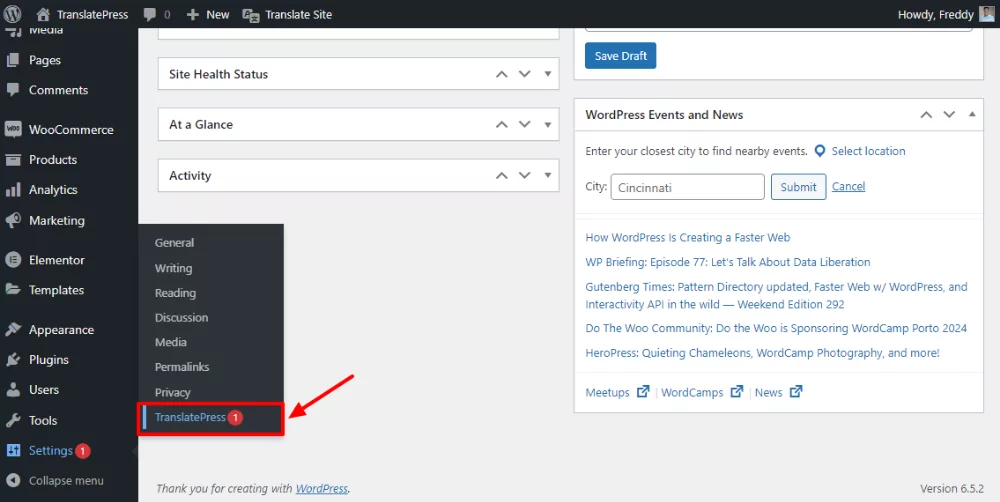
Una vez que hayas activado el plugin, es hora de configurar algunos ajustes predeterminados. Comenzaremos configurando el idioma predeterminado, es decir, el inglés, y el idioma de traducción, es decir, el árabe.
Para hacerlo, vaya a Configuración → TranslatePress, como se muestra a continuación.
Debajo de General pestaña, establezca el idioma predeterminado (el mío es inglés (Estados Unidos)) y luego elija Árabe en el Todos los idiomas sección. Siguiente clic Añadir y Guardar cambios, como se demuestra a continuación.
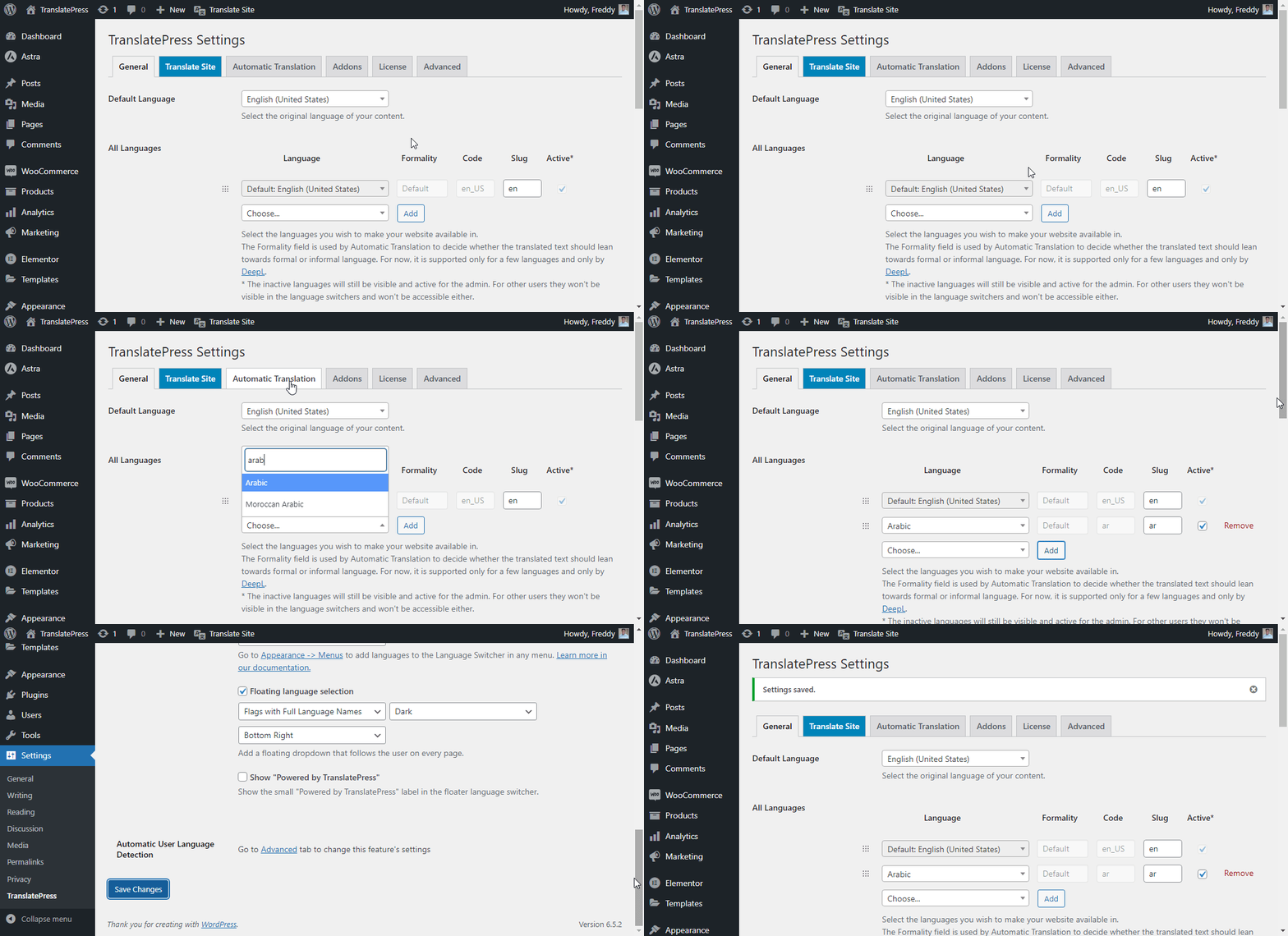
Como de costumbre, recuerda siempre guardar tus cambios.
Consejo de experto: TranslatePress Personal y otros planes de pago te permiten añadir múltiples idiomas de traducción y dialectos, como el árabe marroquí. También tienes muchas más características, como aprenderás más adelante.
No te precipites a consultar tu página web todavía. Por el momento, solo hemos instalado TranslatePress y hemos añadido nuestros idiomas preferidos. Ahora nos dejas traducir la página web al árabe, ya sea de forma automática o manual.
Cómo traducir un sitio web al árabe automáticamente
En esta sección, te mostraré cómo traducir una página web al árabe utilizando TranslatePress. El complemento admite traducciones automáticas a través de Google Traductor y DeepL.
Utilizo DeepL porque ofrece un mejor soporte para las traducciones automáticas al árabe que Google Translate. Ten en cuenta que, para utilizar DeepL, debes actualizar a la Plan de negocio de TranslatePress.
Si bien puedes traducir un sitio al árabe manualmente, o contratar a servicio de traducción profesional, la traducción automática ahorra tiempo y reduce costos.
La mejor parte es que puedes traducir un sitio al árabe gratis siempre que no excedas los límites del nivel gratuito de DeepL.
DeepL te permite traducir 500 000 caracteres al mes de forma gratuita. Eso equivale a unas 100 000 palabras al mes. Una vez que superes los límites del plan gratuito, pagarás una tarifa plana de $5,49 al mes, más $25 por cada millón de caracteres que traduzcas.
Lo bueno de TranslatePress es que solo tienes que pagar las tarifas de uso de DeepL una vez, ya que TranslatePress almacena las traducciones en tu base de datos. No es necesario traducir el contenido cada vez que visitas la página.
Vamos al grano.
Primero, necesitas genera una clave de API de DeepL. Para hacerlo, sigue la guía vinculada o mira el siguiente video.
Una vez que hayas generado tu clave API de DeepL, vuelve a la configuración de TranslatePress y haz clic en el Traducción automática pestaña, como se muestra a continuación.
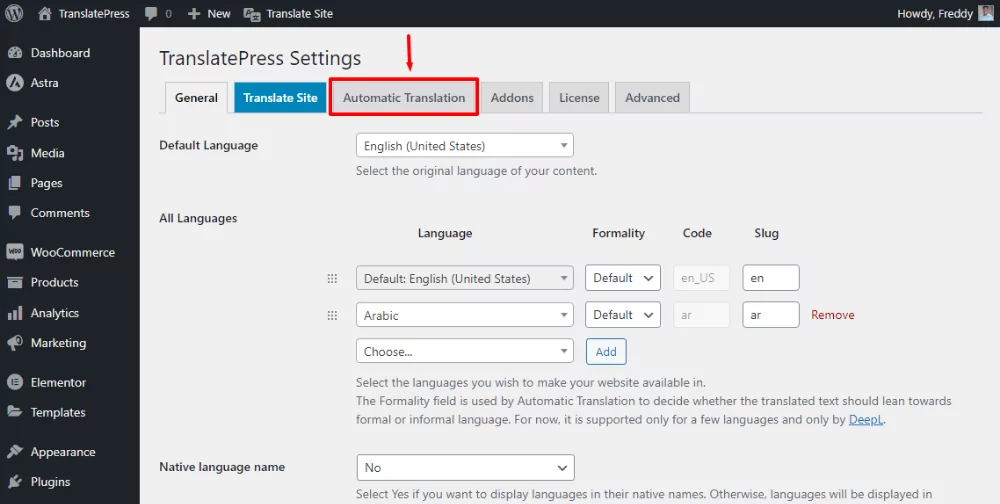
Después de eso, habilite la traducción automática, copie y pegue su clave de API de DeepL y guarde los cambios, como se resalta a continuación.
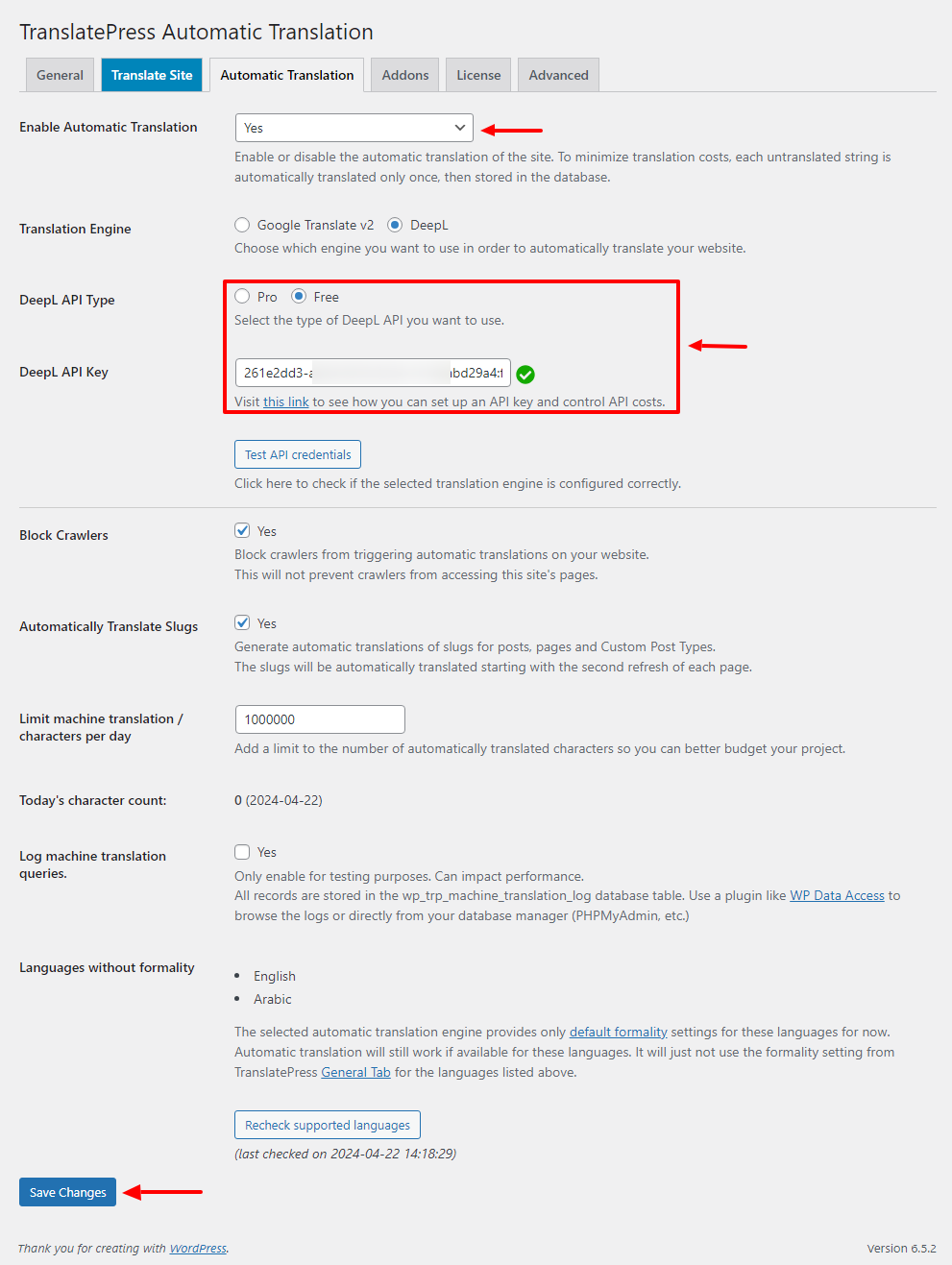
Y eso es todo lo que hay que hacer. A partir de ahí, TranslatePress se encargará de traducir tu página web al árabe en segundo plano.
Ahora, si usas el selector de idioma En la interfaz, verás la versión en árabe de tu sitio.

Eso fue tan fácil como uno, dos, tres. ¿A que sí?
Llegados a este punto, has traducido con éxito tu sitio web al árabe de forma automática. Pero como cabría esperar, una máquina no puede captar todos los matices del lenguaje humano, especialmente del árabe.
Por ejemplo, DeepL podría pasar por alto la jerga y otras frases comunes en inglés pero que carecen de equivalentes en árabe. Además, es posible que no te guste cómo traduce algunas palabras DeepL.
Aquí es donde la traducción manual entra en juego para salvar el día.
Cómo traducir manualmente una página web al árabe con TranslatePress
Aquí es donde el plugin de traducción de WordPress TranslatePress se lleva la palma. Tras activar las traducciones automáticas, puedes editar manualmente el texto traducido para pulir el resultado.
TranslatePress incluye un editor visual de traducciones que te permite editar las traducciones en la interfaz de usuario como un auténtico experto.
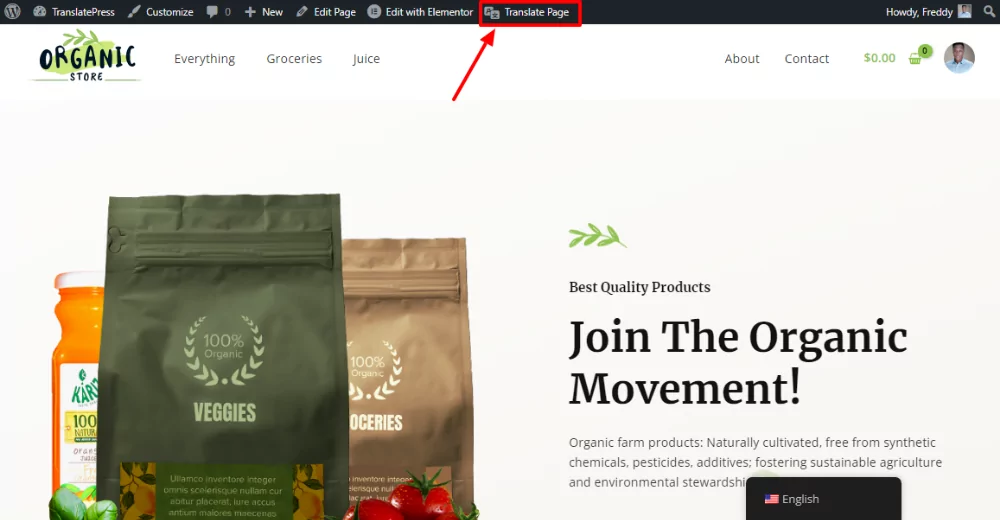
Abre la página que deseas traducir y haz clic Traducir página en la barra de administración de WordPress, como se muestra a continuación.
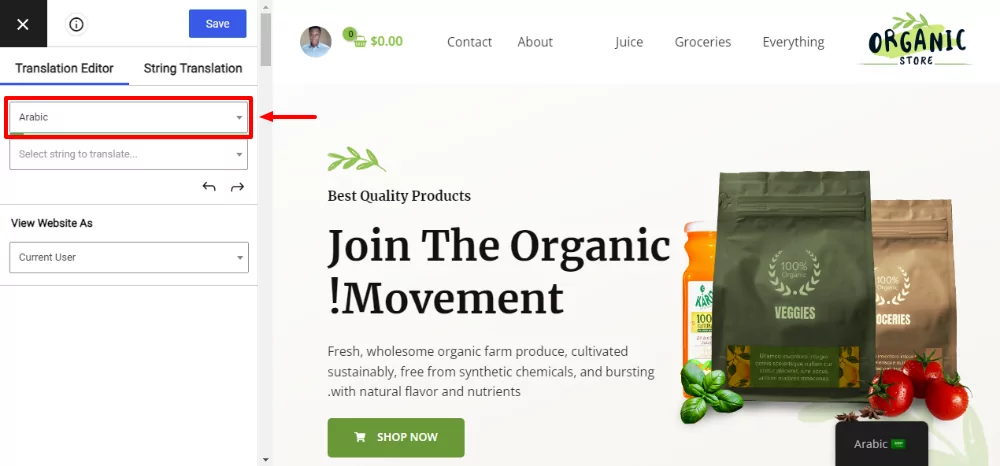
Después de eso, cambia el idioma al árabe para que puedas ver los cambios de traducción directamente en la página.
Después de eso, selecciona el texto que deseas traducir haciendo clic en el icono del lápiz. Introduce la traducción en árabe y haz clic en el Guardar botón, como se muestra a continuación.
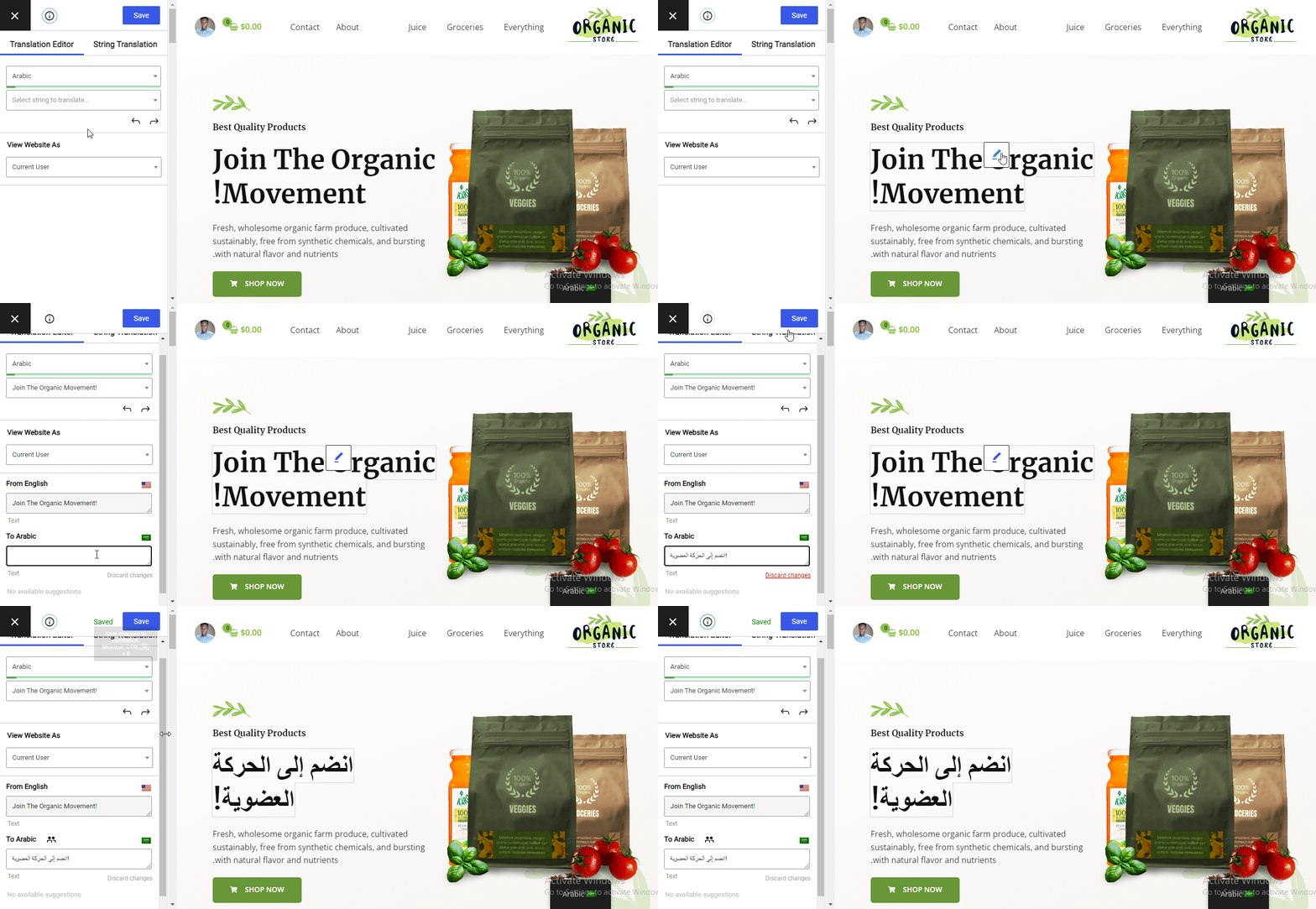
Como puedes ver, traducir manualmente una página web al árabe con TranslatePress es pan comido. Puedes traducir todo el contenido de tu página web de la misma manera. Esto incluye:
- Menús de navegación;
- Imágenes, controles deslizantes y videos;
- Correos electrónicos de WooCommerce;
- Cadenas dinámicas de temas y complementos;
- Elementos SEO y URL.
También, echa un vistazo a:
- Cómo traducir un plugin de WordPress a cualquier idioma;
- Cómo traducir un tema de WordPress: guía completa de traducción de temas.
Tenga en cuenta que algunas de estas características, como la traducción de elementos SEO, solo están disponibles en el versiones de pago de TranslatePress.
Otras características destacadas del TranslatePress Pro
Aunque la versión gratuita de TranslatePress te ofrece lo necesario para traducir una página web al árabe, la versión pro cuenta con funciones avanzadas que te permiten controlar tus traducciones por completo.
Otras características del TranslatePress Pro son:
- Compatibilidad total con Yoast SEO;
- Soporte para 221 idiomas adicionales;
- Traducir título SEO, descripciones y slug;
- Publicar solo cuando la traducción esté completa;
- Navegar como rol de usuario;
- Elementos de menú diferentes para cada idioma;
- Detección automática del idioma del usuario;
- Etc.
Puedes utilizar el mismo proceso para traducir un sitio web de cualquier idioma (no solo inglés) al árabe y viceversa.
TranslatePress Multilingüe
Ahora ya sabes cómo traducir una página web al árabe de forma rápida y precisa. Como has podido comprobar, es fácil, sobre todo con una herramienta como TranslatePress.
¿Cuáles son tus opiniones? Por favor, háznoslo saber en la sección de comentarios. Si te ha parecido útil la publicación, ¡considera compartirla para ayudar a otros!