
En esta publicación
¿Interesado en crear un sitio web multilingüe?
Internet es un lugar global, por lo que nunca ha habido un mejor momento para invertir en la creación de una experiencia multilingüe para los visitantes de tu sitio web.
En nuestra guía definitiva, cubriremos todo lo que necesitas saber sobre la configuración de un sitio multilingüe, incluyendo teoría importante y mejores prácticas, así como una guía paso a paso sobre cómo crear un sitio web multilingüe usando WordPress, la forma más popular y flexible del mundo para crear un sitio web.
Aquí está todo lo que cubriremos en nuestra guía definitiva:
- Las razones y beneficios de crear un sitio web multilingüe.
- Algunos ejemplos de sitios web multilingües de la vida real.
- Los mejores constructores de sitios web multilingües (y por qué recomendamos WordPress).
- Cuánto cuesta un sitio web multilingüe.
- Consejos para optimizar SEO multilingüe.
- Consejos para diseñar un sitio web multilingüe.
- Cómo crear un sitio web multilingüe usando WordPress: una guía detallada paso a paso.
Puedes usar los enlaces de arriba para saltar a una sección específica de nuestra guía. De lo contrario, sigue leyendo para aprender todo lo que necesitas saber sobre la creación de un sitio multilingüe.
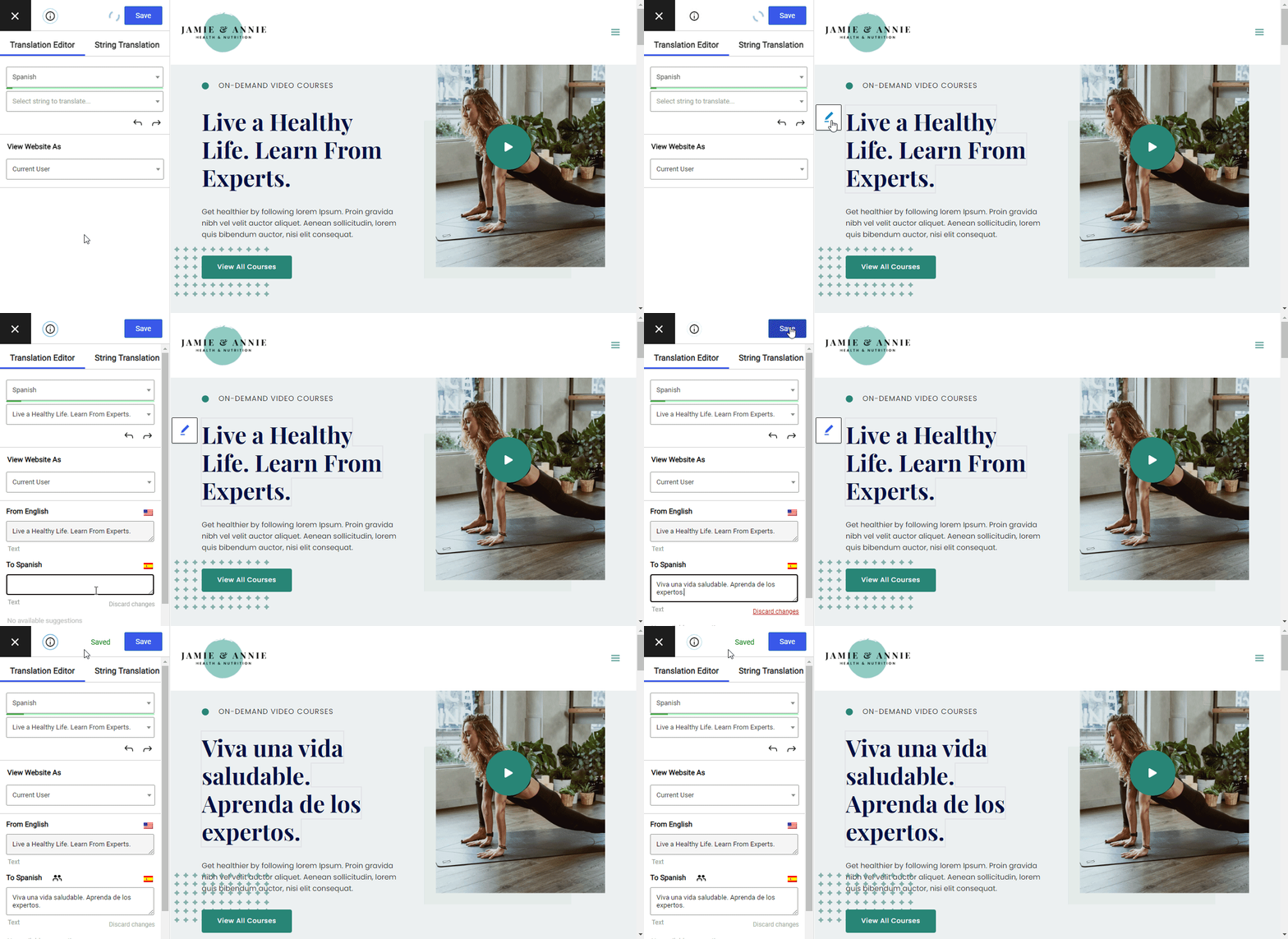
Al final de esta publicación, tendrás un sitio web multilingüe funcional que sigue las mejores prácticas clave. También podrás administrar todas las traducciones de tu sitio utilizando un editor visual sencillo como este:
¡Sigue leyendo para subir de nivel tus conocimientos multilingües!
¿Por qué crear un sitio web multilingüe?
En 2026 y más allá, vivimos en un mundo global y multilingüe. Ya sea que solo se dirija a clientes en un área, como los EE. UU. (o incluso un solo estado), o te diriges a personas de todo el mundo, es muy probable que tengas una audiencia multilingüe.
Por ejemplo, el Estimaciones de la Oficina del Censo de los EE. UU. que más de 44% de personas mayores de 5 años en California hablan un idioma distinto del inglés en casa. Así que, aunque te dirigieras a clientes de un solo estado de EE. UU., tendrías un público multilingüe.
¿Por qué es eso importante? Bueno, porque como era de esperar, la mayoría de la gente (alrededor de 90%) prefieren navegar por sitios web en su lengua materna siempre que sea posible. Muchas personas (~42%) ni siquiera se molestan en visitar un sitio web si no está disponible en su lengua materna.
Ese mismo estudio también encontró tendencias similares para comercio electrónico, donde un gran número de personas no navegarán ni comprarán en una tienda que no esté disponible en su idioma.
Así que esa es la razón número uno: crear un sitio web multilingüe te ayuda a crear una mejor experiencia para tu audiencia multilingüe.
Pero si eso no fuera suficiente, volverse multilingüe también puede ayudarte a construir una audiencia más grande en primer lugar por algunas razones:
- SEO – la gente suele buscar en Google en su idioma nativo. Por lo tanto, si tu sitio solo está en inglés, te estás perdiendo muchas búsquedas potenciales del mismo contenido en diferentes idiomas. Hacerlo multilingüe te permite empezar a clasificar esas consultas.
- Compartibilidad – ser multilingüe también permite a las personas compartir tu contenido traducido en redes sociales, lo que te da otra oportunidad de aumentar tu visibilidad.
Tres ejemplos de sitios web multilingües del mundo real
A veces, ver es creer: así que si quieres ver algunos ejemplos de sitios web multilingües del mundo real, aquí tienes algunos de los muchos sitios que han triunfado con el multilingüismo.
1. Moodle
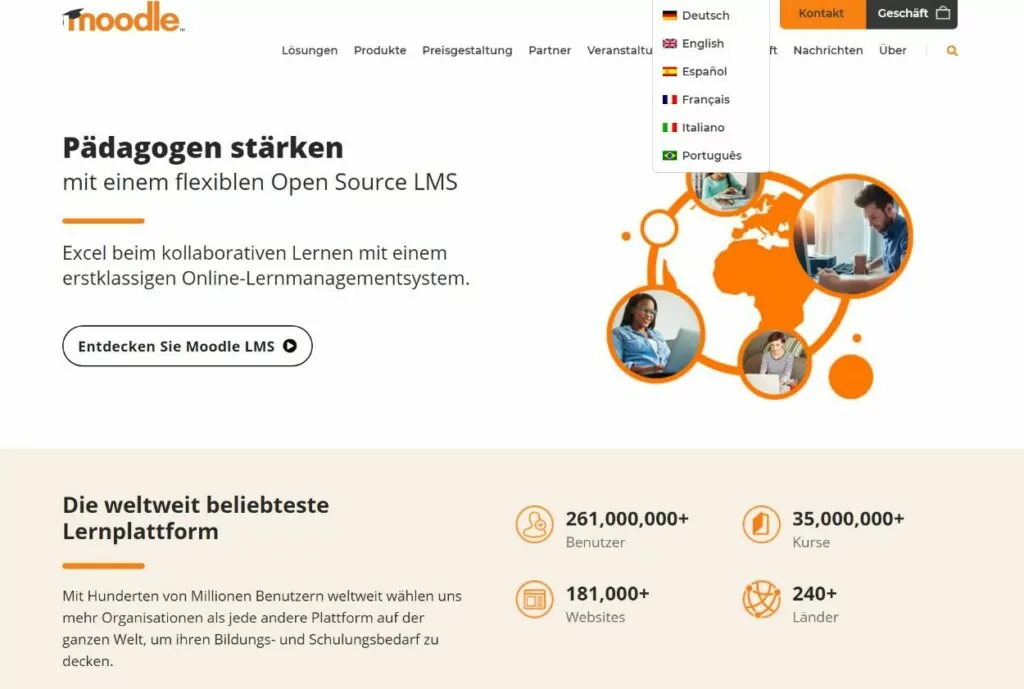
Moodle es un sistema de gestión de aprendizaje (LMS) popular que utilizan millones de personas en todo el mundo, incluidas algunas marcas muy importantes. Para llegar a personas de todo el mundo, Moodle utiliza WordPress para crear un sitio web disponible en seis idiomas diferentes:
- Inglés
- Alemán
- Español
- Francés
- Italiano
- Portugués
2. Guri
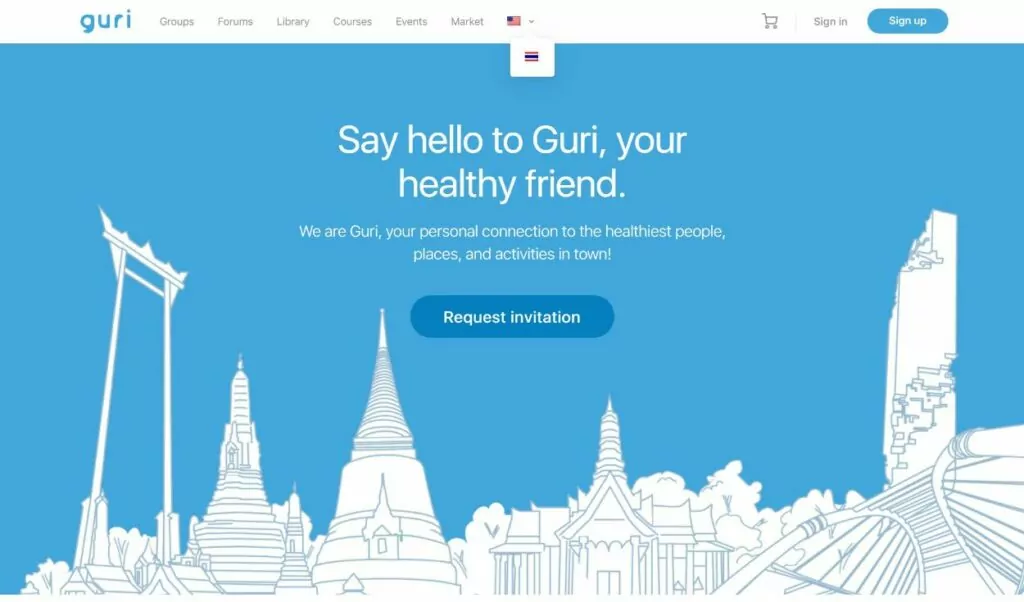
Guri es una comunidad en Bangkok, Tailandia, para fanáticos de la salud y el bienestar. Para llegar a la audiencia de expatriados, Guri ofrece su sitio web impulsado por WordPress tanto en inglés como en tailandés.
3. Torneo ESL One RIO

ESL es una liga de deportes electrónicos con torneos en todo el mundo. Para llegar a sus audiencias multilingües para su torneo de Río de Janeiro, crearon un sitio web multilingüe para el torneo impulsado por WordPress.
👉 Para más inspiración aún, consulta nuestra colección completa de ejemplos de sitios web multilingües.
¿Cuál es el mejor creador de sitios web multilingüe?
Dado que la funcionalidad multilingüe es tan importante hoy en día, la mayoría de los creadores de sitios web ofrecen ahora al menos cierto nivel de soporte multilingüe.
Sin embargo, si quieres que tu sitio web tenga éxito, es importante elegir una plataforma que te ofrezca flexibilidad a la hora de configurar el contenido traducido. Tener flexibilidad te permite optimiza tu sitio para SEO multilingüe, traduce tu contenido de la manera más óptima y rentable, optimiza el diseño de tu sitio web multilingüe, y, en general, crear una mejor experiencia multilingüe.
La flexibilidad también te permite localizar completamente tu sitio web, en lugar de solo traducir el contenido, puedes aprende más sobre localización aquí.
Si te tomas en serio la idea de ser multilingüe, te recomendamos evitar plataformas como Wix y Squarespace ya que, mientras ofrecen funcionalidad multilingüe básica, no te dan suficiente flexibilidad y son especialmente difíciles de manejar para sitios multilingües grandes. Por ejemplo, puedes lee este documento de ayuda de Squarespace para ver lo incómodo que es crear un sitio multilingüe con Squarespace.
Por qué recomendamos WordPress para sitios web multilingües
En cambio, recomendamos el gratuito, software WordPress de código abierto, lo que impulsa más de 41% de todos los sitios web en Internet, incluyendo sitios web en prácticamente todos los idiomas imaginables.
Si añades un plugin de traducción como TranslatePress a WordPress, podrás ofrecer tu sitio web en un número ilimitado de idiomas nuevos y, además, tendrás control total sobre aspectos importantes de la creación de un sitio web multilingüe, tales como:
- SEO multilingüe.
- Gestión de traducciones multilingües a través de una interfaz fácil de usar.
- Conexión a servicios de traducción automática como Google Translate y DeepL (si es necesario).
- Trabajando con traductores autónomos o servicios de traducción profesionales.
Por ejemplo, con WordPress y el complemento TranslatePress, puedes gestionar todas las traducciones de tu sitio en idiomas ilimitados utilizando un editor visual sencillo como este:
Para usar WordPress, necesitarás configurarlo por tu cuenta alojamiento web (a diferencia de un creador de sitios web). Sin embargo, la mayoría de los alojamientos web lo hacen fácil y no técnico, y el ligero aumento en la complejidad vale la pena por la mayor flexibilidad.
Una de nuestras recomendaciones habituales en cuanto a servicios de hosting es SiteGround, el punto de partida perfecto para principiantes. SiteGround es una excelente opción si recién comienzas tu aventura con WordPress, ya que viene con un asistente de instalación de WordPress fácil de usar.
Otra gran opción que recomendamos es EasyWP, el alojamiento administrado de WordPress más rápido. EasyWP es fácil de usar para principiantes, lo que te ayuda a configurar tu sitio en solo un par de minutos, y es asequible, ofreciendo planes competitivos listos para usar e incluso una prueba gratuita de 30 días.
¿Cuáles son los costos comunes de un sitio web multilingüe?
Existen dos tipos principales de costos de sitio web multilingüe que encontrarás al crear tu sitio:
- Costos técnicos. Es lo que necesitarás pagar por el software que te permite crear un sitio web y ofrecerlo en varios idiomas.
- Costes de traducción. Esto es lo que necesitarás pagar para traducir realmente tu contenido de su idioma actual a los nuevos idiomas que desees ofrecer.
Si tu presupuesto es ajustado, puedes evitar (o al menos limitar) ambos tipos de costes. Sin embargo, tendrás que hacer algunas concesiones, como traducir manualmente tu contenido o utilizar la traducción automática que ofrece el plan gratuito de Google Translate.
Claro, si quieres pagar un servicio de traducción profesional para que humanos reales traduzcan tu sitio desde cero, deberías estar preparado para invertir dinero.
Entonces, analicemos los costos con más detalle…
Costos técnicos
La parte técnica de los costos de tu sitio web multilingüe dependerá de la plataforma que estés utilizando para crearlo. Sin embargo, como recomendamos WordPress, nos centraremos en esa plataforma para nuestro análisis.
Para añadir funcionalidad multilingüe a un sitio web de WordPress, necesitarás la ayuda de un plugin de traducción de WordPress.
Para sitios sencillos, es posible que puedas usar un plugin gratuito. Por ejemplo, el versión gratuita del complemento TranslatePress te permite traducir tu sitio a un nuevo idioma. Así que si solo quieres agregar un idioma nuevo y no necesitas funciones avanzadas (como SEO multilingüe avanzado), puedes hacerlo todo gratis.
Si necesitas un plugin premium, lo bueno de los plugins de WordPress es que son tarifas únicas: solo necesitas renovar tu licencia si quieres seguir recibiendo soporte y actualizaciones.
Los plugins premium varían en precio, pero normalmente debes contar con pagar entre $80 y $200, dependiendo de las funciones que necesites.
Si aún no tienes una página web de WordPress, también tendrás que pagar un servicio de alojamiento web para poder utilizar el software de WordPress. En el caso de las páginas web pequeñas, esto puede costar tan solo ~$60 al año., pero necesitarás pagar más por sitios con más tráfico.
Costos de traducción
Los costos de traducción son más variables porque dependen de:
- El enfoque que utiliza para traducir su contenido.
- ¿Cuánto contenido tienes?.
- ¿A cuántos idiomas estás traduciendo tu contenido?.
La opción más barata es obviamente traducir todo su contenido usted mismo; su único “costo” es su propio trabajo.
Sin embargo, esta podría no ser una opción si:
- Tú no eres multilingüe.
- No tienes tiempo.
Si necesita externalizar traducciones, tiene dos opciones:
- Puedes utilizar la traducción automática de servicios como Google Translate o DeepL. Esta es la opción más barata; incluso podría ser gratuita si te mantienes dentro de los límites de los planes gratuitos de estos servicios. Google Translate te permite traducir 500 000 personajes por mes gratisaprox. ~100.000 palabras). A partir de ahí, pagarás $20 por cada millón personajes.
- Puedes pagar un servicio de traducción humana profesional. Por lo general, el precio oscila entre $0,08 y $0,12 por palabra, aunque depende del idioma y del servicio. El coste puede dispararse rápidamente si tienes mucho contenido. Otra opción es contratar a un profesional autónomo por horas.
Si quieres reducir los costes de traducción, una buena estrategia es:
- Utilice la traducción automática para generar las traducciones base de su sitio.
- Si es necesario, puedes pagar a un corrector por horas para que revise las traducciones y corrija cualquier error, lo cual te saldrá mucho más barato que pagar $0,12 por palabra para que las traduzcan desde cero.
👉 Para más, consulta nuestro análisis completo de los costos de traducción de sitios web.
Cómo optimizar el SEO de un sitio web multilingüe
Como mencionamos en las secciones introductorias, uno de los grandes beneficios de crear un sitio web multilingüe es que puedes empezar a posicionar tu contenido en varios idiomas, lo que amplía enormemente el grupo de visitantes potenciales que puedes alcanzar en motores de búsqueda como Google.
Pero para poder hacer eso, necesitas asegurarte de que estás optimizando para SEO multilingüe. Hay dos partes generales del SEO multilingüe:
- Estructura – necesitas estructurar tu contenido multilingüe de una manera que sea fácil de entender e indexar para Google. Esto incluye usar una estructura de URL optimizada, añadiendo etiquetas hreflang, crear un mapa del sitio XML multilingüe, etc.
- SEO en la página – necesitas poder detalles clave de SEO como la URL de una publicación, el título SEO y la meta descripción, etc.
Consideraciones clave para el SEO multilingüe
Debes asegurarte de que el creador de sitios web multilingüe que elijas sea capaz de implementar esas optimizaciones. Algunos de los factores de SEO más importantes a considerar incluyen los siguientes:
- Estructura de las URL – Tendrás que asegurarte de que tu contenido traducido sea indexable y utilice una estructura de URL óptima. La forma más sencilla de empezar a utilizar una estructura de URL optimizada para el SEO es colocar el contenido de cada idioma en una subcarpeta. Por ejemplo, tusitio.com/es (español), tusitio.com/de (alemán), etc.
- atributo hreflang – el atributo hreflang le indica a Google qué idioma y configuración regional utiliza cada página para que Google pueda dirigir a sus visitantes a la versión adecuada de tu sitio.
- Mapa del sitio XML multilingüe – Un mapa del sitio en formato XML ayuda a Google y a otros motores de búsqueda a rastrear tu sitio web. En el caso de un sitio web multilingüe, es importante que te asegures de que tu mapa del sitio incluya todas tus páginas traducidas y los idiomas correspondientes.
- Títulos/descripciones SEO traducidos – Asegúrate de traducir íntegramente los títulos y las descripciones SEO para optimizar el SEO on-page en todos los idiomas.
- URL slugs traducidos – asegúrate de que estás traducir completamente las slugs de las URL para optimizar el SEO y crear una mejor experiencia de usuario.
- Investigación de palabras clave multilingüe – así como investigas palabras clave en tu idioma nativo, también querrás investigar las palabras clave que la gente busca en otros idiomas.
Para obtener consejos más detallados sobre SEO para sitios web multilingües, consulta estas publicaciones:
- 👉 SEO multilingüe para sitios web de WordPress
- 👉 SEO para múltiples idiomas
- 👉 SEO para Sitios Web Multilingües: La Guía Definitiva
Consejos de Diseño de Sitios Web Multilingües
En su mayor parte, el diseño de sitios web multilingües no es muy diferente de diseñar un sitio en un solo idioma. Lo único a lo que hay que prestar atención, sin embargo, es que el espaciado puede desordenarse un poco en algunas situaciones porque el contenido traducido puede ser más largo o más corto que la versión original del contenido.
Por ejemplo, tu titular podría ocupar una línea en inglés pero dos en español; deberías asegurarte de que tu diseño pueda manejar estas diferencias sin ningún problema.
Una de las cosas buenas de usar WordPress y el complemento TranslatePress es que podrás gestionar tus traducciones desde un editor visual, de modo que puedas ver de inmediato si la versión traducida de tu contenido está causando algún problema con tu diseño.
Otro aspecto importante a tener en cuenta en el diseño es el selector de idiomas de tu sitio web, que es lo que utilizarán tus visitantes para elegir sus idiomas preferidos. Con el plugin TranslatePress, puedes colocar el selector de idiomas en diferentes zonas, como un selector flotante en la esquina inferior derecha, un elemento del menú (en el encabezado o el pie de página) y mucho más.
También puedes controlar el diseño de tu selector de idiomas. En general, nunca deberías solo muestre las banderas en su selector de idioma, ya que las banderas no son idiomas (ya que este sitio te lo recuerda). De hecho, hay quien prefiere desactivar la opción por completo, algo que TranslatePress te permite hacer.
La otra consideración es cómo mostrar el nombre del idioma. En general, deseas mostrar el nombre del idioma en ese idioma en lugar de la versión en inglés del nombre del idioma. Por ejemplo, en lugar de poner “German”, deberías poner “Deutsch” para que los hablantes de alemán puedan reconocer más fácilmente su idioma.
Volviendo al ejemplo de Moodle, puedes ver cómo incluyen el nombre de cada idioma en la traducción local. Todavía incluyen una bandera, pero el nombre deja claro con qué idioma está asociada cada bandera:
Cómo crear un sitio web multilingüe con WordPress
Ahora que ya hemos abordado muchas de las consideraciones importantes y las mejores prácticas, veamos paso a paso el proceso concreto para crear una página web multilingüe utilizando WordPress y el plugin gratuito TranslatePress, nuestra solución recomendada.
Para esta guía, lo único que asumiremos es que ya tienes un sitio web básico de WordPress funcionando en tu idioma “principal”. Luego, te mostraremos cómo traducir ese sitio a uno o más idiomas nuevos y crear una excelente experiencia multilingüe para tus visitantes.
Si necesitas ayuda para configurar tu sitio básico de WordPress, puedes sigue la guía aquí.
Una vez que tengas tu sitio web básico de WordPress, puedes seguir los pasos que se indican a continuación para empezar a ofrecerlo en varios idiomas. O, si quieres más detalles, echa un vistazo a nuestra guía completa sobre cómo crear un sitio web multilingüe en WordPress.
TranslatePress Multilingüe
1. Instala el plugin gratuito TranslatePress y selecciona los idiomas
Para empezar, instala el plugin gratuito TranslatePress de WordPress.org.
Una vez que hayas activado el plugin, ve a Configuración → TranslatePress para elegir los idiomas que deseas usar en tu sitio:
- Idioma predeterminado – el idioma en el que se encuentra actualmente el contenido de tu sitio.
- Todos los idiomas – uno o más idiomas nuevos a los que quieras traducir el contenido de tu sitio web. La versión gratuita de TranslatePress te permite añadir un nuevo idioma mientras la versión premium te permite agregar idiomas ilimitados.
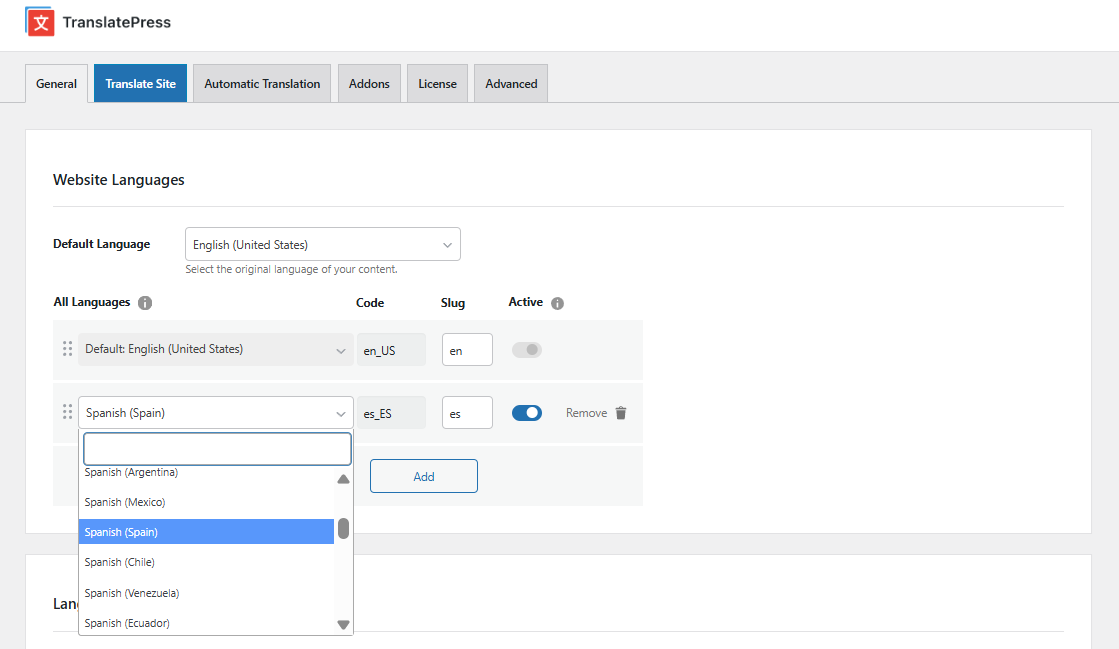
Si quieres añadir un idioma que no aparece en la lista, TranslatePress también te permite añade tus propios idiomas personalizados. Puedes añadir idiomas reales como el hmong o incluso crear tus propios idiomas divertidos y falsos, como el pirata o el klingon.
2. Configurar Traducción Automática (Opcional)
Como mencionamos en nuestra sección sobre los costos de sitios web multilingües, Usando traducción automática puede ser una excelente manera de ahorrar tiempo y reducir costos.
TranslatePress admite dos servicios de traducción automática diferentes:
- API de Traducción de Google Cloud (También conocido como Google Translate) - traducción gratuita de ~100.000 palabras por mes (500.000 caracteres). A partir de ahí, pagarás $20 por cada ~200 000 palabras (1.000.000 de caracteres).
- API de DeepL – gratuito para traducir ~100.000 palabras al mes (500.000 caracteres). A partir de ahí, puedes pagar $5,49 al mes + $25 por cada ~200 000 palabras (1.000.000 de caracteres). Algunas personas consideran que DeepL es ofrecer traducciones más precisas que Google Translate.
El uso de estos servicios es opcional (100%); también puedes añadir tus traducciones manualmente.. O, si actualizar a la versión TranslatePress Business licencia, también puedes crear cuentas de traductor especiales que facilitan el trabajo con autónomos o servicios de traducción profesionales.
Si quieres configurar la traducción automática, ve a Traducción automática pestaña de la configuración de TranslatePress y selecciona y configura el servicio que prefieras. Disponemos de guías detalladas sobre cómo configurar ambos servicios:
Google Translate está disponible en la versión gratuita de TranslatePress, mientras que tendrás que actualizar a la Business licencia para acceder a la integración de DeepL.
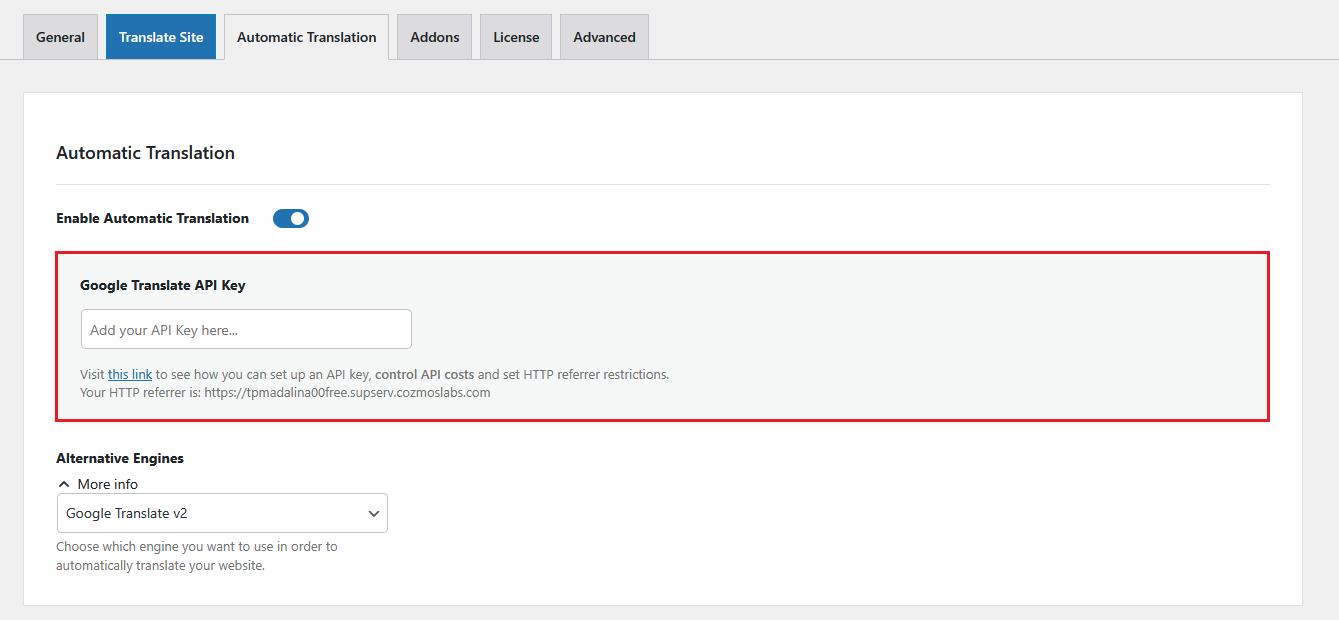
Una función muy útil que ofrece TranslatePress es la opción de establecer límites en la traducción automática, lo que puede ayudarte a controlar tu presupuesto y evitar cargos inesperados.
3. Traduce tu contenido
Ahora ya estás listo para editar manualmente tus traducciones con el editor visual de traducción de TranslatePress. Utilizarás el mismo editor tanto si has utilizado la traducción automática como si no:
- Traducción automática – las traducciones de tu sitio se completarán previamente en el editor, pero puedes editar por completo todas las traducciones si lo deseas.
- Traducción manual – el contenido traducido en el editor estará vacío y tendrás que añadirlo desde cero.
Para abrir el editor de traducción, ve a la página que deseas traducir en la interfaz pública de tu sitio web de WordPress. Luego, haz clic en el Traducir página opción en la barra de herramientas de WordPress para abrir esa página en el editor:
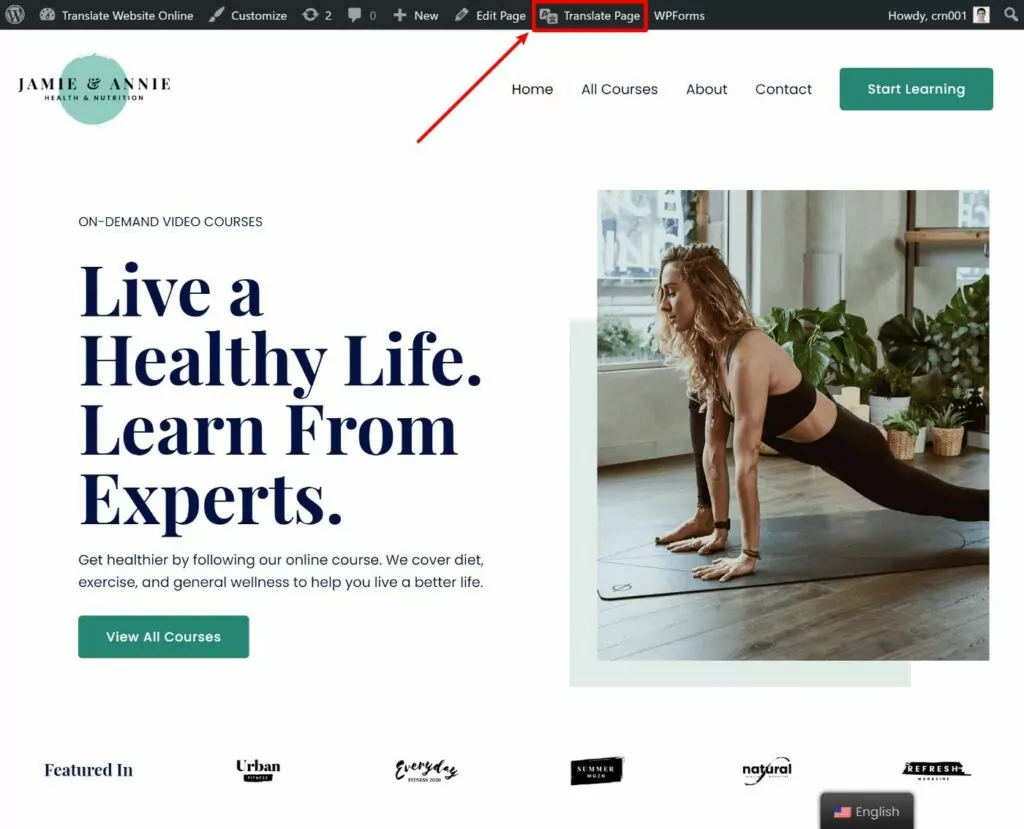
Ahora debería ver una vista previa en directo de su sitio junto con una barra lateral a la izquierda donde puede gestionar todas sus traducciones.
Para editar la traducción de una cadena de texto, todo lo que tienes que hacer es pasar el cursor sobre ella en la vista previa en vivo y hacer clic en el icono del lápiz. Eso abrirá la traducción en la barra lateral, donde puedes añadir o editar la versión traducida del texto:
Puedes usar este mismo enfoque de apuntar y hacer clic para traducir todo el contenido de tu sitio, sin importar de dónde provenga; puedes usarlo para traducir contenido del editor de WordPress, tu tema, tus complementos, etc.
Incluso puedes ir más allá del texto y “traducir” imágenes mostrando una imagen diferente según el idioma elegido por el usuario.
Cómo traducir otros tipos de contenido
Para ver ejemplos más específicos, puedes consultar todas nuestras guías sobre la traducción de diferentes tipos de contenido de WordPress:
- Imágenes
- Bloques del Editor (Gutenberg)
- Campos personalizados
- Tipos de publicaciones personalizadas
- Formularios de WordPress
- Menús de WordPress
- Contenido emergente
- Deslizadores
- Productos de WooCommerce
- Elementor (constructor de páginas)
- Divi (constructor de páginas)
- Oxígeno (creador de sitios web)
Si tú Pasarse a la versión premium de TranslatePress, también obtendrás la capacidad de detalles de SEO backend como títulos SEO, metadescripciones, todas las URL amigables de tu sitio y más.
Para activar esta habilidad, tendrás que comprar al menos el TranslatePress Personal licencia. Luego, una vez que instales y actives el complemento SEO Pack, puedes traducir los metadatos de SEO del backend desde la interfaz de traducción usando el menú desplegable:
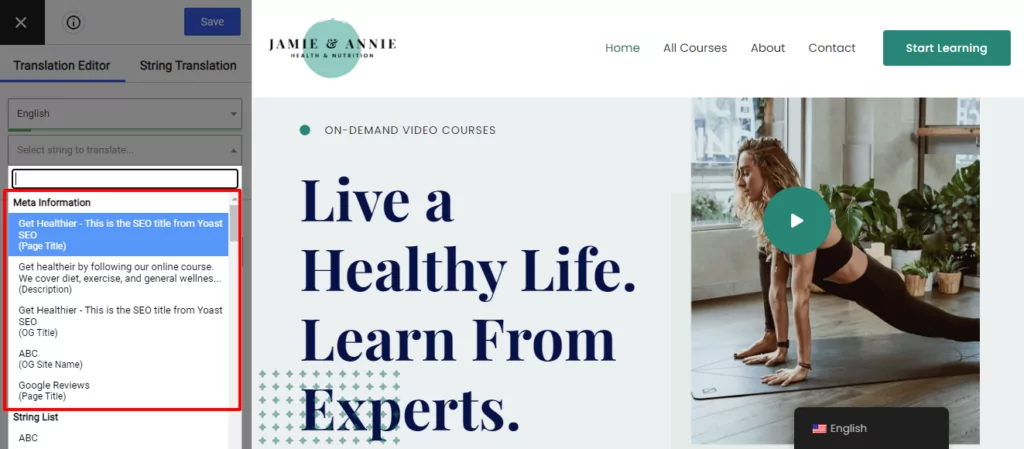
También puedes abrir la Traducción de cadenas editor (resaltado arriba) para traducir todos los slugs de URL de todo tu sitio.
4. Configura tu selector de idioma
Por defecto, TranslatePress añade un selector de idioma en la esquina inferior derecha de tu página web. Como mencionamos en la sección de consejos para el diseño de páginas web multilingües, esto es lo que tus visitantes pueden utilizar para elegir su idioma preferido.
Si prefieres colocarlo en otra sección, TranslatePress también te permite añadir el selector de idioma mediante una opción del menú de WordPress o un código corto que puedes colocar manualmente en cualquier lugar de tu sitio web (incluso en un widget de pie de página).
Si vas a Configuración → TranslatePress, también obtendrás algunas opciones para configurar aún más el diseño de tu selector de idiomas, como elegir si deseas mostrar banderas de idioma y cómo mostrar el nombre de cada idioma:
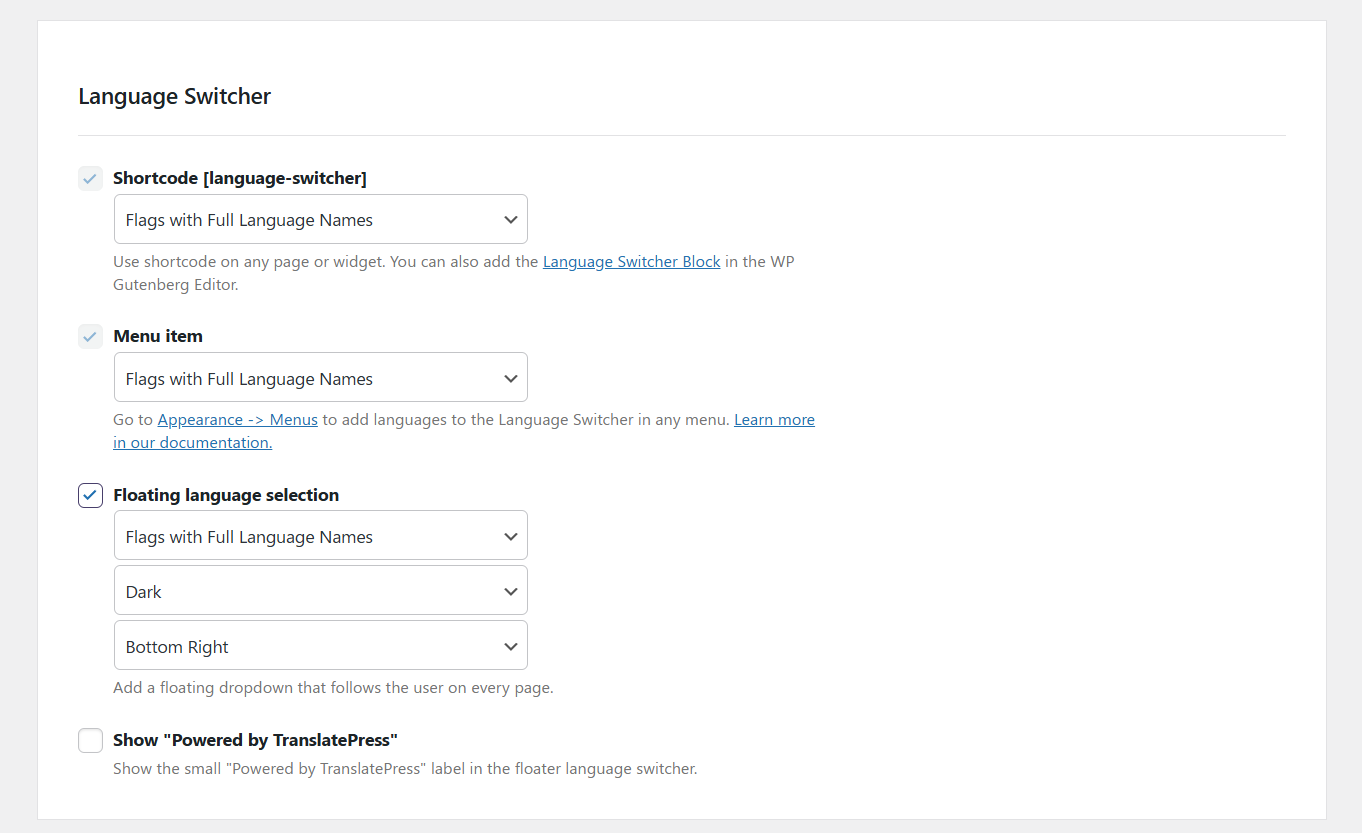
Con la versión premium de TranslatePress, también puedes redirigir automáticamente a los visitantes de tu sitio a sus idiomas preferidos.
👉 Para más información sobre este tema, consulta nuestro guía completa para añadir un selector de idioma de WordPress.
Crea Tu Sitio Web Multilingüe Hoy
Crear un sitio web multilingüe es una excelente manera de ofrecer una mejor experiencia a sus visitantes y también de llegar a más visitantes en primer lugar gracias a una mejor visibilidad en los motores de búsqueda y otros canales de tráfico.
Aunque la mayoría de los creadores de sitios web ofrecen hoy en día al menos cierto nivel de funcionalidad multilingüe, WordPress sigue siendo el mejor creador de sitios web multilingüe para la mayoría de las personas debido a su flexibilidad y asequibilidad.
Para traducir tu sitio web de WordPress a un nuevo idioma, puedes usar la versión gratuita del complemento TranslatePress. Entonces, cambiar a la versión de pago de TranslatePress para acceder a funciones más útiles como:
- Soporte para idiomas ilimitados.
- Funciones de SEO multilingüe, como la traducción de títulos y metadescripciones de SEO, mapas de sitio XML multilingües y más.
- Redirigir automáticamente a los usuarios a sus idiomas preferidos.
- Cuentas de traductores dedicadas para trabajar con traductores autónomos o servicios de traducción.
- Soporte de DeepL para traducción automática.
TranslatePress Multilingüe
¿Todavía tienes alguna pregunta sobre cómo crear un sitio multilingüe? ¡Háznoslo saber en la sección de comentarios!
Buen resumen. Sin embargo, los propietarios de sitios web comerciales deberían pensárselo dos veces antes de utilizar herramientas de traducción automática, arriesgando su imagen de marca. Podría ser mejor contratar a un traductor profesional.
Estamos totalmente de acuerdo y por eso siempre recomendamos que un hablante nativo o un traductor profesional revise cualquier traducción que se haya hecho de forma automática. Incluso recomendamos algunos servicios para ayudar con este paso del proceso de traducción en esta entrada del blog: https://translatepress.com/best-translation-companies/.