

En esta publicación
Al pensar en motores de búsqueda, el primero que probablemente te viene a la mente es Google. Se ha vuelto tan omnipresente que incluso hemos convertido su nombre en un verbo. Sin embargo, Google está lejos de ser la única opción. Hay muchos otros motores de búsqueda ahí fuera, cada uno con diferencias significativas. No obstante, lo único que todos tienen en común es que pueden enviarte tráfico si sabes cómo posicionarte en ellos.
Incluso podría ser más fácil lograr que lo hagan. Como todo el mundo se centra en Google, los demás motores de búsqueda suelen tener menos competencia con la que lidiar.
Para ayudarte a aprovechar este hecho, esta entrada de blog analizará las diferencias y características únicas de los motores de búsqueda más populares que existen actualmente. Comprender en qué se diferencian puede ayudarte a optimizar mejor tu sitio web, aumentando tu visibilidad y maximizando las oportunidades de tráfico.
¿Te parece bien? Entonces empecemos por ver quiénes son estos motores de búsqueda.
Los 5 mejores motores de búsqueda de Internet: una visión general
Para comprender mejor el panorama de los motores de búsqueda, le ofreceremos un resumen de los motores más populares disponibles en la actualidad.
Búsqueda de Google

Google es, por supuesto, el elefante en la habitación. Fue desarrollado en 1996 por Larry Page, Sergey Brin y Scott Hassan. Según Statcounter, el motor de búsqueda cuenta ahora con una cuota de mercado mundial de más de 90%. Su índice contiene cientos de miles de millones de páginas y procesa varios miles de millones de búsquedas cada día, lo que lo convierte en el sitio web más visitado del mundo.
Google es especialmente popular en EE. UU., India, Brasil, el Reino Unido y Japón. Originalmente un motor de búsqueda basado en texto, ahora ofrece muchos tipos de resultados, incluidas imágenes, videos, productos, noticias, lugares, libros y más. La plataforma popularizó el concepto de los “diez enlaces azules”. Hoy en día ofrece información más detallada en sus resultados de búsqueda gracias al Knowledge Graph y otras características de las SERP.
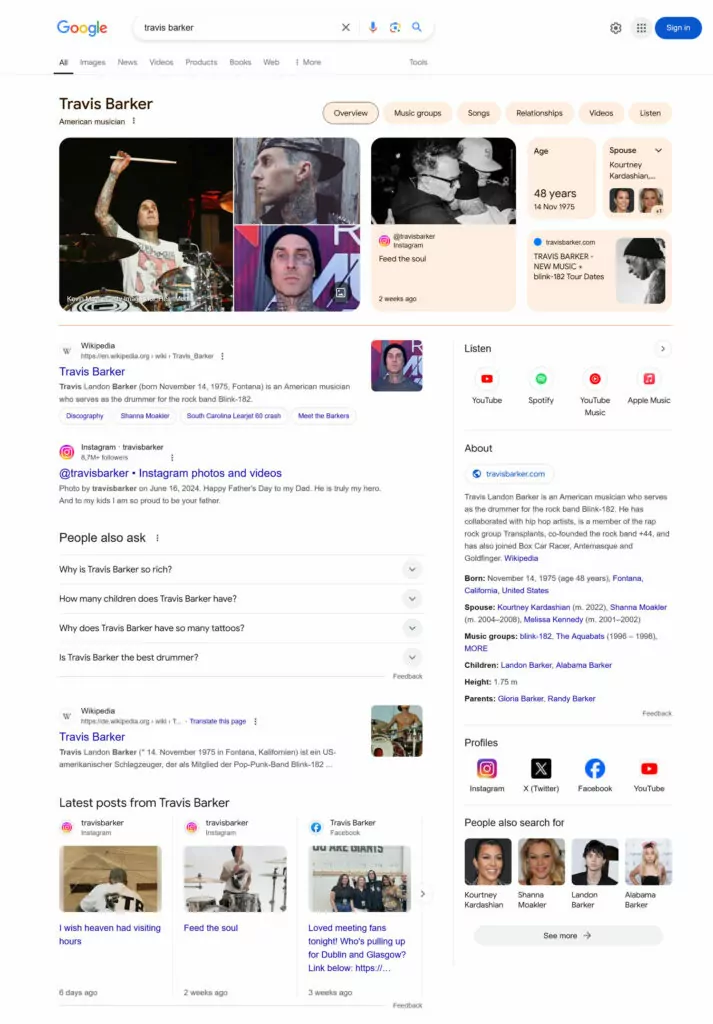
Además del buscador, Google ofrece docenas de servicios más, como Gmail, Google Maps, Google Traductor, Google Docs, YouTube y mucho más. Es el motor de búsqueda estándar para muchos navegadores, incluidos Firefox, Safari y, naturalmente, Google Chrome.
Bing

Bing es el segundo motor de búsqueda más grande del mundo. Creado por Microsoft, se lanzó por primera vez en 1998 como MSN Search. Tras varias iteraciones y cambios de nombre (Windows Live Search, Live Search), finalmente se estableció como Bing.
El motor de búsqueda funciona de forma similar a Google. Escribes tu consulta en el campo de búsqueda y obtienes los resultados en un formato que te resultará familiar.

Bing ofrece resultados de búsqueda en la web, vídeos, imágenes y mapas, y además puede text trans. Una característica única es el programa de recompensas de Bing, donde los usuarios pueden acumular puntos y canjearlos en la Tienda Microsoft.
Bing fue el primer motor de búsqueda en introducir un chatbot de inteligencia artificial. Está basado en GPT-4, se llama Microsoft Copilot y puede resumir los resultados de búsqueda para ti y más. También cuenta con un generador de imágenes de inteligencia artificial basado en DALL-E.
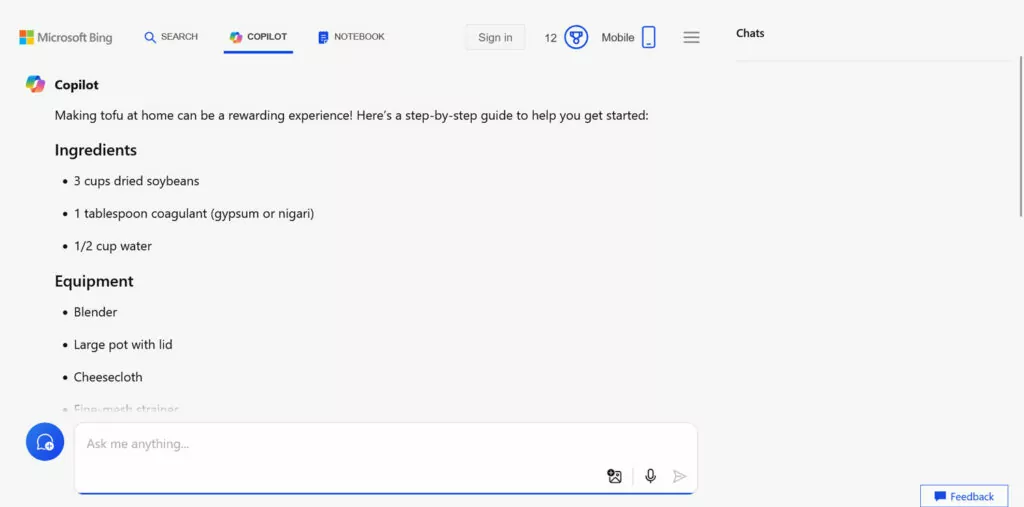
Esta fue una gran iniciativa, ya que contribuyó a que la base de usuarios de Bing superara los 100 millones de usuarios activos. Actualmente cuenta con una cuota de mercado mundial del 3,71 TP16T, con un crecimiento constante desde 2023.
Yandex
Yandex es el mayor motor de búsqueda de Rusia, donde se fundó en 1997. Allí, su cuota de mercado ronda el 70%, pero también es muy popular en países como Kazajistán, Bielorrusia y Uzbekistán. A nivel mundial, lo utilizan alrededor de 2% de usuarios.
El nombre “Yandex” significa “Yet Another Indexer” (otro indexador más) o la frase “Soy Index” en ruso. Además de los resultados de búsqueda habituales (texto, imágenes, noticias, compras, etc.), la empresa ofrece servicios como Yandex Maps y Traductor Yandex. Además, admite la búsqueda local en más de 1400 ciudades.
Naturalmente, su especialización es el procesamiento de consultas de búsqueda en ruso, que es uno de los idiomas más difíciles Lo hay. Tiene en cuenta la morfología del idioma y realiza búsquedas en varias formas de palabras automáticamente para ofrecer los mejores resultados.

Desde 2020, Yandex ha estado sometido a una mayor influencia por parte del Gobierno ruso. Se ha demostrado que el motor de búsqueda amplifica la desinformación, especialmente en lo que respecta a la guerra en Ucrania. A principios de 2024, la mayor parte de sus activos con sede en Rusia se vendieron a inversores vinculados al Kremlin, lo que otorgó al Gobierno un control aún mayor.
Búsqueda de Yahoo!

Yahoo! Search fue lanzado en 1994 por Jerry Yang y David Filo. Comenzó como un directorio web al que más tarde se le añadieron funciones de búsqueda. Por lo tanto, al principio no era un auténtico rastreador web.
A lo largo de los años, Yahoo! ha impulsado sus búsquedas con diferentes motores de búsqueda, incluidos Google, Bing, Yelp y otros, a menudo de forma simultánea. Incluso construyeron su propio rastreador web, pero lo abandonaron al cabo de un par de años. Hoy en día, los resultados de búsqueda de Yahoo! son proporcionados por Bing.

A pesar de su antigüedad, Yahoo! sigue siendo uno de los motores de búsqueda más populares, con una cuota de mercado del 1,31 TP16T. En EE. UU., esta cifra asciende al 2,51 TP16T, ¡y en Japón supera incluso el 101 TP16T!
Yahoo! tiene una interfaz bastante recargada. Te permite buscar noticias, imágenes, vídeos, productos, ofertas de empleo y mucho más. Además, está disponible en varios idiomas y sigue difuminando la línea divisoria entre un motor de búsqueda y un directorio web.
Baidu
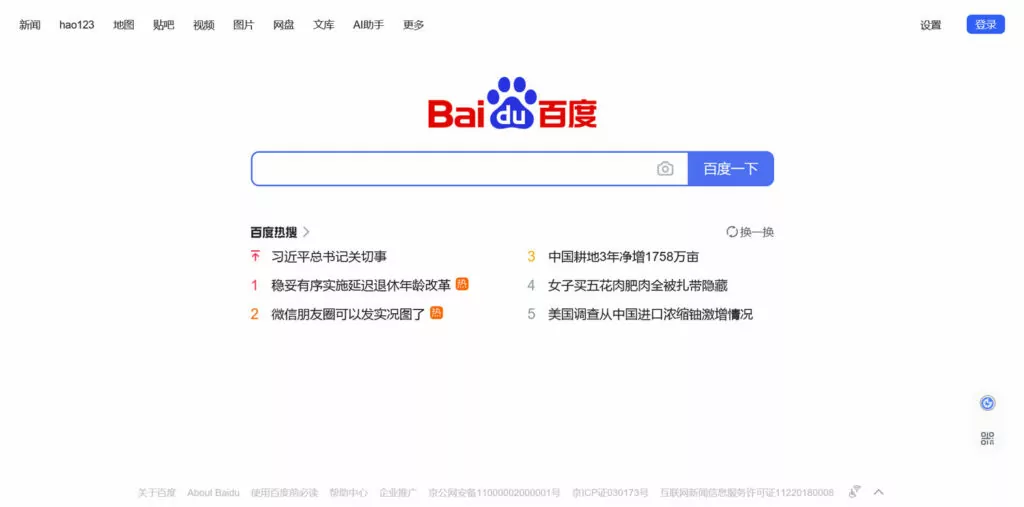
Baidu es el principal motor de búsqueda de China continental. La cuota de mercado exacta de este motor es difícil de cuantificar y... motivo de animada discusión. Según Statcounter, la cifra es de algo más de 50%, pero su conjunto de datos sobre China es muy limitado. Una fuente Según datos analíticos de sitios web del país, Baidu posee el 90% del mercado. Aunque no podemos conocer el porcentaje con certeza, todo el mundo coincide en que Baidu es el pez más grande del estanque.
Uno de los fundadores del motor de búsqueda escribió en realidad el algoritmo de clasificación que influyó en el PageRank de Google. Más tarde formó la base para la propia búsqueda de Baidu cuando la empresa fue constituida en 2000 por Robin Li y Eric Xu.
Baidu cuenta ahora con el índice más extenso de sitios web chinos. También está pensado para ser utilizado en chino, razón por la cual su interfaz solo está disponible en ese idioma.
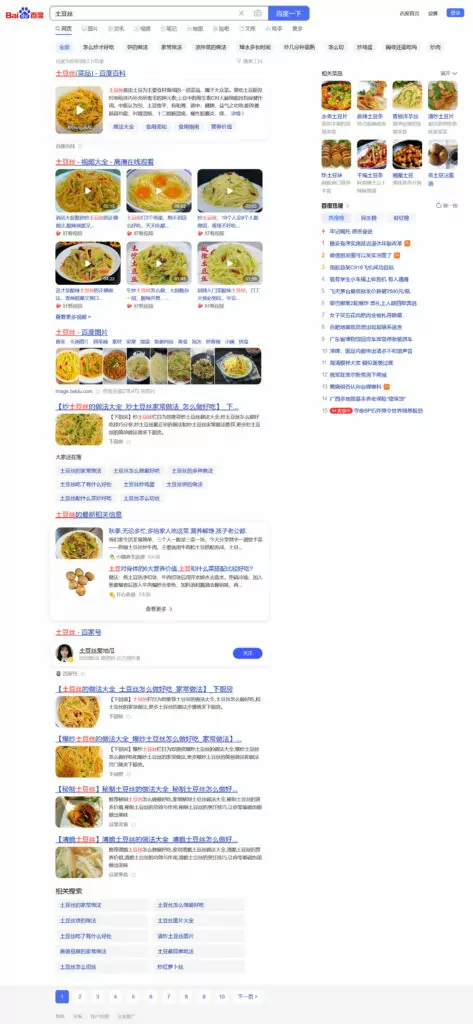
Al igual que Google, Baidu ofrece una amplia variedad de resultados de búsqueda, tales como:
- Noticias
- Acciones
- Imágenes
- Videos
- El tiempo
- Horarios de trenes y vuelos
- Mapas
También tiene muchos otros sitios web bajo su paraguas, incluido el foro Baidu Tieba, Baidu Zhidao (que es como Quora), el equivalente de Wikipedia Baidu Baike y Baidu Translate. Hay decenas más y puedes encontrar un lista más larga en Wikipedia. Al mismo tiempo, dado que Baidu tiene su sede en China, está sujeto a la censura impuesta por el gobierno.
DuckDuckGo
DuckDuckGo, lanzado en 2008 por Gabriel Weinberg, es conocido por su enfoque en la privacidad. No almacena información de los usuarios ni rastrea sus actividades. Esto ha convertido a DuckDuckGo en el motor de búsqueda predeterminado para navegadores como Linux Mint y Tor. También está disponible como opción en la mayoría de los principales navegadores.
La empresa obtiene ingresos a través de anuncios (no personalizados) y programas de afiliación. Utiliza varias fuentes de búsqueda, entre ellas Bing, Yandex, Wikipedia, Apple Maps, Wolfram Alpha y Yahoo!. En total, obtiene resultados de más de 400 canales, pero no de Google, y ofrece resultados web, imágenes, informes meteorológicos, recetas y más.
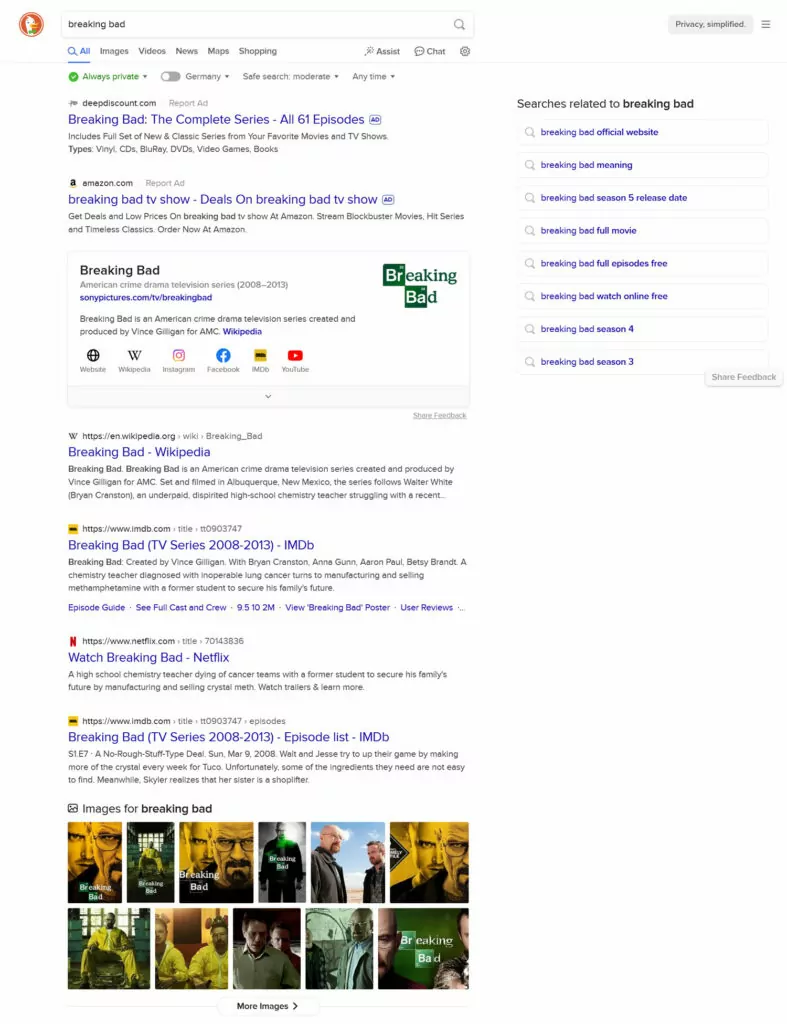
Además de eso, DuckDuckGo ha comenzado a integrar funciones de inteligencia artificial a través de OpenAI y otros servicios para obtener respuestas instantáneas dentro de sus resultados de búsqueda. También ofrece otros servicios, como correo electrónico respetuoso con la privacidad, una VPN y productos similares.
La gente parece interesada en lo que ofrece este motor de búsqueda. Según se informa, DuckDuckGo procesó más de 100 millones de búsquedas diarias y cuenta con una cuota de mercado de aproximadamente el 0,61 TP16T, con un crecimiento constante a lo largo de varios años.
Diferencias Clave Entre los Motores de Búsqueda y Cómo Optimizar para Ellos
Ahora que sabemos qué motores de búsqueda existen, hablemos de cómo optimizar su sitio web para cada uno de ellos individualmente.
Optimización de motores de búsqueda: Consejos generales
El objetivo de todos los motores de búsqueda es básicamente el mismo: ofrecer a sus usuarios los mejores resultados y más relevantes para sus consultas. Si no lo hacen, la gente dejará de usarlos, lo que significa que dejarán de ganar dinero. En consecuencia, tu objetivo es ser el mejor resultado para los usuarios con necesidades relacionadas con tu negocio o sitio web. Así es como se hace.
Mejores prácticas a seguir
- Orientar palabras clave relevantes – Averigua qué palabras clave y frases utiliza la gente para buscar lo que ofreces. Así sabrás a qué apuntar con tus páginas web.
- Crear contenido de alta calidad – Haz tu mejor esfuerzo para ofrecer lo que la gente busca con contenido relevante, atractivo y actualizado. Esto puede ser en forma de las páginas normales de tu sitio y/o publicaciones de blog. Hazlos fáciles de leer, bien estructurados y claramente formateados.
- Haz SEO en la página – Parte de la creación de contenido es asegurarse de orientar claramente su palabra clave principal. Para ello, debe aparecer en lugares importantes como el título de su página, la URL, la introducción y a lo largo de su contenido. En WordPress, un plugin de SEO hace esto mucho más fácil y también te permite personalizar información como las meta descripciones y las etiquetas de título.
- Proporcionar una gran experiencia de usuario – Asegúrate de que la gente se divierta en tu sitio web. Haz que sea agradable a la vista y fácil de usar. Presta especial atención a velocidad de carga de la página y usabilidad móvil.
- Construye y gana backlinks – Los enlaces de otros sitios web son una señal de posicionamiento positiva en prácticamente todos los motores de búsqueda. Puedes conseguir backlinks creando y compartiendo contenido de primera categoría y haciendo contactos con sitios web de tu sector.
- Regístrese en las herramientas para webmasters – Casi todos los motores de búsqueda ofrecen su propio conjunto de herramientas para webmasters. Si quieres posicionarte en un motor de búsqueda en particular, siempre es una buena idea conectar tu sitio a ellas. Te permite ver cómo el motor ve tu sitio, conocer los problemas que identifica y tener la capacidad de corregirlos. Estas herramientas también te permiten enviar mapas del sitio para informar al motor de búsqueda sobre tu contenido.
Cómo optimizar tu sitio para Google
Además de los consejos generales anteriores, existen diferencias en cómo los motores de búsqueda valoran ciertas partes del SEO. En esta parte, hablaremos de estas discrepancias y de lo que significan para su sitio web.
Empezamos con Google. Según se informa, el motor de búsqueda considera más de 250 factores al clasificar las páginas web. A continuación, se muestra a qué debe prestar especial atención.
Tenga en cuenta la indexación móvil primero
Google cambió a la indexación orientada a dispositivos móviles en 2018. Esto significa que, para determinar dónde deben aparecer tus páginas web en las búsquedas, utiliza la versión móvil de tu sitio web como base, incluso para los usuarios de ordenador.
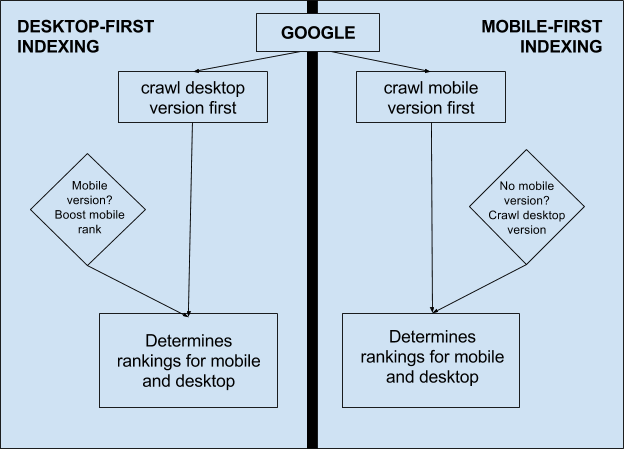
Por consiguiente, debes asegurarte de que tu experiencia de usuario móvil sea absolutamente estelar; de lo contrario, estás perjudicando el SEO de tu sitio en su conjunto. Un tema de WordPress adaptable es un buen comienzo, pero hay otros factores importantes.
Optimizar la experiencia del usuario
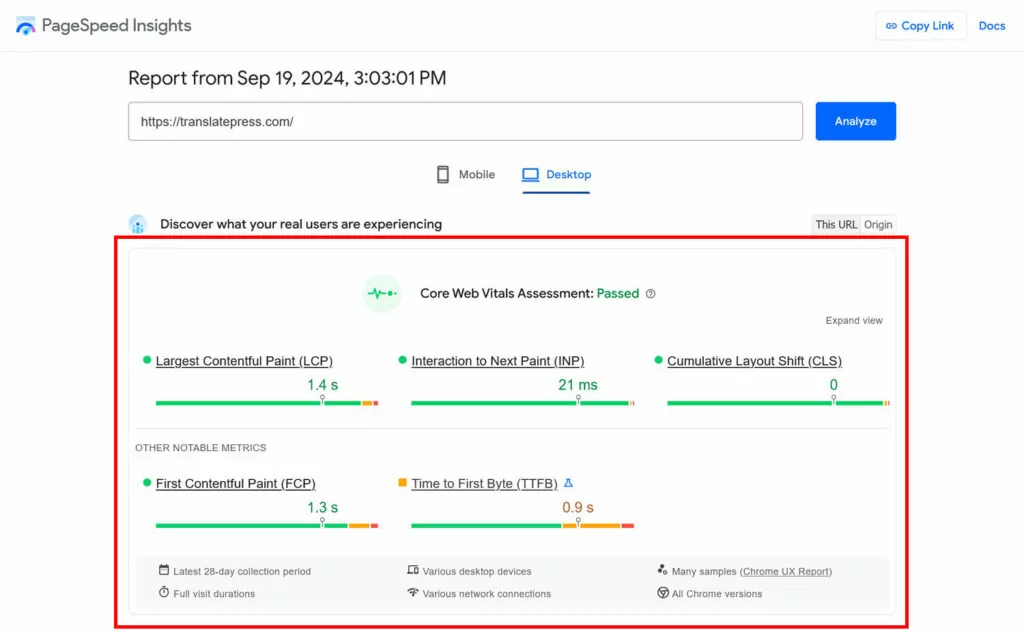
En general, a Google le importa mucho la experiencia del usuario. Tanto es así que en 2020 introdujeron sus Métricas de Core Web Vitals. Estas miden partes específicas de la experiencia de la página, en particular:
- Mayor pintura de contenido – Qué tan rápido aparece el contenido principal de una página web.
- Cambio de diseño acumulativo – La estabilidad visual de las páginas durante el proceso de carga.
- Interacción hasta la siguiente pintura – Si las páginas siguen respondiendo a la interacción del usuario mientras se cargan.
Usar PageSpeed Insights o GTmetrix para averiguar qué tan bien funcionan tus páginas en estas áreas. Estas herramientas también te darán información concreta sobre cómo mejorar los problemas de usabilidad existentes.
Preste atención a la E-E-A-T
Otra incorporación reciente a la forma en que Google clasifica los resultados de búsqueda es el concepto de E-E-A-T. Es un acrónimo que significa:
- Experiencia – Demostrar que tienes conocimientos o habilidades de primera mano relacionados con el tema.
- Experiencia – La profundidad de conocimiento que posees sobre lo que estás hablando.
- Autoridad – La autoridad general de su sitio web o contenido en la industria o área temática.
- Confianza – La fiabilidad y la integridad de su contenido y de su sitio web en general.
Si puedes demostrar todo lo anterior con tu sitio web, aumentas tus posibilidades de tener un buen rendimiento en Google. Esto se aplica especialmente a los llamados sitios web YMYL (“Tu dinero o tu vida”), cuyo contenido puede tener un grave impacto en los medios de subsistencia de los usuarios. Esto incluye sitios web sobre salud, información jurídica, financiera o de importancia similar. Puedes obtener más información al respecto en la sección de Google directrices para evaluadores de búsqueda.
Concéntrate en la intención de búsqueda
Por último, aunque las palabras clave son importantes para Google, su enfoque se centra menos en hacer coincidir palabras clave exactas con el contenido. En su lugar, el motor de búsqueda pone un mayor énfasis en ofrecer contenido que coincida con la intención de búsqueda general, como por ejemplo:
- Informativo – El buscador simplemente busca averiguar algo. Una consulta de búsqueda típica es “¿cómo aprender a tocar la guitarra?”.”
- Comercial/transaccional – Se trata de consultas de búsqueda en las que alguien busca algo específico, muy probablemente para comprar, por ejemplo, “clases de guitarra en brooklyn nueva york”.”
- Navegacional – El usuario está intentando encontrar un lugar en particular o presencia en la web, como “el centro de guitarra de jonny”.”
Aunque debes prestar atención al SEO en la página, es más importante que entiendas las necesidades de los visitantes y alinees tu contenido con ellas. Hazlo cubriendo el tema de una entrada de blog en profundidad para satisfacer la intención informativa, o haciendo que una página de tienda sea fácil de usar.
Conceptos básicos de SEO para Bing
Ahora hablemos de lo que debes hacer bien para posicionarte en el segundo motor de búsqueda más popular.
Enfatizar la participación del usuario
La interacción de los usuarios es uno de los factores más importantes en Bing. Por ejemplo, presta atención a cuántas personas hacen clic en tus páginas cuando aparecen en sus resultados de búsqueda. Para maximizar esto, asegúrate de que los títulos de tus páginas y las metadescripciones sean atractivos y dignos de hacer clic.
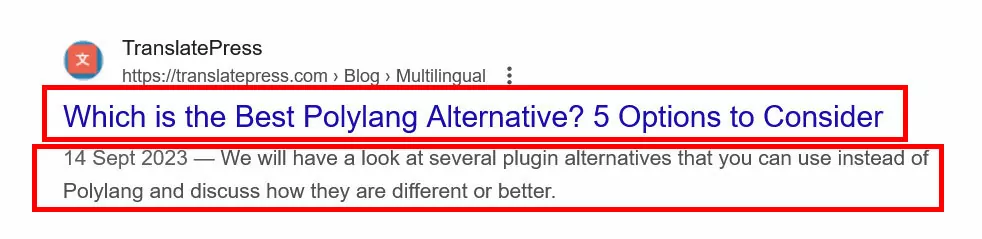
Una vez en tu sitio, haz todo lo posible para retener a los usuarios y evitar que usen el botón “atrás” de su navegador, ya que esto es una señal negativa. Por lo tanto, invierte en la velocidad del sitio, la usabilidad móvil y todos los demás factores de experiencia de usuario mencionados anteriormente.
Finalmente, Bing pone un gran énfasis en las imágenes y otros medios visuales. Incluye ejemplos relevantes de ellos en tu contenido y optimízalos.
Apuesta por la calidad de los backlinks en lugar de la cantidad
Bing afirma con bastante claridad que valoran la calidad de los enlaces a tu sitio por encima de su cantidad. Por lo tanto, tu objetivo no debe ser acumular tantos enlaces como sea posible, sino obtenerlos de sitios web de alto valor. Son particularmente codiciados los enlaces de .edu, .org, y .gov dominios. Bing también considera la antigüedad del dominio como un signo de autoridad.
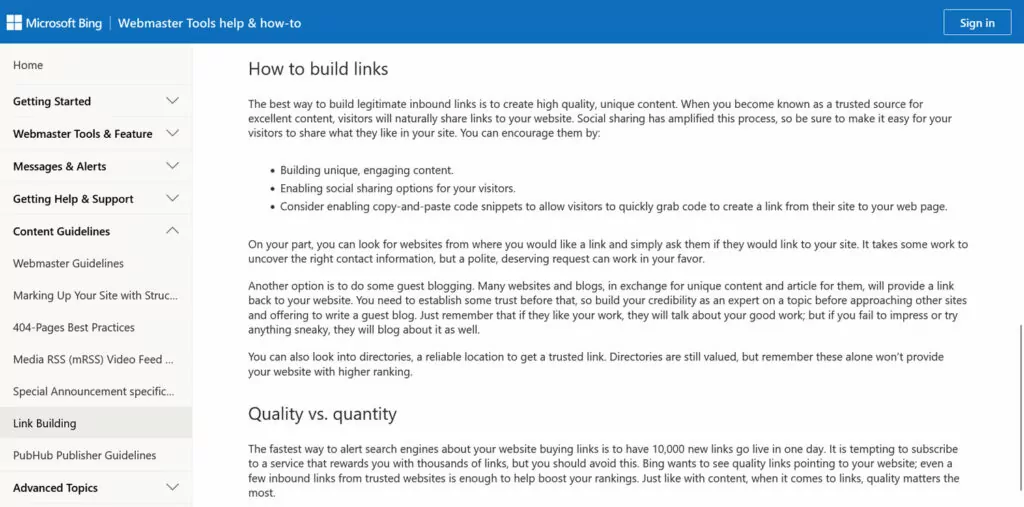
Por otro lado, no participes en tácticas turbias como el intercambio de enlaces, la compra de enlaces o esquemas similares. En su lugar, céntrate en crear contenido relevante y de autoridad que te consiga enlaces de forma natural, hacer networking con sitios conocidos en tu nicho, escribir artículos como invitado (guest blogging) y facilitar el intercambio social en tu sitio web.
Usar palabras clave exactas
El algoritmo de Bing es menos sofisticado que el de Google. En consecuencia, algunas tácticas que ya no son bien vistas en Google todavía funcionan en el motor de búsqueda de Microsoft.
Uno de ellos es el uso de palabras clave de coincidencia exacta. Si las utilizas en tus encabezados, etiquetas ALT, meta descripciones e incluso en tu nombre de dominio, es más probable que Bing te posicione mejor. Simplemente no incurras en el exceso de palabras clave (keyword stuffing) hasta el punto de que Google ya no te posicione.
Invierta en redes sociales
Las publicaciones compartidas en redes sociales tienen un impacto en cómo Bing ve tu sitio, ya que indican popularidad. Sácale provecho a eso facilitando que se comparta contenido, creando tus propios perfiles sociales y publicando regularmente tu contenido con los hashtags adecuados, entre otros.
Aprovecha las herramientas de Bing
Bing y Microsoft ofrecen varias herramientas para ayudarle a mejorar su sitio:
- Directrices para webmasters de Bing – Contienen instrucciones claras sobre cómo mejorar su sitio web y sus páginas web para que Bing los comprenda e indexe mejor.
- Herramienta de inspección de URLs – Esta parte de las herramientas para webmasters de Bing le permite ver si hay problemas de SEO con páginas específicas, para que pueda solucionarlos.
Optimización en motores de búsqueda para Yandex
Si tu plan es posicionarte bien en el motor de búsqueda favorito de Rusia, sigue los pasos a continuación.
Regístrate en Yandex Webmaster

Yandex tiene su propias herramientas de webmaster con mucha información sobre su sitio y páginas web. Incluso contiene algunos datos que otros motores de búsqueda no ofrecen.
Por un lado, Yandex utiliza un Índice de Calidad del Sitio (SQI) para juzgar cuán útil considera que es un sitio web. Esta información está disponible en Webmaster, por lo que no tienes que adivinar las deficiencias que Yandex ve en tu sitio. Esto te ayuda a tomar medidas correctivas fácilmente.
Además, el motor de búsqueda ruso muestra varias insignias en sus resultados, que indican aspectos como conexiones seguras, si un sitio es popular o diferentes tipos de empresas y servicios. Webmaster también incluye información sobre esto, como tu progreso hacia la obtención de ciertas insignias.
Por último, tendrás que registrarte en las herramientas de webmaster para búsquedas locales (ver más abajo).
Nuevamente, concéntrese en la interacción del usuario
Yandex se preocupa por la satisfacción del usuario más que otros motores de búsqueda. Realiza un seguimiento de muchas métricas para medir qué tan contentos están los usuarios con un sitio web en particular. Esto incluye las tasas de clics, el tiempo que las personas permanecen en las páginas web o cuántas páginas visitan. Por lo tanto, para tener un buen rendimiento en Yandex, asegúrate de ofrecer no solo contenido relevante, sino también una gran experiencia general. Esto incluye la compatibilidad con dispositivos móviles, que puedes probar con su herramienta de pruebas móviles.
Además, Yandex tiene algo llamado Páginas Turbo, una idea similar al AMP de Google. Estas permiten que las páginas móviles se carguen más rápido, incluso con conexiones a Internet lentas. Desafortunadamente, la documentación en inglés para las Páginas Turbo actualmente no está disponible.
Configurar la segmentación geográfica para el SEO local
Como se mencionó anteriormente, Yandex ajusta los resultados de búsqueda según la ubicación del usuario. Por lo tanto, si su sitio web ofrece algo con atractivo regional, como servicios o productos locales, debe informar al motor de búsqueda dónde se encuentra su negocio. Este es un proceso de dos pasos:
- Establece tu ubicación en Yandex Webmaster.
- Crear un listado en el Directorio empresarial de Yandex, incluidos los datos de su dirección.
Localice Su Sitio Web
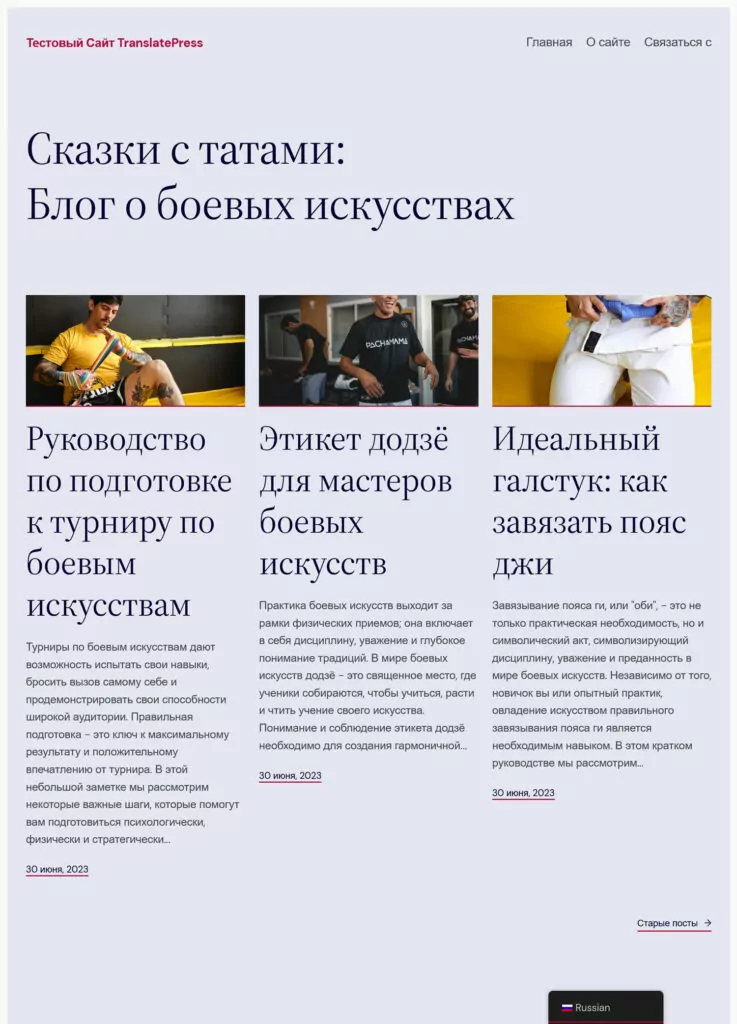
Dado que el mercado de Yandex se encuentra principalmente en Rusia, lo más probable es que te estés dirigiendo a personas que usan el idioma local. Si ese es el caso, adaptar tu sitio web al ruso es imprescindible. Si no hablas el idioma de tu audiencia, es prácticamente imposible llegar a ella.
Optimizando su sitio para Yahoo!
Mencionamos anteriormente que la búsqueda de Yahoo! funciona con Bing, por lo que todo lo que se aplica a la optimización para ese motor de búsqueda también se aplica aquí. Solo hay unos pocos cosas que Yahoo recomienda específicamente además de eso:
- Evitar texto en las imágenes – Conserva el texto relevante en HTML y proporciona etiquetas ALT para las imágenes.
- Usa JavaScript legible – Asegúrate de incluir
<noscript>Elementos HTML para todo el contenido de JavaScript para permitir que los robots de indexación y los usuarios sin JavaScript puedan leerlo.
SEO en Baidu para el mercado de búsqueda chino
A continuación, se presentan consejos de optimización para el motor de búsqueda más popular de China.
Aloja tu sitio web en China o cerca
Para agilizar los tiempos de carga, se recomienda alojar tu sitio web localmente en China. Dado que eso no siempre es fácil (se necesita un registro mercantil y una licencia locales), la siguiente mejor opción es ubicarlo en una región cercana, como Hong Kong, Singapur o Corea del Sur. Lo mismo ocurre con los recursos de terceros, como jQuery, las fuentes, etc. Cárgalos desde servidores chinos o alójalos localmente en tu página web.
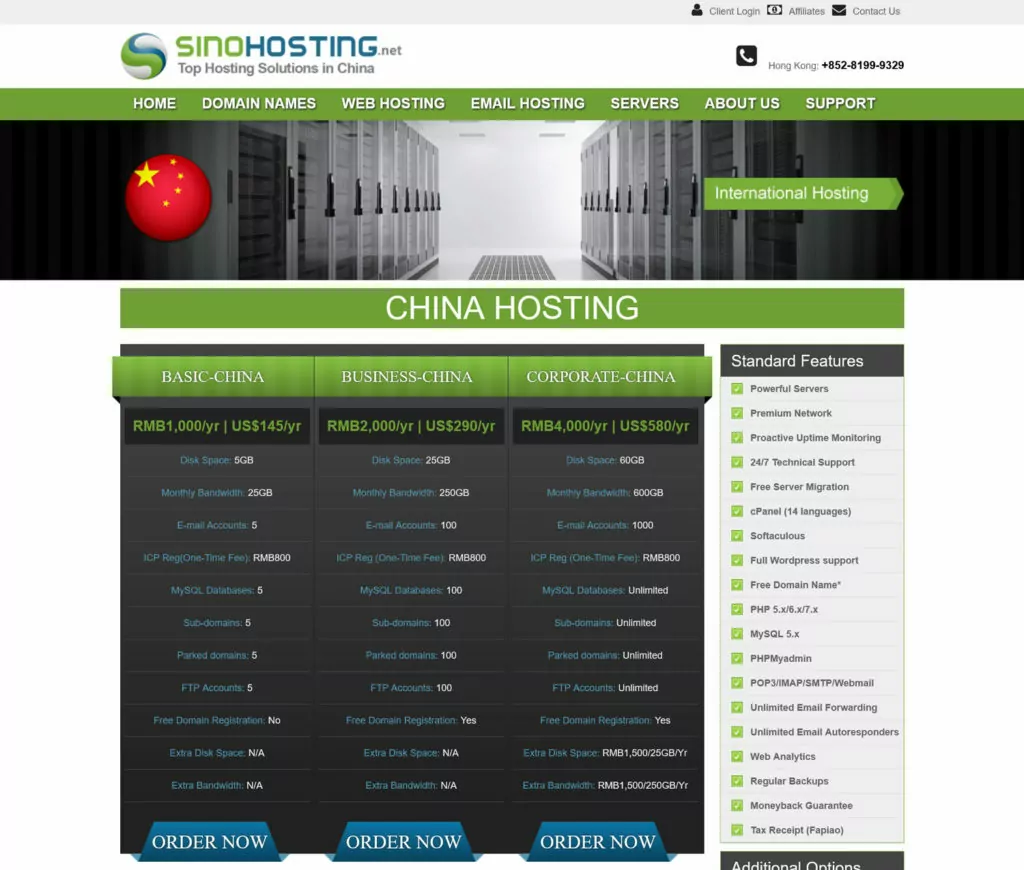
Localice Su Sitio Web
Además de eso, necesitas adaptar tu sitio a los usuarios chinos. Eso significa:
- Traduce tu sitio web– Si estás intentando adentrarte en el mercado chino, tener tu sitio web en el idioma local es imprescindible. Debido a las diferencias culturales, esto va más allá de una simple traducción. Investiga transcreación, especialmente para los eslóganes de marketing. De lo contrario, corres el riesgo de caer víctima de malas traducciones al chino También, usa chino simplificado para China continental.
- Evitar servicios bloqueados – No utilices servicios que no estén disponibles en China. Esto ralentizará tu sitio y causará problemas de diseño cuando ciertos módulos (como un widget de Facebook) no se carguen.
- Use letras romanas en las URL – En lugar de utilizar caracteres chinos en los enlaces de tu sitio web, opta por el alfabeto latino y utiliza pinyin (transcripción fonética del chino) o inglés.
Baidu parece preferir que la versión china de su sitio web esté lo más aislada posible de otros idiomas. No quiere que los visitantes aterricen accidentalmente en versiones en diferentes idiomas y arruinen su experiencia.
Por lo tanto, use un subdominio en lugar de subcarpeta Estructura de URL para sus versiones de idioma. Además, considere obtener una extensión de dominio chino .cn o .com.cn. Si bien esto puede no proporcionar un impulso en la clasificación, puede transmitir confianza a los visitantes chinos. También podría valer la pena considerar un sitio web separado con su propio dominio exclusivamente para el mercado chino. Como mínimo, asegúrese de que su página de inicio esté en chino.
Además, la localización implica cumplir con las leyes chinas relativas al contenido en línea, la protección de datos y el marketing digital.
Céntrate en la compatibilidad con dispositivos móviles
China es un país centrado en los dispositivos móviles, y la mayor parte de las experiencias de Internet ocurren en los teléfonos inteligentes. Baidu incluso tiene una dirección móvil separada (m.baidu.com) para consultas móviles. Por lo tanto, es obligatorio que tu sitio web se vea genial en todos los tamaños de pantalla. Baidu tiene la capacidad de “forzar” una vista móvil de páginas no optimizadas, pero el resultado no siempre es algo que querrías que los visitantes asocien con tu negocio.
Esté presente en otros servicios de Baidu
Baidu no es solo un motor de búsqueda; también ofrece muchos otros servicios. Además, la Búsqueda de Baidu tiende a dar preferencia a los resultados de sus propios servicios.
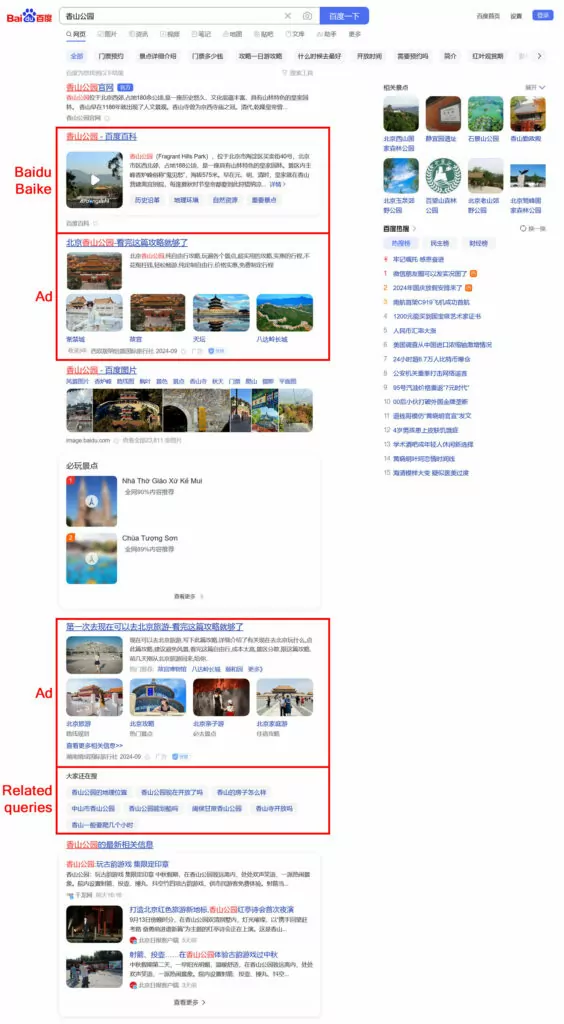
Por consiguiente, si desea posicionarse bien, no solo debe tener su propio sitio web, sino también participar en el ecosistema más amplio de Baidu. Esto aumenta sus posibilidades de aparecer en los resultados de búsqueda normales.
Infórmate sobre qué otros servicios de Baidu tiene sentido que utilices, regístrate y mantente activo en ellos. Muchos de ellos se basan en contenido generado por el usuario y contribuir puede ayudar a aumentar la popularidad de tu marca y atraer lectores de vuelta a tu negocio o sitio web.
Haz una gran investigación de palabras clave
Debido a la preferencia de Baidu por sus propios servicios y por otros grandes actores en el mercado chino, posicionarse para consultas de alto volumen puede ser difícil. Por lo tanto, es importante hacer investigación de palabras clave y céntrate en las palabras clave de cola larga. Debido a cómo funciona el idioma chino y a la gran cantidad de personas, existen más que en otros motores de búsqueda.
Para cada una de tus páginas, intenta encontrar varias frases de varias palabras e inclúyelas en el contenido para mejorar tus posibilidades de posicionamiento.
Practica el SEO de la vieja escuela
Las tácticas más antiguas de optimización en la página todavía funcionan en Baidu. Estas incluyen:
- Uso de palabras clave exactas en todos los lugares habituales (título, metadescripción, encabezados, etiquetas ALT).
- Mantener una densidad de palabras clave relativamente alta (6-10%).
- Evitando Flash, JavaScript e iframes, ya que Baidu tiene dificultades para leerlos.
- Colocar tu contenido más importante hacia la parte superior de la página, ya que las arañas de Baidu a menudo solo cargan los primeros kilobytes de una página.
- Adquisición de enlaces, especialmente de sitios web oficiales (por ejemplo, periódicos, entidades gubernamentales). Los enlaces de sitios web chinos son más valiosos que los extranjeros.
Baidu también se preocupa por la frecuencia de actualización de su contenido, así que tenga una estrategia establecida para publicar contenido relevante con regularidad.
SEO en DuckDuckGo
Por último, veamos cómo optimizar tu sitio para DuckDuckGo y las diferencias que este motor de búsqueda aporta.
Ten en cuenta la búsqueda local
Como se mencionó anteriormente, DuckDuckGo no rastrea a los usuarios, incluidas sus ubicaciones. Si bien eso es excelente para la privacidad, complica el SEO local. ¿Cómo se le puede mostrar a alguien “restaurantes chinos cerca de mí” cuando no se sabe dónde está la persona?
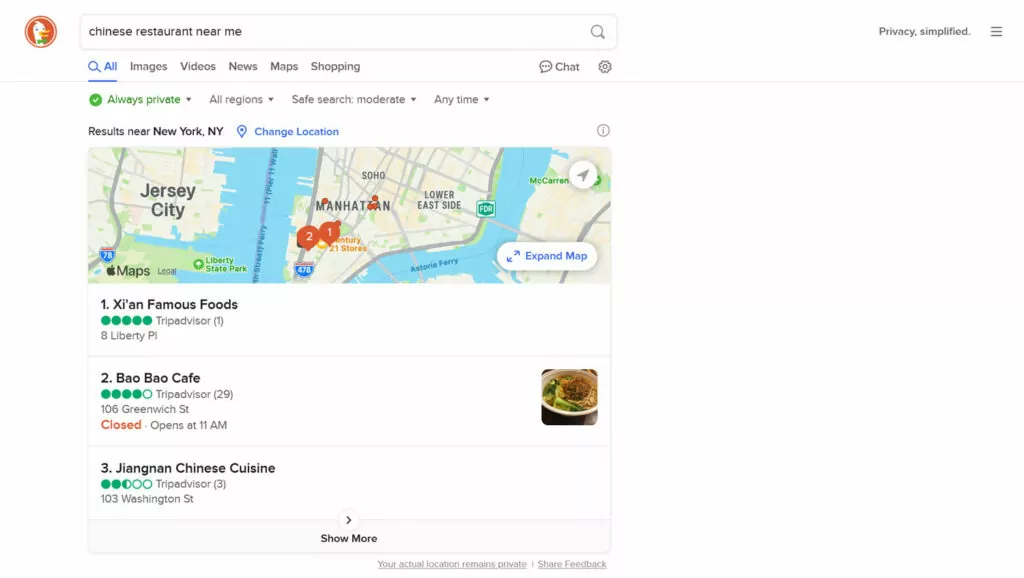
Por esa razón, si dependes de consultas de búsqueda local, asegúrate de dejar claro qué significa exactamente “local” en este caso. Incluye tu ciudad, barrio, puntos de referencia importantes o marcadores similares en tu contenido para que DuckDuckGo pueda detectarlos para las consultas locales adecuadas.
Además, el motor de búsqueda extrae información de empresas y mapas de Apple Maps. Por lo tanto, para aparecer en las búsquedas locales, asegúrate de reclamar tu negocio allí y completar toda la información necesaria.
Establece tu presencia en muchos lugares
DuckDuckGo recopila información de numerosas fuentes. Para aumentar tus posibilidades de aparecer en los resultados de búsqueda, asegúrate de estar presente en plataformas como Bing, Yahoo y otras de las que extrae datos. Simplemente puedes seguir los consejos que proporcionamos anteriormente.
Optimiza tu sitio web para diferentes motores de búsqueda con TranslatePress
Cuando intentas posicionarte en diferentes motores de búsqueda o en sus versiones locales, debes traducir y adaptar localmente tu sitio web. Esto es especialmente cierto en el caso de los motores de búsqueda que se centran en una localidad en particular, como Yandex o Baidu. Aquí, la traducción y la localización deben formar parte de tu Estrategia de SEO internacional.
Así es como TranslatePress puedo ayudar con eso.
1. Agregue fácilmente cualquier idioma que necesite
Después instalando el plugin, para agregar uno o más idiomas, todo lo que tiene que hacer es ir a Configuración → General. Elige tu idioma predeterminado en la parte superior, luego usa el menú desplegable debajo Todos los idiomas para seleccionar su(s) idioma(s) de destino y hacer clic Añadir.
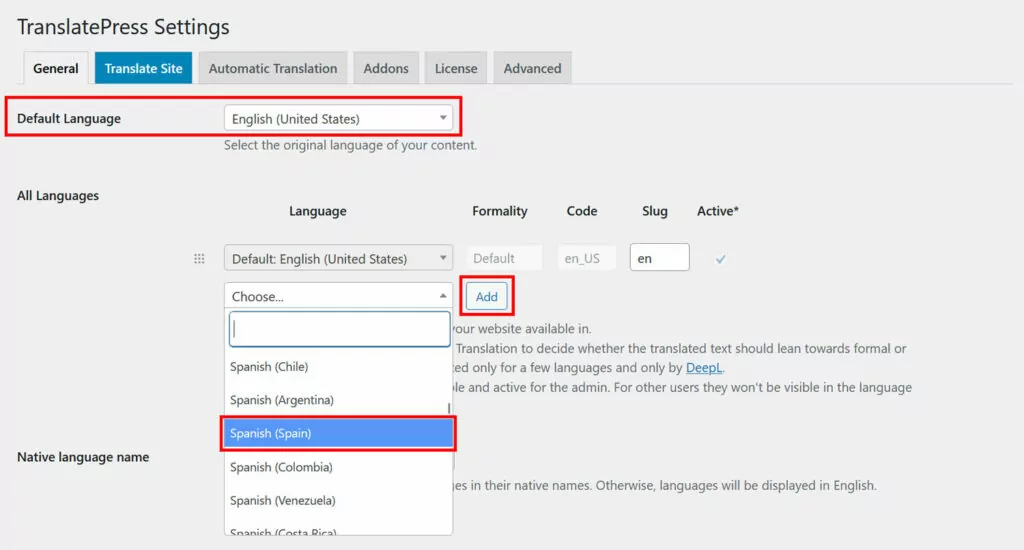
Eso es prácticamente todo. Incluso puedes elegir diferentes dialectos locales como el español mexicano o el alemán suizo. Guarda en la parte inferior cuando estés listo.
2. Traduce tu contenido con IA
TranslatePress ofrece varias formas de traducir el contenido de tu página web. El método que requiere menos intervención por tu parte es utilizar TranslatePress AI.
Ve Traducción automática pestaña y cambia el menú desplegable debajo Activar Traducción Automática a Sí, luego guarde en la parte inferior.
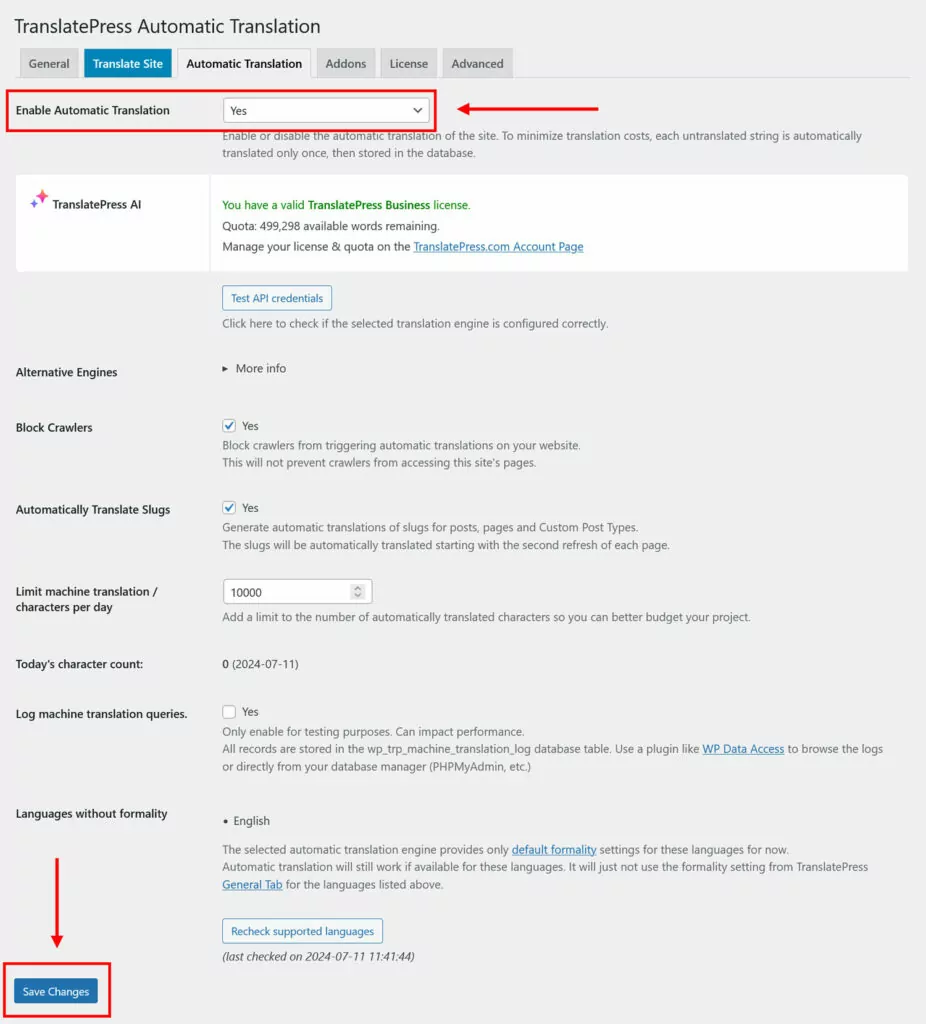
A partir de ahora, TranslatePress convertirá automáticamente tu página web al idioma o idiomas de destino. Podrás verlo de inmediato cuando accedas a la interfaz pública de tu sitio y utilices el selector de idioma.

Esto funciona no solo para tus entradas y páginas, sino también para menús, widgets, temas, plugins e incluso metadatos SEO. Ten en cuenta, sin embargo, que necesitas un Licencia TranslatePress y créditos de IA para que esto funcione.
3. Google Translate y DeepL también son una opción
Aunque no tengas una licencia TranslatePress ni créditos de IA, también puedes seguir utilizando traducción automática. Todavía en Traducciones automáticas, en Motores Alternativos, elegir Google Traductor (si tienes una licencia TranslatePress, DeepL también está disponible).

A continuación, obtén una clave API utilizando esto Guía para Google Translate o esta es para DeepL. Una vez hecho esto, funciona igual que TranslatePress AI. Cuando visites tu página web en el navegador, verás que está traducida a los idiomas adicionales que hayas elegido.
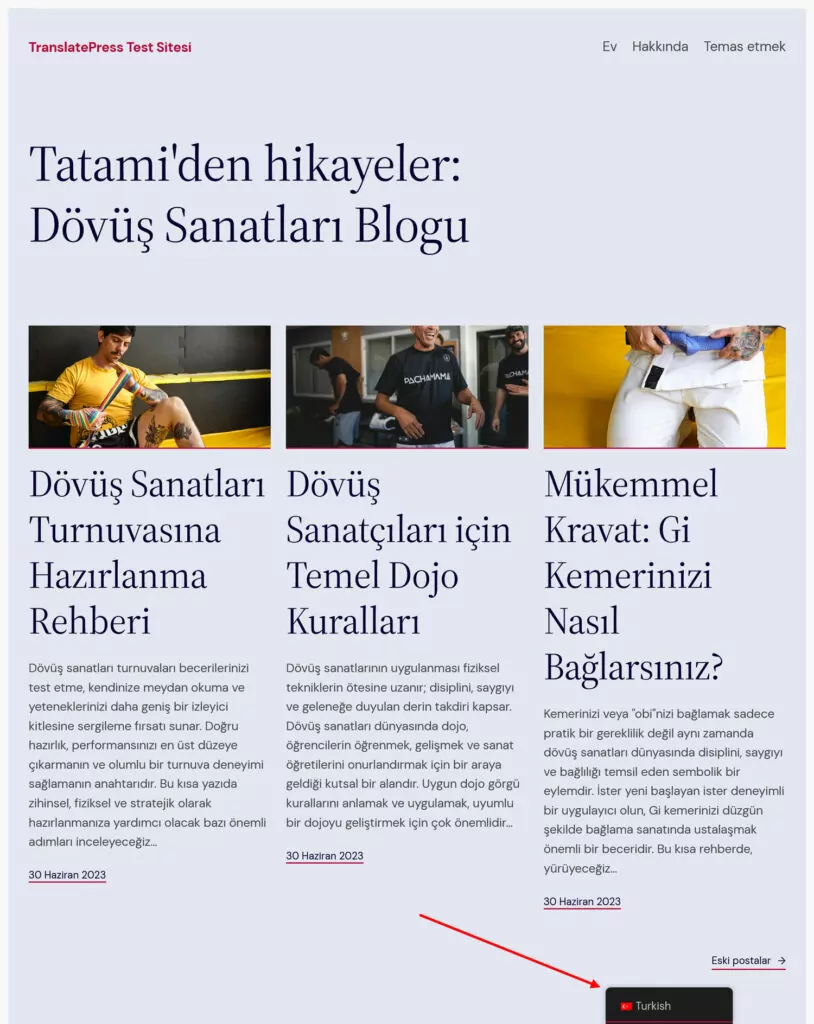
Ten en cuenta que el uso de Google Translate o DeepL puede suponer costes adicionales en función del uso que les des. Esto no supone ningún problema con TranslatePress AI, ya que no conlleva ningún coste adicional al del propio complemento.
4. Correcciones de Traducciones Manualmente
Para corregir las traducciones automáticas o realizar toda la traducción manualmente, debes acceder a la interfaz de traducción de TranslatePress. Para ello, haz clic en Traducir sitio en la configuración o en la barra de tareas de WordPress.

La pantalla a la que llegas muestra una vista previa de tu sitio a la derecha y todas las herramientas de traducción a la izquierda.
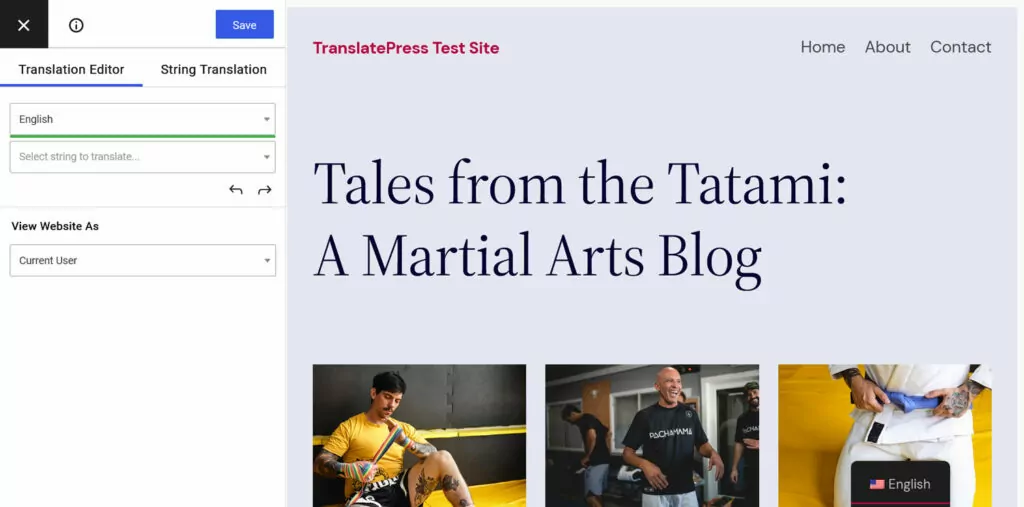
Utiliza el menú desplegable para ver el contenido en tu idioma de destino.
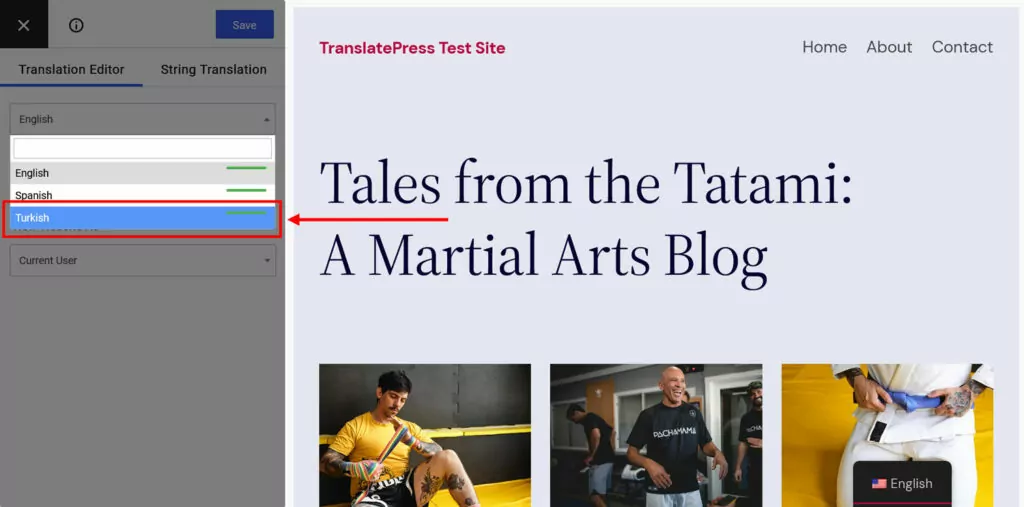
Luego usa la ventana de vista previa para navegar al texto que deseas corregir o traducir. Puedes hacerlo a través del segundo menú desplegable, las flechas hacia adelante y hacia atrás, o haciendo clic en él en la pantalla de vista previa.
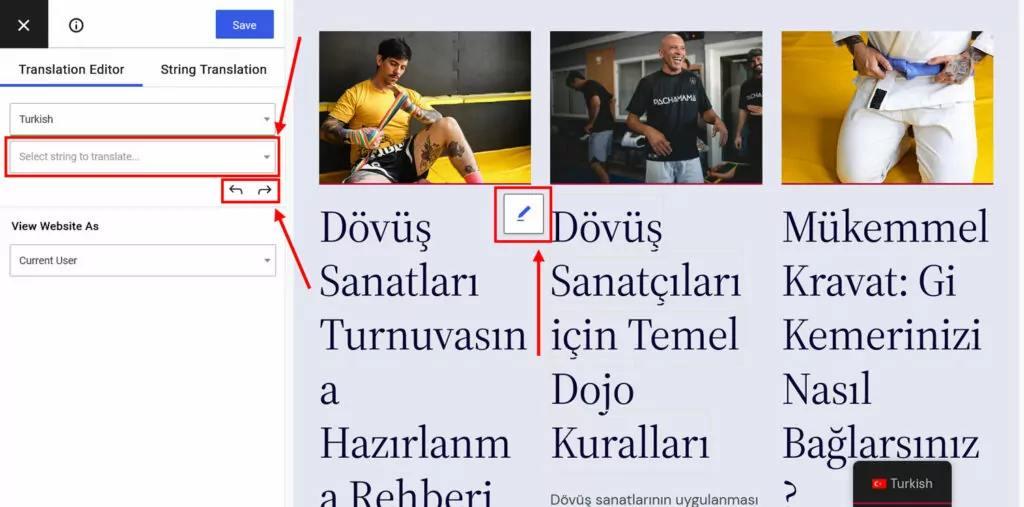
Luego, aparece un nuevo campo a la izquierda con la traducción automática o el espacio para la que usted elabore manualmente.
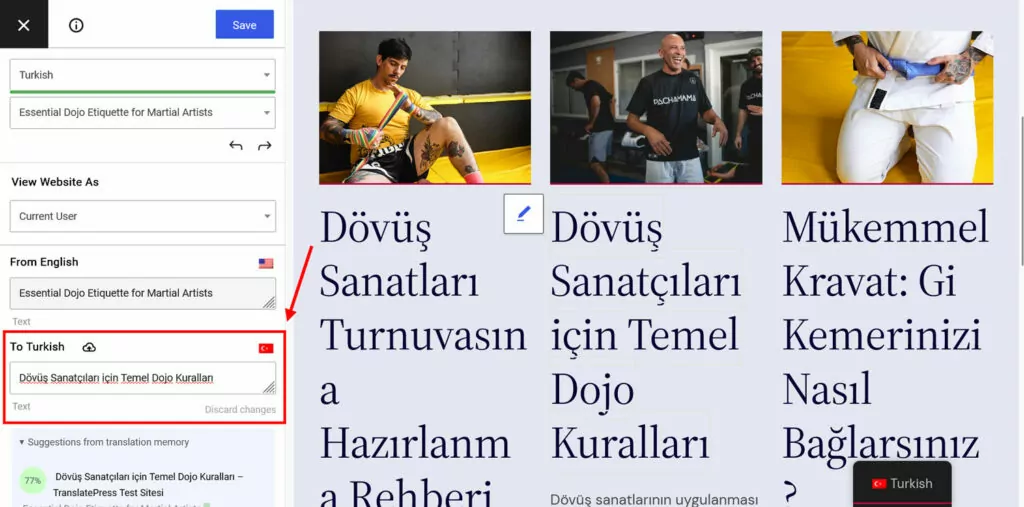
Haz las correcciones o aportaciones que necesites. Haz clic Guardar en la parte superior o presiona Cmd/Ctrl+S en su teclado cuando haya terminado. La cadena corregida o traducida aparecerá ahora en su sitio.
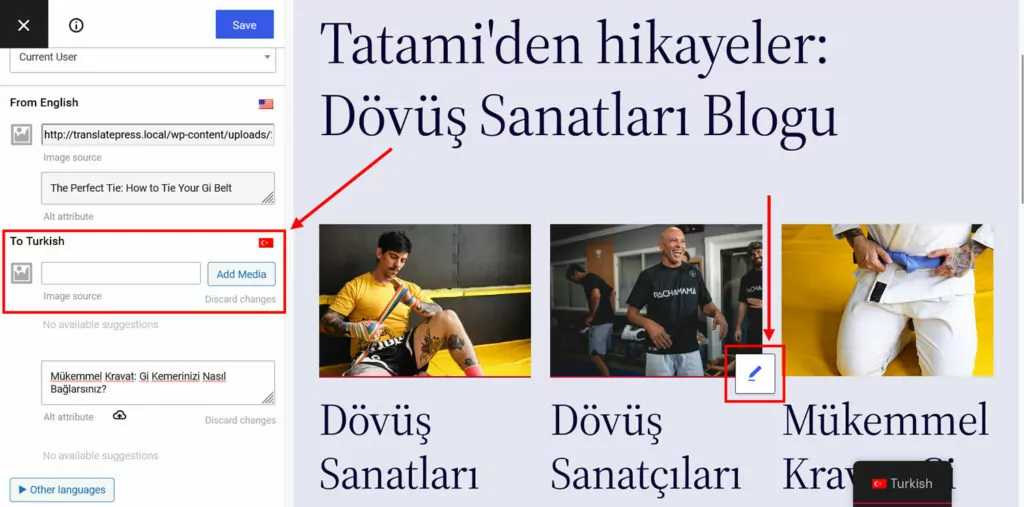
El mismo proceso también funciona para las imágenes. Haga clic para elegir, luego proporcione un enlace a la versión traducida o elíjalo de su biblioteca de medios de WordPress.
5. Utiliza TranslatePress para el SEO internacional
Como ya se ha mencionado, TranslatePress también te ayuda a mejorar tu SEO internacional, lo cual es especialmente importante para los motores de búsqueda localizados.
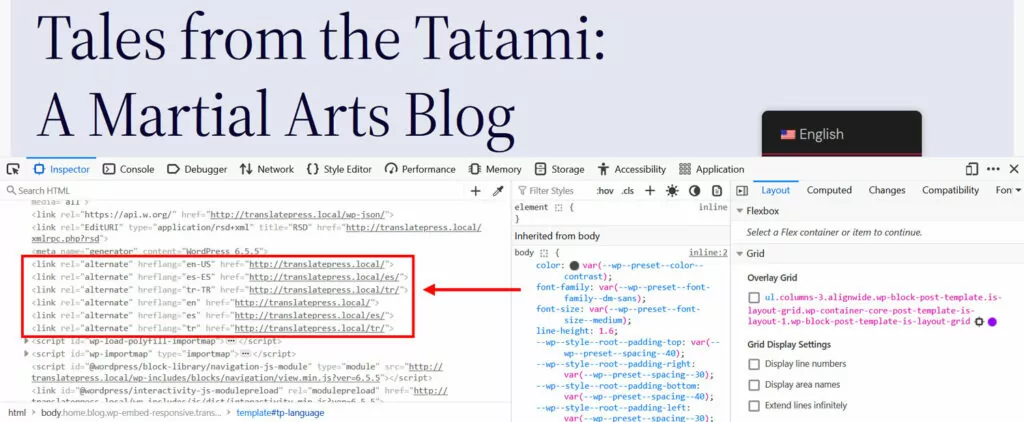
Por un lado, implementa automáticamente etiquetas hreflang para todos tus idiomas elegidos. De este modo, tu contenido traducido se marca claramente como el idioma y la configuración regional correctos.
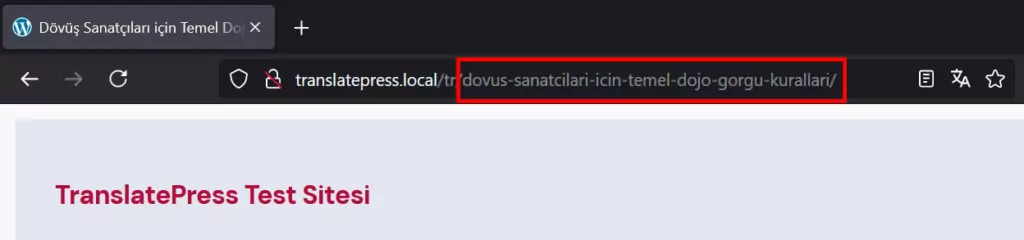
Además, TranslatePress Pro viene con el SEO multilingüe paquete. Te permite convertir las URL de tus páginas, títulos SEO, meta descripciones, etiquetas ALT y otros marcadores SEO importantes a otro idioma.
Además, la extensión crea mapas del sitio multilingües para enviar a los motores de búsqueda y funciona con la mayoría de los plugins de SEO populares para WordPress.
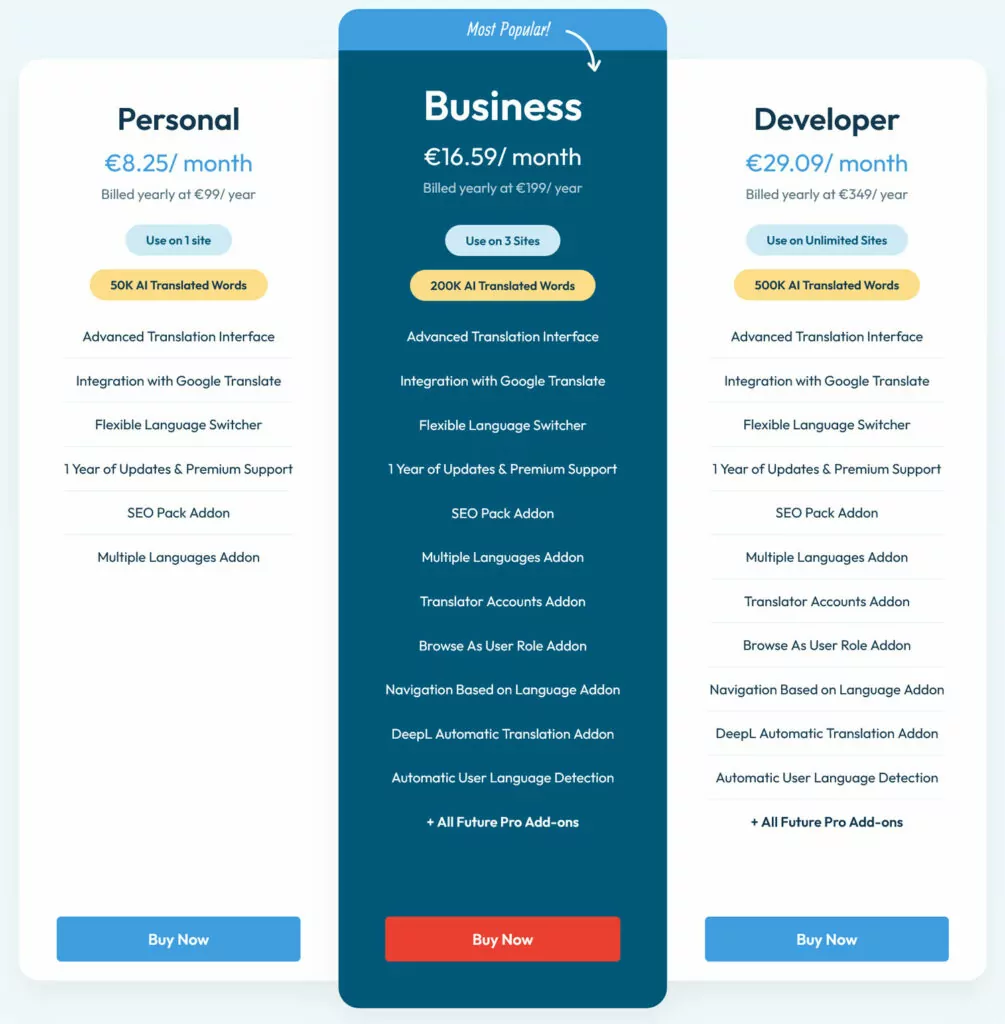
Puedes empezar con la versión gratuita de TranslatePress para un idioma adicional. TranslatePress Pro incluye más características para mejorar tu posición en diferentes motores de búsqueda y tres niveles de precios así puedes encontrar la opción correcta para ti.
Utilice las diferencias de los motores de búsqueda a su favor
Si bien Google puede dominar el panorama de los motores de búsqueda, no es la única opción que existe. Optimizar para otros motores de búsqueda populares puede abrir oportunidades significativas para el crecimiento del tráfico, especialmente en ciertos mercados.
Al comprender las diferencias entre los motores de búsqueda, puedes adaptar tus esfuerzos de SEO a sus algoritmos, aumentar la visibilidad de tu sitio, reducir la competencia y atraer a un público más amplio. Al final, los fundamentos del SEO siguen siendo los mismos; la mayor parte consiste simplemente en registrarse en herramientas adicionales para webmasters y tener en cuenta lo que un motor en particular enfatiza.
Por supuesto, una de las mayores diferencias son los motores de búsqueda que se centran principalmente en un solo idioma. En ese caso, ayuda tener una herramienta confiable como TranslatePress a mano que pueden ayudarte a dar ese paso de forma fácil y fiable.