
In diesem Beitrag
Die Möglichkeit, mehrsprachige WordPress-Suche anzubieten, ist entscheidend für jede Website, die in mehrere Sprachen übersetzt wurde. Benutzer, die Ihre Inhalte in einer bestimmten Sprache durchsuchen, benötigen eine einfache Möglichkeit, relevante Themen in genau dieser Sprache zu finden.
Da Mehrsprachige Suche kommt ins Spiel.
In diesem Tutorial erfahren Sie, wie Sie die mehrsprachige Suche für Ihr aktivieren übersetzte Webseite oder Multisprachiger E-Commerce speichern. Alles, ohne eine einzige Zeile Code zu schreiben oder die Standard-WordPress-Suchfunktion zu beeinträchtigen.
Der Prozess ist wirklich einfach und alles, was benötigt wird, um Ihre Website in mehrere Sprachen zu übersetzen und mehrsprachige Suche zu ermöglichen, ist TranslatePress, ein leistungsstarkes WordPress-Übersetzungs-Plugin.
TranslatePress Mehrsprachig
Bereit zu lernen, wie man es einrichtet? Tauchen wir ein.
Mehrsprachige Suche in WordPress
Abhängig vom verwendeten Übersetzungstool kann die Fähigkeit, mehrsprachige WordPress-Suchen zu unterstützen, sehr schwierig sein.
Das liegt daran, dass im Umgang mit verschiedenen Arten von Inhalten: Beiträge, Produkte, Seiten, Benutzerdefinierte Beitragsarten oder Benutzerdefinierte Felder, die Anzeige der relevanten Suchergebnisse (in der ausgewählten Sprache) ist knifflig.
Aufgrund seiner Bauweise spielt es für TranslatePress keine Rolle, wie Ihre Inhalte erstellt wurden. Es könnte sich um eine Seite handeln, die mit einem Page-Builder wie Elementor oder ein WooCommerce-Produkt, können Sie es visuell direkt aus dem Frontend übersetzen.
Und sobald installiert, TranslatePress macht die Standard-WordPress-Suche automatisch mehrsprachig.
Lass uns sehen, wie das funktioniert.
Die WordPress-Suche mit TranslatePress mehrsprachig gestalten
TranslatePress sorgt dafür, dass alle Ihre übersetzten Inhalte durchsuchbar sind, indem es die Standard-Suchfunktion von WordPress erweitert.
TranslatePress installieren und Übersetzungssprachen auswählen
Um zu beginnen, installieren und aktivieren Sie einfach die Kostenloses TranslatePress-Plugin von WordPress.org.
Sobald du das Plugin aktiviert hast, gehe zu Einstellungen → TranslatePress die Sprache(n) auswählen, die Sie verwenden möchten.
Wählen Sie zuerst die Standardsprache, also die Sprache, in der Ihre Website-Inhalte aktuell vorliegen. Fügen Sie dann die neuen Übersetzungssprachen hinzu, die Sie anbieten möchten. Für dieses Tutorial fügen wir “Spanisch” hinzu.
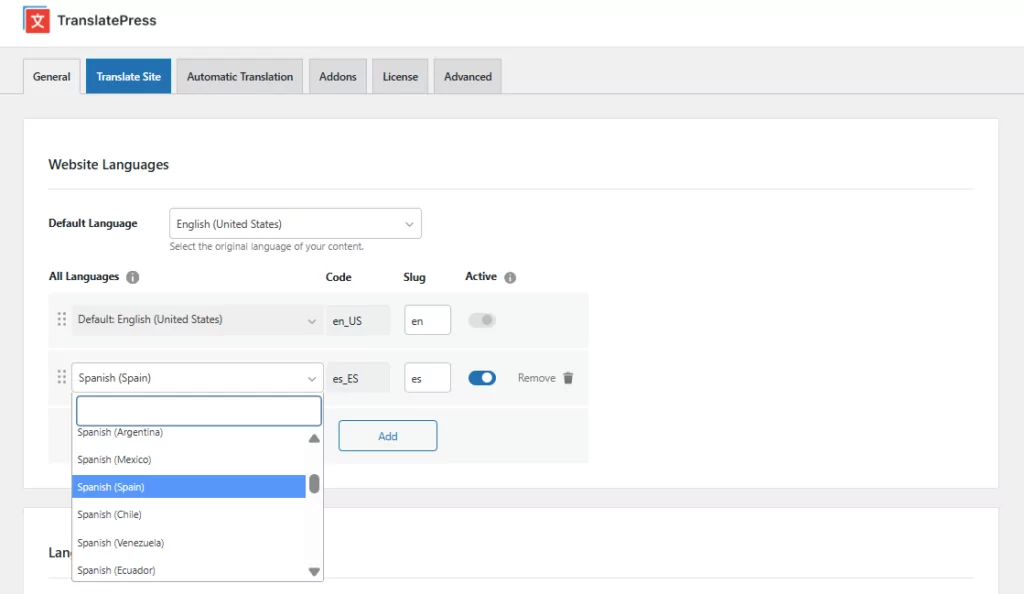
Mit der kostenlosen Version von TranslatePress können Sie Ihre Inhalte in eine neue Sprache übersetzen, während die Premium-Version Mit TranslatePress können Sie eine unbegrenzte Anzahl von Sprachen nutzen.
Unter „TranslatePress-Einstellungen“ können Sie außerdem einige weitere wichtige Dinge konfigurieren, wie zum Beispiel das Hinzufügen und Anpassen eines Frontend-Sprachumschalter. Standardmäßig fügt das Plugin einen schwebenden Sprachumschalter-Button in der unteren rechten Ecke Ihrer Website hinzu, der Ihnen bei der Navigation auf der Website folgt.
Klicken Sie auf “Änderungen speichern”, und Sie können mit der Übersetzung beginnen.
Übersetzen Sie Ihre Website-Inhalte
Alles, was jetzt noch zu tun ist, ist mit der Übersetzung deiner Website-Inhalte zu beginnen. Klicke dazu einfach auf die “Seite übersetzen” Register-Tab“ oder navigieren Sie zum Front-End Ihrer Website und klicken Sie auf das“Seite übersetzen”das Symbol aus der WordPress-Symbolleiste.

Dies öffnet einen visuellen Übersetzungseditor (ähnlich dem Customizer), bei dem Sie eine Live-Vorschau des Website-Inhalts auf der rechten Seite und eine Übersetzungsseitenleiste auf der linken Seite sehen.
Um einen bestimmten Text zu übersetzen, fahren Sie einfach mit der Maus darüber, klicken Sie auf das Stiftsymbol und geben Sie seine Übersetzung ein. Drücken Sie Speichern und Sie sind fertig.
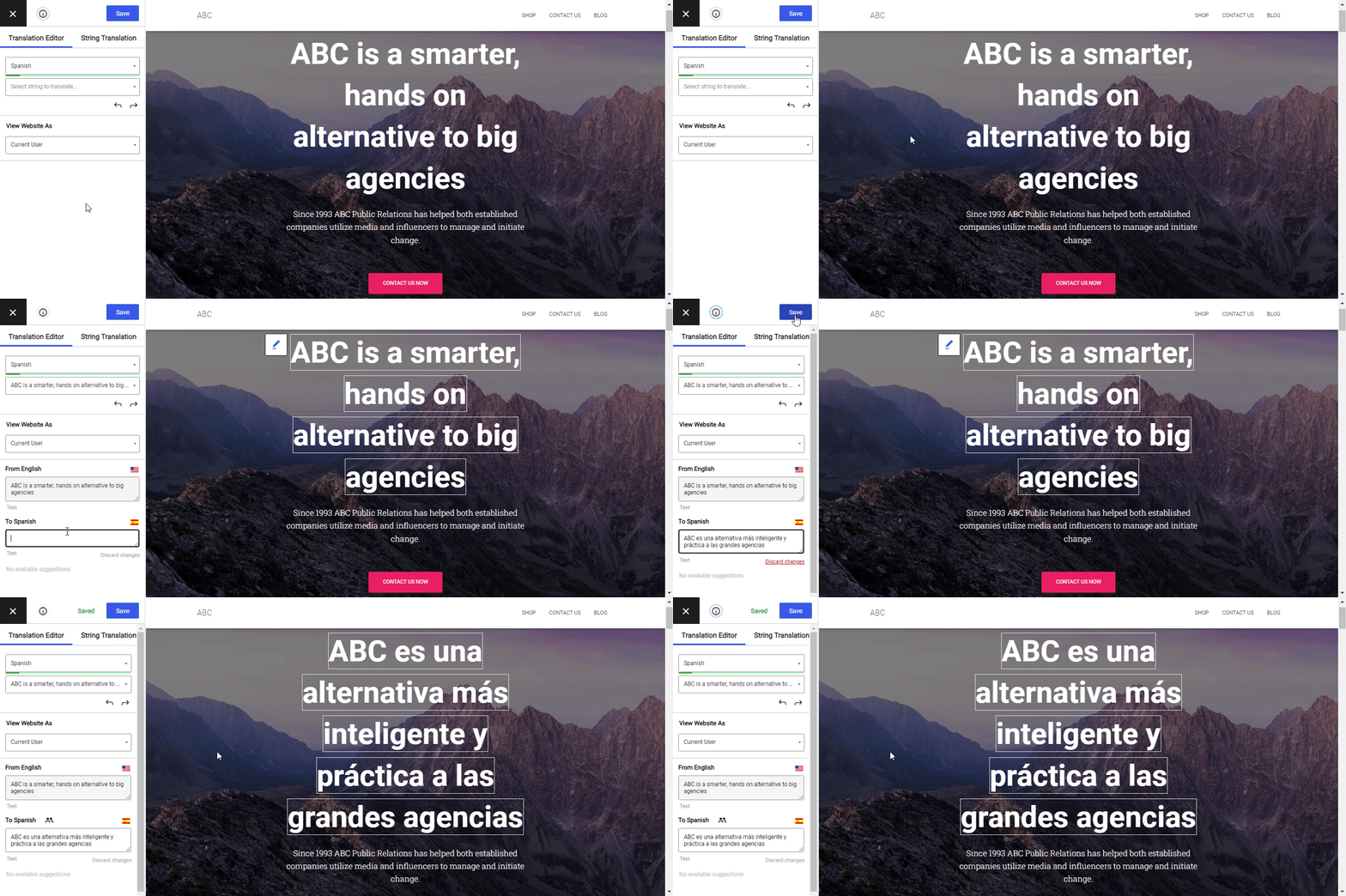
Die Übersetzung wird sofort aktualisiert. Sie wiederholen einfach denselben Prozess für alle verbleibenden Zeichenfolgen auf einer Seite, bis Ihr gesamter Website-Inhalt übersetzt ist. So einfach ist das!
Neben reinem Text können Sie mit TranslatePress eine Vielzahl von Elementen übersetzen: von Bilder mit Text, Schieberegler zu Formulare und Pop-ups. Sie können für alle denselben visuellen Übersetzungsansatz verwenden.
Für einen schrittweiseeren Ansatz schau dir diesen Leitfaden an über Wie man eine mehrsprachige WordPress-Website erstellt.
Um die Dinge zu beschleunigen, können Sie damit beginnen, Folgendes zu aktivieren: Automatische Übersetzung unter den TranslatePress-Einstellungen, entweder mit Google Übersetzer oder DeepL. Nach der Aktivierung wird jede Seite Ihrer Website beim ersten Besuch automatisch übersetzt.
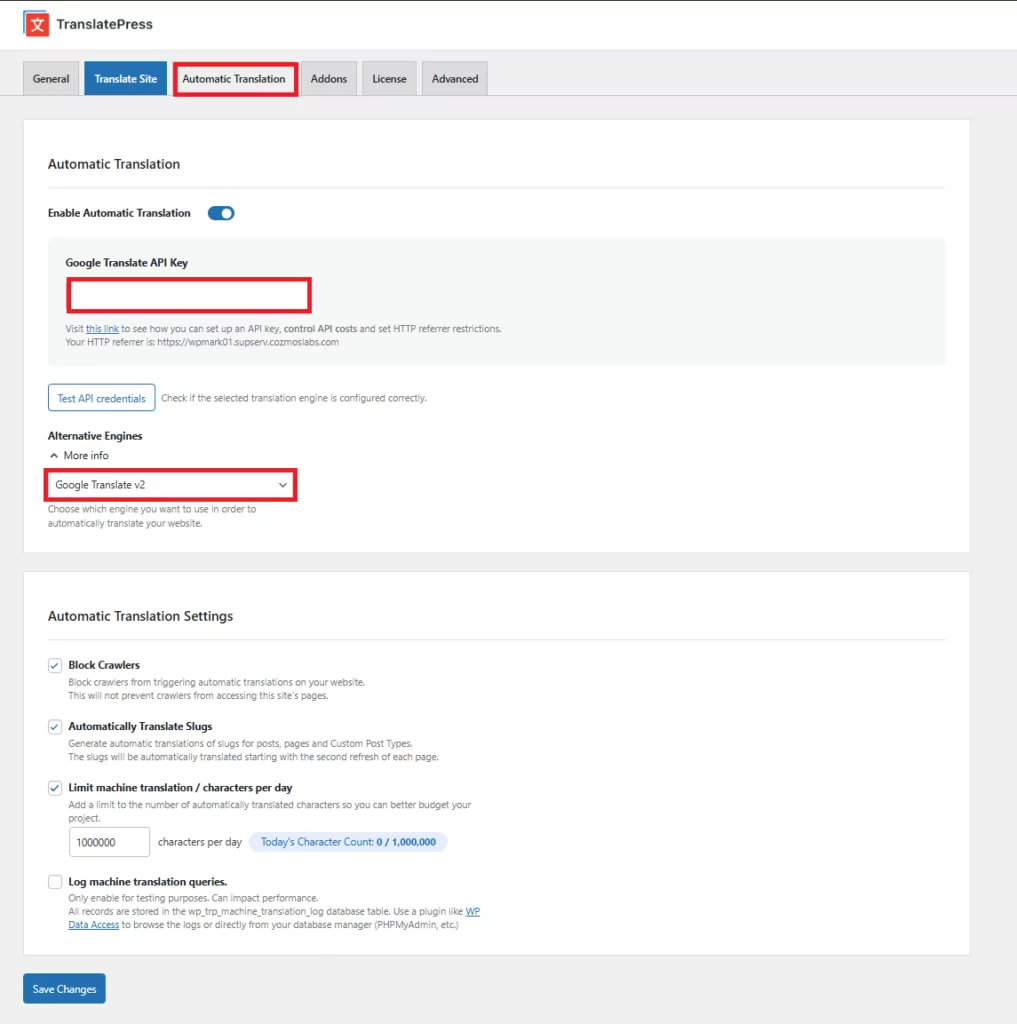
Es ist wichtig zu wissen, dass die automatische Übersetzung von Inhalten mit TranslatePress nur einmal durchgeführt wird, was dazu beiträgt, Ihre Kosten niedrig zu halten und reduziert die Ladezeit der Seite.
Das Plugin speichert dann die automatischen Übersetzungen in Ihrer Datenbank und lädt sie bei Bedarf. Keine weiteren API-Aufrufe an die automatischen Übersetzungsdienste.
Nachdem alle Ihre Website-Inhalte automatisch übersetzt wurden, wird dringend empfohlen, die übersetzten Texte, die seltsam klingen oder nicht im richtigen Kontext stehen, manuell zu überarbeiten.
Um mehr über das Einrichten automatischer Übersetzungen zu erfahren, besuchen Sie Wie Sie Ihre WordPress-Website automatisch übersetzen (schnell und mit minimalen Kosten).
Ein WordPress-Suchformular zu Ihrer mehrsprachigen Website hinzufügen
Nachdem Ihre Website nun vollständig übersetzt ist, bleibt nur noch, die mehrsprachige WordPress-Suche in Aktion zu sehen.
Dafür beginnen wir damit, ein Standard-WordPress-Suchformular hinzuzufügen. Der einfachste Weg, ein Suchformular zu Ihrer Website hinzuzufügen, ist die Verwendung des Such-Widgets, das WordPress anbietet.
Sie können dies zu jeder Seitenleiste hinzufügen, die von Ihrem Theme definiert wird.
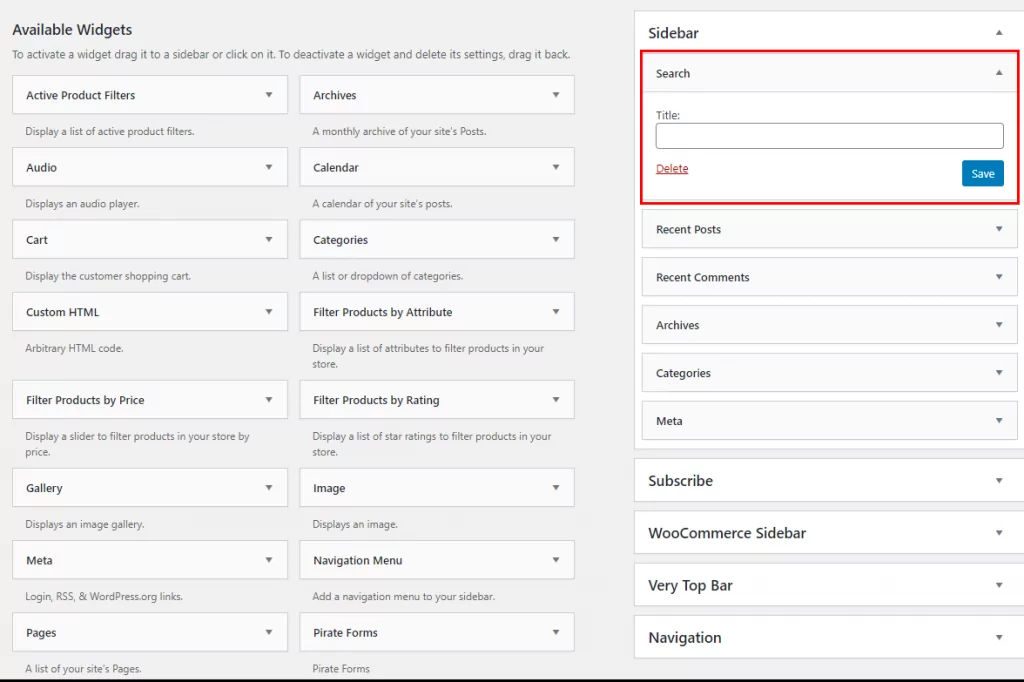
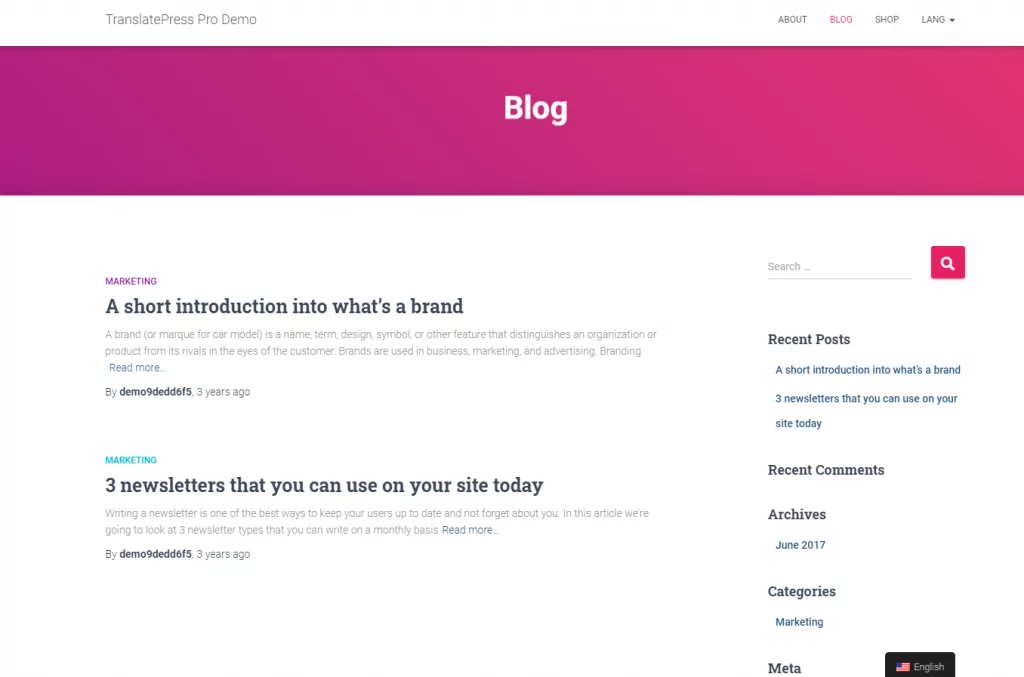
Wir werden unserer Blog-Seite ein Suchformular hinzufügen, um es den Leuten so leicht wie möglich zu machen, Artikel zu Themen zu finden, die sie interessieren.
Hier ist, wie es aussieht:
Lass uns nun den Blog auf Spanisch durchsuchen und versuchen, mit einem spanischen Schlüsselwort zu suchen, um die Ergebnisse zu sehen. Wir suchen nach “marca”, was die entsprechende spanische Übersetzung für das englische “brand” ist.
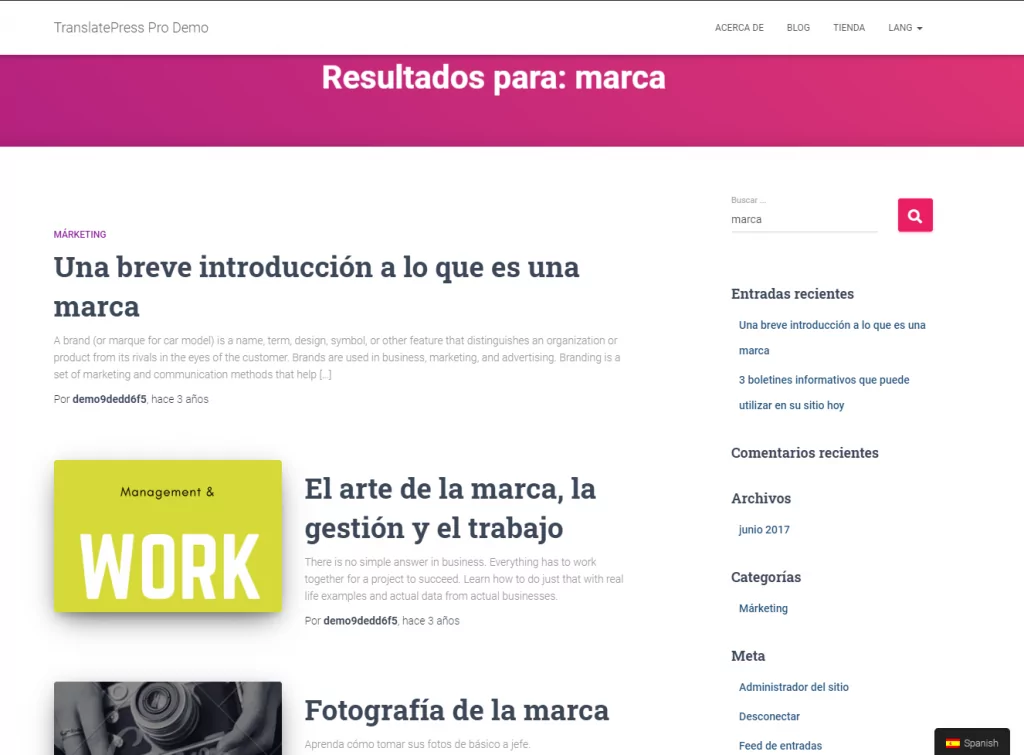
Wie Sie bemerkt haben, werden nur spanische Inhalte angezeigt, die entweder das Schlüsselwort “marca” im Titel oder im Inhalt eines Beitrags, einer Seite, eines Produkts usw. enthalten.
Das war’s schon. Mit Hilfe von TranslatePress zeigt das Standard-Suchformular von WordPress nur Inhalte in der ausgewählten Sprache an, die für den Suchbegriff relevant sind.
Mehrsprachige WooCommerce-Suche
Dasselbe gilt, wenn Sie ein mehrsprachiger WooCommerce-Shop und suchen nach einer einfachen Möglichkeit, Besuchern die Suche nach Produkten in ihrer Sprache zu ermöglichen.
Produkte und Produktbeschreibungen für Ihre Kunden in deren Muttersprache bereitzustellen, ist eine großartige Möglichkeit, Konversionen zu steigern und den Umsatz zu erhöhen.
Mehrsprachige WooCommerce-Produktsuche
Wenn Sie die mehrsprachigen Suchergebnisse auf Produkte eingrenzen möchten, können Sie dies ganz einfach erreichen, indem Sie die Produktsuch-Widget welche WooCommerce-Angebote.
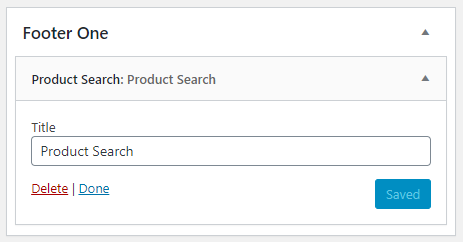
Auch hier sorgt TranslatePress dafür, dass die angezeigten Produktsuchergebnisse in der ausgewählten Sprache vorliegen und für den verwendeten Suchbegriff relevant sind.
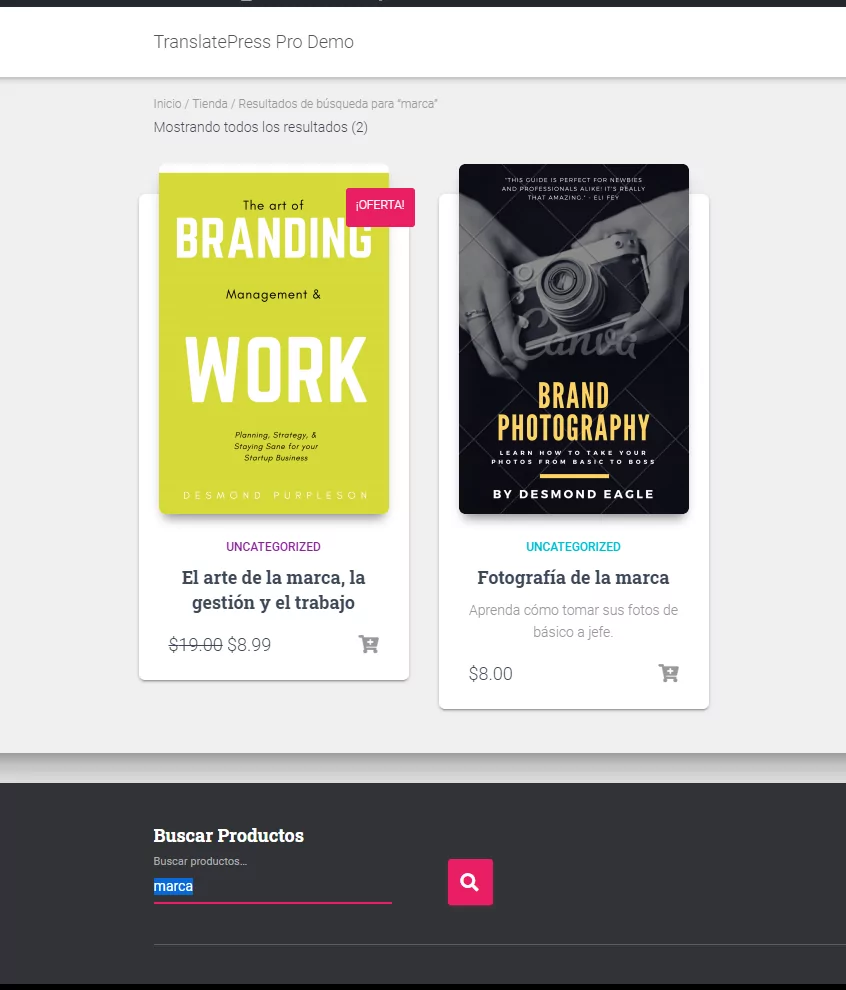
Durch die Verwendung der Produktsuche nach Produkten, die sich auf “marca” (auf Spanisch “Marke”) beziehen, erhalten wir nur die relevanten Produkte – auf Spanisch.
Funktioniert mehrsprachige Suche mit jedem WordPress-Suchplugin?
Wie Sie inzwischen gesehen haben, TranslatePress wird die Standard-WordPress-Suche oder die WooCommerce-Produktsuche verbessern und sie mehrsprachig einsatzbereit machen. Aber was passiert, wenn Sie andere WordPress-Suchplugins verwenden?
Solange die von Ihnen verwendeten WordPress-Such-Plugins auf den Standard-Suchergebnissen von WordPress basieren und diese (mithilfe geeigneter Hooks) filtern, funktioniert die mehrsprachige Suche, und TranslatePress sorgt dafür, dass Sie sprachspezifische Suchergebnisse erhalten.
Wenn Sie nach einer narrensicheren Lösung suchen, ist eine großartige Empfehlung JetSearch von Crocoblock, vollständig mit mehrsprachigen Setups kompatibel ist und sich auch in beliebte Page Builder wie Elementor, WordPress Editor und Bricks Builder integriert.
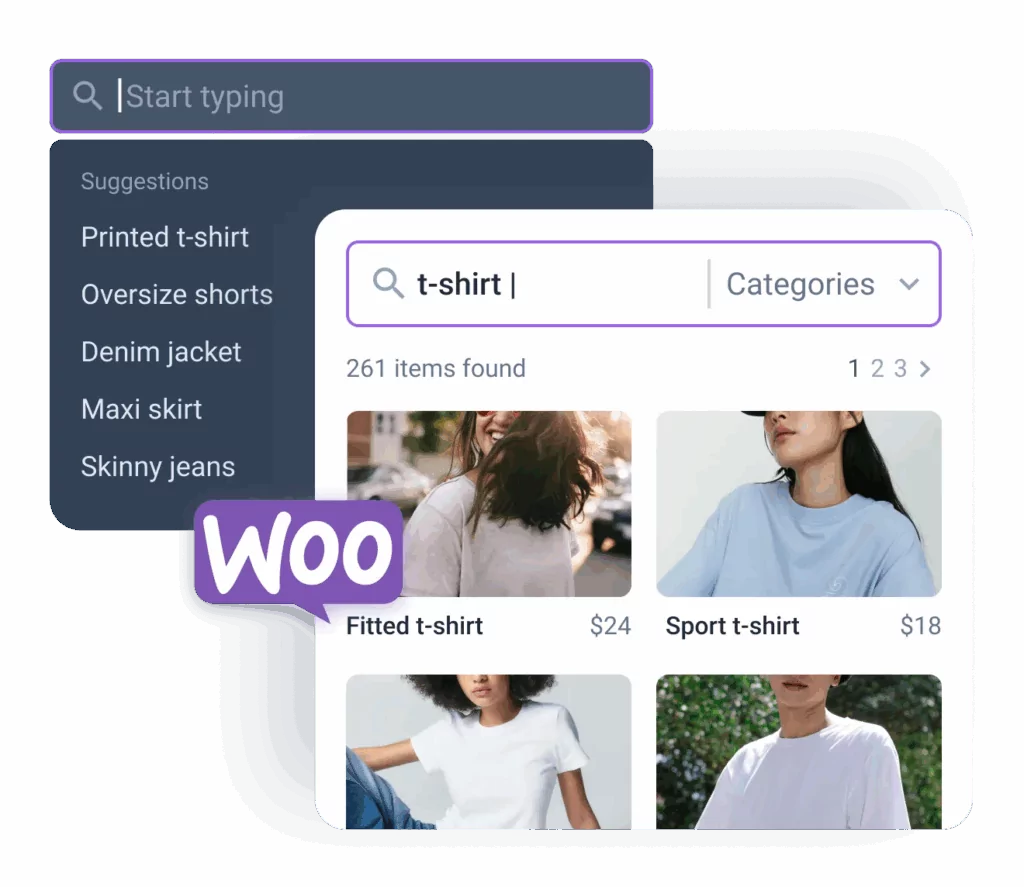
Es unterstützt die Suche über alle Beitragstypen, einschließlich WooCommerce-Produkte, benutzerdefinierte Felder, Benutzer-Metadaten und mehr – und das alles, während die Ergebnisse sofort angezeigt werden, ohne dass die Seite neu geladen werden muss.
Ganz gleich, ob Ihre Besucher auf Englisch, Spanisch oder in einer anderen Sprache suchen – JetSearch in Kombination mit TranslatePress sorgt dafür, dass sie die Ergebnisse in der richtigen Sprache sehen, was sowohl die Benutzererfahrung als auch die Genauigkeit verbessert.
Wenn Sie ein Fan von KI-integrierten Lösungen sind, Queryra könnte eine weitere gute Option für Sie sein. Queryra lässt sich nahtlos in TranslatePress integrieren, sodass Ihre Besucher in der jeweils ausgewählten Sprache suchen und Ergebnisse erhalten können.
Angetrieben von KI-Semantischer Suche versteht Queryra die Benutzerabsicht über exakte Schlüsselwörter hinaus und liefert präzise mehrsprachige Ergebnisse natürlich über Ihre übersetzten Inhalte und WooCommerce-Produkte.
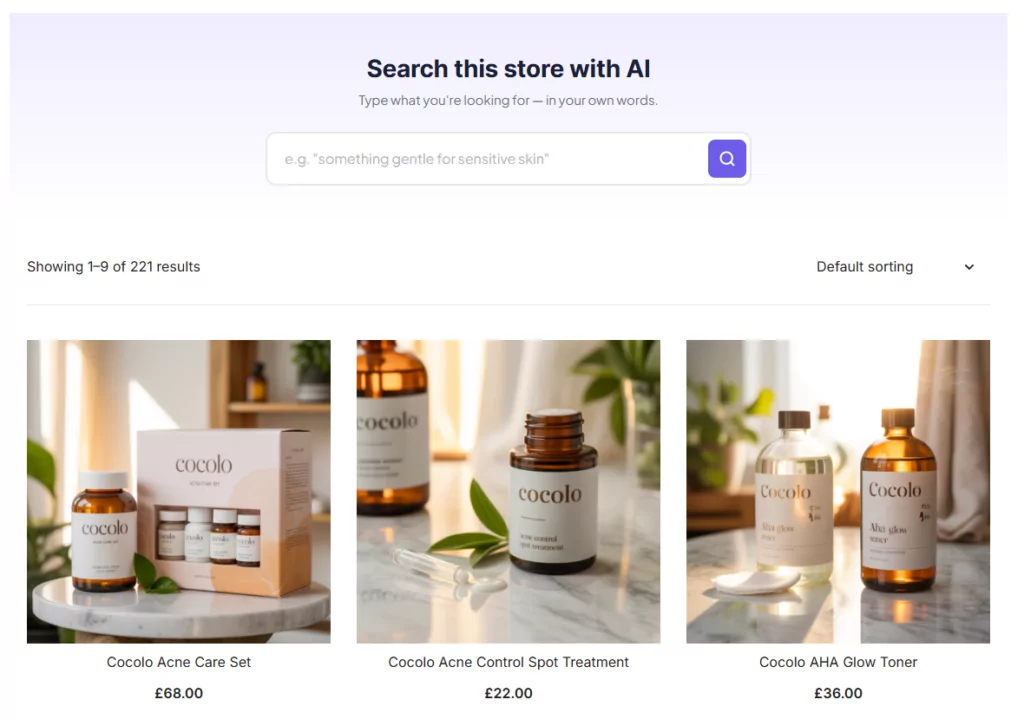
Es gibt zwar noch andere gute Optionen, aber wenn du ein Such-Plugin verwendest, das standardmäßig nicht mit TranslatePress kompatibel ist, kannst du trotzdem diese individuelle Lösung.
Wir möchten alle gängigen Such-Plugins unterstützen. Falls Sie also ein Plugin verwenden, bei dem die mehrsprachige Suche mit TranslatePress nicht funktioniert, bitten wir Sie, hier erreichen.
Richten Sie noch heute die mehrsprachige WordPress-Suche ein
Wie Sie inzwischen gesehen haben, macht TransaltePress es wirklich einfach, Ihre WordPress-Website zu übersetzen und ein mehrsprachiges Suchformular hinzuzufügen.
TranslatePress Mehrsprachig
Sie können den Inhalt entweder manuell mit dem visuellen Übersetzungseditor übersetzen oder die automatische Übersetzung nutzen, um Zeit zu sparen und nur das Nötige zu überarbeiten.
Sobald Ihre Website vollständig übersetzt ist, können Ihre Besucher oder Kunden über die mehrsprachige Suche relevante Inhalte oder Produkte leicht in ihrer Muttersprache finden und durchsuchen.
Haben Sie noch Fragen zur mehrsprachigen Suche in WordPress? Lassen Sie es uns in den Kommentaren wissen!
Wenn Sie diesen Beitrag hilfreich fanden, schauen Sie sich bitte unsere an YouTube-Kanal, wo wir ständig kurze und leicht verständliche Video-Tutorials hochladen. Sie können uns auch folgen auf Facebook und Twitter um der Erste zu sein, der jedes Mal Bescheid weiß, wenn wir etwas posten.


Hallo,
Vielen Dank für diesen Artikel, den ich mit Interesse gelesen habe. Bedeutet das, dass die Suche nur das Unterverzeichnis durchsucht? Also, in diesem Fall, http://www.website.com/es.
Wenn wir also den Fall einer englischen Website (www.website.com) nehmen, die das Wort “investigation” enthält, und die französische Version (www.website.com/fr), die ebenfalls den französischen Begriff “investigation” enthält, werde ich nur französische Ergebnisse erhalten, wenn ich suche, während ich auf http://www.website.com/fr. Ist das richtig?
Ja, Grant, das ist richtig. Die Suche zeigt nur Ergebnisse in der ausgewählten Sprache an.
Das macht Sinn, da es für deine Leser wirklich verwirrend wäre, Ergebnisse in mehreren Sprachen anzuzeigen.
Hallo, ich nutze translatepress, aber wenn ich im deutschen Teil meiner Website nach deutschen Begriffen suche, https://lovefoodfeed.com/de/ Ich erhalte keine Ergebnisse. Was mache ich falsch?