
In this post
When LLMs first became widely available, plenty of WordPress site owners had the same thought: why pay for a translation plugin when ChatGPT can translate anything instantly?
If you’re running a WordPress site and wondering whether you can just use ChatGPT or Claude to translate it, this post will give you an honest answer. We’ll discuss the pros and cons of doing so, practical hurdles, and the best way to integrate LLM tools into WordPress website translation.
Quick Answer: LLMs are capable translators — flexible, context-aware, and good at preserving tone — but they don’t offer a scalable workflow for website translation on their own. They lack string management, translation memory, CMS integration, and SEO tools. The best approach is to use LLM-powered translation through a dedicated plugin like TranslatePress, which handles the workflow while keeping LLM translation quality.
Are LLMs Good for Translation?
When LLM-based chatbots first hit the scene, users were impressed by their human-like output, even across different languages. And it’s true that their translation skills are impressive, but that’s not the full story.
Benefits of LLM-Powered Language Conversion
In my experience, there are four areas where LLMs genuinely outperform older machine translation tools. These are: their flexibility, contextual understanding, ability to produce fluent output across different industries and tones, and that they improve over time.
Flexibility and Accuracy
Most of the widely available LLMs are trained on a broad range of data. It makes them versatile and proficient across different domains, from legal texts to marketing copy. On websites, you can use them to translate blog posts, landing pages, product descriptions, FAQs, SEO metadata, navigation labels, and a lot more.
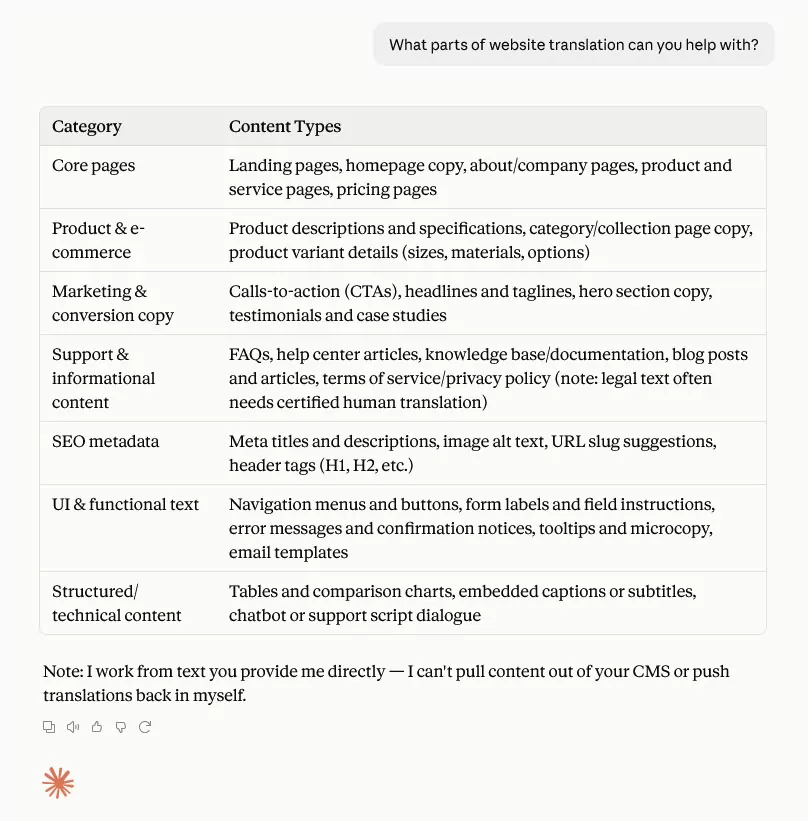
Compared to other types of machine translation tools, LLMs more reliably produce results that are grammatically correct and easy to comprehend. In combination, that makes them suitable to handle translations across a broad range of topics and language styles. Plus, they can do additional tasks, such as post-editing or quality assurance.
Contextual Understanding
LLMs don’t translate sentences in isolation, but take into account the surrounding text. This allows them to choose appropriate words based on context, which is part of what makes translation difficult and a main factor, for example, in bad Chinese translations.

Just take the German word “bekommen.” It can translate into English as:
- to get
- to obtain
- to receive
- to acquire
- to gain
- to develop (a disease)
- to come by something
- to agree with somebody (e.g. medicine, food)
Because of their contextual awareness, LLMs will more likely pick the right translation for ambiguous words like that. It also makes them better at localization and transcreation, not just pure translation.
Tone Preservation
Tone is about conveying an atmosphere, a particular voice, or emotional weight. Preserving it matters especially for content where transporting the original intent of the source material is paramount, not just transfer of information. Think literary works, or website marketing copy.
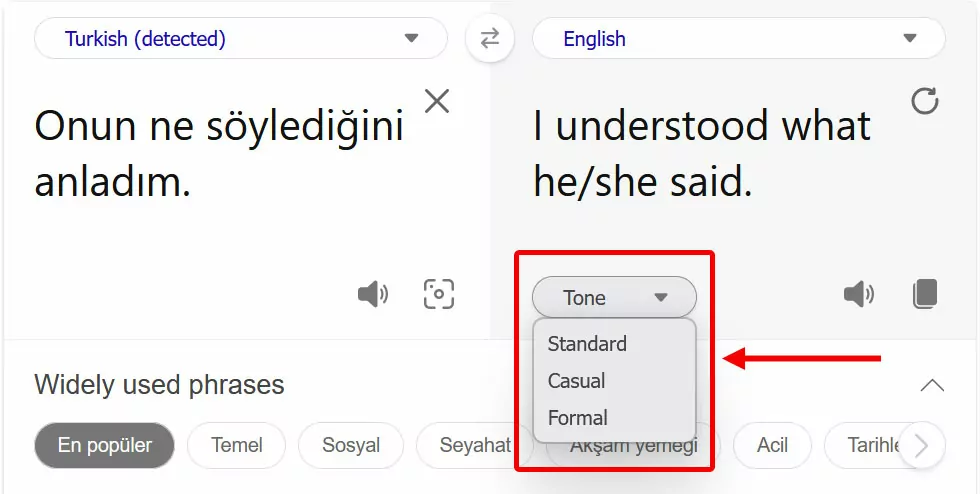
LLMs are quite good at this. They understand different tone requirements like “formal,” “casual,” or “technical”, and can adjust output to various target groups if included in the prompt. You can even specify things like gender-neutral language.
Handling Nuance and Symbolic Language
Idioms and figurative language frequently trip up machine translation tools, since many don’t make sense when translated literally.
Consider phrases like “it’s raining cats and dogs,” “addressing the elephant in the room,” or “to open a can of worms” (apparently, I only remember animal-themed idioms). Imagine hearing them without prior knowledge about their meaning. You’d be quite confused, and rightfully so.
Translating them requires finding equivalents in the target language or a way to describe and paraphrase their meaning. Because of the way LLMs work, they are much better suited for the job than more linear translation tools. Additionally, they can even often explain the meaning of foreign idioms, leading to some of the most accurate translations in this category.

This makes LLM translation especially suitable for languages that rely deeply on cultural nuance, like honorifics or implied subjects, such as Japanese, Korean, or Thai. Those are among the hardest languages to translate.
Maintaining Formatting
Presentation is part of translation — and often underestimated. Layout carries meaning alongside words. Think headings, numbered lists/bullet points, bolded text, italics, and underlining, and the role they play in making information more accessible.
Especially in long-form content like blog posts, help docs, or landing pages, adding styling back into raw translated text is a major task. LLMs can produce translations that are ready to copy and paste from a presentation point of view, saving a lot of time and effort.
Speed and Cost Savings
Especially for websites with many content-heavy pages LLM translation is dramatically faster and cheaper than human translation. This makes localizing content feasible that may not have justified the cost before.
While you still need editing and proofreading from a knowledgeable translator, LLM-powered tools can often produce a version that’s 80 to 90 percent there.
It’s important to note that other types of translation tools, such as neural machine translation (NMT), can be even faster. LLMs tend to start from scratch each time they are asked to translate text, while NMT tools process text more straightforward.
Iterative Refinement
Unlike a one-shot API call to a translation tool like DeepL, LLMs allow you to go back and forth and improve upon their results together. You can ask them to make changes to individual parts, change the tone, improve phrasing, or propose word alternatives.
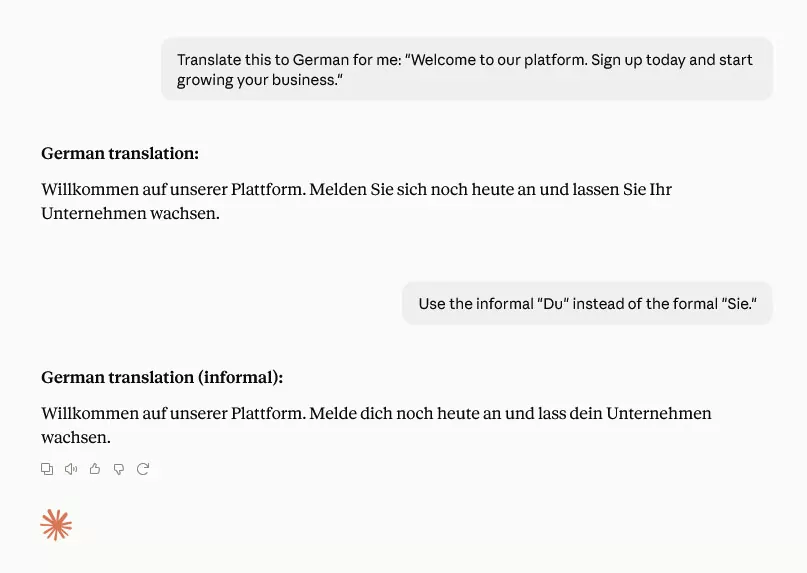
While that still doesn’t replace a human in the loop, it’s immensely helpful in refining the translation output. Additionally, LLMs can learn from user interactions and extend their memory to apply guidelines and feedback in future translation jobs.
Disadvantages of LLMs for (Website) Translation
That said, the limitations are real; and for website translation specifically, some of them are significant enough that I wouldn’t rely on a raw LLM alone.
Hallucinations and Fabrications
As anyone knows who has ever asked Claude or ChatGPT for academic sources, LLMs frequently simply make stuff up. In translation that means, they may confidently invent details or insert content that wasn’t in the source. The worst part: if you’re not familiar with either part of the language pair, you’d never know.
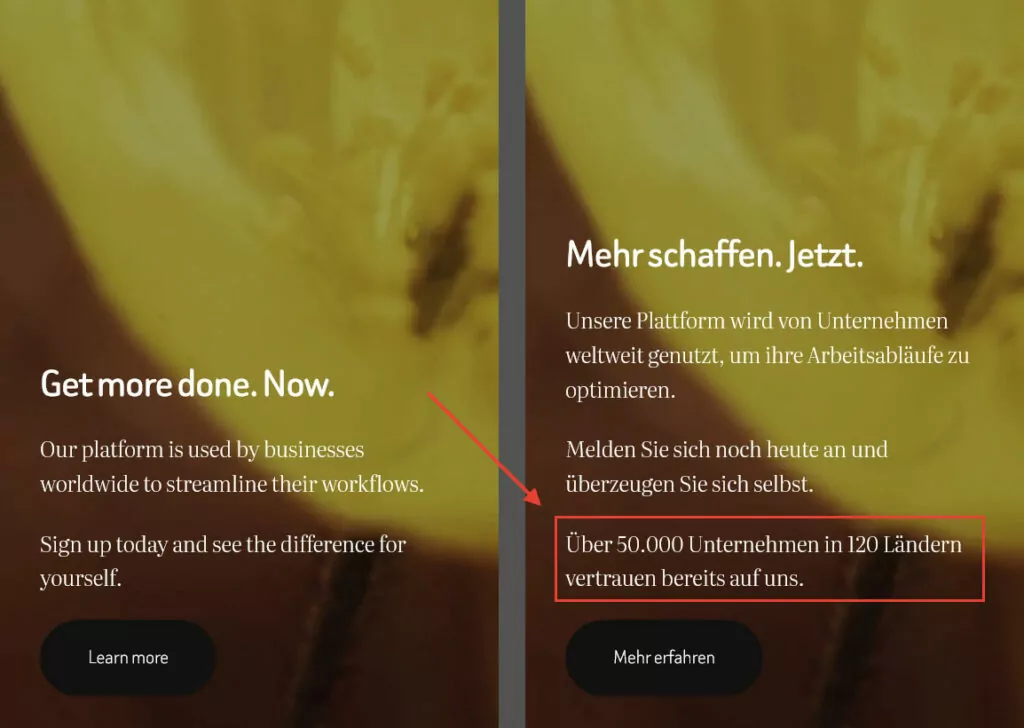
This is unique to LLMs and doesn’t happen with other machine translation tools. It also poses a real risk, especially when using LLM-powered translations in contexts where mistranslations can get you into hot water.
You don’t want customer-facing, legal, brand-critical, or other vital content to be inaccurate or straight up wrong. Imagine having your website mention a non-existent product feature in one of your markets and dealing with the returns from buyers who claim false advertising.
This is where the generalized nature of training data used by mainstream LLMs becomes a limitation. Especially in fields with specialized terminology such as healthcare, legal, or technical domains, they can fall seriously short (or go too far).
Struggling With Low-resource Languages
Speaking of training material, there’s often plenty in the most used languages online such as English, German, or Spanish. However, it’s a different scenario for something like Icelandic, Swahili, or many Southeast Asian languages, that are less present on the internet.
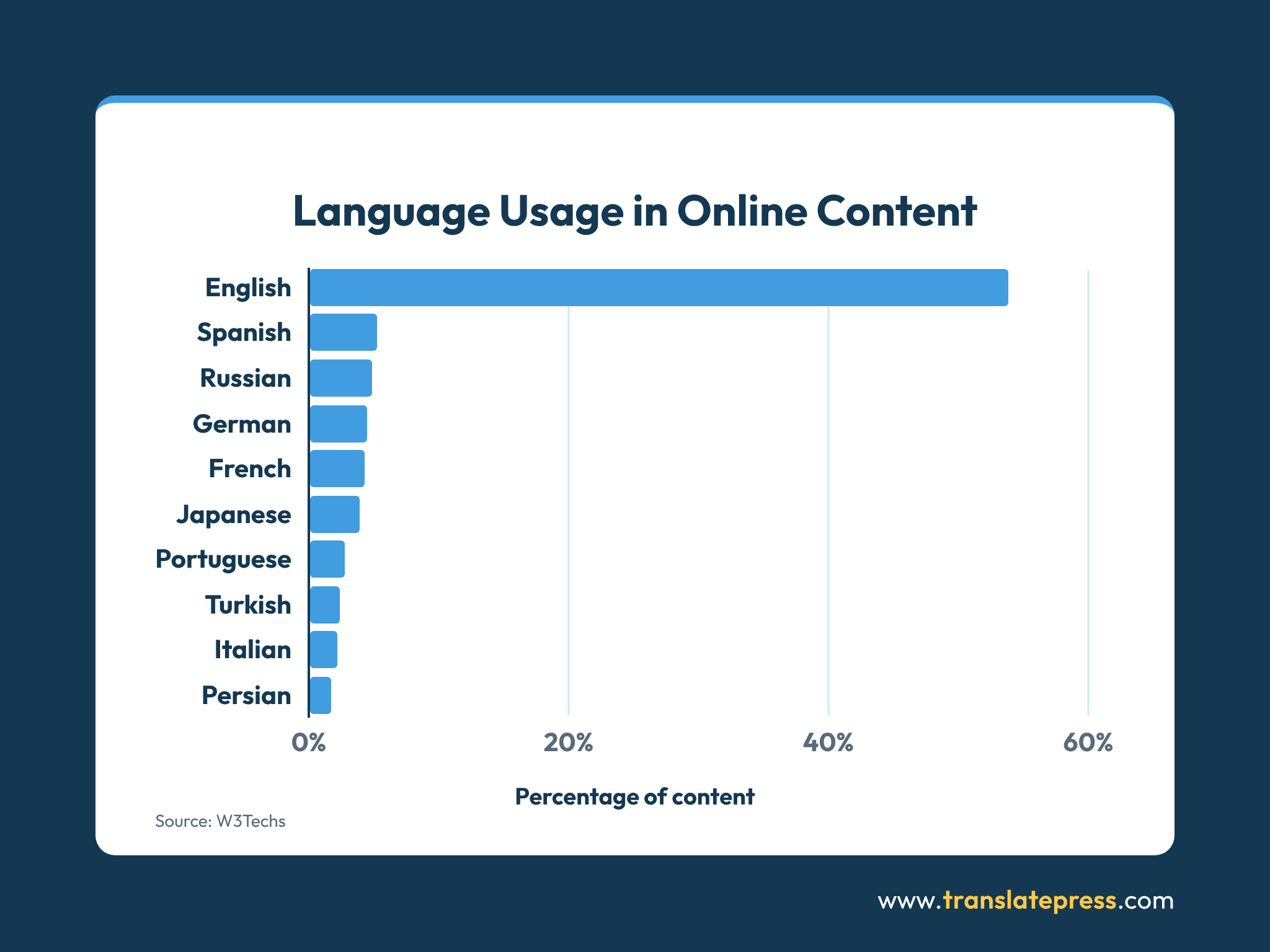
As a consequence, LLMs can be ill equipped to translate a language pair that involves one or more of them, leading to insufficient translation quality.
This extends to language variants, where words can have different meanings and slang plays a big role. For example, you can find out why the Ford “Pinto” wasn’t a big hit among customers speaking Brazilian Portuguese in our collection of translation fails.
Lack of CMS Integration
The ultimate goal of translating your content is to place it on your website. Doing it manually inside an LLM leads to a tedious workflow with lots of copying and pasting.
Additionally, web content doesn’t just live in the main WordPress editor, but also in templates, custom fields, SEO plugins, page builders, and other places. So even if you establish a direct connection between an LLM and your site via API, it doesn’t automatically give it access to every piece of content to translate.
Compiling that is still up to you, which tends to be slow and laborious.
No String Management
“Strings” are small, discrete units of text found on websites. They include the main content on your pages, but also button labels, error messages, alt text, meta descriptions, form field labels, and more.
When you directly use LLMs for website translation, they don’t have a concept of strings as a persistent, trackable unit at all. The context of any text you feed them is unknown to them, potentially leading to wrong translations.
Additionally, AI tools don’t know which strings have already been translated, which are outdated because the source changed, or which are duplicated across pages.
Limited SEO Capabilities
Website translation goes beyond simply converting words from one language to another. To preserve SEO, you also need to manage the technical/structural side.
hreflang tags, translated URL slugs, localized meta titles/descriptions, image alt text, and other SEO markers all shape discoverability and click-through rate.
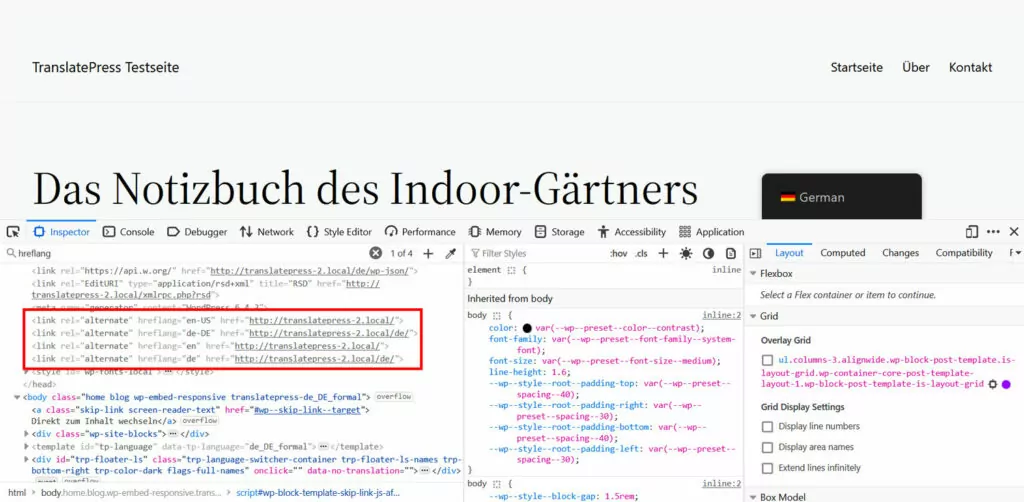
While you can use LLMs to translate them, they don’t help with the technical implementation. Same for updating internal links.
Even in the parts that they are strongest, the translation, unless you give an LLM targeted information, it doesn’t necessarily adjust the copy for local search traffic and terms that people in the target market actually search for (aka keyword research).
Missing Translation Memory or Glossary
Translation memory and glossaries are crucial tools for translation.
Translation memory speeds up the process and saves costs by reusing known phrases and text. For content updates, it ensures only new material is translated.
Glossaries, on the other hand, define key terminology and their translated counterparts to ensure consistent use across the entire website. Examples are brand names, product features, or industry speak. This is especially important for legal pages, medical claims, financial disclosures, and other crucial material.
You can feed an LLM a glossary or style guide and it’ll generally stick to it across a whole session, but this is another area where AI tools are notoriously inconsistent.
Less Suitable for Large Content Volumes
Despite being steerable with a glossary, LLMs tend to forget earlier instructions as context grows. As a consequence, they may translate the same term in different ways, especially in a long document or inside tables, footnotes, or embedded code. Breaking down content into chunks can help counteract the problem, however, it comes with its own risk for inaccuracies.
Traditional CAT tools with dedicated translation memory tend to handle this more reliably and also process long content more quickly than LLMs.
Using LLMs for Website Translation
Because of the reasons above, the practical reality of using LLMs for translating your website is often less than stellar.
- Managing strings manually: LLMs don’t know whether they are translating a plugin button, page title, or heading, nor can they place translated strings in the right location of your website’s markup. You need both the knowledge and skills to do that yourself.
- Handling updates: You don’t just need a workflow for the initial translation, but also subsequent updates. When using a raw LLM, you are back to doing it by hand, including tracking changes to the default language and propagating them across all translations. That includes consistent formatting, linking, and making sure your chosen tool didn’t hallucinate additional content in the update.
- Keeping terminology consistent: Uneven LLM adherence to glossaries and style guides requires a lot of double-checking key terminology, across all pages and languages on your site.
In short, LLMs are able to help with website translation, but they don’t offer a scalable localization workflow out of the box.
Use LLMs for Website Translation with TranslatePress
If you’re looking for a more sustainable way to translate your WordPress site and keep all language versions up to date, there’s TranslatePress. The plugin bridges the gap between LLMs and your CMS, offering both AI translation quality as well as a structured website translation workflow.
TranslatePress Multilingual
1. Add Languages With a Few Clicks
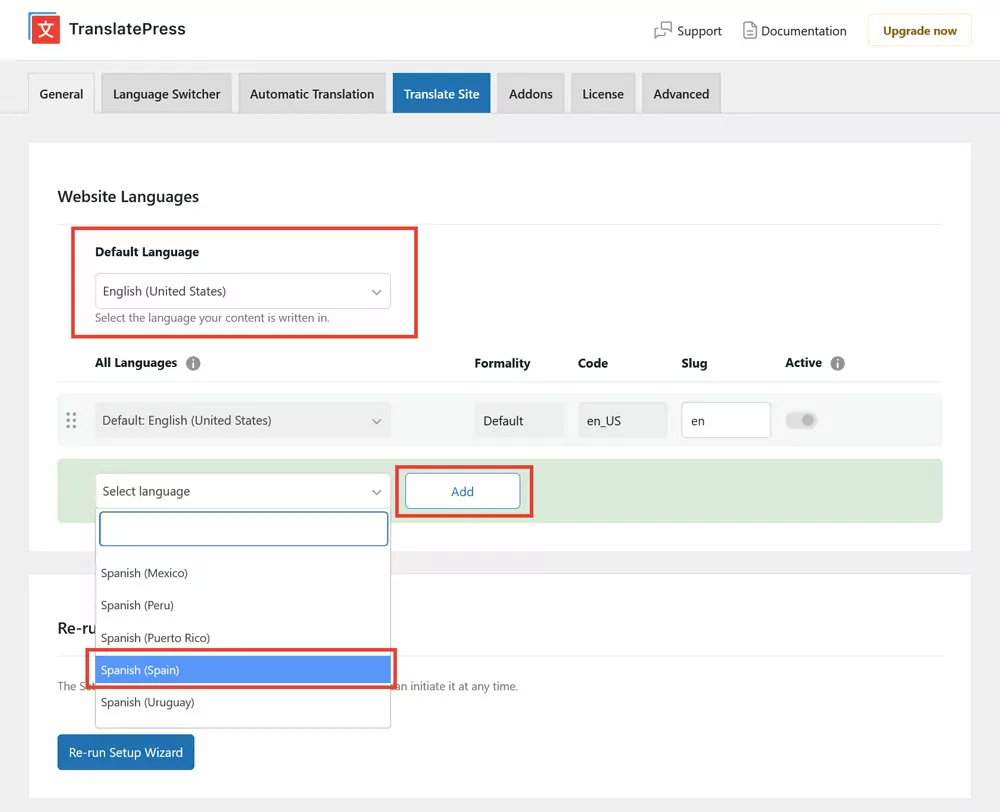
For starters, TranslatePress makes it super simple to offer additional languages on your site. Just go to Settings → General, pick your default language at the top, then select your target language(s) under All Languages, and click the Add button. Save at the bottom — done.
2. Automatically Translate (And Update) Your Site Using AI
The built-in TranslatePress AI connects to several translation engines (including LLMs like ChatGPT, Claude, or Gemini) and automatically chooses the most suitable technology for your chosen language pairs. Additionally, artificial intelligence ensures maximal accuracy.
This allows you to convert your site into your target languages with minimal effort. All you need to do is access the Automatic Translation tab, flip the switch for Enable Automatic Translation, and save at the bottom.
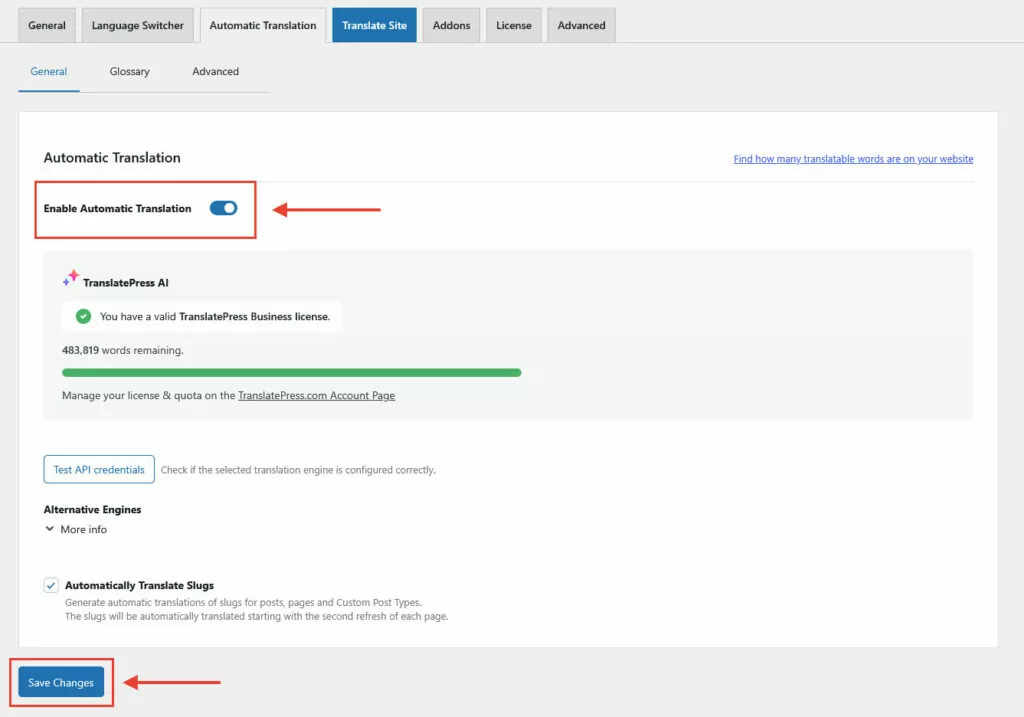
TranslatePress AI immediately starts converting your website to your chosen language(s). In fact, in the time it takes to switch to your front end and use the language switcher, the translation is likely already finished.
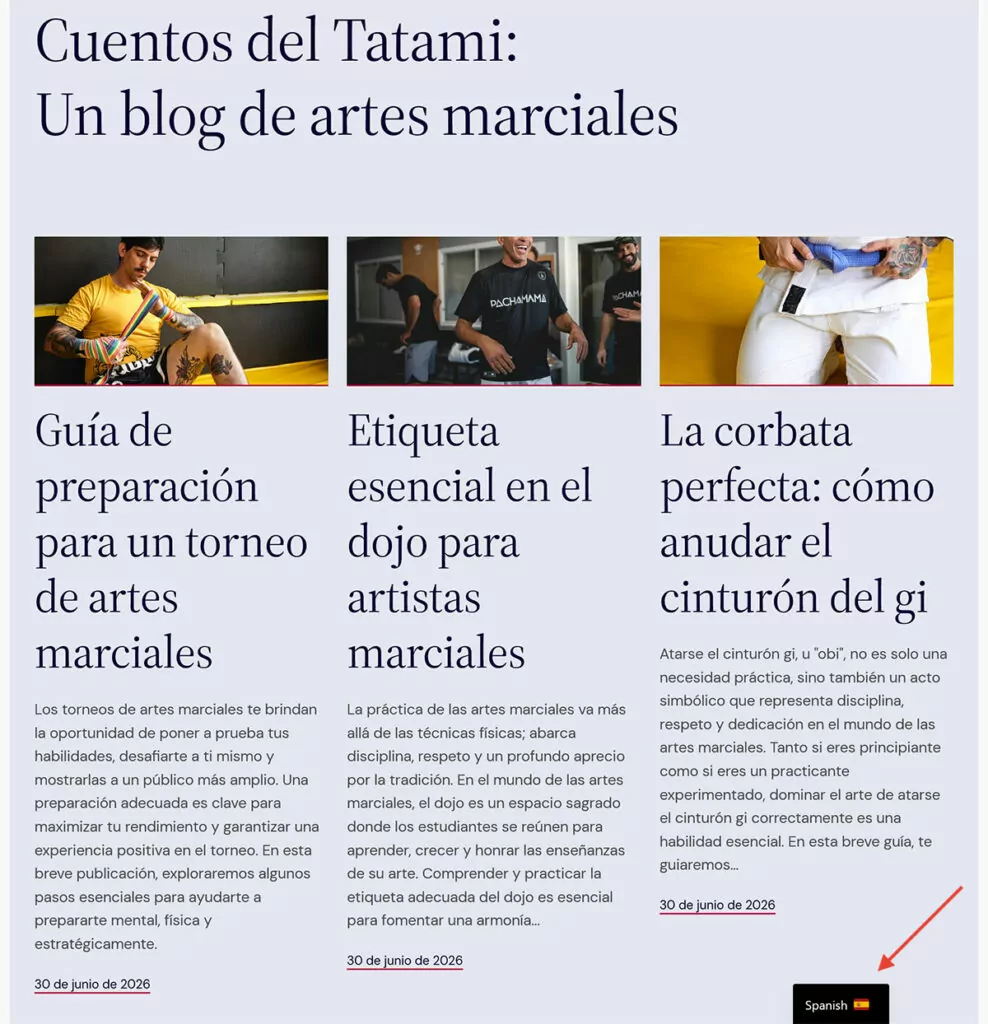
What’s more, TranslatePress AI works on every part of your website, including menus, themes, plugins, and even SEO metadata, not just the main content. Be aware, however, that you need a TranslatePress license and AI credits for this to work.
Finally, TranslatePress AI also detects new content or content changes across your entire site and automatically translates them.
3. Use Google Translate and DeepL as an Alternative
Even without a license, you can still use machine translation for your site. Under Alternative Engines, you have the option to choose Google Translate instead. DeepL is also available for license holders.

Once you obtain an API key (instructions for Google Translate and for DeepL), the rest of the process is the same as before.
4. Ensure Consistency With the TranslatePress Glossary
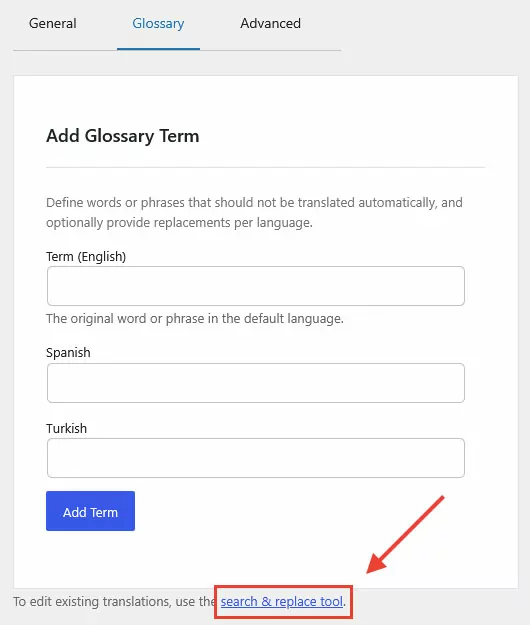
The built-in glossary allows you to specify your preferred wording for certain words or phrases TranslatePress AI should use. It’s located under the Glossary tab in TranslatePress → Settings → Automatic Translation.
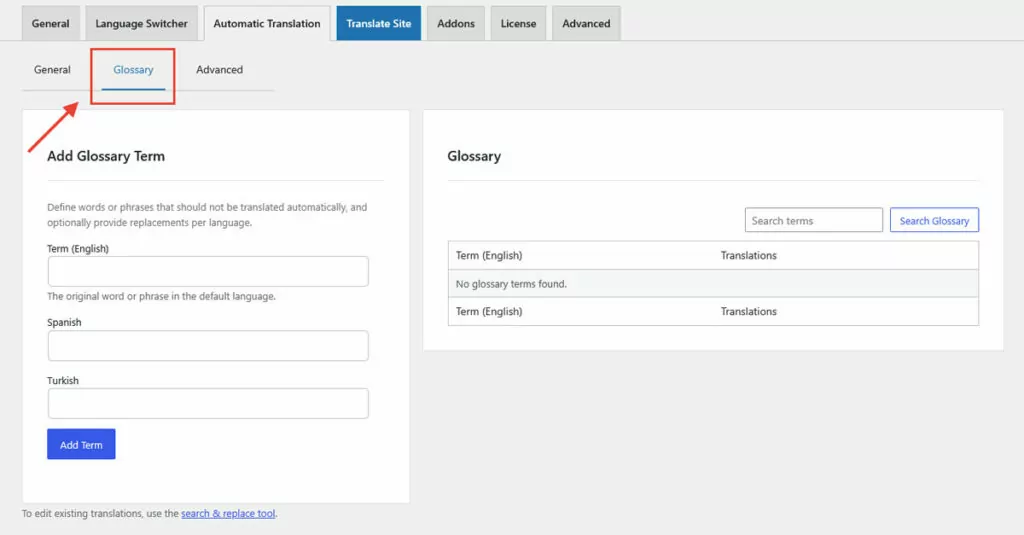
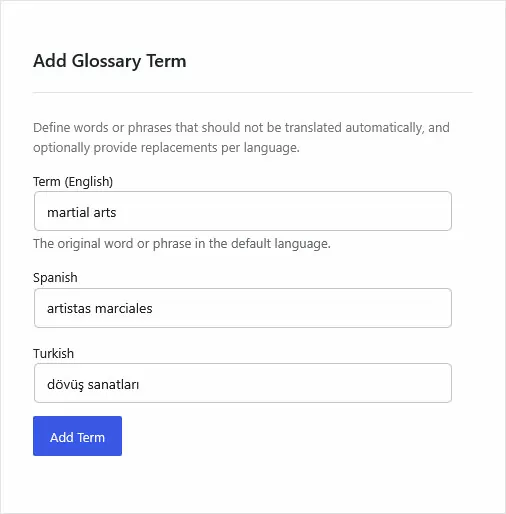
Add the original term in your website’s main language on the left, supply your preferred translation for all target languages, and click Add Term.
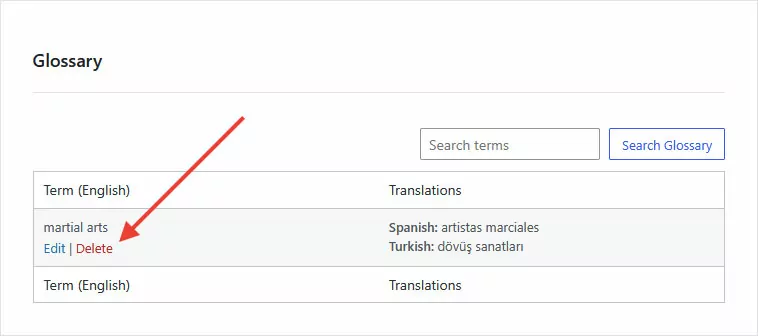
That’s it. You can also edit glossary terms or delete them in the list on the right.
For more info on how glossary terms behave, e.g. for languages without spaces between words, refer to the documentation. If you’re using another translation engine, use their built-in glossaries instead (Google Cloud Translation glossaries, DeepL glossaries).
5. Search and Replace Terms in Existing Translations
Glossary terms only affect new automatic translations. To update translations that already exist on your site, use the search and replace functionality. It’s accessible from the link in the Glossary menu and works for every automatic translation engine, not just TranslatePress AI.
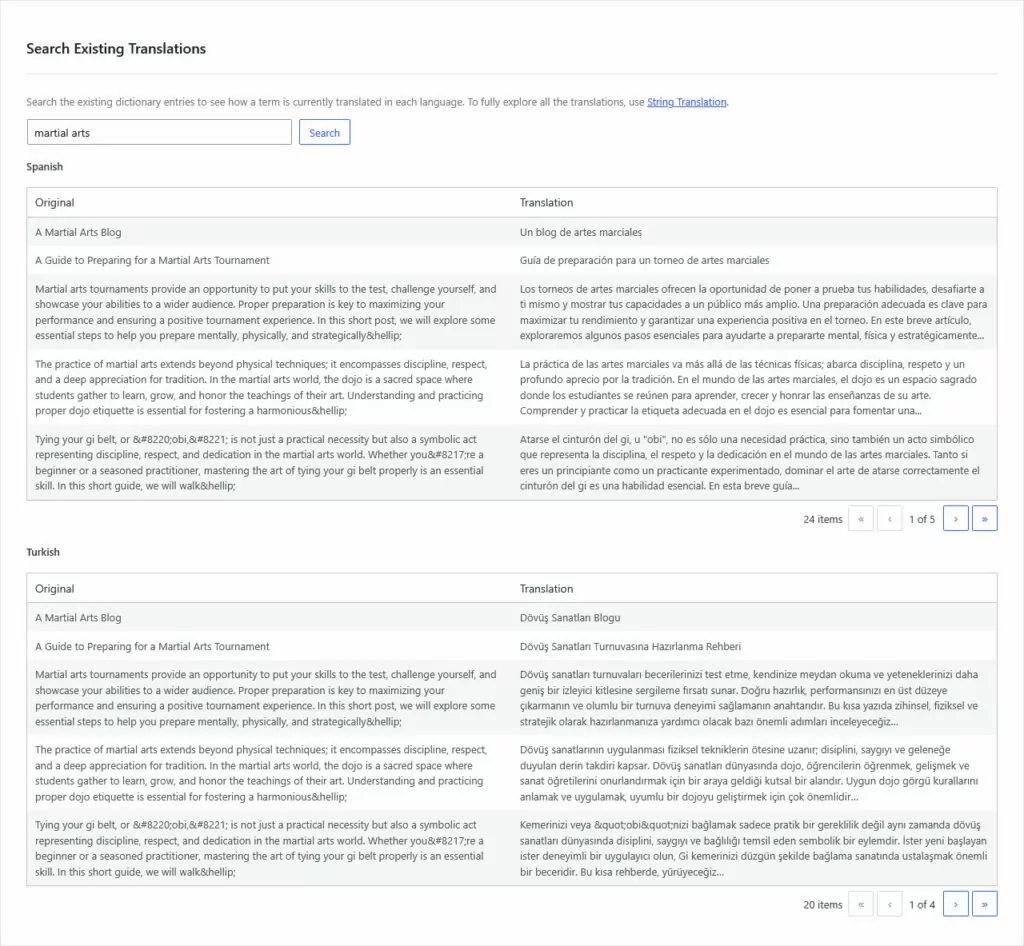
Use the Search box to look up a term on your website and how it is currently translated in each language.
If something shows up you’d like to correct, use the Replace Existing Translations form.
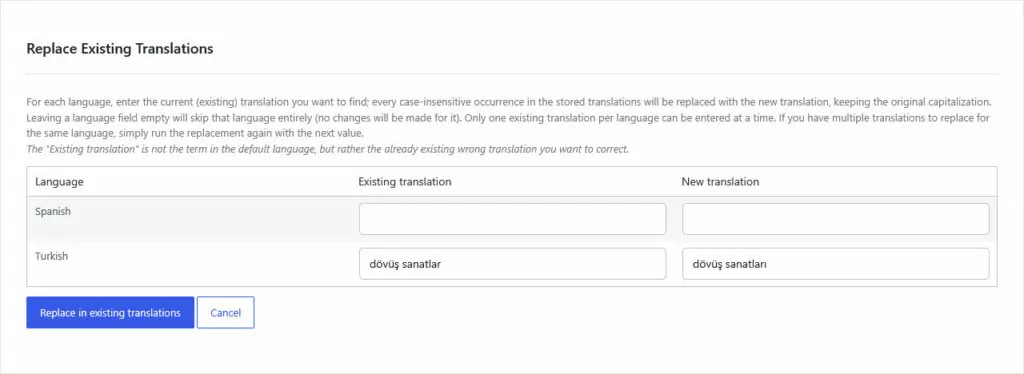
Important: The Existing translation field needs the incorrect translation in the target language, not your default language. Meaning if your menu item “Home” was translated into German as “Zuhause,” but you want it to be “Startseite,” you have to type “Zuhause” into Existing translation, not “Home.”
Additionally, you can only do one replacement per language at a time. If you need more, just run the tool again.
6. Make Manual Adjustments and Localize Images
To make changes to your translations by hand, access the TranslatePress translation interface by clicking Translate Site in the settings or the WordPress taskbar.
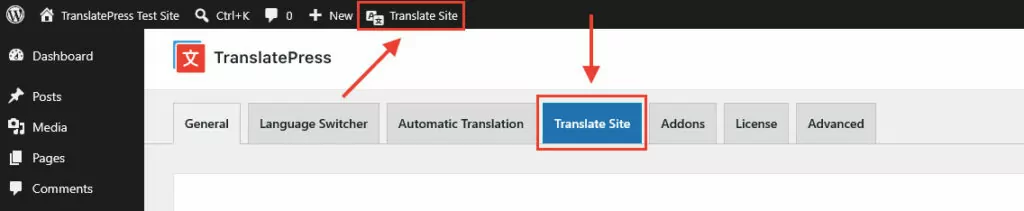
You’ll find a preview of your site on the right and translation tools on the left. First step: switch the screen to your target language using the drop-down menu.
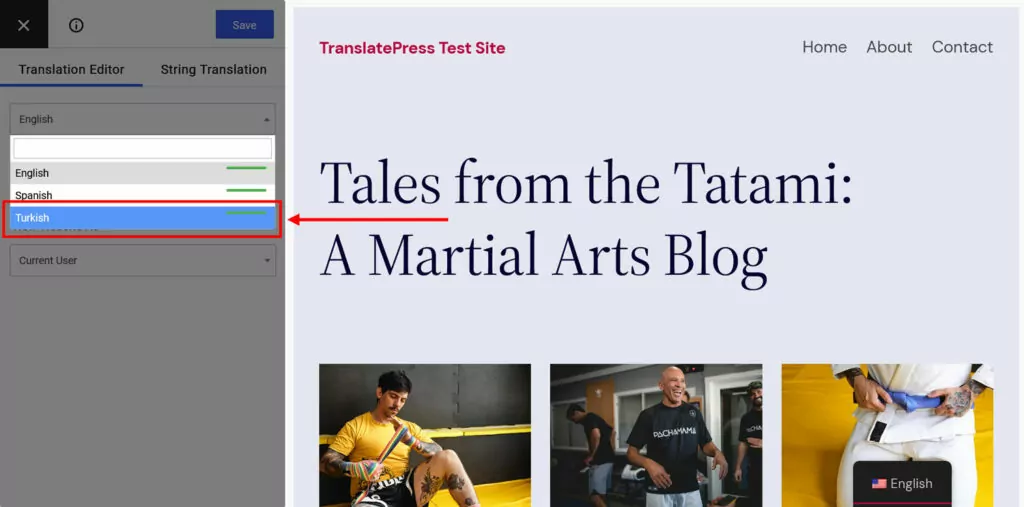
After that, choose which text you want to modify. You can do this through the second drop-down menu, forward and backward arrows, or by clicking it in the preview screen.
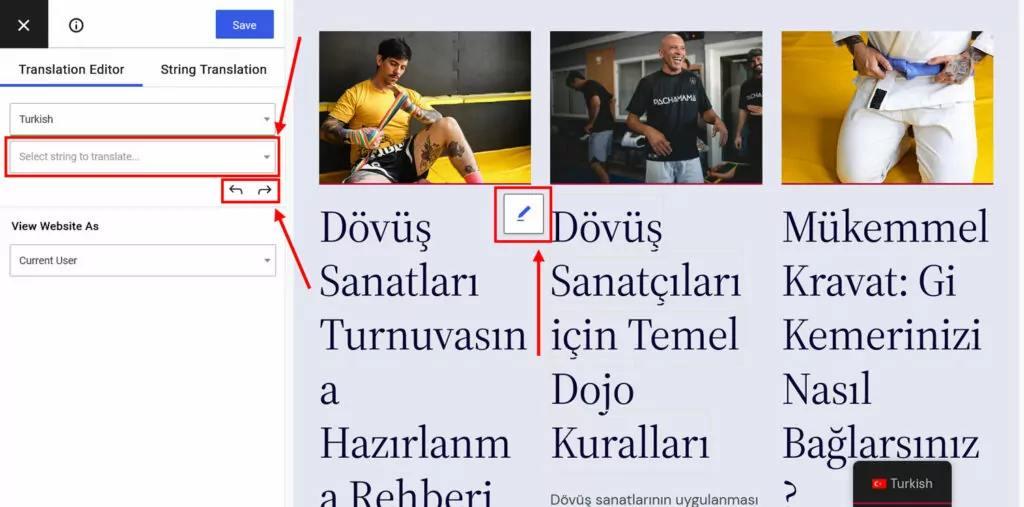
Once you do, a new field for the translation appears on the left.
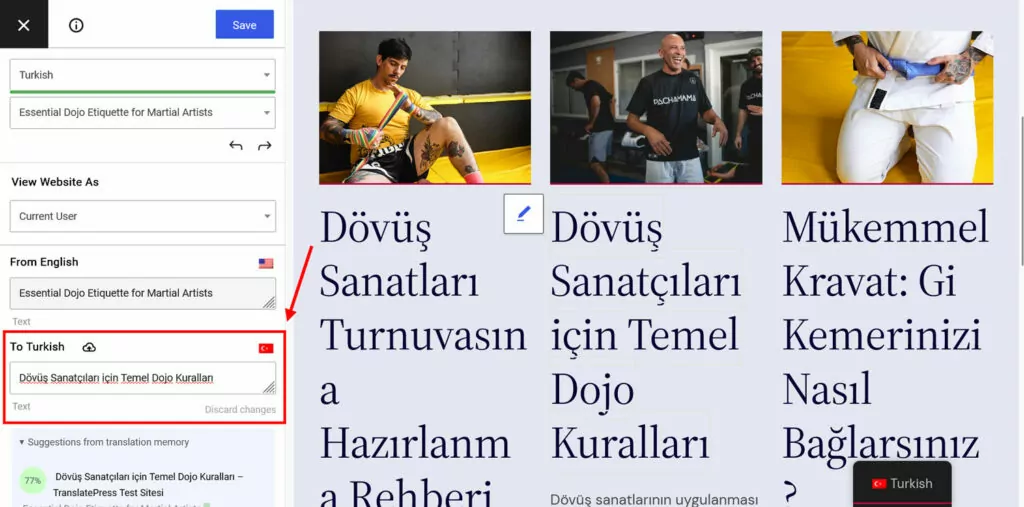
Make any corrections you need, then click Save at the top or press Cmd/Ctrl+S.
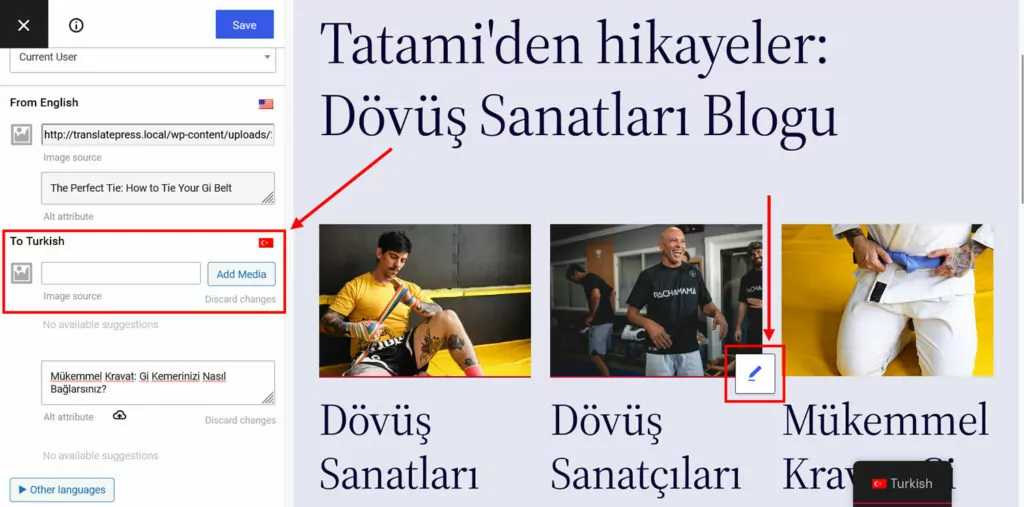
This also works for images. Click one, then provide a link to its translated version or pick it from your WordPress media library.
7. Implement Multilingual SEO
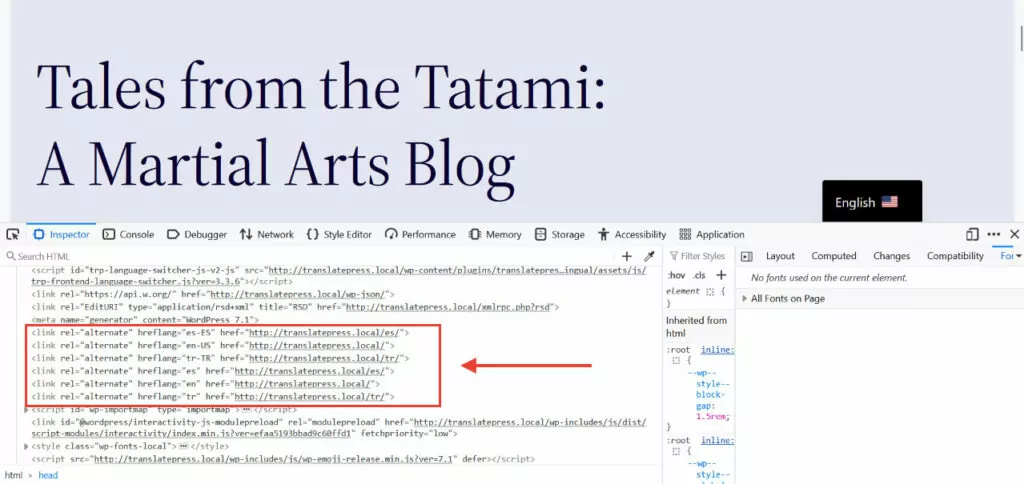
TranslatePress also helps you with multi-language SEO. For one, it automatically implements hreflang tags for every language you set up on your website.
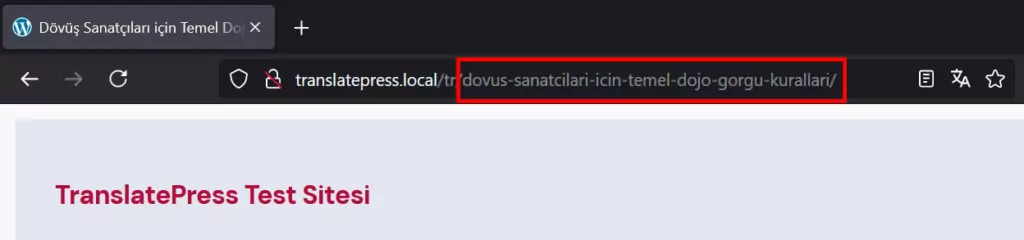
Additionally, TranslatePress Pro comes with the SEO pack addon. It lets you translate page URLs, SEO titles, meta descriptions, ALT tags, and other important SEO metadata.
The SEO pack additionally creates multilingual sitemaps for most of the popular WordPress SEO plugins.
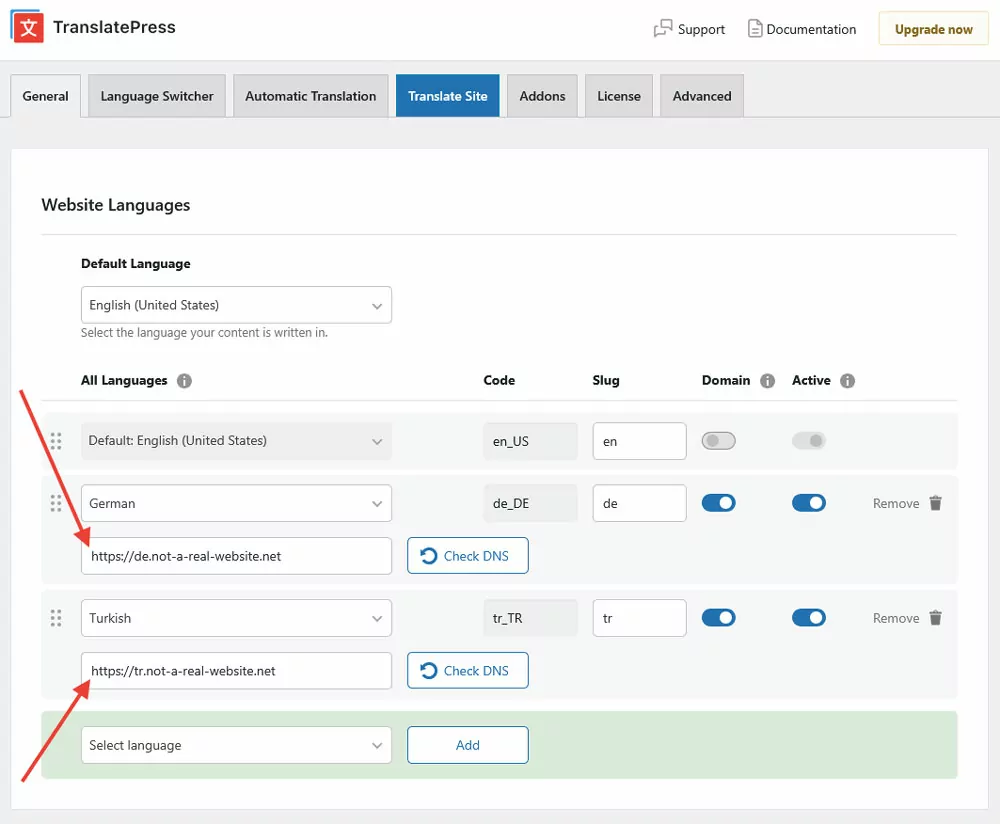
By default, additional language versions in TranslatePress appear as subdirectories (e.g. yoursite.com/de/). With the Different Domain per Language addon, you also have the option to assign unique domains or subdomains to them.
Besides the above, TranslatePress offers more features to support your multi-language websites. The plugin’s free version allows you to add one new language to your site. If you need more, TranslatePress Pro offers three pricing tiers so you can find the right option for you.
FAQs
Can I use ChatGPT or Claude to translate my WordPress site?
You can, but the workflow is almost entirely manual — extract content, translate it, paste it back into the right places across your site. For a small site, it’s manageable. For anything larger or regularly updated, it becomes very difficult to maintain. The best workaround is using a tool like TranslatePress AI, which does it automatically.
What’s the difference between LLM translation and neural machine translation?
NMT tools like DeepL or Google Translate are optimised for speed and consistency. LLMs handle context, tone, and nuance better but can occasionally hallucinate content. In practice, the best translation plugins combine both, routing each language pair to whichever engine performs best. This is exactly what TranslatePress does.
Do LLMs maintain translation consistency across a large site?
Not reliably. LLMs can lose track of earlier instructions as context grows, so the same term may be translated differently across pages. A glossary helps, but adherence isn’t guaranteed — a dedicated plugin like TranslatePress with translation memory and an internal glossary handles this consistently.
Do I still need a translation plugin if I’m using AI translation?
Yes. The translation is only part of the job. A plugin like TranslatePress handles what LLMs can’t: finding every string across your site, placing translations correctly, managing updates, implementing hreflang tags, and keeping terminology consistent. Without that infrastructure, even good LLM translations require significant manual effort to deploy.
Are LLMs Worth It for Website Translation?
Their ability to process and produce natural language position LLMs as the perfect tool for translating websites and beyond. Yet, without a dedicated workflow for finding and converting website strings, tracking changes, and updating them in all languages, LLM translation still requires a lot of manual labor.
If you want to skip the operational overhead on your WordPress website, consider TranslatePress. It allows you to take advantage of LLM-level translation while automating and simplifying the process of putting it on your site.
LLMs are the best translation engine available right now — but an engine still needs a vehicle, and for WordPress, that vehicle is a dedicated translation plugin.
TranslatePress Multilingual