
En esta publicación
El tráfico de los motores de búsqueda es la principal fuente de visitantes para la mayoría de los sitios web, razón por la cual todo el mundo intenta optimizar su sitio para posicionarse bien en las búsquedas.
Este proceso, que se denomina acertadamente “optimización para motores de búsqueda” (o SEO, por sus siglas en inglés), puede resultar abrumador para los principiantes y, para ser sinceros, no es para menos, ya que puede llegar a ser muy complejo.
Sin embargo, a un nivel más básico, se trata simplemente de:
- Crear las posibilidades técnicas para que los motores de búsqueda accedan y entiendan sus páginas web.
- Asegurarte de que los visitantes de tu sitio web tengan una experiencia agradable al estar en él.
- Publicar contenido que resulte útil para quienes lo buscan.
Por supuesto, hay algunos detalles más aparte de eso, pero esa es, básicamente, la idea general.
Si tu objetivo también es mejorar el posicionamiento de tu página web en los motores de búsqueda y atraer más tráfico orgánico hacia ella, has llegado al lugar adecuado. A continuación, te ofrecemos consejos y técnicas detalladas de SEO que te ayudarán a conseguirlo. Van desde lo básico hasta lo más avanzado, para que puedas ir mejorando poco a poco tus habilidades, incluso si eres totalmente nuevo en el mundo del SEO.
1. Ace Technical SEO
El SEO técnico consiste en permitir que los motores de búsqueda lean (es decir, rastreen) y comprendan (indexen) el contenido de tu sitio web. De esta manera, es más probable que te posicionen para palabras clave relevantes. Constituye la base de todas las demás partes del SEO, así que no te lo saltes.
Utiliza un servicio de alojamiento adecuado
El servidor donde está tu web influye muchísimo en su calidad general, sobre todo en la velocidad de carga y las caídas. Por eso, es una pieza clave en el rompecabezas del SEO. Hay varios tipos de alojamiento y la elección correcta depende de varios factores, como el tipo de web que tengas, la cantidad de tráfico y más.

Aquí tienes un resumen rápido para ayudarte a entender mejor:
- Alojamiento compartido — Mira, tu web está en el mismo servidor que varias más, compartiendo los recursos de la máquina. Eso hace que sea barata, pero a menudo también lenta, sobre todo cuando sube el tráfico. Por eso, suele ser adecuada solo para webs pequeñas y sencillas, como una página corporativa.
- Alojamiento de Servidor Privado Virtual (VPS) — En este caso, un servidor físico se divide en varias máquinas virtuales. Esto les da a los usuarios recursos dedicados y un mejor rendimiento que el alojamiento compartido. Sale más caro, pero vale la pena, sobre todo para webs de pequeños negocios y sitios con tráfico moderado.
- Dedicado alojamiento — Esto significa un servidor para un solo sitio web. Te da control total sobre la configuración del servidor y acceso a todos los recursos solo para ti. Pero también es caro y requiere conocimientos en gestión de servidores. Por eso, es más bien para grandes empresas y sitios web con mucho tráfico.
- Alojamiento en la nube — Describe una red de servidores virtuales en la nube. Este tipo de alojamiento ofrece recursos flexibles y escalables, incluso ante picos de tráfico. Es ideal para el comercio electrónico y para empresas que necesitan flexibilidad y fiabilidad. Los costes varían en función del uso.
- Alojamiento administrado — En este tipo de alojamiento, el proveedor se encarga del mantenimiento del servidor, las actualizaciones y otros aspectos técnicos, como la seguridad. Suele estar pensado específicamente para WordPress y te permite centrarte por completo en el crecimiento de la página web en lugar de en los aspectos técnicos, pero tiene un precio más elevado y limita el control sobre el servidor.
Investiga y asegúrate de obtener el mejor rendimiento dentro de tu presupuesto.
Si prefieres no comparar las compañías una por una, Hostinger cubre casi todo lo anterior en un solo lugar, así que sirve como un buen punto de partida. Ofrece hosting compartido, en la nube, VPS y administrado para WordPress, para que puedas empezar con algo básico y subir de nivel a medida que crezca el tráfico de tu sitio, sin tener que cambiar de proveedor. Todos los planes incluyen SSL gratis, y los específicos para WordPress añaden caché y otras funciones de rendimiento que están directamente relacionadas con los factores de velocidad del sitio que veremos más adelante en este artículo.
Invierte en un tema de alta calidad
Como usuario de WordPress, el tema de su sitio web es otro factor importante.
No solo determina el diseño de su sitio, sino también su marcado, lo cual tiene un efecto tanto en el rendimiento del sitio web como en el SEO. Por lo tanto, asegúrese de elegir uno que esté optimizado para ambos y que también se adapte bien a las pantallas de los dispositivos móviles. Tenemos un artículo sobre este tema que puedes utilizar como punto de partida.
Optimiza la estructura de tus URL
La estructura de los enlaces de tu sitio web muestra el contenido y la jerarquía de tu página web. Esto se entiende fácilmente con un ejemplo. ¿Cuál de los siguientes enlaces te permite saber a qué tipo de página accederás al hacer clic en él?
- https://yoursite.com/p=557
- https://yoursite.com/seo/best-seo-tools
Es fácil elegir, ¿verdad? Básicamente, tienes que asegurarte de que tus URL sean fáciles de leer y descriptivas.
En WordPress, hay dos lugares desde donde puedes controlar esto. El primero es Ajustes > Enlaces permanentes.
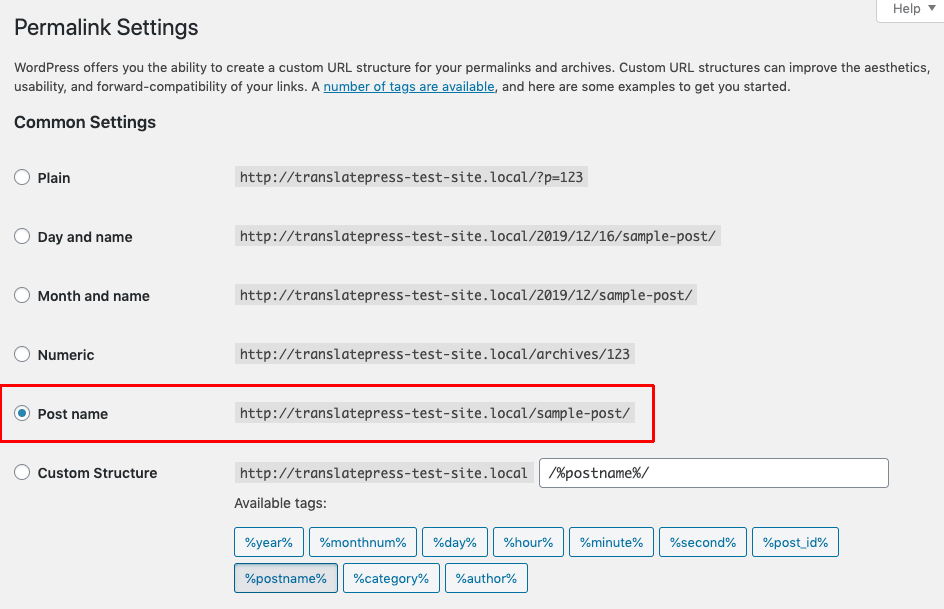
Aquí puedes configurar la estructura general de la URL. La opción más común es Nombre de la publicación. También puedes incluir las categorías de tus contenidos en las URL; sin embargo, evita incluir fechas, a menos que tengas un sitio web de noticias o algo similar en el que tenga sentido fechar tus contenidos.
Con la estructura básica ya establecida, debes crear finales de URL significativos en el panel lateral del editor cada vez que crees una página o entrada.
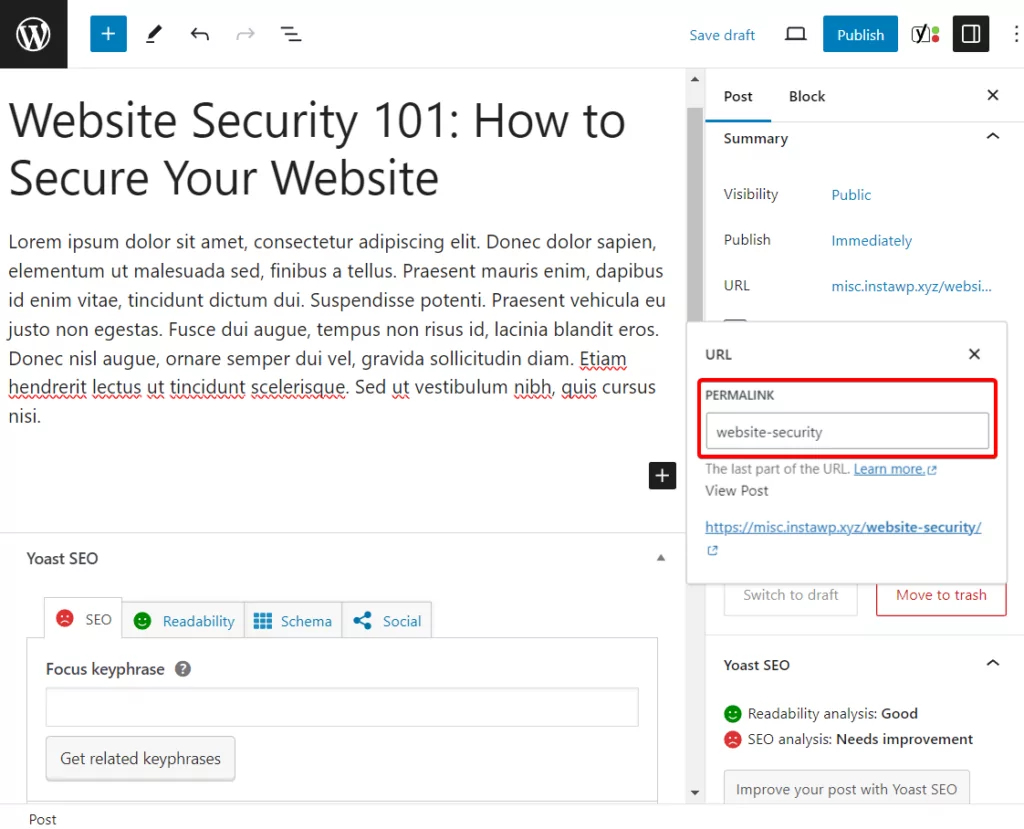
Mantén tus URL cortas y significativas. Por lo general, simplemente consisten en la palabra clave principal de la página.
Implementar SSL/HTTPS
Usar SSL/HTTPS significa cifrar el tráfico de tu sitio. Es obligatorio para tiendas en línea o sitios web que transfieren datos confidenciales; sin embargo, HTTPS se ha convertido cada vez más en el estándar porque los motores de búsqueda como Google te recompensan con un mejor posicionamiento si lo utilizas.
Puedes ver el estado SSL de tu sitio web a través del logotipo del candado en la barra del navegador.

Para habilitarlo en su sitio web, necesita un certificado SSL. La opción más fácil para obtenerlo y configurarlo suele ser a través de su proveedor de alojamiento web. Algunos lo incluyen por defecto y normalmente se puede configurar con solo unos pocos clics.
Si necesita hacer el cambio, un complemento como Really Simple SSL facilita la transferencia de su sitio web de WordPress a HTTPS. A continuación, trataremos con más detalle aspectos adicionales del SEO técnico, como la velocidad del sitio, los mapas del sitio y la analítica.
2. Proporcionar una experiencia de usuario agradable
La siguiente manera de optimizar su sitio web para posicionarse bien en los resultados de los motores de búsqueda es ofrecer una buena experiencia de usuario. Esto es algo que, especialmente Google, ha comenzado a medir más en los últimos años. A continuación, se presentan formas en las que puede garantizar que las personas la pasen bien al visitar su sitio web.
Crear una buena estructura de sitio web
La estructura de su sitio web determina lo fácil que es navegar y encontrar contenido. Su arquitectura también proporciona contexto para ayudar a los motores de búsqueda a entender de qué trata su sitio y distribuir la autoridad en todo el sitio web. Idealmente, debería configurarse para que los usuarios puedan acceder a cualquier página en un máximo de dos a tres clics.
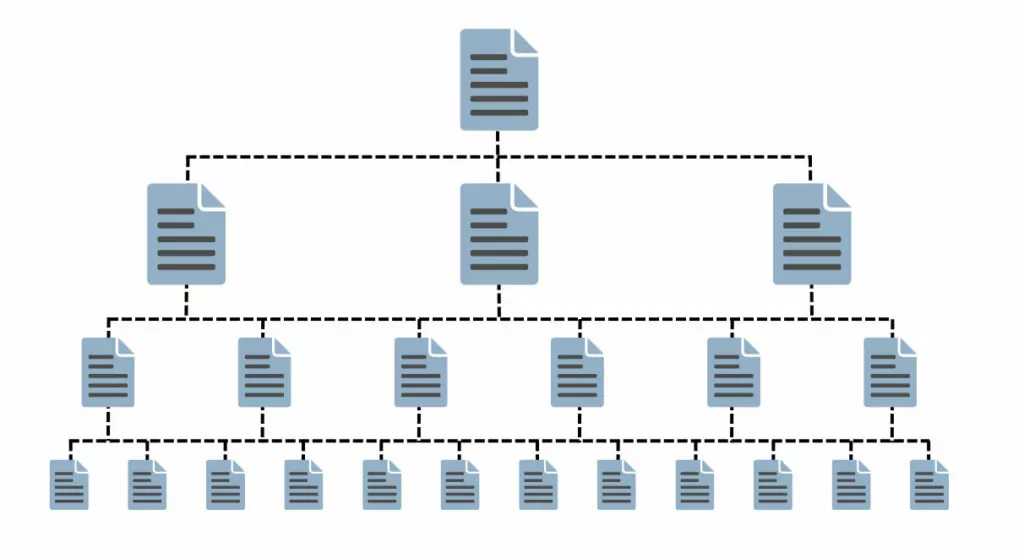
Para crear una estructura de sitio útil:
- Determina qué páginas necesita tu sitio web.
- Invierte en una navegación clara y en enlaces internos (más sobre eso a continuación).
- Elige tus categorías principales de contenido y asígnales contenido.
- Enviar un mapa del sitio a las herramientas para webmasters (pronto daremos más detalles al respecto).
Ofrecer una navegación útil
El menú de navegación determina, literalmente, la facilidad con la que los usuarios se orientan en tu página web y muestra lo que es más importante.
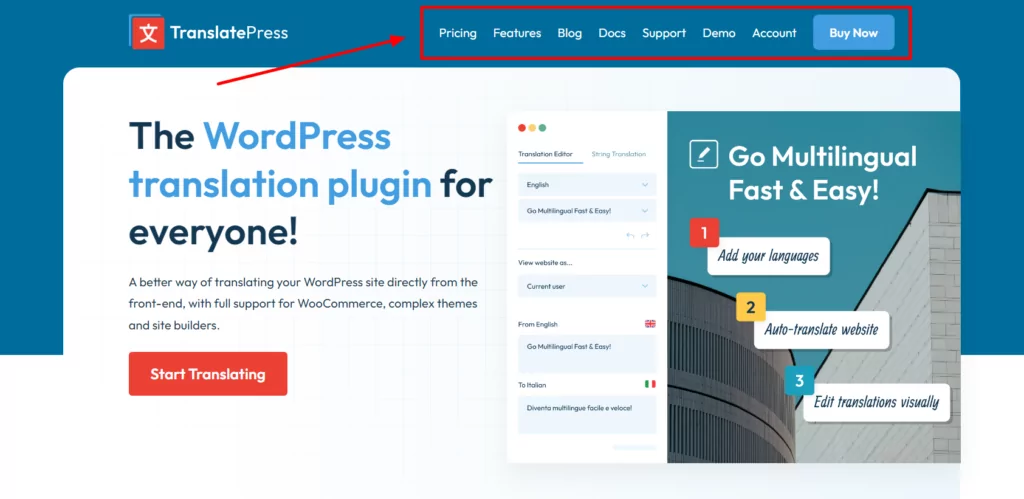
Por eso, asegúrate de incluir allí tus páginas más importantes y de etiquetarlas claramente para que los usuarios sepan adónde les llevará cada clic. Esto contribuye en gran medida a dirigirles a los sitios adecuados.
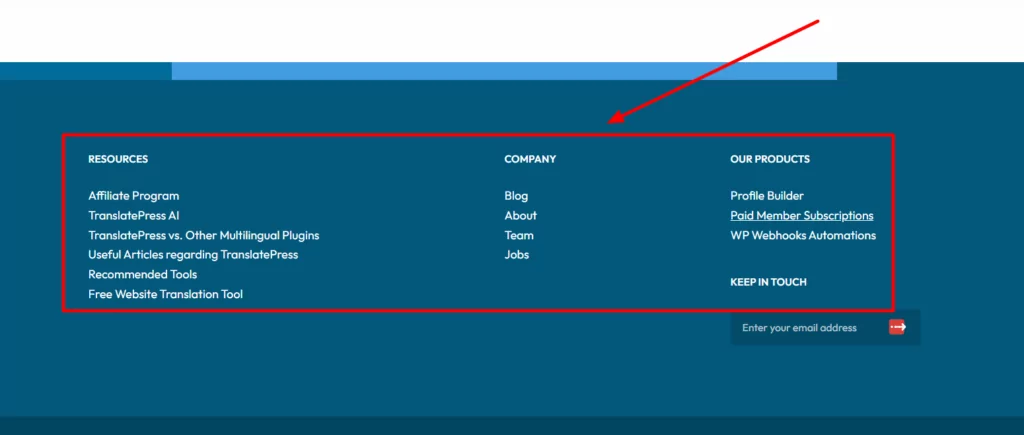
Sin embargo, la navegación por la web no se limita al menú principal. Existen otras formas de ayudar a los visitantes a moverse por tu página web, como las rutas de navegación o el menú de navegación del pie de página, ¡así que no las descuides!
No te pases con las ventanas emergentes
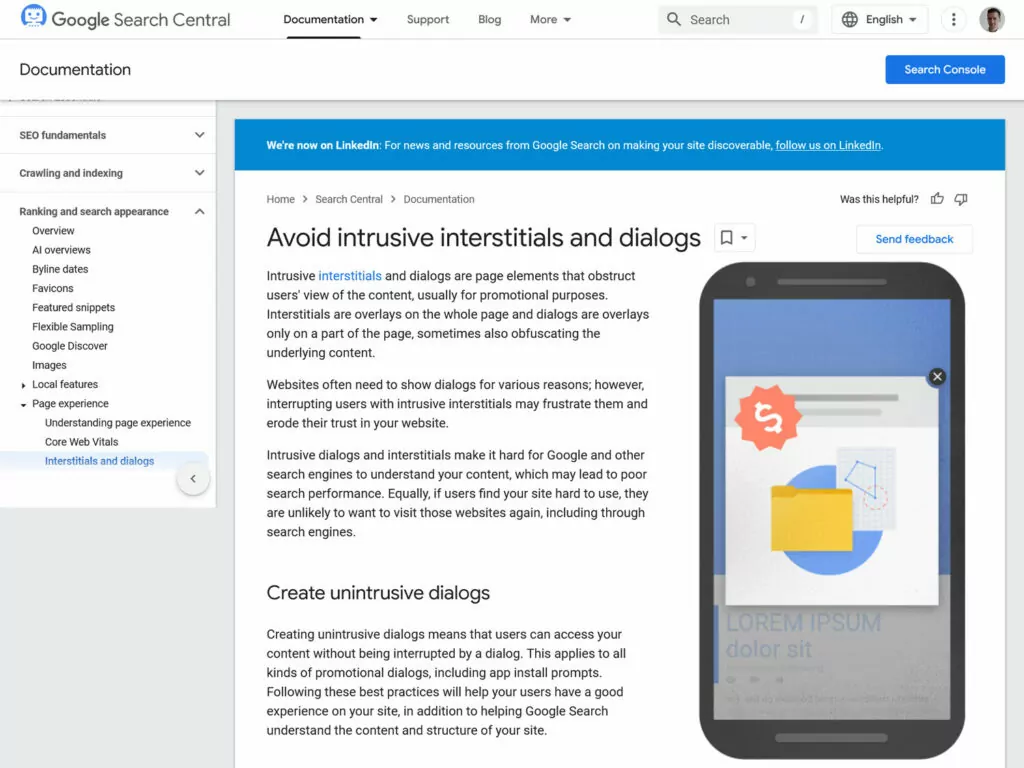
Las ventanas emergentes o los anuncios intersticiales pueden ser un gran obstáculo para una buena experiencia de usuario, sobre todo en dispositivos móviles. Probablemente no hace falta que te lo digan, ya que está claro que has navegado por Internet antes.
Google también lo sabe, y por eso ha elaborado Directrices para el uso de ventanas emergentes. En resumen:
- Limita las ventanas emergentes, especialmente al entrar — Evita los anuncios intersticiales a pantalla completa que bloqueen toda la página, sobre todo justo después de que un visitante acceda a tu sitio web. En su lugar, utiliza banners más pequeños que se puedan cerrar o llamadas a la acción (CTA) integradas.
- Relacionar su aspecto con las acciones del usuario — Si no tienes más remedio que utilizar ventanas emergentes, haz que aparezcan en respuesta a acciones deliberadas del usuario, como hacer clic en un botón de llamada a la acción.
- Optimizar las ventanas emergentes para dispositivos móviles — Asegúrate de que tus ventanas emergentes sean fáciles de cerrar en las pantallas de los móviles, incluso con el control táctil.
3. Realiza una investigación de palabras clave
La investigación de palabras clave puede parecer muy complicada e intimidante cuando se oye el término por primera vez. Sin embargo, en su nivel más básico, simplemente significa averiguar qué escriben las personas en los motores de búsqueda para encontrar páginas y sitios web como el tuyo; eso es todo. Por supuesto, el diablo está en los detalles, así que vayamos poco a poco.
Identificar las palabras clave principales
Para realizar un análisis de palabras clave para tu página web, empieza por temas generales. Haz una lista de temas generales relacionados con tu negocio o tu página web, como “marketing digital” o “repostería sin gluten”. Es posible que ya tengas algunos en mente a partir de las categorías de tu página web.
Utiliza estas palabras clave como punto de partida para introducirlas en herramientas de búsqueda como Planificador de palabras clave de Google, Ahrefs, Semrush, y Ubersuggest. Estas herramientas te ayudan a identificar frases clave específicas relacionadas con tus temas principales y también te proporcionan información como estimaciones de tráfico y el nivel de competencia.
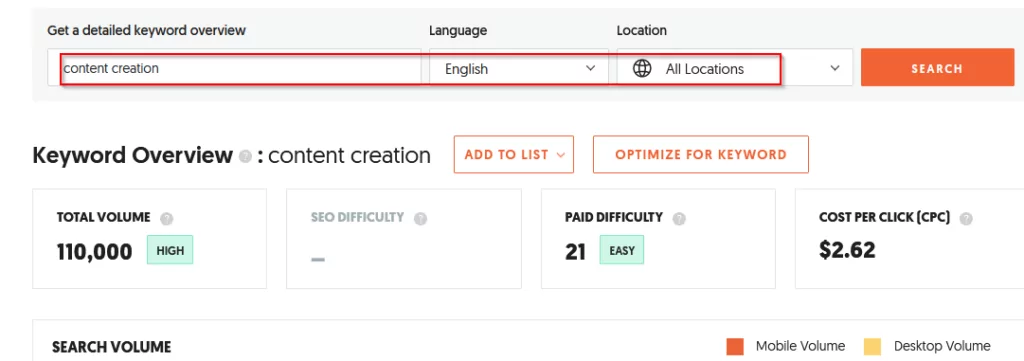
Esto te da una idea más clara de qué palabras clave tiene sentido elegir. Para obtener más información, consulta nuestra guía sobre la búsqueda de palabras clave.
Concéntrate en palabras clave de cola larga
El SEO lleva mucho tiempo entre nosotros. Eso significa que, durante todo ese tiempo, mucha gente ha estado compitiendo por los primeros puestos en los motores de búsqueda.
Como consecuencia, hay una serie de palabras clave para las que resulta muy difícil posicionarse, ya que otras páginas web ya han hecho el trabajo. Suelen ser palabras clave relativamente cortas y generales, como “SEO” o “marketing de contenidos”.”
Por ese motivo, es mejor centrarse en palabras clave más largas o las denominadas “de cola larga”. Estas suelen estar formadas por más palabras (por ejemplo, “consejos de SEO para principiantes”) y tienen menos tráfico.
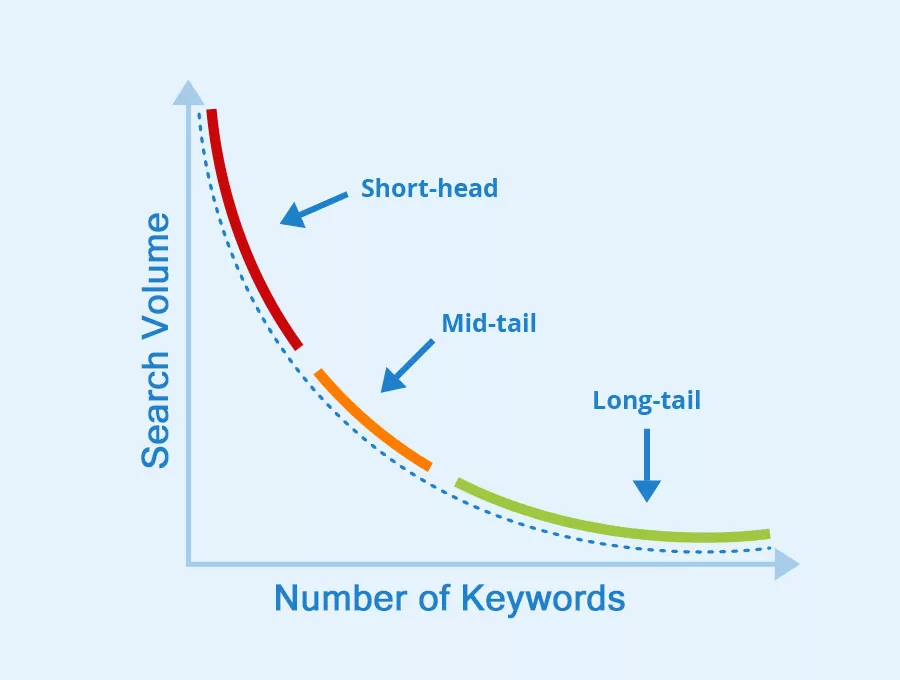
Por otro lado, es más fácil posicionarse en ellas y están más orientadas a un público específico, por lo que hay más posibilidades de que los usuarios hagan clic y se interesen por tu contenido. Esto se traduce en mayores tasas de conversión.
Intención de búsqueda de direcciones
El SEO no consiste solo en utilizar las palabras clave adecuadas. También hay que comprender la intención que hay detrás de la búsqueda de esas palabras. ¿Quiere la persona recabar información (intención informativa), realizar una compra (intención transaccional) o comparar opciones (intención comercial)?
Es importante que utilices el tipo de palabra clave adecuado para cada página. Si no lo haces, corres el riesgo de decepcionar a los visitantes, que se marcharán rápidamente, algo que los motores de búsqueda detectarán.
Por ejemplo, no se optimizaría una página de producto o de ventas para posicionarse en los motores de búsqueda con una palabra clave como “cómo optimizar la velocidad de una página web”. En este caso, la intención es claramente informativa. Una palabra clave más adecuada para una página transaccional sería “comprar software de SEO”.”
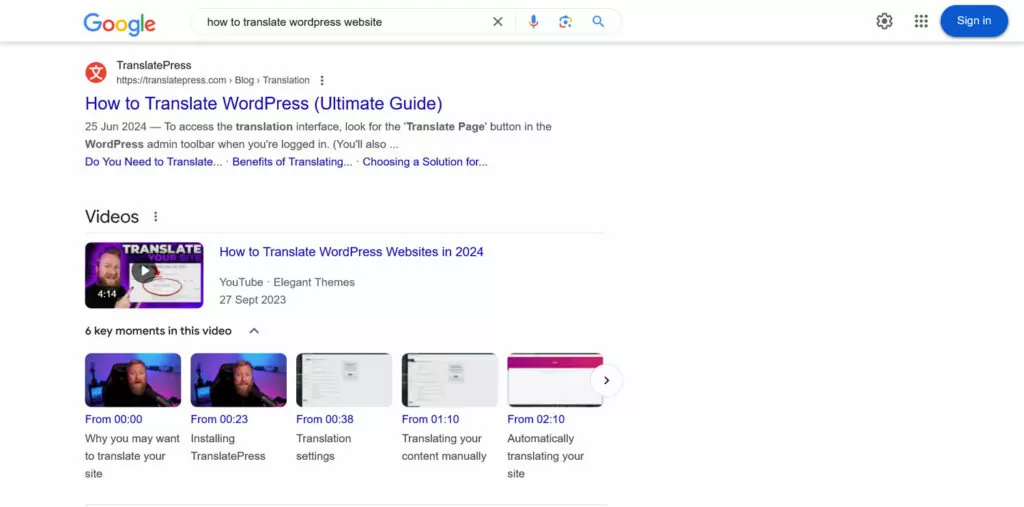
Una buena forma de averiguar la intención de búsqueda es utilizar una buena herramienta de palabras clave (véase más arriba) o consultar los primeros resultados para tus palabras clave objetivo. El tipo de contenido que Google posiciona para ellas —por ejemplo, entradas de blog, páginas de productos o vídeos— te dará mucha información sobre cuál considera que es la intención que hay detrás.
4. Crea contenido que merezca la pena posicionar
El contenido es una de las principales formas en que Google clasifica las páginas web. Por lo tanto, es importante que aprendas a hacer que el tuyo valga la pena para aparecer en los resultados.
Haz que se base en el valor
El objetivo principal del contenido es aportar valor. Solo si el contenido es valioso para los lectores tiene sentido que lo consuman, lo compartan e interactúen con el resto de su sitio web y negocio.
¿Cómo se crea contenido de este tipo?
- Responder a las preguntas del usuario — Investiga las preguntas frecuentes que tiene tu audiencia y proporciona respuestas claras y completas.
- Cubre los temas a fondo — Procura crear contenido “completo” que aborde todos los aspectos de un tema, convirtiéndolo en un recurso de referencia.
- Utilice investigación o datos originales — Cuando sea posible, incluya información única, estudios de caso o investigación original para aumentar la credibilidad.
- Agrega perspectivas únicas — Comparte percepciones personales, ejemplos o soluciones para diferenciar tu contenido.
Una buena manera de determinar qué es un buen contenido es familiarizarse con El concepto de E-E-A-T de Google.
Las siglas significan Experiencia, Pericia, Autoridad, y Confianza. Aunque no se utiliza directamente como factor de posicionamiento, es un concepto que Google utiliza en su directrices de evaluadores de calidad de sitios web para determinar la calidad general de los sitios web.
Si puedes demostrar todo lo anterior con tu contenido, estás en el camino correcto para ganar el favor de Google.
Asegurar la legibilidad
Además de lo que hay en tu contenido, la forma en que lo presentas también importa. Incluso si tienes las ideas más valiosas del mundo, si se presentan en un gran bloque de texto sin saltos de línea o de una manera excesivamente complicada, la gente no se tomará la molestia de descubrirlo.

Por lo tanto, asegúrate de que las publicaciones y páginas sean legibles, especialmente a través de:
- Lenguaje sencillo — Evite la jerga y las palabras demasiado complicadas. Utilice un lenguaje sencillo y claro para que el contenido sea accesible a un público amplio. Compruebe siempre si hay errores de ortografía y gramática.
- Párrafos y oraciones cortos. — Utilice entre dos y tres oraciones por párrafo y manténgalas concisas. Intente transmitir solo una idea por párrafo.
- Encabezados y listas — Estructura el contenido con encabezados H2 y H3 significativos. Utiliza viñetas o listas numeradas para enfatizar los puntos clave y organizar la información compleja.
Incluir elementos visuales
Otra forma de hacer que el contenido sea más atractivo y optimizarlo para el posicionamiento en motores de búsqueda es utilizar elementos visuales. Estos ayudan a dividir el texto, hacen que las páginas sean más agradables a la vista, pueden enfatizar aún más el punto que estás haciendo y proporcionan más contexto para tu audiencia.
Tienes muchos tipos de elementos visuales para elegir:
- Imágenes
- Capturas de pantalla
- Gráficos
- Gráficos
- Infografías
- Videos
- Publicaciones sociales incrustadas
Para maximizar su impacto, procura incluir al menos un elemento visual en cada profundidad de desplazamiento.
Actualiza el contenido a menudo
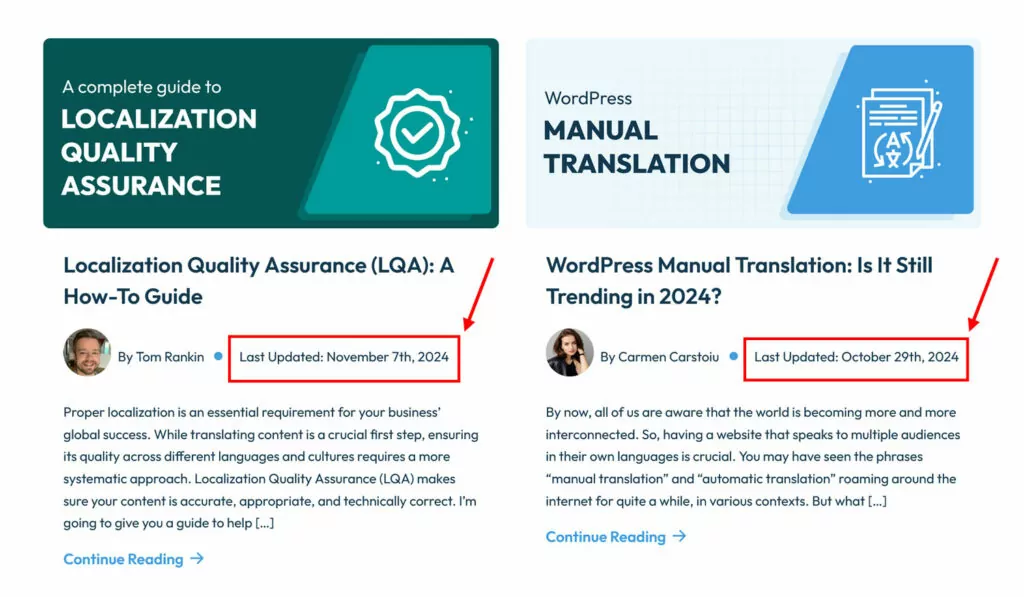
Una de las cosas que Google valora en el contenido es que esté actualizado. El contenido más antiguo desaparece de forma natural de las páginas de resultados de búsqueda con el tiempo.
Por esa razón, harías bien en revisar el contenido antiguo con regularidad para añadir nuevas perspectivas, actualizar estadísticas obsoletas y mejorar los ejemplos para mantenerlo relevante.
5. Implementar un SEO *on-page* adecuado
El SEO en la página es otro de esos términos que al principio pueden parecer un poco abrumadores. Sin embargo, simplemente significa utilizar palabras clave de manera que los motores de búsqueda entiendan el tema de tus publicaciones y páginas, a la vez que se añade información adicional para que se vean bien en los resultados de búsqueda.
Utilice palabras clave de forma estratégica
Para aclarar el tema de su contenido, es importante que las palabras clave aparezcan en ciertos lugares. Los más importantes son:
- URL de la página
- Título de la página
- Introducción
- Encabezados
- Cuerpo principal del texto
- Etiquetas meta (por ejemplo, título y descripción)
Sin embargo, es importante no obsesionarse con esto y evitar exagerar. Google es bastante inteligente hoy en día y por lo general puede averiguar el tema de tu contenido. Principalmente, simplemente debes escribir de forma natural sobre tu tema. Esto conducirá naturalmente a mencionar la palabra clave, así como sinónimos y términos relacionados.
Si quieres un recordatorio y ayuda, instala un plugin de SEO como Yoast SEO, Rank Math, o SEOPress. Estos complementos tienen módulos donde puedes ingresar la palabra clave principal y obtener indicadores de si la has usado lo suficiente y en los lugares correctos.
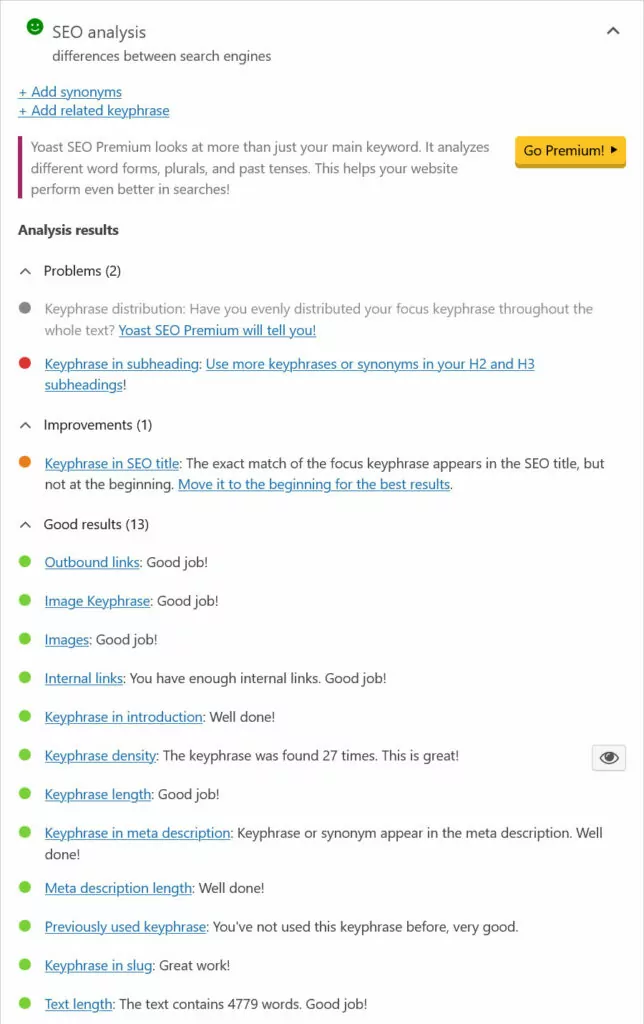
Organiza tu contenido con encabezados
Los encabezados son fundamentales para estructurar el contenido y ofrecer oportunidades para utilizar palabras clave. Sin embargo, para el SEO en la página, es muy importante que comprendas cómo utilizarlos correctamente.

Es posible que ya hayas notado que los encabezados vienen en diferentes niveles (desde H1 hasta H6). Puedes y debes utilizarlos para aclarar la jerarquía de tu contenido:
- Debe haber solo un encabezado H1 por página, que suele ser el título de la página (esto normalmente lo gestiona tu tema).
- Utiliza encabezados H2 para dividir el contenido en secciones.
- Utilice H3s y H4s para las subsecciones dentro de esas divisiones.
Si prestas atención, notarás que este es el uso de encabezados en este mismo artículo. Hay muy pocos casos en los que debas bajar de H4; la mayoría de las veces, los H2 y H3 son suficientes.
Incluir enlaces
Otro factor de SEO en la página que importa para posicionarse bien en los motores de búsqueda son los enlaces. Ayudan tanto a los visitantes como a las arañas de los motores de búsqueda a encontrar contenido relacionado y a distribuir el valor de SEO en todo su sitio.
Aquí hay algunas mejores prácticas:
- Enlace a contenido relevante — Guía a los lectores hacia artículos o páginas relacionados dentro de tu sitio.
- Usa texto de anclaje descriptivo — Utilice palabras clave significativas para el texto vinculado en lugar de anclajes genéricos como “haga clic aquí”.”
- Destacar páginas importantes — Enlaza con más frecuencia a páginas clave (por ejemplo, contenido fundamental o páginas de alta conversión) para transferir autoridad de enlaces.
- Enlaza a fuentes externas en las que confíes — Para exponer tu punto y ofrecer a los lectores la oportunidad de profundizar, enlaza a fuentes confiables y a otro contenido útil.
Optimiza tus imágenes
Como se mencionó, los elementos visuales realmente pueden mejorar su contenido, pero también necesitan optimizado para SEO. Para asegurarte de que sean beneficiosos para tu posicionamiento:
- Usa nombres de archivo descriptivos — Dele a los archivos de imagen nombres significativos (por ejemplo, “best-seo-tools.jpg”).
- Reducir el tamaño de la imagen — Las imágenes pueden ralentizar tus páginas. Redúcelas utilizando formatos modernos como WebP o Avif, y compímelas antes de subirlas.
- Incluir texto alternativo — Añade texto alternativo descriptivo y rico en palabras clave para accesibilidad y SEO. Puedes hacerlo en la biblioteca de medios de WordPress (ver abajo).
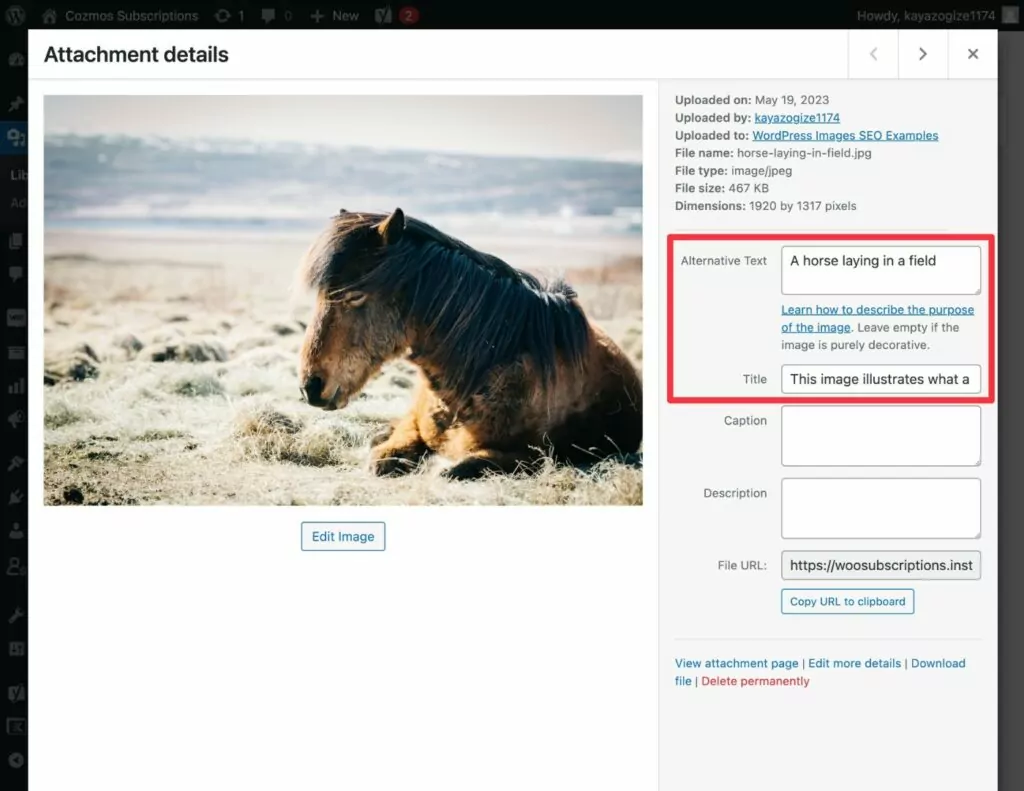
Configurar metatags
Por último, están las metaetiquetas. Te permiten optimizar el aspecto de tus páginas cuando aparecen en los resultados de los motores de búsqueda. Las más importantes son la etiqueta de título y la metadescripción, porque aparecen de forma muy destacada.
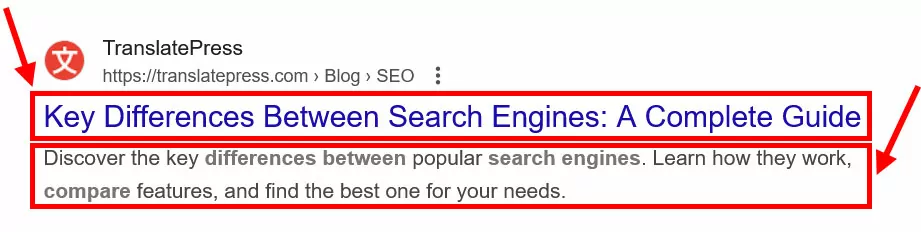
Puedes personalizarlos fácilmente con los complementos de SEO mencionados anteriormente y también ver una vista previa de cómo se verán.
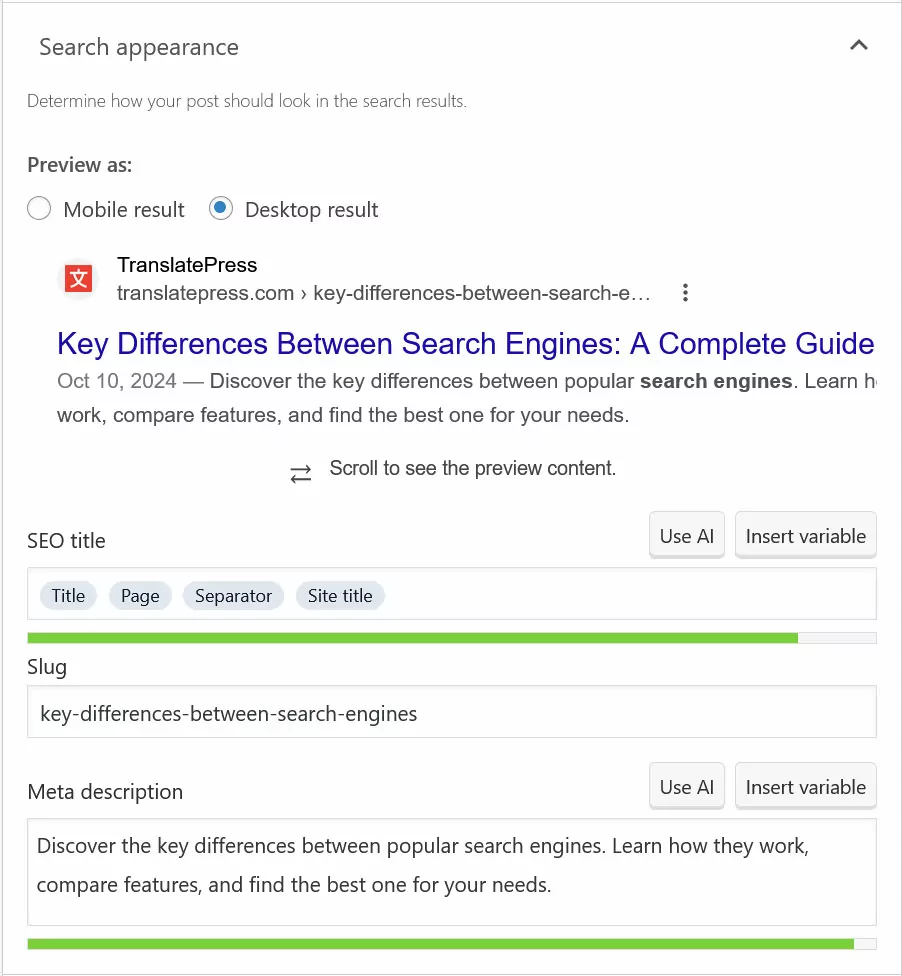
Algunos consejos para obtener los mejores resultados:
- Elabora etiquetas de título únicas y ricas en palabras clave para cada página. Mantenlas por debajo de los 60 caracteres para evitar el truncamiento.
- Escribe meta descripciones concisas y descriptivas (hasta 160 caracteres) que incluyan palabras clave principales y fomenten los clics, por ejemplo, mediante llamadas a la acción.
6. Optimizar la velocidad del sitio
La velocidad de carga de las páginas es una pieza importante del rompecabezas para optimizar su sitio con el fin de posicionarse bien en los motores de búsqueda. Google ha declarado oficialmente que la velocidad es un factor de posicionamiento, y dos de cada tres Métricas de Core Web Vitals tratan sobre el rendimiento de la página.
Ya hemos cubierto algunas de las cosas que puedes hacer para mejorar la velocidad de carga de tu sitio web, como elegir un buen proveedor de alojamiento y optimizar tus imágenes.
Para futuras mejoras, lo más importante que puedes hacer es aprender a probar la velocidad de tu sitio web. Esto es tan fácil como ingresar tus páginas más importantes en una herramienta como PageSpeed Insights. Cuando lo hagas, obtendrás un análisis de rendimiento detallado tanto para usuarios de dispositivos móviles como de escritorio.
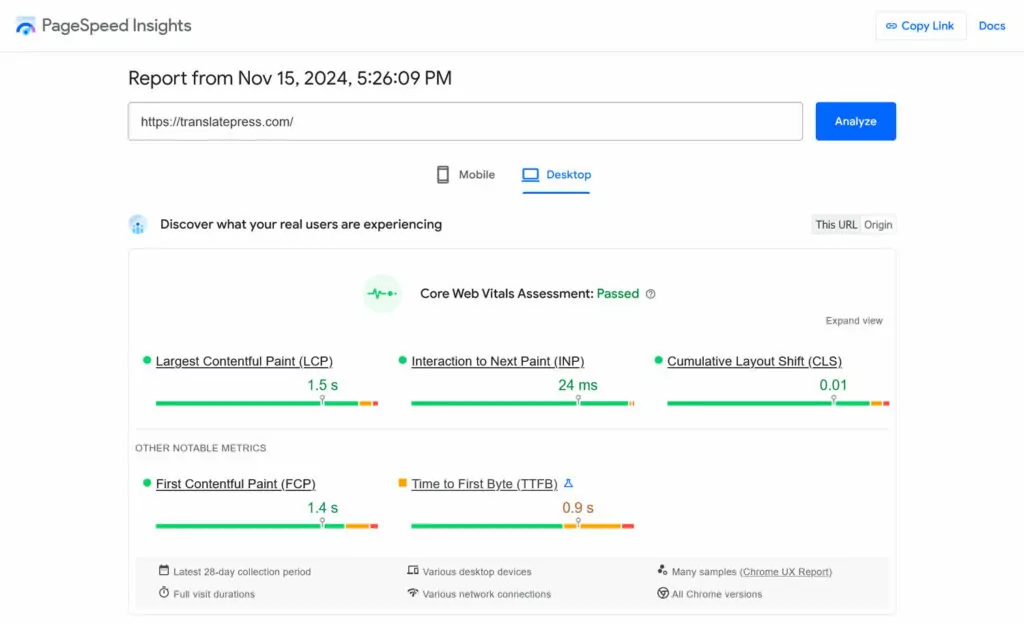
La herramienta también proporciona una lista de problemas específicos que ralentizan su sitio e instrucciones sobre cómo solucionarlos.
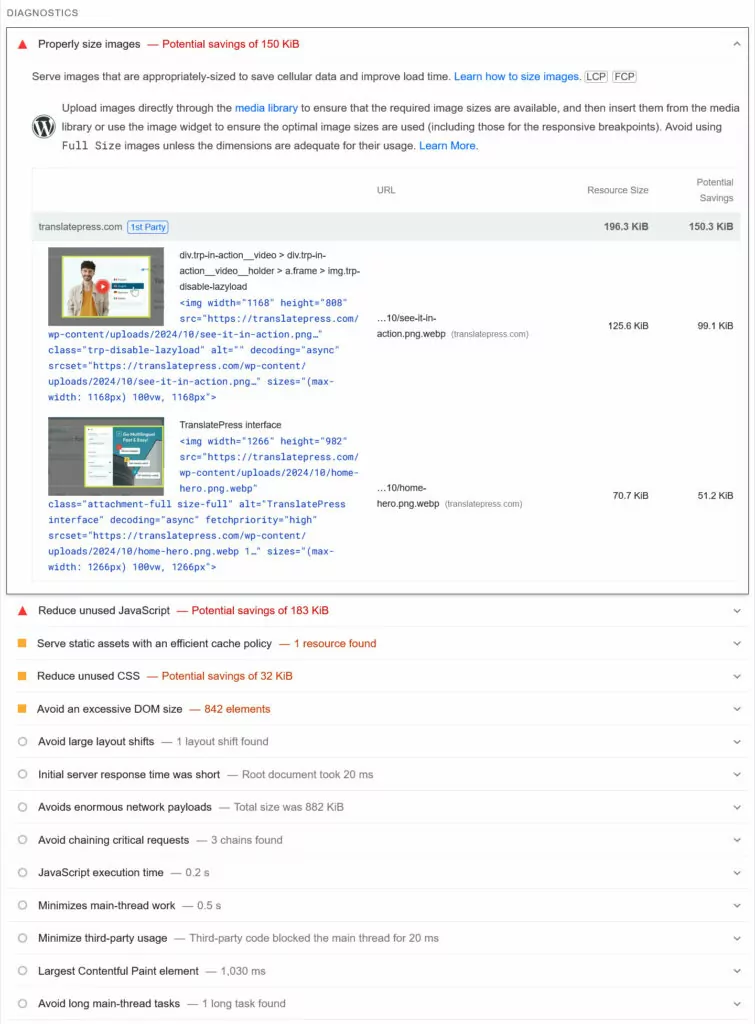
Puedes solucionar muchos de ellos instalando un plugin de rendimiento como LiteSpeed Cache, Autoptimize, o WP Rocket. Pueden hacer cosas como minificar y comprimir código, eliminar recursos que bloquean el renderizado o habilitar el almacenamiento en caché. Esto cubre la mayoría de las bases importantes. Puedes obtener más información en nuestro artículo sobre mejorando la velocidad del sitio web.
7. Configurar análisis y seguimiento
La analítica web te ayuda a entender qué está pasando en tu sitio web, qué hacen los visitantes, de dónde vienen y más. Esto te permite tomar decisiones sobre tu sitio basadas en datos, no solo en corazonadas.
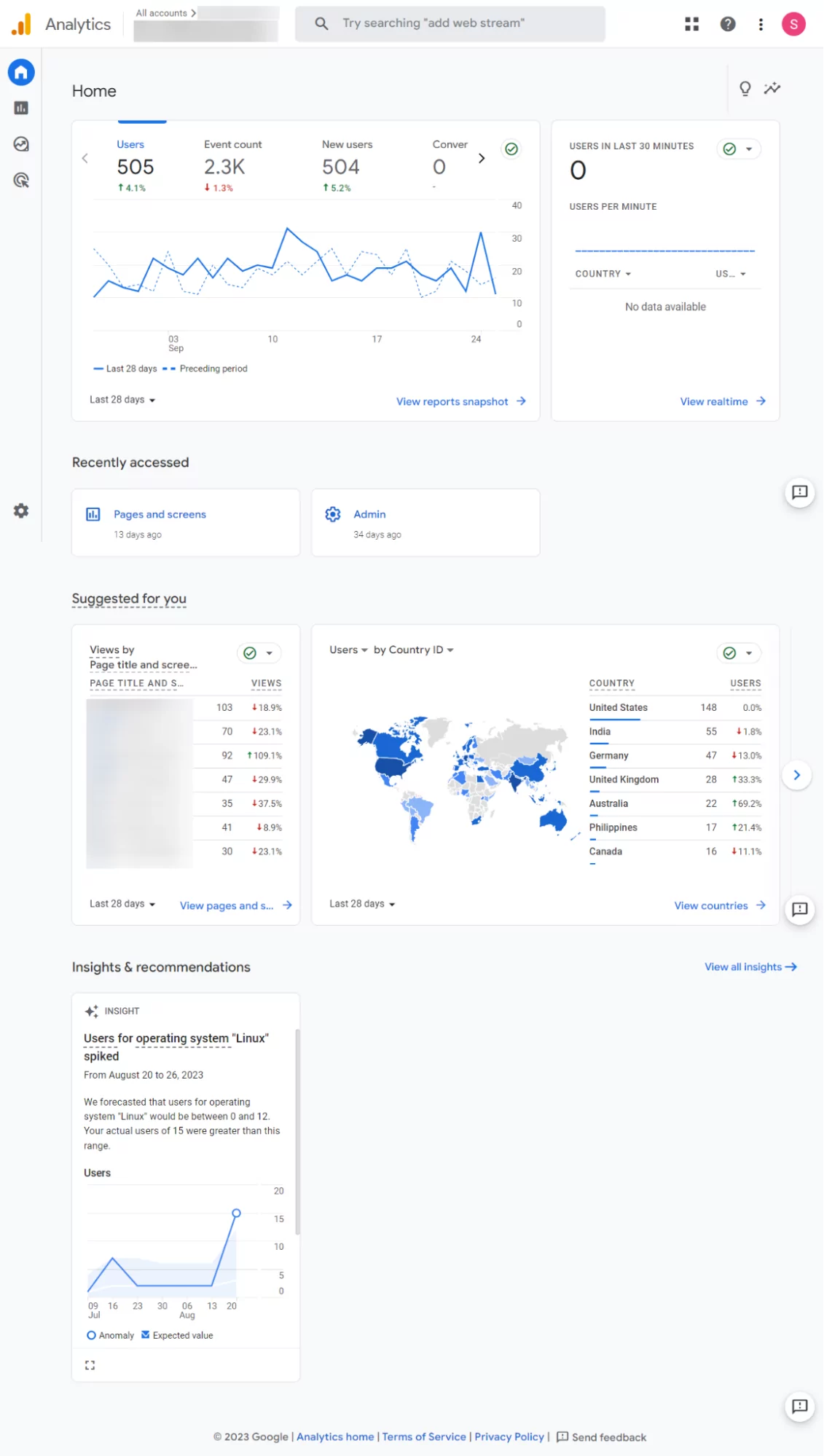
Las dos herramientas de seguimiento más importantes en las que debes registrarte son:
- Google Analytics — Esto le permite realizar un seguimiento del comportamiento del usuario, las fuentes de tráfico y más.
- Google Search Console — Te permite supervisar el rendimiento de las búsquedas (por ejemplo, impresiones, clics y posiciones de las palabras clave), solucionar errores de rastreo e indexación, y enviar sitemaps.
Puedes utilizar los datos que proporcionan estas herramientas para evaluar el rendimiento de tu sitio web y perfeccionar tu estrategia con el tiempo.
8. Utilice técnicas avanzadas de optimización
Las técnicas anteriores deberían ser suficientes para sentar unas buenas bases en cuanto a SEO. Llévalelas a cabo y tu sitio debería estar bien posicionado para aparecer en los resultados de los motores de búsqueda. Si quieres ir más allá, aquí tienes otros tres consejos rápidos de SEO para ti.
Configurar marcado de esquema
Incluso si no sabes el nombre, has visto los datos estructurados en acción. Son los responsables de los llamados fragmentos enriquecidos: resultados de búsqueda que tienen información adicional como imágenes, valoraciones, precios o elementos similares adjuntos.

Esto ayuda con las tasas de clics y también permite que te noten en los resultados de búsqueda más fácilmente.
Los datos estructurados (schema markup) existen para diferentes tipos de contenido, desde publicaciones de blog y preguntas frecuentes (FAQs) hasta productos y negocios locales (ver el siguiente punto). La forma más fácil de implementarlos es usar un plugin de WordPress como Esquema y datos estructurados para WP y AMP. La mayoría de los complementos de SEO también tienen la funcionalidad de agregar el marcado a su contenido. Puedes usar Herramienta de pruebas de marcado de esquema de Google para ver si está funcionando correctamente.
Haz SEO local
El SEO local es fundamental para las empresas con una ubicación física o clientela local. Aumenta la visibilidad para las búsquedas geográficamente relevantes, como el “paquete local de tres”.”
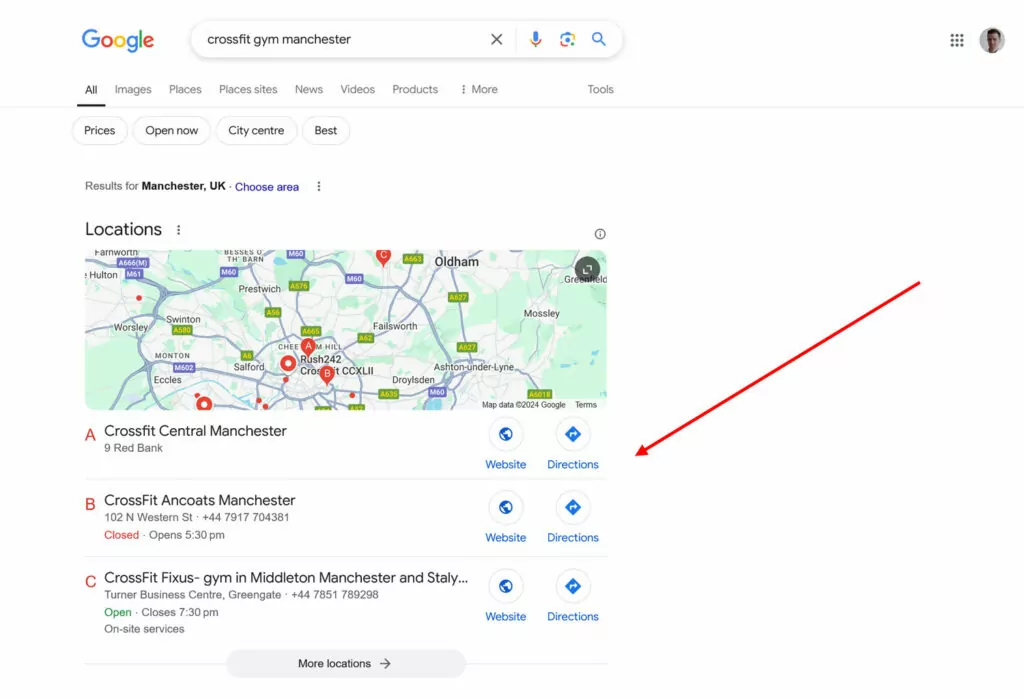
Si eso se aplica a usted, aquí están los pasos más importantes que puede seguir para aparecer en las búsquedas locales:
- Reclama y configura tu perfil de Google My Business — Reclámalo aquí y complète toda la información disponible, como la categoría del negocio, el horario de apertura, el número de teléfono, el enlace del sitio web, etc. Además, solicite activamente reseñas a los clientes y responda a cada una de ellas para mejorar la visibilidad.
- Utiliza palabras clave locales — Incluye tu ciudad, barrio y puntos de referencia locales en las páginas de tu sitio web para que puedan aparecer en las búsquedas locales. Publica contenido relevante a nivel local. Si es relevante, crea páginas para cada una de tus ubicaciones de tiendas.
Crear enlaces de retroceso
Los enlaces a su sitio son una de las señales de clasificación más importantes. Actúan como votos de confianza, indicando a los motores de búsqueda que su contenido es creíble y valioso. Aquí hay formas de atraer más enlaces a su sitio:
- Crea contenido que merezca ser enlazado — El primer paso si quieres que la gente enlace a tu sitio es darles una razón. Puedes hacerlo creando contenido de alta calidad como se discutió anteriormente. Si eres el mejor recurso disponible sobre un tema, haces que sea mucho más probable que la gente se fije en ti y te enlace.
- Guest blogging y outreach — Contacta con sitios web o blogs de alta calidad en tu sector y ofrece escribir una publicación de invitado con un enlace de retroceso a tu sitio. En general, estar en contacto con figuras de la industria y personas influyentes puede ayudarte a ganar publicidad y algún que otro enlace de retroceso.
- Recuperar enlaces rotos — Utiliza herramientas como Ahrefs o SEMrush para rastrear cuándo se pierden, se rompen o se redirigen los backlinks. Ponte en contacto con el sitio web que enlaza, ofreciendo un enlace corregido o actualizado a tu contenido. Cuando se mencione tu marca o contenido sin un enlace, también puedes ponerte en contacto y solicitar amablemente que añadan uno.
9. Haga SEO multilingüe
Optimizar su sitio para posicionarse alto en los resultados de los motores de búsqueda es una cosa, hacer SEO internacional es otro cantar. Por suerte, nuestro Complemento TranslatePress puede hacer que este proceso sea mucho más fácil.
TranslatePress Multilingüe
Traduce fácilmente todo el contenido
El primer paso para intentar posicionarse en otro idioma es traducir el contenido de tu página web a ese idioma. Esto es algo que TranslatePress facilita mucho, sobre todo si utilizas TranslatePress AI. Está incluido en todas las licencias de TranslatePress y puedes utilizarlo con los créditos de IA disponibles a través de tu cuenta.
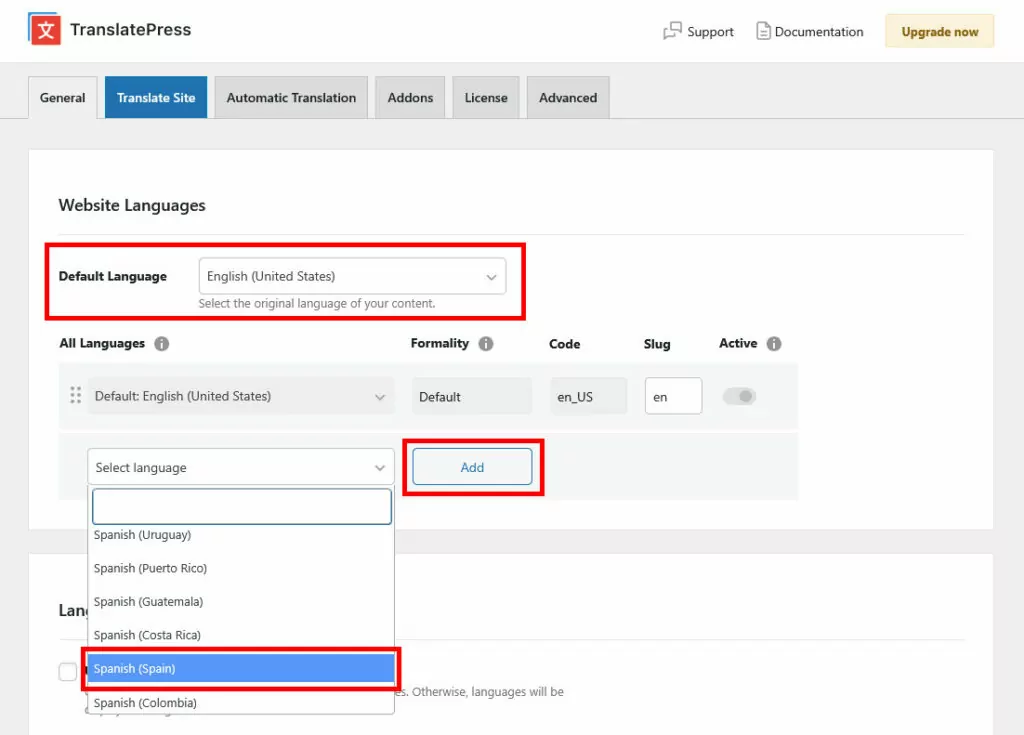
Básicamente, todo lo que tienes que hacer es instalar el complemento, luego definir el idioma predeterminado de tu sitio y al menos un idioma de destino en Configuración → TranslatePress.
Luego, ve a la Traducción automática pestaña. Aquí, cambia el menú desplegable en Activar Traducción Automática a Sí y guardar al final.
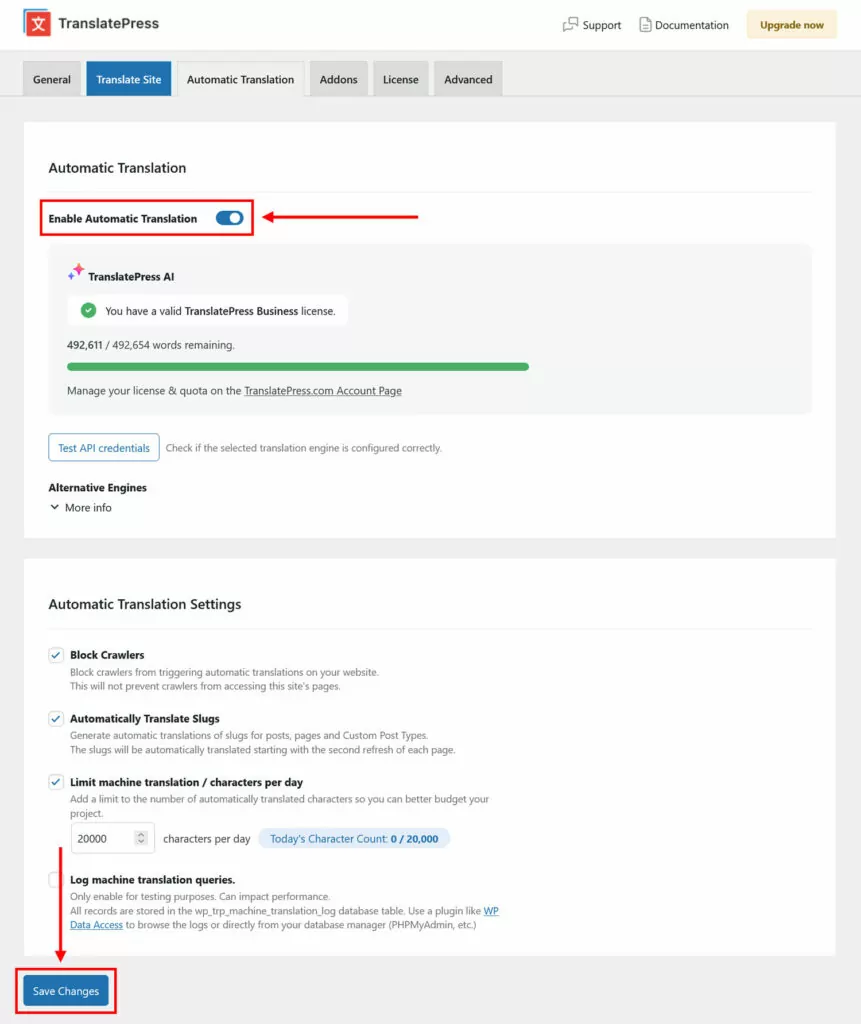
A partir de ahora, TranslatePress convertirá automáticamente tu página web al idioma o idiomas de destino. De hecho, cuando accedas a la interfaz de usuario de tu sitio y utilices el selector de idioma, la traducción probablemente ya esté hecha.

TranslatePress AI utiliza varias fuentes para traducción automática y selecciona automáticamente el más adecuado para tu par de idiomas para garantizar la mejor calidad de traducción.
Además de eso, también puedes optar por usar Google Translate o DeepL en la configuración.

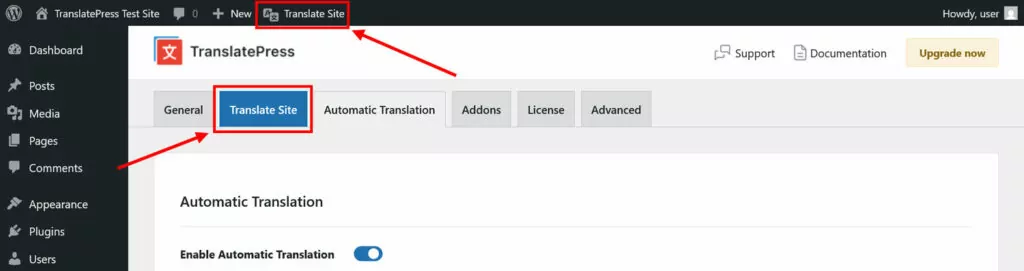
Además, tienes la opción de ajustar las traducciones automáticas a mano o incluso traducir todo tu sitio web manualmente si así lo deseas. Para ello, simplemente haz clic en Traducir sitio/página en la configuración de TranslatePress o en la barra de administración de WordPress.
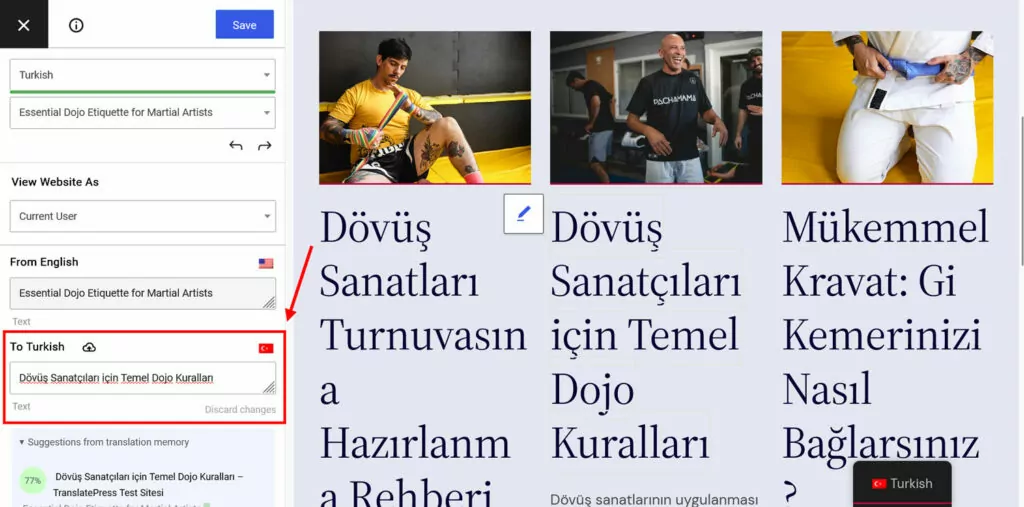
En la interfaz de traducción que sigue, simplemente puede seleccionar contenido de la ventana de vista previa e introducir o editar la traducción en el campo dedicado.
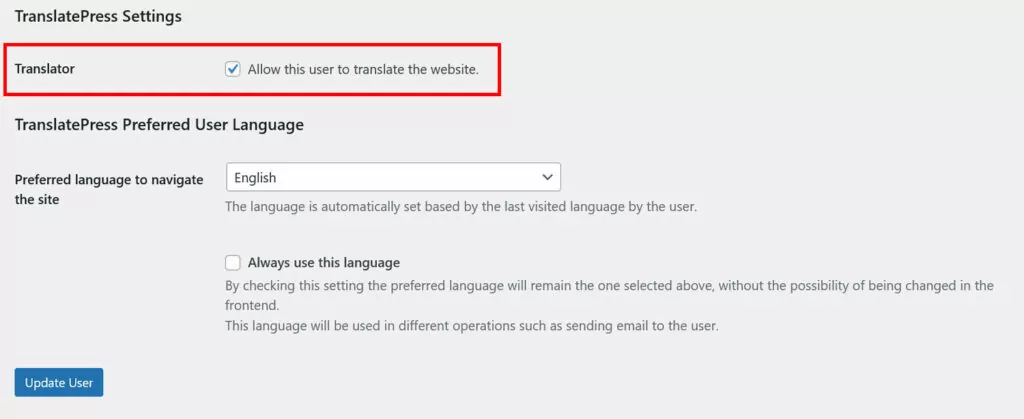
Por último, con una licencia TranslatePress, también tienes la posibilidad de crear cuentas de traductor independientes para que puedas externalizar la traducción de tu sitio web a autónomos y agencias y pueden trabajar directamente en su sitio.
Implementar etiquetas hreflang automáticamente
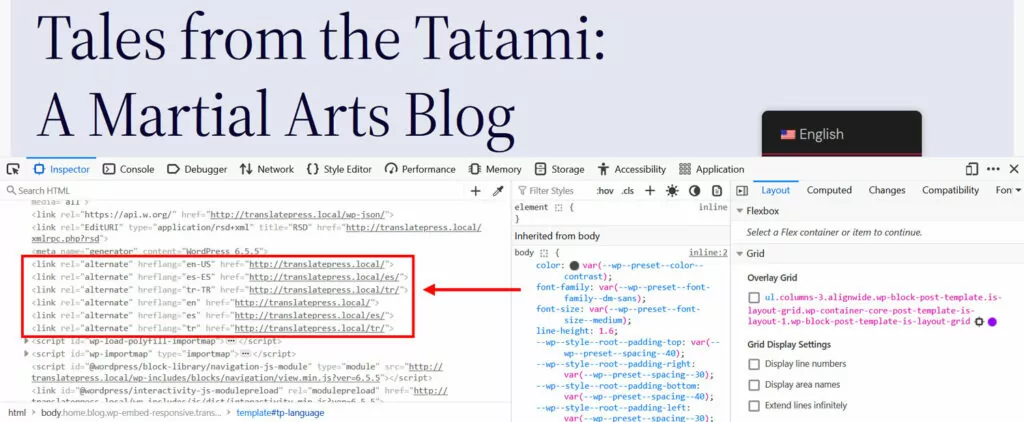
Además de ofrecer traducciones, TranslatePress también optimiza tu sitio web para mejorar su posicionamiento en los resultados de los motores de búsqueda internacionales. Una de las cosas importantes que hace es implementar etiquetas hreflang. Esto marca claramente el idioma y la región de tus páginas para que les resulte más fácil posicionarse en los mercados de idiomas correctos.
Traducir metadatos SEO
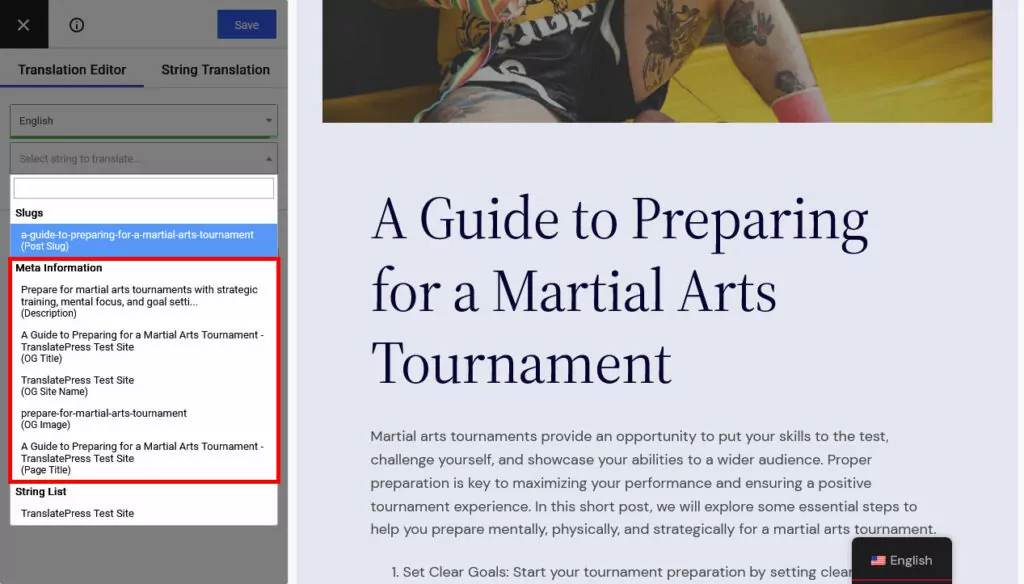
Por fin, TranslatePress Pro viene con el SEO multilingüe paquete. Además, te permite convertir las URL de tus páginas, los títulos SEO, las metadescripciones, las etiquetas ALT y otros marcadores SEO importantes a otro idioma.
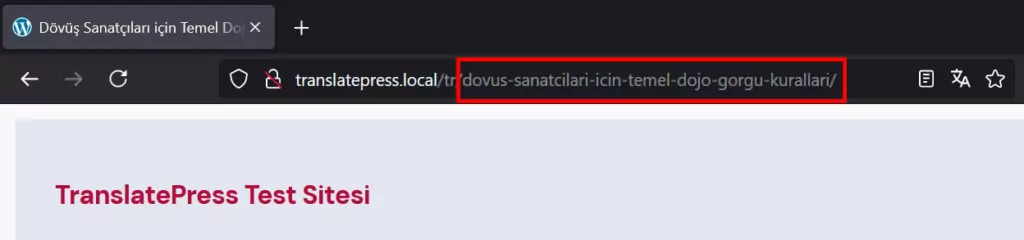
De hecho, si utilizas una herramienta de traducción automática como TranslatePress AI para traducir tu página web, el proceso se realiza automáticamente y también puedes pulir el texto manualmente, al igual que el resto del contenido.
Además, la extensión crea mapas del sitio multilingües para enviar a los motores de búsqueda y funciona con la mayoría de los plugins de SEO populares para WordPress.
Incluso hay más características por descubrir. La versión gratuita de TranslatePress te permite añadir un idioma adicional a tu sitio de WordPress. Si necesitas más de uno, elige entre los tres niveles de precios para encontrar la opción correcta para ti.
No espere para optimizar el posicionamiento en buscadores de su sitio web
Si bien el SEO puede parecer abrumador al principio, dividirlo en pasos manejables hace que sea mucho más accesible. Al final, se trata de garantizar que los motores de búsqueda puedan acceder y comprender tu contenido, ofrecer a los usuarios una gran experiencia y proporcionar contenido que responda a preguntas reales. El resto son solo detalles.
Al implementar las estrategias anteriores, prepararás tu sitio web para una mayor visibilidad, más tráfico orgánico y, en última instancia, una mejor experiencia para tus visitantes. Si quieres expandirte a partir de aquí y empezar a posicionarte en otros idiomas, TranslatePress está listo para hacer que el proceso sea lo menos doloroso posible.