
En esta publicación
¿Te estás preguntando si SYSTRAN Translate es el mejor servicio de traducción para tu negocio? Si la respuesta es un sí rotundo, estás en el lugar correcto.
Elegir un servicio de traducción ejemplar para sus necesidades es una tarea ardua, especialmente si es nuevo en este negocio de la traducción.
Primero, hay innumerables servicios de traducción en línea, tanto gratuitos como de pago. Solo por esta razón, elegir el traductor adecuado para su negocio puede resultar confuso.
Segundo, ¿opta por traducciones automáticas o por servicios de traducción humana, considerando que ambos tienen ventajas y desventajas?
En tercer lugar, los diferentes servicios de traducción ofrecen conjuntos de funciones variados, lo que hace que elegir el ideal para sus necesidades sea algo difícil.
En cuarto lugar, los servicios de traducción no están hechos de la misma manera. Algunas herramientas ofrecen mejores traducciones desde el principio. Del mismo modo, algunos servicios son difíciles de integrar con tus aplicaciones.
A pesar de los desafíos anteriores, ofrecer su sitio web en varios idiomas es sumamente importante en un mundo globalizado.
A sitio web multilingüe te permite llegar a nuevas audiencias, ofrecer mejores experiencias a los clientes y aumentar los ingresos.
Y para traducciones eficaces, necesitas un servicio de traducción confiable.
En esta reseña de SYSTRAN Translate, descubrirás si el servicio de traducción es ideal para las necesidades de tu empresa.
Destacaremos múltiples factores, incluidas las características, las opciones de precios, la atención al cliente, etcétera.
Al final, tendrás toda la información para decidir si debes dejar SYSTRAN Translator en favor de un servicio de traducción alternativo tales como DeepL o Google Translate.
Sin más preámbulo, ¡comencemos!
¿Qué es SYSTRAN Translate? Una breve descripción general
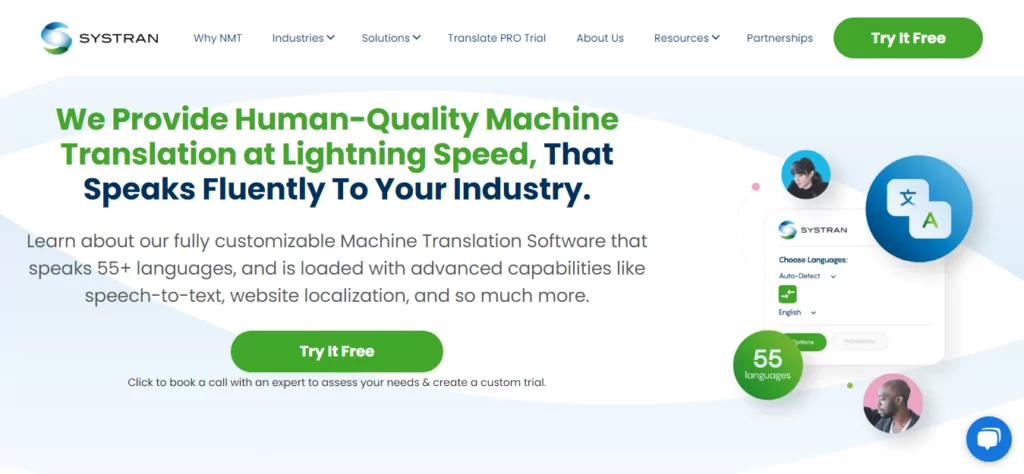
Antes de nada, qué es este animal que estamos llamando SYSTRAN?
Bueno, si el título no lo dice todo, SYSTRAN Translate es un servicio de traducción muy similar a DeepL o Google Traductor.
Sin que muchos lo sepan, SYSTRAN es uno de los servicios de traducción automática comercialmente disponibles más antiguos del mundo.
La empresa fue fundada por el Dr. Peter Toma allá por 1968. Así es, como chatbots, la traducción automática existe desde hace décadas.
La empresa se estableció en La Jolla, California, para ayudar a la Fuerza Aérea de los Estados Unidos a traducir texto ruso al inglés durante el Guerra Fría.
Además del Departamento de Defensa de los Estados Unidos, SYSTRAN Translate realizó un amplio trabajo para la Comisión Europea.
Aparte de los organismos gubernamentales, SYSTRAN ha proporcionado previamente tecnología para las herramientas lingüísticas de Google, Yahoo Babel Fish y el widget de traducción Dashboard en macOS.
Cuando empezaron, la empresa utilizaba traducción automática basada en reglas, que, aunque funcionaba en aquel entonces, no era perfecta.
A lo largo de los años, SYSTRAN Translate ha crecido enormemente gracias a los avances en la tecnología de traducción automática. Ahora, la empresa utiliza su propia tecnología patentada SYSTRAN Pure Neural Machine Translation para gestionar las traducciones,
Actualmente, SYSTRAN es una herramienta de traducción profesional basada en la nube y galardonada, utilizada por autónomos, empresas emergentes, pequeñas empresas y grandes corporaciones.
Gracias a un conjunto único de herramientas de traducción, SYSTRAN Translate es una herramienta fabulosa para aumentar la productividad a la vez que mantiene bajos sus costos de traducción.
Reputación de la empresa de SYSTRAN Translate
A partir de las muchas reseñas entusiastas que encontré en línea, parece que estos muchachos saben lo que hacen. Aquí hay ejemplos de softwareadvice.com:
He utilizado este software para traducir sitios web para clientes, ahorrándome mucho tiempo. Además de eso, me encanta el hecho de que SYSTRAN Translate Pro reconoce los dialectos del árabe y también los traduce. Lo recomiendo encarecidamente. – Nawal
o
Pensaba que estábamos lejos de experimentar una traducción perfecta a partir de herramientas de traducción asistida por ordenador. Si hay un software que se aproxima a eso es el sistema Systran Translate Pro. En mi corta experiencia, no he encontrado ningún software más preciso que este. – Allen
Al momento de escribir esto, Systran Translator tiene más de 100 mil usuarios y una calificación impecable de 4,7/5,0 de más de 1600 reseñas, lo que significa que está bien decir que estás en buenas manos.
Además, el servicio de traducción de SYSTRAN cuenta con la confianza de algunas de las marcas más importantes, entre ellas Deloitte, Banque de France, Allianz, Lufthansa y Continental.
Si alguna vez quieres visitarlos, SYSTRAN tiene sedes en París, Tokio, Daejeon y San Diego.
Ahora que SYSTRAN no suena como un robot de IA de Interestelar película, ¿qué características y beneficios ofrece el servicio de traducción?
Traductor SYSTRAN: Características Clave y Beneficios
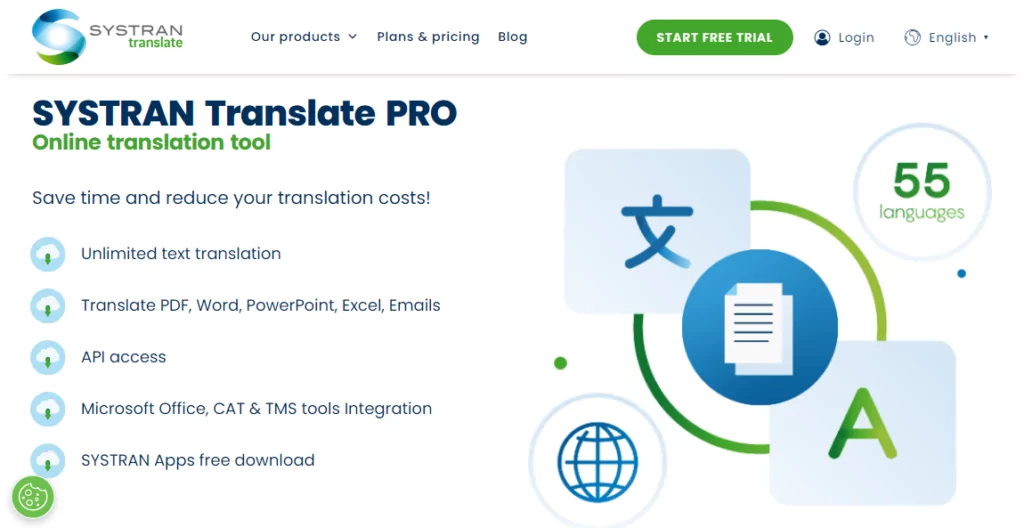
Siempre me gusta bromear diciendo que una herramienta es tan buena como las funciones que ofrece. Si tiene las opciones que necesito sin exceso de funciones ni desorden, es una ganadora segura en mi opinión.
Entonces, ¿cómo le va a SYSTRAN Translate en el departamento de funciones?
Fácil de usar
Primero, el servicio de traducción es intuitivo y fácil de usar. Puede empezar a utilizarlo en tres sencillos pasos. Compre SYSTRAN Translate PRO, inicie sesión con los datos de su cuenta y traduzca sin parar.
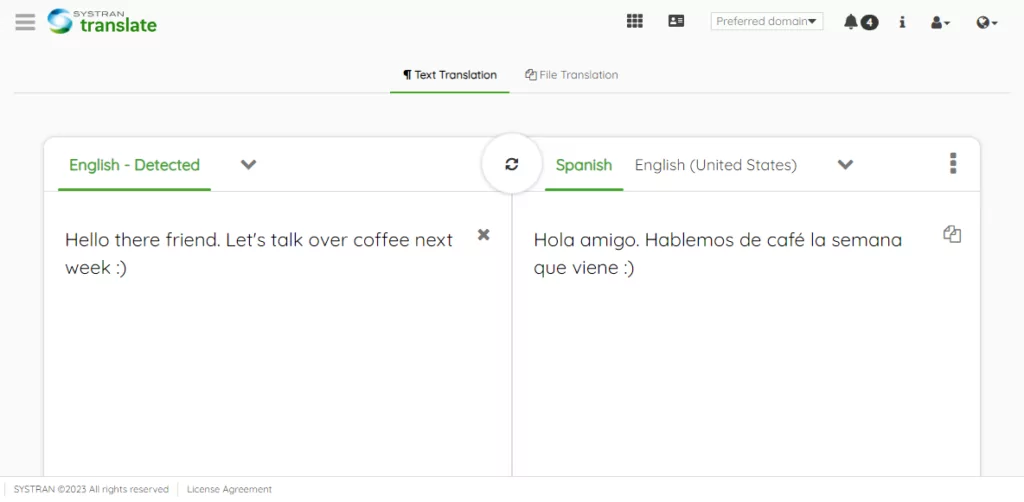
Puedes utilizar la interfaz web fácil de usar para traducir 55 idiomas en más de 150 pares. Incluso sin una cuenta, puedes traducir hasta 5000 caracteres de texto y tres archivos al mes.
Simplemente pega o escribe tu texto en la casilla de origen y SYSTRAN se activará, traduciendo tu contenido en tiempo real.
El servicio admite todas las combinaciones de idiomas principales e incluso algunos dialectos locales.
Aquí está la lista de los idiomas que admite SYSTRAN.
| Idioma de origen | Traducciones admitidas |
|---|---|
| Inglés | Albanés, árabe, armenio, bengalí, búlgaro, birmano, catalán, chino simplificado, chino tradicional, croata, checo, danés, holandés, estonio, finés, francés, georgiano, alemán, griego, hebreo, hindi, húngaro, indonesio, italiano, japonés, coreano, letón, lituano, malayo, noruego, pastún, persa, polaco, portugués de Brasil, portugués de Portugal, rumano, ruso, serbio, eslovaco, esloveno, somalí, español de España, español de América Latina, suajili, sueco, tagalo, tamil, tailandés, turco, ucraniano, urdu, vietnamita. |
| Francés | Árabe, chino (tradicional), chino (simplificado), holandés, inglés, alemán, griego, italiano, portugués y español. |
| Coreano | Chino (tradicional), chino (simplificado), inglés, francés, alemán, indonesio, japonés, ruso, español, tailandés, vietnamita. |
| Español | Inglés, francés, alemán, italiano, coreano, portugués. |
| Alemán | Chino tradicional, chino simplificado, inglés, francés, italiano, coreano, polaco, portugués y español. |
| Ruso | Inglés, Coreano |
| NOTAS: | – Puedes traducir de la fuente a cualquier idioma compatible. Y viceversa. – Algunos pares de idiomas no son compatibles. Por ejemplo, para traducir del ruso al chino, primero debes traducir del ruso al inglés y luego del inglés al chino. |
Otras opciones de traducción de SYSTRAN
Además, dispones de SYSTRAN Translator Chrome y Mozilla Firefox extensiones de navegador a tu disposición.
Para usar las extensiones del navegador, resalta el texto que deseas traducir, haz clic derecho y selecciona Traducir selección con SYSTRAN.
La extensión lo redirigirá a la interfaz web donde podrá completar la traducción.
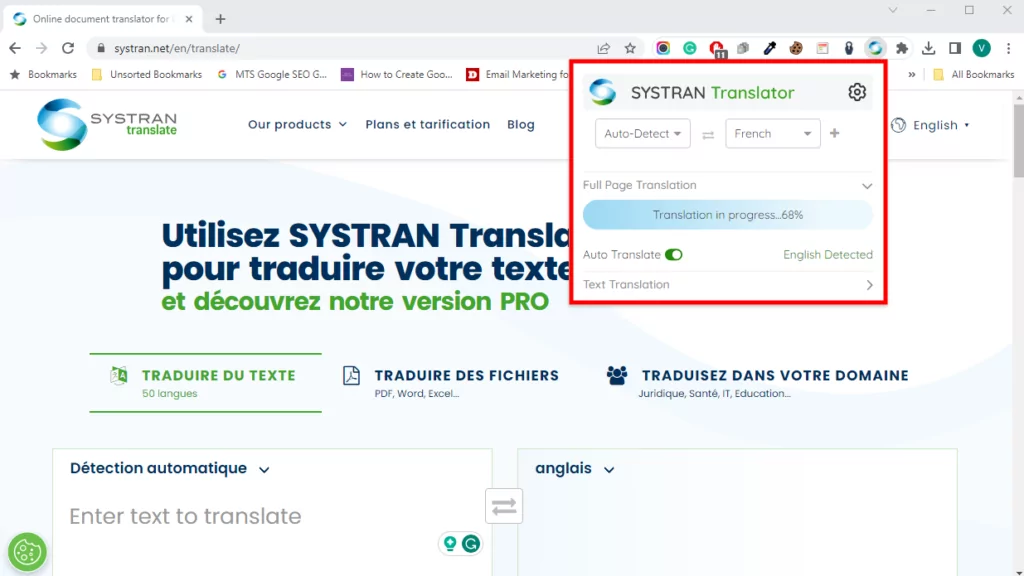
Alternativamente, haga clic en el icono de la extensión del navegador para traducir toda la página de forma manual o automática sin redirigir a la interfaz web de SYSTRAN.
Para usuarios avanzados y desarrolladores, pueden aprovechar la API de SYSTRAN Translate para integrar el servicio de traducción en sus aplicaciones internas y externas.
Estos incluyen plataformas de servicio al cliente, inteligencia de negocios, herramientas de colaboración, bases de conocimiento, chats en línea y más.
Además de eso, puedes llevar la calidad de tus traducciones al siguiente nivel con los modelos de traducción de SYSTRAN.
El SYSTRAN Model Studio le permite crear modelos de traducción personalizados entrenados con los datos de su empresa.
Esto le ayuda a mejorar la calidad y la solidez de sus traducciones significativamente.
Lo mejor es que no necesitas habilidades de IA para crear un modelo de traducción personalizado. SYSTRAN ofrece un amplio catálogo de modelos preconfigurados que puedes personalizar para adaptarlos a tus necesidades.
Desafortunadamente, la empresa descontinuó hace tiempo las aplicaciones de escritorio para Windows y macOS. Su equipo de soporte recomienda SYSTRAN Translate PRO como solución.
Traducciones específicas de la industria
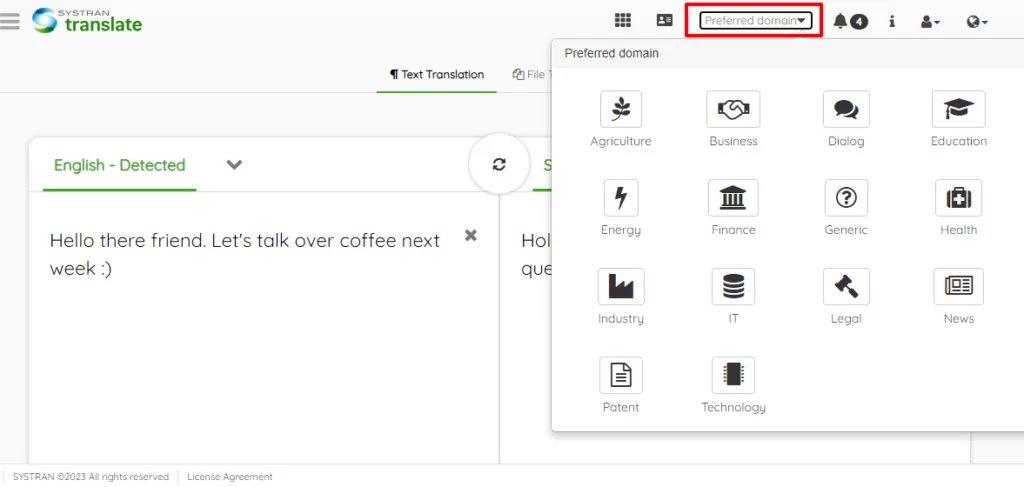
Cada sector es diferente. La jerga que funciona para la publicidad probablemente no sirva para el sector educativo.
El lenguaje que funciona para el sector tecnológico no servirá en el sector sanitario. Ya sabes por dónde voy.
Por ejemplo, la traducción de textos sanitarios de inglés a chino puede que no tenga el efecto deseado. Podrías confundir a los lectores o, peor aún, insultarlos.
Una cosa más. Algunas palabras, contextos o estilos específicos de una industria determinada no existen en el idioma de traducción.
SYSTRAN Translate comprende este tipo de problemas, especialmente para traducciones específicas de la industria.
Como tal, SYSTRAN Translate PRO le permite traducir texto y archivos en múltiples dominios, tales como:
- Negocio;
- Finanzas;
- Tecnología;
- Patente;
- Agricultura;
- Legal;
- Salud;
- Energía;
- Educación;
- Noticias;
- General;
- Y más.
Las traducciones automáticas específicas de un dominio te permiten obtener resultados aún más precisos porque, como imaginarás, el idioma puede variar significativamente según la industria y el contexto.
Para ver historias de éxito y ejemplos reales de SYSTRAN en diferentes industrias, consulte su página de casos de éxito.
Aprenderás cómo la empresa ayudó a compañías como Nestlé, Adobe, MGI Group y ADmantX, entre otras.
Imágenes y otros formatos de archivo
Basta decir que SYSTRAN Translate PRO admite traducciones de texto ilimitadas y una mayor cantidad de archivos y formatos (PDF, DOCX, XLSX, PPTX…).
También puedes traducir imágenes y contenido en correos electrónicos, carpetas comprimidas, archivos JSON, HTML y más.
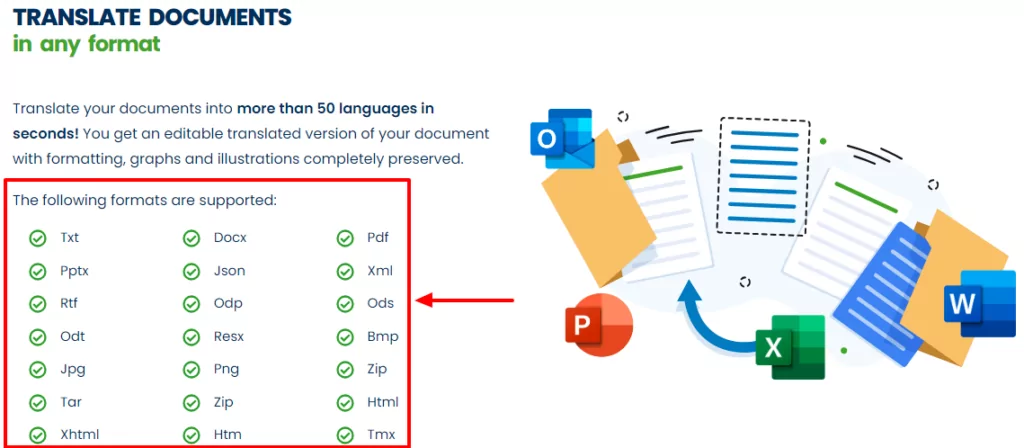
Cuando traduces cualquiera de los formatos de documento (ya sea docx, imágenes, PDF, etc.), SYSTRAN conserva los diseños de tus archivos. O eso es lo que afirman.
No te preocupes, aún puedes editar los documentos de texto después de la traducción.
Lo probé y creo que es una obra en progreso. Algunos de mis diseños finales estaban un poco desorganizados 🙁 Pero es de esperarse de la traducción automática.
Digo esto porque la función de traducción de imágenes deja mucho que desear. Así es como se ve la captura de pantalla PNG anterior después de traducirla del inglés al español:
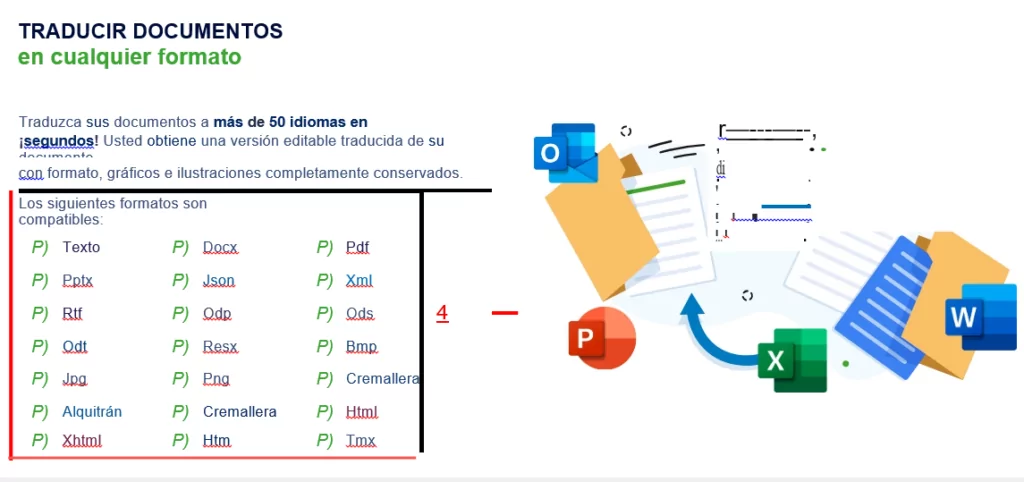
Eso no es tan útil. ¿O sí? Con la tecnología actual de traducción automática, es mejor que traduzcas tus imágenes manualmente usando un complemento como TranslatePress.
Consejo de expertoPara la mejor traducción de imágenes, consulta Cómo traducir imágenes en WordPress [Guía completa].
Precisión de la traducción de SYSTRAN: ¿Es confiable?
La respuesta rápida es sí, SYSTRAN Translate es fiable 🙂
Traducir contenido a diferentes idiomas no es tan sencillo como todos desearíamos.
Ya sea que lo hagas manualmente o utilices un software, te enfrentarás a algunos problemas comunes con la traducción.
Con el nivel tecnológico actual, no es razonable esperar traducciones automáticas con una precisión del 100%, ni siquiera de una empresa que lleva más de 50 años en el mercado.
Aun así, nada detiene a SYSTRAN en seco. Lanzaron el Pure Neural Server para ofrecerte “…traducción automática de calidad humana a una velocidad vertiginosa”.”
Su motor de Traducción Neuronal Pura (PNMT) utiliza inteligencia artificial de autoaprendizaje para ofrecer traducciones de alta calidad.
Además, puedes añadir diccionarios de usuario y entrenar modelos de traducción para ajustar las traducciones en un tiempo récord.
La tecnología PNMT de SYSTRAN es impresionante y te permite generar traducciones que suenan naturales.
Múltiples estudios demostrar que SYSTRAN Translate produce traducciones precisas (o utilizables). Aun así, la traducción automática está lejos de ser perfecta.
Aunque las traducciones parezcan buenas, es recomendable contratar a un profesional para que las revise y limpie las asperezas.
Integraciones de Traducción SYSTRAN
La traducción no tiene que empezar y terminar con páginas web, archivos o texto simple. Y la gente de SYSTRAN Translate lo sabe.
Entienden que usas múltiples aplicaciones para dirigir tu negocio. Es precisamente por esto que siguen añadiendo compatibilidad con aplicaciones internas y de terceros.
Primero, la empresa ofrece complementos para Microsoft Office para traducir MS Word, Excel y PowerPoint mientras se trabaja en los documentos. Además, puedes traducir correos electrónicos sin salir de Outlook. ¡Incluso puedes usar atajos de teclado!
En segundo lugar, SYSTRAN ofrece integraciones con herramientas de traducción asistida por ordenador (CAT) y de gestión de traducciones (TMS). Esto te permite optimizar tus flujos de trabajo de traducción.
En esta sesión, SYSTRAN es compatible con las siguientes herramientas de CAT/TMS:
- A través;
- Déjà vu;
- MemoQ;
- Memsource;
- Ontram;
- SDL Trados Studio;
- SmartLing;
- Terminotix;
- Wordfast;
- Frase;
- XTM;
- Intento;
- Smartcat.
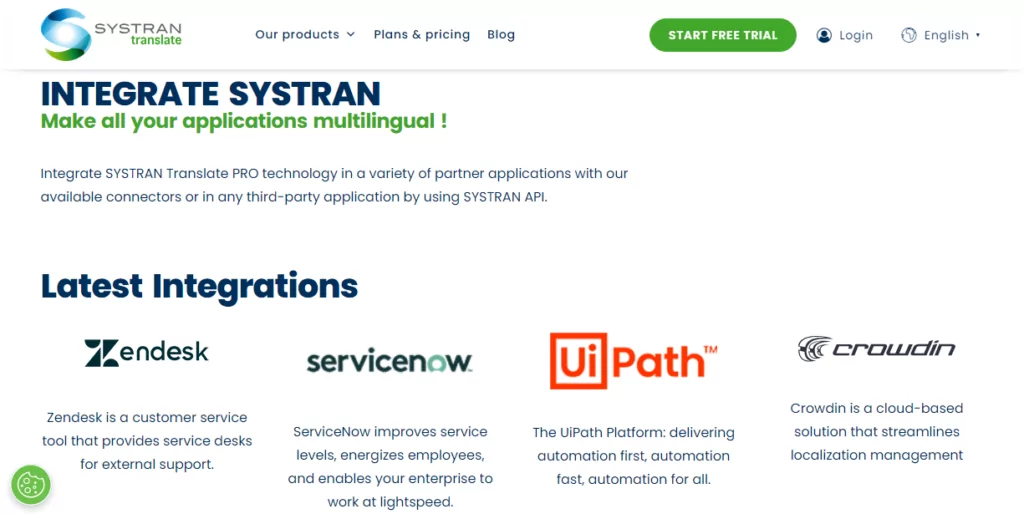
En tercer lugar, este software de traducción también ofrece integraciones para plataformas de atención al cliente, automatización de flujos de trabajo y gestión de la localización.
Actualmente, SYSTRAN Translate admite:
- Zendesk: agregue traducciones automáticas neuronales de SYSTRAN basadas en inteligencia artificial a su Zendesk Chat y mejorar el servicio al cliente;
- ServiceNow: traduce tickets instantáneos, chats en línea, base de conocimiento y correos electrónicos de soporte.;
- UiPath – Traduce tu automatización de flujos de trabajo. Permite que tus robots detecten idiomas y traduzcan texto y archivos más rápido;
- Crowdin – Traduce tu contenido y domina la localización como un jefe.
Integrar las aplicaciones anteriores con SYSTRAN Translate es muy fácil. Usted (o su técnico de TI) puede utilizar la API REST de SYSTRAN Translate para conectarse a más aplicaciones de terceros.
Seguridad y privacidad de datos
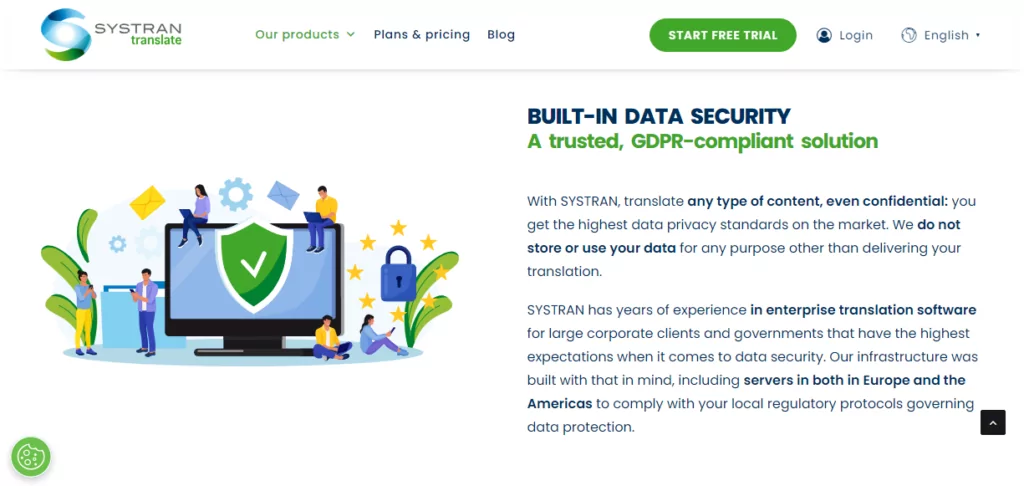
En un mundo conectado digitalmente, la seguridad y la privacidad de los datos son grandes preocupaciones. Las filtraciones de datos perpetradas por unas pocas manzanas podridas pueden derribar incluso a las corporaciones más grandes, como probablemente habrás visto en las noticias.
Las empresas de todos los tamaños generan una gran cantidad de datos confidenciales que aún necesitan traducción. Esto puede ser cualquier cosa, desde memorandos internos, datos de clientes, información de empleados y más.
Dado que más de 80% de empleados admiten que utilizan aplicaciones SaaS no autorizadas para realizar sus tareas laborales, corres el riesgo de exponer traducciones confidenciales e infringir la normativa sobre protección de datos.
Por eso te conviene elegir un servicio de traducción que se comprometa con la seguridad y la privacidad de los datos. Uno de estos servicios es SYSTRAN Translate.
De una empresa que, hace 50 años, realizaba traducciones del ruso al inglés para la Fuerza Aérea de los Estados Unidos, cabe esperar una seguridad de datos de nivel militar.
SYSTRAN cuenta con años de experiencia en el software de traducción empresarial para grandes empresas y administraciones públicas que tienen las mayores exigencias en materia de seguridad de los datos.
SYSTRAN
SYSTRAN Translate no almacena ni utiliza su información para ningún otro fin que no sea la generación de traducciones. Sus datos confidenciales permanecen en su empresa.
Para garantizar una seguridad óptima, puedes implementar el servicio en tus propias instalaciones o en el servidor en la nube dedicado de SYSTRAN.
Además, SYSTRAN Translate cumple con el RGPD. Asimismo, cuenta con servidores de traducción automática neuronal (NMT) en Europa y América para garantizar que tus traducciones cumplan con la legislación local en materia de protección de datos.
Atención al cliente de SYSTRAN Translate
SYSTRAN Translate ofrece varias opciones de atención al cliente, tal y como se muestra a continuación.
Puedes ponerte en contacto con ellos por teléfono, correo electrónico, redes sociales o chat en línea. Si tienes algún problema, también puedes abrir un ticket de asistencia.
Me llamó especialmente la atención la rapidez con la que respondieron a través del chat en línea. Sin embargo, los agentes de atención al cliente no me fueron de gran ayuda cuando les pregunté cómo integrar SYSTRAN Translate con WordPress.
Lo pregunté tres veces, cada vez hablando con un agente de atención al cliente diferente. Por desgracia, nadie supo decirme cómo integrar SYSTRAN con WordPress.
Los tres agentes no paraban de remitirme a un “experto de SYSTRAN”, quien, lamentablemente, nunca respondió. Como último recurso, el agente del chat en línea me dijo que la persona responsable se pondría en contacto conmigo por correo electrónico en un plazo de 24 horas. Ya han pasado tres días.
He buscado por todas partes, pero al parecer no hay ningún plugin de WordPress que permita integrar esta función en tu página web sin esfuerzo.
Aunque el chat en línea era rápido y eficaz, resultaba frustrante tener que hacer la misma pregunta varias veces sin obtener respuesta.
Además, no paraban de insistirme para que les diera mis datos personales, sin hacer caso a mis preguntas. Y tampoco dejaban de intentar venderme sus planes de pago. ¡Venga ya, es una pregunta muy sencilla, chicos!
Si quieres saber más sobre SYSTRAN Translate, disponen de un blog, documentación, preguntas frecuentes, una base de conocimientos y vídeos.
En definitiva, la atención al cliente está por encima de la media, aunque cabría esperar que los agentes tuvieran las respuestas a las preguntas sencillas al alcance de la mano.
Opciones de precios de SYSTRAN Translate
SYSTRAN Translate ofrece planes de precios flexibles de pago por usuario para particulares, desarrolladores y empresas.
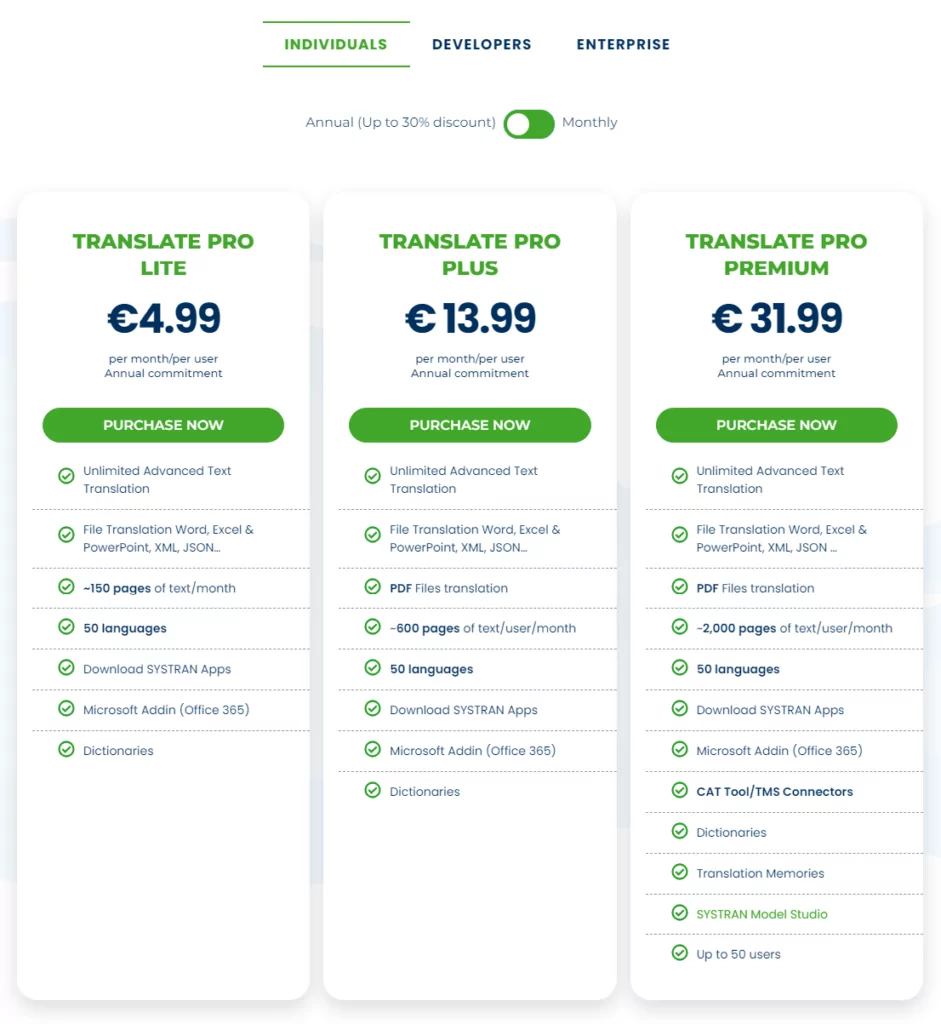
Los planes individuales para autónomos se presentan en tres modalidades, a saber:
- Translate Pro Lite – Cuesta €4,99 al mes por usuario si se factura anualmente. El plan solo admite un usuario e incluye 250 000 créditos por usuario al mes y unas 150 páginas de texto al mes por usuario;
- Translate Pro Plus – A partir de €13,99 por usuario al mes, con facturación anual. El plan admite 20 usuarios e incluye 1 000 000 de créditos por usuario al mes, unas 600 páginas de texto al mes por usuario y traducciones de PDF;
- Translate Pro Premium – El plan te costará €31,99 al mes por usuario con un compromiso anual. Tienes 50 usuarios, 3 000 000 de créditos por usuario al mes, unas 2 000 páginas de texto al mes por usuario, SYSTRAN Model Studio, memorias de traducción y herramientas de traducción asistida (CAT) y conexiones con sistemas de gestión de traducción (TMS).
Para usuarios avanzados y desarrolladores, disponéis de:
- API de Translate Pro – Un plan de prueba que te permite probar la API de SYSTRAN Translate PRO de forma gratuita durante 14 días. Obtienes 500 mil créditos de traducción;
- API de Translate Pro – Cuesta €8,99 al mes por 1 000 000 de caracteres y acceso a la clave de la API;
- Pro Infinite – €64,99 al mes, facturado anualmente. Incluye Translate Pro Premium, una clave API, unas 4.500 páginas de texto por usuario al mes y 7.000.000 de caracteres. Bueno, y todo lo demás que ofrece SYSTRAN Translate Pro.
Las grandes empresas con un elevado volumen de traducciones y que requieran los más altos estándares de seguridad pueden ponerse en contacto con SYSTRAN para solicitar un presupuesto personalizado.
Los planes para particulares y desarrolladores incluyen un periodo de prueba de 14 días sin necesidad de tarjeta de crédito para que puedas probarlos. Como siempre, elige el plan que mejor se adapte a tu negocio.
Ventajas y desventajas de SYSTRAN Translate
SYSTRAN Translate es, sin duda alguna, un motor de traducción formidable. Cuenta con funciones excelentes, una seguridad sólida y traducciones de gran calidad, todo ello a precios asequibles. Pero, ¿es adecuado para ti?
Pros
- Interfaz fácil de usar;
- Extensiones del navegador;
- Múltiples integraciones;
- Traducciones de alta calidad gracias a la tecnología Pure Neural Manual Translation (PNMT) de SYSTRAN;
- Amplio soporte de idiomas;
- Traducciones automáticas personalizables gracias a la posedición, los modelos de traducción y las memorias;
- Prueba gratuita.
Consultar
- No hay plan gratuito;
- El soporte técnico podría mejorar un poco;
- Difícil de integrar con MS Office (menos mal que tienes Microsoft Traductor);
- Sin aplicaciones de escritorio;
- Sin aplicaciones móviles;
- Diseños de documentos desordenados después de la traducción (especialmente las imágenes);
- Aunque es fácil de usar, tiene una ligera curva de aprendizaje;
- Podría admitir más idiomas.
Cómo SYSTRAN Translate destaca en la industria de la traducción
Al igual que muchos otros servicios de traducción, SYSTRAN Translate tiene sus ventajas y sus inconvenientes. Dicho esto, ¿cómo se compara con servicios populares como DeepL y Google Translate?
Traductor SYSTRAN vs DeepL
DeepL es un motor de traducción relativamente más nuevo en comparación con SYSTRAN. Ambos cuentan con interfaces web intuitivas, lo que significa que son fáciles de usar al instante.
SYSTRAN Translate admite más idiomas que DeepL. Si necesitas muchos pares de idiomas, DeepL no se puede comparar con SYSTRAN.
En cuestiones de precisión, ambos servicios ofrecen traducciones utilizables, ya que ambos utilizan tecnología de traducción automática neuronal.
DeepL tiene una versión gratuita perfecta para un uso ligero. Puedes traducir tu contenido gratis, siempre y cuando no agotes los límites. No podemos decir lo mismo de SYSTRAN Translate.
Recuerda que si agotas los límites del nivel gratuito de DeepL, puede salir más caro que SYSTRAN.
A diferencia de SYSTRAN Translate, DeepL incluye aplicaciones de escritorio y móviles para Android e iOS.
SYSTRAN Translate frente a Google Translate
Google Translate es uno de los servicios de traducción web más populares y la opción predeterminada para muchas empresas.
A diferencia de SYSTRAN Translate, Google Translate cuenta con una versión gratuita que te permite traducir 500 000 caracteres al mes.
Necesitarías un plan de pago para traducir más de 5k caracteres con SYSTRAN Translate.
Google Translate es compatible con más de 130 idiomas, lo que deja muy por detrás a SYSTRAN Translate en este aspecto.
En comparación (y teniendo en cuenta la generosa versión gratuita), Google Translate es más barato que SYSTRAN Translate.
Sin embargo, SYSTRAN Translate ofrece mejores traducciones que Google Translate. Además, Google Translate no admite traducciones personalizables ni específicas para cada sector.
Por último, Google Translate ofrece aplicaciones para Android, iPhone y iPad.
Argumentos a favor de TranslatePress
Debo admitir que SYSTRAN Translate es un motor de traducción formidable con mucho potencial.
Sin embargo, tiene algunos defectos. Por ejemplo, te costará mucho integrarlo con tu sitio web de WordPress, especialmente si no sabes cómo funciona la API REST.
Aquí es donde TranslatePress entra.
Si es la primera vez que lo utilizas, TranslatePress es un plugin de traducción para WordPress potente y a la vez fácil de usar, apto para cualquier persona (independientemente de su nivel de conocimientos).
El complemento tiene una versión gratuita completamente funcional que te ayuda a traducir tu sitio de WordPress en la interfaz pública utilizando un editor de traducción visual.
Tiene soporte completo para WooCommerce, constructores de páginas visuales, temas complejos, cadenas de texto de complementos, SEO, múltiples idiomas, URLs y más.
TranslatePress Multilingüe
Sin embargo, TranslatePress aún no es compatible con el motor de traducción SYSTRAN. El complemento ofrece traducciones automáticas mediante DeepL y Google Translate. A continuación, puedes editar manualmente las traducciones automáticas para perfeccionarlas.
Últimas palabras
SYSTRAN Translate es un potente motor de traducción con mucho que ofrecer. Obtiene un sistema robusto respaldado por más de cinco décadas de experiencia en la industria.
Es fácil de usar y ofrece características adecuadas para gestionar la traducción para autónomos, pequeñas empresas y grandes corporaciones.
Es un servicio galardonado con una trayectoria comprobada de traducciones de alta calidad. Además, SYSTRAN es una solución rentable en comparación con algunos competidores.
Sin embargo, tiene algunas desventajas. Por ejemplo, no ofrece un plan gratuito y es relativamente más difícil de conectar con WordPress.
¿Cuáles son tus opiniones? Por favor, háznoslo saber en los comentarios. Si te ha parecido útil esta reseña de SYSTRAN, considera la posibilidad de compartirla.