
In questo post
Vi state chiedendo se SYSTRAN Translate sia il miglior servizio di traduzione per la vostra azienda? Se la risposta è un sonoro sì, siete nel posto giusto.
Scegliere un servizio di traduzione esemplare per le vostre esigenze è un'impresa ardua, soprattutto se siete nuovi a questo settore delle traduzioni.
Prima di tutto, ci sono innumerevoli servizi di traduzione online, sia gratuiti che a pagamento. Solo per questo motivo, scegliere il traduttore giusto per la vostra attività può essere fonte di confusione.
Secondo, opti per traduzioni automatizzate o servizi di traduzione umana, considerando che entrambi presentano vantaggi e svantaggi?
In terzo luogo, diversi servizi di traduzione offrono serie di funzionalità variabili, rendendo la scelta di quello perfetto per le proprie esigenze piuttosto impegnativa.
Quarto, i servizi di traduzione non sono tutti uguali. Alcuni strumenti offrono traduzioni migliori fin da subito. Allo stesso modo, alcuni servizi sono difficili da integrare con le vostre applicazioni.
Nonostante le sfide di cui sopra, offrire il proprio sito web in più lingue è estremamente importante in un mondo globalizzato.
A sito multilingue ti permette di raggiungere nuovi pubblici, offrire esperienze migliori ai clienti e aumentare i ricavi.
E per traduzioni efficaci, hai bisogno di un servizio di traduzione affidabile.
In questa recensione di SYSTRAN Translate, scoprirai se il servizio di traduzione è ideale per le tue esigenze aziendali.
Evidenzieremo molteplici fattori, tra cui funzionalità, opzioni di prezzo, assistenza clienti e così via.
Alla fine, avrai tutte le informazioni per decidere se abbandonare SYSTRAN Translator in favore di un servizio di traduzione alternativo come DeepL o Google Traduttore.
Senza indugio, cominciamo!
Che cos'è SYSTRAN Translate? Una breve panoramica
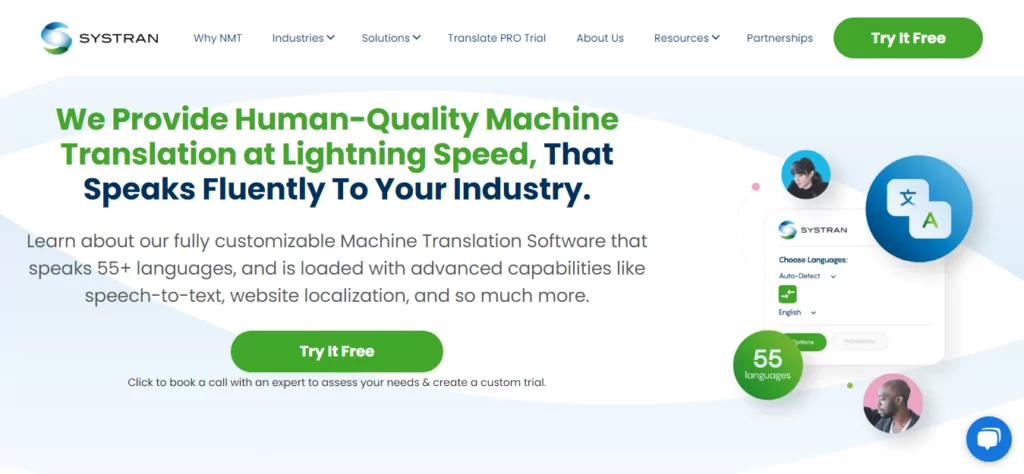
Prima di tutto, cos'è questo animale che stiamo chiamando SYSTRAN?
Beh – se il titolo non dice già tutto – SYSTRAN Translate è un servizio di traduzione molto simile a DeepL o Google Traduttore.
All'insaputa di molti, SYSTRAN è uno dei servizi di traduzione automatica disponibili commercialmente più antichi al mondo.
L'azienda è stata fondata dal Dr. Peter Toma nel 1968. Proprio così, come chatbot, la traduzione automatica esiste da decenni.
L'azienda è stata fondata a La Jolla, in California, per aiutare l'Aeronautica Militare degli Stati Uniti a tradurre testi dal russo all'inglese durante il Guerra Fredda.
Oltre al Dipartimento della Difesa degli Stati Uniti, SYSTRAN Translate ha svolto un lavoro estensivo per la Commissione Europea.
Oltre agli enti governativi, SYSTRAN ha precedentemente fornito tecnologia per gli strumenti linguistici di Google, Yahoo Babel Fish e il widget di traduzione Dashboard in macOS.
Quando hanno iniziato, l'azienda utilizzava la traduzione automatica basata su regole, che, sebbene funzionasse all'epoca, era tutt'altro che perfetta.
Nel corso degli anni, SYSTRAN Translate è cresciuto enormemente grazie ai progressi nella tecnologia di traduzione automatica. Ora, l'azienda utilizza la sua tecnologia proprietaria SYSTRAN Pure Neural Machine Translation per gestire le traduzioni,
Attualmente, SYSTRAN è un pluripremiato strumento di traduzione professionale basato su cloud utilizzato da freelancer, startup, piccole imprese e grandi aziende.
Grazie a un set unico di strumenti di traduzione, SYSTRAN Translate è uno strumento favoloso per aumentare la produttività mantenendo bassi i costi di traduzione.
Reputazione aziendale di SYSTRAN Translate
Dalle numerose recensioni entusiastiche che ho trovato online, sembra che questi ragazzi sappiano il fatto loro. Ecco esempi da softwareadvice.com:
Ho usato questo software per tradurre siti web per i clienti, facendomi risparmiare molto tempo. Oltre a ciò, adoro il fatto che SYSTRAN Translate Pro riconosca i dialetti dell'arabo e li traduca. Lo consiglio vivamente. – Nawal
o
Pensavo fossimo lontani dall'sperimentare una traduzione perfetta da parte degli strumenti di traduzione assistita da computer. Se c'è un software che si avvicina a ciò, è [il] sistema Systran Translate Pro. Nella mia breve esperienza, non ho trovato alcun software più preciso di questo. – Allen
Al momento in cui scrivo, Systran Translator ha oltre 100.000 utenti e una valutazione impeccabile di 4,7/5,0 da oltre 1.600 recensioni, il che significa che va bene dire che sei in buone mani.
Inoltre, il servizio di traduzione SYSTRAN è scelto da alcuni dei marchi più importanti, tra cui Deloitte, Banque de France, Allianz, Lufthansa e Continental.
Se vuoi mai andar a trovarli, SYSTRAN ha sedi a Parigi, Tokyo, Daejeon e San Diego.
Ora che SYSTRAN non suona più come un robot IA del Interstellar film, quali caratteristiche e vantaggi offre il servizio di traduzione?
SYSTRAN Translate: Caratteristiche principali e vantaggi
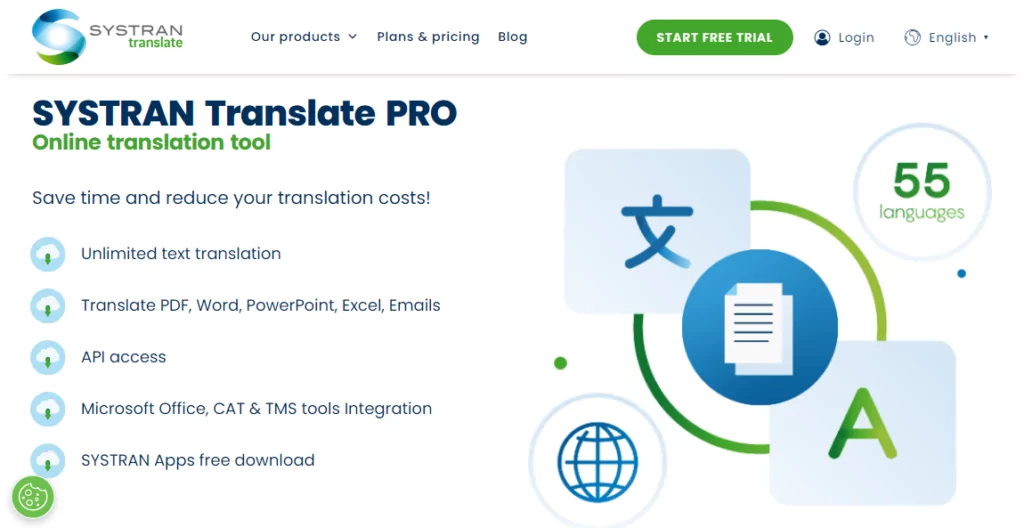
Mi piace sempre dire che uno strumento è valido solo in base alle funzionalità che offre. Se ha le opzioni di cui ho bisogno senza sovraccarico di funzioni o confusione, per me è decisamente un vincitore.
Quindi, come se la cava SYSTRAN Translate nel reparto delle funzionalità?
Facile da usare
Innanzitutto, il servizio di traduzione è intuitivo e facile da usare. Puoi essere operativo in tre semplici passaggi. Acquista SYSTRAN Translate PRO, accedi con i dati del tuo account e traduci subito.
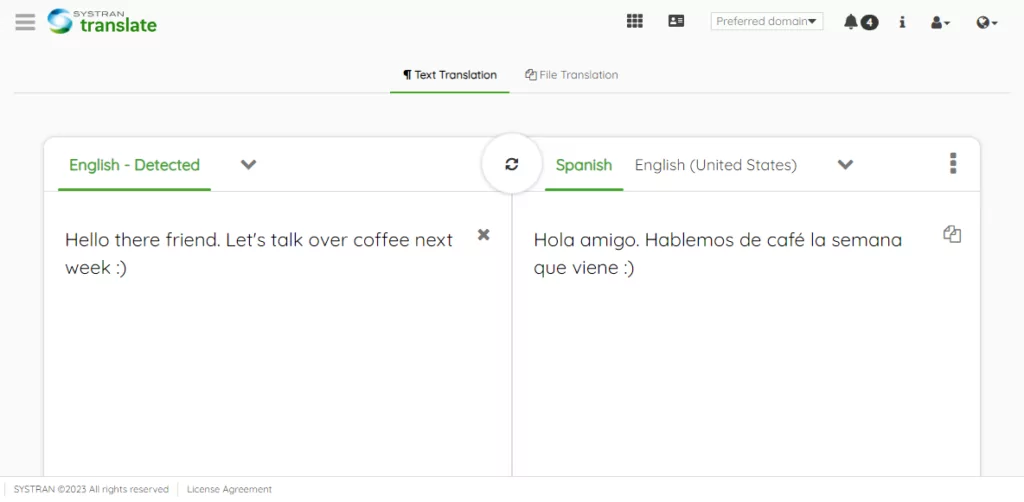
Puoi utilizzare l'interfaccia web facile da usare per tradurre 55 lingue in più di 150 coppie. Anche senza un account, puoi tradurre fino a 5.000 caratteri di testo e tre file al mese.
Basta incollare o digitare il testo nella casella di origine e SYSTRAN si attiverà, traducendo il tuo contenuto in tempo reale.
Il servizio supporta tutte le principali combinazioni linguistiche e persino alcuni dialetti locali.
Ecco l'elenco delle lingue supportate da SYSTRAN.
| Lingua di origine | Traduzioni supportate |
|---|---|
| Inglese | Albanese, arabo, armeno, bengalese, bulgaro, birmano, catalano, cinese (semplificato), cinese (tradizionale), croato, ceco, danese, olandese, estone, finlandese, francese, georgiano, tedesco, greco, ebraico, hindi, ungherese, indonesiano, italiano, giapponese, coreano, lettone, lituano, malese, norvegese, pashto, persiano, polacco, portoghese (Brasile), portoghese (Portogallo), rumeno, russo, serbo, slovacco, sloveno, somalo, spagnolo (Spagna), spagnolo (America Latina), swahili, svedese, tagalog, tamil, thailandese, turco, ucraino, urdu, vietnamita. |
| Francese | Arabo, cinese tradizionale, cinese semplificato, olandese, inglese, tedesco, greco, italiano, portoghese e spagnolo. |
| Coreano | Cinese tradizionale, Cinese semplificato, Inglese, Francese, Tedesco, Indonesiano, Giapponese, Russo, Spagnolo, Tailandese, Vietnamita. |
| Spagnolo | Inglese, francese, tedesco, italiano, coreano, portoghese. |
| Tedesco | Cinese tradizionale, cinese semplificato, inglese, francese, italiano, coreano, polacco, portoghese e spagnolo. |
| Russo | Inglese, Coreano |
| NOTE: | – Puoi tradurre dalla lingua di origine a qualsiasi lingua supportata. E viceversa. – Alcune coppie di lingue non sono supportate. Ad esempio, per tradurre dal russo al cinese, bisogna prima tradurre dal russo all'inglese e poi dall'inglese al cinese. |
Altre opzioni di traduzione SYSTRAN
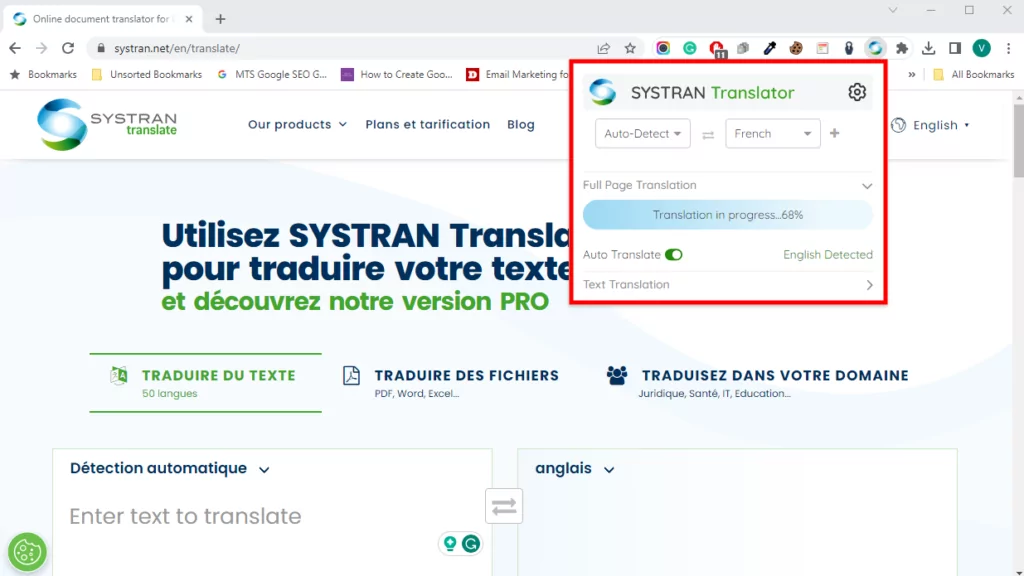
Inoltre, hai SYSTRAN Translator Cromo e Mozilla Firefox estensioni del browser a vostra disposizione.
Per utilizzare le estensioni del browser, evidenziare il testo che si desidera tradurre, fare clic con il pulsante destro del mouse e selezionare Traduci la selezione con SYSTRAN.
L'estensione ti reindirizzerà all'interfaccia web dove potrai completare la traduzione.
In alternativa, clicca sull'icona dell'estensione del browser per tradurre l'intera pagina manualmente o automaticamente senza essere reindirizzato all'interfaccia web di SYSTRAN.
Per gli utenti avanzati e gli sviluppatori, è possibile sfruttare l'API di SYSTRAN Translate per integrare il servizio di traduzione nelle applicazioni interne ed esterne.
Questi includono piattaforme di assistenza clienti, business intelligence, strumenti di collaborazione, basi di conoscenza, chat online e altro ancora.
In aggiunta a ciò, puoi portare la qualità delle tue traduzioni a un livello superiore con i modelli di traduzione SYSTRAN.
Il SYSTRAN Model Studio consente di creare modelli di traduzione personalizzati addestrati con i dati della vostra azienda.
Questo ti aiuta a migliorare in modo significativo la qualità e l'affidabilità delle tue traduzioni.
La parte migliore è che non servono competenze di IA per creare un modello di traduzione personalizzato. SYSTRAN offre un ampio catalogo di modelli pronti all'uso che puoi personalizzare per soddisfare le tue esigenze.
Purtroppo l'azienda ha interrotto da tempo le applicazioni desktop per Windows e macOS. Il loro team di supporto consiglia SYSTRAN Translate PRO come soluzione.
Traduzioni specifiche per settore
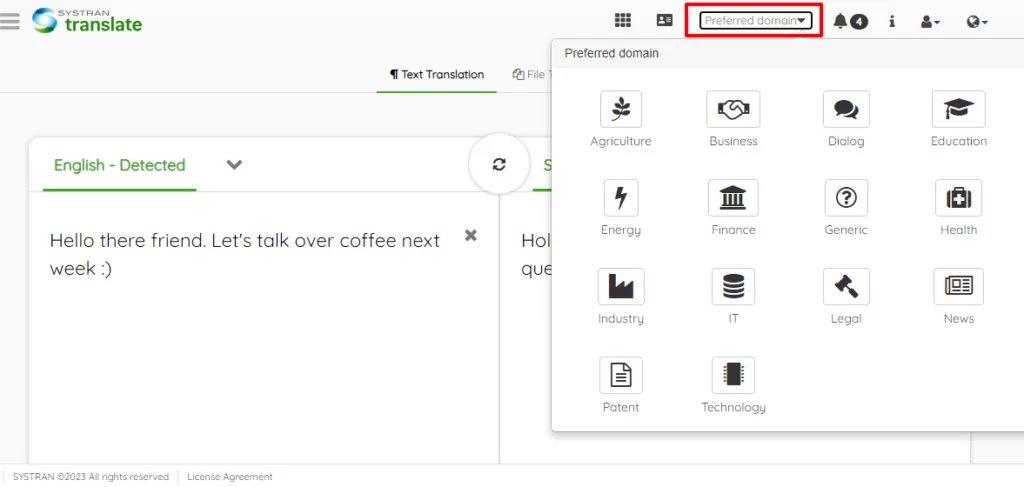
Ogni settore è diverso. Il gergo che funziona per la pubblicità probabilmente non andrà bene per il settore dell'istruzione.
Il linguaggio che funziona per il settore tecnologico non si applica alla sanità. So che hai capito cosa intendo.
Ad esempio, la traduzione di testi sanitari dall'inglese al cinese potrebbe non avere l'effetto desiderato. Potreste confondere i lettori o, peggio, insulterli.
Un'altra cosa. Alcune parole, contesti o stili distinti in un settore specifico non esistono nella lingua di traduzione.
SYSTRAN Translate è in grado di gestire questo tipo di problemi, in particolare nel caso di traduzioni settoriali.
In quanto tale, SYSTRAN Translate PRO consente di tradurre testi e file in molteplici settori, quali:
- Affari;
- Finanza;
- Tecnologia;
- Brevetto;
- Agricoltura;
- Aspetti legali;
- Salute;
- Energia;
- Istruzione;
- Notizie;
- Generale;
- E altro ancora.
Le traduzioni automatiche specifiche per dominio consentono di ottenere risultati ancora più accurati perché, come è facile immaginare, il linguaggio può variare notevolmente a seconda del settore e del contesto.
Per vedere storie di successo ed esempi reali di SYSTRAN in diversi settori, consulta la sezione pagina dei casi studio.
Scoprirai come l'azienda ha aiutato realtà come Nestlé, Adobe, MGI Group e ADmantX, tra le altre.
Immagini e altri formati di file
Basti dire che SYSTRAN Translate PRO supporta traduzioni di testi illimitate e un numero maggiore di file e formati (PDF, DOCX, XLSX, PPTX…).
Puoi persino tradurre immagini e contenuti in email, cartelle compresse, file JSON, HTML e altro ancora.
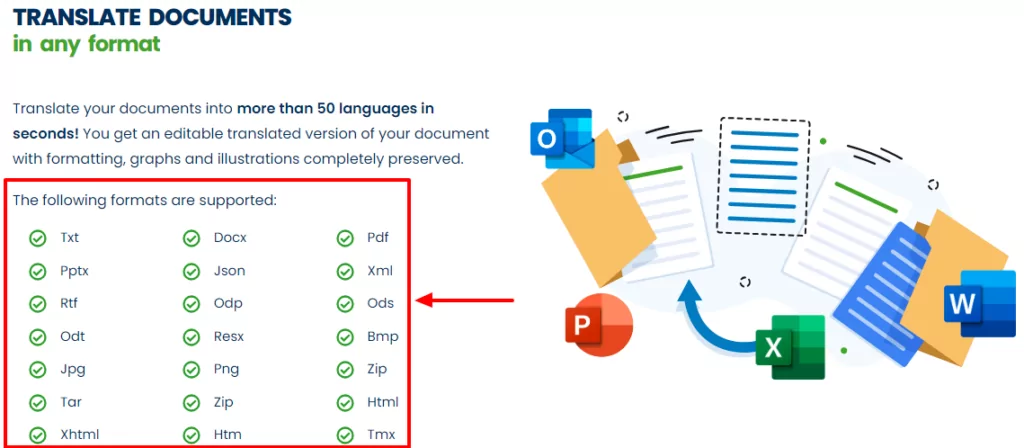
Quando traduci qualsiasi formato di documento (che si tratti di docx, immagini, PDF, ecc.), SYSTRAN mantiene i layout dei tuoi file. O così si sostiene.
Non preoccuparti, puoi comunque modificare i documenti di testo dopo la traduzione.
L'ho provato e penso che sia un lavoro in corso. Alcuni dei miei layout finali erano un po' caotici 🙁 Ma è prevedibile con la traduzione automatica.
Dico questo perché la funzione di traduzione delle immagini lascia molto a desiderare. Ecco come appare la schermata PNG di sopra dopo che l'ho tradotta dall'inglese allo spagnolo:
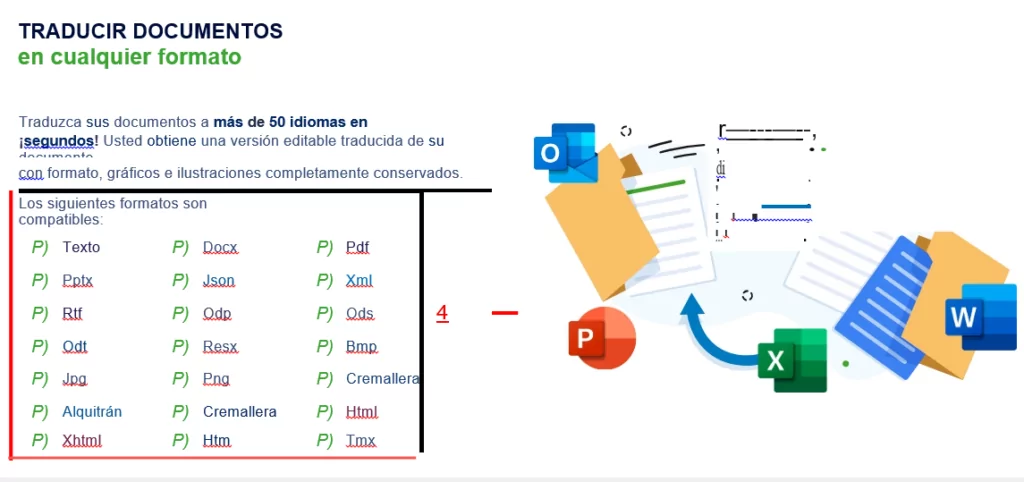
Questo non è molto utile. O sbaglio? Con l'attuale tecnologia di traduzione automatica, è meglio tradurre le immagini manualmente utilizzando un plugin come TranslatePress.
Consiglio ProPer la migliore traduzione di immagini, dai un'occhiata Come tradurre le immagini in WordPress [Guida completa].
Accuratezza della traduzione SYSTRAN: è affidabile?
La risposta breve è sì, SYSTRAN Translate è affidabile 🙂
Tradurre contenuti in diverse lingue non è così semplice come tutti vorremmo.
Che tu lo faccia manualmente o usi un software, ne affronterai alcune problemi comuni con la traduzione.
Allo stato attuale della tecnologia, è ingiusto aspettarsi traduzioni automatiche precise al 100%, anche da un’azienda che opera nel settore da oltre 50 anni.
Tuttavia, nulla può fermare SYSTRAN. Hanno lanciato il Pure Neural Server per offrirvi “...traduzioni automatiche di qualità umana a velocità fulminea.”
Il loro motore di traduzione automatica neurale pura (PNMT) utilizza un'intelligenza artificiale autoapprendente per offrire traduzioni di alta qualità.
Inoltre, è possibile aggiungere dizionari utente e addestrare modelli di traduzione per perfezionare le traduzioni in tempi record.
La tecnologia SYSTRAN PNMT è impressionante e ti consente di generare traduzioni che suonano naturali.
Molti studi dimostrare che SYSTRAN Translate produce traduzioni accurate (o utilizzabili). Tuttavia, la traduzione automatica è ben lontana dall'essere perfetta.
Anche se le traduzioni sembrano buone, è consigliabile assumere un professionista per rivederle e risolvere eventuali problemi.
Integrazioni di SYSTRAN Translate
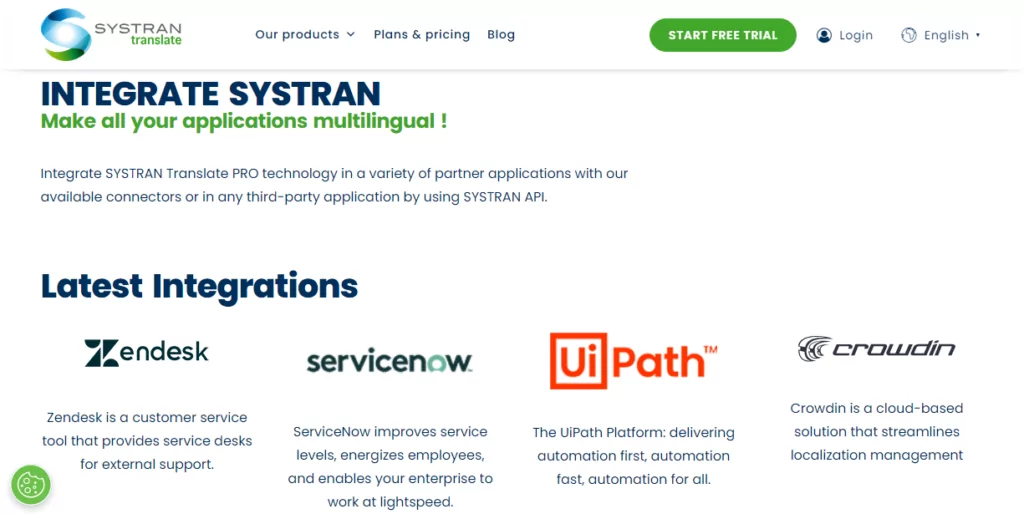
La traduzione non deve per forza iniziare e finire con pagine web, file o semplice testo. E quelli di SYSTRAN Translate lo sanno.
Capiscono che utilizzi più app per gestire la tua attività. È proprio per questo che continuano ad aggiungere il supporto per applicazioni interne e di terze parti.
Innanzitutto, l'azienda offre componenti aggiuntivi per Microsoft Office per tradurre MS Word, Excel e PowerPoint mentre si lavora sui documenti. Inoltre, è possibile tradurre le e-mail senza uscire da Outlook. Si possono persino usare le scorciatoie da tastiera!
Secondo, SYSTRAN offre integrazioni per strumenti di traduzione assistita da computer (CAT) e di gestione della traduzione (TMS). Questo consente di ottimizzare i flussi di lavoro di traduzione.
In questa sessione, SYSTRAN supporta i seguenti strumenti CAT/TMS:
- Attraverso;
- Déjà vu;
- memoQ;
- Memsource;
- Entro;
- SDL Trados Studio;
- SmartLing;
- Terminotix;
- Wordfast;
- Frase;
- XTM;
- Tentativo;
- Smartcat.
In terzo luogo, questo software di traduzione offre anche integrazioni per piattaforme di assistenza clienti, automazione dei flussi di lavoro e gestione della localizzazione.
Attualmente, SYSTRAN Translate supporta:
- Zendesk – Aggiungi traduzioni automatiche neurali SYSTRAN basate sull'intelligenza artificiale al tuo Zendesk Chat e migliorare il servizio clienti;
- ServiceNow – Traduci ticket istantanei, chat online, knowledge base ed email di supporto;
- UiPath – Traduci la tua automazione dei flussi di lavoro. Consente ai tuoi robot di rilevare la lingua e tradurre testi e file più velocemente;
- Crowdin: traduci i tuoi contenuti e gestisci la localizzazione come un professionista.
L'integrazione delle app di cui sopra con SYSTRAN Translate è un gioco da ragazzi. Tu (o il tuo tecnico IT) potete utilizzare le API REST di SYSTRAN Translate per connettervi ad altre applicazioni di terze parti.
Sicurezza dei dati e privacy
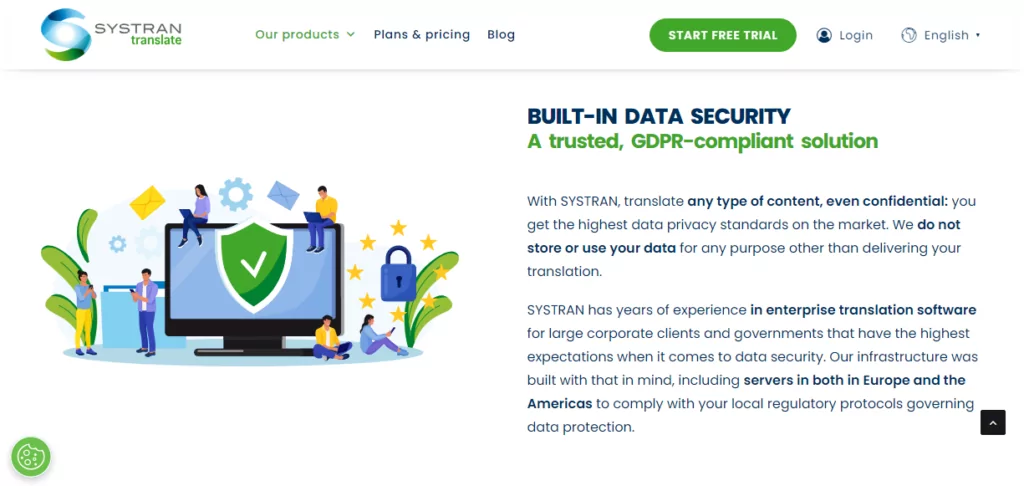
In un mondo digitalmente connesso, la sicurezza dei dati e la privacy sono grandi preoccupazioni. Le violazioni dei dati perpetuate da poche mele marce possono abbattere anche le più grandi corporazioni, come probabilmente avrete visto al telegiornale.
Le aziende di tutte le dimensioni generano enormi quantità di dati sensibili che devono ancora essere tradotti. Può trattarsi di promemoria interni, dati dei clienti, informazioni sui dipendenti e altro ancora.
Con oltre 80% di dipendenti che ammettono di utilizzare applicazioni SaaS non approvate per svolgere le proprie mansioni lavorative, si corre il rischio di esporre traduzioni sensibili e di violare le leggi sulla conformità dei dati.
Ecco perché è nel vostro interesse scegliere un servizio di traduzione impegnato nella sicurezza dei dati e nella privacy. Uno di questi servizi è SYSTRAN Translate.
Per un'azienda che 50 anni fa forniva traduzioni dal russo all'inglese per l'Aeronautica Militare degli Stati Uniti, ci si può aspettare una sicurezza dei dati di livello militare.
SYSTRAN ha anni di esperienza nel software di traduzione aziendale per grandi clienti aziendali e governi che hanno le massime aspettative in termini di sicurezza dei dati.
SYSTRAN
SYSTRAN Translate non memorizza né utilizza le vostre informazioni per scopi diversi dalla generazione di traduzioni. I vostri dati riservati rimangono all'interno della vostra azienda.
Per garantire una sicurezza di altissimo livello, è possibile distribuire il servizio on-premises o sul server cloud dedicato di SYSTRAN.
In aggiunta a ciò, SYSTRAN Translate è conforme al GDPR. Inoltre, dispone di server NMT in Europa e nelle Americhe per garantire che le vostre traduzioni siano conformi alle leggi locali sulla protezione dei dati.
Assistenza clienti SYSTRAN Translate
SYSTRAN Translate offre diverse opzioni di assistenza clienti, come mostrato di seguito.
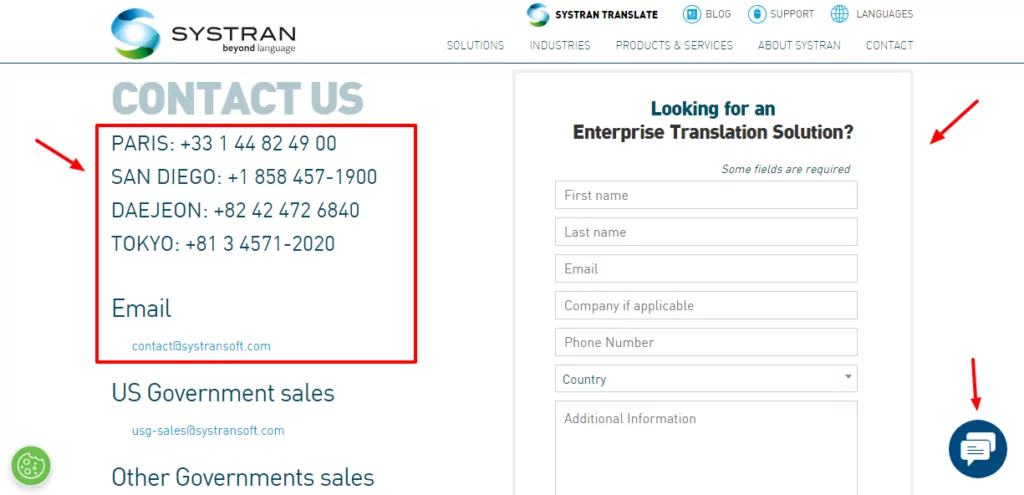
Puoi contattarli tramite telefono, email, social media o chat online. Se riscontri un problema, puoi anche aprire un ticket di supporto.
Sono rimasto particolarmente colpito da quanto velocemente abbiano risposto tramite la chat online. Tuttavia, gli addetti all'assistenza non sono stati di grande aiuto quando ho chiesto come integrare SYSTRAN Translate con WordPress.
Ho chiesto tre volte, parlando ogni volta con un addetto all'assistenza diverso. Purtroppo, nessuno ha saputo dirmi come integrare SYSTRAN con WordPress.
Tutti e tre gli operatori hanno continuato a trasferire la sessione di chat a un “esperto SYSTRAN”, il quale, purtroppo, non ha mai risposto. Come ultima spiaggia, l'operatore della chat online ha detto che la persona responsabile mi avrebbe contattato via email entro 24 ore. Sono passati tre giorni.
Ho cercato ovunque, ma a quanto pare non hanno un plugin di WordPress che renda semplice l'integrazione con il vostro sito web.
Sebbene la chat online fosse veloce e reattiva, è stato frustrante dover fare la stessa domanda più volte invano.
Inoltre, continuavano a insistere per avere le mie informazioni personali ignorando le mie domande. Inoltre, continuavano a cercare di vendermi i loro piani a pagamento. Dai, è una semplice domanda, ragazzi!
Se desideri saperne di più su SYSTRAN Translate, offrono un blog, documentazione, FAQ, una base di conoscenza e video.
Tutto sommato, il supporto è superiore alla media, anche se ci si aspetterebbe che gli addetti all'assistenza abbiano le risposte a semplici domande a portata di mano.
Opzioni di prezzo di SYSTRAN Translate
SYSTRAN Translate offre piani di prezzo flessibili pay-per-user per singoli, sviluppatori e aziende.
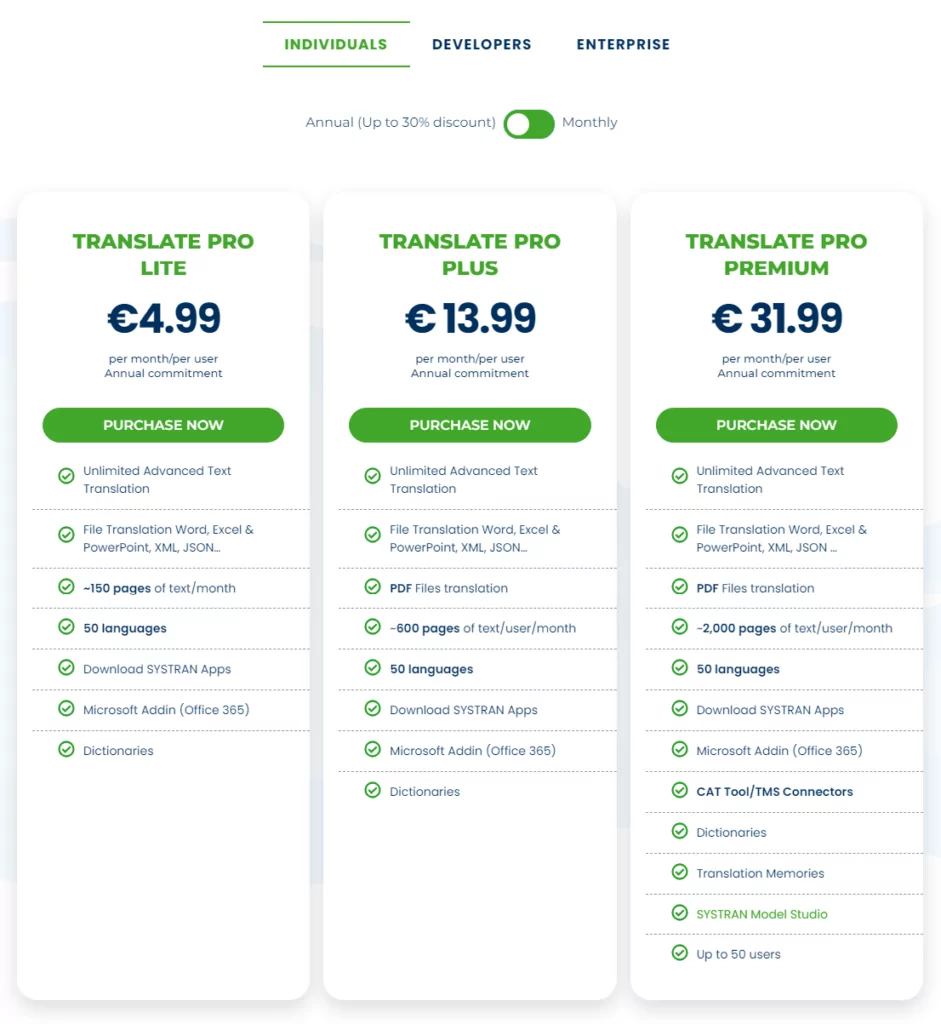
I piani individuali per i liberi professionisti sono disponibili in tre versioni, vale a dire:
- Pro Lite – Il costo è di €4,99 al mese per utente con fatturazione annuale. Il piano prevede un solo utente e include 250.000 crediti al mese per utente e circa 150 pagine di testo al mese per utente;
- Pro Plus – A partire da €13,99 per utente al mese, con fatturazione annuale. Il piano supporta 20 utenti e include 1.000.000 di crediti per utente al mese, circa 600 pagine di testo al mese per utente e traduzioni in formato PDF;
- Pro Premium – Il piano ha un costo di €31,99 al mese per utente con un impegno annuale. Hai 50 utenti, 3.000.000 di crediti al mese per utente, circa 2.000 pagine di testo al mese per utente, SYSTRAN Model Studio, memorie di traduzione e connessioni con strumenti CAT/TMS.
Per utenti avanzati e sviluppatori, hai a disposizione:
- API Pro – Un piano di prova che ti consente di testare gratuitamente l'API di SYSTRAN Translate PRO per 14 giorni. Ricevi 500 mila crediti di traduzione;
- API Pro – Il costo è di €8,99 al mese per 1.000.000 di caratteri e l'accesso alla chiave API;
- Pro Infinite – €64,99 al mese, con fatturazione annuale. Il piano include Translate Pro Premium, una chiave API, circa 4.500 pagine di testo per utente al mese e 7.000.000 di caratteri. E, naturalmente, tutte le altre funzionalità offerte da SYSTRAN Translate Pro.
Per i grandi clienti aziendali con esigenze di traduzione elevate e i più alti standard di sicurezza, contattare SYSTRAN per un preventivo personalizzato.
I piani Individual e Developer includono una prova di 14 giorni senza carta di credito richiesta per testare il terreno. Come al solito, scegliete sempre il piano più adatto alla vostra attività.
Vantaggi e svantaggi di SYSTRAN Translate
SYSTRAN Translate è un motore di traduzione formidabile, senza dubbio. Dispone di funzioni brillanti, sicurezza solida e traduzioni di alta qualità, il tutto a prezzi accessibili. Ma è adatto a voi?
Pro
- Interfaccia facile da usare;
- Estensioni del browser;
- Integrazioni multiple;
- Traduzioni di alta qualità grazie alla tecnologia Pure Neural Manual Translation (PNMT) di SYSTRAN;
- Ampio supporto linguistico;
- Traduzioni automatiche personalizzabili grazie al post-editing, ai modelli di traduzione e alle memorie;
- Prova gratuita.
Consigli
- Nessun piano gratuito;
- L'assistenza avrebbe bisogno di qualche miglioramento;
- Difficile da integrare con MS Office (meno male che hai Microsoft Translator);
- Nessuna applicazione desktop;
- Nessuna applicazione mobile;
- Layout di documenti disordinati dopo la traduzione (specialmente le immagini);
- Sebbene sia facile da usare, c'è una leggera curva di apprendimento;
- Potrebbe supportare più lingue.
In che modo SYSTRAN Translate si distingue nel settore della traduzione
Come molti altri servizi di traduzione, SYSTRAN Translate presenta vantaggi e svantaggi. Detto questo, come si posiziona rispetto a servizi popolari come DeepL e Google Translate?
SYSTRAN Translate contro DeepL
DeepL è un motore di traduzione relativamente più recente rispetto a SYSTRAN. Entrambi presentano interfacce web intuitive, il che significa che sono facili da usare immediatamente.
SYSTRAN Translate supporta più lingue di DeepL. Se necessitate di molte coppie linguistiche, DeepL non può competere con SYSTRAN.
In merito alla precisione, entrambi i servizi offrono traduzioni utilizzabili poiché utilizzano entrambi la tecnologia di traduzione automatica neurale.
DeepL offre un piano gratuito perfetto per un uso leggero. Puoi tradurre i tuoi contenuti gratuitamente, a patto di non esaurire i limiti. Non possiamo dire lo stesso di SYSTRAN Translate.
Ricorda che se esaurisci i limiti del piano gratuito di DeepL, può diventare più costoso di SYSTRAN.
A differenza di SYSTRAN Translate, DeepL include app desktop e mobili per Android e iOS.
SYSTRAN Translate vs Google Translate
Google Translate è uno dei servizi di traduzione web più popolari e la scelta predefinita per molte aziende.
A differenza di SYSTRAN Translate, Google Translate offre una versione gratuita che consente di tradurre 500.000 caratteri al mese.
Ti servirebbe un piano a pagamento per tradurre più di 5k caratteri con SYSTRAN Translate.
Google Translate supporta oltre 130 lingue, surclassando nettamente SYSTRAN Translate sotto questo aspetto.
A confronto (e tenendo conto del generoso piano gratuito), Google Translate risulta più conveniente rispetto a SYSTRAN Translate.
Tuttavia, SYSTRAN Translate offre traduzioni di qualità superiore rispetto a Google Translate. Inoltre, Google Translate non supporta traduzioni personalizzabili e specifiche per settore.
Infine, Google Translate offre app per Android, iPhone e iPad.
A favore di TranslatePress
Devo ammettere che SYSTRAN Translate è un motore di traduzione formidabile con un grande potenziale.
Tuttavia, presenta alcuni limiti. Ad esempio, farai molta fatica a integrarlo con il tuo sito web WordPress, soprattutto se non sai come funziona la REST API.
Ecco dove TranslatePress entra.
Se è la prima volta che lo usi, TranslatePress è un plugin di traduzione per WordPress potente ma facile da usare, adatto a chiunque (indipendentemente dal livello di competenza).
Il plugin ha una versione gratuita completamente funzionale che ti aiuta a tradurre il tuo sito WordPress nel front-end utilizzando un editor di traduzione visivo.
Ha il pieno supporto per WooCommerce, costruttori di pagine visivi, temi complessi, stringhe di plugin, SEO, lingue multiple, URL e altro ancora.
TranslatePress Multilingue
Tuttavia, al momento TranslatePress non supporta il motore di traduzione SYSTRAN. Il plugin fornisce traduzioni automatiche utilizzando DeepL e Google Translate. Successivamente, è possibile modificare manualmente le traduzioni automatiche per perfezionarle.
Ultime parole
SYSTRAN Translate è un potente motore di traduzione con molto da offrire. Ottieni un sistema robusto supportato da oltre cinque decenni di esperienza nel settore.
È facile da usare e offre funzionalità adeguate per gestire la traduzione per freelance, piccole imprese e grandi aziende.
È un servizio pluripremiato con una comprovata esperienza di traduzioni di alta qualità. Inoltre, SYSTRAN è una soluzione economicamente vantaggiosa rispetto ad alcuni concorrenti.
Tuttavia, presenta alcuni svantaggi. Ad esempio, non offre un piano gratuito ed è relativamente più difficile da connettere a WordPress.
Cosa ne pensate? Fatecelo sapere nei commenti. Se avete trovato utile questa recensione di SYSTRAN, vi invitiamo a condividerla.