
In diesem Beitrag
Fragen Sie sich, ob SYSTRAN Translate der beste Übersetzungsdienst für Ihr Unternehmen ist? Wenn Sie diese Frage mit einem klaren Ja beantworten können, sind Sie hier genau richtig.
Die Auswahl eines vorbildlichen Übersetzungsdienstes für Ihre Bedürfnisse ist eine schwierige Aufgabe, besonders wenn Sie neu in diesem Übersetzungsgeschäft sind.
Erstens gibt es zahlreiche Übersetzungsdienste online, sowohl kostenlos als auch kostenpflichtig. Allein aus diesem Grund kann die Wahl des richtigen Übersetzers für Ihr Unternehmen verwirrend sein.
Zweitens: Entscheiden Sie sich für maschinelle Übersetzungen oder menschliche Übersetzungsdienste, wenn man bedenkt, dass beide sowohl Vor- als auch Nachteile haben?
Drittens bieten verschiedene Übersetzungsdienste unterschiedliche Funktionsumfänge, was die Auswahl des perfekten Dienstes für Ihre Bedürfnisse etwas schwierig macht.
Viertens sind Übersetzungsdienste nicht alle gleich aufgebaut. Einige Tools bieten von vornherein bessere Übersetzungen. Ebenso lassen sich manche Dienste nur schwer in Ihre Anwendungen integrieren.
Trotz der genannten Herausforderungen ist es in einer globalisierten Welt äußerst wichtig, Ihre Website in mehreren Sprachen anzubieten.
A mehrsprachige website ermöglicht es Ihnen, neue Zielgruppen zu erreichen, bessere Kundenerlebnisse zu bieten und den Umsatz zu steigern.
Und für effektive Übersetzungen benötigen Sie einen zuverlässigen Übersetzungsdienst.
In diesem SYSTRAN Translate Testbericht erfahren Sie, ob der Übersetzungsdienst ideal für Ihre geschäftlichen Anforderungen ist.
Wir werden mehrere Faktoren hervorheben, darunter Funktionen, Preisoptionen, Kundensupport und so weiter.
Am Ende haben Sie alle Informationen, um zu entscheiden, ob Sie SYSTRAN Translator zugunsten eines alternativer Übersetzungsdienst wie zum Beispiel DeepL oder Google Translate.
Lassen Sie uns ohne Umschweife beginnen!
Was ist SYSTRAN Translate? Eine kurze Übersicht
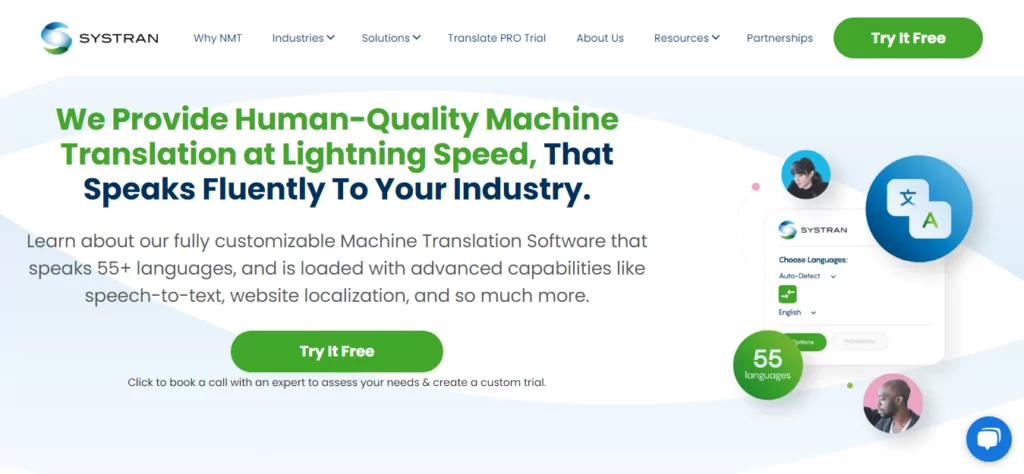
Zuallererst, was ist dieses Tier, das wir nennen SYSTRAN?
Nun – wenn der Titel nicht alles sagt – SYSTRAN Translate ist ein Übersetzungsdienst, der sehr ähnlich ist wie DeepL oder Google Übersetzer.
Was vielen nicht bekannt ist, ist, dass SYSTRAN einer der ältesten kommerziell verfügbaren maschinellen Übersetzungsdienste der Welt ist.
Das Unternehmen wurde bereits 1968 von Dr. Peter Toma gegründet. Ganz recht, wie Chatbots, Maschinelle Übersetzung gibt es bereits seit Jahrzehnten.
Das Unternehmen wurde in La Jolla, Kalifornien, gegründet, um der United States Air Force zu helfen, während der Kalter Krieg.
Neben dem Verteidigungsministerium der Vereinigten Staaten leistete SYSTRAN Translate umfangreiche Arbeit für die Europäische Kommission.
Abgesehen von Regierungsbehörden hat SYSTRAN zuvor Technologie für Google-Sprachtools, Yahoo Babel Fish und das Dashboard-Übersetzungs-Widget in macOS bereitgestellt.
Als sie anfingen, verwendete das Unternehmen regelbasierte maschinelle Übersetzung, die – obwohl sie damals funktionierte – alles andere als perfekt war.
Im Laufe der Jahre ist SYSTRAN Translate dank der Fortschritte in der maschinellen Übersetzungstechnologie enorm gewachsen. Mittlerweile nutzt das Unternehmen seine proprietäre SYSTRAN Pure Neural Machine Translation-Technologie zur Bewältigung von Übersetzungen,
Derzeit ist SYSTRAN ein preisgekröntes, cloudbasiertes professionelles Übersetzungstool, das von Freiberuflern, Start-ups, kleinen Unternehmen und Großkonzernen genutzt wird.
Dank einer einzigartigen Reihe von Übersetzungstools ist SYSTRAN Translate ein fantastisches Werkzeug zur Steigerung der Produktivität bei gleichzeitig niedrigen Übersetzungskosten.
Unternehmensruf von SYSTRAN Translate
Den vielen begeisterten Bewertungen im Internet zufolge scheinen diese Leute zu wissen, was sie tun. Hier sind Beispiele von softwareadvice.com:
Ich habe diese Software verwendet, um Websites für Kunden zu übersetzen, was mir viel Zeit spart. Darüber hinaus gefällt mir sehr, dass SYSTRAN Translate Pro arabische Dialekte erkennt und diese ebenfalls übersetzt. Ich kann es uneingeschränkt empfehlen. – Nawal
oder
Ich dachte, wir wären noch weit davon entfernt, eine perfekte Übersetzung von computergestützten Übersetzungswerkzeugen zu erleben. Wenn es eine Software gibt, die dem nahekommt, dann ist es [das] Systran Translate Pro [-System]. Nach meiner kurzen Erfahrung habe ich keine präzisere Software als diese gefunden. – Allen
Zum Zeitpunkt dieses Schreibens hat der Systran Translator über 100.000 Nutzer und eine tadellose Bewertung von 4,7 von 5,0 Sternen bei über 1.600 Bewertungen, was bedeutet, dass man mit gutem Gewissen sagen kann, dass man in sicheren Händen ist.
Darüber hinaus vertrauen einige der bekanntesten Marken wie Deloitte, Banque de France, Allianz, Lufthansa und Continental auf den Übersetzungsdienst von SYSTRAN.
Wenn Sie sie jemals besuchen möchten, hat SYSTRAN Hauptsitze in Paris, Tokio, Daejeon und San Diego.
Jetzt, wo SYSTRAN nicht mehr wie ein KI-Roboter aus den Interstellar Film: Welche Funktionen und Vorteile bietet der Übersetzungsdienst?
SYSTRAN Translate: Hauptfunktionen & Vorteile
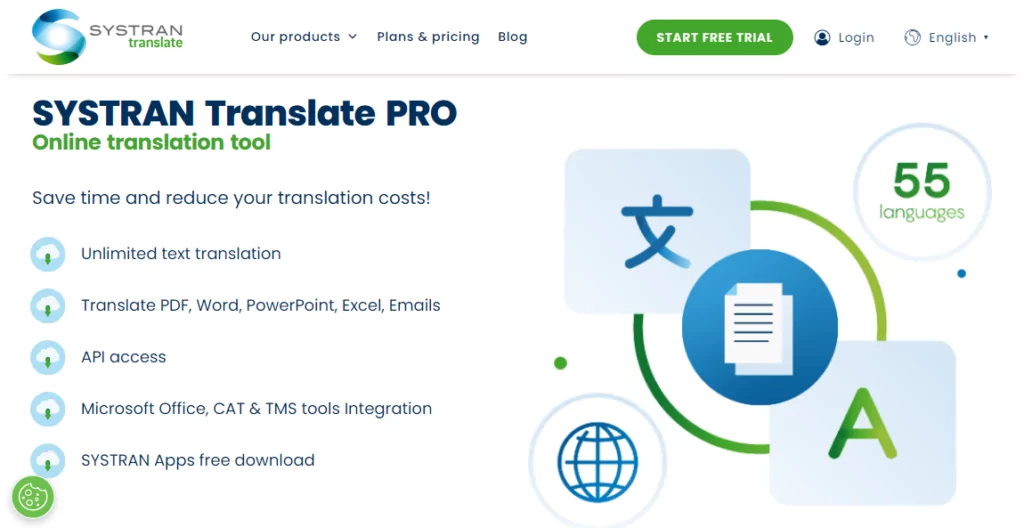
Ich sage immer scherzhaft, dass ein Werkzeug nur so gut ist wie die Funktionen, die es bietet. Wenn es die von mir benötigten Optionen ohne Funktionsüberladung oder Unordnung hat, ist es für mich definitiv ein Gewinner.
Wie schlägt sich SYSTRAN Translate also im Bereich der Funktionen?
Einfach zu bedienen
Erstens ist der Übersetzungsdienst intuitiv und einfach zu bedienen. Sie können in drei einfachen Schritten loslegen. Kaufen Sie SYSTRAN Translate PRO, melden Sie sich mit Ihren Kontodaten an und übersetzen Sie drauflos.
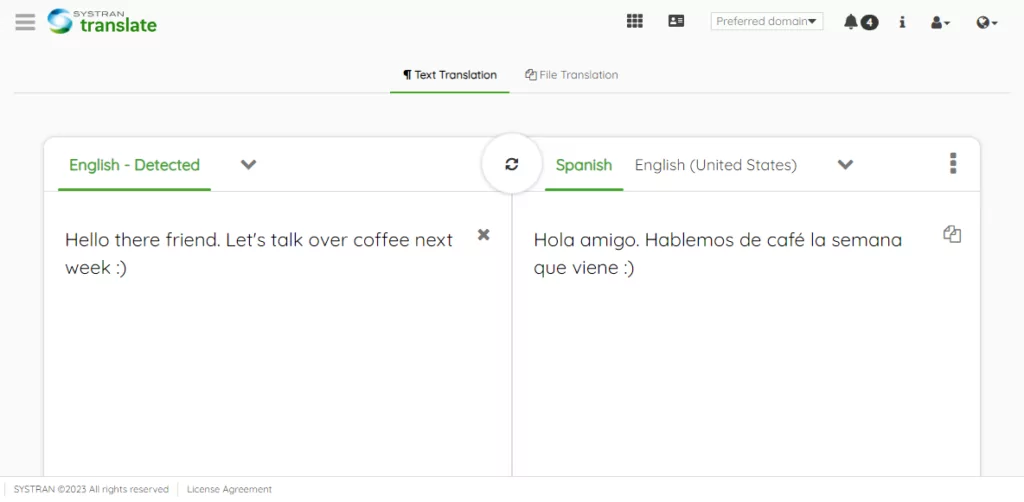
Sie können die benutzerfreundliche Weboberfläche nutzen, um 55 Sprachen in mehr als 150 Paaren zu übersetzen. Selbst ohne Konto können Sie bis zu 5.000 Textzeichen und drei Dateien pro Monat übersetzen.
Fügen Sie Ihren Text einfach in das Quellfeld ein oder tippen Sie ihn ein, und SYSTRAN legt sofort los und übersetzt Ihre Inhalte in Echtzeit.
Der Dienst unterstützt alle gängigen Sprachkombinationen und sogar einige lokale Dialekte.
Hier ist die Liste der Sprachen, die SYSTRAN unterstützt.
| Ausgangssprache | Unterstützte Übersetzungen |
|---|---|
| Englisch | Albanisch, Arabisch, Armenisch, Bengali, Bulgarisch, Birmanisch, Katalanisch, Chinesisch (vereinfacht), Chinesisch (traditionell), Kroatisch, Tschechisch, Dänisch, Niederländisch, Estnisch, Finnisch, Französisch, Georgisch, Deutsch, Griechisch, Hebräisch, Hindi, Ungarisch, Indonesisch, Italienisch, Japanisch, Koreanisch, Lettisch, Litauisch, Malaiisch, Norwegisch, Paschtu, Persisch, Polnisch, Portugiesisch (Brasilien), Portugiesisch (Portugal), Rumänisch, Russisch, Serbisch, Slowakisch, Slowenisch, Somalisch, Spanisch (Spanien), Spanisch (Lateinamerika), Swahili, Schwedisch, Tagalog, Tamilisch, Thailändisch, Türkisch, Ukrainisch, Urdu, Vietnamesisch. |
| Französisch | Arabisch, Chinesisch (traditionell), Chinesisch (vereinfacht), Niederländisch, Englisch, Deutsch, Griechisch, Italienisch, Portugiesisch und Spanisch. |
| Koreanisch | Traditionelles Chinesisch, Vereinfachtes Chinesisch, Englisch, Französisch, Deutsch, Indonesisch, Japanisch, Russisch, Spanisch, Thailändisch, Vietnamesisch. |
| Spanisch | Englisch, Französisch, Deutsch, Italienisch, Koreanisch, Portugiesisch. |
| Deutsch | Chinesisch (traditionell), Chinesisch (vereinfacht), Englisch, Französisch, Italienisch, Koreanisch, Polnisch, Portugiesisch und Spanisch. |
| Russisch | Englisch, Koreanisch |
| HINWEISE: | – Sie können vom Ausgangstext in jede unterstützte Sprache übersetzen. Und umgekehrt. – Einige Sprachpaare werden nicht unterstützt. Um beispielsweise Russisch ins Chinesische zu übersetzen, müssen Sie Russisch zuerst ins Englische und dann Englisch ins Chinesische übersetzen. |
Weitere SYSTRAN-Übersetzungsoptionen
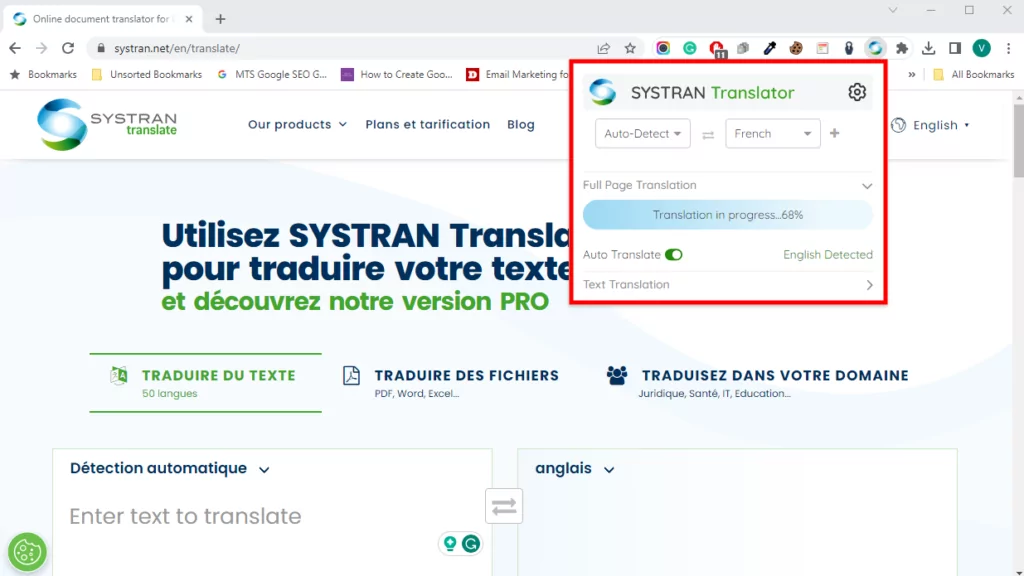
Außerdem verfügen Sie über den SYSTRAN Translator Chrome und Mozilla Firefox Ihnen zur Verfügung stehende Browser-Erweiterungen.
Um die Browser-Erweiterungen zu verwenden, markieren Sie den Text, den Sie übersetzen möchten, machen Sie einen Rechtsklick und wählen Sie Mit SYSTRAN übersetzen.
Die Erweiterung leitet Sie zur Web-Oberfläche weiter, auf der Sie die Übersetzung abschließen können.
Alternativ können Sie auf das Symbol der Browsereweiterung klicken, um die gesamte Seite manuell oder automatisch zu übersetzen, ohne zur SYSTRAN-Weboberfläche weitergeleitet zu werden.
Für fortgeschrittene Benutzer und Entwickler können Sie die SYSTRAN Translate API nutzen, um den Übersetzungsdienst in Ihre internen und externen Anwendungen zu integrieren.
Dazu gehören Kundenservice-Plattformen, Business Intelligence, Kollaborations-Tools, Wissensdatenbanken, Online-Chats und vieles mehr.
Darüber hinaus können Sie die Qualität Ihrer Übersetzungen mit den Übersetzungsmodellen von SYSTRAN auf die nächste Stufe heben.
Das SYSTRAN Model Studio ermöglicht Ihnen die Erstellung benutzerdefinierter Übersetzungsmodelle, die mit den Daten Ihres Unternehmens trainiert wurden.
Dies hilft Ihnen dabei, die Qualität und Robustheit Ihrer Übersetzungen erheblich zu verbessern.
Das Beste daran ist, dass Sie keine KI-Kenntnisse benötigen, um ein maßgeschneidertes Übersetzungsmodell zu erstellen. SYSTRAN bietet einen umfangreichen Katalog vorgefertigter Modelle, die Sie genau an Ihre Bedürfnisse anpassen können.
Leider hat das Unternehmen Desktop-Apps für Windows und macOS schon vor längerer Zeit eingestellt. Das Support-Team empfiehlt SYSTRAN Translate PRO als Lösung.
Branchenspezifische Übersetzungen
Jede Branche ist anders. Das Fachchargon, das in der Werbung funktioniert, taugt wahrscheinlich nichts für den Bildungssektor.
Die Sprache, die im Technologiesektor funktioniert, lässt sich nicht auf das Gesundheitswesen übertragen. Ich weiß, was gemeint ist.
Zum Beispiel das Übersetzen von Texten aus dem Gesundheitswesen von Englisch nach Chinesisch hat möglicherweise nicht die gewünschte Wirkung. Sie könnten die Leser verwirren oder, noch schlimmer, vor den Kopf stoßen.
Noch etwas. Einige spezifische Wörter, Kontexte oder Stile in einer bestimmten Branche existieren in der Zielsprache nicht.
SYSTRAN Translate versteht diese Arten von Problemen, insbesondere bei branchenspezifischen Übersetzungen.
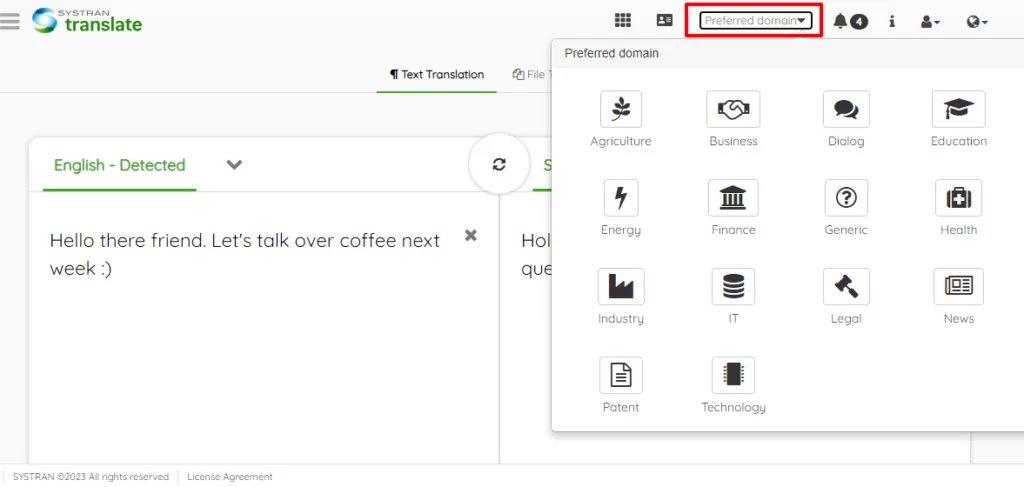
Als solches ermöglicht Ihnen SYSTRAN Translate PRO, Text und Dateien in mehreren Bereichen zu übersetzen, wie zum Beispiel:
- Geschäft;
- Finanzen;
- Technologie;
- Patent;
- Landwirtschaft;
- Rechtlich;
- Gesundheit;
- Energie;
- Bildung;
- Nachrichten;
- Allgemein;
- Und mehr.
Fachspezifische maschinelle Übersetzungen ermöglichen noch präzisere Ergebnisse, da sich die Sprache, wie man sich denken kann, je nach Branche und Kontext erheblich unterscheiden kann.
Um Erfolgsgeschichten und Praxisbeispiele von SYSTRAN in verschiedenen Branchen zu sehen, besuchen Sie deren Fallstudien-Seite.
Sie erfahren, wie das Unternehmen unter anderem Unternehmen wie Nestlé, Adobe, die MGI Group und ADmantX unterstützt hat.
Bilder und andere Dateiformate
Es genügt zu sagen, dass SYSTRAN Translate PRO unbegrenzte Textübersetzungen sowie eine größere Anzahl von Dateiformaten (PDF, DOCX, XLSX, PPTX…) unterstützt.
Sie können sogar Bilder und Inhalte in E-Mails, komprimierten Ordnern, JSON-, HTML-Dateien und mehr übersetzen.
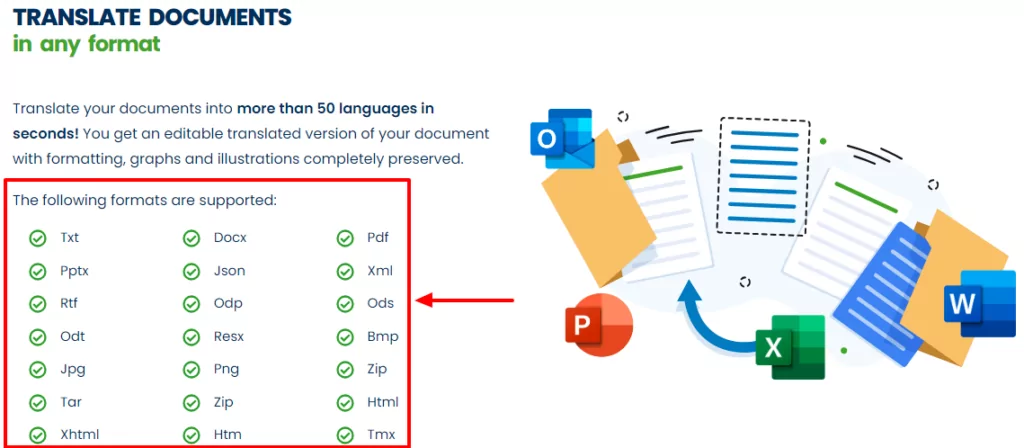
Wenn Sie eines der Dokumentformate (sei es docx, Bilder, PDF usw.) übersetzen, behält SYSTRAN Ihre Dateilayouts bei. Oder so lautet zumindest die Behauptung.
Keine Sorge, Sie können die Textdokumente nach der Übersetzung immer noch bearbeiten.
Ich habe es ausprobiert und ich denke, es ist noch in der Entwicklung. Einige meiner finalen Layouts waren etwas durcheinander 🙁 Aber das ist bei maschineller Übersetzung zu erwarten.
Ich sage das, weil die Bildübersetzungsfunktion sehr zu wünschen übrig lässt. So sieht der obige PNG-Screenshot aus, nachdem ich ihn aus dem Englischen ins Spanische übersetzt habe:
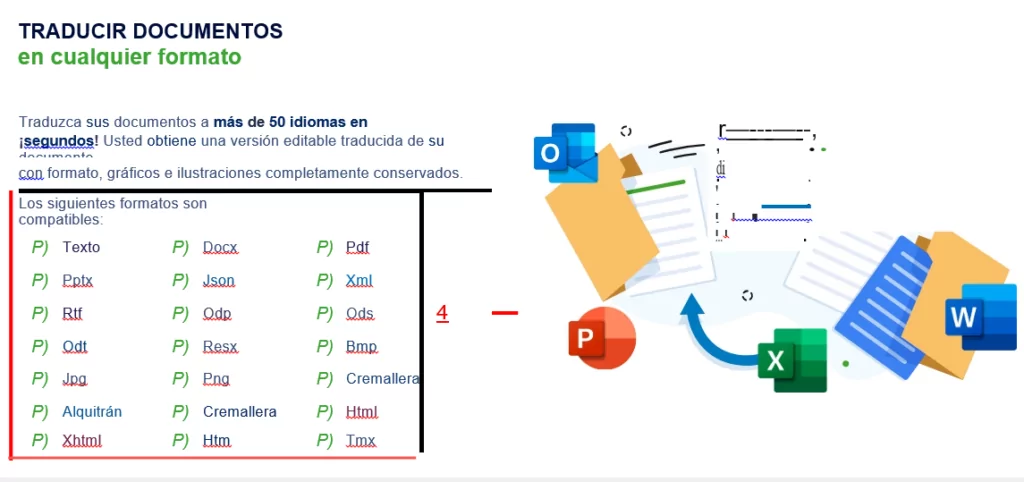
Das ist nicht so hilfreich. Oder etwa doch? Mit der aktuellen maschinellen Übersetzungstechnologie sind Sie besser dran, wenn Sie Ihre Bilder manuell mit einem Plugin wie übersetzen TranslatePress.
Profi-TippFür die beste Bildübersetzung, schauen Sie sich an So übersetzen Sie Bilder in WordPress [Vollständige Anleitung].
SYSTRAN-Übersetzungsgenauigkeit: Ist sie zuverlässig?
Die schnelle Antwort lautet ja, SYSTRAN Translate ist zuverlässig 🙂
Das Übersetzen von Inhalten in verschiedene Sprachen ist nicht so einfach, wie wir es uns alle wünschen würden.
Egal, ob Sie es manuell tun oder Software verwenden, Sie werden vor einigen häufige Probleme bei der Übersetzung.
Angesichts des derzeitigen Stands der Technik ist es unrealistisch, 100%-genaue maschinelle Übersetzungen zu erwarten – selbst von einem Unternehmen, das seit über 50 Jahren besteht.
Dennoch hält nichts SYSTRAN auf seinem Weg auf. Sie haben den Pure Neural Server auf den Markt gebracht, um Ihnen “...maschinelle Übersetzung in menschlicher Qualität bei blitzschneller Geschwindigkeit” anzubieten.”
Ihre PNMT-Engine (Pure Neural Machine Translation) nutzt selbstlernende künstliche Intelligenz, um qualitativ hochwertige Übersetzungen zu liefern.
Darüber hinaus können Sie Benutzerwörterbücher hinzufügen und Übersetzungsmodelle trainieren, um Übersetzungen in Rekordzeit zu optimieren.
Die SYSTRAN PNMT-Technologie ist beeindruckend und ermöglicht es Ihnen, Übersetzungen zu generieren, die natürlich klingen.
Mehrere Studien Zeigen Sie, dass SYSTRAN Translate genaue (oder brauchbare) Übersetzungen liefert. Dennoch ist die maschinelle Übersetzung weit von perfekt entfernt.
Auch wenn die Übersetzungen gut aussehen, ist es ratsam, einen Profi zu engagieren, der die Übersetzungen durchgeht und Unstimmigkeiten ausbügelt.
SYSTRAN Translate-Integrationen
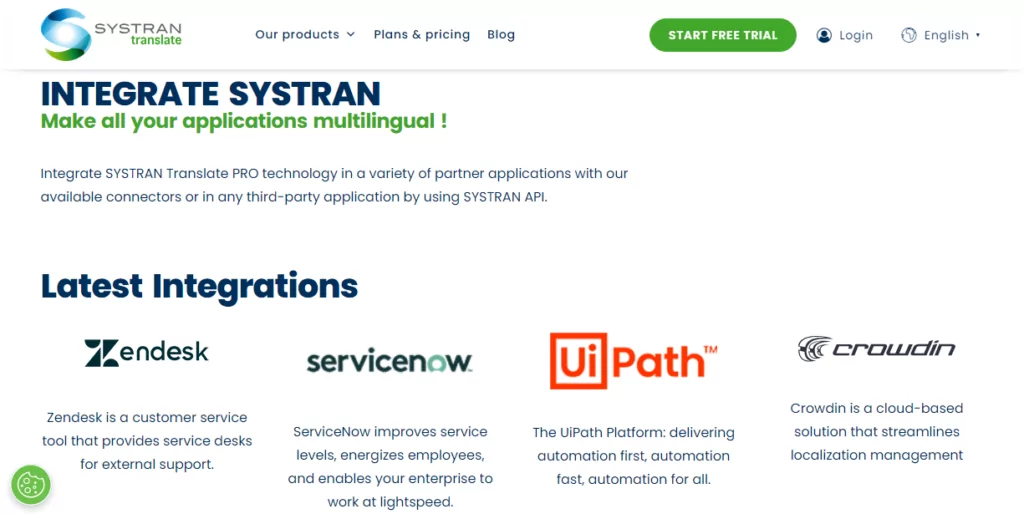
Übersetzung muss nicht mit Webseiten, Dateien oder einfachem Text beginnen und enden. Und die Leute bei SYSTRAN Translate wissen das.
Sie verstehen, dass Sie mehrere Apps verwenden, um Ihr Unternehmen zu führen. Genau aus diesem Grund fügen sie kontinuierlich Unterstützung für interne und Drittanbieter-Anwendungen hinzu.
Erstens bietet das Unternehmen Add-Ins für Microsoft Office an, um MS Word, Excel und PowerPoint während der Arbeit an den Dokumenten zu übersetzen. Darüber hinaus können Sie E-Mails übersetzen, ohne Outlook zu verlassen. Sie können sogar Tastenkombinationen verwenden!
Zweitens bietet SYSTRAN Integrationen für Tools zur computergestützten Übersetzung (CAT) und zum Übersetzungsmanagement (TMS) an. Dies ermöglicht es Ihnen, Ihre Übersetzungsworkflows zu optimieren.
In dieser Sitzung unterstützt SYSTRAN die folgenden CAT/TMS-Tools:
- Durch;
- Déjà-vu;
- MemoQ;
- Memsource;
- Ontram;
- SDL Trados Studio;
- SmartLing;
- Terminotix;
- Wordfast;
- Phrase;
- XTM;
- Versuch;
- Smartcat.
Drittens bietet diese Übersetzungssoftware auch Integrationen für Kundenservice-Plattformen, Workflow-Automatisierung und Lokalisierungsmanagement.
Derzeit unterstützt SYSTRAN Translate:
- Zendesk – Fügen Sie KI-basierte neuronale maschinelle Übersetzungen von SYSTRAN hinzu Zendesk Chat und den Kundenservice zu verbessern;
- ServiceNow – Soforttickets, Online-Chats, Wissensdatenbank und Support-E-Mails übersetzen;
- UiPath – Übersetzen Sie Ihre Workflow-Automatisierung. Ermöglicht Ihren Robotern, Sprache zu erkennen und Text und Dateien schneller zu übersetzen;
- Crowdin – Übersetzen Sie Ihre Inhalte und steuern Sie die Lokalisierung wie ein Boss.
Die Integration der obigen Apps mit SYSTRAN Translate ist kinderleicht. Sie (oder Ihr IT-Spezialist) können die SYSTRAN Translate REST-API verwenden, um eine Verbindung zu weiteren Drittanbieter-Anwendungen herzustellen.
Datensicherheit und Datenschutz
In einer digital vernetzten Welt sind Datensicherheit und Datenschutz große Anliegen. Datenpannen, die von ein paar schwarzen Schafen verübt werden, können selbst die größten Unternehmen zu Fall bringen, wie Sie wahrscheinlich in den Nachrichten gesehen haben.
Unternehmen jeder Größe generieren große Mengen an sensiblen Daten, die nach wie vor übersetzt werden müssen. Dies kann alles sein, von internen Memos, Kundendaten, Mitarbeiterinformationen und mehr.
Da über 80% der Mitarbeiter zugeben, dass sie nicht genehmigte SaaS-Anwendungen zur Erledigung ihrer Arbeitsaufgaben nutzen, laufen Sie Gefahr, sensible Übersetzungen offenzulegen und gegen Datenschutzvorschriften zu verstoßen.
Aus diesem Grund liegt es in Ihrem besten Interesse, einen Übersetzungsdienst zu wählen, der sich der Datensicherheit und dem Datenschutz verpflichtet fühlt. Ein solcher Dienst ist SYSTRAN Translate.
Von einem Unternehmen, das vor 50 Jahren Russisch-Englisch-Übersetzungen für die US-Luftwaffe durchgeführt hat, können Sie Datensicherheit auf militärischem Niveau erwarten.
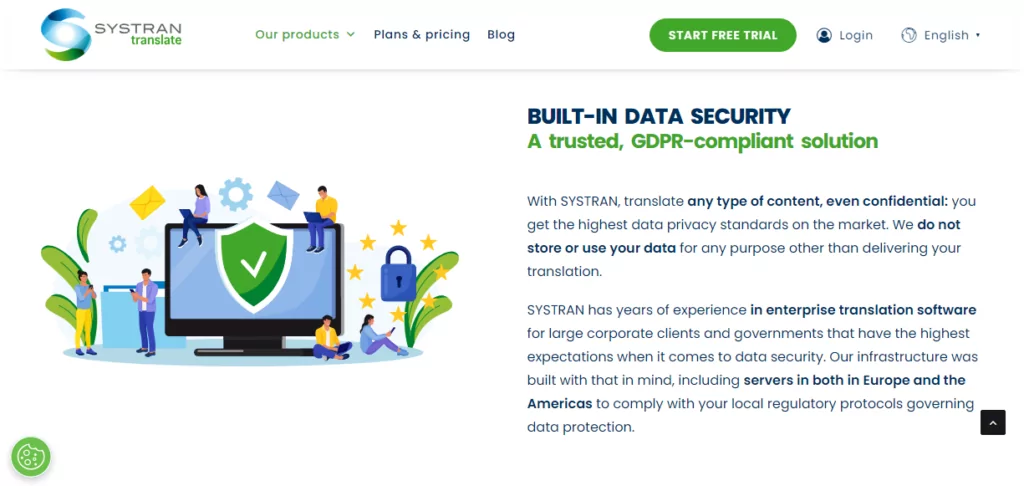
SYSTRAN verfügt über jahrelange Erfahrung in Enterprise-Übersetzungssoftware für große Unternehmenskunden und Regierungen, die höchste Ansprüche an die Datensicherheit stellen.
SYSTRAN
SYSTRAN Translate speichert oder verwendet Ihre Informationen zu keinem anderen Zweck als zur Erstellung von Übersetzungen. Ihre vertraulichen Daten verbleiben in Ihrem Unternehmen.
Um höchste Sicherheit zu gewährleisten, können Sie den Dienst lokal (on-premises) oder auf dem dedizierten Cloud-Server von SYSTRAN bereitstellen.
Darüber hinaus ist SYSTRAN Translate DSGVO-konform. Außerdem verfügt es über NMT-Server in Europa und Amerika, um sicherzustellen, dass Ihre Übersetzungen den lokalen Datenschutzgesetzen entsprechen.
SYSTRAN Übersetzungs-Kundendienst
SYSTRAN Translate bietet verschiedene Kundensupport-Optionen, wie unten gezeigt.
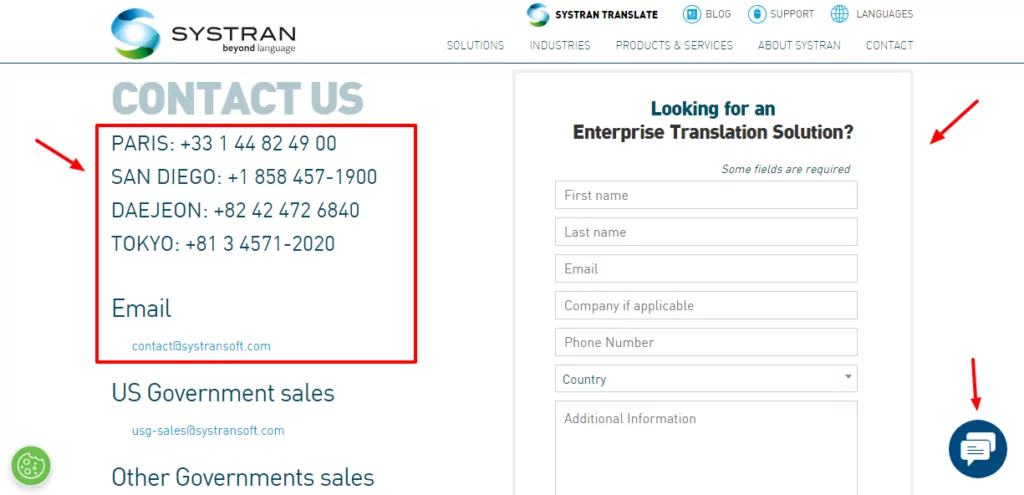
Sie erreichen sie per Telefon, E-Mail, Social Media oder Online-Chat. Wenn Sie ein Problem haben, können Sie auch ein Support-Ticket eröffnen.
Ich war besonders beeindruckt davon, wie schnell sie über den Online-Chat antworteten. Die Support-Mitarbeiter waren jedoch keine große Hilfe, als ich fragte, wie man SYSTRAN Translate in WordPress integriert.
Ich habe dreimal gefragt und jedes Mal mit einem anderen Support-Mitarbeiter gesprochen. Leider konnte mir niemand sagen, wie man SYSTRAN in WordPress integriert.
Alle drei Mitarbeiter verwiesen den Chatverlauf an einen “SYSTRAN-Experten”, der bedauerlicherweise nie antwortete. Als letzte Rettung sagte der Online-Chat-Mitarbeiter, dass die verantwortliche Person mich innerhalb von 24 Stunden per E-Mail kontaktieren würde. Es sind bereits drei Tage vergangen.
Ich habe überall gesucht, aber anscheinend haben sie kein WordPress-Plugin, das die Integration in Ihre Website mühelos machen würde.
Während der Online-Chat schnell und reaktionsfreudig war, war es frustrierend, dieselbe Frage mehrmals vergeblich zu stellen.
Außerdem drängten sie mich ständig auf meine persönlichen Daten, während sie meine Fragen ignorierten. Außerdem versuchten sie ständig, mir ihre kostenpflichtige Tarife aufzuschwatzen. Mensch Leute, es ist eine einfache Frage!
Wenn Sie mehr über SYSTRAN Translate erfahren möchten, bieten sie einen Blog, Dokumentationen, FAQs, eine Wissensdatenbank und Videos an.
Alles in allem ist der Support überdurchschnittlich, obwohl man erwarten würde, dass die Support-Mitarbeiter Antworten auf einfache Fragen parat haben.
SYSTRAN Translate Preiserleichterungen
SYSTRAN Translate bietet flexible Preismodelle mit nutzungsabhängiger Bezahlung pro Nutzer für Privatpersonen, Entwickler und Unternehmen.
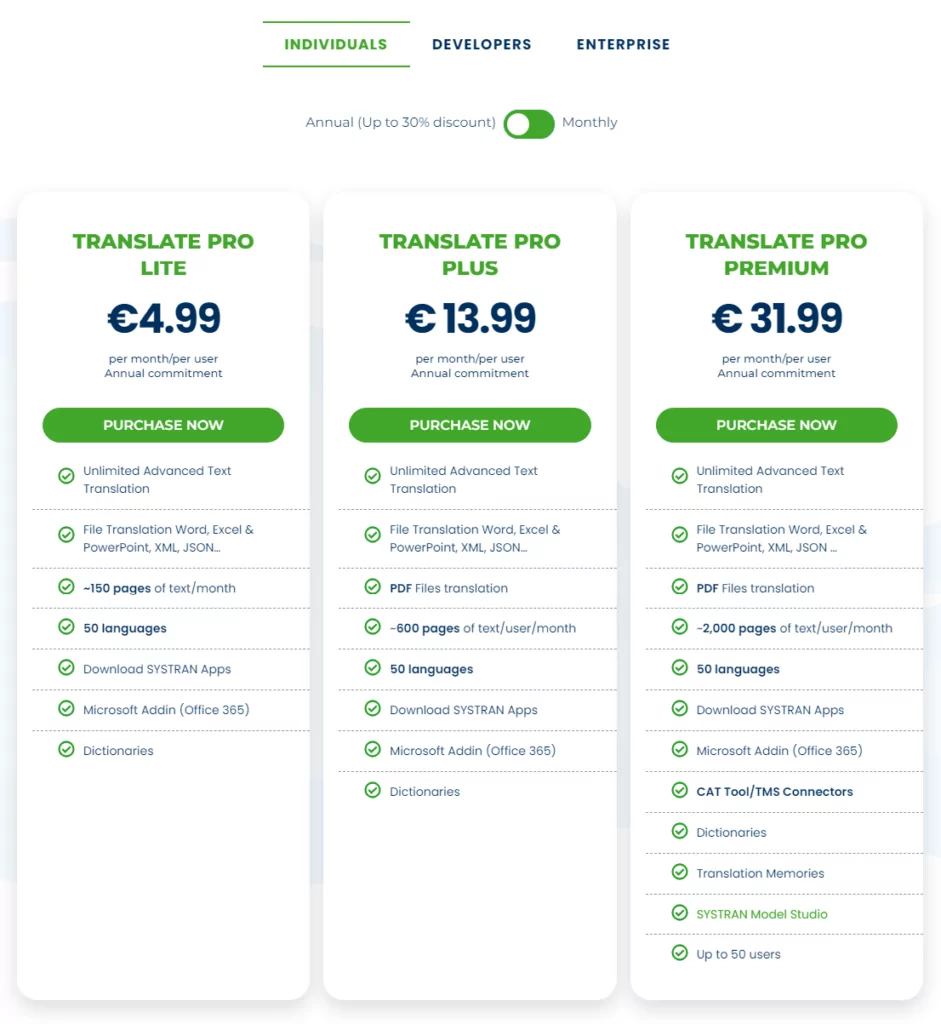
Individuelle Tarife für Freiberufler gibt es in drei verschiedenen Varianten, nämlich:
- Pro Lite – Kostet €4,99 pro Monat und Nutzer bei jährlicher Abrechnung. Der Tarif ist auf einen Nutzer beschränkt und umfasst 250.000 Credits pro Nutzer und Monat sowie ca. 150 Textseiten pro Monat und Nutzer;
- Pro Plus – Ab €13,99 pro Benutzer und Monat bei jährlicher Abrechnung. Der Tarif unterstützt 20 Benutzer und umfasst 1.000.000 Credits pro Benutzer und Monat, ca. 600 Textseiten pro Monat und Benutzer sowie PDF-Übersetzungen;
- Pro Premium – Der Tarif kostet €31,99 pro Monat und Nutzer bei einer jährlichen Vertragslaufzeit. Sie haben 50 Nutzer, 3.000.000 Credits pro Nutzer und Monat, ca. 2.000 Textseiten pro Monat und Nutzer, SYSTRAN Model Studio, Übersetzungsspeicher sowie CAT-Tools- und TMS-Anbindungen.
Für fortgeschrittene Benutzer und Entwickler stehen zur Verfügung:
- Pro-API – Ein Testplan, mit dem Sie die SYSTRAN Translate PRO API 14 Tage lang kostenlos testen können. Sie erhalten 500.000 Übersetzungsguthaben;
- Pro-API – Kosten: €8,99 pro Monat für 1.000.000 Zeichen und Zugriff auf den API-Schlüssel;
- Pro Infinite – €64,99 pro Monat, jährliche Abrechnung. Sie erhalten Translate Pro Premium, einen API-Schlüssel, ca. 4.500 Textseiten pro Benutzer und Monat sowie 7.000.000 Zeichen. Und natürlich alles andere, was SYSTRAN Translate Pro zu bieten hat.
Für große Unternehmenskunden mit hohem Übersetzungsbedarf und höchsten Sicherheitsstandards kontaktieren Sie SYSTRAN für ein maßgeschneidertes Angebot.
Einzelpersonen- und Entwicklertarife beinhalten eine 14-testphase ohne Angabe von Kreditkartendaten, um das Angebot auszuprobieren. Wählen Sie wie immer einen Tarif, der zu Ihrem Unternehmen passt.
Vor- und Nachteile von SYSTRAN Translate
SYSTRAN Translate ist ohne Zweifel eine beeindruckende Übersetzungsmaschine. Sie bietet brillante Funktionen, solide Sicherheit und qualitativ hochwertige Übersetzungen zu erschwinglichen Preisen. Aber ist sie die richtige für Sie?
Vorteile
- Benutzerfreundliche Oberfläche;
- Browser-Erweiterungen;
- Mehrere Integrationen;
- Hochwertige Übersetzungen dank der Pure Neural Manual Translation (PNMT)-Technologie von SYSTRAN;
- Umfangreiche Sprachunterstützung;
- Anpassbare maschinelle Übersetzungen dank Post-Editing, Übersetzungsmodellen und Translation Memories;
- Kostenlose Testversion.
Kons
- Kein kostenloser Tarif;
- Der Support könnte etwas besser sein;
- Schwierig in MS Office zu integrieren (gut, dass Sie Microsoft Übersetzer);
- Keine Desktop-Apps;
- Keine mobilen Apps;
- Unübersichtliche Dokumentenlayouts nach der Übersetzung (vor allem bei Bildern);
- Obwohl es einfach zu bedienen ist, gibt es eine leichte Lernkurve;
- Es könnte mehr Sprachen unterstützen.
Wie sich SYSTRAN Translate in der Übersetzungsbranche abhebt
Wie viele andere Übersetzungsdienste hat auch SYSTRAN Translate seine Vor- und Nachteile. Wie schneidet es jedoch im Vergleich zu beliebten Diensten wie DeepL und Google Translate ab?
SYSTRAN Translate vs DeepL
DeepL ist im Vergleich zu SYSTRAN eine relativ neuere Übersetzungs-Engine. Beide verfügen über intuitive Webschnittstellen, was bedeutet, dass sie sofort einfach zu bedienen sind.
SYSTRAN Translate unterstützt mehr Sprachen als DeepL. Wenn Sie viele Sprachpaare benötigen, kann DeepL SYSTRAN nicht das Wasser reichen.
Was die Genauigkeit betrifft, bieten beide Dienste brauchbare Übersetzungen, da beide die Technologie der neuronalen maschinellen Übersetzung verwenden.
DeepL bietet eine kostenlose Stufe, die sich perfekt für die gelegentliche Nutzung eignet. Sie können Ihre Inhalte kostenlos übersetzen, vorausgesetzt, Sie schöpfen die Limits nicht aus. Das Gleiche können wir von SYSTRAN Translate nicht sagen.
Denken Sie daran, dass es teurer werden kann als SYSTRAN, wenn Sie die Limits der kostenlosen Version von DeepL ausschöpfen.
Im Gegensatz zu SYSTRAN Translate wird DeepL mit Desktop- und Mobil-Apps für Android und iOS geliefert.
SYSTRAN Translate im Vergleich zu Google Translate
Google Translate ist einer der beliebtesten Online-Übersetzungsdienste und für viele Unternehmen die erste Wahl.
Im Gegensatz zu SYSTRAN Translate bietet Google Translate eine kostenlose Version, mit der Sie monatlich 500.000 Zeichen übersetzen können.
Sie benötigen einen kostenpflichtigen Tarif, um mit SYSTRAN Translate mehr als 5.000 Zeichen zu übersetzen.
Google Translate unterstützt über 130 Sprachen und stellt SYSTRAN Translate in dieser Hinsicht weit in den Schatten.
Im Vergleich (und unter Berücksichtigung des großzügigen kostenlosen Kontingents) ist Google Translate günstiger als SYSTRAN Translate.
SYSTRAN Translate liefert jedoch bessere Übersetzungen als Google Translate. Zudem unterstützt Google Translate keine anpassbaren und branchenspezifischen Übersetzungen.
Schließlich bietet Google Translate Apps für Android, iPhone und iPad an.
Ein Plädoyer für TranslatePress
Ich muss zustimmen, dass SYSTRAN Translate eine gewaltige Übersetzungsmaschine mit viel Potenzial ist.
Es hat jedoch einige Schwächen. Zum Beispiel werden Sie Schwierigkeiten haben, es in Ihre WordPress-Website zu integrieren, besonders wenn Sie nicht wissen, wie die REST-API funktioniert.
Hier ist TranslatePress kommt herein.
Falls Sie es zum ersten Mal nutzen: TranslatePress ist ein leistungsstarkes und dennoch benutzerfreundliches WordPress-Übersetzungs-Plugin, das jeder (unabhängig von seinen Vorkenntnissen) verwenden kann.
Das Plugin verfügt über eine voll funktionsfähige kostenlose Version, mit der Sie Ihre WordPress-Website im Frontend mithilfe eines visuellen Übersetzungseditors übersetzen können.
Es bietet volle Unterstützung für WooCommerce, visuelle Page Builder, komplexe Themes, Strings aus Plugins, SEO, mehrere Sprachen, URLs und vieles mehr.
TranslatePress Mehrsprachig
Allerdings unterstützt TranslatePress die SYSTRAN-Übersetzungs-Engine bislang noch nicht. Das Plugin liefert automatische Übersetzungen mithilfe von DeepL und Google Translate. Anschließend können Sie Ihre automatischen Übersetzungen manuell bearbeiten, um alles noch genau abzustimmen.
Letzte Worte
SYSTRAN Translate ist eine leistungsstarke Übersetzungs-Engine, die viel zu bieten hat. Sie erhalten ein robustes System, das auf über fünf Jahrzehnten Branchenerfahrung basiert.
Es ist einfach zu bedienen und bietet ausreichende Funktionen, um Übersetzungen für Freiberufler, kleine Unternehmen und große Konzerne abzuwickeln.
Es ist ein preisgekrönter Dienst mit einer nachgewiesenen Erfolgsbilanz bei qualitativ hochwertigen Übersetzungen. Darüber hinaus ist SYSTRAN im Vergleich zu einigen Mitbewerbern eine kostengünstige Lösung.
Jedoch hat es einige Nachteile. Zum Beispiel bietet es keinen kostenlosen Tarif an und ist vergleichsweise schwieriger mit WordPress zu verbinden.
Was sind Ihre Gedanken? Bitte lassen Sie es uns in den Kommentaren wissen. Wenn Sie diesen SYSTRAN-Test nützlich fanden, teilen Sie ihn bitte.