
Joinchat includes native support for TranslatePress, allowing you to configure Joinchat in your website’s main language and then translate its strings for each additional language using the TranslatePress Translation Editor.
How to translate Joinchat strings
First, make sure that TranslatePress and Joinchat are installed and configured on your website.
Then follow these steps:
1. Configure Joinchat in your main language
Go to Settings → Joinchat and configure the general Joinchat settings in your website’s default language.
You can then use TranslatePress to provide translations for the Joinchat strings in your additional languages.
2. Open the TranslatePress Translation Editor
There are two ways to access the Joinchat strings.
You can open the Translation Editor from the WordPress admin bar by clicking Translate Site, then go to String Translation → Regular.
Alternatively, Joinchat provides a Manage translations link directly in its settings, which takes you to the relevant TranslatePress Translation Editor interface.
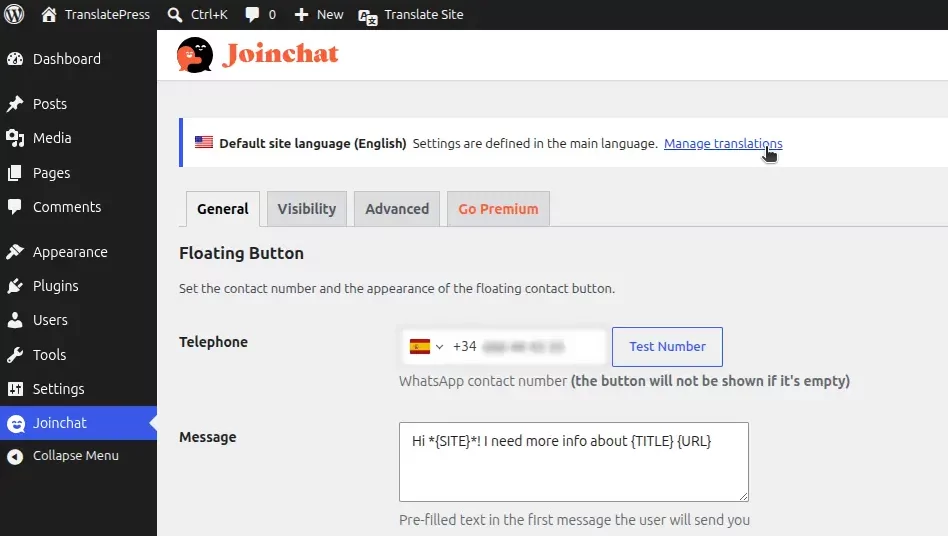
3. Find Joinchat strings
In the Translation Editor, use the search/filter field and enter jc.
This makes it easier to find the strings provided by Joinchat.
Joinchat strings use the JC/ prefix, so you may see entries such as:
JC/ Your Joinchat string
The JC/ prefix is used to identify Joinchat strings. You do not need to include it in your translation.
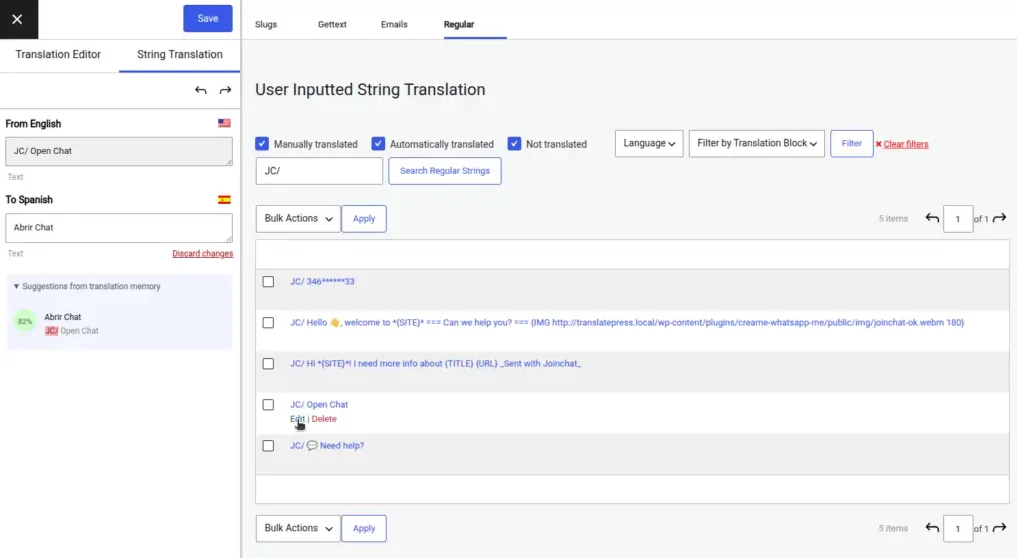
4. Translate and save the strings
For each Joinchat string:
- Click the Edit icon next to the string.
- Enter the translation for the selected language.
- Click Save.
Repeat these steps for each Joinchat string and language you want to translate.
Once saved, TranslatePress will display the corresponding Joinchat translation when visitors view your website in that language.
Joinchat strings are missing
If a Joinchat string does not appear in the Translation Editor, first reload a page where the Joinchat floating button is displayed.
Then open the TranslatePress Translation Editor again and search for jc.
This allows TranslatePress to detect the Joinchat strings that are loaded on that page.
More information
For more information about translating strings with TranslatePress, see our String Translation documentation.
You can also consult Joinchat’s documentation for its TranslatePress integration.