

En esta publicación
Si bien puede haber muchos sentimientos encontrados con respecto al uso de complementos de ventanas emergentes, siguen siendo una herramienta súper eficiente para aumentar sus suscriptores de correo electrónico.
Si estás dirigiendo una sitio web multilingüe Sin embargo, averiguar cómo traducir el contenido de las ventanas emergentes puede ser bastante difícil. Esto se debe a que encontrar una solución que funcione independientemente de la solución de ventanas emergentes que estés utilizando no es sencillo.
La mayoría Plugins de traducción de WordPress necesito agregar compatibilidad para cierto plugin de ventanas emergentes para poder hacer que su contenido sea traducible, mientras que otros simplemente no funcionarán. Dado que hay una gran cantidad de plugins de ventanas emergentes para elegir, es fácil perderse.
Gracias a su interfaz de traducción visual, TranslatePress te ayudará a traducir el contenido de las ventanas emergentes independientemente de la herramienta utilizada para crearlas. Lo mismo ocurre con formularios, Productos de WooCommerce, o Bloques de Gutenberg a fin de cuentas.
A continuación, vamos a ver los pasos exactos necesarios para traducir el contenido de cualquier ventana emergente a varios idiomas.
Pasos para traducir el contenido emergente
1. Instalar TranslatePress
Primero, nosotros instalar TranslatePress. Después de activar el complemento, notarás un nuevo Traducir sitio artículo añadido en la barra de administración.
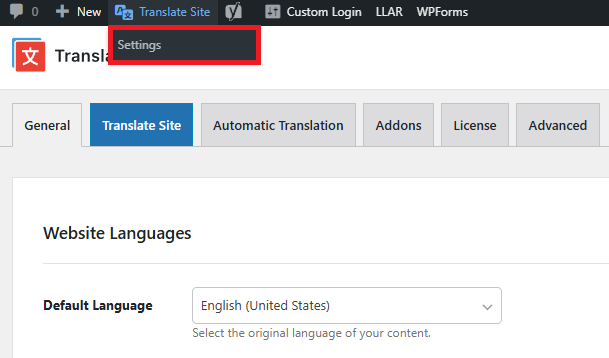
Solo pasa el ratón sobre él y haz clic Configuración o puedes hacer clic en Configuración elemento de menú y seleccionar TranslatePress). Esto te llevará a la página de configuración de TranslatePress.
Aquí podemos añadir los idiomas a los que queremos traducir el contenido de la ventana emergente.
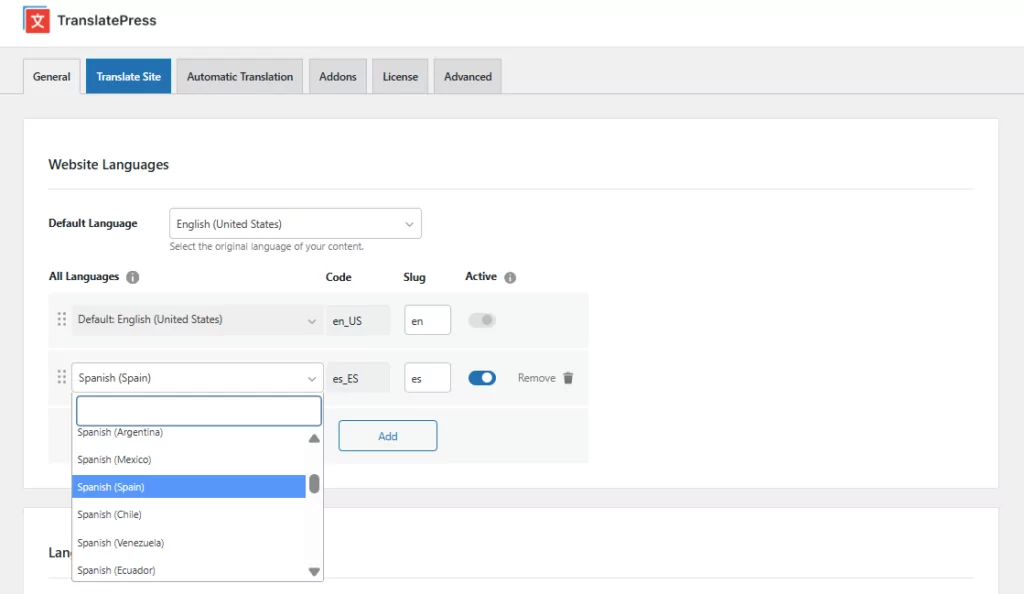
El inglés es nuestro idioma predeterminado, y también añadiremos el español. Hay algunos ajustes más (como la integración con Google Translate para la traducción automática), pero por ahora los omitiremos y haremos clic en Guardar cambios.
2. Crear la ventana flotante lightbox
En este tutorial, crearemos una ventana emergente tipo lightbox para recopilar correos electrónicos de usuarios.
La ventana emergente se configurará para que aparezca una vez que el usuario haya desplazado la pantalla una distancia considerable (~80%) a lo largo de tu artículo, lo que indica claramente que está interesado en tu contenido y que hay muchas posibilidades de que quiera suscribirse.
Para esto, utilizaremos Elementor, el creador de páginas más popular para WordPress, que también te permite crear e integrar ventanas emergentes en tu sitio web. El Creador de ventanas emergentes forma parte de Elementor Pro.
Después de instalar y activar el plugin, en el panel de control de WP, en Plantillas, selecciona Ventanas emergentes. Luego haz clic Añadir Nuevo para crear nuestra primera plantilla emergente. Puedes seleccionar entre una lista predefinida de plantillas y personalizarla según tus necesidades.

Una vez que estés satisfecho con la ventana emergente creada, puedes pulsar «Publicar» y configurar las condiciones, los desencadenantes y las reglas avanzadas de tu ventana emergente. Estos ajustes determinarán cuándo y cómo aparecerá la ventana emergente.
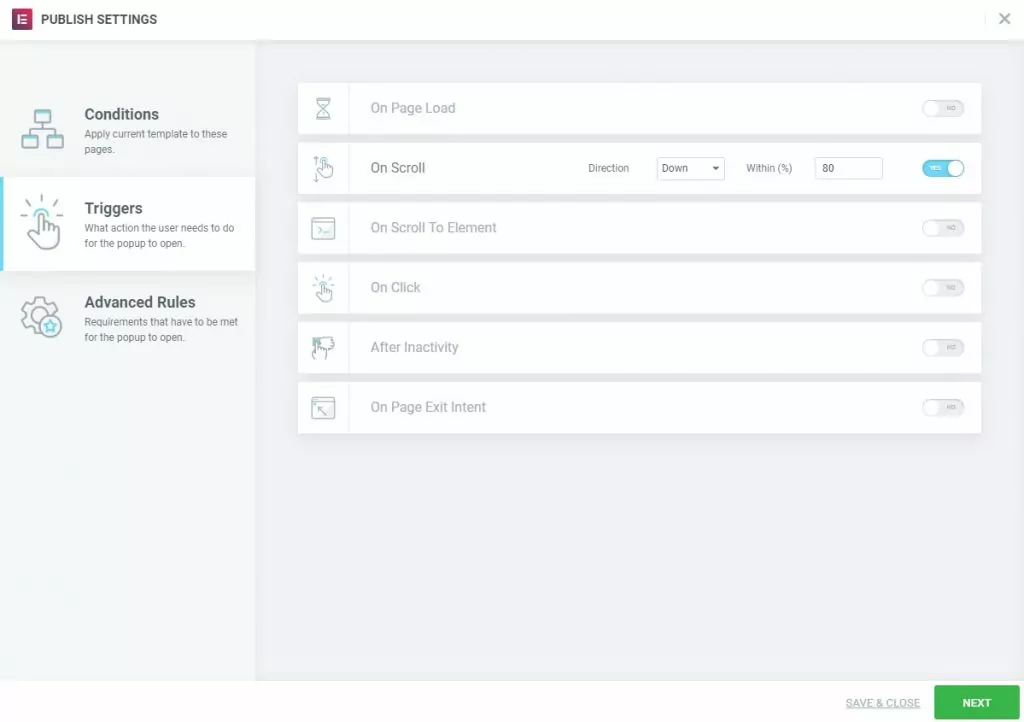
3. Traducir el contenido de la ventana emergente
Ahora que hemos creado la ventana emergente y hemos añadido los desencadenantes, solo nos queda traducirla.
Para ello, vamos a Plantillas → Ventanas emergentes, selecciona la plantilla de ventana emergente que acabas de crear y haz clic en Vista previa de los cambios.
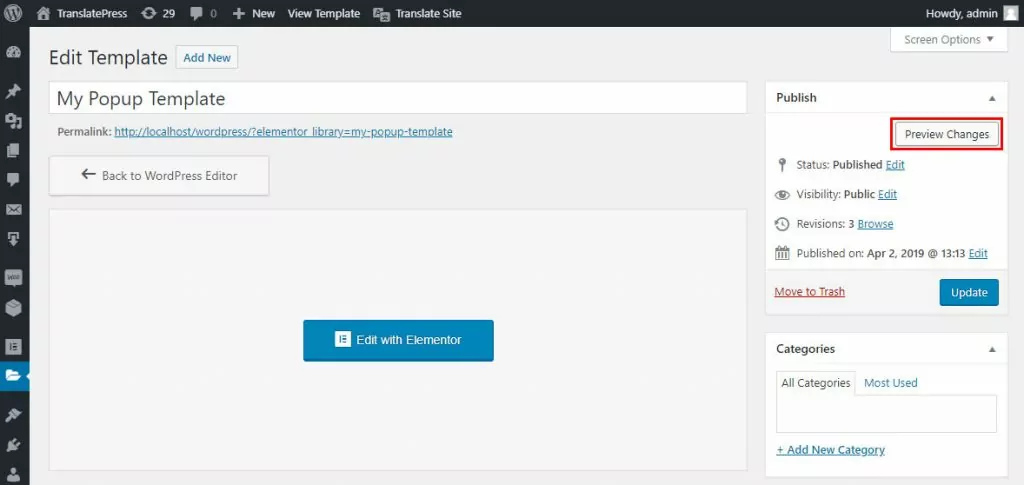
Esto abrirá una vista previa de nuestra ventana emergente. Ahora, desde la barra de administración, haz clic en Traducir página y aparecerá una interfaz de traducción que te permitirá traducir el contenido de la ventana emergente.
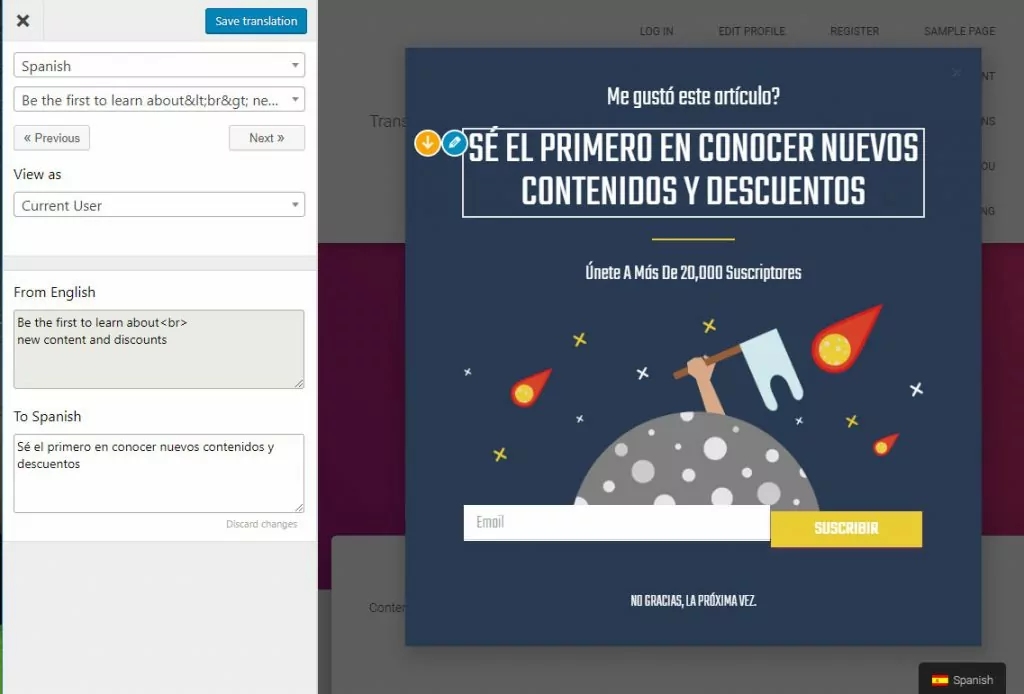
Solo tienes que seleccionar cada texto emergente e introducir su traducción al español; a continuación, haz clic en Guardar traducción.
Una vez que hayas terminado, cierra la ventana de traducción y comienza a navegar por la versión en español del sitio web. Cuando aparezca la ventana emergente, estará traducida.

Se puede utilizar el mismo proceso intuitivo para traducir cualquier otro tipo de ventana emergente.
Si toda tu página web está creada con Elementor, no te pierdas este tutorial detallado sobre cómo traducir sitios de Elementor (rápido y sencillo). Se encarga de traducir toda la amplia variedad de contenidos que Elementor te permite crear.
Comenzar a traducir el contenido de las ventanas emergentes
Con TranslatePress, traducir el contenido de las ventanas emergentes es realmente intuitivo. Solo tienes que previsualizar la ventana emergente en la interfaz de tu página web y, a continuación, utilizando el editor de traducción visual, hacer clic para seleccionar un texto concreto de la ventana emergente e introducir su traducción. De este modo, te resultará muy fácil mostrar el contenido de tus ventanas emergentes en varios idiomas.
TranslatePress Multilingüe
¿Todavía tienes alguna pregunta sobre la traducción del contenido de las ventanas emergentes? ¡Háznoslo saber en los comentarios!
Si encontraste útil esta publicación, por favor visita nuestro Canal de YouTube, donde subimos constantemente tutoriales en video cortos y fáciles de seguir. También puedes seguirnos en Facebook y Twitter ser el primero en enterarte cada vez que publicamos.
Relacionado: Cómo traducir los campos personalizados en WordPress