
In questo post
La migliore app di traduzione per Shopify non è necessariamente quella che traduce il negozio più velocemente. Ormai la maggior parte delle app più famose gestisce la traduzione automatica, quindi farei molta più attenzione a quello che succede dopo che viene generata quella prima traduzione.
Lo puoi modificare? I nuovi contenuti restano tradotti? Che ne è della tua SEO? Puoi gestire la terminologia? E, forse la cosa più importante, che succede al prezzo quando il tuo catalogo si ingrandisce o aggiungi altre tre lingue?
Quei dettagli non sono sempre ovvi quando guardi sei schede dello Shopify App Store che promettono tutte qualche variante di “traduci il tuo negozio con l'IA”.”
Quindi, in questa guida ho confrontato sei delle opzioni principali che considererei se stessi cercando la migliore app di traduzione per Shopify in questo momento:
- TranslatePress;
- Shopify Translate & Adapt;
- Transcy;
- Weglot;
- Tradurre;
- T Lab.
Darò un'occhiata a cosa sa fare particolarmente bene ciascuno, dove secondo me iniziano a contare i limiti e per che tipo di negozio Shopify te lo consiglierei davvero.
Se vuoi solo la versione breve, eccola qui:
Risposta Rapida: TranslatePress è la migliore app di traduzione per Shopify per i commercianti che vogliono aggiornamenti automatici, modifiche manuali illimitate, controllo della terminologia, SEO multilingue e prezzi trasparenti. Shopify Translate & Adapt è il punto di partenza gratuito più semplice per una o due lingue. Transcy unisce la traduzione alla localizzazione delle valute. Weglot è rifinito ma può diventare costoso man mano che i tuoi contenuti crescono. GTranslate si adatta ai negozi che danno la priorità alla traduzione automatica illimitata con un budget limitato. T Lab merita di essere preso in considerazione se hai bisogno di tradurre contenuti di immagini o di app di terze parti.
Vediamo il perché.
Cosa devi cercare in un'app di traduzione per Shopify?
Un'app di traduzione per Shopify è uno strumento che crea e gestisce i contenuti tradotti del tuo negozio Shopify, di solito unendo la traduzione automatica a strumenti per rivedere, modificare, pubblicare e mantenere quelle traduzioni. In altre parole, la migliore app di traduzione per Shopify è quella che si adatta a come funziona davvero il tuo negozio, non semplicemente quella con la lista di funzioni più lunga.
Sembra piuttostò semplice.
Il bello è che due app possono entrambe pretendere di “tradurre Shopify” offrendoti flussi di lavoro completamente diversi una volta che inizi a usarle.
Ora Shopify offre direttamente ai commercianti una solida base multilingue. I negozi con i piani Basic, Grow, Shopify e Advanced possono vendere fino a un massimo di 20 lingue, mentre i negozi Shopify Plus ed Enterprise Commerce possono supportarne fino a 30. Shopify può anche creare URL localizzati e gestire elementi tecnici come hreflang, URL canonici e sitemap multilingua.
L'app di traduzione si basa su questa struttura o, in alcuni casi, usa un'architettura di traduzione diversa, e stabilisce quanto sia facile creare e gestire i contenuti multilingue.
Ecco le cose che guarderei prima di installare qualsiasi cosa.
L'app traduce tutti i contenuti che usi davvero?
Le descrizioni dei prodotti sono solo l'inizio.
Un'app di traduzione per Shopify potrebbe anche dover gestire:
- Collezioni;
- Pagine;
- Articoli del blog;
- Navigazione;
- Stringhe del tema;
- Campi personalizzati;
- Metadata SEO;
- URL personalizzati;
- Testo alt dell'immagine;
- Notifiche;
- Contenuto generato da app di terze parti.
Quell'ultimo punto è davvero facile da perdere.
Shopify fa presente che i contenuti delle app di terze parti non si traducono in automatico, a meno che l'app non li renda disponibili tramite le risorse di traduzione supportate da Shopify o tramite i file di localizzazione.
Quindi, se il tuo negozio si affida molto a un'app di recensioni, a un page builder, a uno strumento per gli abbonamenti, a un'app per i bundle o a un altro sistema di terze parti, ti consiglio di testare quei contenuti prima di scegliere una soluzione di traduzione.
Una traduzione perfetta del prodotto non serve a molto se metà dei widget della tua pagina prodotto sono ancora in inglese.
Si possono combinare traduzione automatica e manuale?
Non sceglierei tra traduzione IA e traduzione umana, perché per la maggior parte dei negozi e-commerce ti servono entrambe.
La traduzione automatica è ottima per sbrigare un catalogo in fretta. La revisione manuale ti dà il controllo sulle parole che poi influenzano come i clienti vedono il negozio.
Per esempio, probabilmente lascerei che la traduzione automatica facci un primo tentativo con centinaia di specifiche di prodotto semplici.
Sarei molto più propenso a controllare a mano:
- Homepage;
- I prodotti più venduti;
- Inviti all'azione importanti;
- Terminologia del brand;
- Info su spedizioni e resi;
- Landing page di alto valore.
E controllerei se le traduzioni manuali possono essere protette da futuri aggiornamenti automatici.
Non c'è niente di particolarmente divertente nel perfezionare un titolo e poi scoprire che il flusso di lavoro per la traduzione l'ha sostituito dopo.
Che succede quando il tuo negozio cambia?
Questa è probabilmente una delle domande più importanti per un negozio Shopify attivo.
I prodotti cambiano. I prezzi cambiano. Le collezioni cambiano. Le promozioni vanno e vengono. Nuovi post del blog spuntano fuori. Qualcuno nota un errore di battitura nella descrizione di un prodotto alle 4:47 di venerdì pomeriggio.
Il tuo negozio tradotto deve darsi una mossa.
Alcune app riconoscono da sole i cambiamenti nei testi originali e aggiornano le traduzioni. Altre invece ti chiedono di far partire un'altra traduzione.
Per un negozio con 30 prodotti, entrambi i flussi di lavoro potrebbero andare bene.
Per uno che ha 3.000 prodotti e aggiorna il catalogo ogni settimana, quella differenza inizia a contare parecchio.
Come gestisce l'app la SEO multilingue?
La SEO multilingue è il processo per fare in modo che le diverse versioni linguistiche del tuo negozio siano comprensibili e facili da trovare per i motori di ricerca.
Come minimo, darei un'occhiata a:
- URL specifici per lingua;
- Titoli SEO tradotti;
- Meta description tradotte;
- URL tradotti;
hreflang;- Mappe del sito;
- Indicizzabilità delle pagine tradotte.
C'è una sfumatura importante legata a Shopify qui.
Shopify gestisce già gran parte del livello tecnico della SEO internazionale. Quando le lingue sono pubblicate correttamente, Shopify crea URL specifici per lingua, aggiunge automaticamente hreflang, e include le versioni tradotte nelle sue sitemap.
Quindi, quando un'app pubblicizza la “SEO multilingue”, guarda oltre le apparenze.
Chiederei se ti permette davvero di creare e gestire i contenuti SEO tradotti che servono a Shopify, se la traduzione degli URL è inclusa nel tuo piano e se le sue pagine tradotte sono indicizzabili a tutti gli effetti.
Come si inserisce il selettore di lingua nel negozio?
I tuoi clienti hanno bisogno di un modo per raggiungere tutte quelle traduzioni.
Un Shopify selettore di lingua dovrebbe essere visibile, funzionare bene da mobile e integrarsi alla perfezione nel tuo tema, senza sembrare un widget a caso aggiunto cinque minuti prima del lancio.
Darei un'occhiata per vedere se l'app ti dà il controllo su:
- Tirocinio;
- Nomi delle lingue;
- Bandiere;
- Stile di visualizzazione;
- Colori;
- Rilevamento o reindirizzamento automatico.
In genere preferisco mostrare i nomi delle lingue invece di affidarmi solo alle bandiere. Una bandiera rappresenta uno stato, mentre le lingue raramente rispettano i confini in modo così netto.
Quanto controllo hai sulla terminologia?
Diventa una cosa incredibilmente importante appena hai un catalogo più grande.
Forse il nome di un prodotto non andrebbe mai tradotto.
Forse “subscription” ha bisogno di una traduzione tedesca specifica ovunque.
Magari il tuo motore di traduzione continua a usare tre parole diverse per la stessa funzione.
È qui che la funzione glossario torna utile.
Un glossario di traduzione ti permette di stabilire delle regole per parole e frasi importanti, in modo che la traduzione automatica non debba decidere la terminologia da zero ogni volta.
Non definirei un glossario essenziale per ogni negozietto su Shopify.
Ma per un brand con terminologia di prodotto ricorrente, linguaggio tecnico o diversi mercati di riferimento, ne vorrei assolutamente uno.
Quanto costerà davvero l'app man mano che cresci?
Questa è la parte in cui mi leggerei la tabella dei prezzi con molta attenzione.
Non confrontare solo il primo piano a pagamento.
Guarda cosa succede quando:
- Aggiungi un'altra lingua;
- Traduci più prodotti;
- Aggiungi un blog grande;
- Mi serve la funzionalità SEO;
- Vuoi modificare le traduzioni a mano?;
- Mi serve la sincronizzazione automatica;
- Ho superato il limite di parole dell'IA o della traduzione.
Alcune app fanno pagare soprattutto in base alla lingua. Altre per parole tradotte. Altre ancora mettono limiti al catalogo o alle funzioni. Qualcuna ne unisce un po'.
Nessuno di quei modelli fa automaticamente schifo.
Voglio solo riuscire a prevedere la bolletta prima che il mio negozio diventi dipendente dall'app.
Confronto rapido delle migliori app di traduzione per Shopify
Ho controllato i prezzi qui sotto rispetto agli elenchi attuali dell'App Store di Shopify a settembre 2026. Ovviamente i prezzi possono cambiare dopo la pubblicazione.
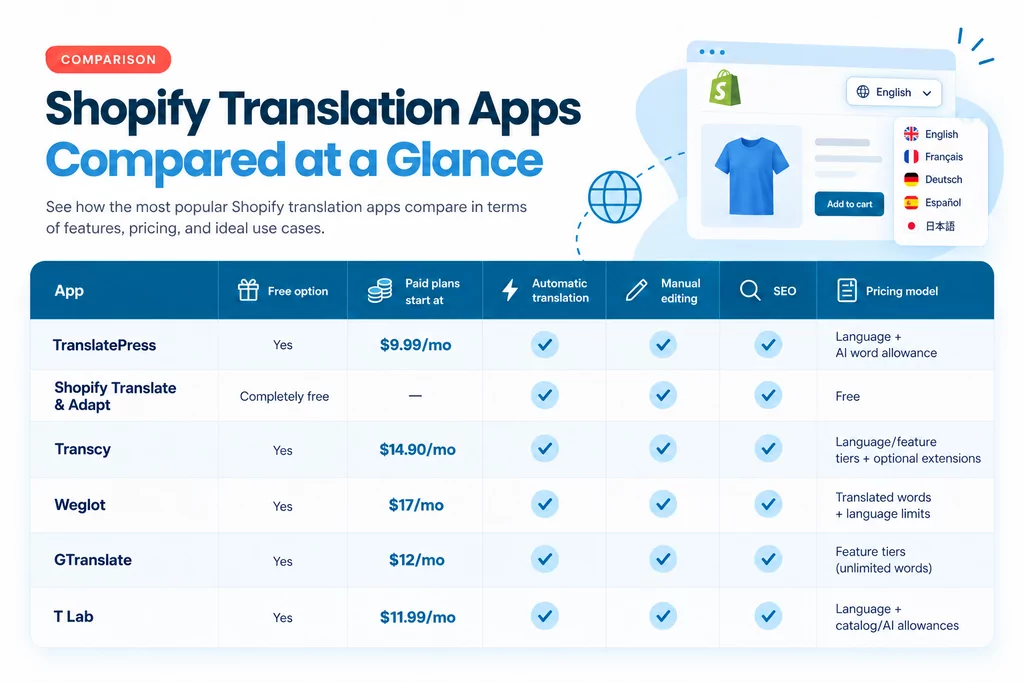
Non c'è un'app di traduzione per Shopify che sia la migliore in assoluto per tutti i commercianti.
E penso proprio che sia importante dirlo prima di andare avanti.
Se hai un catalogo piccolo, un solo mercato internazionale e nessun piano di espansione a breve, pagare per una piattaforma di traduzione piena di funzioni potrebbe non servire a nulla.
Se hai cinque lingue, migliaia di prodotti, una content strategy attiva e un team che aggiorna continuamente il negozio, la soluzione nativa gratuita potrebbe creare più lavoro manuale di quanto ne risparmi.
Allora, vediamo ogni opzione un po’ più nel dettaglio.
1. TranslatePress: Il migliore in assoluto per controllo, aggiornamenti automatici e scalabilità prevedibile
Comincio con TranslatePress, in parte perché stai leggendo questo sul blog di TranslatePress, ma anche perché non voglio fare finta che non abbiamo un interesse in gioco.
Ecco quindi il criterio che sto usando: in quali casi TranslatePress ha davvero più senso rispetto alle alternative, e in quali casi un'altra app potrebbe essere comunque la scelta migliore?
La versione Shopify di TranslatePress è strutturata attorno a un flusso di lavoro che secondo me ha molto senso per l'ecommerce: traduci in automatico il lavoro ad alto volume, poi prendi il controllo manualmente ovunque le parole contino davvero.
TranslatePress usa una combinazione dei migliori LLM e di motori di traduzione neurale automatica per tradurre prodotti, collezioni, pagine, articoli di blog, contenuti dei temi, notifiche e testi alternativi delle immagini. Questa app sceglie quale motore di traduzione usare a seconda di ogni combinazione linguistica, garantendo la massima precisione per ogni contesto.
Poi, le traduzioni vengono salvate nativamente su Shopify e pubblicate tramite gli URL localizzati di Shopify.
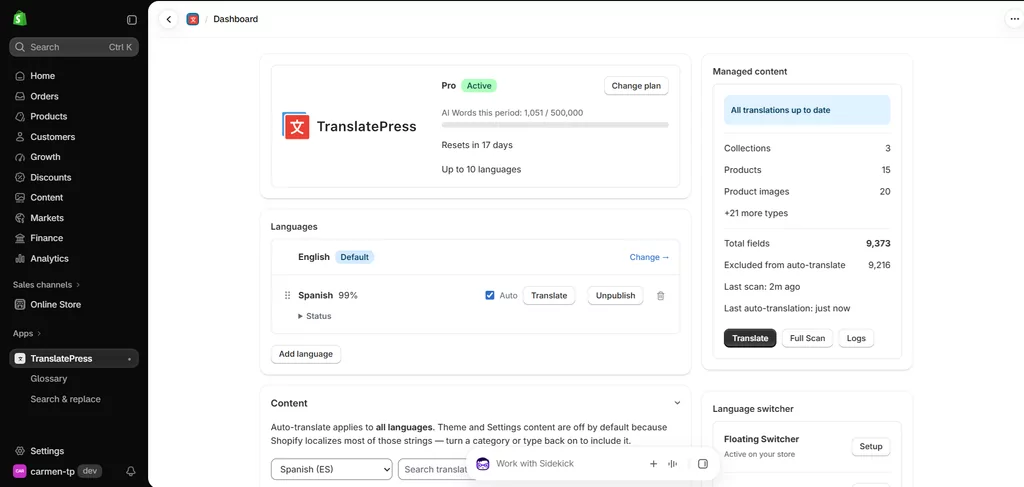
Inoltre, mantiene sincronizzate le traduzioni automatiche quando il contenuto di origine idoneo cambia.
Quella specie di ultima parte sarebbe bella alta nella mia lista.
Non voglio che “ricordati di aggiornare la traduzione in spagnolo” diventi l'ennesimo compito ogni volta che qualcuno modifica la descrizione di un prodotto.
TranslatePress per Shopify
Quello che mi piace di TranslatePress
La cosa migliore è il bilanciamento tra automazione e controllo.
Ogni piano include un numero stabilito di lingue e parole IA da usare per la traduzione automatica. Però, ci sono anche traduzioni manuali illimitate. Questo significa due cose per il tuo flusso di lavoro.
Prima puoi correggere una traduzione automatica e poi disattivarla per una singola stringa, bloccando di fatto la formulazione che preferisci mentre il resto del negozio resta automatizzato. Sulla carta è una piccola funzione, ma risolve un problema molto pratico.
Secondo, le traduzioni manuali illimitate significano anche che puoi crearne quante ne vuoi da zero, nel caso in cui finisci le parole IA ma vuoi continuare.
Anche la versione gratis include SEO multilingue (traduzione di URL, tag hreflang, metadati), così puoi posizionarti anche in queste nuove lingue che aggiungi, e un sacco personalizzabile selettore di lingua con un sacco di opzioni.
I piani a pagamento includono anche un Glossario, dove puoi dire a TranslatePress di conservare un nome di un marchio o di tradurre sempre un termine particolare in un modo specifico.
E se c'è già una traduzione indesiderata in tutto il tuo negozio, Trova e sostituisci ti permette di trovarlo e correggerlo in blocco.
Mi piace pure il sistema dei prezzi perché si capisce abbastanza in fretta cosa cambia tra un piano e l'altro:
- Gratis 1 lingua tradotta automaticamente e 5.000 parole IA/mese;
- Starter: $9,99/mese: 2 lingue per auto e 50.000 parole IA/mese;
- Business: $25.99/mese: 5 lingue auto e 200.000 parole IA al mese;
- Pro: $49.99 al mese: 10 lingue auto e 500.000 parole AI al mese.
Non ci sono costi nascosti o crediti a consumo, solo una fatturazione fissa mensile o annuale.
Starter, Business e Pro includono il Glossario e Trova e Sostituisci, mentre ogni piano offre traduzioni manuali illimitate, un selettore di lingua personalizzabile, SEO multilingue, e sincronizzazione automatica delle traduzioni.
Dove TranslatePress potrebbe non essere la scelta ideale
Il piano gratuito traduce automaticamente una lingua.
Se tutto ciò che ti importa è aggiungere quante più lingue possibile gratis, potresti trovare che altre alternative in questa lista fanno più al caso tuo.
E se la conversione di valuta è il nocciolo del problema che stai cercando di risolvere, TranslatePress al momento non la supporta.
A chi lo consiglio TranslatePress
Io metterei TranslatePress quasi in cima alla lista per i commercianti che:
- Aggiorna regolarmente prodotti o contenuti;
- Vuoi la traduzione automatica senza rinunciare al controllo manuale;
- Ci serviranno diverse lingue man mano che il negozio cresce;
- Occhio alla coerenza dei termini;
- Vuoi traduzioni e URL nativi per Shopify;
- Vuoi la SEO multilingua inclusa senza passare a un piano SEO speciale (è inclusa nel piano gratuito);
- Preferisco prezzi chiari fin da subito che non aumentano all'improvviso man mano che il negozio cresce.
Mi attira un sacco per i negozi che sono andati oltre il “traduci una volta sola” e ora devono gestire un catalogo multilingue.
È lì che il flusso di lavoro comincia a contare tanto quanto il motore di traduzione stesso.
2. Shopify Translate & Adapt: la migliore opzione gratuita per i negozi più semplici
Prima di pagare per qualsiasi cosa, penso che ogni commerciante su Shopify dovrebbe almeno capire cosa Shopify offre già gratis.
Translate & Adapt è l'app di traduzione ufficiale di Shopify, ed è un ottimo punto di partenza.
Ti permette di tradurre automaticamente fino a due lingue, di aggiungere manualmente tutte le traduzioni che ti servono, di modificarle tramite un'interfaccia affiancata e di adattare i contenuti per mercati diversi che usano la stessa lingua.
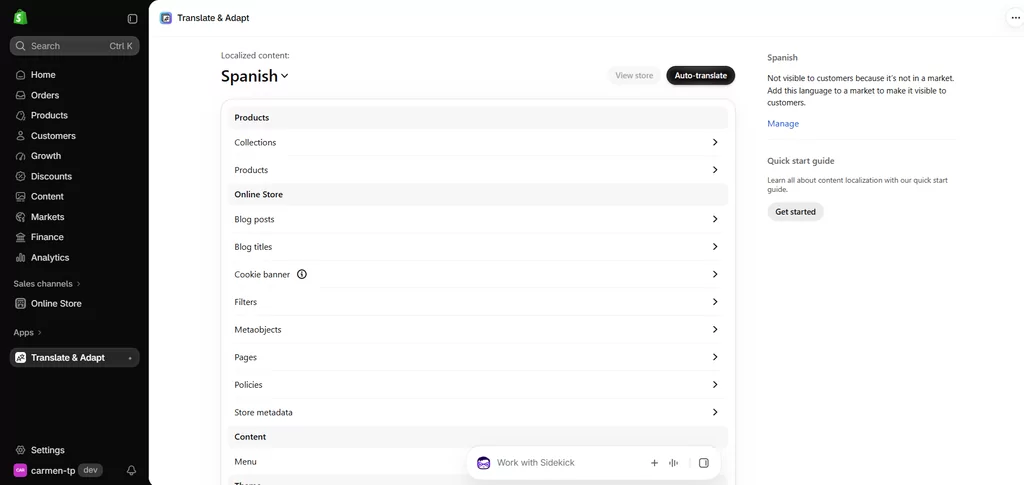
Quello che mi piace di Translate & Adapt
Il vantaggio più grande è la semplicità.
Vive direttamente dentro Shopify, usa il sistema di traduzione di Shopify e funziona in modo naturale con Markets.
Le traduzioni create con Translate & Adapt restano su Shopify anche se disinstalli l'app. Shopify dice chiaramente che disinstallare Translate & Adapt non cancella le traduzioni fatte.
Hai anche l'infrastruttura SEO multilingue di Shopify, inclusi gli URL localizzati, hreflang, le sitemap e la possibilità di tradurre gli URL supportati e i campi SEO personalizzati.
Dove Translate & Adapt Inizia a Sembrare Limitato
Il limite evidente è il blocco a due lingue per la traduzione automatica. Puoi aggiungere altre lingue manualmente, ma la traduzione automatica si ferma a due.
C'è un'altra limitazione a cui farei ancora più attenzione se il tuo negozio cambia spesso.
I nuovi contenuti non vengono tradotti continuamente in background.
Shopify dice che quando aggiungi nuovi contenuti o modifichi quelli originali, devi tornare su Translate & Adapt e rifare la traduzione automatica per ogni lingua.
Per un catalogo stabile, la cosa potrebbe quasi passare inosservata. Ma per un negozio che pubblica prodotti ogni settimana, ci sta che diventi una di quelle cose che tutti danno per scontato che qualcun altro si sia ricordato di fare.
Anche alcuni contenuti non sono supportati e i contenuti di terze parti devono usare risorse o file di lingua supportati da Shopify.
Recente Recensioni dell'App Store dimostra che il limite delle due lingue e la coerenza delle traduzioni sono lamentele ricorrenti dei commercianti, insieme all'accuratezza delle traduzioni, anche se l'app mantiene comunque una valutazione complessivamente positiva.
Quindi non definirei affatto Translate & Adapt una cattiva app. La definirei una buona base di partenza gratuita che alcuni negozi col tempo finiscono per superare.
A chi consiglio di tradurre e adattare
Lo userei se:
- Ti basta una o due lingue tradotte in automatico;
- Il vostro catalogo non cambia molto spesso;
- Non vuoi spendere niente;
- Preferisci rimanere completamente all'interno degli strumenti nativi di Shopify;
- Ti va bene fare un po' più di manutenzione manuale.
Per un negozietto, potrebbe davvero essere tutto ciò di cui hai bisogno.
3. Transcy: La migliore per unire traduzione, valuta e geolocalizzazione
Transcy adotta un approccio un po' più ampio rispetto a una semplice app di traduzione..
Oltre alla traduzione delle lingue, punta molto sulle funzioni di vendita internazionale come valute, geolocalizzazione, cambio lingua/valuta, immagini tradotte e traduzione di app di terze parti.
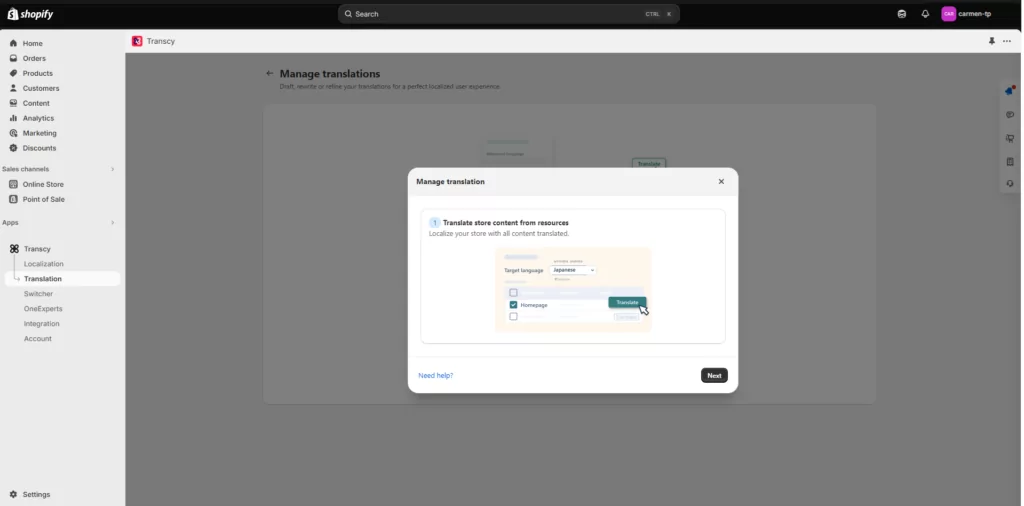
I suoi punti di forza principali sono la geolocalizzazione, l'adattamento delle immagini e il cambio valuta in tempo reale per oltre 169 valute.
Questa combinazione rende Transcy particolarmente interessante se il tuo progetto multilingue e la tua strategia multivaluta sono praticamente la stessa cosa.
Cosa mi piace di Transcy
Anche se il piano gratuito ti limita a una sola lingua tradotta automaticamente e una sola valuta, non ha limiti di parole o di visualizzazioni. Quindi puoi restare sul piano gratuito per sempre finché ti serve una sola lingua, non importa quanti contenuti o prodotti aggiungi nel tempo.
È un punto di ingresso piuttosto interessante.
Il pagato Local Plus il piano inizia alle $14.90 al mese e aggiunge la modifica manuale della traduzione per una lingua, motori di traduzione IA, SEO multilingue, personalizzazione dello switcher e altre funzionalità.
Costi regionali $29/mese e espande tutto questo a tre lingue, due lingue modificabili, tre valute, un glossario di 20 termini, processi di traduzione automatica e un po' di localizzazione di immagini. Continental è $69 al mese con più giga e funzioni extra.
Dove guarderei con attenzione prima di scegliere Transcy
Transcy è potente, ma i prezzi sono meno “una cifra e via” di quanto sembri all'inizio.
Il piano stesso può mettere limiti a prodotti, regole di traduzione automatica, voci del glossario, localizzazione delle immagini e risorse simili.
Transcy vende pure estensioni mensili opzionali per cose come prodotti tradotti, regole di traduzione automatica, immagini, regole delglossario e sincronizzazione programmata. Questo non rende i prezzi ingiusti.
Significa che prima di scegliere un piano farei una stima di ciò di cui ha bisogno il mio negozio vero e proprio, invece di guardare solo al prezzo mensile in evidenza.
Il piano gratuito non include nemmeno la modifica manuale delle traduzioni; quella parte lì inizia con Local Plus ed è piuttosto limitata anche sui piani a pagamento.
A chi consiglio Transcy
Secondo me Transcy ha più senso se vuoi:
- Traduzione + Conversione valuta + Geolocalizzazione + Cambio lingua/valuta + Traduzione di app di terze parti
…il tutto gestito tramite un'unica app di internazionalizzazione.
Se per il tuo negozio la valuta e la traduzione sono due aspetti separati, prima di decidere darei un'occhiata più da vicino al flusso di lavoro per le traduzioni confrontandolo con TranslatePress o T Lab.
4. Weglot: Il migliore per un flusso di lavoro di traduzione curato quando il budget non è un problema
Weglot è probabilmente uno dei nomi più noti nella traduzione di siti web, visto che è un prodotto multi-piattaforma.
Ha la traduzione automatica, la modifica manuale, la funzione glossario, la collaborazione in team, la possibilità di ordinare traduzioni professionali, i prompt IA per la voce del brand e un set di funzionalità SEO multilingue.
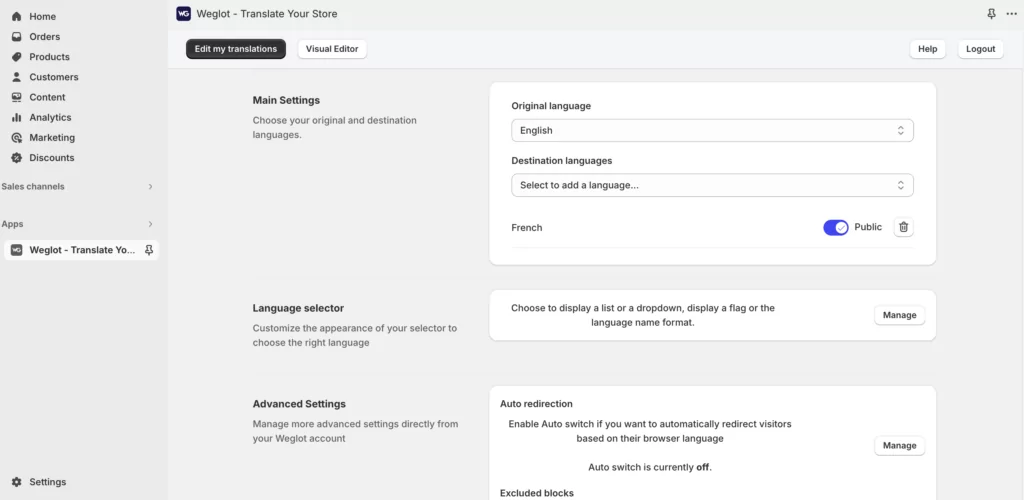
Proprio come TranslatePress, copre hreflang, metadati tradotti, URL puliti, traduzione automatica, revisione manuale, regole del glossario e indicizzazione SEO. I punti di forza principali rispetto alla concorrenza sono le funzioni di collaborazione e quelle basate sui prompt dell'IA.
Non avrei nessun problema a consigliare Weglot solo per le sue funzionalità.
La parte su cui rifletterei bene è il modello di prezzo.
Quel che mi piace di Weglot
Il flusso di traduzione è rodato.
Puoi generare traduzioni automatiche, correggerle a mano, collaborare con altre persone, stabilire regole per il glossario e persino ordinare traduzioni professionali se ti serve. Il tutto abbastanza intuitivo e facile da configurare.
Questo è un flusso di lavoro che anche le recensioni recenti di Shopify lodano continuamente.
Perché Weglot può diventare costoso
I prezzi dei piani di Weglot si basano in parte su numero totale di parole tradotte.
Il piano gratuito include una lingua e 2.000 parole tradotte.
I prezzi a pagamento partono da:
- Iniziale: $17/mese: 1 lingua, 10.000 parole tradotte;
- Business: $32 al mese: 3 lingue, 50.000 parole;
- Pro: $87/mese: 5 lingue, 200.000 parole.
- Avanzato $299 al mese: 10 lingue, 1.000.000 di parole.
- Esteso: $699/mese: 20 lingue, 5.000.000 di parole.
Weglot calcola il limite in base al tuo contenuto di origine moltiplicato per le lingue tradotte. La sua stessa documentazione fa l'esempio di un sito web di 8.000 parole tradotto in tre lingue che conta come circa 24.000 parole tradotte. Anche i metadati SEO contano per quel totale.
Questo è simile a come funzionano anche le parole IA di TranslatePress. Tuttavia, il prezzo aumenta piuttosto bruscamente man mano che i piani avanzano.
Quindi un catalogo che cresce e diverse lingue possono farti salire di fascia di prezzo molto in fretta, prosciugando il budget in men che non si dica.
Weglot offre una funzione facoltativa di aggiornamento automatico quando superi il limite di parole. Cosa importante, si può attivare o disattivare, quindi non definirei un upgrade come inevitabile. Se l'aggiornamento automatico è disattivato, le nuove parole rilevate smettono di essere tradotte una volta raggiunto il limite del piano.
Questa è probabilmente l'app per cui ti consiglierei di più in assoluto di stimare il tuo volume di contenuti reale prima di iscriverti.
A chi consiglierei Weglot
Prenderei in considerazione Weglot se:
- Vuoi funzionalità collaborative;
- Ti serve una traduzione umana professionale nel tuo flusso di lavoro.;
- Vuoi la personalizzazione del tono di voce;
- Il budget non è un problema.
Per un'operazione multilingue ad alto valore, il costo potrebbe valere la pena. Per un negozio pieno di contenuti, con un grosso blog e diverse lingue, prima farei due conti.
5. GTranslate: il migliore per la traduzione automatica illimitata a poco prezzo
GTranslate ha una proposta di valore ben diversa.
Il suo piano gratuito ti dà la traduzione automatica in tutte le lingue, con parole e visualizzazioni di pagina illimitate. Sembra quasi assurdamente generoso rispetto alla concorrenza.
Però c'è il trucco. La versione gratuita va bene per le funzioni di base, ma non per una strategia e-commerce multilingue gestita per bene.
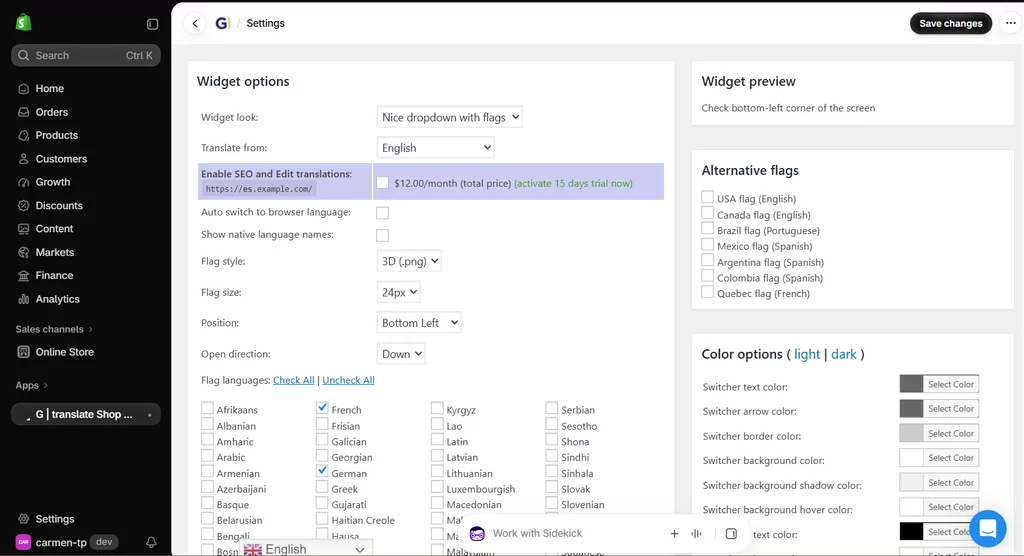
Quello che mi piace di GTranslate
Se il tuo obiettivo principale è semplicemente dare ai visitatori un modo per capire il tuo sito in un'altra lingua, il piano gratuito copre un mucchio di roba.
Non c'è limite di parole tradotte da guardare.
Anche i piani a pagamento sono piuttosto semplici:
- Startup bilingue: $12/mese: una lingua in più, revisione delle traduzioni, indicizzazione sui motori di ricerca;
- Avvio: $25/mese: tutte le lingue, editing, indicizzazione SEO;
- Business: $35 al mese: aggiunge la traduzione degli URL.
- Enterprise $50 al mese: aggiunge l'hosting della lingua.
La sua tecnologia proxy può anche tradurre gran parte dei contenuti generati da app di terze parti, il che può essere utile per i negozi con stack di app complessi.
Dove l'app lascia a desiderare
Con la versione gratuita non hai la modifica manuale delle traduzioni né le pagine tradotte indicizzate. E sono due limitazioni belle e grosse.
Se qualcuno traduce una pagina solo per capirla, può anche andare bene, ma se sto investendo nel traffico organico in francese e voglio che ogni messaggio importante sui prodotti usi le parole che ho scelto io, non basta.
Ecco perché considererei il piano gratuito di GTranslate come uno strato multilingue super veloce piuttosto che come la configurazione definitiva che sceglierei per un mercato internazionale strategico.
Oltre a questo, la dashboard principale e l'interfaccia in generale sono piuttosto pesanti e sono decisamente le meno intuitive del gruppo.
A chi consiglio GTranslate
GTranslate ha senso quando:
- Vuoi un sacco di lingue in fretta;
- La traduzione automatica illimitata è importante, ma la correzione manuale no;
- Il tuo budget è limitato;
- Ti va di passare a un piano a pagamento per il editing e la SEO.
Se la ricerca organica è importante, salterei la prova del piano gratuito e confronterei direttamente i piani a pagamento.
6. T Lab: La migliore alternativa economica con un piano gratuito super generoso
T Lab è un'altra app piuttosto consolidata sull'App Store di Shopify, con un piano gratuito generoso e una proposta di valore interessante.
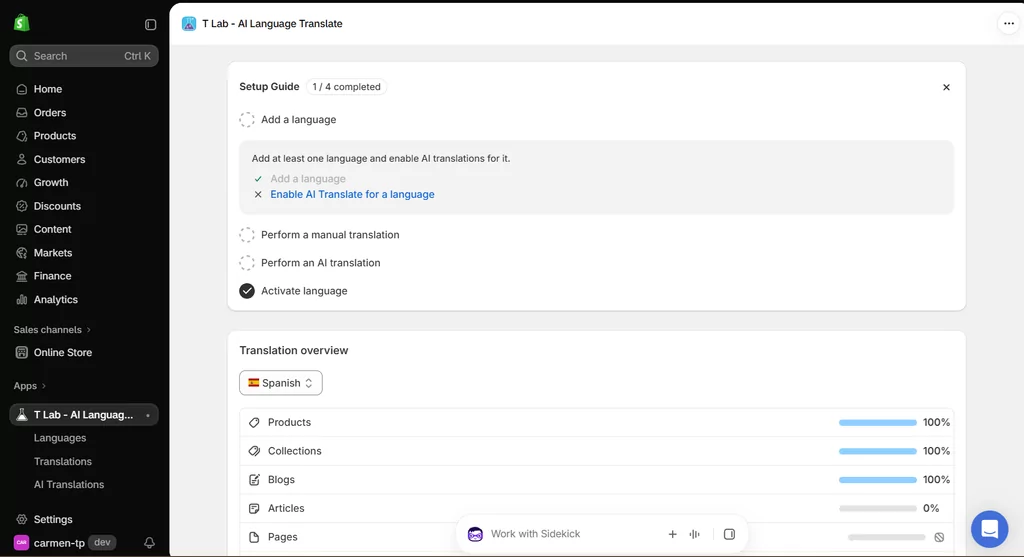
Puoi aggiungere fino a 20 lingue, traduci automaticamente uno di essi, traduci manualmente senza limiti, esegui traduzioni IA in blocco, traduci immagini e contenuti di app di terze parti e usa un glossario. Il credito IA gratuito incluso copre fino a 500 prodotti, 20 collezioni e 20 articoli.
È una versione gratuita niente male.
Cosa mi piace di T Lab
Anche il percorso di aggiornamento è abbastanza chiaro.
I piani attuali sono:
- Pro: $11.99/mese: Traduzione IA per un massimo di 5 lingue e limiti di contenuti più ampi;
- Business: $29.99/mese: Traduzione IA in 10 lingue, valute multiple, glossario illimitato, immagini, app di terze parti e traduzioni personalizzate;
- Premium: $59,99 al mese: Traduzione IA in 20 lingue, Autopilota IA e la possibilità di gestire i motori di traduzione DeepL, Google e ChatGPT.
L'app include tra le funzioni supportate anche la sincronizzazione automatica, la traduzione SEO, gli URL tradotti, la gestione del glossario, il rilevamento della lingua, la traduzione delle immagini e la traduzione di app di terze parti.
Anche la sua valutazione attuale sull'App Store è particolarmente alta, intorno alle 4,9 stelle.
In cosa è diverso l'approccio di T Lab
T Lab è un ottimo prodotto, e non cercherebbe di inventarmi un difetto drammatico solo per riempire questa sezione.
La cosa principale che guarderei con attenzione è come sono strutturati i suoi limiti. Invece di un limite mensile di parole IA, T Lab basa i suoi limiti sul numero di prodotti, collezioni, articoli e lingue gestite dall'IA. A seconda delle dimensioni del tuo catalogo e di come è organizzato, quel modello potrebbe fare al caso tuo, oppure potrebbe richiedere un po' di calcoli iniziali per assicurarti che il piano giusto copra tutto ciò di cui hai effettivamente bisogno.
Darei anche un'occhiata per vedere se il piano che stai valutando permette di bloccare le singole stringhe modificate a mano per evitare che vengano ritradotte automaticamente in futuro, perché è un dettaglio del flusso di lavoro che vale la pena confermare prima di decidere.
A chi consiglierei T Lab
T Lab è un ottimo candidato se:
- Vuoi un piano gratuito davvero valido;
- Il tuo catalogo rientra tranquillamente nei limiti di contenuto consentiti;
- Ti serve la traduzione di immagini o di app di terze parti;
- Il multi-valuta ti è utile anche a te.
Quale app di traduzione per Shopify dovresti scegliere?
Trovare la migliore app di traduzione per Shopify diventa molto più semplice quando smetti di confrontare ogni singola funzione allo stesso modo e inizi a dare priorità a quelle che il tuo negozio userà davvero.
Se sei arrivato a questo punto e le sei app cominciano a sembrarti tutte uguali, prenderei la decisione in base al tuo negozio reale anziché a un'altra lista di funzioni.
Scegli Shopify Translate & Adapt se vuoi la configurazione gratuita più semplice
Se ti servono solo una o due lingue tradotte automaticamente e il tuo negozio non cambia continuamente, partirei da qui.
Potresti scoprire che non ti serve affatto un'app a pagamento. E io sono decisamente a favore del non comprare software che in realtà non ti serve.
Scegli Transcy se traduzione e localizzazione della valuta vanno a braccetto
Se vuoi geolocalizzazione, cambio valuta, localizzazione delle immagini e traduzione tutto in uno, Transcy merita davvero di essere preso in considerazione. Fai solo bene i conti con i limiti di risorse e le estensioni opzionali prima di scegliere il piano.
Scegli Weglot se il flusso di lavoro conta più del budget
Weglot è rifinito, maturo e particolarmente forte nella gestione delle traduzioni.
Prima stima il numero totale di parole che devi tradurre, specialmente se hai un catalogo grosso o un blog pieno di contenuti.
Scegli GTranslate se vuoi la massima copertura automatica al minor costo
Il piano gratuito con parole illimitate è difficile da battere per quanto riguarda la copertura pura della traduzione automatica.
Ma se ci tieni alla ricerca organica, al controllo qualità manuale e a un'alta precisione di traduzione, confronta i suoi piani a pagamento invece di giudicare l'app dalla versione gratuita.
Scegli T Lab se cerchi un'alternativa ricca di funzioni e super conveniente
T Lab ti dà un sacco di cose anche prima che tu paghi.
È particolarmente interessante per i commercianti che hanno bisogno della traduzione di app di terze parti, immagini, diverse lingue e un sacco di opzioni per la traduzione manuale.
Scegli TranslatePress se vuoi il miglior bilanciamento tra automazione e controllo
È qui che andrei a parare io per un negozio in crescita. Non perché ha la lista di funzioni più lunga, ma perché il modo in cui i pezzi si incastrano ha senso.
La traduzione automatica con IA sbriga il lavoro ripetitivo. I contenuti di origine aggiornati possono restare sincronizzati. Le traduzioni manuali sono illimitate. Le modifiche individuali possono essere bloccate in modo che l'automazione non le sovrascriva. Un glossario gestisce la terminologia futura. Trova e Sostituisci corregge la terminologia esistente. E le traduzioni si trovano nativamente in Shopify anziché essere pubblicate tramite pagine proxy.
Anche i prezzi sono facili da prevedere: decidi quante lingue vuoi tradurre automaticamente e quanto volume di traduzione IA ti serve, poi scegli il piano corrispondente.
Per il tipo di venditore che mi aspetto ci tenga abbastanza all'e-commerce multilingue da leggere un confronto così lungo, quella combinazione è difficile da battere.
Perché non dovresti scegliere solo in base al piano gratuito
C'è un errore che cercherei di evitare a tutti i costi.
Non stare a confrontare quello che ti dà ogni app il primo giorno. Guarda piuttosto come saranno messe entrambe tra sei o dodici mesi.
Immagina che il tuo negozio al momento abbia:
- 250 prodotti;
- altri 2 lingue;
- Un piccolo blog;
- Una sola persona che gestisce il sito.
Immaginatelo adesso con:
- 1.500 prodotti;
- 5 lingue;
- Nuovi contenuti ogni settimana;
- Un team di marketing;
- Campagne SEO locali;
- Terminologia già revisionata manualmente.
La stessa app avrebbe ancora senso? È lo scenario che userei per confrontare i piani.
Passare a un altro sistema di traduzione non è per forza impossibile, soprattutto se le traduzioni sono salvate nel sistema nativo di Shopify, ma comunque non hai voglia di rifare da capo processi, selettori, regole per i termini, flussi SEO e abitudini del team senza un buon motivo.
L'app più economica oggi può diventare quella più costosa se poi devi cambiarla.
Domande frequenti sulle app di traduzione per Shopify
Qual è la migliore app di traduzione per Shopify?
Non c'è un'app migliore in assoluto per ogni negozio.
Per un negozietto che ha bisogno di due lingue tradotte automaticamente, Shopify Translate & Adapt è difficile da battere perché è gratis.
Per i commercianti che desiderano una combinazione più forte di aggiornamenti automatici, modifiche manuali illimitate, controllo della terminologia, traduzioni native di Shopify e SEO multilingue, sceglierei TranslatePress.
Anche T Lab è un'opzione particolarmente vantaggiosa, mentre Weglot è interessante per i commercianti che danno priorità a un flusso di lavoro di gestione delle traduzioni consolidato.
Qual è la migliore app di traduzione gratuita per Shopify?
Shopify Translate & Adapt è probabilmente l'opzione più semplice e completamente gratuita perché può tradurre automaticamente fino a due lingue e permette traduzioni manuali illimitate.
T Lab ha uno dei piani gratuiti per terze parti più generosi, con ben 20 lingue disponibili per la traduzione manuale e l'IA per una lingua.
TranslatePress Free traduce automaticamente una lingua con 5.000 parole IA al mese e include traduzione manuale illimitata, SEO multilingue, un selettore di lingua e sincronizzazione automatica della traduzione.
Quindi il “migliore” dipende da se preferisci due lingue automatiche gratis, un supporto per più lingue manuali, o una gestione continua delle traduzioni.
Shopify può tradurre automaticamente un negozio?
Shopify supporta già i negozi multilingua, ma le traduzioni devono comunque arrivare da un'app di traduzione o da dati tradotti importati.
La loro app nativa Translate & Adapt traduce automaticamente fino a due lingue. Altre app possono aumentare quel numero o offrire un flusso di lavoro automatizzato diverso.
Qual è la migliore app di traduzione per Shopify per la SEO?
Mi concentrerei meno sul fatto che l'app si spacci per “SEO” e più su ciò che supporta davvero.
Shopify offre già importanti funzioni tecniche di SEO internazionale come URL localizzati, automatico hreflang, URL canonici e sitemap multilingua.
La tua app di traduzione dovrebbe completare il tutto dandoti contenuti tradotti come si deve, metadati SEO, slug URL dove supportati e versioni linguistiche indicizzabili.
TranslatePress, Weglot, Transcy, T Lab, Shopify Translate & Adapt e i piani a pagamento di GTranslate offrono diversi livelli di supporto SEO multilingue.
L'eccezione principale in questo confronto è GTranslate Free, dove le pagine tradotte non sono pensate per l'indicizzazione sui motori di ricerca.
Vale la pena usare Weglot su Shopify?
Ci può stare.
Weglot ha uno dei flussi di traduzione più maturi in questo confronto.
La decisione dipende principalmente dai costi.
Visto che il prezzo dipende dal volume di parole tradotte e dal numero di lingue, farei una stima di tutto il tuo negozio prima di sceglierlo. Un sito di partenza di 8.000 parole tradotto in tre lingue conta circa 24.000 parole tradotte, nell'esempio di Weglot.
Per un negozietto, ci può stare tranquillamente.
Per un catalogo enorme in più lingue, i conti cambiano.
Shopify Translate & Adapt può tradurre più di due lingue?
Puoi tradurre manualmente più di due lingue, ma la sua funzione di traduzione automatica è limitata a due.
Se ti serve la traduzione automatica per un sacco di lingue, ti serve un'app di terze parti compatibile per Shopify.
Le app di traduzione di Shopify possono tradurre i contenuti di app di terze parti?
A volte.
Dipende sia dall'app di traduzione che dall'app di terze parti.
Shopify spiega che Translate & Adapt può funzionare con contenuti di terze parti quando questi vengono esposti tramite tipi di risorse traducibili supportati di Shopify o file di lingua della vetrina.
App come TranslatePress, Transcy, T Lab e GTranslate offrono tutte funzionalità di traduzione tramite app di terze parti.
Qualsiasi opzione tu scelga, prima del lancio ti conviene testare i widget di terze parti più importanti, invece di dare per scontato che ogni stringa generata dall'app venga coperta.
Se cambio app di traduzione, elimino le mie traduzioni esistenti su Shopify?
Non per forza, ma dipende da come l'app salva e gestisce le traduzioni.
Shopify conferma che le traduzioni create con Translate & Adapt restano anche dopo aver disinstallato l'app.
TranslatePress memorizza anche le sue traduzioni in modo nativo su Shopify.
Le app che usano architetture di traduzione esterne o basate su proxy possono comportarsi in modo diverso, quindi ti conviene dare un'occhiata alla documentazione su esportazione, migrazione e disinstallazione prima di cambiare.
Quale app di traduzione per Shopify dovrei scegliere?
Ora ci sono opzioni di traduzione per Shopify molto migliori rispetto a qualche anno fa, il che è una bella notizia ma non rende necessariamente la scelta più semplice. La maggior parte riesce a tradurre automaticamente il catalogo prodotti, e questa non è più la parte interessante. Io guarderei a cosa succede dopo.
Quanto è facile correggere qualcosa? Che succede se cambia il prodotto originale? Puoi impedire che il nome del tuo prodotto venga tradotto? Una traduzione che hai perfezionato a mano è al sicuro? Google riesce a indicizzare la versione nella lingua giusta? Che ne è della tua spesa mensile se aggiungi altri tre mercati?
Quelle domande sono molto più utili per trovare la migliore app di traduzione per Shopify per il tuo negozio rispetto al semplice confronto di quale strumento genera le traduzioni più velocemente.
Per un piccolo negozio Shopify con una o due lingue extra, partirei sinceramente da Shopify Translate & Adapt e vedrei fino a che punto la soluzione gratuita mi porta.
Se volessi traduzioni, valute e geolocalizzazione in un unico pacchetto, darei un'occhiata approfondita a Transcy.
Se il budget non fosse un problema per un flusso di lavoro multilingue ben rodato, Weglot sarebbe nella lista dei favoriti.
Per una traduzione automatica molto ampia ed economica, prenderei in considerazione GTranslate, mentre T Lab è probabilmente l'alternativa più forte qui se dovessi valutare principalmente il rapporto qualità-prezzo e la copertura delle funzioni.
Ma per un negozio in crescita in cui volevo che la versione multilingue sembrasse voluta e non semplicemente tradotta in modo automatico una volta e dimenticata, sceglierei TranslatePress.
La combinazione che mi piace è piuttosto semplice: automatizzare il lavoro ripetitivo, mantenere i contenuti nuovi e aggiornati sincronizzati, modificare quanto ti pare, proteggere le parole che hai già perfezionato e usare le regole del glossario quando ci sono termini su cui non vuoi proprio che l'IA decida di testa sua.
Questo ti dà automazione senza perdere del tutto il controllo, e per la traduzione e-commerce penso che sia il bilanciamento giusto da cercare.


