
In questo post
La coerenza della traduzione significa utilizzare la stessa terminologia approvata, lo stesso tono e lo stesso linguaggio del marchio in ogni pagina tradotta del tuo sito web. Per i proprietari di siti WordPress che utilizzano la traduzione automatica, il modo più pratico per ottenerla è combinare una breve guida di stile per la traduzione con un glossario che dica al motore di traduzione esattamente come devono essere gestiti i termini importanti.
Questo diventa particolarmente utile quando ci si affida alla traduzione automatica. Senza alcuna guida, il motore di traduzione deve fare le proprie scelte terminologiche ogni volta che incontra una nuova stringa, e tali scelte non sempre coincideranno.
Risposta Rapida: Per mantenere la coerenza di traduzione in un sito web multilingue, definisci i tuoi termini di traduzione preferiti in un glossario, documenta le decisioni relative al tono e alla formattazione in una breve guida di stile per la traduzione, riutilizza le traduzioni approvate tramite la memoria di traduzione e usa la funzione trova e sostituisci per correggere la terminologia già attiva.
Il nome della vostra azienda potrebbe essere tradotto su una pagina ma lasciato invariato su un'altra. “Subscription” potrebbe diventare l'equivalente di “membership” nella vostra pagina dei prezzi, “plan” al momento del pagamento e “recurring payment” nella vostra area account.
Nessuna di queste traduzioni potrebbe essere completamente sbagliata di per sé. Tuttavia, quando compaiono tutte sullo stesso sito web, i visitatori si chiedono se si riferiscano alla stessa cosa.
E anche quando i lettori non sanno spiegare esattamente cosa non va, di solito noteranno che l'esperienza tradotta non risulta raffinata o intenzionale quanto l'originale.
Vedo questo come un rischio particolarmente comune per i siti Web WordPress, in cui gli stessi concetti possono comparire in post di blog, landing page, menu, pagine WooCommerce, moduli, email e stringhe generate da diversi plugin.
Fortunatamente, non serve una complessa configurazione di localizzazione aziendale per risolverlo. Un piccolo glossario e poche regole di stile condivise possono già fare una differenza notevole.
Cosa significa coerenza di traduzione?
La coerenza di traduzione è la pratica di esprimere gli stessi concetti in modo prevedibile in tutto il contenuto tradotto.
Non significa tradurre ogni parola letteralmente o usare strutture di frase identiche in ogni pagina. Una traduzione può, e spesso dovrebbe, cambiare per risultare naturale nella lingua di arrivo. L'obiettivo è prendere decisioni consapevoli e applicarle in modo coerente.
L'obiettivo è semplicemente quello di prendere decisioni importanti intenzionalmente e poi applicarle in modo coerente.
Ci sono due livelli principali da considerare:
- Coerenza della terminologia: Utilizzando le stesse parole approvate per gli stessi prodotti, funzionalità, azioni e concetti.
- Coerenza di tono e registro: Mantenere la stessa voce, lo stesso livello di formalità e lo stesso rapporto con il lettore in tutte le pagine.
Hai bisogno di entrambi. La tua terminologia potrebbe essere perfettamente coerente, ma il sito potrebbe comunque sembrare disgiunto se una pagina suona formale e aziendale mentre un'altra usa improvvisamente un gergo informale.
In altre parole, il glossario aiuta il tuo sito ad usare le parole giuste, mentre la guida di stile aiuta quelle parole a sembrare appartenenti allo stesso marchio.
Cos'è la coerenza della terminologia?
La coerenza terminologica significa usare la stessa traduzione per un concetto specifico ogni volta che quella traduzione è appropriata.
Ad esempio, immagina che il tuo sito web venda abbonamenti a software. Potresti decidere che il termine inglese “workspace” debba utilizzare sempre una particolare traduzione in tedesco.
Senza un termine approvato, pagine diverse potrebbero riferirsi allo stesso spazio di lavoro come “Spazio di lavoro”, “Posto di lavoro”, o “Area di progetto.Ogni parola potrebbe avere senso in un determinato contesto, ma passare dall'una all'altra costringe il lettore a capire se si riferiscono alla stessa caratteristica.
Quindi, la coerenza terminologica aiuta i lettori a familiarizzare con i contenuti. Una volta che imparano come il vostro sito chiama una funzione, non dovrebbero doverne imparare un secondo o un terzo nome altrove.
Cos'è la coerenza del tono o del registro?
La coerenza del tono significa mantenere la stessa personalità e lo stesso livello di formalità in tutto il sito web tradotto.
In alcune lingue, questo implica la scelta tra modi formali e informali per rivolgersi al lettore. Un sito Web potrebbe dover decidere se usare il francese voi o tu, il tedesco Tu o tu, o lo spagnolo Lei o tu.
Le decisioni sul tono riguardano anche questioni quali:
- Usi le contrazioni e le frasi colloquiali?
- Gli inviti all'azione sono diretti o educati?
- L'umorismo è appropriato?
- Il testo tradotto deve risultare conciso o esplicativo?
- I traduttori possono adattare modi di dire, esempi e riferimenti culturali?
Queste scelte appartengono normalmente a una guida di stile di traduzione piuttosto che a un glossario terminologico.
Cos'è una guida di stile per la traduzione?
Una guida allo stile di traduzione è un breve insieme di istruzioni che descrive come la vostra organizzazione dovrebbe comunicare in ciascuna lingua di arrivo.
Un glossario controlla i singoli termini di traduzione. Una guida di stile controlla le decisioni di scrittura più ampie relative a tali termini, inclusi tono, formalità, punteggiatura, formattazione e adattamento culturale.
I team di localizzazione professionisti possono mantenere guide dettagliate per ogni lingua e mercato. La maggior parte dei proprietari di siti WordPress non ha bisogno di iniziare con qualcosa di così elaborato.
L'espressione “style guide” può far sembrare questo un grande progetto di documentazione, ma in realtà non deve esserlo per forza.
I grandi team di localizzazione possono mantenere guide dettagliate per ogni lingua e mercato. Per un tipico sito web WordPress, inizierei con un documento condiviso contenente cinque o dieci regole chiare.
Anche un documento condiviso di una sola pagina contenente cinque o dieci regole chiare è più utile che aspettarsi un traduzione automatica motore o ogni redattore umano per prendere le stesse decisioni in modo indipendente.
Cosa dovrebbe includere una guida allo stile di traduzione?
Una guida di stile di traduzione pratica per un sito Web WordPress può coprire:
- Pubblico: A chi è destinato il contenuto tradotto e quanta conoscenza possiede.
- Tono Amichevole, professionale, tecnico, giocoso, rassicurante o diretto.
- Formalità Se la lingua debba usare forme di trattamento formali o informali.
- Formulazione preferita: Modelli di frasi comuni, inviti all'azione ed espressioni del marchio.
- Adattamento culturale Se esempi, idiomi, valute, unità di misura e riferimenti debbano essere localizzati.
- Formattazione Regole per maiuscole, date, numeri, punteggiatura e intestazioni.
- Parole da evitare: Linguaggio troppo tecnico, antiquato, aggressivo o incoerente con il marchio.
- Riferimento alla terminologia Un collegamento al glossario di traduzione contenente i termini approvati.
Ecco un semplice esempio di guida di stile per la traduzione di un sito web di abbonamento fittizio:
| Area | Regola |
|---|---|
| Pubblico | Scrivi per i singoli professionisti anziché per le grandi aziende. |
| Tono | Disponibile, sicuro di sé e colloquiale senza usare gergo. |
| Formalità | Usa la forma informale del “tu” in tedesco e francese. |
| Inviti all'azione | Mantieni i pulsanti brevi e orientati all'azione. Preferisci “Inizia a imparare” a “Inizia il tuo percorso educativo.” |
| Nomi dei prodotti | Lasciare “TranslatePress” e “TranslatePress Business” in inglese. |
| Adattamento culturale | Converti date, separatori decimali, valute e unità di misura secondo le convenzioni locali. |
| Maiuscole | Usare le normali regole di maiuscolatura della lingua di arrivo anziché copiare il titolo in maiuscolo inglese. |
| Terminologia | Segui i termini approvati nel glossario di localizzazione del sito web. |
Questo documento è sufficiente a risolvere molte delle decisioni che uno strumento automatico non può prendere da una stringa isolata.
Dovrebbero tutte le lingue usare le stesse regole di stile?
Non necessariamente.
La personalità generale del vostro marchio dovrebbe rimanere riconoscibile, ma il modo in cui la esprimete potrebbe dover cambiare a seconda del mercato.
Un invito all'azione diretto e informale può sembrare amichevole in una lingua ma eccessivamente confidenziale in un'altra. L'umorismo che funziona in inglese potrebbe dover essere sostituito anziché tradotto. Una frase molto concisa potrebbe anche dover diventare più lunga per risultare naturale o educata nella lingua di arrivo. Pertanto, la coerenza della traduzione non deve andare a scapito della naturalezza della lingua.
Punterei a mantenere l'intento coerente anziché costringere ogni lingua a seguire esattamente le stesse parole e la stessa struttura.
Dopotutto, c'è ben poco valore nell'usare la stessa regola ovunque se il risultato suona innaturale per le persone che stai cercando di raggiungere.
Cos'è unglossario di traduzione?
Un glossario di traduzione è un elenco di importanti parole ed espressioni della lingua di partenza insieme alle loro traduzioni approvate in una o più lingue di arrivo.
A volte viene chiamato glossario di terminologia, glossario di localizzazione, termbase o database terminologico. Sebbene questi termini possano riferirsi a sistemi con diversi livelli di complessità, essi rispondono tutti alla stessa esigenza pratica: decidere come i concetti importanti debbano essere espressi prima che un motore di traduzione o un traduttore li incontri.
Un glossario fornisce al tuo team e al sistema di traduzione automatica una fonte di verità condivisa.
Per ciascuna voce, risponde a domande quali:
- Questo termine deve essere tradotto?
- Quale traduzione dovrebbe essere usata?
- Quali traduzioni alternative dovrebbero essere evitate?
- Il termine ha un significato speciale per un marchio o un settore?
- La traduzione preferita varia a seconda della lingua?
- Le maiuscole o le forme plurali sono importanti?
La ricerca suggerisce anche che fornire la terminologia direttamente a un flusso di lavoro di traduzione basato sull'intelligenza artificiale può migliorare significativamente la precisione dei termini. In un Studio di preprint di maggio 2026 In un testo relativo al patrimonio culturale ricco di terminologia, l’utilizzo di prompt integrati con un glossario ha raggiunto un’accuratezza terminologica con corrispondenza esatta pari a 81,41 TP16T, rispetto al 69,11 TP16T ottenuto dallo stesso modello senza il ricorso al glossario e al 64,41 TP16T del modello di riferimento basato sulla traduzione automatica neurale. Lo studio si è limitato a un unico caso d’uso specialistico, pertanto le percentuali esatte non dovrebbero essere generalizzate a tutti i siti web, ma i risultati illustrano perché le istruzioni terminologiche esplicite siano importanti.
Quali termini di traduzione appartengono a un glossario?
Un glossario utile non deve contenere ogni parola presente sul vostro sito web, e non consiglierei di provare a crearne uno che lo faccia.
Inizia con i termini in cui l'inconsistenza confonderebbe i visitatori, indebolirebbe il tuo marchio o creerebbe molte modifiche ripetitive in seguito.
I candidati migliori sono solitamente parole e frasi importanti, spesso ripetute o aperte a diverse interpretazioni plausibili.
Ecco i cinque tipi di termini a cui darei la priorità.
1. Marchi e nomi dei prodotti
Aggiungi nomi di aziende, nomi di prodotti, nomi di piani, marchi e funzioni brandizzate.
Per ciascuno, specifica se deve:
- Rimani nella lingua di origine;
- Essere traslitterato in un altro sistema di scrittura;
- Utilizza un nome ufficiale localizzato;
- Includi una spiegazione tradotta al primo utilizzo.
La traduzione automatica può interpretare male il nome di un marchio come un nome comune, in particolare quando il nome è anche una parola del dizionario. Il controllo esplicito previene traduzioni inattese o persino imbarazzanti.
2. Terminology del prodotto e dell'interfaccia
Includi le parole di cui gli utenti hanno bisogno per navigare e comprendere il tuo sito web.
Esempi includono:
- Account;
- Dashboard;
- Spazio di lavoro;
- Abbonamento;
- Iscrizione;
- Cassa;
- Ciclo di fatturazione;
- Libreria dei corsi;
- Ticket di supporto;
- Scarica;
- Rinnovo.
Questi termini di traduzione compaiono spesso nei contenuti di diverse fonti: pagine WordPress, plugin, temi, moduli, email e modelli di WooCommerce. Ciò rende la coerenza della traduzione particolarmente importante.
3. Terminologia di traduzione specifica per settore
Aggiungi termini tecnici o professionali che abbiano un significato specifico nel tuo settore.
Un motore di traduzione generico può selezionare una traduzione linguisticamente valida ma insolita o errata nel tuo settore. Questo è comune nei settori del software, della finanza, della sanità, della manifattura, del diritto, dell'istruzione e in altre industrie ad alta intensità terminologica.
Ove necessario, includere una breve nota che spieghi il concetto, non solo la parola di arrivo preferita.
4. Parole e frasi che non devono essere tradotte
Alcuni termini devono rimanere esattamente come sono scritti.
Questi potrebbero includere:
- Nomi di marchi;
- Edizioni del prodotto;
- Nomi di plugin o temi;
- Acronimi;
- Comandi tecnici;
- Nomi di file;
- Codice;
- Slogan marchigati;
- Nomi che non hanno un equivalente locale stabilito.
Un'istruzione di “non tradurre” è comunque una decisione terminologica e dovrebbe essere documentata.
5. Scelte di formulazione preferite
Un glossario può anche risolvere i casi in cui diverse traduzioni sono accettabili ma solo una si adatta al vostro prodotto o marchio.
Supponendo che la parola inglese “plan” si riferisca specificamente a un abbonamento software a pagamento, un motore di traduzione potrebbe scegliere una parola che significa piano di progetto, fascia di prezzo, tariffa o abbonamento.
Il tuo glossario dovrebbe specificare la traduzione intesa.
Per i termini ambigui, è spesso più sicuro aggiungere una frase più lunga come “piano tariffario” o “piano di abbonamento” anziché controllare la parola isolata “piano” ovunque.
Che aspetto ha un glossario di traduzione?
Qui puoi vedere un esempio di glossario di traduzione per un sito web fittizio di abbonamenti e corsi online basato su WordPress, tradotto dall'inglese al tedesco e allo spagnolo.
| Termine di origine | Traduzione in tedesco | traduzione in spagnolo | Appunti |
| Northstar Academy | Northstar Academy | Northstar Academy | Brand name. Do not translate. |
| Northstar Pro | Northstar Pro | Northstar Pro | Nome del prodotto. Non tradurre. |
| abbonamento | Abbonamento | abbonamento | Da utilizzare per la relazione con il cliente, non “abbonamento”.” |
| abbonamento | Abbonamento | abbonamento | Da utilizzare per la fatturazione ricorrente. |
| catalogo dei corsi | Biblioteca dei corsi | libreria di corsi | Nome approvato per l'intera collezione di corsi. |
| bacheca membri | Dashboard dei membri | pannello dei membri | Da usare in modo coerente nei menu e nei contenuti di supporto. |
| prova gratuita | periodo di prova gratuito | prova gratuita | Evita alternative che significano “demo.” |
| accesso a vita | accesso a vita | accesso a vita | Da utilizzare solo laddove l'accesso non ha veramente una data di fine certa. |
| ticket di supporto | Ticket di supporto | ticket di supporto | Conserva “ticket” anziché tradurlo come un biglietto fisico. |
| Inizia a imparare | Ora impara | Inizia ad imparare | Invito all'azione preferito. |
La colonna delle note è preziosa anche quando il vostro strumento di traduzione richiede solo coppie di termini sorgente-destinazione. Fornisce ai revisori il contesto di cui hanno bisogno quando esaminano il risultato.
Per un glossario di localizzazione più ampio, potresti anche volere colonne per:
- Definizione;
- Parte del discorso;
- Stato approvato;
- Termini da evitare;
- Prodotto o area di contenuto;
- Frase di esempio;
- Data aggiunta;
- Proprietario;
- Data dell'ultima revisione.
Tuttavia, una tabella di base per i termini di partenza e di arrivo è sufficiente per iniziare.
Cosa dovresti escludere da un glossario di traduzione?
L'aggiunta di un numero eccessivo di termini può rendere un glossario più difficile da mantenere e può limitare la coerenza delle traduzioni che dovrebbero variare in base al contesto.
Evita di riempirlo con:
- Parole comuni che si traducono correttamente nella maggior parte delle situazioni;
- Interi paragrafi o frasi lunghe;
- Parole con diversi significati a meno che non specifichiate la frase pertinente;
- Testo della campagna temporaneo;
- Traduzioni non approvate;
- Termini che nessuno è responsabile di revisionare;
- Traduzioni letterali che non suonano naturali per i madrelingua.
Un glossario non sostituisce il giudizio linguistico.
Ad esempio, tradurre costantemente la parola inglese “home” con un unico termine fisso può creare problemi perché potrebbe riferirsi a una homepage, a una residenza fisica, a un link di navigazione o a un'azione di ritorno.
Quando il contesto cambia il significato, usa una frase più specifica come “pagina iniziale”, “torna alla home” o “indirizzo di casa”.”
Come lavorano insieme un glossario, una guida di stile, una memoria di traduzione e la funzione Trova e Sostituisci?
Questi strumenti risolvono problemi correlati ma diversi. Comprendere il principale tipi di strumenti di traduzione rende più semplice scegliere lo strumento giusto per ogni fase del flusso di lavoro di traduzione di WordPress.
| Strumento | Cosa controlla | Consigliato per |
| Guida allo stile di traduzione | Voce, formalità, formattazione e decisioni culturali | Mantenere i contenuti tradotti allineati con il marchio |
| Glossario di traduzione | Parole e brevi frasi approvate | Controllo della terminologia di prodotto, di settore e di interfaccia |
| Memoria di traduzione | Stringhe o segmenti precedentemente tradotti | Riutilizzo delle traduzioni approvate e riduzione del lavoro ripetitivo |
| Trova e sostituisci | Terminologia già presente nelle traduzioni esistenti | Correzione di un'inconsistenza nei contenuti precedentemente tradotti |
| Revisione umana o visiva | Significato, contesto, impaginazione e naturalezza | Intercettare i problemi che le regole e l'automazione tralasciano |
Insieme, formano un sistema leggero di coerenza di traduzione:
- Il guida allo stile di traduzione definisce come dovrebbe suonare il sito web.
- Il traduzione glossario definisce come dovrebbero essere chiamati i concetti importanti.
- Traduzione automatica crea il contenuto tradotto iniziale.
- Memoria di traduzione riutilizza le traduzioni pertinenti che sono già state approvate.
- Trova e sostituisci corregge la terminologia utilizzata prima che venisse presa una nuova decisione.
- Un finale revisione nel contesto verifica che il testo della pagina risulti naturale e che sia visivamente accattivante.
Non è necessaria una piattaforma di localizzazione aziendale per utilizzare questo modello. Basta un breve documento e un Plugin di traduzione per WordPress Con gli strumenti terminologici adeguati è possibile soddisfare le esigenze di molti siti web di piccole e medie dimensioni. Man mano che il vostro sito web e il vostro team di traduzione crescono, potrete sviluppare questi elementi in un sistema più strutturato sistema di gestione del flusso di lavoro di traduzione.
TranslatePress Multilingue
Come utilizzare il glossario TranslatePress in WordPress
TranslatePress include un glossario integrato che consente di definire come determinate parole ed espressioni debbano essere tradotte dal motore TranslatePress AI.
Ecco come fare:
Passaggio 1: Scegli i Termini che Vuoi Controllare
Inizia esaminando le tue pagine più importanti e stilando un elenco dei termini che ricorrono frequentemente, che sono strettamente legati al tuo marchio o che sono già stati tradotti in modo non coerente.
Non aspetterei di avere un glossario completo prima di tradurre il sito web. Ciò potrebbe trasformare un’attività utile in un progetto che sembra non finire mai. Spesso è più gestibile iniziare dai 20 o 30 termini che presentano il rischio maggiore.
Un modo utile per stabilire l'ordine di priorità di un termine consiste nel prendere in considerazione tre fattori:
- Frequenza: Con quale frequenza si manifesta?
- Ambiguità: Quante traduzioni plausibili potrebbe avere?
- Impatto Quanto sarebbe confusa o dannosa una traduzione errata?
I termini che ottengono un punteggio elevato in tutte e tre le aree vanno inseriti in cima alla tua lista.
Fase 2: Apri il glossario in TranslatePress
Supponendo che tu abbia già installato e attivato TranslatePress, dalle impostazioni vai su Traduzione automatica → Glossario.
In questa sezione, l'area di gestione del glossario ti consente di aggiungere una parola o una frase nella lingua di origine e di specificare la traduzione esatta che desideri per ciascuna lingua di destinazione.
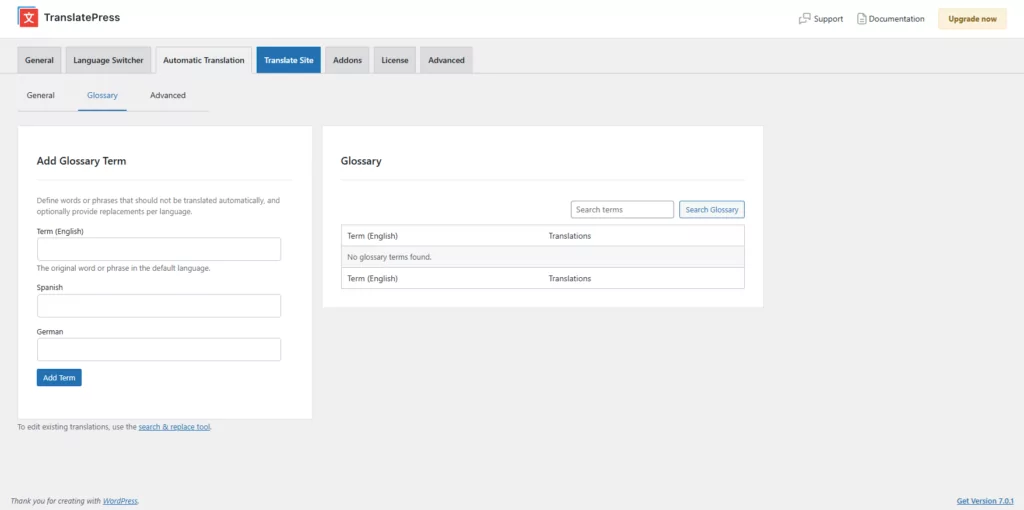
Il glossario integrato influisce attualmente sulla traduzione automatica quando TranslatePress AI viene selezionato come motore di traduzione. Quando è attivo un altro motore, l'interfaccia del glossario non è disponibile; Google Cloud Translation e DeepL dispongono di sistemi di glossario propri.
Fase 3: Aggiungere il termine di origine e le relative traduzioni approvate
Inserisci il termine nella lingua predefinita del tuo sito web, quindi aggiungi la traduzione desiderata per ciascuna lingua che desideri gestire.
TranslatePress consiglia di inserire i termini del glossario e le relative traduzioni in minuscolo. Il plugin adatta l'uso delle maiuscole in modo che corrisponda alla forma in cui il termine originale appare nel contenuto.
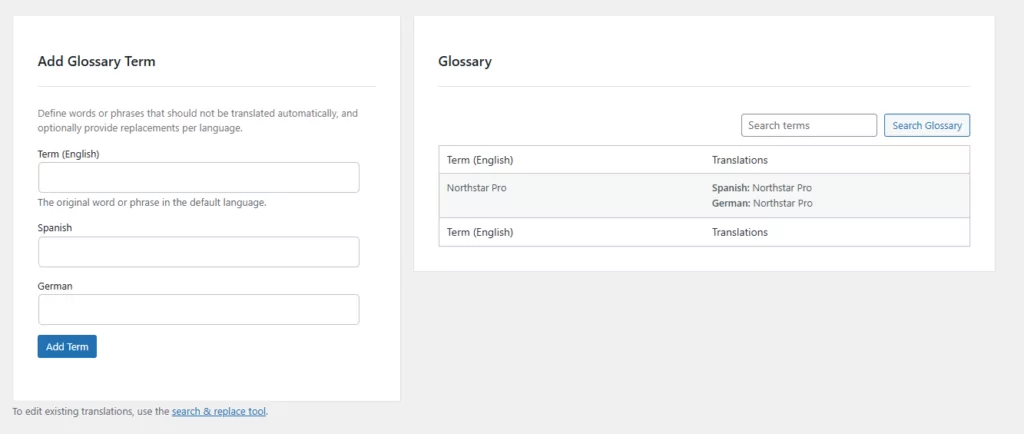
Ad esempio, una voce del glossario scritta in minuscolo può comunque generare un risultato con lettere maiuscole o interamente in maiuscolo quando la stringa di origine utilizza tali forme.
È inoltre possibile lasciare vuoto il campo della lingua di destinazione quando non è necessario gestire quel termine per una lingua specifica. In tal caso, il motore di traduzione automatica tradurrà il termine normalmente.
Fase 4: Tenere conto dei plurali e delle varianti lessicali
TranslatePress utilizza la corrispondenza per parole intere per le lingue in cui le parole sono separate da spazi.
Ciò significa una voce del glossario per gatto corrisponde a “gatto,”, ma non “gatti”" oppure "“categoria.” Anche i termini composti da più parole devono comparire esattamente nella forma in cui sono definiti.
Di conseguenza, potresti aver bisogno di voci separate per:
- Forme singolari e plurali;
- Importanti forme verbali;
- Variazioni comuni dei nomi dei prodotti;
- Frasi più lunghe con significati diversi;
- Versioni con e senza trattino.
Per le lingue in cui le parole non sono solitamente separate da spazi, tra cui il cinese, il giapponese e il thailandese, TranslatePress ricorre invece alla corrispondenza di sottostringhe. Ciò rende particolarmente importante la revisione contestuale.
Passaggio 5: Genera nuove traduzioni automatiche
Le voci del glossario influenzano le traduzioni automatiche generate dopo aggiungi il termine.
Quando TranslatePress AI rileva un termine del glossario in un nuovo contenuto, utilizza la formulazione nella lingua di destinazione da te approvata, anziché affidarsi interamente alla scelta terminologica predefinita del motore.
Questa distinzione è importante: l'aggiunta di un termine al glossario non riscrive automaticamente le traduzioni già memorizzate nel database.
Passaggio 6: Correzione delle traduzioni esistenti con Trova e sostituisci
Per correggere la terminologia già generata, apri Cerca e Sostituisci Traduzioni dall'area del Glossario.
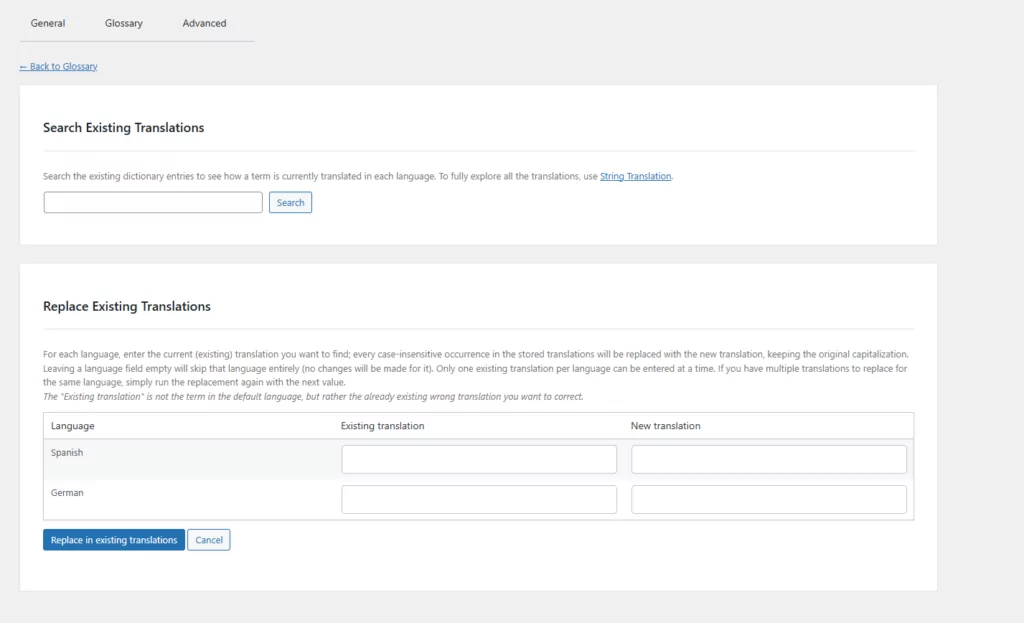
Cerca il termine della lingua di partenza per vedere come appare nelle tue traduzioni esistenti. Puoi quindi sostituire una traduzione indesiderata nella lingua di arrivo con l'alternativa approvata.
Quando si compilano i campi di sostituzione, inserire:
- Il traduzione esistente nella lingua di arrivo;
- Il nuova traduzione vuoi usare.
Non inserire il termine originale di partenza nel campo “Traduzione esistente”.
Ad esempio, se l'inglese “support” fosse tradotto in spagnolo come supporto ma vuoi mantenimento, inserisci supporto come la traduzione esistente e mantenimento come nuova traduzione.
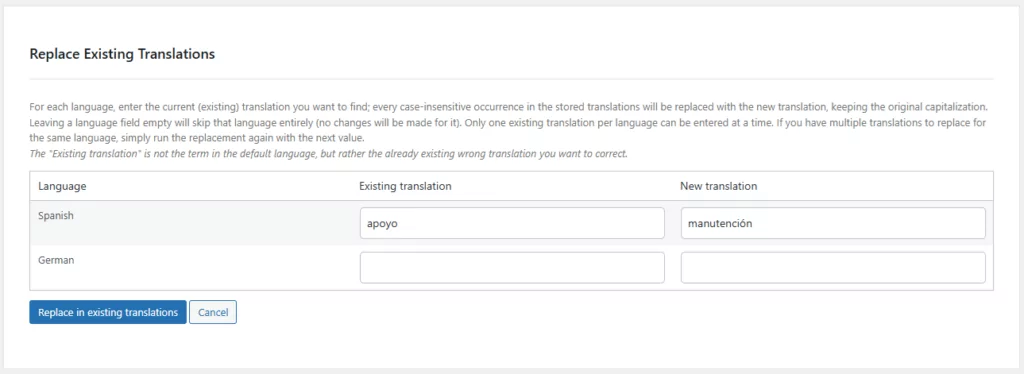
La sostituzione si applica alle traduzioni memorizzate corrispondenti in quella lingua. Poiché questo modifica direttamente il database delle traduzioni e non può essere annullato tramite lo strumento, eseguire un backup del database e verificare attentamente la sostituzione prima di confermarla.
A differenza della gestione dei glossari, la funzione Cerca e sostituisci traduzioni è disponibile indipendentemente dal motore di traduzione automatica utilizzato.
Passaggio 7: Aggiungi memoria di traduzione per stringhe simili
Un glossario controlla termini specifici. La memoria di traduzione opera a livello di stringa o di segmento.
La funzione "Memoria di traduzione automatica" di TranslatePress consente di riutilizzare una traduzione esistente quando individua una stringa sufficientemente simile. Per impostazione predefinita, affinché una stringa sia idonea, deve presentare una somiglianza di almeno 95% e contenere almeno 50 caratteri. La memoria di traduzione viene eseguita prima della traduzione automatica, quindi una traduzione esistente adeguata può essere riutilizzata prima che il plugin richiami il motore di traduzione automatica.
Puoi abilitarlo in:
TranslatePress → Avanzate → Opzioni varie → Memoria di traduzione automatica.
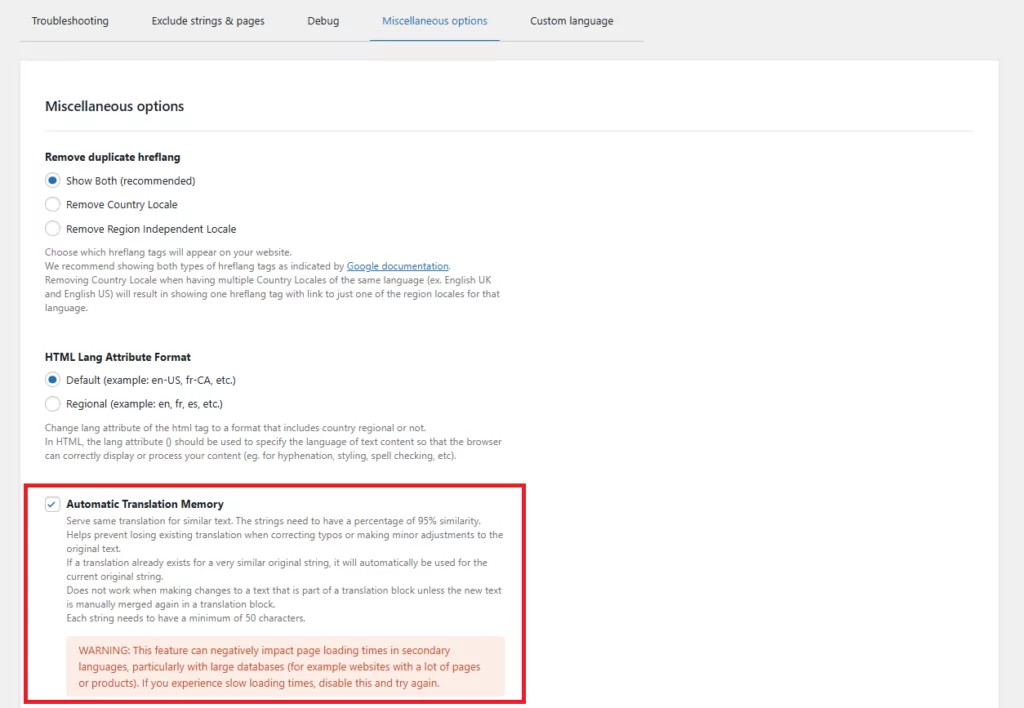
La memoria di traduzione è utile per descrizioni di prodotti ripetute, avvisi, istruzioni di interfacce e varianti di contenuto. Tuttavia, non sostituisce un glossario perché riutilizza traduzioni più lunghe anziché definire la traduzione approvata di un determinato termine.
Fase 8: Esamina le pagine importanti nel contesto
Un glossario può rendere la tua terminologia molto più coerente, ma non può comunque decidere se ogni frase suoni naturale nel suo contesto finale.
Ecco perché includerei sempre una revisione visiva, anche se la traduzione automatica si è occupata della maggior parte del lavoro iniziale. Non è necessario controllare immediatamente ogni archivio del blog e pagina a basso traffico, ma io rivedrei almeno:
- Pagina iniziale;
- Navigazione principale;
- Pagina dei prezzi;
- Pagine di prodotti o servizi;
- Carrello e cassa;
- Area clienti;
- Moduli;
- Email automatiche;
- Pagine di atterraggio con il maggior traffico.
Una revisione visiva può rivelare problemi difficili da individuare in un foglio di calcolo, tra cui testo in overflow, etichette di pulsanti inadeguate, forme grammaticali errate e termini che sono tecnicamente coerenti ma errati in un determinato contesto.
Le regole sono utili, ma questo controllo finale nel contesto è il punto in cui il giudizio umano fa ancora la differenza più grande.
Come mantieni la coerenza delle traduzioni man mano che il sito web cresce?
Un glossario dovrebbe essere una risorsa viva anziché un documento che si crea una volta e si dimentica.
Usa il seguente flusso di lavoro per renderlo utile.
Assegna una persona per approvare la terminologia di traduzione
Qualcuno dovrebbe avere la responsabilità finale di accettare i nuovi termini e risolvere i disaccordi.
Questo non deve essere necessariamente un localization manager professionista. Potrebbe essere un content manager, un product marketer, un editor multilingue o il proprietario di un sito che lavora con un revisore madrelingua.
Senza un proprietario, un glossario può raccogliere voci contrastanti o non verificate.
Aggiungi termini quando crei nuovi prodotti e funzionalità
Le decisioni sulla terminologia dovrebbero essere prese quando vengono introdotti nuovi概念, e non solo dopo che compaiono traduzioni incoerenti.
Nel lanciare un nuovo piano, funzionalità, corso, categoria di prodotto o campagna, decidi:
- Se il nome verrà tradotto;
- Qual è la traduzione approvata;
- Se le diverse varianti regionali richiedano termini diversi;
- Quali alternative dovrebbero essere evitate;
- Dove apparirà il termine.
Ciò rende la gestione della terminologia parte del flusso di lavoro dei contenuti anziché un progetto di pulizia.
Esamina la ricerca, il supporto e i feedback dei clienti
I clienti rivelano spesso problemi di terminologia attraverso:
- Ricerche interne al sito web;
- Ticket di supporto;
- Recensioni di prodotti;
- Domande della live-chat;
- Feedback sull'abbandono del carrello;
- Commenti dalle squadre locali.
Quando i visitatori usano ripetutamente una parola diversa da quella sul tuo sito web, verifica se la tua traduzione approvata riflette il modo in cui il pubblico parla realmente.
La coerenza è preziosa, ma usare costantemente un termine non naturale non lo è.
Rivedere il glossario periodicamente
Pianificare una revisione della terminologia dopo i principali aggiornamenti del prodotto o almeno alcune volte all'anno.
Rimuovere i termini obsoleti, aggiornare le funzionalità rinominate, aggiungere le varianti mancanti e confermare che le traduzioni preferite suonino ancora naturali.
Per i siti multilingue con più redattori, registrate la data e il responsabile di ogni decisione. Questo evita di riaprire lo stesso dibattito sulla terminologia ogni pochi mesi.
Domande frequenti sulla coerenza della traduzione
Qual è la differenza tra un glossario di traduzione e una guida di stile per la traduzione?
Un glossario di traduzione definisce le traduzioni approvate per singole parole e frasi. Una guida di stile per la traduzione definisce regole di scrittura più generali, come tono, formalità, maiuscole, adattamento culturale e stile di frase preferito.
Usa il glossario per decidere come si chiama un concetto. Usa la guida di stile per decidere come comunica il sito web.
Qual è la differenza tra un glossario e una memoria di traduzione?
Un glossario contiene traduzioni approvate per termini specifici, come nomi di prodotti, parole tecniche ed etichette di interfaccia.
Memoria di traduzione memorizza o riutilizza stringhe e segmenti più lunghi precedentemente tradotti. Può impedire che frasi ripetute vengano tradotte da zero, ma non controlla necessariamente come un termine appare in ogni nuovo contesto.
I due strumenti funzionano al meglio insieme.
Quanti termini dovrebbe contenere un glossario di traduzione?
Non c'è un numero richiesto.
Un piccolo sito web WordPress potrebbe aver bisogno di soli 20-50 termini ad alto impatto. Un grande negozio WooCommerce o una base di conoscenza tecnica potrebbe eventualmente averne bisogno di centinaia o migliaia.
Inizia con termini frequenti, ambigui o importanti per il brand. Un glossario più piccolo di termini approvati e mantenuti è più prezioso di un grande elenco di traduzioni non revisionate.
I nomi dei marchi dovrebbero essere tradotti?
Di solito, il nome di un marchio o di un prodotto dovrebbe rimanere invariato a meno che l'azienda non disponga di un nome localizzato ufficiale, di una traslitterazione o di una politica di denominazione specifica per il mercato.
Non dare per scontato che ogni nome sia sicuro da lasciare alla traduzione automatica. I nomi che sono anche normali parole del dizionario sono particolarmente soggetti a essere tradotti inaspettatamente.
L'aggiunta di un termine al glossario modifica le traduzioni TranslatePress già esistenti?
I termini del glossario n. TranslatePress influiscono sulle nuove traduzioni automatiche generate dopo l'aggiunta della voce.
Usa le traduzioni di Trova e Sostituisci per correggere la terminologia già presente nel tuo database di traduzioni. Esegui il backup del database prima di effettuare sostituzioni su vasta scala.
Un glossario di traduzione può gestire parole con più di un significato?
Può farlo, ma le parole ambigue isolate dovrebbero essere gestite con attenzione.
Invece di aggiungere una parola generica come “plan”, aggiungi una frase più specifica come “pricing plan”, “subscription plan” o “project plan”. Questo fornisce al motore di traduzione istruzioni più precise senza imporre la traduzione errata in contesti non correlati.
La traduzione automatica può essere completamente coerente senza la revisione umana?
Un glossario, una guida di stile e una memoria di traduzione possono migliorare notevolmente la coerenza della traduzione, ma non possono risolvere ogni decisione contestuale o culturale.
Revisione umana e controllo qualità della localizzazione rimanere preziosi per pagine ad alto impatto, linguaggio difficile, contenuti legali o tecnici e mercati in cui il tono ha un effetto importante sulla fiducia.
Crea oggi un semplice sistema di coerenza di traduzione
Mantenere un sito web multilingue coerente può sembrare un compito per un intero team di localizzazione, ma puoi iniziare con una configurazione molto più semplice.
La mia raccomandazione è di iniziare con quattro elementi pratici:
- Una breve guida allo stile di traduzione che definisce tono e formalità;
- Un glossario contenente i vostri termini di traduzione più importanti;
- Memoria di traduzione che riutilizza contenuti già approvati;
- Un processo di revisione e trova-e-sostituisci per correggere le incoerenze esistenti.
Non è necessario documentare ogni singola decisione di traduzione prima di iniziare. Inizia con i nomi dei marchi, la terminologia dei prodotti, le etichette dell'interfaccia e le frasi ambigue che i tuoi visitatori incontrano più spesso. Di solito sono queste le voci che producono il maggiore impatto immediato.
Da lì, puoi aggiungere nuovi termini ogni volta che lanci un prodotto, noti un'inconsistenza o scopri che i clienti usano una frase diversa rispetto a quella attualmente presente sul tuo sito.
TranslatePress integra le parti principali di questo flusso di lavoro in WordPress. Il suo glossario integrato guida le nuove traduzioni automatiche create con TranslatePress AI, mentre la funzione "Cerca e sostituisci traduzioni" ti aiuta a correggere la terminologia già memorizzata. La memoria di traduzione e l'editor visivo ti offrono ulteriori modalità per riutilizzare i contenuti approvati e verificare il risultato finale nel contesto.
La traduzione automatica può ancora occuparsi del lavoro ad alto volume. Le state semplicemente dando istruzioni più chiare e mantenendo il controllo sulla terminologia che rende il vostro sito web riconoscibile, intenzionale e genuinamente coerente in ogni lingua.
TranslatePress Multilingue