
In this post
The best Shopify translation app isn’t necessarily the one that can translate your store the fastest. Most of the popular options can handle automatic translation these days, so I’d pay much more attention to what happens after that first translation is generated.
Can you edit it? Does new content stay translated? What happens to your SEO? Can you control terminology? And, maybe most importantly, what happens to the price once your catalog gets bigger or you add another three languages?
Those differences aren’t always obvious when you’re looking at six Shopify App Store listings that all promise some variation of “translate your store with AI.”
So, in this guide, I’ve compared six of the main options I’d consider if I were looking for the best Shopify translation app right now:
- TranslatePress;
- Shopify Translate & Adapt;
- Transcy;
- Weglot;
- GTranslate;
- T Lab.
I’ll look at what each one does particularly well, where I think the limitations start to matter, and what kind of Shopify store I’d actually recommend it for.
If you just want the short version, here it is:
Quick Answer: TranslatePress is the best Shopify translation app for merchants who want automatic updates, unlimited manual editing, terminology control, multilingual SEO, and straightforward pricing. Shopify Translate & Adapt is the simplest free starting point for one or two languages. Transcy combines translation with currency localization. Weglot is polished but can get expensive as your content grows. GTranslate suits stores that prioritize unlimited automatic translation on a budget. T Lab is worth considering if you need image or third-party app content translated.
Let’s get into why.
What Should You Look for in a Shopify Translation App?
A Shopify translation app is a tool that creates and manages translated versions of your Shopify store content, usually combining automatic translation with tools for reviewing, editing, publishing, and maintaining those translations. In other words, the best Shopify translation app is the one that fits the way your store actually works, not simply the one with the longest feature list.
That sounds fairly straightforward.
The tricky part is that two apps can both claim to “translate Shopify” while giving you very different workflows once you start using them.
Shopify itself now gives merchants a solid multilingual foundation. Stores on Basic, Grow, Shopify, and Advanced plans can sell in up to 20 languages, while Shopify Plus and Enterprise Commerce stores can support up to 30. Shopify can also create localized URLs and handle technical elements such as hreflang, canonical URLs, and multilingual sitemaps.
The translation app sits on top of that foundation or, in some cases, uses a different translation architecture, and determines how easy the actual multilingual content is to create and maintain.
Here are the things I’d look at before installing anything.
Does the App Translate All the Content You Actually Use?
Product descriptions are only the beginning.
A Shopify language translation app may also need to handle:
- Collections;
- Pages;
- Blog posts;
- Navigation;
- Theme strings;
- Metafields;
- SEO metadata;
- URL handles;
- Image alt text;
- Notifications;
- Content generated by third-party apps.
That last point is especially easy to miss.
Shopify notes that third-party app content isn’t automatically translatable unless the app exposes that content through Shopify’s supported translation resources or locale files.
So, if your storefront relies heavily on a reviews app, page builder, subscription tool, bundles app, or another third-party system, I’d test that content before committing to a translation solution.
A perfect product translation doesn’t help much if half of your product-page widgets are still in English.
Can You Combine Automatic and Manual Translation?
I wouldn’t choose between AI translation and manual translation, as for most ecommerce stores, you want both.
Automatic translation is excellent for getting through a catalog efficiently. Manual editing gives you control over the wording that actually affects how customers perceive the store.
For example, I’d probably let automatic translation take the first pass at hundreds of straightforward product specifications.
I’d be much more inclined to manually review:
- Homepage copy;
- Best-selling products;
- Important calls to action;
- Brand terminology;
- Shipping and returns information;
- High-value landing pages.
And I’d check whether manual translations can be protected from future automatic updates.
There’s nothing particularly fun about perfecting a headline and then discovering that your translation workflow replaced it later.
What Happens When Your Store Changes?
This is probably one of the most important questions for an active Shopify store.
Products change. Prices change. Collections change. Promotions come and go. New blog posts appear. Someone notices a typo in a product description at 4:47 on a Friday afternoon.
Your translated store needs to keep up.
Some apps automatically detect source-content changes and update translations. Others require you to trigger another translation run.
For a store with 30 products, either workflow might be manageable.
For one with 3,000 products and weekly catalog updates, that difference starts to matter quite a lot.
How Does the App Handle Multilingual SEO?
Multilingual SEO is the process of making the different language versions of your store understandable and discoverable to search engines.
At minimum, I’d look at:
- Language-specific URLs;
- Translated SEO titles;
- Translated meta descriptions;
- Translated URL handles;
hreflang;- Sitemaps;
- Indexability of translated pages.
There’s an important Shopify-specific nuance here.
Shopify already handles a significant amount of the technical international SEO layer. When languages are properly published, Shopify creates language-specific URLs, automatically adds hreflang, and includes translated versions in its sitemaps.
So when an app advertises “multilingual SEO,” look beyond the badge.
I’d ask whether it actually lets you populate and maintain the translated SEO content that Shopify needs, whether URL translation is included on your plan, and whether its translated pages are genuinely indexable.
How Does the Language Switcher Fit Into the Store?
Your customers need a way to reach all those translations.
A Shopify language switcher should be visible, work properly on mobile, and fit naturally into your theme rather than looking like an unrelated widget someone added five minutes before launch.
I’d check whether the app gives you control over:
- Placement;
- Language names;
- Flags;
- Display style;
- Colors;
- Automatic detection or redirection.
I generally prefer displaying language names instead of relying entirely on flags. A flag represents a country, while languages rarely respect borders quite so neatly.
How Much Control Do You Have Over Terminology?
This becomes surprisingly important once you have a larger catalog.
Maybe a product name should never be translated.
Maybe “subscription” needs one specific German translation everywhere.
Maybe your translation engine keeps using three different words for the same feature.
That’s where glossary functionality becomes useful.
A translation glossary lets you establish rules for important words and phrases so automatic translation doesn’t have to make the terminology decision from scratch every time.
I wouldn’t call a glossary essential for every tiny Shopify store.
But for a brand with recurring product terminology, technical language, or several target markets, I’d absolutely want one.
What Will the App Actually Cost as You Grow?
This is the part where I’d read the pricing table very carefully.
Don’t only compare the first paid plan.
Look at what happens when you:
- Add another language;
- Translate more products;
- Add a large blog;
- Need SEO functionality;
- Want to manually edit translations;
- Need automatic synchronization;
- Hit an AI or translated-word limit.
Some apps charge primarily by language. Others by translated words. Others impose catalog or feature quotas. Some combine several of these.
None of those models is automatically bad.
I just want to be able to predict the bill before my store becomes dependent on the app.
Best Shopify Translation Apps Compared at a Glance
I checked the pricing below against the current Shopify App Store listings in September 2026. Prices can obviously change after publication.
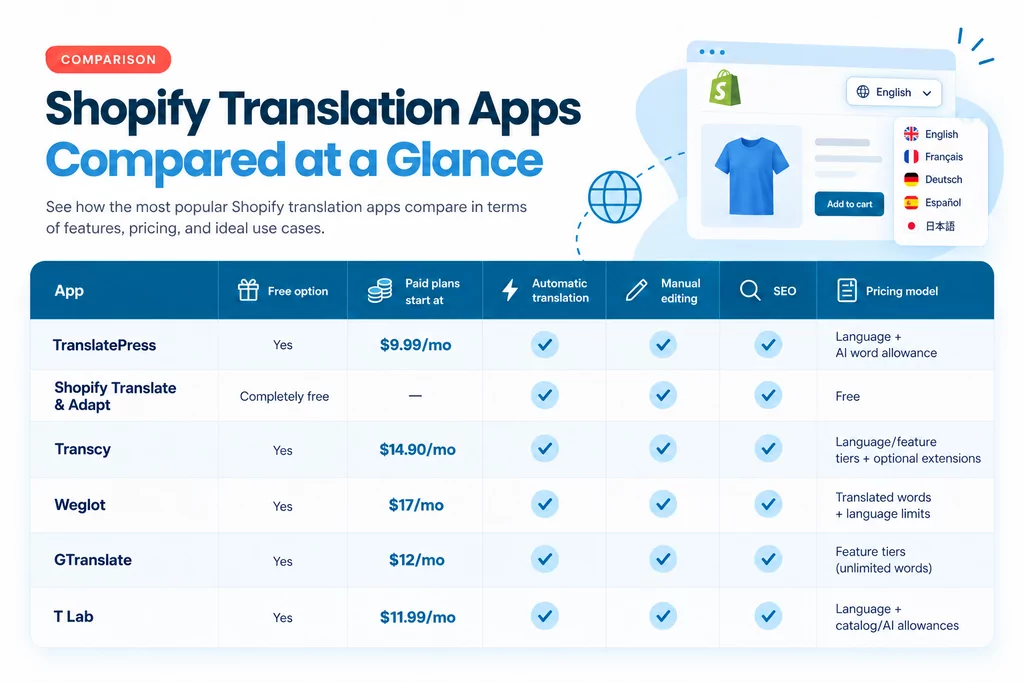
There isn’t one objectively correct best Shopify translation app for every merchant.
And I actually think that’s important to say before we go any further.
If you have a small catalog, one international market, and no plans to expand beyond that anytime soon, paying for a feature-heavy translation platform may be unnecessary.
If you have five languages, thousands of products, an active content strategy, and a team constantly updating the store, the free native solution may create more manual work than it saves.
So let’s look at each option in a little more detail.
1. TranslatePress: Best Overall for Control, Automatic Updates, and Predictable Scaling
I’ll start with TranslatePress, partly because you’re reading this on the TranslatePress blog, but also because I don’t want to pretend we don’t have a horse in this race.
So here’s the standard I’m using instead: where does TranslatePress genuinely make more sense than the alternatives, and where might another app still be the better fit?
The Shopify version of TranslatePress is built around a workflow I personally think makes a lot of sense for ecommerce: Automatically translate the high-volume work, then manually take control wherever the wording actually matters.
TranslatePress uses a combination of the leading LLMs and neural machine translation engines to automatically translate products, collections, pages, blog posts, theme content, notifications, and image alt text. This app chooses which translation engine to use depending on each language pair, ensuring the best accuracy for every context.
Then, translations are stored natively in Shopify and served through Shopify’s localized language URLs.
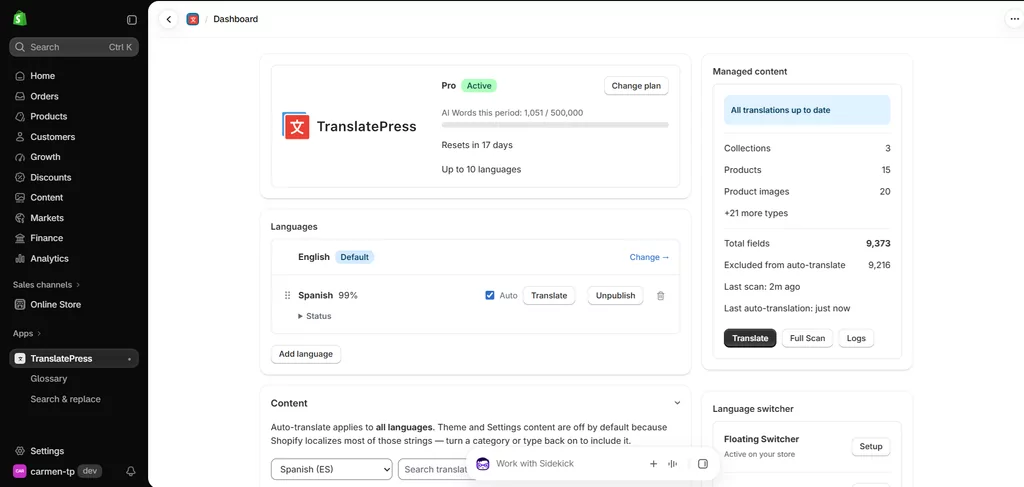
It also keeps automatic translations synchronized when eligible source content changes.
That last part would be fairly high on my own checklist.
I don’t want “remember to update the Spanish translation” becoming another task every time somebody changes a product description.
TranslatePress for Shopify
What I Like About TranslatePress
The best thing about it is the balance between automation and control.
Every plan includes a set amount of languages and AI words to use for automatic translation. However, they also come with unlimited manual translations. This means two things for your workflow.
First, you can edit an automatically generated translation and then disable automatic translation for an individual string, effectively locking in the wording you want while the rest of the store remains automated. That’s a small feature on paper, but it solves a very practical problem.
Second, unlimited manual translations also means you get to create however many manual translations you want from scratch in case you run out of AI words but want to keep going.
The free version also includes multilingual SEO (URL translation, hreflang tags, metadata), so you can also rank in these new languages you add, and a very customizable language switcher with lots of options.
The paid plans also include a Glossary, where you can tell TranslatePress to preserve a brand name or always translate a particular term in a specific way.
And if an unwanted translation already exists throughout your store, Search & Replace lets you find and correct it in bulk.
I also like the pricing structure because you can understand fairly quickly what changes between tiers:
- Free: 1 automatically translated language and 5,000 AI words/month;
- Starter: $9.99/month: 2 auto languages and 50,000 AI words/month;
- Business: $25.99/month: 5 auto languages and 200,000 AI words/month;
- Pro: $49.99/month: 10 auto languages and 500,000 AI words/month.
There’s no hidden fees or pay-as-you-go credits, just fixed monthly or yearly billing.
Starter, Business, and Pro include the Glossary and Search & Replace, while every plan gets unlimited manual translation, a customizable language switcher, multilingual SEO, and translation auto-sync.
Where TranslatePress Might Not Be the Best Fit
The free plan automatically translates one language.
If all you care about is adding as many languages as possible for free, you might find that other alternatives in this list suit your needs better.
And if currency conversion is central to the problem you’re trying to solve, TranslatePress doesn’t currently support that.
Who I’d Recommend TranslatePress For
I’d put TranslatePress near the top of the list for merchants who:
- Regularly update products or content;
- Want automatic translation without giving up manual control;
- Need several languages as the store grows;
- Care about terminology consistency;
- Want Shopify-native translations and URLs;
- Want multilingual SEO included without moving to a special SEO tier (it’s included in the free plan);
- Prefer pricing that is easy to understand from the get-go and doesn’t increase abruptly as the store grows.
It’s particularly attractive to me for stores that have moved beyond “translate this once” and now need to maintain a multilingual catalog.
That’s where the workflow starts to matter as much as the translation engine itself.
2. Shopify Translate & Adapt: Best Free Option for Simpler Stores
Before paying for anything, I think every Shopify merchant should at least understand what Shopify already gives them for free.
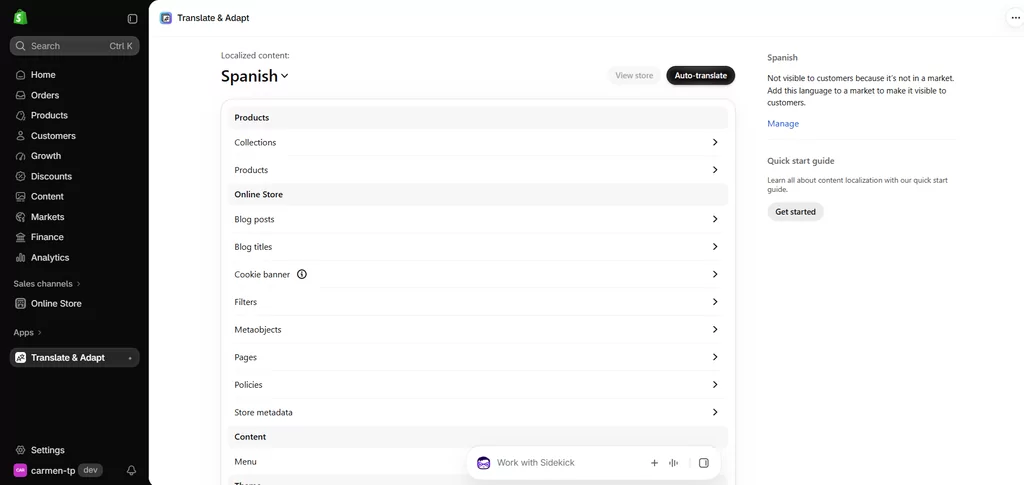
Translate & Adapt is Shopify’s own translation app, and it’s a decent starting point.
It lets you automatically translate up to two languages, manually add as many translations as you need, edit them through a side-by-side interface, and adapt content for different markets that use the same language.
What I Like About Translate & Adapt
The biggest advantage is simplicity.
It lives directly inside Shopify, uses Shopify’s translation system, and works naturally with Markets.
Translations generated by Translate & Adapt also remain in Shopify if you uninstall the app. Shopify explicitly states that uninstalling Translate & Adapt does not delete the translations it created.
You also get Shopify’s underlying multilingual SEO infrastructure, including localized URLs, hreflang, sitemaps, and the ability to translate supported URL handles and custom SEO fields.
Where Translate & Adapt Starts to Feel Limited
The obvious limitation is the two-language cap on automatic translation. You can add more languages manually, but automatic translation stops at two.
There’s another limitation I’d pay even more attention to if your store changes frequently.
New content isn’t continuously translated in the background.
Shopify says that when you add new content or change source content, you need to return to Translate & Adapt and run Auto-translate again for each language.
For a stable catalog, that might barely register. But for a store publishing products every week, I can see that becoming one of those jobs everybody assumes somebody else remembered to do.
Certain content also isn’t supported, and third-party content needs to use Shopify-supported translatable resources or locale files.
Recent App Store reviews show that the two-language limit and translation consistency are recurring merchant complaints, along with translation accuracy, although the app still holds an overall good rating.
So I wouldn’t characterize Translate & Adapt as a bad app at all. I’d characterize it as a good free baseline that some stores eventually outgrow.
Who I’d Recommend Translate & Adapt For
I’d use it if:
- You only need one or two automatically translated languages;
- Your catalog doesn’t change very often;
- You want to spend nothing;
- You prefer staying entirely within Shopify’s native tools;
- You’re happy to do a bit more manual maintenance.
For a small store, it may genuinely be all you need.
3. Transcy: Best for Combining Translation With Currency and Geolocation
Transcy takes a somewhat broader approach than a pure translation app.
Alongside language translation, it puts a lot of emphasis on international selling features such as currencies, geolocation, language/currency switching, translated images, and third-party app translation.
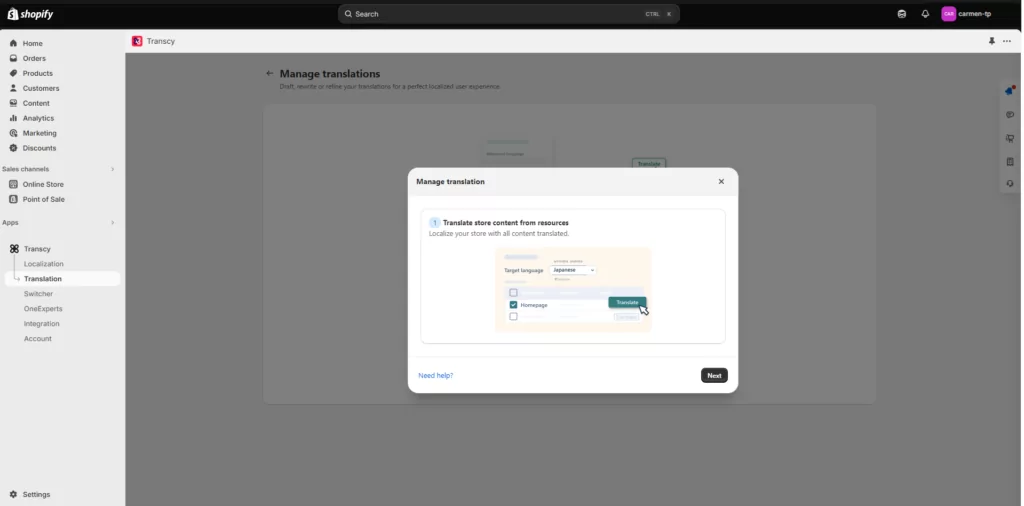
Its main differentiations are geolocation, image adaptation, and real-time currency conversion across 169+ currencies.
That combination makes Transcy particularly interesting if your multilingual project and your multi-currency strategy are really the same project.
What I Like About Transcy
Although the free plan limits you to one automatically translated language and one currency, it has no word or pageview limit. So you could stay on the free plan forever as long as you only need one language, no matter how much content or how many products you add over time.
That’s a fairly appealing entry point.
The paid Local Plus plan starts at $14.90/month and adds manual translation editing for one language, AI translation engines, multilingual SEO, switcher customization, and other features.
Regional costs $29/month and expands this to three languages, two editable languages, three currencies, a 20-term glossary, automated translation processes, and some image localization. Continental is $69/month with larger allowances and additional features.
Where I’d Look Closely Before Choosing Transcy
Transcy is powerful, but its pricing is less “one number and you’re done” than it initially appears.
The plan itself can impose limits on products, automatic translation rules, glossary entries, image localization, and similar resources.
Transcy also sells optional monthly quota extensions for things such as translated products, automatic translation rules, images, glossary rules, and scheduled synchronization. That doesn’t make the pricing unfair.
It does mean I’d model what my actual store needs before choosing a tier rather than looking only at the headline monthly price.
The free plan also doesn’t include manual translation editing; that begins on Local Plus, and is fairly limited on paid plans too.
Who I’d Recommend Transcy For
I think Transcy makes the most sense if you want:
- Translation + Currency conversion + Geolocation + Language/currency switching + Third-party app translation
…all managed through one internationalization app.
If currency and translation are separate concerns for your store, I’d compare the translation workflow itself more carefully against TranslatePress or T Lab before deciding.
4. Weglot: Best for a Polished Translation Workflow When Budget Is Less Important
Weglot is probably one of the most recognizable names in website translation, as it’s a multi-platform product.
It has automatic translation, manual editing, glossary functionality, team collaboration, professional translation ordering, AI prompts for brand voice, and a multilingual SEO feature set.
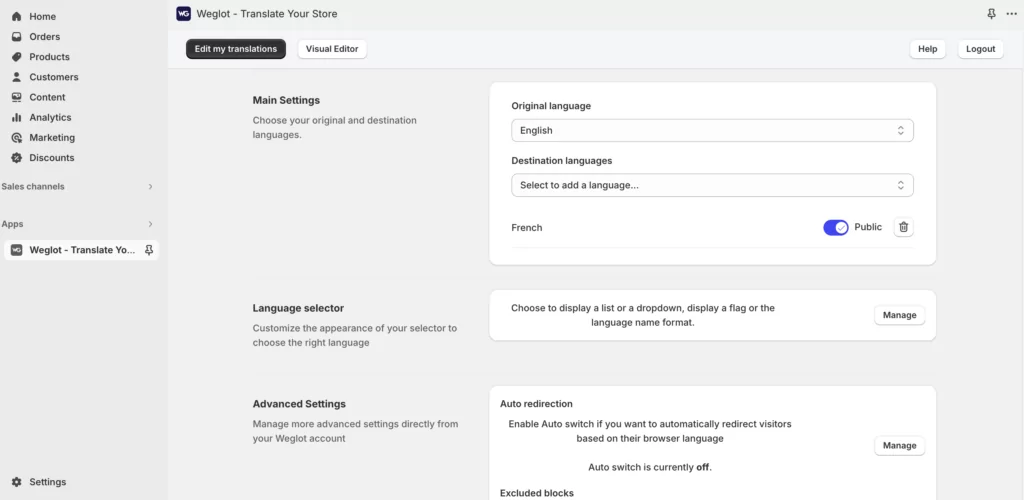
Just like TranslatePress, it covers hreflang, translated metadata, clean URLs, automatic translation, manual review, glossary rules, and SEO indexing. The main differentiators from the competition are the collaboration features and AI prompt features.
I wouldn’t have any trouble recommending Weglot on features alone.
The part I’d think about carefully is the pricing model.
What I Like About Weglot
The translation workflow is polished.
You can generate automatic translations, manually refine them, collaborate with other people, establish glossary rules, and even order professional translation if needed. All fairly intuitive and easy to set up.
This workflow is something that recent Shopify reviews also repeatedly praise.
Why Weglot Can Get Expensive
Weglot prices plans based partly on the total number of translated words.
The free plan covers one language and 2,000 translated words.
Current paid pricing starts at:
- Starter: $17/month: 1 language, 10,000 translated words;
- Business: $32/month: 3 languages, 50,000 words;
- Pro: $87/month: 5 languages, 200,000 words.
- Advanced: $299/month: 10 languages, 1,000,000 words.
- Extended: $699/month: 20 languages, 5,000,000 words.
Weglot calculates the limit based on your source content multiplied across translated languages. Its own documentation gives the example of an 8,000-word website translated into three languages counting as roughly 24,000 translated words. SEO metadata counts toward that total too.
This is similar to how TranslatePress’ AI words work too. However, the pricing increases quite abruptly as the plans progress.
So a growing catalog plus several languages can move you through the pricing tiers quite quickly, and force your budget pretty quickly.
Weglot does offer an optional auto-upgrade feature when you hit the word limit. Importantly, this can be enabled or disabled, I wouldn’t describe an upgrade as unavoidable. If auto-upgrade is disabled, newly detected words stop being translated once the plan limit is reached.
This is probably the app where I’d most strongly recommend estimating your real content volume before signing up.
Who I’d Recommend Weglot For
I’d consider Weglot if:
- You want collaborative features;
- You need professional human translation included in your workflow;
- You want brand-voice customization;
- Budget is not a problem.
For a high-value multilingual operation, the cost may be justified. For a content-heavy store with a large blog and several languages, I’d do the maths first.
5. GTranslate: Best for Unlimited Automatic Translation on a Budget
GTranslate has a very different value proposition.
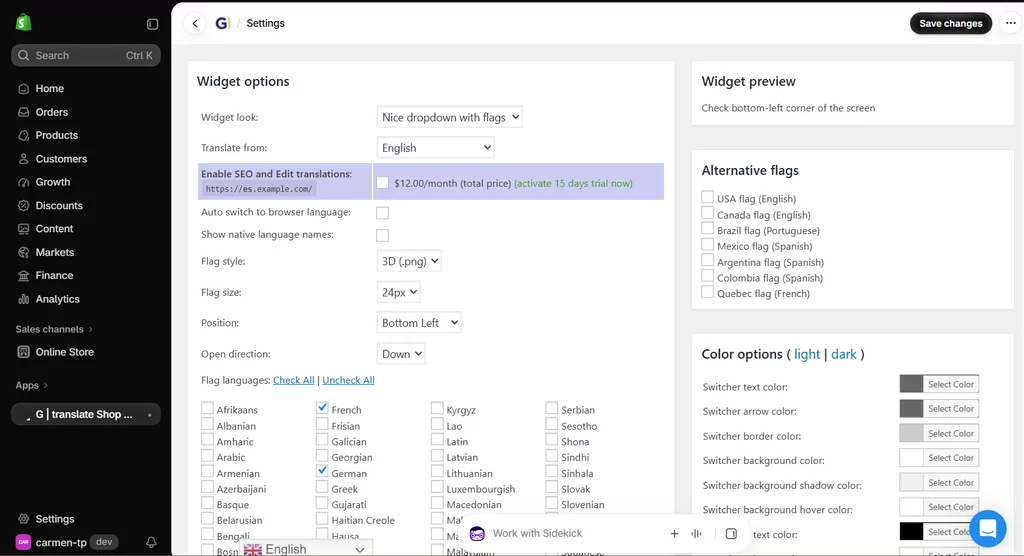
Its free plan gives you machine translation across all languages, with unlimited words and pageviews. That sounds almost absurdly generous compared with the competition.
There is a catch, though. The free version is much more appropriate for basic accessibility than for a carefully managed multilingual ecommerce strategy.
What I Like About GTranslate
If your main goal is simply giving visitors a way to understand your site in another language, the free plan covers an enormous amount of ground.
There’s no translated-word allowance to watch.
Paid plans are also relatively straightforward:
- Bilingual Startup: $12/month: one additional language, translation editing, search-engine indexing;
- Startup: $25/month: all languages, editing, SEO indexing;
- Business: $35/month: adds URL translation.
- Enterprise: $50/month: adds language hosting.
Its proxy technology can also translate much of the content generated by third-party apps, which may be valuable for stores with complex app stacks.
Where the App Falls Short
On the free version, you don’t get manual translation editing or indexed translated pages. And those are two fairly big limitations.
If somebody is translating a page purely to understand it, that may be fine, but if I’m investing in French organic search traffic and want every important product message to use the wording I chose, it’s not enough.
That’s why I’d think of GTranslate’s free tier as a very quick multilingual layer rather than the finished setup I’d choose for a strategic international market.
Apart from this, the main dashboard and overall UI is quite clunky and is definitely the least user-friendly of the bunch.
Who I’d Recommend GTranslate For
GTranslate makes sense when:
- You want lots of languages quickly;
- Unlimited automatic translation is important, but manual editing isn’t;
- Your budget is limited;
- You’re willing to move to a paid plan for editing and SEO.
If organic search matters, I’d skip evaluating the free plan and compare the paid tiers directly.
6. T Lab: Best Value Alternative With a Very Generous Free Plan
T Lab is another pretty well-established app in the Shopify App Store, with a generous free tier and decent value proposition.
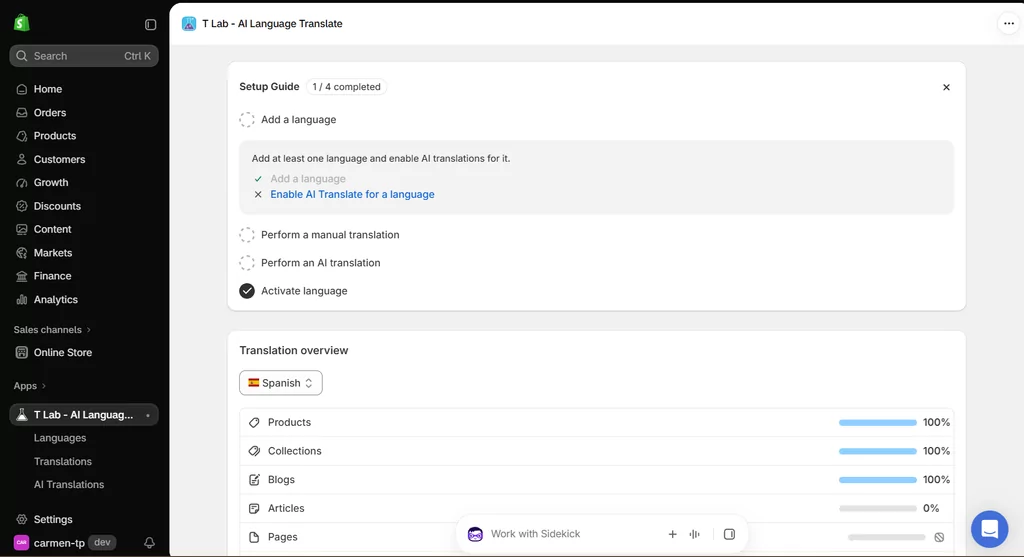
You can add up to 20 languages, automatically translate one of them, manually translate without a limit, run bulk AI translations, translate images and third-party app content, and use a glossary. The included free AI allowance covers up to 500 products, 20 collections, and 20 articles.
That’s a strong free offering.
What I Like About T Lab
The upgrade path is also fairly clear.
The current plans are:
- Pro: $11.99/month: AI translation for up to 5 languages and larger content allowances;
- Business: $29.99/month: AI translation for 10 languages, multi-currency, unlimited glossary, image, third-party app, and custom translations;
- Premium: $59.99/month: AI translation for 20 languages, AI Autopilot, and the ability to manage DeepL, Google, and ChatGPT translation engines.
The app also lists automatic synchronization, SEO translation, translated URLs, glossary management, language detection, image translation, and third-party app translation among its supported features.
Its current App Store rating is also particularly strong at around 4.9 stars.
Where T Lab’s Approach Differs
T Lab is a good product, and I wouldn’t try to manufacture a dramatic weakness just to fill this section.
The main thing I’d look at closely is how its allowances are structured. Rather than a monthly AI-word allowance, T Lab frames its limits around numbers of products, collections, articles, and AI-enabled languages. Depending on your catalog size and how it’s organized, that model may suit you well — or it may mean doing some upfront math to make sure the right tier covers everything you actually need.
I’d also check whether the ability to lock individual manually refined strings against future automatic retranslation is available on the plan you’re considering, as that’s a workflow detail worth confirming before committing.
Who I’d Recommend T Lab For
T Lab is an excellent candidate if:
- You want a very capable free tier;
- Your catalog fits comfortably within its content allowances;
- You need image or third-party app translation;
- Multi-currency is also useful to you.
Which Shopify Translation App Should You Choose?
Finding the best Shopify translation app becomes much easier once you stop comparing every feature equally and start prioritizing the ones your store will actually use.
If you’ve reached this point and the six apps are starting to blur together, I’d make the decision based on your actual store rather than another feature checklist.
Choose Shopify Translate & Adapt If You Want the Simplest Free Setup
If you only need one or two automatically translated languages, and your store doesn’t change constantly, I’d start here.
You may discover you don’t need a paid app at all. And I’m very much in favor of not buying software you don’t actually need.
Choose Transcy If Translation and Currency Localization Belong Together
If you want geolocation, currency switching, image localization, and translation under one roof, Transcy is worth a serious look. Just calculate the resource limits and optional extensions before choosing your plan.
Choose Weglot If Workflow Matters More Than the Budget
Weglot is polished, mature, and particularly strong around translation management.
I’d just estimate your total translated-word requirement first, especially if you have a large catalog or content-heavy blog.
Choose GTranslate If You Want Maximum Automatic Coverage for Minimum Cost
The unlimited-word free plan is difficult to beat for raw automatic translation coverage.
But if you care about organic search, manual quality control, and high translation accuracy, compare its paid plans rather than judging the app by the free tier.
Choose T Lab If You Want a Feature-Rich, High-Value Alternative
T Lab gives you a lot even before you pay.
It’s especially attractive for merchants who need third-party app translation, images, several languages, and generous manual translation options.
Choose TranslatePress If You Want the Best Balance Between Automation and Control
This is where I’d personally land for a growing store. Not because it has the longest feature list, but because the way the pieces fit together makes sense.
Automatic AI translation handles the repetitive work. Updated source content can stay synchronized. Manual translations are unlimited. Individual edits can be locked so automation doesn’t overwrite them. A glossary handles future terminology. Search & Replace fixes existing terminology. And the translations live natively in Shopify rather than being delivered through proxy pages.
The pricing is also easy to forecast: decide how many languages you want automatically translated and how much AI translation volume you need, then choose the corresponding tier.
For the kind of merchant I’d expect to care enough about multilingual ecommerce to be reading a comparison this long, that combination is difficult to beat.
Why You Shouldn’t Choose Based on the Free Plan Alone
There’s one mistake I’d try particularly hard to avoid.
Don’t compare what each app gives you on day one. Compare what each one looks like six or twelve months from now.
Imagine that your store currently has:
- 250 products;
- 2 additional languages;
- A small blog;
- One person managing the site.
Now imagine it with:
- 1,500 products;
- 5 languages;
- New content every week;
- A marketing team;
- Local SEO campaigns;
- Terminology that has already been manually reviewed.
Would the same app still make sense? That’s the scenario I’d use when comparing plans.
Switching translation systems isn’t necessarily impossible, especially when translations are stored through Shopify’s native translation framework, but you still don’t want to rebuild processes, switchers, terminology rules, SEO workflows, and team habits unnecessarily.
The cheapest app today can become the expensive option if you need to replace it later.
Frequently Asked Questions About Shopify Translation Apps
What Is the Best Shopify Translation App?
There isn’t one best app for every store.
For a simple store needing two automatically translated languages, Shopify Translate & Adapt is difficult to beat because it’s free.
For merchants who want a stronger combination of automatic updates, unlimited manual editing, terminology control, native Shopify translations, and multilingual SEO, I’d choose TranslatePress.
T Lab is also a particularly strong value option, while Weglot is attractive for merchants prioritizing a mature translation-management workflow.
What Is the Best Free Shopify Translation App?
Shopify Translate & Adapt is probably the simplest completely free option because it can automatically translate up to two languages and allows unlimited manual translations.
T Lab has one of the most generous third-party free plans, with up to 20 languages available for manual translation and AI translation for one language.
TranslatePress Free automatically translates one language with 5,000 AI words per month and includes unlimited manual translation, multilingual SEO, a language switcher, and automatic translation synchronization.
So “best” depends on whether you value two free auto languages, broader manual language support, or continuous translation management.
Can Shopify Automatically Translate a Store?
Shopify itself supports multilingual storefronts, but translations still need to come from a translation app, or imported translation data.
Their native Translate & Adapt automatically translates up to two languages. Other apps can increase that number or provide a different automation workflow.
Which Shopify Translation App Is Best for SEO?
I’d focus less on the app claiming “SEO” and more on what it actually supports.
Shopify already provides important technical international SEO features such as localized URLs, automatic hreflang, canonical URLs, and multilingual sitemaps.
Your translation app should complement that by giving you properly translated content, SEO metadata, URL handles where supported, and indexable language versions.
TranslatePress, Weglot, Transcy, T Lab, Shopify Translate & Adapt, and paid GTranslate plans all provide different levels of multilingual SEO support.
The main exception in this comparison is GTranslate Free, where translated pages aren’t intended for search-engine indexing.
Is Weglot Worth It for Shopify?
It can be.
Weglot has one of the more mature translation workflows in this comparison.
The decision mainly comes down to cost.
Because its pricing depends on translated-word volume and language count, I’d estimate your full store before choosing it. An 8,000-word source site translated into three languages counts as roughly 24,000 translated words in Weglot’s own example.
For a relatively small store, that can be perfectly reasonable.
For a very large catalog with several languages, the economics look different.
Can Shopify Translate & Adapt Translate More Than Two Languages?
You can manually translate more than two languages, but its automatic translation feature is limited to two.
If you need automatic translation across a larger number of languages, you’ll need a compatible third-party Shopify translation app.
Can Shopify Translation Apps Translate Third-Party App Content?
Sometimes.
It depends on both the translation app and the third-party app.
Shopify explains that Translate & Adapt can work with third-party content when that content is exposed through supported Shopify translatable resource types or storefront locale files.
Apps such as TranslatePress, Transcy, T Lab, and GTranslate all have third-party app translation capabilities.
Whatever option you choose, I’d test your most important third-party widgets before launch rather than assuming every app-generated string will be covered.
Will Switching Translation Apps Delete My Existing Shopify Translations?
Not necessarily, but it depends on how the app stores and serves translations.
Shopify confirms that translations created by Translate & Adapt remain after that app is uninstalled.
TranslatePress also stores its translations natively in Shopify.
Apps using external or proxy-based translation architectures can behave differently, so I’d check export, migration, and uninstall documentation before switching.
Which Shopify Translation App Would I Choose?
There are much better translation options for Shopify now than there were a few years ago, which is good news but doesn’t necessarily make choosing one easier. Most of them can automatically translate your product catalog, and that’s no longer the interesting part. I’d look at what happens next.
How easily can you correct something? What happens when the original product changes? Can you stop your product name being translated? Is a translation you manually perfected safe? Can Google index the right language version? What happens to your monthly bill when you add three more markets?
Those questions are much more useful for finding the best Shopify translation app for your store than simply comparing which tool generates translations fastest.
For a small Shopify store with one or two extra languages, I’d genuinely start with Shopify Translate & Adapt and see how far the free solution gets me.
If I wanted translation plus currencies and geolocation in one package, I’d look closely at Transcy.
If budget were secondary to a mature multilingual workflow, Weglot would be on the shortlist.
For very broad, inexpensive automatic translation, I’d consider GTranslate, while T Lab is probably the strongest alternative here if I were shopping primarily on value and feature coverage.
But for a growing store where I wanted the multilingual version to feel intentional rather than simply machine-translated once and forgotten, I’d choose TranslatePress.
The combination I like is pretty simple: automate the repetitive work, keep new and updated content synchronized, edit as much as you want, protect the wording you’ve already perfected, and use glossary rules when there are terms you simply don’t want an AI making up its own mind about.
That gives you automation without completely handing over control, and for ecommerce translation, I think that’s the balance worth looking for.


