
In diesem Artikel werde ich erläutern, wie man mit TranslatePress einen umfangreichen Textabschnitt als Ganzes übersetzt. Um zu verstehen, warum man das tun möchte, beginnen wir mit einem Beispiel.
Sie sind also gerade dabei, Ihre Website mit TranslatePress zu übersetzen. Ihre Website ist auf Englisch verfasst und Sie möchten sie mehrsprachig. Sie haben TranslatePress installiert, schnell einrichten Französisch als Übersetzungssprache und Sie übersetzen bereits aus dem Live-Vorschau-Übersetzungseditor.
Alles läuft gut, bis Sie auf den folgenden Absatz stoßen:
“Blau Augen sind wunderschön.”
Jetzt das Wort Blau wird hervorgehoben, wodurch es zu einer eigenständigen Zeichenkette wird. Der Rest des Satzes ist eine separate Zeichenkette.
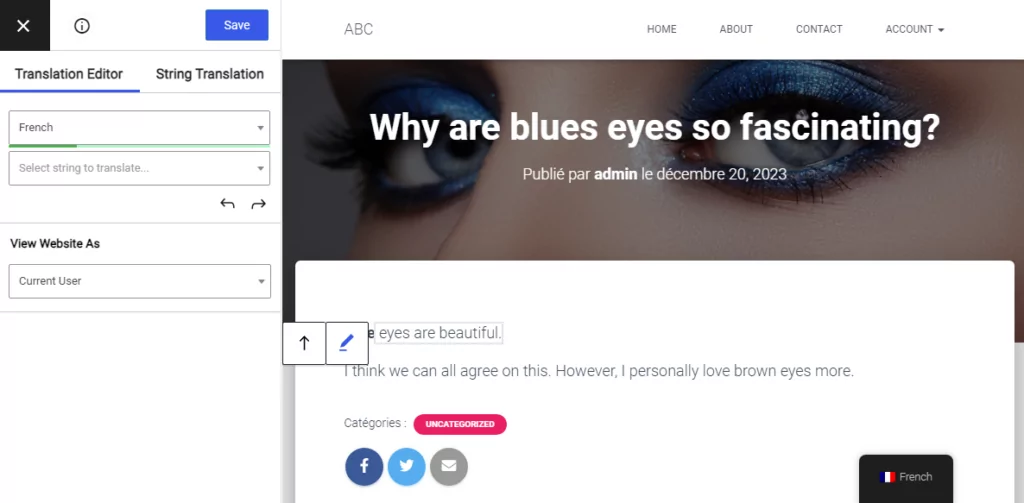
Das Problem ist, dass die französische Übersetzung das Nomen “les yeux” (Augen) vor dem Adjektiv “bleus” (blaue) hat. Die Übersetzung sieht so aus:
“Blaue Augen sind wunderschön.”
Jetzt muss das betonte Wort in der Mitte des Satzes stehen, weil sich dort das Wort “bleus” befindet. Die Struktur dieses Satzes ist für die französische Sprache ein wenig anders, daher wäre es viel einfacher, einfach alles auf einmal.
Hier ist unsere neue Funktion namens Übersetzungsblöcke ist das praktisch. Sie können einfach auf das Zusammenführen Symbol  einen einzigen Block aus dem ganzen Satz zu erstellen.
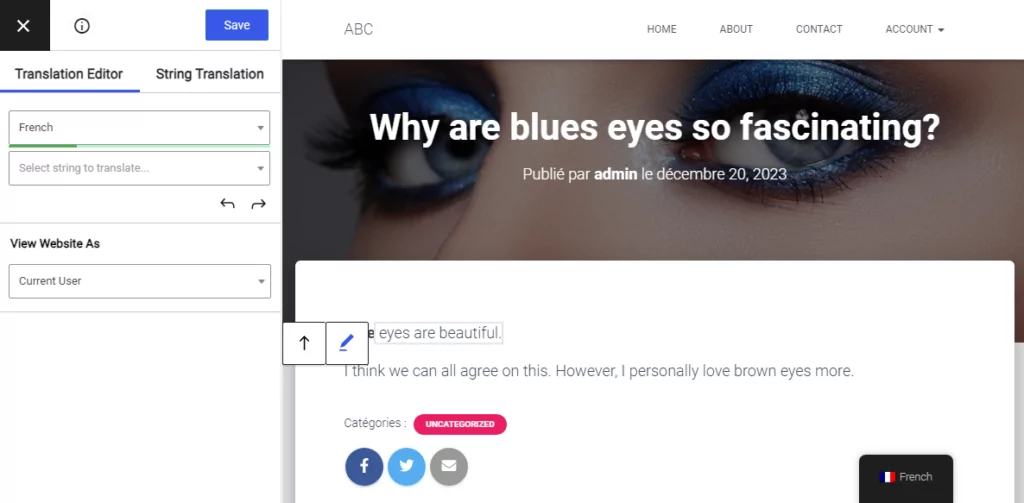
Dann können Sie einfach die Übersetzung für den gesamten Satz hinzufügen und dabei das betroffene Wort genau dort einfügen, wo es hingehört.
Dieses neue Tool erleichtert die Übersetzung größerer Textmengen auf einmal, insbesondere da sich Sprachen in ihrer Struktur stark unterscheiden können. Das Zusammenführen von Texten ist sehr nützlich, wenn der Inhalt Links, unterstrichene Wörter und andere Arten von Formatierungen enthält, die dem Text hinzugefügt wurden.
Wenn Sie sich später entscheiden, diesen Zusammenführungsvorgang rückgängig zu machen, um die kleinen Teile einzeln zu übersetzen, können Sie einfach auf klicken Teilen Button  . Die Übersetzung des gesamten Blocks ist durch das Zusammenfügen jederzeit verfügbar.
Haben Sie noch Fragen zum Übersetzen ganzer Absätze oder größerer Textmengen? Lassen Sie es uns in den Kommentaren unten wissen!
Wenn Sie diesen Beitrag hilfreich fanden, schauen Sie sich bitte unsere an YouTube-Kanal, wo wir ständig kurze und leicht verständliche Video-Tutorials hochladen. Sie können uns auch folgen auf Facebook und Twitter um der Erste zu sein, der jedes Mal Bescheid weiß, wenn wir etwas posten.