
Möchten Sie WordPress in zwei Sprachen nutzen?
Wenn Sie ein zweisprachiges Publikum haben, ist es eine gute Idee, Ihre Inhalte in beiden Sprachen anzubieten, damit alle Ihre Besucher eine großartige Erfahrung machen. Darüber hinaus bietet Ihnen die Übersetzung Ihrer Inhalte auch die Möglichkeit, mehr Menschen in Suchmaschinen und in den sozialen Medien zu erreichen, was ein weiterer großer Vorteil ist.
Während WordPress über keine integrierte Funktion verfügt, die Ihnen hilft Erstelle eine mehrsprachige Website, Sie können ein WordPress-Übersetzungsplugin verwenden, um Ihre Website in zwei Sprachen (oder bei Bedarf sogar in noch mehr Sprachen) anzubieten.
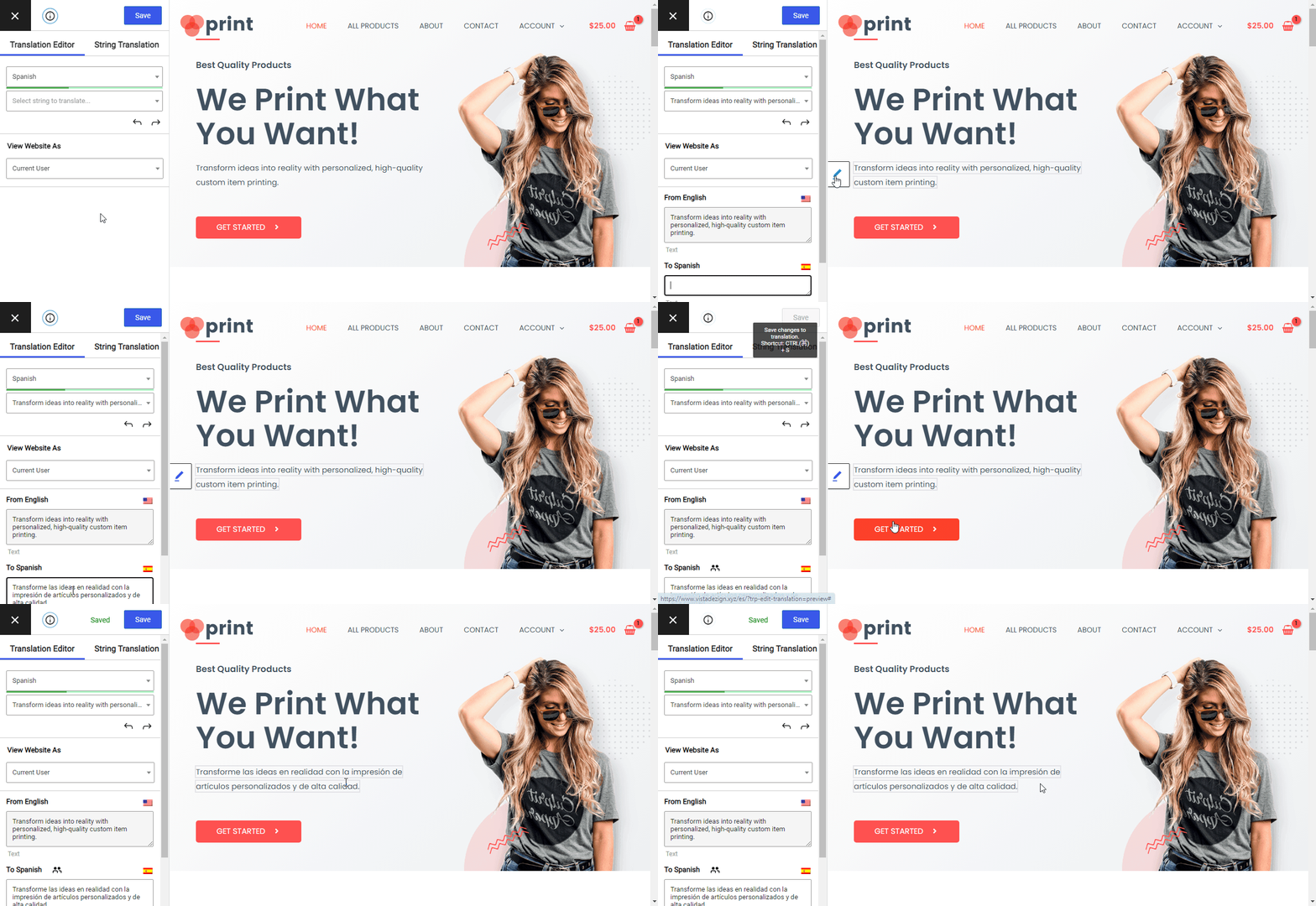
In diesem Beitrag zeigen wir Ihnen Schritt für Schritt, wie Sie WordPress mit dem kostenlosen TranslatePress-Plugin. Am Ende dieses Beitrags werden Sie in der Lage sein, all Ihre Inhalte ganz einfach mit einem einfachen visuellen Editor wie diesem zu übersetzen:
Fangen wir an...
Was Sie anbieten müssen, um WordPress in zwei Sprachen zu betreiben
Wie wir in der Einleitung erwähnt haben, wenn Sie zwei Sprachen im Front-End Ihrer WordPress-Website verwenden möchten (der Teil, den Ihre Besucher sehen werden), benötigen Sie ein WordPress-Übersetzungs-Plugin.
Hinweis – wenn Sie im WordPress-Backend einfach nur zwei Sprachen verwenden möchten, haben wir auch eine Anleitung zur Einrichtung.
TranslatePress ist ein WordPress-Übersetzungsplugin, das in beiden Varianten erhältlich ist eine kostenlose Version auf WordPress.org und eine Premium-Version mit einigen zusätzlichen Funktionen. Damit können Sie 100% der Inhalte Ihrer Website in eine oder mehrere neue Sprachen übersetzen.
Eines der einzigartigsten Merkmale von TranslatePress ist der Editor für visuelle Übersetzungen, den Sie oben gesehen haben.
Eine weitere Besonderheit ist, dass Sie damit 100% der Inhalte Ihrer Website sofort nach der Installation übersetzen können. Dabei spielt es keine Rolle, ob die Inhalte aus dem WordPress-Editor, einem Plugin (wie einem Page Builder) oder Ihr Thema…können Sie das alles direkt im visuellen Editor verwalten.
Während du diesem Tutorial folgen und WordPress mit nur der kostenlosen Version des Plugins in zwei Sprachen übersetzen kannst, bietet die kostenpflichtige Version einige zusätzliche Suchmaschinenoptimierungsfunktionen (SEO), Unterstützung für unbegrenzte Sprachen und viele weitere nützliche Ergänzungen.
TranslatePress Mehrsprachig
Haben Sie noch Fragen dazu, wie Sie Ihre WordPress-Website in zwei Sprachen verfügbar machen? Lassen Sie es uns in den Kommentaren wissen!
Wenn Sie diesen Beitrag hilfreich fanden, schauen Sie sich bitte unsere an YouTube-Kanal, wo wir ständig kurze und leicht verständliche Video-Tutorials hochladen. Sie können uns auch folgen auf Facebook und X um der Erste zu sein, der jedes Mal Bescheid weiß, wenn wir etwas posten.