
Vous voulez utiliser WordPress en deux langues ?
Si vous avez un public bilingue, c'est une bonne idée de proposer votre contenu dans les deux langues afin que tous vos visiteurs vivent une excellente expérience. Au-delà de cela, traduire votre contenu vous donne également la chance de toucher plus de personnes sur les moteurs de recherche et sur les réseaux sociaux, ce qui constitue un autre avantage considérable.
Bien que WordPress ne dispose pas d'une fonctionnalité intégrée pour vous aider créer un site multilingue, vous pouvez utiliser un plugin de traduction WordPress pour proposer votre site en deux langues (ou même plus de langues, si nécessaire).
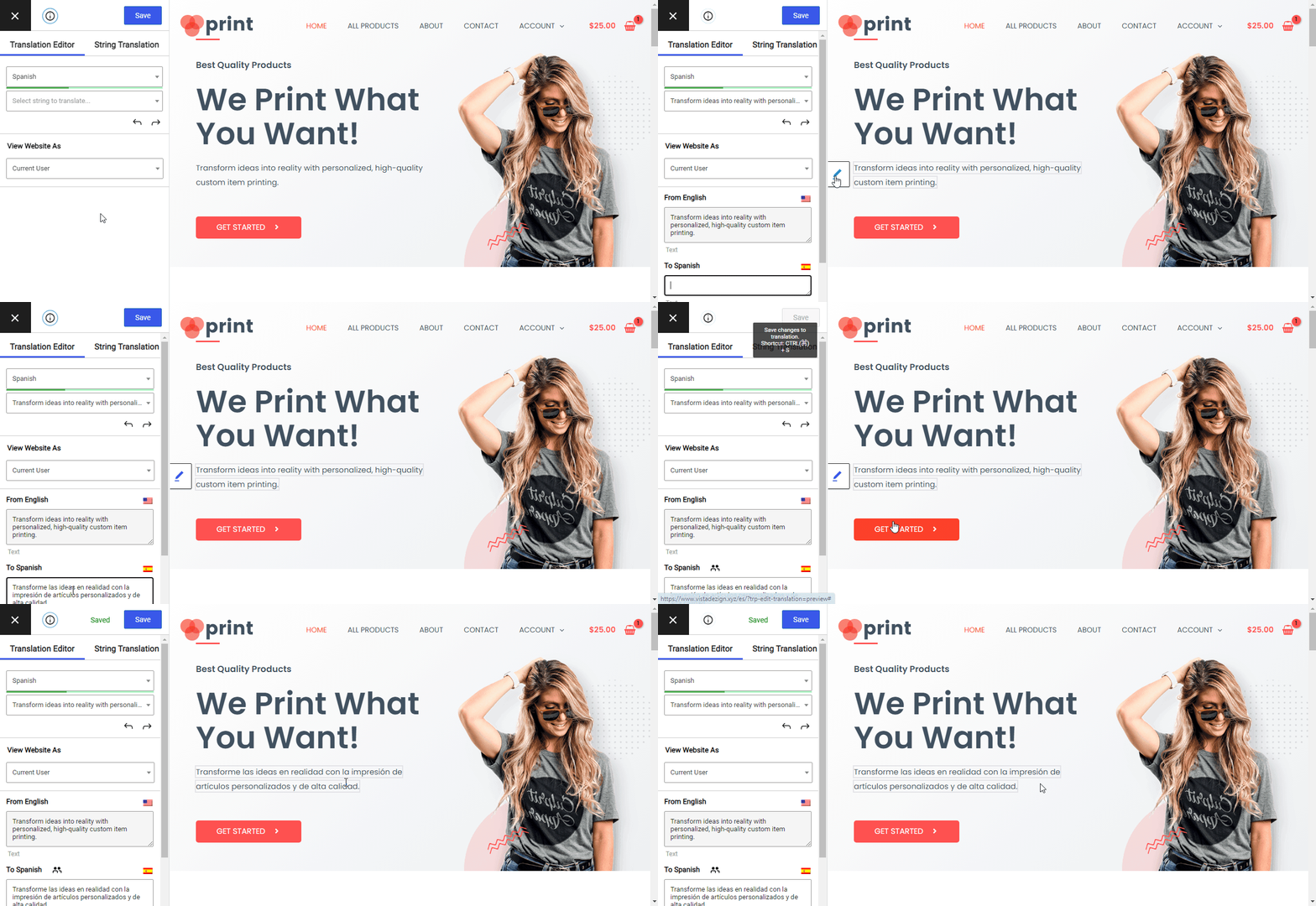
Dans cet article, nous vous montrons étape par étape comment proposer WordPress en deux langues en utilisant le gratuit Plugin TranslatePress. À la fin de cet article, vous serez capable de traduire facilement tout votre contenu à l'aide d'un éditeur visuel simple comme celui-ci :
C'est parti...
Ce que vous devez offrir à WordPress en deux langues
Comme nous l'avons mentionné dans l'introduction, si vous souhaitez utiliser deux langues sur le front-end de votre site WordPress (la partie que vos visiteurs verront), vous aurez besoin d'un plugin de traduction WordPress.
Remarque – si vous souhaitez simplement utiliser deux langues dans le tableau de bord administrateur de WordPress, nous avons également un guide sur la façon de configurer cela.
TranslatePress est un plugin de traduction WordPress qui est disponible dans les deux une version gratuite sur WordPress.org et une version premium avec quelques fonctionnalités supplémentaires. Il vous permet de traduire 100% du contenu de votre site dans une ou plusieurs nouvelles langues.
L'une des particularités les plus remarquables de TranslatePress est son éditeur de traduction visuelle, que vous venez de voir ci-dessus.
Une autre particularité est qu’il vous permet de traduire 100% du contenu de votre site dès son installation. Peu importe que ce contenu provienne de l’éditeur WordPress, d’un plugin (comme un constructeur de pages) ou votre thème...vous pourrez tout gérer directement depuis l'éditeur visuel.
Bien que vous puissiez suivre ce tutoriel et traduire WordPress en deux langues en utilisant uniquement la version gratuite de l'extension, la version payante ajoute des fonctionnalités supplémentaires d'optimisation pour les moteurs de recherche (SEO), la prise en charge d'un nombre illimité de langues et de nombreux autres ajouts utiles.
TranslatePress Multilingue
Avez-vous encore des questions sur la façon de rendre votre site WordPress disponible en deux langues ? Faites-le-nous savoir dans les commentaires !
Si vous avez trouvé ce message utile, consultez notre Chaîne YouTube, où nous téléchargeons constamment des tutoriels vidéo courts et faciles à suivre. Vous pouvez également nous suivre sur Facebook et X pour être le premier à savoir chaque fois que nous publions.