
Dans ce post
La meilleure appli de traduction Shopify n'est pas forcément celle qui traduit ton site le plus vite. La plupart des applis populaires gèrent la traduction auto aujourd'hui, du coup je ferais bien plus gaffe à ce qui se passe après cette première traduction.
Tu peux l'éditer ? Est-ce que le nouveau contenu reste traduit ? Qu'est-ce qui se passe avec ton SEO ? Tu peux gérer la terminologie ? Et, le plus important peut-être, qu'est-ce qui arrive au prix quand ton catalogue grandit ou que tu ajoutes trois langues de plus ?
Ces différences sautent pas toujours aux yeux quand tu regardes six fiches de l'App Store de Shopify qui te promettent toutes une variante de “traduis ta boutique avec l'IA”.”
Du coup, dans ce guide, j'ai comparé six des principales options que je regarderais si je cherchais la meilleure appli de traduction pour Shopify en ce moment :
- TranslatePress;
- Shopify Translate & Adapt;
- Transcy ;
- Weglot;
- GTranslate;
- Labo T.
Je vais regarder ce que chacun fait particulièrement bien, là où je pense que les limites commencent à poser problème, et pour quel type de boutique Shopify je le recommanderais vraiment.
Si tu veux faire court, le voici :
Réponse rapide : TranslatePress est la meilleure appli de traduction Shopify pour les marchands qui veulent des mises à jour automatiques, des modifications manuelles illimitées, un contrôle de la terminologie, un SEO multilingue et des tarifs transparents. Shopify Translate & Adapt est le point de départ gratuit le plus simple pour une ou deux langues. Transcy associe la traduction à la conversion de devises. Weglot est soigné mais peut devenir cher à mesure que ton contenu grandit. GTranslate convient aux boutiques qui privilégient une traduction automatique illimitée avec un petit budget. T Lab vaut le coup d'œil si tu as besoin de traduire des images ou du contenu d'applis tierces.
Voyons pourquoi.
Qu'est-ce qu'il faut chercher dans une appli de traduction Shopify ?
Une appli de traduction Shopify est un outil qui crée et gère du contenu avec des versions traduites de votre boutique Shopify, en combinant généralement la traduction automatique et des outils pour relire, modifier, publier et entretenir ces traductions. En gros, la meilleure appli de traduction Shopify est celle qui correspond à la façon dont fonctionne réellement votre boutique, et pas seulement celle qui a la plus longue liste de fonctionnalités.
Ça a l'air plutôt simple.
Le piège, c'est que deux apps peuvent prétendre “ traduire Shopify ” tout en proposant des façons de faire totalement différentes une fois que tu commences à les utiliser.
Shopify offre maintenant aux marchands de super bases multilingues. Les boutiques sur les abonnements Basic, Grow, Shopify et Advanced peuvent vendre dans jusqu'à 20 langues, tandis que les boutiques Shopify Plus et Enterprise Commerce peuvent en gérer jusqu'à 30. Shopify peut aussi créer des URL localisées et s'occuper des aspects techniques comme hreflang, des URL canoniques et des sitemaps multilingues.
L'appli de traduction repose sur cette base ou, parfois, utilise une autre archi de traduction, et détermine à quel point c'est simple de créer et de gérer le contenu multilingue.
Voilà les trucs que je regarderais avant d'installer quoi que ce soit.
Est-ce que l'appli traduit tout le contenu que tu utilises vraiment ?
Les fiches produits, ce n'est que le début.
Une appli de traduction pour Shopify peut aussi devoir gérer :
- Collections;
- Pages;
- Articles de blog;
- Navigation;
- Chaînes de thème;
- Champs personnalisés;
- Métadonnées SEO;
- les alias d'URL;
- Texte alternatif de l'image;
- Notifications;
- Contenu généré par des apps tierces.
Ce dernier point est super facile à rater.
Shopify précise que le contenu des applis tierces ne se traduit pas automatiquement, sauf si l'appli expose ce contenu via les ressources de traduction prises en charge par Shopify ou des fichiers de locale.
Du coup, si ta vitrine dépend pas mal d'une app d'avis, d'un constructeur de pages, d'un outil d'abonnement, d'une app de packs ou d'un autre système tiers, je testerais ce contenu avant de valider une solution de traduction.
Une super traduction de produit ne sert pas à grand-chose si la moitié des widgets de ta page produit sont encore en anglais.
Est-ce qu'on peut combiner la traduction automatique et manuelle ?
Je choisirais pas entre la trad par IA et la trad humaine, parce que pour la plupart des boutiques e-commerce, tu veux les deux.
La traduction automatique, c'est nickel pour boucler un catalogue à fond. La reédition manuelle te donne la main sur les tournures qui jouent vraiment sur l'image que les clients ont de la boutique.
Par exemple, je laisserais probablement la traduction automatique s'occuper du premier jet pour des centaines de fiches produits simples.
Je serais bien plus chaud pour checker manuellement :
- Page d'accueil;
- Meilleures ventes;
- Appels à l'action importants;
- Terminologie de marque;
- Infos sur la livraison et les retours;
- Des pages de destination qui déchirent.
Et je vérifierais si les traductions manuelles peuvent être protégées contre de futures mises à jour automatiques.
Rien de bien marrant à se faire chier à peaufiner un titre pour se rendre compte qu'il a été écrasé par le process de trad plus tard.
Qu'est-ce qui se passe quand ton magasin change ?
C'est probablement l'une des questions les plus importantes pour une boutique Shopify active.
Les produits changent. Les prix changent. Les collections changent. Les promos vont et viennent. Des nouveaux articles de blog apparaissent. Quelqu'un remarque une coquille dans la description d'un produit à 16h47 un vendredi aprèm.
Ta boutique traduite doit suivre le rythme.
Certaines applis détectent direct les changements de contenu et mettent à jour les traductions. D'autres te demandent de lancer une nouvelle traduction.
Pour une boutique de 30 produits, les deux méthodes se valent.
Pour quelqu'un qui a 3 000 produits et des mises à jour de catalogue chaque semaine, cette différence commence à compter pas mal.
Comment l'app gère le SEO multilingue ?
Le SEO multilingue, c'est le fait de rendre les différentes versions linguistiques de ta boutique compréhensibles et faciles à trouver pour les moteurs de recherche.
Au strict minimum, je jetterais un œil à :
- Des URL spécifiques à la langue;
- Titres SEO traduits ;
- Métas-descriptions traduites ;
- Adresses URL traduites;
hreflang;- Plans du site;
- L'indexation des pages traduites.
Y'a une subtilité super importante propre à Shopify ici.
Shopify gère déjà une bonne partie de la couche technique du SEO international. Quand les langues sont bien publiées, Shopify crée des URL spécifiques par langue et ajoute automatiquement hreflang, et comprend des versions traduites dans ses sitemaps.
Du coup, quand une appli vante son “ SEO multilingue ”, regarde au-delà du simple argument marketing.
Je demanderais si ça te permet vraiment de créer et de gérer le contenu SEO traduit dont Shopify a besoin, si la traduction des URL est comprise dans ton forfait, et si les pages traduites sont vraiment indexables.
Comment est-ce que le sélecteur de langue s'intègre dans la boutique ?
Tes clients ont besoin d'un moyen d'accéder à toutes ces traductions.
Un sélecteur de langue Shopify doit être bien visible, fonctionner nickel sur mobile et s'intégrer naturellement dans ton thème au lieu d'avoir l'air d'un widget random ajouté cinq minutes avant le lancement.
Je vérifierais si l'appli te laisse contrôler :
- Stage;
- Noms de langues;
- Drapeaux;
- Style d'affichage;
- Les couleurs;
- Détection ou redirection automatique.
En général, je préfère afficher le nom des langues plutôt que de me fier uniquement aux drapeaux. Un drapeau représente un pays, alors que les langues dépassent rarement les frontières de manière aussi simple.
Tu as quel contrôle sur le vocabulaire ?
Ça devient étonnamment important une fois que t'as un gros catalogue.
Faut peut-être jamais traduire un nom de produit.
Peut-être qu'il faudrait une seule traduction allemande spécifique pour “subscription” partout.
Peut-être que ton moteur de traduction continue à utiliser trois mots différents pour la même fonctionnalité.
C’est là que la fonction de glossaire devient utile.
Un glossaire de traduction te permet de fixer des règles pour les mots et expressions clés afin que la traduction automatique n'ait pas à deviner la terminologie à chaque fois.
Je n'appellerais pas ça un indispensable pour chaque petite boutique Shopify.
Mais pour une marque avec du vocabulaire produit récurrent, du jargon technique ou plusieurs marchés cibles, j'en voudrais absolument un.
Ça va vraiment coûter combien l'appli quand tu vas grandir ?
C'est le moment où je vais éplucher le tableau des tarifs.
Te limite pas à comparer le premier forfait payant.
Regarde ce qui se passe quand tu :
- Ajoute une autre langue;
- Encore des produits !;
- Ajoute un gros blog ;
- Besoin de fonctionnalités SEO ;
- Tu veux modifier les traductions à la main ?;
- Besoin d'une synchro auto ;
- T'as atteint une limite de mots (ou d'IA).
Certaines appli se font payer surtout par langue. D'autres au nombre de mots traduits. D'autres encore imposent des quotas sur le catalogue ou les fonctionnalités. D'autres mélangent un peu tout ça.
Aucun de ces modèles n'est mauvais d'office.
Je veux juste pouvoir prédire la facture avant que mon magasin devienne dépendant de l'appli.
Comparatif rapide des meilleures applications de traduction pour Shopify
J'ai vérifié les prix ci-dessous par rapport aux offres actuelles de l'App Store Shopify en septembre 2026. Les prix peuvent évidemment changer après la publication.
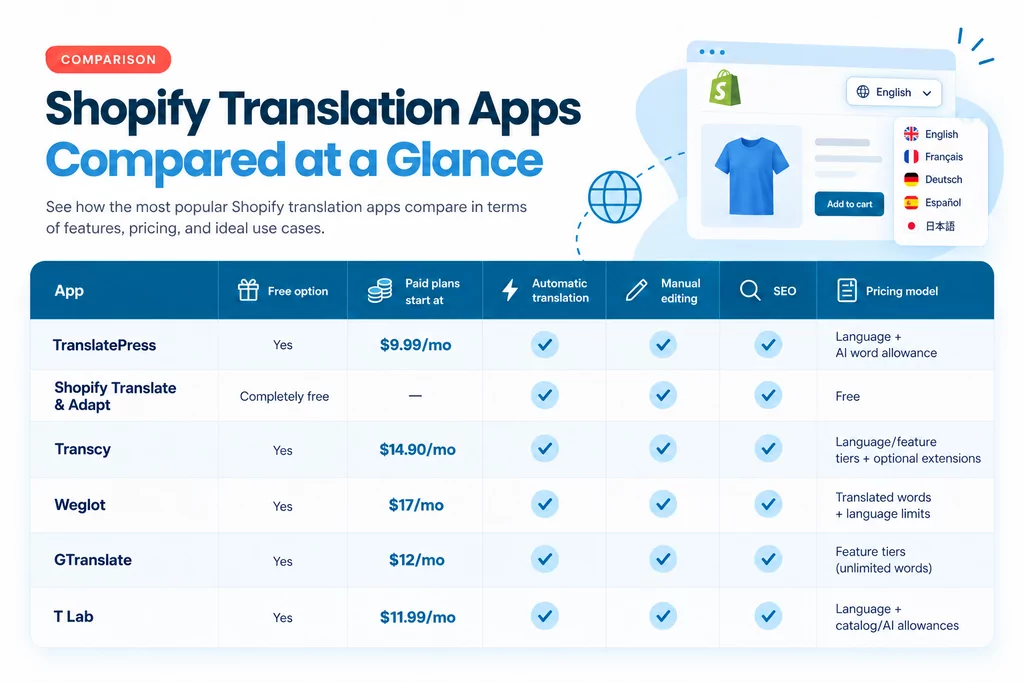
Y a pas une seule appli de traduction Shopify qui soit objectivement la meilleure pour tout le monde.
Et franchement, je trouve que c'est important de le dire avant d'aller plus loin.
Si t'as un petit catalogue, un seul marché international, et que tu prévois pas d'aller plus loin de sitôt, payer une plateforme de traduction blindée de fonctionnalités, c'est peut-être pas la peine.
Si t'as cinq langues, des milliers de produits, une stratégie de contenu active et une équipe qui met constamment la boutique à jour, la solution gratuite de base risque de te donner plus de boulot manuel qu'autre chose.
Du coup, regardons chaque option un peu plus en détail.
1. TranslatePress : Le meilleur en matière de contrôle, de mises à jour automatiques et d'évolutivité prévisible
Je vais commencer par TranslatePress, en partie parce que tu lis ça sur le blog TranslatePress, mais aussi parce que je veux pas faire comme si on n'avait pas notre mot à dire.
Voici donc le critère que j'utilise à la place : dans quels cas TranslatePress a-t-il vraiment plus de sens que les alternatives, et dans quels cas une autre appli reste-t-elle un meilleur choix ?
La version Shopify de TranslatePress est conçue autour d'un flux de travail qui me paraît vraiment logique pour le e-commerce : traduire automatiquement les volumes importants, puis prendre la main manuellement là où les mots comptent vraiment.
TranslatePress utilise une combinaison des meilleurs grands modèles de langage et de moteurs de traduction automatique neuronale pour traduire automatiquement les produits, collections, pages, articles de blog, contenus de thème, notifications et textes alternatifs d'images. Cette appli choisit le moteur de traduction à utiliser selon chaque paire de langues, garantissant ainsi la meilleure précision pour chaque contexte.
Ensuite, les traductions sont stockées directement dans Shopify et diffusées via les URL localisées de Shopify.
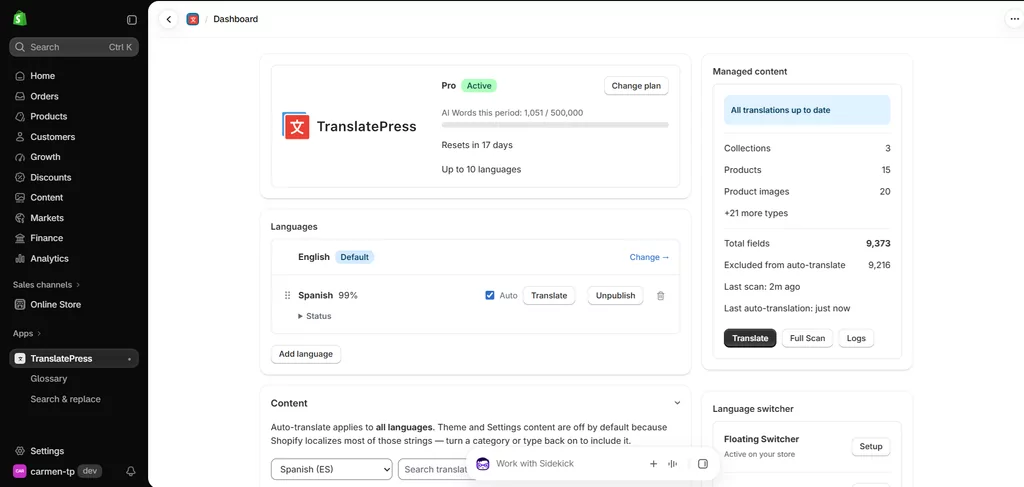
Ça garde aussi les traductions automatiques synchro quand le contenu source éligible change.
Cette dernière partie serait pas mal en haut de ma propre liste.
Je veux pas que “penser à mettre à jour la traduction en espagnol” devienne une corvée de plus à chaque fois que quelqu'un modifie la description d'un produit.
TranslatePress pour Shopify
Ce que j'aime chez TranslatePress
Le mieux là-dedans, c'est l'équilibre entre automatisation et contrôle.
Chaque forfait comprend un nombre défini de langues et de mots d'IA à utiliser pour la traduction automatique. Par contre, les traductions manuelles sont illimitées. Ça change deux choses pour ton process.
Déjà, tu peux modifier une traduction auto puis désactiver la trad automatique pour une chaîne spécifique, ce qui bloque la formulation que tu veux pendant que le reste de la boutique reste en auto. Sur le papier c'est un petit détail, mais ça règle un vrai problème pratique.
Ensuite, les traductions manuelles illimitées signifient aussi que tu peux en créer autant que tu veux à partir de zéro au cas où tu manquerais de mots IA mais que tu voudrais continuer.
La version gratuite comprend aussi SEO multilingue (traduction d'URL, balises hreflang, métadonnées), pour que tu puisses aussi te positionner dans ces nouvelles langues que tu ajoutes, et un très sélecteur de langue personnalisable avec plein d'options.
Les forfaits payants incluent aussi un Glossaire, où tu peux dire à TranslatePress de garder une marque ou de toujours traduire un terme d'une façon spécifique.
Et si une mauvaise traduction traîne déjà partout dans ta boutique, Rechercher et remplacer ça te permet de les trouver et de les corriger en masse.
J'aime bien aussi la grille tarifaire parce qu'on comprend assez vite ce qui change d'un niveau à l'autre :
- Gratuit 1 langue traduite automatiquement et 5 000 mots IA par mois ;
- Débutant : $9.99/mois : 2 langues automatiques et 50 000 mots IA/mois ;
- Professionnel : $25,99/mois : 5 langues auto et 200 000 mots IA par mois ;
- Pro : $49,99/mois : 10 langues auto et 500 000 mots IA par mois.
Y'a pas de frais cachés ni de crédits à l'utilisation, juste une facturation fixe par mois ou par an.
Starter, Business et Pro incluent le glossaire et la fonction Rechercher & Remplacer, tandis que toutes les formules ont droit à la traduction manuelle illimitée et à un sélecteur de langue personnalisable, SEO multilingue, et la synchro auto des trads.
Là où TranslatePress pourrait ne pas être la meilleure solution
L'offre gratuite traduit automatiquement une langue.
Si tout ce qui t'importe, c'est d'ajouter max de langues gratos, tu trouveras sûrement d'autres alternatives dans cette liste qui correspondent mieux à tes besoins.
Et si la conversion de devises est au cœur du problème que tu essaies de résoudre, TranslatePress ne prend pas ça en charge pour l'instant.
À qui je le recommande TranslatePress
Je placerais TranslatePress vers le haut de la liste pour les marchands qui :
- Mets régulièrement à jour les produits ou le contenu ;
- Tu veux une traduction auto sans perdre le contrôle manuel ;
- Il va nous falloir plusieurs langues à mesure que la boutique grandit.;
- Fais gaffe à la cohérence des termes !;
- Tu veux des traductions et des URL natives sur Shopify ?;
- Tu veux du SEO multilingue sans passer à une formule SEO spéciale (c'est compris dans l'offre gratuite) ;
- Je préfère des tarifs clairs dès le départ et qui n'augmentent pas d'un coup quand la boutique grandit.
Ça m'interpelle particulièrement pour les boutiques qui en ont fini avec le “ traduire une fois pour toutes ” et qui doivent maintenant gérer un catalogue multilingue.
C'est là que le process commence à compter autant que le moteur de traduction lui-même.
2. Shopify Translate & Adapt : La meilleure option gratuite pour les boutiques plus simples
Avant de payer pour quoi que ce soit, je pense que tous les marchands Shopify devraient au moins comprendre ce que Shopify leur donne déjà gratuitement.
Translate & Adapt est l'appli de traduction officielle de Shopify, et c'est un bon point de départ.
Ça te permet de traduire automatiquement jusqu'à deux langues, d'en rajouter manuellement autant que tu veux, de les modifier via une interface côte à côte, et d'adapter ton contenu pour différents marchés qui utilisent la même langue.
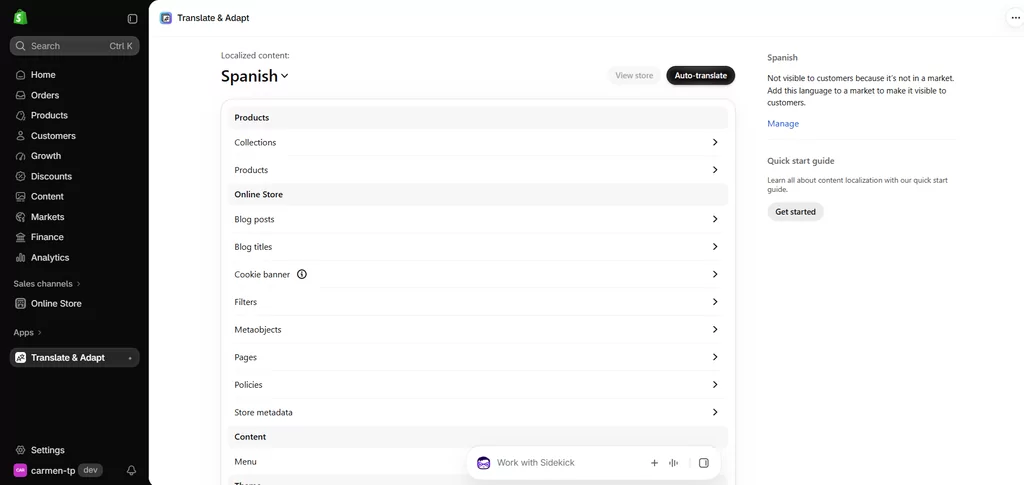
Ce que j'aime avec Translate & Adapt
Le plus gros avantage, c'est la simplicité.
Ça vit direct dans Shopify, ça utilise le système de traduction de Shopify et ça marche nickel avec Markets.
Les traductions faites avec Translate & Adapt restent aussi sur Shopify si tu désinstalles l'appli. Shopify dit clairement que la désinstallation de Translate & Adapt ne supprime pas les traductions créées.
Tu profites aussi de l'infrastructure SEO multilingue de Shopify, y compris des URL localisées, hreflang, des sitemaps, et la possibilité de traduire les slugs d'URL pris en charge et les champs SEO personnalisés.
Où Translate & Adapt commence à montrer ses limites
La limite évidente, c'est le blocage à deux langues pour la traduction automatique. Tu peux en rajouter d'autres à la main, mais la trad auto s'arrête à deux.
Y a une autre limite à laquelle je ferais encore plus gaffe si ta boutique bouge souvent.
Le nouveau contenu n'est pas traduit en continu en arrière-plan.
Shopify dit que quand tu ajoutes du nouveau contenu ou que tu modifies le contenu source, tu dois retourner sur Translate & Adapt et relancer la traduction auto pour chaque langue.
Pour un catalogue stable, ça passe presque inaperçu. Mais pour un magasin qui sort des produits chaque semaine, je vois bien ça devenir le genre de tâche dont tout le monde suppose qu'un autre a pensé à s'en occuper.
En plus, y a du contenu qui passe pas, et le contenu tiers doit utiliser des ressources traduisibles ou des fichiers de langue pris en charge par Shopify.
Récent Avis sur l'App Store montre que la limite à deux langues et la cohérence des traductions sont des plaintes récurrentes chez les marchands, tout comme la qualité de la traduction, même si l'appli garde une bonne note globale.
Du coup, je qualifiais pas du tout Translate & Adapt de mauvaise appli. Je dirais plutôt que c'est une bonne base gratuite que certaines boutiques finissent par dépasser.
À qui je recommanderais Translate & Adapt
Je l'utiliserais si :
- T'as juste besoin d'une ou deux langues traduites automatiquement ;
- Ton catalogue ne change pas super souvent ;
- Tu veux rien dépenser ;
- Tu préfères rester totalement dans les outils natifs de Shopify ;
- T'es chaud pour faire un peu plus de maintenance manuelle.
Pour une petite boutique, ça peut carrément suffire.
3. Transcy : Le top pour combiner traduction, conversion de devises et géolocalisation
Transcy adopte une approche un peu plus large qu'une simple application de traduction..
En plus de la traduction, ça met grave l'accent sur les fonct°,nalités de vente internationale comme les devises, la géolocalisation, le changement de langue/devise, les images traduites et la traduction d'applis tierces.
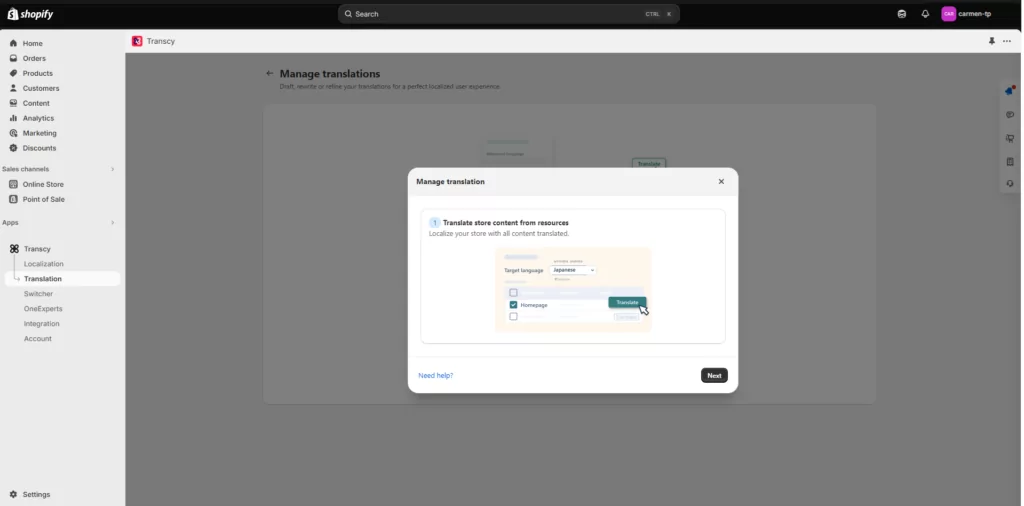
Ses gros points forts, c'est la géolocalisation, l'adaptation des images et la conversion de devises en temps réel pour plus de 169 monnaies.
Cette combinaison rend Transcy super intéressante si ton projet multilingue et ta stratégie multi-devises ne font en fait qu'un.
Ce que j'aime chez Transcy
Bien que le plan gratuit te limite à une seule langue traduite automatiquement et à une seule devise, il n'y a aucune limite de mots ou de vues. Tu peux donc rester sur le plan gratuit indéfiniment tant que tu n'as besoin que d'une seule langue, peu importe la quantité de contenu ou de produits que tu ajoutes au fil du temps.
C'est un point d'entrée plutôt sympa.
Le payé Local Plus le forfait commence à $14,90/mois et ajoute l'édition manuelle de traduction pour une langue, des moteurs de traduction par IA, du SEO multilingue, la personnalisation du sélecteur et d'autres fonctionnalités.
Coûts régionaux $29/mois et ça s'étend à trois langues, deux langues modifiables, trois devises, un glossaire de 20 termes, des processus de traduction automatisés et un peu de localisation d'images. Continental est $69/mois avec des forfaits plus généreux et des fonctionnalités en plus.
Où je regarderais de plus près avant de choisir Transcy
Transcy est puissant, mais sa grille tarifaire fait moins “ un seul prix et c'est réglé ” que ça n'en a l'air au début.
Le plan en soi peut poser des limites sur les produits, les règles de traduction auto, les entrées de glossaire, la localisation d'images et les ressources du genre.
Transcy vend aussi des extensions de quota mensuelles en option pour des trucs genre produits traduits, règles de traduction auto, images, règles de glossaire et synchro programmée. Ça ne rend pas les tarifs injustes pour autant.
Ça veut dire que je vais simuler les besoins réels de ma boutique avant de choisir une formule, au lieu de regarder seulement le prix mensuel affiché.
Le forfait gratuit n'inclut pas non plus la modification manuelle des traductions ; ça commence avec Local Plus, et c'est aussi assez limité sur les forfaits payants.
À qui je recommanderais Transcy
Je trouve que Transcy c'est le meilleur choix si tu veux :
- Traduction + Conversion de devises + Géolocalisation + Changement de langue/devise + Traduction d'applications tierces
...le tout géré via une seule application de traduction.
Si la devise et la traduction sont deux sujets distincts pour ta boutique, je comparerais plus attentivement le processus de traduction lui-même avec TranslatePress ou T Lab avant de me décider.
4. Weglot : Le top pour un flux de traduction pro quand le budget n'est pas un problème
Weglot est sans doute l'un des noms les plus connus de la traduction de sites web, car c'est un produit multiplateforme.
Il y a la traduction automatique, l'édition manuelle, un glossaire, la collaboration d'équipe, la commande de traduction pro, des prompts IA pour la voix de la marque et des outils SEO multilingues.
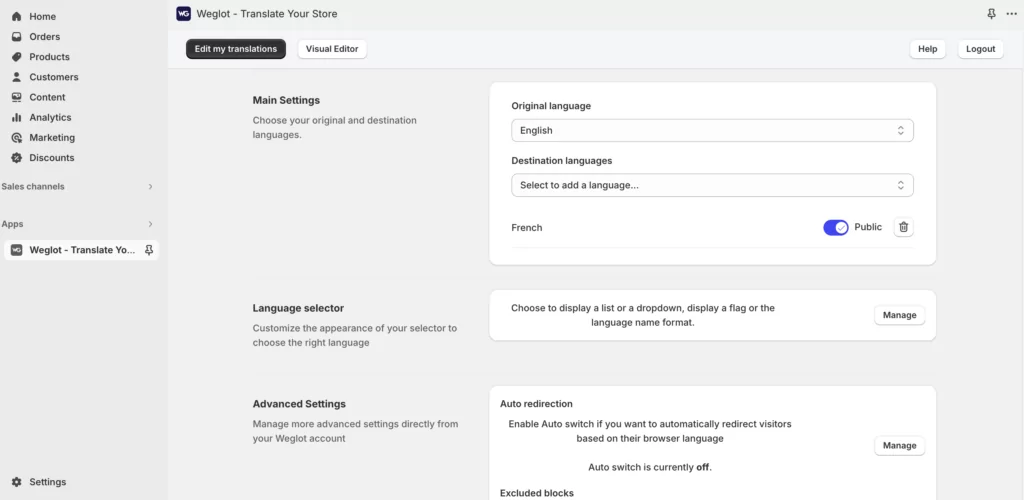
Pareil que TranslatePress, ça couvre hreflang, métadonnées traduites, URLs propres, traduction automatique, révision manuelle, règles de glossaire et indexation SEO. Les principaux points de différence par rapport à la concurrence sont les fonctionnalités de collaboration et les options de prompt IA.
J'aurais aucun mal à recommander Weglot rien que pour ses fonctionnalités.
Le truc sur lequel je réfléchirais bien, c'est le modèle de prix.
Ce que j'aime avec Weglot
Le processus de traduction est bien rodé.
Tu peux générer des traductions auto, les retoucher à la main, bosser en équipe, fixer des règles de glossaire, et même commander de la traduction pro si besoin. Tout ça hyper intuitif et facile à configurer.
Ce flux de travail, c'est aussi un truc que les avis récents sur Shopify encensent à répétition.
Pourquoi Weglot peut devenir cher
Weglot base en partie ses tarifs sur les nombre total de mots traduits.
Le forfait gratuit comprend une langue et 2 000 mots traduits.
Les tarifs payants actuels commencent à :
- Débutant : $17/mois : 1 langue, 10 000 mots traduits !;
- Pro : $32/mois : 3 langues, 50 000 mots ;
- Pro : $87 / mois : 5 langues, 200 000 mots.
- Avancé $299/mois : 10 langues, 1 000 000 de mots.
- Prolongé : $699/mois : 20 langues, 5 000 000 de mots.
Weglot calcule la limite en se basant sur ton contenu d'origine multiplié par les langues traduites. Leur propre doc donne l'exemple d'un site de 8 000 mots traduit en trois langues qui compte pour environ 24 000 mots traduits. Les métadonnées SEO comptent aussi pour ce total.
C'est un peu pareil avec les mots d'intelligence artificielle de TranslatePress. Par contre, les prix montent en flèche assez vite quand on avance dans les abonnements.
Du coup, un catalogue qui s'élargit en plus de plusieurs langues, ça peut te faire grimper les tarifs super vite et plomber ton budget en un rien de temps.
Weglot propose bien une option de mise à niveau auto quand tu atteints la limite de mots. Le truc important, c'est qu'on peut l'activer ou la désactiver, du coup je dirais pas qu'une mise à niveau est inévitable. Si l'auto-upgrade est désactivé, les nouveaux mots détectés s'arrêtent d'être traduits une fois que la limite du forfait est atteinte.
C'est probablement l'appli pour laquelle je te conseille le plus de calculer ton vrai volume de contenu avant de t'inscrire.
À qui je conseillerais Weglot
Je considererais Weglot si :
- Tu veux des fonctionnalités collaboratives ;
- T'as besoin d'intégrer une traduction humaine pro dans ton process ;
- Tu veux personnaliser la voix de ta marque ;
- Le budget n'est pas un problème.
Pour une opération multilingue à forte valeur ajoutée, le coût peut se justifier. Pour une boutique remplie de contenu avec un gros blog et plusieurs langues, je ferais d'abord les calculs.
5. GTranslate : le top pour la traduction automatique illimitée sans se ruiné
GTranslate a une proposition de valeur super différente.
Son forfait gratuit offre la traduction automatique pour toutes les langues, avec un nombre illimité de mots et de pages vues. Ça a l'air presque exagérément généreux par rapport à la concurrence.
Mais y a un piège. La version gratuite est bien plus adaptée pour de l'accessibilité de base que pour une stratégie e-commerce multilingue bien gérée.
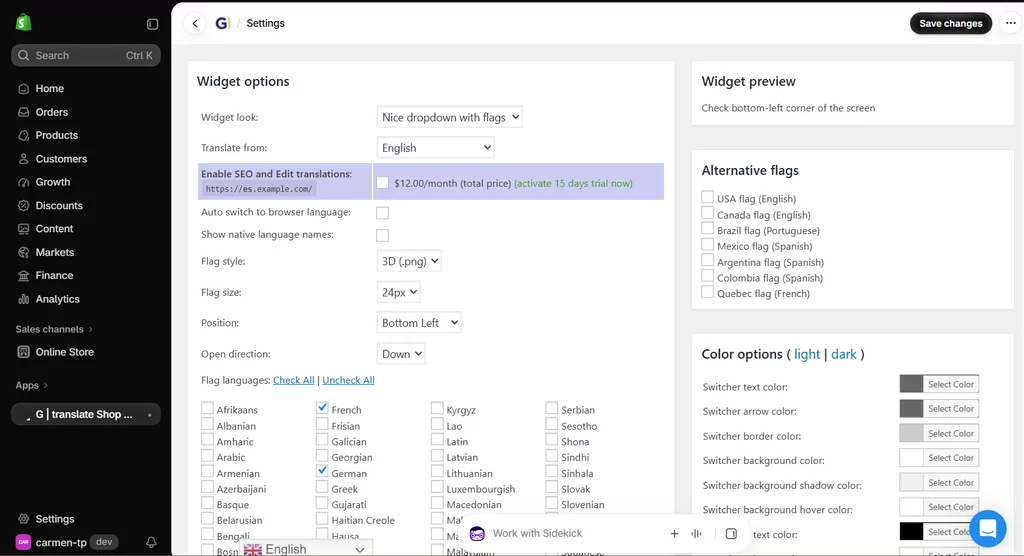
Ce que j'aime avec GTranslate
Si ton but principal c'est juste de donner aux visiteurs un moyen de capter ton site dans une autre langue, la formule gratuite assure un max.
Y'a pas de quota de mots traduits à surveiller.
Les abonnements payants sont aussi plutôt simples :
- Startup bilingue : $12/mois : une langue en plus, révision de traduction, indexation pour les moteurs de recherche ;
- Startup : $25/mois : toutes les langues, révision, indexation SEO ;
- Entreprise : $35/mois : ajoute la traduction d'URL.
- Entreprise $50/mois : ajoute l'hébergement de langues.
Sa techno de proxy peut aussi traduire une bonne partie du contenu généré par des applis tierces, ce qui peut être super utile pour les boutiques qui utilisent un tas d'applis.
Là où l'appli coince
Sur la version gratuite, t'as pas le droit de modifier les traductions à la main ni d'avoir des pages traduites indexées. Et franchement, c'est deux gros points noirs.
Si quelqu'un traduit une page juste pour la comprendre, ça peut le faire, mais si j'investis dans le trafic de recherche organique en français et que je veux que chaque message produit important utilise les mots que j'ai choisis, ça ne suffit pas.
C'est pour ça que je verrais l'offre gratuite de GTranslate comme une couche multilingue vite fait plutôt que comme le setup final que je choisirais pour un marché international stratégique.
À part ça, le tableau de bord principal et l'interface globale font assez fouillis et c'est clairement le moins intuitif du lot.
À qui je conseillerais GTranslate
GTranslate a du sens quand :
- Tu veux plein de langues rapidement ?;
- La traduction automatique illimitée c'est important, mais pas la révision manuelle ;
- Ton budget est serré ;
- Tu veux bien passer sur un plan payant pour l'édition et le SEO.
Si le référencement naturel est important, je zapperais l'évaluation de la formule gratuite pour comparer directement les abonnements payants.
6. T Lab : la meilleure alternative qualité-prix avec un plan gratuit super généreux
T Lab est une autre appli bien établie sur l'App Store de Shopify, avec une offre gratuite généreuse et un rapport qualité-prix correct.
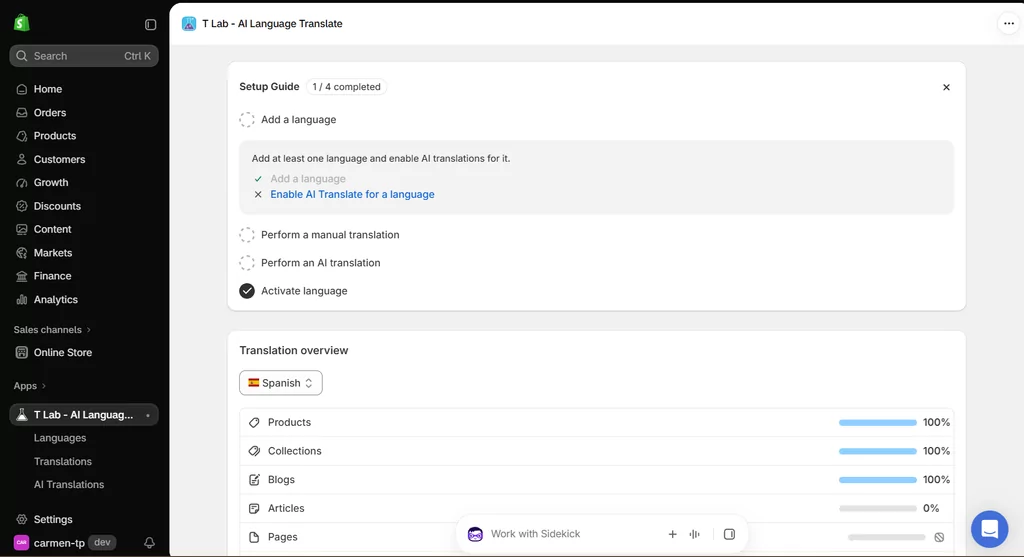
Tu peux ajouter jusqu'à 20 langues, tu traduis l'un d'eux automatiquement, tu traduis manuellement sans limite, tu lances des traductions IA en gros, tu traduis des images et du contenu d'applis tierces, et tu utilises un glossaire. Le quota d'IA gratuit inclus couvre jusqu'à 500 produits, 20 collections et 20 articles.
C'est une super offre gratuite.
Ce que j'aime chez T Lab
Le parcours de mise à niveau est aussi plutôt clair.
Les plans actuels sont :
- Pro : $11.99/mois : Traduction par IA pour max 5 langues et des quotas de contenu plus larges ;
- Professionnel : $29,99/mois : Traduction par IA en 10 langues, multi-devises, glossaire illimité, image, application tierce et traductions personnalisées ;
- Premium : $59.99/mois : Traduction IA pour 20 langues, pilote automatique IA, et possibilité de gérer les moteurs de traduction DeepL, Google et ChatGPT.
L'appli propose aussi la synchro auto, la traduction SEO, des URL traduites, la gestion de glossaire, la détection de langue, la traduction d'images et la traduction d'applis tierces parmi ses fonctionnalités.
Sa note actuelle sur l'App Store est aussi super bonne, autour de 4,9 étoiles.
En quoi l'approche de T Lab est différente
T Lab, c'est un bon produit, et je vais pas chercher un point faible dramatique juste pour remplir cette section.
Le truc principal à mater de près, c'est comment ses quotas sont foutus. Plutôt qu'un forfait mensuel de mots en IA, T Lab base ses limites sur le nombre de produits, collections, articles et langues gérées par l'IA. Selon la taille de ton catalogue et comment c'est organisé, ce modèle peut t'aller nickel — ou alors ça demande de faire un petit calcul au départ pour être sûr que la bonne formule couvre tout ce dont tu as vraiment besoin.
Je vérifierais aussi si l'option de verrouiller les chaînes modifiées manuellement pour éviter qu'elles ne soient retraduites automatiquement est dispo sur le forfait que tu regardes, c'est un détail pratique à confirmer avant de t'engager.
À qui je recommanderais T Lab
T Lab est un super candidat si :
- Tu veux une offre gratuite super puissante ;
- Ton catalogue rentre sans problème dans les limites de contenu ;
- T'as besoin d'une traduction d'image ou d'une appli tierce ;
- Le multi-devises t'est aussi utile.
Quelle appli de traduction Shopify choisir ?
Trouver la meilleure appli de traduction pour Shopify devient beaucoup plus simple dès que tu arrêtes de comparer chaque fonctionnalité de la même manière et que tu commences à prioriser celles que ta boutique va vraiment utiliser.
Si t'en es là et que les six applis commencent à se ressembler, je ferais mon choix en fonction de ta vraie boutique plutôt que d'une autre liste de fonctionnalités.
Choisis Shopify Translate & Adapt si tu veux la configuration gratuite la plus simple
Si t'as juste besoin d'une ou deux langues traduites automatiquement, et que ta boutique change pas tout le temps, je commencerais par là.
Tu te rendras peut-être compte que t'as pas du tout besoin d'une appli payante. Et je suis carrément pour l'idée de pas acheter de logiciels dont tu n'as pas vraiment besoin.
Choisis Transcy si la traduction et la conversion de devises vont de pair
Si tu veux de la géolocalisation, du changement de devise, de la localisation d'images et de la traduction au même endroit, Transcy vaut vraiment le détour. Pense juste à calculer tes limites de ressources et les extensions optionnelles avant de choisir ton forfait.
Choisis Weglot si le workflow compte plus que le budget
Weglot est bien léché, mature et gère super bien la traduction.
Je calculerais d'abord le nombre total de mots que tu dois faire traduire, surtout si tu as un gros catalogue ou un blog super riche en contenu.
Choisis GTranslate si tu veux un max de couverture automatique pour un minimum de frais
Le forfait gratuit illimité est dur à battre pour ce qui est de la couverture brute de traduction automatique.
Mais si tu te soucies du référencement naturel, du contrôle qualité manuel et d'une haute précision de traduction, compare plutôt ses abonnements payants au lieu de juger l'appli sur la version gratuite.
Choisis T Lab si tu veux une alternative riche en fonctionnalités et super rentable
T Lab te donne plein de trucs avant même que tu paies.
C'est particulièrement séduisant pour les marchands qui ont besoin de traduire des apps tierces, d'images, de plusieurs langues et de plein d'options de traduction manuelle.
Choisis TranslatePress si tu veux le meilleur équilibre entre automatisation et contrôle
C'est là-dessus que je miserais perso pour une boutique qui grandit. Pas parce qu'elle a le plus de fonctionnalités, mais parce que tout s'emboîte de façon logique.
La traduction automatique par IA gère le boulot répétitif. Le contenu source mis à jour peut rester synchronisé. Les traductions manuelles sont illimitées. Les modifs individuelles peuvent être verrouillées pour que l'automation ne les écrase pas. Un glossaire gère la terminologie future. Rechercher et Remplacer corrige la terminologie existante. Et les traductions vivent directement dans Shopify au lieu d'arriver via des pages proxy.
Côté prix, c'est aussi hyper simple à prévoir : tu décides combien de langues tu veux faire traduire automatiquement et quel volume de traduction IA il te faut, puis tu choisis la formule qui correspond.
Pour le genre de e-commerçant qui en a assez à faire du multilingue pour lire un comparatif aussi long, cette combinaison est dure à battre.
Pourquoi il ne faut pas choisir uniquement selon la formule gratuite
Il y a une erreur que je ferais vraiment tout pour éviter.
Ne compare pas ce que chaque appli te file le premier jour. Compare à quoi chacune ressemble dans six ou douze mois.
Imagine que ton magasin a en ce moment :
- 250 produits;
- 2 langues de plus ;
- Un petit blog;
- Une seule personne qui gère le site.
Maintenant, imagine ça avec :
- 1 500 produits;
- 5 langues ;
- Du nouveau contenu toutes les semaines !;
- Une équipe marketing;
- Campagnes de référencement local;
- La terminologie qui a déjà été vérifiée manuellement.
Est-ce que la même appli aurait encore du sens ? C'est le genre de situation que j'utiliserais pour comparer les forfaits.
Changer de système de traduction, ce n'est pas forcément impossible, surtout quand les traductions sont enregistrées via le framework natif de Shopify, mais t'as quand même pas envie de recréer des processus, des sélecteurs, des règles de terminologie, des workflows SEO et les habitudes de ton équipe pour rien.
L'appli la moins chère aujourd'hui peut te coûter cher si tu dois la remplacer plus tard.
Foire aux questions sur les applis de traduction Shopify
C'est quoi la meilleure appli de traduction pour Shopify ?
Y a pas une seule meilleure app pour toutes les boutiques.
Pour une boutique simple qui a besoin de deux langues traduites automatiquement, Shopify Translate & Adapt est dur à battre parce que c'est gratuit.
Pour les marchands qui veulent un meilleur cocktail de mises à jour automatiques, d'éditions manuelles illimitées, de gestion de la terminologie, de traductions Shopify natives et de référencement multilingue, je choisirais TranslatePress.
T Lab est aussi une option super intéressante niveau prix, tandis que Weglot plaît bien aux e-commerçants qui cherchent un process de gestion des trads bien rodé.
C'est quoi la meilleure appli de traduction gratuite sur Shopify ?
Shopify Translate & Adapt est probablement l'option gratuite la plus simple parce qu'elle peut traduire automatiquement jusqu'à deux langues et permet des traductions manuelles illimitées.
T Lab a l'un des forfaits gratuits tiers les plus généreux, avec jusqu'à 20 langues dispo pour la traduction manuelle et la traduction IA pour une langue.
TranslatePress Free traduit automatiquement une langue avec 5 000 mots par IA par mois et inclut la traduction manuelle illimitée, le référencement multilingue, un sélecteur de langue et la synchronisation automatique des traductions.
Du coup, le “ meilleur ” dépend si tu préfères deux langues auto gratuites, un support plus large pour les langues manuelles, ou une gestion continue de la traduction.
Est-ce que Shopify peut traduire une boutique automatiquement ?
Shopify gère les boutiques multilingues, mais il faut quand même choper les traductions via une appli ou importer les données.
Leur app native Translate & Adapt traduit automatiquement jusqu'à deux langues. D'autres applis peuvent augmenter ce nombre ou offrir un autre flux de travail automatisé.
Quelle est la meilleure appli de traduction Shopify pour le SEO ?
Je me prendrais moins la tête sur le fait que l'appli se vante de faire du “SEO” et je regarderais plutôt ce qu'elle gère vraiment.
Shopify propose déjà des fonctionnalités SEO techniques internationales importantes comme des URL localisées, automatique hreflang, des URL canoniques et des sitemaps multilingues.
Ton appli de traduction devrait compléter ça en te donnant du contenu bien traduit, des métadonnées SEO, des identifiants d'URL quand c'est possible, et des versions linguistiques indexables.
TranslatePress, Weglot, Transcy, T Lab, Shopify Translate & Adapt et les abonnements payants de GTranslate offrent tous des niveaux variés de support SEO multilingue.
La principale exception dans cette comparaison, c'est GTranslate Free, où les pages traduites ne sont pas faites pour être indexées par les moteurs de recherche.
Est-ce que Weglot vaut le coup pour Shopify ?
Ça peut l'être.
Weglot a un des flux de traduction les plus matures de ce comparatif.
La décision dépend surtout du prix.
Comme son prix dépend du nombre de mots traduits et de langues, je ferais une estimation pour ta boutique avant de choisir. Un site source de 8 000 mots traduit en trois langues, ça fait environ 24 000 mots traduits selon l'exemple de Weglot.
Pour un magasin assez petit, ça peut tout à fait le faire.
Pour un catalogue super grand avec plein de langues, les calculs sont pas les mêmes.
Est-ce que Shopify Translate & Adapt peut traduire plus de deux langues ?
Tu peux traduire manuellement plus de deux langues, mais sa fonction de traduction automatique se limite à deux.
Si tu as besoin d'une traduction automatique pour un plus grand nombre de langues, il te faudra une application de traduction Shopify tierce compatible.
Est-ce que les applis de traduction Shopify peuvent traduire le contenu des applis tierces ?
Parfois.
Ça dépend à la fois de l'appli de traduction et de l'appli tierce.
Shopify explique que Translate & Adapt peut fonctionner avec du contenu tiers quand ce dernier est accessible via les types de ressources traduisibles pris en charge par Shopify ou les fichiers de langue de la vitrine.
Des applications comme TranslatePress, Transcy, T Lab et GTranslate proposent toutes des fonctionnalités de traduction d'applications tierces.
Peu importe l'option que tu choisis, je testerais tes widgets tiers les plus importants avant le lancement au lieu de partir du principe que chaque chaîne générée par l'app sera couverte.
Est-ce que changer d'appli de traduction va supprimer mes traductions Shopify actuelles ?
Pas forcément, mais ça dépend de comment l'appli stocke et gère les traductions.
Shopify confirme que les traductions créées avec Translate & Adapt restent après la désinstallation de l'appli.
TranslatePress stocke aussi ses traductions de manière native dans Shopify.
Les applis qui utilisent des archi de traduction externes ou basées sur des proxys peuvent réagir différemment, du coup je jetterais un œil à la doc sur l'export, la migration et la désinstallation avant de changer.
Quelle appli de traduction Shopify je devrais choisir ?
Il y a de bien meilleures options de traduction pour Shopify maintenant qu'il y a quelques années, ce qui est une bonne nouvelle mais ne rend pas forcément le choix plus facile. La plupart d'entre elles peuvent traduire ton catalogue de produits automatiquement, et ce n'est plus la partie intéressante. Je regarderais plutôt ce qui se passe après.
C'est facile de corriger un truc ? Il se passe quoi si le produit d'origine change ? Tu peux empêcher qu'on traduise le nom de ton produit ? Une traduction que tu as peaufinée à la main, elle est en sécurité ? Google peut indexer la bonne version linguistique ? Qu'est-ce qui arrive à ta facture mensuelle si tu ajoutes trois marchés de plus ?
Ces questions sont bien plus utiles pour trouver la meilleure appli de trad Shopify pour ta boutique que de simplement comparer quel outil traduit le plus vite.
Pour une petite boutique Shopify avec une ou deux langues en plus, je commencerais vraiment par Shopify Translate & Adapt et je verrai bien jusqu'où la version gratuite me mène.
Si je voulais de la traduction, des devises et de la géolocalisation dans un seul outil, je regarderais de près Transcy.
Si le budget n'était pas un problème pour un flux de travail multilingue bien rodé, Weglot serait dans les finalistes.
Pour de la traduction automatique très large et pas chère, je pencherais pour GTranslate, tandis que T Lab est probablement la meilleure alternative ici si je devais choisir principalement en fonction du rapport qualité-prix et des fonctionnalités.
Mais pour une boutique en pleine expansion où je voulais que la version multilingue ait l'air soignée plutôt que simplement traduite par une machine une bonne fois pour toutes, je choisirais TranslatePress.
Le combo que j'aime bien est assez simple : automatiser le boulot répétitif, garder le contenu neuf et mis à jour synchro, éditer autant que tu veux, protéger les tournures que tu as déjà perfectionnées, et utiliser des règles de glossaire quand y a des termes pour lesquels tu veux pas que l'IA fasse à sa sauce.
Ça t'apporte de l'automatisation sans pour autant perdre le contrôle, et pour la traduction e-commerce, je pense que c'est le bon équilibre à chercher.


