
In this post
In this post
Running a global WooCommerce store means you face a set of SEO decisions that a content site never has to make. For starters, the moment you add a second language, you need to tell search engines which version of every page belongs to which audience. It means dedicated WooCommerce international SEO strategies should be your marketing ‘bread and butter’.
“Every page” for your store means far more than most expect and getting it wrong costs you rankings and conversions. I’m going to discuss the decisions you’ll want to make in order. By the end you’ll have a clear picture of what your WooCommerce SEO implementation needs to look like.
Why all WooCommerce stores need international SEO strategies
A content site going multilingual typically has a home page, a blog (complete with a collection of posts), and maybe some contextual Contact and About pages. A WooCommerce store has all of that, plus:
- Product pages and variable product pages for every item in your catalog.
- Product category pages and tag archives.
- The
/shop/base page. - The cart, the checkout, and the customer account area.
Google’s hreflang documentation is clear: every URL that exists in more than one language or region needs a hreflang annotation pointing to all of its equivalents.

Miss the cart or the checkout and you create a situation where a customer lands on a localized product page, adds to cart, and then falls into an English-only checkout flow. That’s both a conversion and an indexing problem.
The other distinction is that WooCommerce product data is dynamic. Attributes, variations, and stock status all generate output on the front end. As such, a translation solution for WooCommerce needs to capture that output. This coverage matters because an incomplete translation creates incomplete hreflang tags.
1. How target market decisions shape your hreflang setup
Before you touch a plugin setting though, you need to decide which markets you’re entering. That decision is the direct input to your hreflang configuration.
If you’re entering France and Germany, you need fr-FR and de-DE entries on every product page, category page, cart, and checkout. If you’re entering both the United States and Canada, you need en-US and en-CA as two separate entries, even though the language is the same.
Google distinguishes between multi-regional and multilingual sites, and the en-US / en-CA case is a classic example. Your pricing, shipping options, promotional messaging, and product availability will differ between those two markets, and your hreflang tags need to reflect that.
Typically, there are a few factors when expanding into a new market: language, infrastructure, payment methods, legal requirements, and cultural norms. Each factor can mean different things for your hreflang tags.
Where it gets more complex: border regions and language overlap
Of course, markets rarely divide neatly along national lines, which creates hreflang decisions that go beyond a simple country-to-language mapping.
Take the US-Mexico border. States such as Texas, California, and Arizona have large Spanish-speaking populations who live and shop on the US side. If you target es-MX for Mexico, you may find that some of that traffic actually comes from US-based users. A separate es-US variant that targets Spanish speakers in the United States will address this audience. It also gives you a more precise hreflang map.
A similar dynamic appears along the French-Spanish border. The southern regions of France (Catalonia and the Basque Country in particular) have communities where Spanish or Catalan is spoken alongside French. If your fr-FR content doesn’t serve those users well, a regional variant or a Spanish-language alternative with es-ES coverage picks up that audience.
Germany presents a different version of the same challenge. German is the official language in Austria, Switzerland, and Luxembourg, as well as parts of Belgium. If you sell into those markets, you have a choice:
- Use
de-DE - Use
de-DE,de-AT, andde-CHas separate entries if you have genuinely different pricing, product availability, or legal disclosures for each country.
The end result is a list of language-region pairs. That list is your hreflang map, and every page in your store needs either an entry for every pair on that list or a deliberate exclusion with a documented reason. Getting this right at the planning stage prevents the situation where you’ve launched in three markets only to discover that one of them has no self-referencing hreflang tag on its product pages.
2. What to do when you can’t sell the same products in every market
This is one of the most WooCommerce-specific implementation challenges in international e-commerce SEO because some products can’t be sold in certain countries. For instance, legal restrictions could apply to alcohol, supplements, and certain electronics. Some products simply can’t be shipped to certain destinations.
In short, when a product exists in your English catalog but not your French one, the French hreflang entry for that product shouldn’t exist. It also can’t point to pages that are deliberately hidden for a given locale.
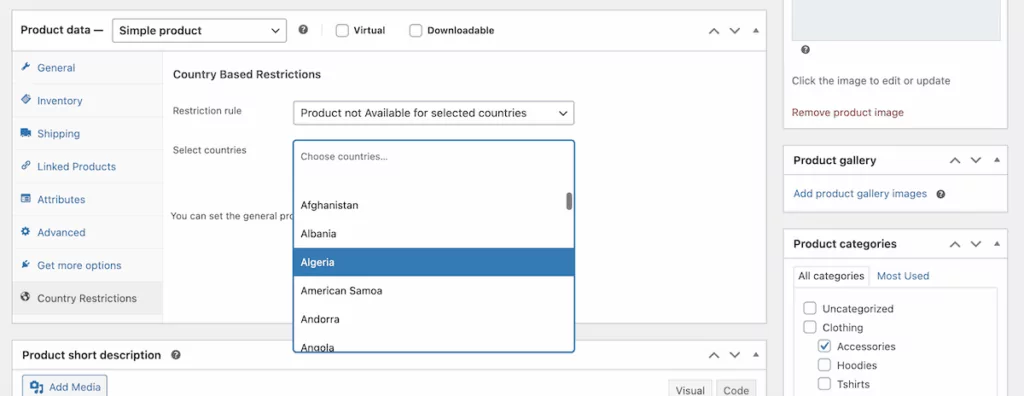
For WordPress, there are two tools that help you handle per-product country restriction in WooCommerce:
- The Country Restrictions for WooCommerce extension is WooCommerce’s own official extension and covers legal, shipping, and licensing cases.
- The WooCommerce Country Base Restrictions plugin offers similar per-product control as a third-party option.
So, the mapping between your restriction rules and your hreflang implementation has to be consistent or you risk creating a situation where Google tries to index a localized version of a page that returns a 404 or a redirect.
I’d recommend auditing your product catalog for restrictions before you configure your translation plugin. It’s far easier to exclude a locale at setup than to remove hreflang entries from hundreds of product pages after launch!
3. How WooCommerce URL structure affects your hreflang tags
WooCommerce has its own URL architecture and follows a predictable pattern:
/shop/for the store base./product-category/for category pages./product/for individual product pages.
These bases can be customized (WooCommerce’s permalink documentation covers the options) but the point is that you’re committing to a URL structure before you add any languages. That commitment shapes what your hreflang tags need to contain.
If you use TranslatePress to add a second language to your store, it will insert a language prefix at the root of the URL:
- For French product category URLs, you see
yourstore.com/fr/product-category/vetements/ - Your French product URL becomes
yourstore.com/fr/produit/robe-rouge/
This will also translate the category and product slugs too.
TranslatePress Multilingual
That language prefix has to appear in every href attribute and has to match exactly across all language versions. A single mismatch between the URL in your hreflang tag and the actual URL of the page breaks the annotation.
The numbers are surprising, as nearly half of international sites either have conflicting directives or miss self-referencing tags. Both are errors that typically stem from URL inconsistency. This is why TranslatePress uses subfolders by default, as it keeps all domain authority in one place, as well as generating hreflang tags that reference the translated URLs it creates.
You can also use separate domains for each language with TranslatePress, but hreflang tags are still added automatically by the plugin.
4. Knowing when to translate and when to localize
Translation and localization are not the same thing, which has a direct effect on your hreflang setup:
- If your translated product page says the same thing in English and French (same price, images, and size labeling) you have a single French version of that page, and you reference it with
fr-FRhreflangtag. - Localization adapts those product names, descriptions, imagery, sizing conventions, and prices for a specific regional market. So, a page for French-speaking Belgium (
fr-BE) needs a differenthreflangentry than French-speaking France (fr-FR).
You will already know that there’s an uplift when it comes to localization, but this also increases the implementation cost. Each additional locale code means:
- More
hreflangentries to maintain across your entire catalog. - A greater number of pages to keep in sync as your content evolves.
- More opportunities for errors.
My recommendation is to start with less specific language codes (such as f) unless you have a genuine operational reason to serve different content to each market. You can always add regional variants later. In a nutshell, premature granularity in your r-FRhreflang map will give you a maintenance overhead that builds as your catalog grows.
How TranslatePress automates hreflang for your WooCommerce store
Manual hreflang implementation on a WooCommerce store could be working with 500 products, three languages, and two regional variants. This will mean thousands of hreflang relationships to maintain, which is a huge prospect. Every new product, language, and URL change will require an update.
TranslatePress eliminates that work through the SEO Pack add-on. Once you configure your languages, the plugin takes care of the technical layer for you.
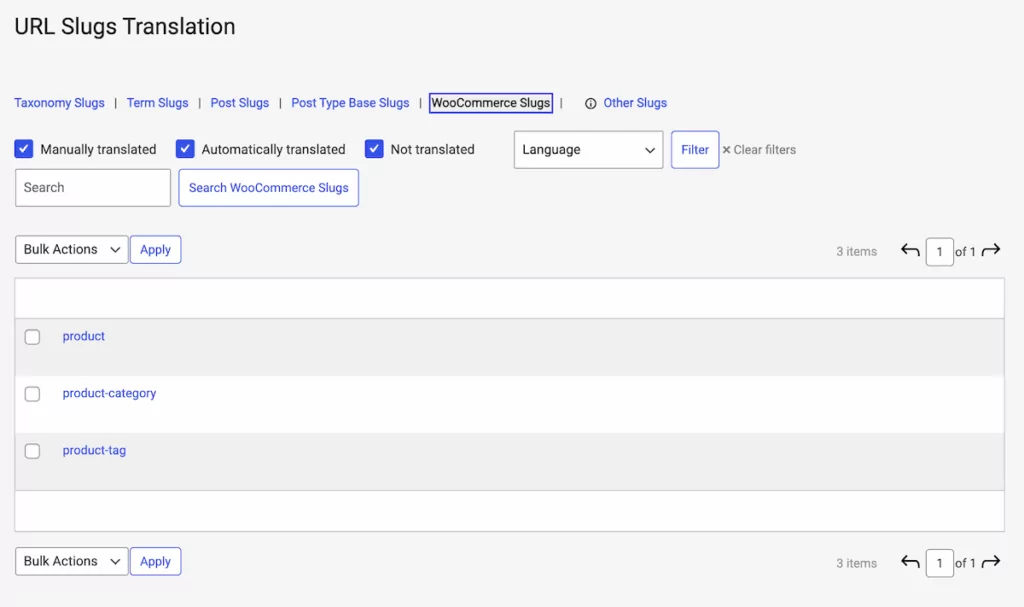
Here’s what TranslatePress handles for you:
- Every page type in your store gets a
hreflangtag: products, categories, cart, checkout, and the account area. - A multilingual XML sitemap is generated automatically and works with your choice of WordPress SEO plugin.
- URL slugs are translated as standard.
- WooCommerce SEO metadata (such as page titles, meta descriptions, Open Graph and Twitter/X Card data) is translated across all language versions.
- Image ‘alt text’ is translatable directly from the translation interface, without returning to the WordPress Media Library for each language.
In practical terms, you don’t need to write or maintain hreflang markup manually. You select your target languages, set your regional variants where applicable, and TranslatePress handles the implementation.
Also, when you add a product, the hreflang tags update. Translating a slug means the URL in the hreflang annotation updates to match. If you add a new market, the existing tag network expands to include it.
The best WooCommerce international SEO strategies start with the right decisions
The pattern across every section of this article is the same: the right hreflang implementation for your WooCommerce store follows from business decisions you’ve already made or need to make. For instance, which markets are you entering, what are you selling there, and how deeply are you localizing?
The answers to those questions determine what your hreflang map looks like. TranslatePress turns that map into a working implementation without requiring you to touch the underlying markup.
TranslatePress Multilingual
Do you have questions about creating your own WooCommerce international SEO strategies? Ask away in the comments section below!