

Si vous souhaitez modifier les chaînes de caractères d'une extension ou d'un thème dans WordPress, vous pourriez être tenté d'apporter des modifications aux fichiers de cette extension ou de ce thème. Mais cela signifie que vous perdrez également ces modifications lors de la prochaine mise à jour.
Comment remplacer le texte “ S'inscrire ” par “ Créer un compte ” ?
C'est une demande tellement courante que nous en avons même une Modifier les étiquettes greffon pour Profile Builder qui vous permet de modifier les chaînes gettext du plugin pour autre chose.
Et nous ne sommes pas seuls dans ce cas. Eric Daams, de Charitable nous a contactés pour nous demander d'utiliser TranslatePress sans langue secondaire.
L'une de nos demandes d'assistance les plus courantes concerne la modification d'un texte généré par le plugin (c'est-à-dire “ Faire un don ”, “ Campagne ”, “ Donateur ”).
Notre réponse standard est qu'ils utilisent Loco Translate ou un bout de code. Aucun des deux n'est parfait. Avec Loco Traduire, le plus gros problème est que parfois le thème qu'ils utilisent peut également être responsable du petit bout de texte qu'ils veulent modifier, ce qui les sème la confusion.
Avec TranslatePress, modifier les chaînes de caractères d'un plugin ou d'un thème est un jeu d'enfant : quelques clics suffisent. Voici la marche à suivre :
Modifier les chaînes de caractères du plugin
Tout d'abord, installons version gratuite de TranslatePress disponible sur wordpress.org. Vous pouvez soit télécharger l'extension, soit l'installer depuis le tableau de bord des extensions WordPress.
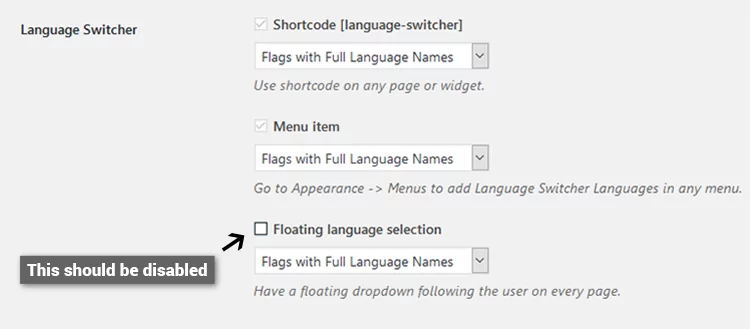
Dans la page des paramètres de TranslatePress, désactivez l'option “ Sélection de langue flottante ” afin d'éviter que le Sélecteur de langue sur chaque page.
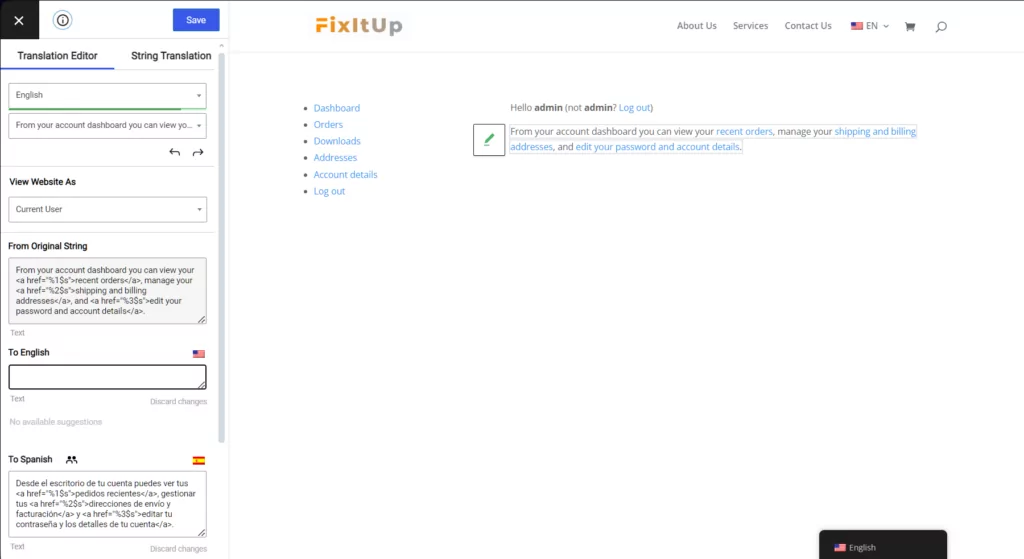
Vous pouvez commencer à modifier les chaînes de traduction du plugin qui sont utilisées sur le front-end, comme remplacer “ Tableau de bord ” par “ Compte ” dans WooCommerce.
Puis-je consulter le site en tant qu'utilisateur non connecté ?
Oui, vous le pouvez. Et bien que le changement de statut Connecté / Non connecté fasse partie du plugin de base, nous avons également un add-on avancé (Naviguer en tant que rôle utilisateur) où vous pouvez naviguer sur le site Web en fonction d'un rôle d'utilisateur particulier et traduire le contenu spécifique à ce rôle d'utilisateur.
Puis-je exporter des fichiers .po et .mo ?
Cette fonctionnalité est sur notre liste de développement et fera partie d'un autre module complémentaire à l'avenir.
L'utilisation de TranslatePress comme éditeur de fichiers PO constituera un aspect majeur de TranslatePress et fera l'objet de toute notre attention dans un avenir proche.
Toutes les chaînes ne sont pas traduisibles ? Pourquoi ?
Seules les chaînes chargées via les filtres gettext sont activées pour la traduction. Le reste doit être généré par l'utilisateur, ce qui signifie Vous devez les modifier depuis l'interface de votre thème ou de votre extension.
Est-ce que cela fonctionne avec mon plugin ou mon thème ?
Oui, TranslatePress fonctionne avec n'importe quel plugin ou thème prêt pour la traduction qui utilise correctement les fonctions gettext, ce qui rend vraiment très simple l'apport de cette dernière petite modification à vos textes web.
TranslatePress Multilingue
Avez-vous encore des questions sur la modification des chaînes de caractères des extensions dans WordPress ? Faites-le-nous savoir dans les commentaires !
Si vous avez trouvé ce message utile, consultez notre Chaîne YouTube, où nous téléchargeons constamment des tutoriels vidéo courts et faciles à suivre. Vous pouvez également nous suivre sur Facebook et Twitter pour être le premier à savoir chaque fois que nous publions.


[…] il faudrait modifier ces éléments dans les fichiers du thème ou du plugin, mais TranslatePress vous aide également à vous occuper de cette partie. Ça fonctionne juste un peu […]